Table of Content
- What Is Cypress?
- Cypress Framework Architecture
- Cypress Testing Types
- Quick Tutorial: Cypress Unit Testing Example
- Security Unit Testing with Bright Security
What Is Cypress?
Cypress is an open source end-to-end testing framework that can help you unify web application testing. It works for all programming languages, platforms, and browsers. You can use Cypress for unit and integration testing. All tests are written in JavaScript and run in real browsers.
Cypress provides an integrated development environment (IDE) that you can load in your browser. The framework employs an event-based architecture that connects with Google Chrome’s lifecycle events. It enables Chrome to wait for Ajax requests to complete without using a timeout or polling mechanism, leading to faster and more reliable tests.
Related content: Read our guide to mocha testing.
Key features of Cypress include:
- Time travel
- Live code reloading
- Current and previous state diff-ing
- Running tests in a browser or headless
- Screenshots and video recordings
- Asynchronous testing
- In-browser debugging
Cypress provides a CLI that you can use to test websites on various devices and browsers. The framework lets you use familiar debugging tools with Chrome and also install additional tools such as Redux Dev Tools and React Dev Tools. The goal is to enable you to run tests using the same stack you use for development.
This is part of our series of articles about unit testing frameworks.
In this article:
Cypress Framework Architecture
Standard testing frameworks (e.g., Selenium) usually run outside the web browser to execute commands remotely across the network. The Cypress testing framework does the opposite – it runs in the same loop as the tested application.
A Node server process supports Cypress with constant communication and synchronization. The Node process and Cypress execute tasks for each other. Accessing the front and back end allows you to respond quickly to an application’s events. You can simultaneously perform high-privilege tasks outside the browser.
Cypress works at the network layer, reading and modifying web traffic as it flows. Therefore, Cypress can modify all incoming and outgoing browser traffic and change any code that might disrupt its capabilities, such as automating the browser.
Cypress maintains control over the entire test automation process. It has a unique ability to understand events both within and outside the browser. Cypress can thus deliver consistent results – more so than other testing tools.
You install Cypress locally on a physical machine, allowing it to access the operating system to automate tasks. This setup enables Cypress to perform tasks like recording video content, taking snapshots, and executing network and file system operations.
Cypress works within an application, providing native access to all components, including application instances, functions, timers, windows, documents, DOM elements, and service workers. You can access everything in a Cypress test. Cypress does not serialize objects or use an over-the-wire protocol to limit access. The test code has the same access as the application code.
Related content: Read our guide to junit testing.
Cypress Testing Types
Choosing the type of test is one of the first considerations when building a testing suite. Cypress supports component and end-to-end tests. Each testing type has specific considerations and benefits depending on the test’s objectives. Usually, the application testing suite will contain both test types.
End-to-End Tests
This technique fully tests applications from the back end to the web browser, covering third-party integrations. An end-to-end test aims to check how an application works as a whole. Cypress executes end-to-end testing using the same means users interact with an application, ensuring the test reflects the user experience.
Developers, test engineers, and other team members can write these tests in Cypress using an API to simulate a real user’s behavior. End-to-end testing requires more complicated setup and maintenance than component testing.
Component Tests
Some development frameworks allow teams to break applications into components that team members write and test individually. Components are logical units ranging from small buttons to complex forms. They are easy to test because they are mountable, enabling testers to work with them separately from the rest of the application.
A component test focuses on a specific component’s functionality. Usually, developers write component tests when they build components – the test code resides with the component’s code. However, component testing does not accurately represent a component’s real-world performance – it doesn’t cover how the component interacts with other components or how the application functions overall.
Quick Tutorial: Cypress Unit Testing Example
Here is a guide for creating Cypress component tests for React applications. Several frameworks are available to build React projects automatically (i.e., Vite, Create React App) – the following example uses Vite.
Use the following steps to create a project with Vite:
1. Use the scaffold command to create a project with the React template.
2. In the directory, run the npm install command.
3. Specify Cypress and launch the project.
Configure the Component Test
When Cypress runs for the first time for a given project, it prompts the user to set up end-to-end or component testing. Select the component testing option and continue through the wizard. The Cypress launchpad detects the framework and generates the required configuration information.
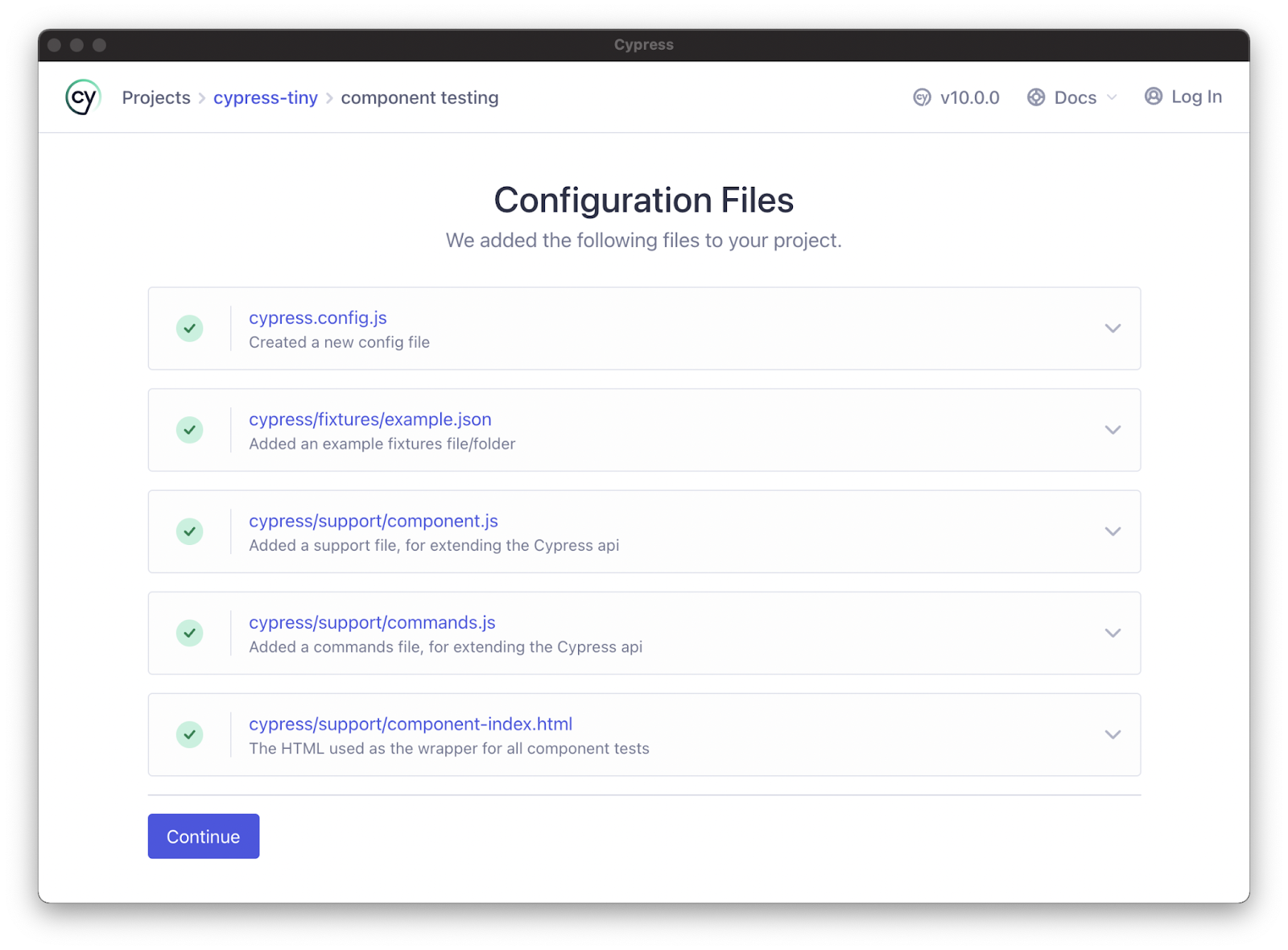
Image Source: Cypress
Once you’ve set up component testing, select and launch the preferred browser to open Cypress.
Create a Component
Next, you’ll need components to test – you can start with a simple component with few dependencies. For an example of a simple React component, use a button without dependencies. Import the component from React.
Mount the Components
Most tests use a similar format regardless of the framework. To test a component, arrange the test by mounting your chosen component. You can import a mount function for every supported framework from the Cypress package:
import { mount } from 'cypress/react'
Mount the imported component:
import { mount } from 'cypress/react'
import Button from './Button'
describe('
You can add the mount function as a custom command to make it easier to use for all the component tests (the launchpad wizard normally configures this automatically).
The component support file might look like this:
// cypress/support/component.js
import { mount } from 'cypress/react'
Cypress.Commands.add('mount', mount)
Next, remove the mount import to update the button component – use the cy.mount command. Create a project spec (Button.spec.jsx) and apply this script:
import Button from './Button'
describe('
The test should now work. Open Cypress in your chosen browser and select Button.cy.jsx from your spec list. You should see the mounted button component in the test environment. If the test works in Cypress, it should also work in the real world because the test uses a real web browser.
Security Unit Testing with Bright Security
Bright is a developer-first Dynamic Application Security Testing (DAST) scanner, the first of its kind to integrate into unit testing, revolutionizing the ability to shift security testing even further left. You can now start to test every component / function at the speed of unit tests, baking security testing across development and CI/CD pipelines to minimize security and technical debt, by scanning early and often, spearheaded by developers. With NO false positives, start trusting your scanner when testing your applications and APIs (REST, GraphQL), built for modern technologies and architectures.