Table of Contents
- What is Local File Inclusion (LFI)?
- How Do Local File Inclusions Work?
- Scenarios Where Local File Inclusions Are Used
- Manually Testing for Local File Inclusion
- Impact of Exploited Local File Inclusion Vulnerabilities
- Preventing Local File Inclusion vulnerabilities
- Common Real-World Examples of Local File Inclusion (LFI) Attacks
- Local File Inclusion vs Remote File Inclusion (LFI vs RFI)
- Tools and Techniques Used to Detect LFI Vulnerabilities
- Best Practices for Secure File Handling in Web Applications
- How Bright Can Help You Find LFI Vulnerabilities
What is Local File Inclusion (LFI)?
Local File Inclusion is an attack technique in which attackers trick a web application into either running or exposing files on a web server. LFI attacks can expose sensitive information, and in severe cases, they can lead to cross-site scripting (XSS) and remote code execution. LFI is listed as one of the OWASP Top 10 web application vulnerabilities.
File inclusions are a key to any server-side scripting language, and allow the content of files to be used as part of web application code. Here is an example of how LFI can enable attackers to extract sensitive information from a server. If the application uses code like this, which includes the name of a file in the URL:
https://example-site.com/?module=contact.php
An attacker can change the URL to look like this:
https://example-site.com/?module=/etc/passwd
And in the absence of proper filtering, the server will display the sensitive content of the /etc/passwd file.
As LFIs help an attacker trick a web application into either running or exposing files on a web server, a local file inclusion attack can lead to cross-site scripting (XSS) and remote code execution (RFI) vulnerabilities.
This is part of an extensive series of guides about application security
How Do Local File Inclusions Work?
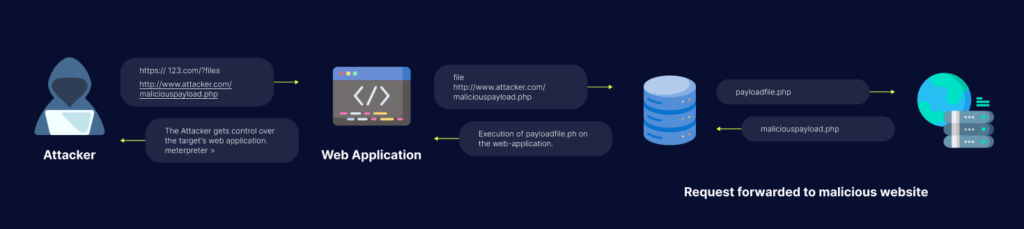
When an application uses a file path as an input, the app treats that input as trusted and safe. A local file can then be injected into the included statement. This happens when your code is vulnerable. In this case, a hacker makes a request that fools the app into executing a malicious PHP script (web shell for example).
In some cases, if the application provides the ability to upload files, attackers can run any server-side malicious code they want. Most applications do not provide this capability, and even if they do, the attacker cannot guarantee that the app saves the file on the server where the LFI vulnerability is located. The attacker will also need to know the file path to their uploaded file on the server file system.
Impact of Exploited Local File Inclusion vulnerabilities
The impact of a Local File Inclusion attack can vary based on the exploitation and the read permissions of the webserver user. Based on these factors, an attacker can gather usernames via an /etc/passwd file, harvest useful information from log files, or combine this vulnerability with other attack vectors (such as file upload vulnerability) to execute commands remotely.
Let’s take a closer look at three possible outcomes of local file inclusion:
1. Information disclosure
Although not the worst outcome of a local file inclusion vulnerability, information disclosure can reveal important information about the application and its configuration. That information can be valuable to an attacker to gain a deeper understanding of the application and can help them detect and exploit other vulnerabilities.
2. Directory Traversal
A local file inclusion vulnerability can lead to Directory Traversal attacks, where an attacker will try to find and access files on the web server to gain more useful information, such as log files. Log files can reveal the structure of the application or expose paths to sensitive files.
An incorrectly configured server can give attackers access to user config files, giving them access to other files on your server, or even gain administrator access.
If you want to learn more about directory traversal, we have a great article that covers this vulnerability in more depth – Directory Traversal: Examples, Testing, and Prevention
3. Remote Code Execution
Combined with a file upload vulnerability, a Local File vulnerability can lead to remote code execution. In this case the attacker would use LFI to execute the unwanted file.
To compound matters, an attacker can upload a file to the server to gain the ability to execute commands remotely, resulting in the attacker being able to control the whole server remotely.
Learn more in our detailed guide to file inclusion vulnerability.
Scenarios Where Local File Inclusions Are Used
Including Files to be Parsed by the Language’s Interpreter
Developers usually divide a website’s code into directories, multiple files, etc. to make everything neat and readable. In order for an interpreter to find these files you need to designate the correct file path and then pass it to a function. The function then opens the file in question and includes it inside the document for the parser to be able to see it as valid code that can be interpreted.
What happens when there’s no effective filtering? Well, code like this:
https://example-site.com/?module=contact.php
Can be changed to look like this:
https://example-site.com/?module=/etc/passwd
As you can see, the contact.php part of the code was replaced with /etc/passwd. Passwords, username information, the attacker can see the content of everything depending on what they are looking for. That’s not all, as more severe cases include the injection of code on the webserver. The parser then interprets this code as an instruction that can exploit an LFI vulnerability. Some hackers can use the Local File Inclusion vulnerability to stage a directory traversal/path traversal attack that in turn gives the hacker full access to error.log and access.log or some other type of sensitive meta-data.
Including Files that are Printed to a Page
A developer sometimes wants to share the output of a file across multiple web pages. A header. file or something similar. To keep things quick, a dev wants the change of this file to be seen on all pages where it was included immediately. This file, while standardly plain HTML, can also be used to display ordinary text files:
https://example-site.com/?helpfile=login.txt
This way the content of the text file gets printed straight to the page. The information isn’t stored in any database. A hacker will exploit this and alter the link if no filter stops them. Then helpfile=login.txt becomes helpfile=../secret/.htpasswd and all of a sudden the hacker has access to the password hashes of a .htpasswd file. A file that includes all the credentials of any user that can access a restricted area of that webserver. Naturally, this information falling into the hands of a hacker is a terrible thing for a company and is a severe security threat.
Including Files that are Served as Downloads
Lastly, we have types of files that all web browsers automatically open. A PDF, for example. Users can configure this so the files get downloaded instead of shown in the browser window. That’s achieved by adding an additional header that tells the browser to do things differently. A simple Content-Disposition: attachment; filename=file.pdf addition in the request and now the files are downloaded instead of opened. An example would look something like this:
https://example-site.com/?download=brochure.pdf
An issue arises when the request isn’t sanitized. This way the hacker has the option of requesting the download of the base files (the building blocks of the web app). They can then read the source code and find other web application vulnerabilities, making that hacker an enormous threat to your cybersecurity.
Related content: Read our guide to lfi attack.
Manually Testing for Local File Inclusion
Here are a few ways to test for LFI vulnerabilities in your web applications.
Null Byte Injection
The terms “null character”, “null terminator”, and “null byte” all refer to a control character where the value zero is present in the reserved character sets used to mark the end of the string. The null byte ensures that any character following it is ignored.
Typically, a null byte is injected as %00 at the end of a URL. Here is an example:
https://example-site.com/preview.php?file=../../../../../passwd%00
Path and Dot Truncation
The majority of PHP installations limit filenames to 4096 bytes. If a filename is longer, PHP truncates it and discards all additional characters. However, attackers can remove the 4096 bytes limitation from the .php extension, manipulating the process. In this case, no error is triggered, additional characters are dropped, and the PHP engine continues its execution.
Typically, attackers combine this bypass with other logic bypass techniques. For example, attackers might introduce double encoding, encode part of a file path with Unicode, or use other inputs that represent a valid filename.
PHP Wrappers
LFI vulnerabilities usually give attackers read-only access to sensitive data, granted from the host server. There are, however, ways to turn this read-only access into a fully compromised host. This type of attack is called Remote Code Execution (RCE). Attackers create RCE vulnerabilities by combining an LFI vulnerability with PHP wrappers.
A wrapper is an entity that surrounds another entity (in this case – code). The wrapper can contain functionality added to the original code. PHP uses built-in wrappers, which are implemented alongside file system functions. Attackers use this native functionality of PHP to add vulnerabilities into wrappers.
Here are two commonly used wrappers:
- PHP filter – provides access to a local file system. Attackers use this filter to read PHP files containing source code, typically for the purpose of identifying sensitive information, including credentials.
- PHP ZIP – this wrapper was designed to manipulate files compressed into a ZIP format. However, its behavior enables attackers to create a malicious ZIP file and upload it to the server.
There are many more wrappers that could be exploited by attackers. Some PHP wrapper vulnerabilities are well known while others require deep ad hoc analysis to be discovered.
Preventing Local File Inclusion vulnerabilities
Here are a few ways to prevent LFI attacks:
- ID assignation – save your file paths in a secure database and give an ID for every single one, this way users only get to see their ID without viewing or altering the path
- Whitelisting – use verified and secured whitelist files and ignore everything else
- Use databases – don’t include files on a web server that can be compromised, use a database instead
- Better server instructions – make the server send download headers automatically instead of executing files in a specified directory
Common Real-World Examples of Local File Inclusion (LFI) Attacks
A Local File Inclusion attack does not look like a big deal at first. It often starts with something like a file parameter in a URL. For example, if a web application loads pages using something like ?page=home.php, an attacker might try replacing that value with system files. This is a Local File Inclusion attack.
In life, attackers use inputs like../../../../etc/passwd to access sensitive files on the server. If the web application does not properly check the paths, it ends up showing data. Sometimes the goal is not just to read files. Local File Inclusion attackers may use this to access logs or temporary files that contain code, which can lead to the code being executed.
What makes Local File Inclusion tricky is that it looks normal. It is just file access. It is slightly manipulated. That small mistake is often enough to cause problems.
Local File Inclusion vs Remote File Inclusion (LFI vs RFI)
When people first learn about a Local File Inclusion attack, they often get it mixed up with Remote File Inclusion. The difference is small but important. In Local File Inclusion, the attacker can only access files that are already on the server. They are basically navigating the system in ways they should not be.
Remote File Inclusion, on the other hand, allows attackers to load files from an external source. This means an attacker can host a script somewhere else and force the web application to execute it. It is generally more dangerous, but less common, because modern web applications block it by default.
Local File Inclusion is still widely seen because it does not require access, just poor input handling. In cases, Local File Inclusion attackers use this with other techniques to make the impact worse, turning simple file access into something more serious. Local File Inclusion is a problem because it can be used to access files on the server.
Tools and Techniques Used to Detect LFI Vulnerabilities
Finding a Local File Inclusion vulnerability usually starts with testing how the web application handles file paths. One simple method is to change parameters and see how the web application responds. If changing a file path shows data that is a sign of a problem.
Security testers often use tools like Burp Suite to intercept requests and try bad inputs. Automated scanners can also help. They do not always catch deeper issues, especially if the vulnerability depends on specific conditions.
Another common technique is to try file paths like directory traversal patterns or encoded inputs. Logs and error messages can also provide clues. Detection is not about finding access; it is about understanding how far that access goes and whether it can be abused further. Local File Inclusion detection is important to prevent attackers from accessing files.
Best Practices for Secure File Handling in Web Applications
Preventing a Local File Inclusion attack mostly comes down to controlling how files are accessed in the web application. The safest approach is to avoid using direct user input in file paths. Instead, map inputs to predefined values.
For example, when accepting a file name, use a fixed list of allowed options. This removes the risk of file access. Input validation also plays a role. Relying only on filters can be risky. Local File Inclusion prevention is important to secure the web application.
Developers should also restrict file system permissions so that even if something goes wrong, the damage is limited. Avoid exposing directories and disable unnecessary file inclusion features. These steps may seem small. Together, they significantly reduce the chances of Local File Inclusion vulnerabilities being exploited. Local File Inclusion is an issue that can be prevented with proper security measures.
How Bright Can Help You Find LFI Vulnerabilities
Bright can help you scan web applications to make sure no one tinkered with the code and tried to use Local File Inclusion to steal sensitive information.
Bright is an automated black-box security testing solution that scans your entire application on its own, identifies any vulnerabilities, then notifies you of their existence and tells you how to remedy them. Bright saves time by finding LFI vulnerabilities and telling you how to fix them. For example, in the example below:
https://example-site/bar/file=content.ini..%2F..%2F..%2F..%2F..%2F..%2Fetc%2Fpasswd
Bright shows the original part of the code in red. The green part of the code is the one that was altered by someone. Our tool also provides remedy guidelines that can help a developer or SecOps team member instantly remediate the vulnerability.
Learn more about Bright and get started today!
See Additional Guides on Key Application Security Topics
Together with our content partners, we have authored in-depth guides on several other topics that can also be useful as you explore the world of application security.
Vulnerability Management
Authored by Bright Security
- Vulnerability Management: Lifecycle, Tools, and Best Practices
- Vulnerability Examples: Common Types and 5 Real World Examples
- Vulnerability Testing: Methods, Tools, and 10 Best Practices
API Security
Authored by Bright Security
- What Is API security? The Complete Guide
- REST API Testing: The Basics and 8 API Testing Tips
- WS-Security: Is It Enough to Secure Your SOAP Web Services?
SSRF
Authored by Bright Security