What Is Unit Testing?
A unit test validates and verifies individual software units (or components) to ensure each unit works as intended. A unit may be a function, procedure, method, object, or module. Unit testing occurs during the coding phase of the software development lifecycle, and can help identify coding errors, code quality issues, and security issues.
While unit testing are very useful, there are also many ways to get them wrong. Poorly written or designed unit tests can be difficult to maintain, execute, and interpret. We’ll provide a few best practices that will make your unit tests shine.
In this article:
- Why Is Unit Testing Important?
- Unit Testing Best Practices
- 1. Write Readable, Simple Tests
- 2. Write Deterministic Tests
- 3. Test One Scenario Per Test
- 4. Unit Tests Should Be Automated
- 5. Write Isolated Tests
- 6. Avoid Test Interdependence
- 7. Avoid Active API Calls
- 8. Combine Unit and Integration Testing
- 9. Ensure Unit Tests are Repeatable and Scalable
- 10. Test for Security Issues as Part of Your Unit Tests
Why Is Unit Testing Important?
Unit testing enables you to exercise individual code units to verify and validate that it performs the intended software behavior. Unit testing solutions help ensure code security, reliability, and quality. These are typically automated tools that quickly build and auto-generate unit test cases to verify code quality across platforms, hosts, virtual environments, or hardware environments.
Unit testing is especially important for embedded development environments requiring software systems and hardware to work in sync and comply with exacting functional safety standards.
Once you set up an automated unit testing framework, it can transition into your regression test suites. It helps across the lifecycle as you implement software updates, new requirements, and patches. You can also automate regression and unit testing and integrate them with your CI/CD pipeline.
Related content: Read our guide to unit testing vs integration testing.
Unit Testing Best Practices
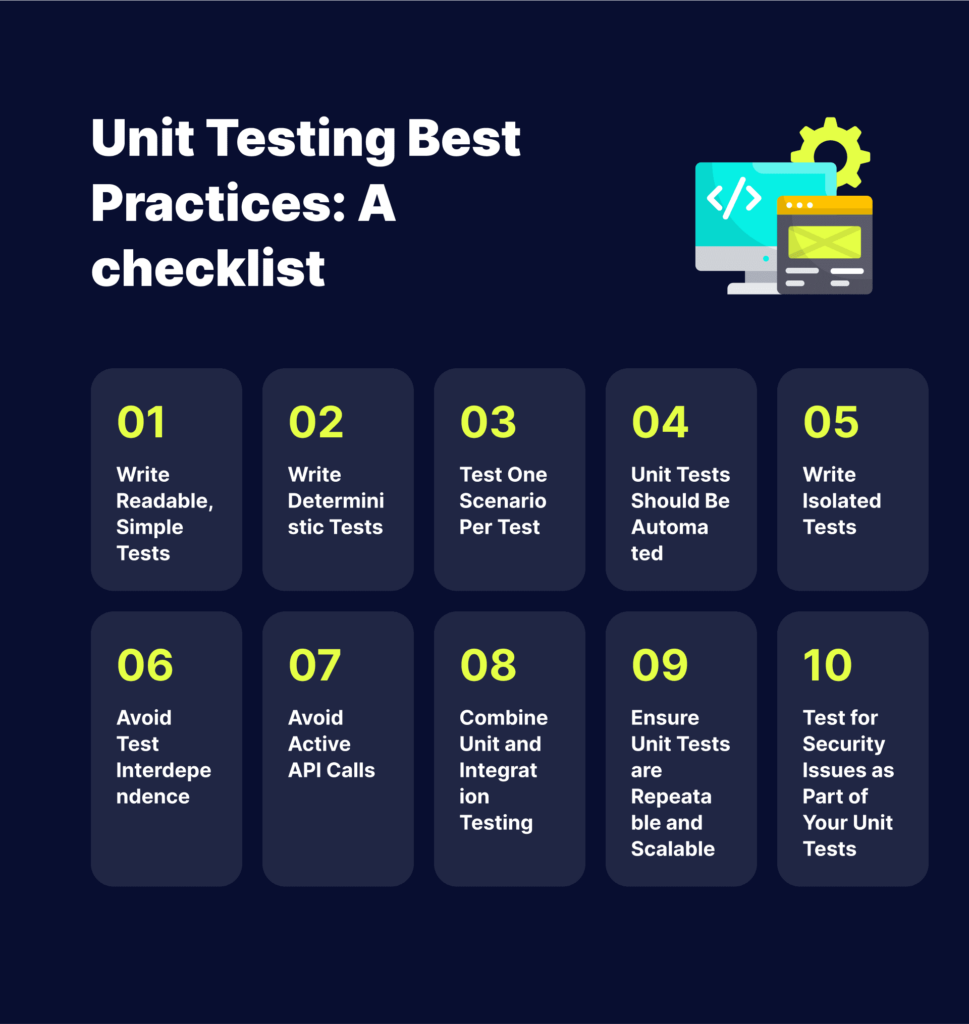
The following best practices will help you make your unit tests more effective.
1. Write Readable, Simple Tests
Unit testing helps ensure your code works as intended. However, you can learn why a unit fails to pass only if you write simple and readable tests. It is easier to write, maintain, and understand simple test cases. Additionally, simple tests are easier to refactor. If the test is complex and you need to refactor some code, the tests might break.
You can use the AAA structure to write unit tests:
- Arrange – configure the test by setting up the tested system and other mechanisms.
- Act – call an action to perform to test the unit.
- Assert – check the result of the performed operation to verify it worked as intended.
Related content: Read our guide to unit testing examples
2. Write Deterministic Tests
A deterministic test presents the same behavior as long as the code remains unchanged. It enables you to understand the issue and fix it. Then, when you run another test after modifying the code, you should see different results that either pass or fail the test.
A non-deterministic test can fail or pass without any code change. It makes it difficult to isolate the issue and fix it, which is why it is also referred to as an unstable test. You can avoid non-deterministic testing by isolating the test case, making it completely independent of other cases.
3. Test One Scenario Per Test
Manual testing typically involves testing various scenarios, for example, verifying a certain bug is resolved, and all related features work as intended. You can check many types of testing and variables, but you should always ensure each unit test covers one scenario.
Covering one scenario per unit test helps isolate specific program parts containing the issue when a test fails. However, running a single test to cover several scenarios can result in uncertainties – once the test fails, you need to invest time to identify the issue.
4. Unit Tests Should Be Automated
You should set up an automated process for unit testing on a daily or hourly basis or through a CI/CD process. Configure the process to ensure all team members can access and view reports. It helps ensure teams can discuss the relevant metrics, including code coverage, number of test runs, modified code coverage, and performance.
5. Write Isolated Tests
Isolated unit tests help verify specific components. This type of testing is faster to run and provides more stability, ensuring you only deal with one logic at a time. You can create isolated tests using test doubles – simulated substitutes for a real class. A test double provides a fake version of a component, helping you isolate its behavior within the unit test. You can also use a stuck or mock object as a test double.
6. Avoid Test Interdependence
Unit testing does not require 100% test coverage. You should set up fewer, but high-quality unit tests than many tests configured only to reach the necessary code coverage. Unit tests aim to validate individual code units, which is why you should avoid test interdependence.
Test dependency occurs when one unit test depends on the outcome of another. When one test fails, the whole suite fails too. You can prevent this issue by avoiding test interdependence in unit tests. You should write individual, independent test methods and put related tests in a single test class.
7. Avoid Active API Calls
You might often encounter API calls or other service calls to databases that you don’t need to include in your tests. However, if the tests don’t engage these calls, make sure they are inactive while the tests run. It is preferable to provide API stubs with the expected behavior and responses, restricting tests to specific units.
8. Combine Unit and Integration Testing
The testing pyramid is a popular model for describing the desired distribution of test resources. Tests generally become more complex and fragile the higher the pyramid you go. The tests at the top are the hardest to build and the slowest to run and debug, while lower-level tests are faster and simpler to set up and debug. Automated unit tests, representing the lowest levels of the pyramid, should comprise most of the testing.
Use unit tests to validate all the details, including the boundary conditions and corner cases. Use other tests (component, UI, functional, and integration tests) sparingly to assess the overall behavior of an API or application. Manual tests should make up the smallest proportion of your testing pyramid – they are useful for investigative and release acceptance testing.
The pyramid model can guide you through your testing strategy to achieve extensive test coverage and automation. It should help you scale up your tests while minimizing the costs involved in building, maintaining, and running your test suites.
Learn more in our detailed guide to vue unit testing.
9. Ensure Unit Tests are Repeatable and Scalable
Make your unit tests repeatable and scalable to ensure the success of your testing strategy. Establish an organized set of practices to ensure everyone writes the unit tests simultaneously as writing the application code. You might even write tests before writing your application code, such as behavior- or test-driven programming. Either way, you must build the tests closely with the application code.
Assess the application code and tests together during the code review process. Reviews provide insights into the code and its behavior, allowing you to improve the tests. Writing tests together with the code is important for bug fixes, not just planned updates and changes. There should always be a test verifying every bug fix to ensure it remains fixed.
Take a zero-tolerance approach to test failures. Testing is useless if the team ignores the results – a test failure indicates a real issue, alerting the team to address it immediately before wasting more time on buggy code or releasing it to production.
10. Test for Security Issues as Part of Your Unit Tests
Bright is a developer-first Dynamic Application Security Testing (DAST) scanner, the first of its kind to integrate into unit testing, revolutionizing the ability to shift security testing even further left. You can now start to test every component / function at the speed of unit tests, baking security testing across development and CI/CD pipelines to minimize security and technical debt, by scanning early and often, spearheaded by developers. With NO false positives, start trusting your scanner when testing your applications and APIs (SOAP, REST, GraphQL), built for modern technologies and architectures. Sign up now for a free account and read our docs to learn more.