Announcing the Bright Security + Tenable Integration

We are thrilled to introduce a new integration between Bright Security’s Dynamic Application Security Testing (DAST) solution and the Tenable Vulnerability Management platform!

Most security teams don’t struggle with finding vulnerabilities – they struggle with knowing which ones actually matter backlogs explode, dashboards scream critical, and everyone wastes time debating priority instead of fixing real risk. 

This blog shows how combining Bright’s real attack validation with Tenable’s exposure intelligence cuts through the noise and surfaces the vulnerabilities that are actually reachable, exploitable, and business-critical. 

If you’re tired of alert fatigue, false positives, and spreadsheet triage, this is the clarity your AppSec program has been missing. Read it – because you don’t need more alerts you need answers, context, and fixes that ship faster.

Table of Contants:

1.Introduction

2.The Challenge: Visibility Without Understanding

3. The Solution: Unified, Context-Aware Risk Prioritization

4. What Teams Gain From the Integration

5. Why Developers Care

6. How Security Leaders Benefit

7. Enhanced Web Application Security Coverage

8. Shift Left No matter the Lost, Right in Security

9. Ready to See It in Action?

10. Conclusion

Introduction

Modern application environments evolve quickly, and so do their risks. 

A single feature release might introduce new routes, new data flows, and new access paths – but most organizations are still relying on outdated governance: quarterly scans, annual audits, and spreadsheets that get stale overnight.

Many claim they’re aligned with frameworks like the OWASP API Top 10, but only a fraction continuously validate against them. This creates gaps in authentication logic, object-level authorization, data exposure, and session management. 

Bright scans applications dynamically as code changes, while Tenable enriches those findings with environmental details. The result is a clean, unified workflow that prevents critical issues from ever reaching production.

The Challenge: Visibility Without Understanding

Modern application ecosystems are complicated. A single business workflow might touch five microservices, two internal APIs, a cloud asset, and a database running in a container. 

Vulnerabilities spread across these surfaces can look unrelated, but attackers are great at chaining weaknesses.

The problem is:

  • Tools report risk in isolation.
  • Vulnerabilities are siloed by category.
  • Developers receive generic tickets with no business context!
  • Security teams shift between dashboards to manually prioritize issues.

This leads to three painful realities:

1. Endless Backlog Noise
Everything looks critical when you don’t know what’s exposed.

2. Delayed Remediation
Teams have to debate priority before writing a single line of code.

3. Missed Exploitation Paths
Obfuscation of logical bugs, improper access settings, hidden flows go unnoticed.

With the attack surface expanding, teams require more than detection, they need a common understanding of risk.

The Solution: Unified, Context-Aware Risk Prioritization

The Bright + Tenable integration creates a single workflow where application vulnerabilities discovered through live attack simulation are enriched with Tenable’s environmental data. 

Instead of static assumptions, you now understand:

  • Is this vulnerability externally reachable?
  • Does it touch sensitive data?
  • Can the attacker pivot into the environment further?
  • Is this service Internet-facing or an internal service?
  • How essential is the asset to the business?

This confluence of vulnerability + context changes the game dramatically for an organization that prioritizes fixes.

This confluence of live exploitability (Bright) plus environmental significance (Tenable) erases the guesswork from vulnerability management and replaces it with evidence-based security. Businesses can prioritize fixes based on business risk, not arbitrary severity scores from a manual.

What Teams Gain From the Integration

1. Automated, Continuous Application Scanning

Bright plugs into CI/CD pipelines directly, constantly checking applications as an attacker would. When new services, In this case, features and endpoint get deployed, then many are the times that vulnerabilities come just right. There’s no waiting for the next quarterly penetration test. This reduces remediation timelines and identifies issues much earlier than in production.

2. Tenable’s Risk Engine Adds Environmental Context

A vulnerability behind a login screen behaves differently than one exposed publicly. Tenable understands:

  • Exposure footprint
  • Cloud network reachability
  • Asset sensitivity
  • Regulatory requirements

Together, you get actual business risk not textbook severity.

3. Less Than ~3% False Positives

The Bright attack-based validation is used to determine if a problem is actually exploitable.

It builds developer trust and avoid so called alert fatigue which is the biggest blocker in security adoption.

4. Faster, Cleaner Remediation Workflows

Because findings are automatically ingested into Tenable’s backlog:

  • Finding the right tickets route to right teams
  • SLA policies apply automatically
  • Compliance reporting becomes effortless

Rather than dragging developers kicking and screaming into spreadsheets filled with security issues, remediation takes place within the familiar tooling.

Why Developers Care

Most developers don’t object to fixing vulnerabilities­ – they just have difficulty with findings that are vague, context poor, and do not reflect actual application logic. Bright lowers this friction barrier through validating exploiting paths and presenting context-based evidence with proposed focused rectification guidance. Following integration with Tenable, findings are succinctly flagged as reachable, exploitable, and business-critical. The conversation shifts from “Is this real?” Let’s fix this now. This eliminates confusion and speeds up the safe passed delivery.

Bright reduces that friction by:

  • Validating the exploit path
  • Providing in-context evidence
  • Suggesting patch guidance
  • Re-testing fixes automatically

When a finding pops up in Tenable tagged as reachable, exploitable, business-critical, the conversation goes from Is this real? to Let’s ship the fix.

How Security Leaders Benefit

CISOs and AppSec leads can:

  • Track remediation performance at scale
  • Compare risk across applications
  • Support board-level reporting with real data
  • Demonstrate audit-ready posture instantly

Rather than reacting defensively to auditors, teams can passively demonstrate the remediation of high-risk vulnerabilities before they are discovered.

Enhanced Web Application Security Coverage

Bright covers actual attack vectors that are often overlooked by static scanners like:

  • Broken access control
  • Business logic abuse
  • IDOR exploitation
  • Multi-step workflow bypasses
  • Hidden or shadow API exposure

Tenable then layers exposure intelligence on top of it to address the second part: Is this relevant to business? This is two orders of magnitude more useful than standard CVSS scoring.

Bright emulates these attack patterns in run-time; Tenable superimposes real-world exposure metrics like network reachability. This two-lens view of the data leads to more accurate prioritization than using only severity scores.

Shift Left No matter the Lost, Right in Security

Shift Left is awesome – but it only matters if you have sight all the way to production. Otherwise, you end up with feature velocity without risk awareness.

Together:

  • Bright moves detection earlier.
  • Tenable keeps visibility continuous.
  • Developers retain velocity.
  • Teams eliminate tool sprawl.

It’s the best of both worlds.

Real-World Outcomes We’re Already Seeing

Teams using the integration report:

  • 40–60% reduction in triage time
  • 30–50% faster remediation cycles
  • Near-zero wasted effort on false positives
  • Better alignment between AppSec and engineering

When findings flow into one platform, conversations get shorter and fixes get shipped faster.

Ready to See It in Action?

When you’re trying to keep track of dozens of dashboards, being overwhelmed with vulnerability noise and have trouble quantifying your decisions around priorities, this integration clears the way. We’ll show how Bright checks and persists real exploitation paths, how Tenable adds exposure context, and how issues route automatically to the right teams. You’ll see how remediation becomes measurable, predictable, and friction-free.

We’ll show you:

  • How Bright validates real exploitation paths
  • How Tenable enriches findings with live exposure context
  • How issues route automatically to the right team
  • How remediation becomes measurable and predictable

 Book a demo
 

Conclusion

In application security, context is everything. A vulnerability isn’t dangerous just because it exists – it’s dangerous when someone can reach it and turn it into real impact. A vulnerability isn’t dangerous because it exists, it’s dangerous because someone can reach it, exploit it, and turn it into impact.

This integration isn’t about adding another tool to an already crowded security stack. It’s about simplifying prioritization, eliminating false positives, and helping developers fix the right issues faster. 

It aligns security and engineering around one view of risk, accelerates remediation, and gives leaders measurable proof of progress.Bright tells you what can be exploited. Tenable tells you why it matters.

Together, they help teams fix the right things, at the right time with the least friction. Because at the end of the day, speed matters – but accuracy is priceless. With Bright + Tenable, you get both.
3-Step AI Code Security Plan CISOs can adopt in less than 3 hours

It is October, the Cybersecurity Awareness Month. Thus, there’s no better time than now to audit potential security risks with AI generated code.

What if I told you can reduce vulnerabilities in their AI generated code in less than 3 hours?

In fact, what if I said this could be done at no additional cost, workload, tech stack etc?


This 5-7 Minutes read blog will get you the simple yet effective steps to start your AI code security journey.

So then, let’s get started.

Table of Contents

  1. Introduction – The Hidden Crisis in AI Code.
  2. What You’ll Learn – Your Complete Security Roadmap.
  3. Three Critical Security Gaps – What Most Organizations Miss.
  4. Your 3-Step Action Plan – Immediate Protection Strategies.
  5. Implementation Roadmap – Making Security Stick.
  6. Conclusion – Securing Your AI-Driven Future

The Hidden Crisis Hiding in Your Codebase

Last week, I was talking to a CISO at a Fortune 500 company. Smart guy, great team, all the industry standard security tools.

But when I asked him about AI-generated code in their environment, he went quiet.

We know developers are using ChatGPT and GitHub Copilot,” he said. 

But honestly? 

We have no idea how to secure it.

He’s not alone.

In fact, Google CEO Sundar Pichai said 25% of the code at google is AI generated as per Forbes.

AI tools are churning out thousands of lines of code daily. Developers love the speed. Management loves productivity gains.

But here’s what nobody’s talking about. Nearly half of all AI-generated code contains critical security vulnerabilities.

In other words, every second piece of code you are shipping might have a security hole.

I’ve seen this pattern dozens of times now. Organizations rush to adopt AI coding tools, celebrate the productivity boost, then get blindsided six months later when vulnerabilities start surfacing in production.

Our team just Replit’s AI app generator to build a complete forum app in minutes – with authentication, posts, comments, and user profiles. 

The finished app contained 11 serious security vulnerabilities. Check out this LinkedIn post by our CTO Bar Hofesh. 

The scary part? 

Most security teams don’t even know which code in their environment was AI-generated.

What You’ll Learn from This Guide

Look, I’m not here to scare you away from AI coding tools. They’re incredible when used right. But after working with hundreds of organizations on this exact problem, we’ve seen what works and what doesn’t.

This guide will give you:

  • The reality check – Why 45% of AI-generated code contains vulnerabilities (and why that number is climbing)
  • The blind spots – The three critical security gaps that catch even sophisticated security teams off-guard.
  • The solution – A proven 3-step framework you can implement starting tomorrow – no budget required.
  • The roadmap – How to roll this out across your organization without slowing down development.
  • The peace of mind – Specific tools and processes that actually identify AI code vulnerabilities before they hit production.

If your developers are using any AI coding assistant – and let’s be honest, they probably are whether you know it or not – this could be the difference between staying ahead of the curve and becoming another breach statistic.

Three Critical Security Gaps Organizations Miss

Gap No 1 – The It Works, So It’s Fine Trap

Here’s the thing about AI-generated code – it’s really good at solving functional problems.

Need a function to parse JSON?

AI nails it.

Want to integrate with an API?

Done in seconds.

But, here’s the thing. Functional and secure are different things.

I was reviewing code at a fintech startup last month. Their developers had been using AI to speed up their payment processing integration. 

The code worked perfectly in testing. 

It handled edge cases beautifully. It even had decent error handling.

But it also had three separate SQL injection vulnerabilities.

The AI had generated code that worked exactly as requested. 

But it used concatenated queries instead of parameterized statements. 

Classic mistake that human developers rarely make anymore. 

Thus, AI tools stumble on such surfaces regularly.

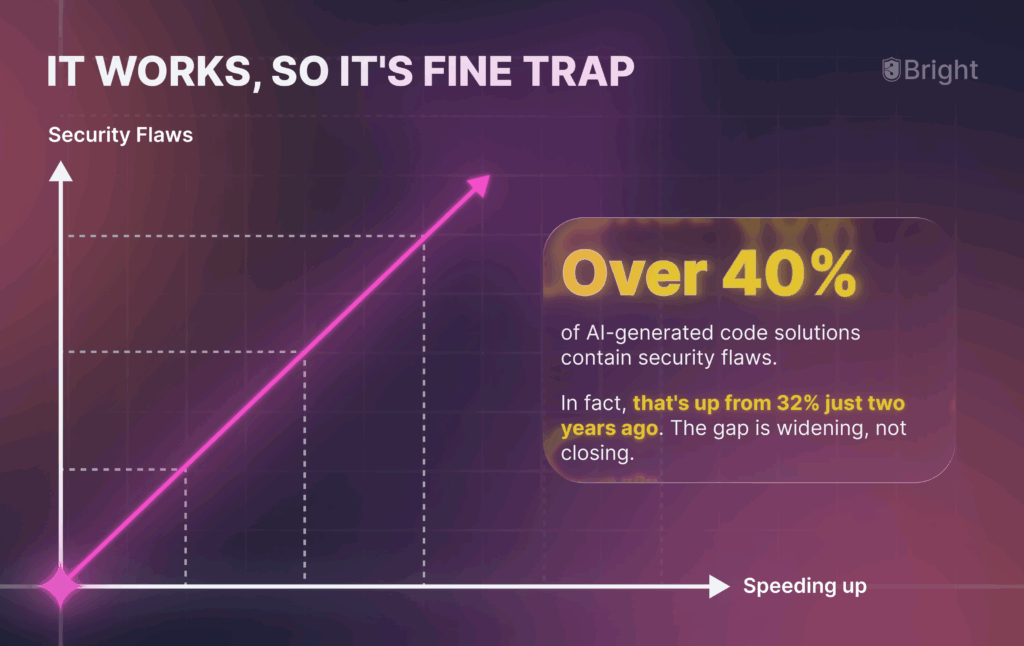
Recent studies show that over 40% of AI-generated code solutions contain security flaws.

In fact, that’s up from 32% just two years ago. The gap is widening, not closing.

Also, feel free to check out the Top 5 LLM Application Security risks in 2025.

Gap No 2: The Hallucination Problem Nobody Talks About

AI doesn’t just make mistakes. It hallucinates.

Last month, I saw AI-generated code that referenced a “secure_hash_md5()” function that doesn’t exist in any standard library. 

The developer didn’t catch it because the function name looked legitimate. 

The code compiled because they had created a wrapper function with that name.

Guess what that wrapper function did? 

It used MD5 – a hashing algorithm that’s been considered cryptographically broken for over a decade.

AI systems experience hallucinations when generating code. This creates solutions that look professional but contain fundamental security flaws. Developers accept these suggestions without deeper review. Hence, vulnerabilities slip through.

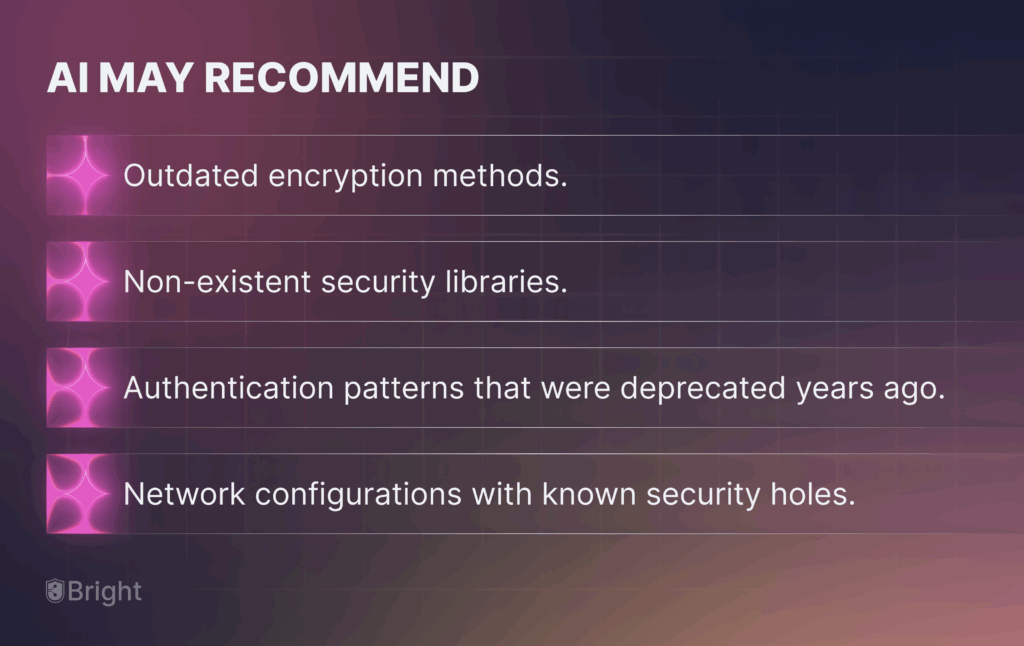
I’ve seen AI recommend

  • Outdated encryption methods.
  • Non-existent security libraries.
  • Authentication patterns that were deprecated years ago.
  • Network configurations with known security holes.

Gap No 3: The Scale Nightmare

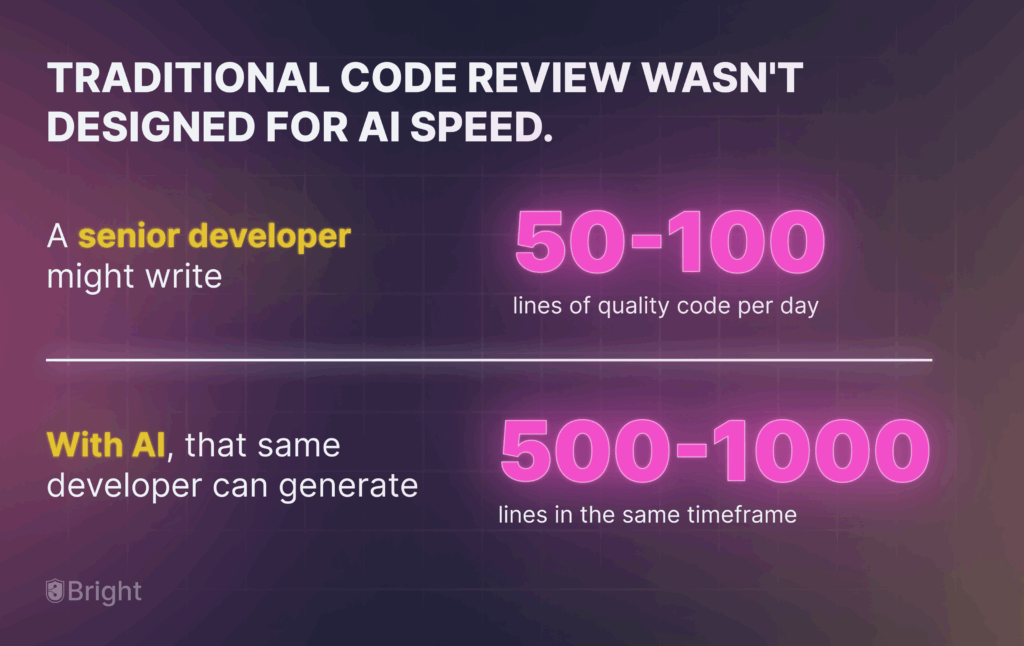
Traditional code review wasn’t designed for AI speed.

A senior developer might write 50-100 lines of quality code per day. With AI, that same developer can generate 500-1000 lines in the same timeframe.

Your security review processes weren’t built for that volume.

I worked with a company where their AI-powered development team was shipping code 5x faster than before. 

Great for delivery timelines. Terrible for their security team. The security team suddenly had to review 5x more code with the same resources.

The result? 

They started spot-checking instead of comprehensive reviews. 

Three months later, they discovered 47 security issues in production – all in AI-generated code that had slipped through their overwhelmed review process.

AI tools have failed to defend against Cross-Site Scripting vulnerabilities in 86% of relevant code samples.

Thus, this isn’t just a training problem. It’s a systemic issue with how AI approaches security.

Your 3-Step AI Code Security Action Plan

After working through this problem with dozens of organizations, here’s what actually works:

Step 1: Get Visibility Into Your AI Code

You can’t secure what you can’t see.

Start simple – Implement a tagging system. This helps you know which code was AI-generated. This isn’t about restricting AI use. It’s about bringing visibility to your blind spots.

How to do it?

  • Add comments or tags when developers use AI assistance.
  • Implement automated detection for common AI code patterns.
  • Track AI usage across different teams and projects.

I helped a mid-size company implement this, and they discovered that 60% of their recent commits contained some AI-generated code. 

The CISO’s reaction? 

Now I understand why our vulnerability scans have been lighting up.

Step 2: Deploy AI-Aware Security Scanning

Standard security scanners miss AI-specific vulnerability patterns. You need tools trained to catch the unique ways AI code fails.

The vulnerability detection rate in AI-generated code can be 2-3x higher than human-written code, but only if your tools know what to look for.

Focus areas:

  • Injection vulnerabilities (AI loves string concatenation).
  • Authentication bypasses (AI often simplifies auth logic).
  • Data exposure issues (AI tends to over-share data between functions)

Bright STAR ( Security Testing and Auto remediation ) – Our Human + AI code scanner yields the following results. 

  • < 3 % False Positives. 
  • 98% Faster Remediation.

Step 3: Create AI-Specific Review Checkpoints

This isn’t about slowing down development. It’s about adding targeted checkpoints where AI code is most likely to fail.

The approach that works:

  • Flag security-critical AI-generated code for human review.
  • Create AI-specific security checklists.
  • Train your team to recognize common AI vulnerability patterns.

One company I worked with reduced their AI code vulnerability rate from 45% to 12% just by implementing focused review checkpoints. 

Same development speed, dramatically better security posture.

Making Your Action Plan Stick: The Implementation Roadmap

Here’s how to roll this out without causing a developer revolt:

Week 1: The Reality Check

  • Audit current AI usage (spoiler: it’s probably higher than you think).
  • Establish baseline metrics for vulnerability rates.
  • Get buy-in from development leads.

Week 2-3: Tool Integration

  • Integrate AI-aware scanning into your CI/CD pipeline.
  • Set up automated flagging for AI-generated code.
  • Train your security team on AI vulnerability patterns.

Week 4+: Process Refinement

  • Monitor detection rates and adjust thresholds.
  • Gather feedback from development teams.
  • Scale successful practices across the organization.

The key is starting with visibility, then building security controls around what you discover.

The Real Cost of Doing Nothing

I’ve seen what happens when organizations ignore this problem.

Last year, a retail company had a breach that started with an AI-generated API endpoint. The AI had created code that worked perfectly for their use case.

However, it exposed customer data through a parameter manipulation vulnerability.

60% of IT leaders describe the impact of AI coding errors as very or extremely significant. But the real cost isn’t just the immediate damage – it’s the long-term technical debt and compliance headaches.

[INSERT_METRIC_OR_PROOF: Add industry-specific breach cost data for your target audience]

When regulatory frameworks start including AI-specific security requirements (and they will), organizations that haven’t addressed this will face a compliance nightmare.

Your Next Steps: From Awareness to Action

This Cybersecurity Awareness Month, make AI code security your priority.

Start with one simple question. How much AI-generated code is currently running in our production environment?”

If you don’t know the answer, that’s your first red flag.

This week

  1. Survey your development teams about AI tool usage.
  2. Run a scan specifically looking for AI code vulnerability patterns.
  3. Identify your highest-risk AI-generated code areas.

Next week

  1. Implement basic tagging for AI-assisted development.
  2. Add AI-aware rules to your security scanning tools.
  3. Create review checkpoints for security-critical AI code

Small steps now prevent major headaches later.

Conclusion: Securing Your AI-Driven Future

AI coding tools aren’t going away. The productivity gains are too significant, and the competitive advantages too clear.

But there’s a right way and a wrong way to do this.

The wrong way is what most organizations are doing right now: embracing AI coding with no security strategy, hoping the problems will solve themselves.

The right way is what I’ve outlined here. Visibility first, targeted scanning second, focused review processes third.

Organizations that get this right will have the best of both worlds – AI-powered productivity with enterprise-grade security.

Those that don’t will keep playing security whack-a-mole, patching AI-generated vulnerabilities in production.

Which would you rather be?

CTA

Ready to get visibility into your AI code security risks?

Don’t wait for a vulnerability to surface in production. 

Get a quick tour of Bright STAR – Our Autonomous Application Security Testing and Remediation Platforms to auto-detect, auto-correct, and auto-protect your applications

Announcing the Bright Security + OX Integration

Table of Contents 

  1. The Challenge: Fragmented Security Management
  2. The Solution: Unified Security Backlog in OX
     
  3. Key Benefits of the Bright + OX Integration
  4. Shift Left and Stay Unified

We’re excited to announce a new integration between Bright Security’s Dynamic Application Security Testing (DAST) and OX security ASPM platform. This integration enables AppSec teams and developers to seamlessly import Bright’s real-time vulnerability findings into OX, ensuring that all security risks are tracked, prioritized, and managed in one place.

The Challenge: Fragmented Security Management

Many teams using Bright Security’s dev-friendly DAST still face a familiar pain point: findings are siloed from the rest of their product security stack. This forces security teams to toggle between tools, manually track vulnerabilities, and struggle to align priorities across AppSec and development teams – slowing down remediation efforts and reducing overall visibility.

The Solution: Unified Security Backlog in OX

With the new Bright + OX integration, vulnerabilities detected by Bright are automatically ingested into OX. This means:

  • Centralized Risk Management – Bright’s findings now sit alongside SAST, SCA, ASPM, and other security signals inside OX, giving you one source of truth for application security risks.
  • Consistent Prioritization – Every issue, from every scanner, is evaluated and prioritized with the same context-aware risk model.
  • Automated Workflows – Findings are routed to the right teams for remediation without manual handoffs.

Key Benefits of the Bright + OX Integration

1. Automated Vulnerability Discovery

Bright scans your applications in real time, feeding validated vulnerabilities directly into OX’s backlog.

2. Industry-Leading Accuracy

With less than 3% false positives, Bright ensures you only see vulnerabilities that actually matter. Its attack-based validation helps AppSec and developers avoid noise and focus on fixing real issues.

3. DAST Built for Developers

Bright integrates directly into the developer toolchain, enabling security testing from unit testing through production – without slowing down velocity. This makes it easier to “shift left” and foster collaboration between security and engineering teams.

4. Enhanced OX Web App Scanning

The integration expands OX’s capabilities by conducting comprehensive dynamic application security testing and enabling deep scans against new targets, strengthening overall application coverage.

Shift Left and Stay Unified

Bright Security helps you shift DAST left. OX helps you keep everything in one place. Together, this integration makes DAST more accessible, actionable, and fully integrated across your SDLC.

Start importing Bright Security findings into OX today and give your teams a streamlined, unified approach to managing application security risks.

SAST vs DAST vs IAST: Choosing the Right Approach for Application Security

Threats are growing faster than release cycles. Modern teams face a crowded toolbox and real deadlines. So how do you choose between SAST vs. DAST vs. IAST for practical coverage that fits DevSecOps velocity? This guide gives you a quick overview, a side-by-side comparison, pros and cons, impact on your workflow, and a simple decision flow. We also link to deeper reads and tools so you can act today.

Table of Contents 

Introduction

What Is SAST, DAST, and IAST? (Quick Overview with real uses)

SAST vs DAST vs IAST: Key Differences


Comparison Table: SAST vs DAST vs IAST

Pros and Cons in Real Life

SAST vs DAST vs IAST: Impact on Developers and the SDLC

How to Choose Between SAST, DAST, and IAST

Final Thoughts: Choose the Right Mix for Stronger Security

Introduction

Threats are growing faster than release cycles, and modern stacks are complex. Developers now face several ways to test software. How do you choose between SAST vs. DAST vs. IAST without slowing down delivery?

This article gives you a quick overview of each method, a simplified comparison, how they affect developer workflows, and a decision flow you can follow today. We also link to deeper resources when you want to dive in.

What Is SAST, DAST, and IAST? (Quick Overview with real uses)

SAST inspects source code or bytecode without running the app. It shines early in the SDLC for catching insecure patterns, hardcoded secrets, and risky data flows before build and deployment. Teams commonly run SAST on pre-commit hooks and pull requests to block obvious mistakes and to enforce secure coding standards. For a primer on how SAST fits into broader testing, see Bright’s guide to Application Security Testing.

DAST tests a running application or API from the outside, the way an attacker would. It is excellent at confirming real, exploitable issues like injection bugs, cross-site scripting, and authentication gaps. Many teams run DAST on staging as a release gate and schedule regular scans to watch for new exposures. For a deeper look at why DAST matters at the edge, read Bright’s introduction to Dynamic Application Security Testing.

IAST instruments the app while it runs, usually during automated tests or on a staging environment. Because it observes real code execution and data paths, IAST gives more precise findings with fewer false positives and line-level context that developers can fix fast. Many teams plug IAST into CI alongside integration tests to keep feedback tight. Bright’s explainer on IAST covers how this works in practice, and this article on IAST vs DAST compares the runtime tradeoffs.

SAST vs DAST vs IAST: Key Differences

People compare DAST vs. SAST vs. IAST because each one optimizes for a different moment in the lifecycle. You can think of them as complementary lenses: SAST sees code early, IAST sees code paths as they run, and DAST sees what is actually exposed from the outside.

SAST vs DAST

  • SAST finds risky code patterns before you can even run the app.
  • DAST validates what is exploitable against a live target, including configuration issues that code-only scans may miss.
    Used together, SAST reduces security debt early and DAST proves risk at the boundary before you ship.

SAST vs IAST

  • SAST can be noisy because it lacks runtime context.
  • IAST runs your code, so it reduces false positives and shows exactly where to fix, with stack traces and file locations.

IAST vs DAST

  • Both require a working app, but they look from different angles.
  • IAST runs inside the app, so it provides deep, code-level insights.
  • DAST stays outside to model attacker behavior and catch exposed endpoints, broken access control, and misconfigurations.

Also read: a single, deeper comparison of runtime methods in Bright’s IAST vs DAST

Comparison Table: SAST vs DAST vs IAST

AspectSASTDASTIAST
StageEarlyPre-release, ongoingBuild, test, staging
ViewCodeExternalIn-app runtime
SetupCode rulesRunning envAgent + tests
NoiseHigherMediumLow
Who usesDev + AppSecAppSec + platformDev + AppSec
CI/CDPR gatesRelease gateCI tests

Pros and Cons in Real Life

Instead of listing bullets in a vacuum, here is how these tradeoffs play out during a normal sprint.

  • SAST in a Tuesday PR:
    A developer opens a pull request that adds a new endpoint. SAST flags the use of unsanitized input. It blocks the merge, the developer fixes it in minutes, and there is no follow-on meeting. The risk never reaches staging. The caveat is tuning. If rules are too broad, you get false positives and frustrated devs. Teams solve this by setting severity thresholds, suppressing by pattern, and triaging centrally once per week.
  • IAST in CI on Wednesday night:
    During integration tests, IAST observes a real code path that joins user input into a query builder. Because it sees the path and parameters as they execute, it raises a precise finding with file, function, and a replay. The developer knows exactly what to do. No back-and-forth, no guesswork. The catch is coverage mirrors your tests, so improving tests improves IAST signal.
  • DAST before a Friday release:
    The staging app passes unit and integration tests. A targeted DAST scan, tuned for your app’s auth and routes, finds an insecure HTTP header and a redirect that leaks a token on certain errors. The release is delayed by an hour, you push a fix, and you avoid a production incident. DAST needs a stable test environment and good scan profiles, but it is excellent at catching the “real world” things that only show up when all parts are assembled.

For broader context on these approaches, see Bright’s overview of Application Security Testing.

SAST vs DAST vs IAST: Impact on Developers and the SDLC

  • Workflow changes:
    • SAST can slow pipelines if rules are noisy or blocking. Tune rules and use severity thresholds to keep velocity.
    • DAST can delay feedback if run only before release. Run lighter scans earlier and a full gate before prod.
    • IAST integrates into test runs to deliver actionable, low-noise issues where developers already work.
  • Ownership:
    • Developers handle SAST and IAST findings in code with quick fixes.
    • Security teams tune policies, curate rules, and set DAST gates for release readiness.
  • Practical example:
    • Use SAST on pull requests, run IAST in CI against integration tests, and run DAST before release with a policy that gates production.

For more on balancing methods, see IAST vs DAST and the DevSecOps guidance from OWASP.

How to Choose Between SAST, DAST, and IAST

There is no single best tool. Choose by stage, goal, team maturity, and app type.

Stage of development

  • Early in SDLC: start with SAST for shift-left coverage.
  • Mid or late development: add DAST or IAST to validate running behavior.

Primary goal

  • Prevent issues early: SAST.
  • Prove exploitability and external risk: DAST.
  • Balance accuracy with speed in CI: IAST.

Team resources and maturity

  • Lean team: IAST gives precise tickets with less triage.
  • Dedicated AppSec: combine all three and tune DAST gates.

Type of application

  • APIs and microservices: SAST per repo, IAST in integration tests, DAST for perimeter checks.
  • Serverless and cloud-native: favor IAST for code-level insight and DAST for public endpoints.

Final Thoughts: Choose the Right Mix for Stronger Security

DAST vs SAST vs IAST is not about a single winner. Mature teams layer methods to cover blind spots. A practical baseline is SAST in PRs, IAST in CI for accurate context, and DAST as a pre-release gate.

If you want help automating that mix without adding friction, explore Bright STAR. It brings dynamic testing, AI-powered remediation, and real-time validation into your pipeline so engineering velocity stays high.

NoSQL Injection Explained: What It Is and How to Prevent It

Table of Content

  1. Introduction
  2. What Is NoSQL Injection?
  3. Exploitation Techniques: How Attackers Use NoSQL Injection
  4. Testing and Identifying NoSQL Injection Vulnerabilities
  5. How to Prevent NoSQL Injection
  6. NoSQL Injection vs. SQL Injection (Comparison)
  7. Real-World Breaches & Lessons Learned
  8. Conclusion
  9. FAQs

Introduction

At Bright, we help engineering teams ship fast without sacrificing security. One threat we see again and again is NoSQL injection. If you have ever Googled “what is NoSQL injection” or “NoSQL injection,” you already know it targets the flexible query models behind today’s apps and APIs. That flexibility is powerful, but it can be abused.

The risk is not theoretical. Verizon’s 2024 DBIR counted 10,626 confirmed breaches, with web applications remaining a leading way in. Injection continues to play a major part. Bright’s developer-first DAST and our Bright STAR platform make finding, fixing, and verifying these issues part of your CI flow, so vulnerable code never ships.

What Is NoSQL Injection?

NoSQL injection happens when untrusted input is inserted into a NoSQL query, changing its logic. It is similar in spirit to classic SQL injection, but targets document, key-value, or search stores (for example MongoDB, Redis, or Elasticsearch). With NoSQL operators like $ne, $gt, or $regex, an attacker can bypass logins, read or modify data, or cause denial of service.

Why NoSQL’s flexibility is a risk: NoSQL engines accept rich, JSON-like filters and even JavaScript in some cases. That flexibility is great for developers, but if parameters are built directly from user input, operators can be smuggled into queries. OWASP’s testing guide highlights dangerous areas such as MongoDB’s $where and unserialized inputs.

Exploitation Techniques: How Attackers Use NoSQL Injection

  1. Query manipulation
    Attackers inject operators into filters to force logic to evaluate true (for example, {“user”:{“$ne”:null}}). They may chain boolean conditions to enumerate data.
  2. Authentication bypass
    By abusing operators like $or, $regex, or $ne, an attacker can trick the login check to accept any password. Labs and write-ups show practical payloads for admin takeover.
  3. Data exfiltration
    Blind techniques use timing or boolean responses to extract secrets record by record. Public bug-bounty reports document token leakage and privilege escalation through NoSQLi.
  4. Regex injection / ReDoS
    Feeding a catastrophic regex (for example, ^(a+)+$) into a $regex filter can lock the CPU, leading to service degradation or downtime.

Summary table

Attack TypeExample PayloadPotential Impact
Query Manipulation{“username”:{“$ne”:null}}Enumerate users, skip checks
Authentication Bypass{“user”:”admin”,”pass”:{“$regex”:”.*”}}Log in without a password
Data Exfiltration{“email”:{“$regex”:”^a.*”}} + binary search loopsExtract data via responses
Regex Injection (ReDoS){“name”:{“$regex”:”^(a+)+$”}}CPU spike, app unresponsive

Tip: Store these in a safe “payload bank” for testing, not production.

Testing and Identifying NoSQL Injection Vulnerabilities

Manual testing

  • Payload injection: Try JSON operators in parameters ($ne, $gt, $or, $regex), and watch for changes in query behavior.
  • Fuzzing & tampering: Toggle parameter types (string, array, object), add unexpected keys, and observe error timing or status codes.
  • Auth-path focus: Exercise password reset, search, filtering, and admin listing endpoints.

Where to look: Follow OWASP WSTG for NoSQL testing specifics, including $where hazards and unserialized inputs. 

Automated testing

Example tools: Bright Security (DAST/STAR), OWASP ZAP (DAST), Burp Suite (DAST), Semgrep (SAST), Contrast (IAST).

Bright resources for deeper dives:

How to Prevent NoSQL Injection

  1. Input validation and sanitization
    Strip or reject operator keys from user-controlled objects. Libraries like express-mongo-sanitize remove keys starting with $ and dots in filters.
  2. Secure coding practices
    1. Build whitelists of allowed fields and operators.
    2. Avoid $where and server-side JavaScript evaluation.
    3. Treat all input as hostile, even from internal APIs. 
  1. Role-based access & least privilege
    Lock down read and write permissions. Separate public search from administrative queries.
  2. Security libraries and frameworks
    Use schema validators and type guards.
  3. Secure testing lifecycle
    Run automated security tests in CI on every change and before release. Bright’s STAR platform can gate builds on verified vulnerabilities, combining testing and auto-remediation to keep releases safe.

NoSQL Injection vs. SQL Injection (Comparison)

Both attacks hijack query logic with untrusted input. The differences matter for detection and defense.

AreaNoSQL InjectionSQL Injection
StoresDocument, key-value, search (MongoDB, Redis, ES)Relational (PostgreSQL, MySQL, MSSQL)
Query shapeJSON-like filters and operators ($ne, $regex)Stringified SQL statements
Common impactsAuth bypass, data extraction, ReDoS via regexData extraction, RCE via stacked queries, auth bypass
Typical mistakesPassing raw objects from requests to drivers; $whereString concatenation in SQL, missing parameters
Prevention focusSanitize objects, deny dangerous operators, schema validationParameterized queries, stored procedures, least privilege
Testing angleDAST with operator payloads, IAST for sinksDAST for injection strings, SAST/IAST for query builders

Real-World Breaches & Lessons Learned

  • Rocket.Chat NoSQLi enabling token leakage and RCE paths
    Disclosed HackerOne reports showed post-auth blind NoSQL injection in users.list that could leak password reset tokens and 2FA secrets, paving the way to admin takeover and remote code execution. Lesson: validate selectors and never pass user filters straight to DB queries. HackerOneVulners
  • Rocket.Chat unauthenticated blind NoSQLi (CVE-2023-28359)
    The listEmojiCustom method accepted user-controlled selectors. Timing-based payloads let unauthenticated attackers probe and exfiltrate. Lesson: strip dangerous operators and enforce strict request schemas before DB calls. HackerOneHackTricks
  • Mongoose $where mishandling (CVE-2024-53900)
    A recent advisory explains how improper handling of $where could enable NoSQL injection paths in apps using affected versions. Lesson: keep ODMs up to date, disable risky operators, and adopt defense-in-depth. CVE CyberSecurity Database NewsCIP Blog

Conclusion

NoSQL injection is real, versatile, and actively exploited. Treat every filter and search box like a potential query changer. Validate input, enforce schemas, and test early and often. Bright’s developer-first DAST and the Bright STAR platform help you find, fix, and verify these issues in CI so vulnerable code never ships. Injection flaws may be old, but they’re not going away.

FAQs

Can NoSQL databases get hacked the same way as SQL databases?
Yes. The syntax differs, but the core issue is the same: untrusted input changes query logic. 

Is NoSQL injection only a problem with MongoDB, or can it affect other databases too?
It affects many NoSQL systems, including Redis, Elasticsearch, CouchDB, and DynamoDB, depending on how queries are built. 

How do hackers usually find NoSQL injection weaknesses in a website or app?
They fuzz parameters, try operator keys in JSON, abuse regex inputs, and leverage timing to extract data. OWASP and PortSwigger document effective approaches and labs. 

What happens if a NoSQL injection attack is not detected quickly?
Attackers may bypass authentication, read or modify sensitive data, or cause ReDoS, leading to downtime and breaches. 

Are cloud-hosted NoSQL databases safe from injection attacks?
Managed platforms secure the infrastructure, not your application logic. If your app builds unsafe queries, you remain vulnerable. Use schema validation and sanitize filters.

Your Apps & APIs Never Sleep – Neither Do We

When it comes to protecting your tech stack, threats don’t work a 9-to-5 job. They don’t respect weekends, holidays, or timezone boundaries. At Bright, we know that when a vulnerability is not remediated, it gets exploited, and every second counts. When you run scans or need to push to prod on the weekend, someone needs to be there to support you if needed. Not eventually. Immediately.

That’s why our in-house technical support team is staffed by engineers from around the globe, who work 24/7/365 in multiple languages, ready and able to investigate, respond, diagnose, and solve your complex AppSec issues as they happen. Bright support isn’t your standard chatbot or call center. Our global support desk is staffed by highly trained engineers with the expertise to dive deep into your possible authentication issues, SDLC integrations,  scan queries and vulnerabilities whenever you need help, understand the nuance of your environment, and collaborate with you in real time. 

Table of Content

  1. Saturday Emergencies Don’t Wait

Saturday Emergencies Don’t Wait

Need proof? Take the recent Amazon Q hack, engineered specifically on a Saturday. That magic day when too many tech organizations operate with skeleton crews or shut customer and internal support off altogether. Threat actors and malicious insiders know only too well that weekends are often prime time for slipping through cracks. Unfortunately, many companies insist on learning the hard way that relying on standard limited weekend coverage from their tools and partners leaves them dangerously exposed.

Our team is ready, equipped, and trained to take immediate action. Bright’s kind of responsiveness doesn’t just give peace of mind – it actively reduces your possible downtime, damage, and ability to respond.

Over a recent weekend, Bright Security’s 24/7 support team sprang into action for a major global institution with more than 15,000 developers, facing critical CI/CD disruptions. With production pipelines at risk and developers blocked from deploying secure releases, our team provided immediate hands-on support and resolved their issues before they could cascade into costly outages. The result? Hundreds of developer hours saved and production stability preserved, all thanks to Bright’s round-the-clock vigilance. For enterprises operating at scale, it’s more than support, it’s on-demand business continuity and peace of mind.

Not All Customer Support Is Created Equal

Other providers in the AppSecspace often claim to offer “round-the-clock” support, but when push comes to shove, many rely on AI chatbots, outsourced help desks, delayed ticket queues, or vague SLAs that stretch hours into days. In critical moments, these gaps aren’t just frustrating, they’re costly and disruptive.

Here’s what sets Bright Support apart:

FeatureBright SecurityMost Competitors 
True 24/7/365 Coverage✅ Engineers on standby❌ Limited after-hours
Deep Technical Expertise✅ DevSecOps trained❌ AI/Bot/Generalist agents
Instant Response Times✅ Real-time triage❌ SLA-bound delays 
Weekend/Holiday Support✅ No compromise ❌ Often unavailable

Your Security Program Deserves Better

Modern tech stacks are interconnected, constantly evolving, and vulnerable to fast-moving threats. Your security posture is only as strong as your ability to react in the moment. Whether you’re deploying updates, scanning for vulnerabilities, or responding to incidents, you need partners who are always in the fight.

Bright Security’s 24/7/365 support isn’t just a feature. It’s a philosophy. A commitment to standing by your side, no matter what time or day it is.

So, see you on Saturday?

The Hidden Costs of Ignoring Shift-Left Security

Security that waits for the release gate is like a smoke alarm installed in the basement: by the time it screams, the fire is already upstairs. “Shift-left” simply means moving those alarms into the developer’s editor – scanning, fuzzing and testing while the code is still malleable. Yet teams still postpone AppSec because a last-minute penetration test feels cheaper than wiring checks into every pull request. 

Table of Content

  1. Why “Shift-Left” Matters
  2. How Developer-First DAST Removes Friction

Why “Shift-Left” Matters

Cost isn’t the only casualty. When vulnerabilities surface late, they’re often woven through multiple layers – input checks morph into schema rewrites, auth flaws demand refactoring of gateway logic. Release trains stall while developers context-switch from new features to month-old code. Morale dips, too: BlackFog’s 2024 survey found 24 % of CISOs are actively looking to quit, and 93 % of them blame stress from constant incident response. Nothing erodes trust faster than 2 a.m. rollbacks where security looks like a bottleneck, not a partner.

How Developer-First DAST Removes Friction

Moving checks left doesn’t have to feel like adding friction. Developer-centric DAST tools—Bright is a leading example—plug straight into GitHub Actions, Jenkins or GitLab pipelines and finish in seconds. One Fortune-500 software firm that deployed Bright’s scanner during unit testing phase now spots vulnerabilities before code even hits staging, cutting remediation work by about 70 % in both wall-clock and engineer hours. Another case study credits early Bright scans with preventing high-severity flaws from ever reaching QA, saving entire sprints of rework. Because scans run automatically on each commit, developers get feedback while the problem is still in their mental cache, often a one-line fix instead of a multi-team refactor.

If you’re weighing the trade-off, track a few simple metrics:

  • Detection ratio: how many vulns surface in development versus production.
  • Mean time to remediate (MTTR): days from report to fix; this plummets when issues appear in a pull request, not a customer ticket.
  • Scan coverage per sprint: the share of code paths exercised automatically.

Bright customers, thanks to tight CI/CD integration and near-zero false positives, often watch the first two numbers rise and fall in the right directions within a single quarter.

In the end, shift-left isn’t extra work; it’s shifting the same work to a cheaper, calmer moment. Spend a few minutes per commit now or gamble on all-hands fire-fights later. The compound interest of software defects is relentless, better to let it work for you than against you.

AI‑Generated Code Security Risks (and How to Eliminate Them)

Table of Content

  1. The Rise—and the Fall —of AI Pair‑Programming
  2. Six Common Risks Introduced by AI‑Generated Code
  3. Why Traditional AppSec Approaches Struggle
  4. A Modern DAST Approach
  5. Key Capabilities to Look For
  6. Moving Forward

The Rise—and the Fall —of AI Pair‑Programming

Generative coding assistants have moved from novelty to near‑standard tooling in just a few years. They accelerate delivery, but that speed can hide blind spots—especially when models replicate insecure patterns that live in public repositories and forum snippets.

Six Common Risks Introduced by AI‑Generated Code

  1. Injection Flaws – Unsanitised input can creep in, opening SQL Injection, XSS or XXE paths.
  2. Insecure Defaults – Boilerplate may disable CSRF protection or store passwords in plain text.
  3. Hard‑Coded Secrets – Auto‑completed tokens and API keys might slip into commits.
  4. Missing Authorization Checks – Endpoints sometimes omit permission validation, creating logic‑access gaps.
  5. Outdated Dependencies – Suggested libraries can ship with known CVEs.
  6. Reviewer Blind Spots – When large portions of a pull-request diff are AI-generated, it is easy to skim security‑critical lines.

Why Traditional AppSec Approaches Struggle

Static analysis generates high false‑positive rates, while legacy DAST often finds issues late in the pipeline—too late for today’s release cadence. Teams need feedback that is accurate, fast, and integrates with CI/CD.

A Modern DAST Approach

Bright’s developer‑centric DAST engine can be invoked on‑demand from the web UI, triggered by an API call, or integrated directly into CI/CD pipelines. By exercising the running application instead of parsing source code, it highlights issues that are actually exploitable and filters out the noise. Coverage spans everything from classic injection and XSS vulnerabilities to more subtle business‑logic and authorisation flaws.

Note: Bright is just one option—evaluate any DAST that offers low‑noise results, CI/CD integrations, and clear remediation guidance.

Key Capabilities to Look For

  • Pipeline‑Friendly Scans – Triggered automatically on pull requests across GitHub Actions, Jenkins, Azure Pipelines and other well known CI CD platforms.
  • Focused Findings – Results prioritise what is actually exploitable, cutting alert fatigue.
  • Auto‑Verification – After a fix has been applied, Bright re‑runs the relevant tests to confirm the vulnerability is closed.
  • Broad Test Coverage – A robust payload library should tackle classic injections, CSRF, XSS, and business‑logic abuse.

Moving Forward

AI assistants can transform productivity, but they also widen the potential attack surface. Combining them with an automated DAST such as Bright helps ensure that speed does not outpace security.

Curious how this fits into your workflow? 

The Importance of Finding Vulnerabilities with Application Security in Pre-Production

In today’s digital-first world, organizations are under constant pressure to deliver software faster while maintaining high security standards. However, this rapid development pace often comes at the cost of security vulnerabilities, which cybercriminals can exploit to compromise sensitive data, disrupt operations, or cause financial and reputational damage. This is why application security (AppSec) testing in pre-production environments is critical – it allows organizations to identify and fix security weaknesses before they reach production, mitigating risks and ensuring software resilience.

Table of Content

  1. Why Pre-Production Security Testing Matters
  2. Key Strategies for Effective Pre-Production AppSec Testing
  3. Conclusion

Why Pre-Production Security Testing Matters

1. Prevent Costly Breaches and Remediation
Fixing security vulnerabilities after deployment is significantly more expensive and complex than addressing them earlier in the software development lifecycle (SDLC). Studies show that the cost of fixing a vulnerability post-production can be up to 100 times higher than if caught during the design or development phases. Identifying security flaws before production deployment minimizes the risk of costly security breaches, regulatory fines, and reputational damage.

2. Ensuring Compliance with Industry Regulations

Many industries, including finance, healthcare, and e-commerce, are subject to stringent security and data protection regulations such as GDPR, HIPAA, and PCI DSS. Pre-production security testing helps ensure compliance by proactively identifying vulnerabilities that could lead to non-compliance. Organizations that fail to secure their applications adequately can face legal consequences and hefty fines.

3. Reducing Production Downtime and Business Disruptions

A security vulnerability discovered in a live application often requires urgent patches or emergency maintenance, leading to service downtime, degraded performance, and frustrated users. By implementing robust AppSec testing in pre-production, organizations can deploy secure applications confidently, minimizing the risk of unexpected disruptions in production environments.

4. Enhancing Software Quality and Reliability

Security vulnerabilities are often symptomatic of broader issues in software design and development. By addressing these issues in pre-production, organizations not only enhance security but also improve overall software quality, stability, and performance. Secure code practices help developers produce more robust applications that function correctly under various conditions.

5. Improving Developer Awareness and Secure Coding Practices

Incorporating security testing into pre-production environments fosters a security-first mindset among developers. Regular security assessments, such as static application security testing (SAST), dynamic application security testing (DAST), and software composition analysis (SCA), provide developers with insights into common vulnerabilities and best practices. Over time, this results in more secure coding habits and a reduction in security flaws introduced during development.

Key Strategies for Effective Pre-Production AppSec Testing

To maximize the effectiveness of application security testing in pre-production, organizations should adopt a comprehensive approach that includes:

1. Shift-Left Security

Integrating security testing earlier in the SDLC – known as “shift-left security” – helps detect vulnerabilities before they become costly to fix. Security tools and automated testing should be embedded into development workflows to catch security issues as early as possible.

2. Automated Security Testing

Automated security tools, including SAST, DAST, and interactive application security testing (IAST), help identify vulnerabilities quickly and at scale. These tools can be integrated into CI/CD pipelines to ensure continuous security testing without slowing down development.

3. Penetration Testing and Red Team Assessments

While automated tools are effective, manual security testing, such as penetration testing, is essential for uncovering complex vulnerabilities that automated scanners might miss. Red teaming exercises simulate real-world attack scenarios to evaluate the application’s security resilience.

4. Secure Coding Training for Developers

Investing in security training for developers ensures they understand secure coding best practices and common vulnerabilities, such as those outlined in the OWASP Top 10. Security-conscious developers are less likely to introduce security flaws in the first place.

5. Threat Modeling and Risk Assessments

Proactively identifying potential threats and attack vectors through threat modeling helps organizations design applications with security in mind. Risk assessments allow teams to prioritize vulnerabilities based on their severity and impact.

Conclusion

Identifying and mitigating vulnerabilities in pre-production environments is essential for delivering secure, high-quality software. Organizations that prioritize pre-production AppSec testing benefit from reduced security risks, lower remediation costs, improved compliance, and enhanced software reliability. By integrating automated security testing, penetration testing, and secure coding practices throughout the SDLC, businesses can stay ahead of cyber threats and ensure their applications remain resilient against evolving security challenges.