Why Prevention Beats Cure Against AI-Powered Cyber Threats

Table of Content

  1. AI-Powered Cyber Threats Are Escalating. Are We Ready?
  2. Why Legacy Tools Are Losing the Battle
  3. The Case for Cybersecurity Prevention
  4. Building AI-Resilient Security
  5. Final Thought: Don’t Wait for the Breach

AI-Powered Cyber Threats Are Escalating. Are We Ready?

Artificial intelligence is reshaping the cybersecurity landscape at a staggering pace. What was once the domain of human-led exploits and manual phishing campaigns is now being turbocharged by machine learning and automation. Attackers are using AI to identify vulnerabilities, bypass traditional defenses, and launch personalized attacks at scale.

In AI Journal’s article “What to Know About AI-Powered Cyber Threats and How to Defend Against Them,” Kris Beevers, CEO of Netography, outlines the risks and realities of this new era. One of his most compelling arguments? The security industry must move from detection to prevention.

Why Legacy Tools Are Losing the Battle

For years, many organizations have leaned heavily on tools like Web Application Firewalls (WAFs) and threat signatures. While these tools have their place, they rely on a reactive model. They’re designed to stop attacks that have already been seen and documented.

But AI-powered cyber threats don’t play by those rules. Attackers now use generative AI to constantly evolve their tactics, generating novel payloads and variants that evade static signatures. Every hour, new techniques emerge, and WAFs are struggling to keep up. What’s worse, defenders are often left chasing yesterday’s threats while today’s breaches unfold silently.

The Case for Cybersecurity Prevention

In this high-speed threat environment, the only viable strategy is prevention. Beevers argues – and we strongly agree – that the focus must shift to identifying and eliminating vulnerabilities before attackers can exploit them.

This means gaining continuous visibility into your digital footprint, from public-facing APIs to misconfigured cloud services. It requires security teams to find exposures proactively, not just respond after the fact. Most importantly, it involves building security earlier into the development lifecycle: “shifting left.”

At Bright, this approach is at the heart of what we do. Our platform is built to help security and development teams detect issues as they emerge, integrating testing and validation into every phase of development. We believe the best way to respond to a threat is to prevent it from ever reaching production.

Building AI-Resilient Security

Adapting to AI-enhanced cyber threats means rethinking how we build, monitor, and protect our systems. Prevention in this context is not about being perfect – it’s about being faster and more adaptive than the adversary.

That starts with continuous security testing, automated vulnerability discovery, and developer-friendly tooling that closes gaps before they’re exploitable. It continues with smarter monitoring, behavior-based anomaly detection, and a culture that treats security as a shared responsibility, not a final checkpoint.

Prevention isn’t a luxury anymore. It’s table stakes in a world where attackers no longer need to sleep, think, or even write code themselves.

Final Thought: Don’t Wait for the Breach

AI has changed the rules of cybersecurity. Defenders can no longer afford to react after the fact. Instead, the priority must be to detect and fix vulnerabilities before they become weapons.

By shifting security left, investing in automated testing, and committing to continuous prevention, organizations can stay ahead of the curve, even as AI accelerates it.

Don’t wait for the breach. Prevent it.

Related Reading:

Beware of AI tools that claim to fix security vulnerabilities but fall woefully short!

Where others claim to auto-fix, Bright auto-validates!

TL:DR

There is a big difference between auto-fixing and auto-validating a fix suggestion, the first gives a false sense of security while the second provides a real validated and secured response.

In this post we will discuss the difference between simply asking the AI (LLM) to provide a fix, and having the ability to ensure the fix fully fixes the problem.

The Problem: LLM and AI can only read and respond to text, they have no ability to validate and check the responses they give, this becomes an even more critical issue when combined with a static detection approach of SAST solutions in which from the beginning the finding can’t be validated, and the fix for the guestimated issue cannot be validated either.

Example 1 – SQL Injection:

Given the following vulnerable code:

We can easily identify an SQL injection in the “value” field and so does the AI:

The problem here is that even though the AI fixed the injection via “value”, the “key” which is also user controlled is still vulnerable.

Enabling to attack it as: “{ “1=1 — “: “x” }” which will construct the SQL Query as: 

Allowing an injection vector.

This means that by blindly following the AI and applying its fix, the target is still vulnerable.

The issue with the Static approach we discussed above is that as far as the SAST and AI solutions perspective the problem is now fixed. 

Using a Dynamic approach will by default rerun a test against this end point and will identify that there is still an issue with the key names and that an SQL Injection is still there.

After this vulnerability is detected, the dynamic solution then notifies the AI know that there is still an issue: 

This response and the following suggested fix highlights again why its paramount to not blindly trust the AI responses without having the ability to validate them and re-engage the AI to iterate over the response. Bright STAR does this automatically.

Just to hammer in the point, even different models will still make that mistake, here is CoPilot using the claude sonnet 4 premium model:

As can be seen in the picture, it makes the exact same error.

And here is the same using GTP4.1:

Where we can see it makes the same mistake as well.

Example 2 – OS Injection: 

Given the code:

There are actually two OSI vectors here, the –flags and the flags’ values.

Both can be used in order to attack the logic.

Giving this code to the LLM we can see: 

The fix only addresses the –flags, but neglects to validate and sanitize the actual values. 

When confronted with this the AI says: 

Again, we can see that only accepting the first patch or fix suggestion by the AI without validation or interaction leaves the application vulnerable due to partial fixes.

To conclude, without full dynamic validation the fixes in many cases will leave applications and APIs vulnerable and organizations at risk due to AI’s shortcomings. In many cases security issues are not obvious or may have multiple vectors and possible payloads in which case the AI will usually fix the first issue it detects and neglects to remediate other potential vulnerabilities.

Business Logic Vulnerabilities: Busting the Automation Myth

Business Logic Vulnerabilities (BLVs) are a cause of a lot of headaches in the cybersecurity sphere. And why is that? The primary reason is that, unlike most other vulnerabilities, business logic exploits are heavily contextualized and very difficult to detect automatically, leaving room for different interpretations of the application’s logic, which could go unnoticed by the developers.

Business Logic Vulnerabilities are the ones where we use the application’s own logic against it

Table of Content

  1. What is the Difference Between Regular Vulnerability and Business Logic Vulnerability?
  2. Busting the Myth: BLVs Cannot Be Automated
  3. Examples of Business Logic Vulnerability
  4. Mitigating Business Logic Vulnerabilities

What is the Difference Between Regular Vulnerability and Business Logic Vulnerability?

Regular vulnerability usually occurs when the application has a technical flaw, meaning that a developer made a mistake that best coding practices could’ve prevented. This would include invalid data sanitization, pushing everything directly to the database, etc. 

SQL injection is a good example of a technical vulnerability – you inject something into the database that allows you to exit the data context and enter the command context, leaving you with a world of possibilities to harm the application and cause mayhem. 

On the other hand, all BLVs do is recognize logical flaws within the application itself, even though from the outside, nothing looks inherently wrong. This is why they’re so revered as the most dangerous and difficult vulnerabilities to recognize and mitigate.

Busting the Myth: BLVs Cannot Be Automated

Back in 1989, when the legendary chess grandmaster Gary Kasparov was asked about machines playing chess, his answer was resolute – he proclaimed that a machine’ll never beat him. Only seven years later, this proclamation would come back to haunt him as he lost to Deep Blue, IBM’s state-of-the-art computer. For as brilliant as he was, even someone like Kasparov was stunned by the rapid development of machines to the point where humans didn’t stand a chance against machines in chess matches since the end of the 20th century.

Well, similar to Kasparov’s theory, there’s a certain sentiments around BLVs that says that, due to complexity and specificity of each use case, business logic vulnerabilities cannot be automated and that they require a human pentester in order to be properly tested. 

Regardless of application-specific workflow, we can still identify recurring patterns and find common denominators to create an automatic process that finds the vulnerabilities in the app. Some of those would include:

  • Broken access control
  • Race conditions
  • ID enumerations
  • Cart manipulation
  • Password resets
  • Discount abuse

Examples of Business Logic Vulnerability

Say that we have an e-commerce website in a traditional sense where you have a list of products that you can put in a cart, a checkout page, and ultimately, the payment. In the API checkout call below, we have an example of what that call would look like:

{
  "status": "success",
 "message": "Thank you for your purchase",
  "orderDetails": {
    "orderId": 451350,
    "orderDate": "2024-12-03T14:25:30Z",
    "totalAmount": 366.0,
    "items": [
      {"itemId": 312, "name": "Wireless Keyboard", "price": 87.0},
      {"itemId": 872, "name": "Monitor", "price": 223.0},
      {"itemId": 15, "name": "Wireless Mouse", "price": 56.0}
    ]
  }
}

Now, if the totalAmount calculation was put on a frontend, we would be able to change it to any sum we want. So, in a modified version of the call, we would get this:

{
  "status": "success",
  "message": "Thank you for your purchase",
  "orderDetails": {
    "orderId": 451350,
    "orderDate": "2024-12-03T14:25:30Z",
    "totalAmount": 1.0,
    "items": [
      {"itemId": 312, "name": "Wireless Keyboard", "price": 87.0},
      {"itemId": 872, "name": "Monitor", "price": 223.0},
      {"itemId": 15, "name": "Wireless Mouse", "price": 56.0}
    ]
  }
}

This wasn’t any traditional vulnerability, it was only using app’s logic against itself in a practical way. This is why moving the logic to the backend and validating every request is so important. Move as many modules as you can away from the user. 

Mitigating Business Logic Vulnerabilities

The obvious answer to the question of how to protect against BLVs seems to be quality assurance. A thorough QA process is important, but unfortunately, it’s simply not enough. If you’re doing development at scale & speed, it’s impossible for human QA to test every single scenario with every single endpoint. 

The faster you want to release, the more problems you’ll run into, and the whole thing can get messy real fast. 

You’ll often see WAF (Web Application Firewall) as an alternative, but it’s far from an ideal solution. That’s because WAF won’t even understand there’s anything wrong with having a BLV due to the fact it’s not set up to recognize contextualized exploits that occur in these scenarios. With business logic vulnerabilities, the attacker is simply using the application within the rulebooks, easily bypassing WAF.

So, what’s the answer to this dilemma?

Continuous testing and automation is what you’re looking for. Say that you have a CI/CD process – simply run the automated tests before pushing them into the QA cycle. Doing that on each iteration is the only way to ensure maximum security in defending against BLVs, at least at a high level. 

5 Examples of Zero Day Vulnerabilities and How to Protect Your Organization

Table of Content

  1. What Is a Zero Day Vulnerability? 
  2. Zero Day Vulnerability vs. Zero Day Attack 
  3. The Zero Day Lifecycle 
  4. 5 Examples of Zero Day Vulnerabilities that Led to Attacks 
  5. Preventing Zero Day Vulnerabilities and Exploits 
  6. Vulnerability Testing with Bright Security

What Is a Zero Day Vulnerability? 

A zero day vulnerability refers to a software security flaw that is unknown to those who should be mitigating it, including the vendor of the target software. Being unaware of the vulnerability, the vendor has not been able to produce patches or advise on workarounds. This leaves the software at potential risk of exploitation—known as a zero day attack.

Zero day vulnerabilities are not uncommon in software systems. They occur due to errors in software design or implementation, and in most cases, they are unintentional. Despite the best efforts of software engineers and security experts, it’s virtually impossible to detect and eliminate every potential vulnerability in a complex software system.

The term “zero day” refers to the fact that the developers have zero days to fix the problem that has just been exposed—and perhaps already exploited. It’s like a ticking time bomb in the software, waiting for an attacker to exploit it. The potential for damage is significant, particularly if the vulnerability exists in widely used software.

Zero Day Vulnerability vs. Zero Day Attack 

While zero day vulnerability refers to the security flaw itself, a zero day attack is the actual exploitation of this flaw. An attacker who has discovered a zero day vulnerability can write code to take advantage of it, creating a zero day exploit. The attacker can then either use the exploit for their own malicious purposes, such as stealing data or installing malware, or sell it to others on the black market.

Zero day attacks are especially dangerous because they are challenging to defend against. Since the vulnerability is unknown to the software vendor and security professionals, there are no patches available to fix it, and antivirus software is unlikely to recognize the exploit. However, modern security solutions use techniques like behavioral analysis to identify software or traffic patterns that appear to be suspicious, even if not previously known, and might represent a zero-day attack.

The Zero Day Lifecycle 

The lifecycle of a zero day vulnerability begins the moment a software flaw is introduced into a system, often during the coding process. At this stage, the vulnerability is like a hidden mole, unknown and undetected.

The next stage in the lifecycle is the discovery of the vulnerability. This could be by a well-intentioned security researcher, a malicious hacker, or even an automated bot scanning for vulnerabilities. Once discovered, the vulnerability can be exploited, leading to a zero day attack. The time from initial discovery of the vulnerability to its eventual fix is known as the “vulnerability window”.

The final stage is mitigation. This is when the software vendor becomes aware of the vulnerability and begins to develop a patch or workaround. The time between discovery and mitigation can vary greatly, depending on factors such as the complexity of the vulnerability and the responsiveness of the vendor.

5 Examples of Zero Day Vulnerabilities that Led to Attacks 

1. Stuxnet

One of the most prominent examples of a zero day vulnerability leading to an attack was the Stuxnet worm. Discovered in 2010, Stuxnet targeted the programmable logic controllers (PLCs) used in Iran’s nuclear program. It was thought to be carried out by Israel’s cyber defense program.

The worm exploited four zero day vulnerabilities in Microsoft’s Windows operating system to gain control of the PLCs and cause physical damage to the centrifuges. The Stuxnet attack was a high-profile example of the potential damage that a zero day attack can cause, extending beyond the digital realm to cause physical destruction.

2. NTLM Vulnerability

Another example of a zero day vulnerability is the NTLM vulnerability in Microsoft’s Windows NT LAN Manager (NTLM). Discovered in 2019, this vulnerability could allow an attacker to bypass NTLM’s message integrity check (MIC) and modify parts of an NTLM message.

The vulnerability was particularly concerning due to the widespread use of NTLM for authentication in Windows networks. Eventually, Microsoft issued a patch to address the vulnerability.

3. Zerologon

The Zerologon vulnerability, discovered in 2020, existed in Microsoft’s Netlogon Remote Protocol (MS-NRPC). It could allow an unauthenticated attacker with network access to a domain controller to completely compromise all Active Directory identity services. Microsoft issued a patch for the vulnerability, but not before it was exploited in the wild.

4. Kaseya Attack

One of the most devastating examples of a zero day vulnerability leading to a significant attack is the Kaseya VSA attack. In July 2021, the IT solutions provider Kaseya fell victim to a ransomware attack that affected more than 1,000 companies worldwide. 

The attackers exploited a vulnerability in Kaseya’s VSA software, an endpoint management and network monitoring solution. This allowed them to infect the systems of Kaseya’s customers with ransomware, leading to significant data loss and financial damage.

5. MSRPC Printer Spooler Relay

Another notable example is the MSRPC Printer Spooler Relay vulnerability, more commonly known as PrintNightmare. This vulnerability, discovered in June 2021, affects the Windows Print Spooler service, which manages the printing process on Windows systems.

Exploiting this vulnerability allows attackers to execute arbitrary code with system privileges, providing them with full control over the affected system. Even though Microsoft released patches to address this vulnerability, it continues to pose a risk due to the complexity of the patching process and the potential for incomplete patch deployment.

Preventing Zero Day Vulnerabilities and Exploits 

There are several important measures that can help organizations prepare for zero day vulnerabilities and prevent attacks:

Vulnerability Management

While zero-day vulnerabilities are initially unknown, they are eventually reported and become known vulnerabilities. It is critical for organizations to identify such vulnerabilities and remediate them quickly. 

Effective vulnerability management involves identifying, classifying, prioritizing, and remediating vulnerabilities in your systems and applications. Regular vulnerability assessments are crucial for detecting potential weaknesses and taking prompt action. It is important to prioritize vulnerability remediation efforts based on risk, ensuring that the most critical vulnerabilities are addressed first.

Patch Management

Patch management involves keeping your systems and applications up to date with the latest patches released by vendors. These patches often address known vulnerabilities, reducing the potential attack surface for hackers.

However, patch management isn’t always straightforward. Patches may not always be available immediately, and applying them can sometimes disrupt operations. Therefore, it’s essential to have a well-thought-out patch management strategy that balances the need for security with operational requirements.

Attack Surface Management

Attack surface management involves identifying and reducing the points of exposure in your systems and applications that could potentially be exploited by attackers.

One way to manage your attack surface is by practicing good cybersecurity hygiene. This includes measures like limiting the use of administrative privileges, implementing strong password policies, and using multi-factor authentication. Additionally, segmenting your network and isolating critical systems can help reduce the potential impact of an attack.

Anomaly-Based Detection Methods

Anomaly-based detection methods, also known as behavioral analysis, can help detect zero-day exploits by identifying unusual behavior or patterns in your IT environment. These methods use machine learning algorithms to establish a baseline of normal behavior and then alert security teams when deviations from this baseline are detected.

While anomaly-based detection methods can’t prevent zero-day vulnerabilities, they can help detect exploits in real-time, allowing for faster response and mitigation. However, these methods require a significant amount of data and computational resources, making them more suitable for larger organizations.

Zero Trust Architecture

Adopting a zero trust architecture can help prevent zero day vulnerabilities. In a zero trust architecture, every user and device is treated as potentially untrustworthy, regardless of their location or network status. 

This means that every access request is verified, every user is authenticated, and every device is validated before access is granted. By assuming that every user and device could potentially be a threat, you can significantly reduce the potential attack surface for hackers.

Dynamic Application Security Testing

Dynamic Application Security Testing (DAST) is a security solution that scans for vulnerabilities in a running application. Unlike static methods that analyze code offline, DAST simulates external attacks on a live application, mirroring an attacker’s approach to uncover vulnerabilities that are only visible during active operation, such as SQL injection and Cross-Site Scripting (XSS).

In the context of zero-day vulnerabilities, DAST serves as a preemptive measure. By continually testing applications from an outsider’s perspective, DAST helps in identifying and addressing security flaws before they are exploited by attackers. Regular DAST assessments ensure that potential vulnerabilities are discovered and mitigated promptly, reducing the window of opportunity for attackers to exploit these flaws.

Vulnerability Testing with Bright Security

Bright Security helps address the shortage of security personnel, enabling AppSec teams to provide governance for security testing, and enabling every developer to run their own security tests. 

Bright empowers developers to incorporate an automated Dynamic Application Security Testing (DAST), earlier than ever before, into their unit testing process so they can resolve security concerns as part of their agile development process. Bright’s DAST platform integrates into the SDLC fully and seamlessly: 

  • Test results are provided to the CISO and the security team, providing complete visibility into vulnerabilities found and remediated
  • Tickets are automatically opened for developers in their bug tracking system so they can be fixed quickly
  • Every security finding is automatically validated, removing false positives and the need for manual validation

Bright Security can scan any target, whether Web Apps, APIs (REST/SOAP/GraphQL) to help enhance DevSecOps and achieve regulatory compliance with our real-time, false positive free actionable reports of vulnerabilities. In addition, our ML-based DAST solution provides an automated solution to identify Business Logic Vulnerabilities.

Learn more about Bright Security testing solutions

Domain Hijacking: How It Works and 6 Ways to Prevent It

Table of Content

  1. What Is Domain Hijacking? 
  2. What Is the Impact of Domain Hijacking?
  3. Types of Domain Hijacking Attacks 
  4. How to Prevent Domain Hijacking 

What Is Domain Hijacking? 

Domain hijacking refers to the unauthorized acquisition of a domain name by a third party, effectively taking control away from the rightful owner. This form of cyber attack can lead to significant disruptions, including loss of website functionality, email services, and potentially damaging the brand’s reputation. 

Domain hijackers often exploit security vulnerabilities or use social engineering tactics to gain access to domain registration accounts, allowing them to change the registration details and transfer the domain to another registrar. 

Once inside, the attacker can modify the domain’s DNS settings, redirecting traffic to a different server, or transfer the domain to another account, effectively seizing control. The original owners might remain unaware until they notice changes in their website’s traffic or functionality.

This is part of a series of articles about DNS attack

In this article:

What Is the Impact of Domain Hijacking?

Impact for Domain Owners

  • Loss of business revenue: With the website being redirected or down, online sales and advertising revenue can drop significantly.
  • Compromised customer trust: Customers may lose faith in the brand if they encounter security issues or cannot access services, potentially leading to loss of clientele.
  • Recovery costs: Reclaiming ownership of a hijacked domain can be expensive and time-consuming, involving legal fees and negotiations.
  • Search engine ranking impact: Unexpected changes in the website content or downtime can negatively affect search engine rankings.

Impact for Domain Users

  • Exposure to malicious sites: Hijacked domains can redirect users to phishing or malware-laden sites, compromising their security.
  • Loss of personal information: If the hijacked domain is used for phishing, users may inadvertently provide sensitive information to attackers.
  • Disruption of services: Users relying on the domain for specific services, such as email or access to personal accounts, may experience disruptions.
  • Trust issues: Users may become wary of using the site in the future, even after the domain has been recovered, fearing potential security risks.

Types of Domain Hijacking Attacks 

Social Engineering

Social engineering attacks are a common method used in domain hijacking. Attackers manipulate individuals into divulging sensitive information, such as login credentials or personal data, which can then be used to access domain registrar accounts. These tactics often involve phishing emails or fake websites designed to mimic legitimate services, tricking users into unwittingly compromising their own security.

Registrar Security Breaches

Registrar security breaches occur when attackers exploit vulnerabilities in a domain registrar’s system to gain unauthorized access. These breaches can lead to mass hijackings if attackers manage to compromise the registrar’s entire database, allowing them to modify or transfer ownership of domains en masse. Such attacks underscore the importance of robust security measures on the part of domain registrars.

Expired Domain Registrations

Expired domain registrations present an opportunity for hijackers to legally take control of domains. If a domain owner fails to renew their domain registration before it expires, it becomes available for anyone to register. Hijackers monitor expiring domains, especially those with established traffic, and attempt to register them the moment they become available, often using automated tools.

How to Prevent Domain Hijacking 

1. Choose a Reputable Domain Registrar

Selecting a reputable domain registrar is crucial for safeguarding your online presence. A reputable registrar offers robust security features, excellent customer support, and a history of reliable service. 

Research and choose a registrar accredited by the Internet Corporation for Assigned Names and Numbers (ICANN), ensuring they comply with industry standards. Additionally, consider the registrar’s reputation in the industry, customer reviews, and the security measures they provide to protect against domain hijacking.

Reputable registrars typically offer advanced security options such as two-factor authentication, registry lock services, and timely alerts for any changes to your domain settings. They also have protocols in place for verifying identity before making any significant changes to your domain’s registration details.

2. Enable Two-Factor Authentication for Domain Administration

Two-factor authentication (2FA) adds an extra layer of security to your domain administration by requiring two forms of identification before access is granted. This typically involves something you know (like a password) and something you have (such as a code sent to your mobile device). Enabling 2FA ensures that even if an attacker obtains your password, they would still need the second factor to gain access to your domain account.

Implementing 2FA can significantly deter attackers since it complicates unauthorized access. Most reputable domain registrars offer 2FA options, so it’s advisable to enable this feature and use it consistently for all administrative access. This simple step can prevent many potential hijacking attempts, protecting your domain from unauthorized transfers or alterations.

3. Implement Email Security Solutions

Email security solutions are essential for protecting against phishing attacks, which are often used to initiate domain hijacking. These solutions can include spam filters, antivirus software, and phishing detection systems that identify and block malicious emails before they reach your inbox. By implementing robust email security, you can reduce the risk of falling victim to social engineering tactics that aim to steal login credentials.

Furthermore, training and awareness programs for staff and administrators about the dangers of phishing and how to recognize suspicious emails are crucial. Coupled with technical solutions, this human layer of defense can significantly enhance your domain’s security posture, making it more difficult for attackers to use email as a vector for domain hijacking.

Learn more in the detailed guide to email security

4. Enable Domain Registry Lock

Enabling a domain registry lock provides an additional security layer by preventing unauthorized changes to your domain’s registration and DNS settings. With this feature activated, any attempts to transfer your domain or modify critical settings must be manually verified and approved by you or your designated contact through direct communication with the registrar.

This extra verification step ensures that even if an attacker gains access to your domain management account, they cannot transfer the domain or alter its DNS settings without explicit approval. It’s an effective deterrent against quick hijack attempts, providing time to detect and respond to unauthorized access attempts.

5. Enable WHOIS Protection

WHOIS protection helps maintain the privacy of your domain registration details by masking your personal information in the publicly accessible WHOIS database. This service prevents attackers from easily obtaining your contact information, which they could use for social engineering attacks or to attempt identity theft.

With WHOIS protection enabled, your registrar displays their own contact information in the database instead of yours, while still forwarding any legitimate communications to you. This not only protects your privacy but also adds a layer of security against domain hijacking attempts that start with gathering personal information about the domain owner.

6. Keep Domain Contact Details Up-to-Date

Maintaining current contact details with your domain registrar is crucial for receiving timely alerts about any suspicious activity or necessary renewals. Ensure that your email address, phone number, and other contact information are up-to-date in the registrar’s records. This enables quick communication in the event of attempted hijacking or other security concerns, allowing you to respond promptly to protect your domain.

Regularly reviewing and updating your contact details, especially after any changes in your organization, ensures that you remain reachable in critical situations. This proactive approach helps safeguard against losing control of your domain due to outdated contact information, which could delay the recovery process in the event of a hijack.

Learn more about Bright Security’s web application security solutions

Mastering Vulnerability Management: A Comprehensive Guide

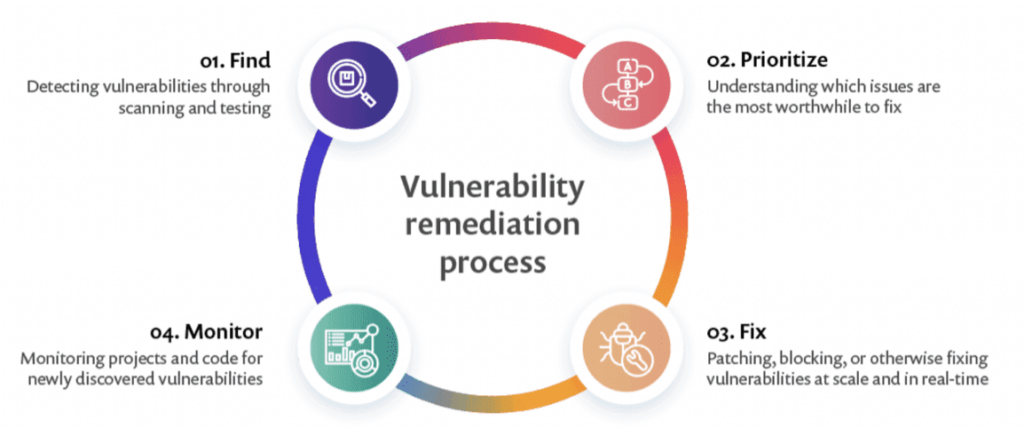
Modern day organizations face a constant barrage of cyber threats, making it imperative to implement robust vulnerability management processes. Vulnerability management is a systematic approach to identifying, evaluating, treating, and reporting on security vulnerabilities in systems and their associated software. In this blog post, we’ll delve into the four crucial steps of vulnerability management process and explore the significance of continuous vulnerability assessments.

Table of Content

  1. Step 1: Perform Vulnerability Scan
  2. Step 2: Assess Vulnerability Risk
  3. Step 3: Prioritize and Address Vulnerabilities 
  4. Step 4: Continuous Vulnerability Management

Step 1: Perform Vulnerability Scan

The foundation of vulnerability management lies in performing thorough vulnerability scans. A vulnerability scan is a systematic and automated process designed to identify potential weaknesses or vulnerabilities within a computer system, network, or application. The primary objective of a vulnerability scan is to assess the security posture of an organization’s digital assets by discovering and highlighting areas that may be susceptible to exploitation by malicious actors. This process consists of four essential stages: 

Network Scanning

Conducting a scan involves pinging or sending TCP/UDP packets to network-accessible systems to identify their presence. This initial step is crucial for creating a comprehensive inventory of the systems within an organization’s network. By actively probing these systems, security teams can pinpoint potential weak points, ensuring a thorough examination of the attack surface. Network scanning serves as the reconnaissance phase, helping organizations understand the scope of their digital infrastructure and identify potential areas that require security reinforcement. 

Port and Service Identification

Once systems are identified, the next step is to determine open ports and services running on these systems. This granular understanding is essential for cybersecurity teams as it provides insights into the specific pathways that malicious actors could exploit. Identifying open ports and services enables organizations to tailor their security measures to protect these entry points, enhancing overall defense against cyber threats. 

Detailed System Information 

For a comprehensive assessment, remote logins to systems are initiated to gather detailed information about the system’s configuration and potential vulnerabilities. This step goes beyond surface-level scans, allowing security professionals to delve into the intricacies of each system. By collecting detailed system information, organizations can better understand the unique risks associated with each system and tailor their response to address specific vulnerabilities effectively. 

Correlation with Known Vulnerabilities 

The gathered system information is then correlated with known vulnerabilities, helping prioritize and address potential threats effectively. This correlation step is pivotal in the vulnerability management process, as it allows organizations to match identified vulnerabilities with existing knowledge about their severity and potential exploits. By aligning current vulnerabilities with known risks, security teams can allocate resources more efficiently, focusing on addressing the most critical issues first and reducing the overall risk profile. 

Step 2: Assess Vulnerability Risk

After performing the vulnerability scan, a thorough risk assessment is needed. Risk assessments are integral to effective risk management and provide organizations with insights to make informed decisions about resource allocation, security measures, and overall business strategy. When assessing risk, consider the following factors: 

True or False Positive 

Determine whether the identified vulnerability is genuine or a false positive. This step is crucial in avoiding unnecessary panic or resource allocation for non-existent threats. Security teams need to validate the accuracy of the identified vulnerabilities to ensure their efforts are focused on real risks. 

Remote Exploitation

Evaluate the likelihood of someone exploiting the vulnerability directly from the internet. Understanding the remote exploitation potential helps organizations gauge the urgency of addressing specific vulnerabilities, especially in the context of evolving cyber threats and the increasing sophistication of attackers. 

Exploit Difficulty 

Assess how challenging it would be to exploit the vulnerability. This factor helps prioritize vulnerabilities based on the skill level required for exploitation. High difficulty may reduce the immediate risk, while low difficulty indicates a more pressing need for mitigation. 

Existence of Exploit Code

Check if there is known and published exploit code for the identified vulnerability. The presence of exploit code in the public domain increases the urgency of addressing the vulnerability, as it suggests that attackers may already have the tools to exploit the weakness. 

Business Impact 

Understand the potential impact on the business if the vulnerability is exploited. This involves assessing the consequences in terms of data loss, service disruption, financial loss, and damage to reputation. The business impact analysis guides organizations in making informed decisions on prioritizing vulnerabilities based on their potential harm. 

Security Controls 

Consider existing security controls that may reduce the likelihood or impact of exploitation. Evaluating the effectiveness of current security measures helps organizations understand their overall resilience and guides decisions on whether additional controls or enhancements are necessary. 

Vulnerability Age

Determine how long the vulnerability has existed on the network. The age of a vulnerability provides insights into the organization’s historical security posture and helps prioritize older vulnerabilities that may have been overlooked in previous assessments. 

Step 3: Prioritize and Address Vulnerabilities 

Once vulnerabilities are assessed, they need to be prioritized based on the identified risks. Treatment options include: 

Remediation 

Fully fixing or patching a vulnerability to prevent exploitation. Remediation is a proactive and comprehensive approach, aiming to eliminate the vulnerability entirely by applying patches, updates, or configuration changes. It represents a decisive action to enhance security by addressing the root cause of the vulnerability, reducing the risk of exploitation. 

Mitigation 

Lessening the likelihood and/or impact of a vulnerability being exploited, providing time for eventual remediation. Mitigation involves implementing interim measures to reduce the risk associated with a vulnerability while plans for full remediation are underway. This strategic approach recognizes the urgency of addressing immediate threats and offers a temporary shield, allowing organizations to buy time for thorough and permanent fixes. 

Acceptance

Taking no action when a vulnerability is deemed low-risk, and the cost of fixing outweighs the potential impact. This decision is typically based on a careful assessment of the risk’s low impact or the understanding that existing compensatory controls sufficiently minimize the threat. 

Step 4: Continuous Vulnerability Management

Vulnerability management is an ongoing process that requires regular assessments. Continuous vulnerability management allows organizations to: 

Track Progress

Understand the speed and efficiency of the vulnerability management program over time. Tracking progress is essential for organizations to measure the effectiveness of their vulnerability management efforts. By analyzing the trends and improvements in identifying and addressing vulnerabilities, they can fine-tune their strategies for better outcomes and increased resilience against potential threats. 

Adapt to Changes

Adjust strategies based on evolving threats and changes in the organizational landscape. The dynamic nature of the cybersecurity landscape demands adaptability. By staying informed about the latest threat intelligence and adjusting their approach in real-time, organizations can enhance their ability to withstand evolving cyber risks. 

Enhance Security Posture

Strengthen the overall security posture by addressing emerging vulnerabilities promptly. Continuous vulnerability management goes beyond mere identification; it involves swift action to address newly discovered vulnerabilities. 

Conclusion 

In conclusion, vulnerability management is a critical component of an effective cybersecurity strategy. By following the four key steps and embracing continuous vulnerability assessments, organizations can stay ahead of potential threats, minimize their attack surface, and foster a resilient security environment. Prioritizing and addressing vulnerabilities proactively is not just a best practice; it’s a necessity in the world of cybersecurity.

Understanding XML Injection: Risks, Prevention, and Best Practices

In today’s interconnected digital landscape, data exchange plays a pivotal role in web applications. Extensible Markup Language (XML) is a popular format for data interchange due to its flexibility and readability. However, with the rise of cyber threats, developers need to be vigilant about potential vulnerabilities in their applications. One such threat is XML injection, a type of attack that exploits vulnerabilities in XML parsers and processors. In this blog post, we’ll delve into the details of XML injection, its risks, and best practices for prevention. 

Table of Content

  1. What is XML Injection? 
  2. Risks of XML Injection
  3. Prevention and Best practices 
  4. Conclusion

What is XML Injection? 

XML injection, also known as XML External Entity (XXE) injection, is a type of security vulnerability that arises when an application processes XML input insecurely. Attackers exploit this vulnerability to include external entities or execute malicious code, potentially leading to sensitive data exposure, denial of service, or even remote code execution. This type of attack is particularly menacing in scenarios where applications parse user-supplied XML data without adequate validation, allowing malicious actors to manipulate the XML structure for their advantage.

One of the key challenges posed by XML injection lies in its ability to target the very core of data exchange in web applications. By manipulating XML input, attackers can trick the application into processing unintended data, leading to unforeseen consequences. As technology evolves, new variations of XML injection exploits emerge, underscoring the importance of developers staying informed about the latest security best practices and vulnerabilities to ensure the resilience of their applications against these sophisticated attacks.

Risks of XML Injection

Sensitive Data Exposure

One of the primary risks associated with XML injection is the potential exposure of sensitive information. Attacks can manipulate XML input to access and retrieve confidential data stored on the server. This may include personally identifiable information (PII), financial records, or proprietary business data. The consequences of such exposure extend beyond immediate financial losses, including reputational damage and legal implications, as organizations may be held accountable for data breaches. 

Denial of Service (DoS)

By injecting malicious XML payloads, attackers can overwhelm the server’s resources, causing a denial of service. This can lead to application downtime, affecting users and disrupting business operations. In addition to the immediate impact on service availability, a successful DoS attack can result in a loss of customer trust, damage to brand reputation, and potential financial repercussions, making it crucial for organizations to implement robust measures against XML injection vulnerabilities. 

Remote Code Execution 

In severe cases, XML injection may allow attackers to execute arbitrary code on the server. This can lead to complete compromise of the application and potentially the underlying server infrastructure. Remote code execution poses a grave threat as attackers gain unauthorized access, enabling them to manipulate data, install malware, or even pivot to other parts of the network. The aftermath of a successful remote code execution attack includes not only the potential loss of sensitive data but also the need for extensive remediation efforts and the implementation of enhanced security measures to prevent future exploits. 

Prevention and Best practices 

To avoid XML injection, consider implementing the following best practices: 

Input Validation and Sanitization

To safeguard against XML injection, it is crucial to implement strict input validation, ensuring that only expected and valid XML content is processed. Additionally, user input must undergo thorough sanitization to remove any malicious characters or entities that could be exploited in an injection attack. By meticulously validating and cleaning input, developers fortify their applications against potential vulnerabilities and bolster overall system security. 

Use of Whitelists

A proactive approach to preventing XML injection involves defining and employing whitelists for allowed XML entities, elements, and attributes. Any input that deviates from the predefined whitelist should be rejected outright. This restrictive approach ensures that only known, safe elements and processed, reducing the risk of malicious XML injection attempts and reinforcing the application’s resilience against unauthorized access. 

Disable External Entity Expansion 

To mitigate the risk of XML injection attacks, it is essential to disable external entity expansion in XML parsers. This precautionary measure prevents the inclusion of external entities, a commonly exploited vector in XML injection attacks. By configuring parsers to disallow external entity expansion, developers minimize the attack surface and fortify their applications against potential security breaches stemming from malicious XML payloads. 

XML Parsers Configuration

An integral aspect of securing XML processing is configuring XML parsers to restrict access to external resources. By ensuring that the application processes XML content securely, developers can thwart attempts to exploit vulnerabilities in the parsing mechanism. Thoughtful configuration of XML parsers strengthens the application’s resilience and forms a critical layer of defense against potential XML injection threats.

Regular Security Audits

Maintaining a robust security posture requires regular security audits and vulnerability assessments to identify and address potential XML injection vulnerabilities in your application. Through systematic evaluation and proactive testing, developers can stay ahead of emerging threats, patch vulnerabilities promptly, and continuously enhance the security of their systems. Regular security audits form an essential component of a comprehensive strategy to safeguard against XML injection and other evolving cyber threats. 

Conclusion

XML Injection poses a significant threat to the security of web applications that process XML input. Developers must adopt a proactive approach by implementing secure coding practices, conducting thorough security assessments, and staying informed about emerging threats. By following best practices and remaining vigilant, organizations can fortify their applications against XML injection attacks and ensure the confidentiality of integrity of their data. 

As technology evolves, it’s crucial for developers to stay up-to-date with the latest advancements in XML security and continuously update their defense mechanisms. Collaborating with cybersecurity experts and participating in information-sharing forums can provide valuable insights into emerging trends and potential vulnerabilities. In this dynamic landscape of web application security, fostering a culture of adaptability and continuous improvement is key to maintaining a robust defense against XML injection and other emerging cybersecurity challenges.

Broken Authentication: Impact, Examples, and How to Fix It

What is Broken Authentication and Session Management? 

Broken authentication is a term used to describe security vulnerabilities in a web application’s authentication process or session management, which can potentially allow unauthorized users to compromise the system. This typically happens when an application’s functions related to authentication of users, session management, and password management are implemented incorrectly, leaving it susceptible to cyberattacks.

The term ‘session management’ refers to the process of maintaining a user’s state and data across multiple requests. When a user logs into an application, their credentials are authenticated, and a session is established. This session persists as the user interacts with the application, allowing them to stay logged in. If the session management is mishandled, it can lead to broken authentication.

Broken authentication vulnerabilities can arise from numerous scenarios. For instance, when session IDs are exposed in the URL, session timeout is not properly set, passwords are not adequately hashed and salted, or when an application permits automated attacks such as credential stuffing or brute force.

According to the Open Web Application Security Project (OWASP), broken authentication is one of the most severe threats to web applications and APIs. Broken Authentication is the #2 most severe API vulnerability listed in the OWASP API Top 10, and in the OWASP Top 10 for web applications, Broken Access Control is the #1 security vulnerability.

This is part of a series of articles about unauthorized access

What is the Impact of Broken Authentication Attacks?

The impact of broken authentication attacks can be devastating for both an organization and its customers. When attackers exploit these vulnerabilities, they gain unauthorized access to user accounts, personal data, sensitive business information, and more. This not only leads to a breach of privacy and potential financial losses but can also severely tarnish the reputation of the impacted organization.

For an end-user, a broken authentication attack could mean unauthorized access to their account, leading to the theft of sensitive personal data such as credit card information, social security numbers, and more. This could further result in identity theft, unauthorized transactions, and other forms of personal harm.

For businesses, the consequences can be even more severe. A successful attack could potentially give cybercriminals access to privileged accounts, allowing them to manipulate data, perform malicious actions, or even take control of the entire system. This could lead to substantial financial losses, damage to the organization’s reputation, loss of customer trust, and potential legal implications.

Examples of Broken Authentication Vulnerabilities 

Use of Passwords as the Only Authentication Factor

Relying solely on passwords for user authentication is a significant vulnerability in web application security. Passwords, while being a traditional and widely used method for securing accounts, are often weak due to poor user practices such as using easy-to-guess passwords or reusing the same password across multiple sites. This vulnerability becomes more critical when additional layers of security, like multi-factor authentication (MFA), are not in place.

Attackers exploit weak or reused passwords through various methods like phishing attacks, credential stuffing, or brute force attacks. Phishing attacks trick users into revealing their passwords, while credential stuffing uses previously leaked credentials to gain unauthorized access. Brute force attacks involve systematically checking all possible passwords until the correct one is found. When passwords are the only line of defense, any of these methods can lead to broken authentication, granting attackers access to user accounts and sensitive data.

Application Session Timeouts Aren’t Set Properly

Another common source of broken authentication vulnerabilities is improperly set application session timeouts. When a user logs into a web application, a session is established. This session should expire after a period of inactivity to prevent unauthorized access in case the user leaves their device unattended. If the session timeout is not properly set, it could allow an attacker to hijack the session and gain access to the user’s account.

Inadequate session timeouts can also lead to session fixation attacks, where an attacker induces a user to use a specific session ID, and then uses that same session ID to gain unauthorized access to the user’s account.

Passwords Not Properly Hashed and Salted

Proper handling of user passwords is a crucial aspect of web application security. When passwords are not properly hashed and salted, it can lead to broken authentication. Hashing is a process that transforms a password into a unique, fixed-size string of characters, which is then stored in the system. Salting involves adding an additional, random string of characters to the password before it’s hashed.

If an attacker manages to breach the system and gain access to the password data, and if the passwords are not properly hashed and salted, they could potentially crack the passwords using various methods such as brute force attacks, dictionary attacks, or rainbow table attacks. Once the attacker has the user’s password, they can easily gain unauthorized access to their account, leading to broken authentication.

How to Fix Broken Authentication in Your Applications 

Control Session Length

One of the easiest ways to mitigate the risks associated with broken authentication is by controlling session length. When a user logs into a system, a session is created to keep track of their interactions with the system. The session length is the duration in which the session remains active.

Keep session lengths as short as possible without affecting the user experience. This practice reduces the window of opportunity for an attacker to exploit the session.Moreover, idle session timeouts should be implemented. This feature automatically logs out users after a certain period of inactivity, further reducing the risk of session hijacking.

Rotate and Invalidate Session IDs

Another effective measure is to rotate and invalidate session IDs. Every user session is identified by a unique session ID. When a user logs in, the system generates a new session ID for that session.

Rotating session IDs means changing the session ID after a certain period or after certain critical operations. This practice makes it harder for an attacker to predict or guess the session ID.

In addition to rotating session IDs, it is also crucial to invalidate them when they are no longer needed. For example, when a user logs out, their session ID should be invalidated immediately. This prevents an attacker from using an old session ID to gain unauthorized access to the system.

Multi-factor Authentication

Multi-factor authentication (MFA) is another effective way to fix broken authentication in your organization. MFA is a method of authentication that requires users to provide two or more verification factors to gain access to a resource.

The factors used in MFA can be something the user knows (like a password), something the user has (like a physical token or a smartphone), or something the user is (like a fingerprint or other biometric trait).

By requiring multiple forms of verification, MFA significantly enhances the security of your system. Even if an attacker manages to steal a user’s password, they would still need the other factors to gain access.

Implement Brute-Force Protection

Brute-force attacks are a common method used by attackers to break authentication. In a brute-force attack, the attacker attempts to guess the user’s password by trying different combinations until they find the correct one.

To protect your system against brute-force attacks, you should implement brute-force protection measures. These measures include limiting the number of failed login attempts, introducing time delays after a certain number of failed attempts, and using CAPTCHAs to prevent automated attacks.

Moreover, you can also use blacklisting and whitelisting techniques. Blacklisting involves blocking IP addresses that are suspected of conducting brute-force attacks, while whitelisting involves allowing only certain trusted IP addresses to access your system.

Unauthorized Access: Risks, Examples, and 6 Defensive Measures

What Is Unauthorized Access? 

Unauthorized access is the process of gaining entry or access to a system, physical or electronic, without the permission of the owner or administrator. Such access can be obtained by bypassing security measures, exploiting system vulnerabilities or by using stolen credentials. Unauthorized access is a serious violation of privacy laws and can lead to severe consequences, including legal action.

In cybersecurity, unauthorized access refers to the breach of computer systems, networks or databases. These breaches generally involve hackers infiltrating the system to steal, alter, or destroy information. However, it’s important to note that unauthorized access isn’t limited to attacks by external hackers. It can also include an employee accessing files or information outside their level of authorization.

The increasingly prevalent threat of unauthorized access raises significant concerns about data security, privacy, and the integrity of digital systems. It poses a significant risk to individuals, corporations, and governments alike.

This is part of an extensive series of guides about access management.

The Risks and Consequences of Unauthorized Access 

Theft or Destruction of Private Data

When unauthorized individuals gain access to a system, they often target sensitive data such as financial records, personal identification information, trade secrets, or intellectual property. This intrusion can result in substantial financial loss, damage to a company’s reputation, and potential legal repercussions.

Additionally, in certain instances, the intruder may not only steal data but also corrupt, destroy, or encrypt it. This act of sabotage can cause catastrophic damage, particularly for businesses that rely heavily on their data. From crippling a business operation to causing a significant loss of trust among clients and customers, the impact of such instances can be devastating.

Moreover, the theft or destruction of personal information can have severe implications for individuals as well. From identity theft to financial fraud, the personal consequences can be long-lasting and difficult to recover from.

Theft of Money or Goods via Fraudulent Activity

Another major risk associated with unauthorized access is the potential for fraud. With access to sensitive data, cybercriminals can carry out a variety of fraudulent activities. These may include credit card fraud, manipulation of bank accounts, or even setting up fake businesses.

Unauthorized access enables criminals to commit these acts of fraud by providing them with the necessary information or access to financial resources. For instance, they could use stolen credit card information to make illegitimate purchases, or manipulate banking systems to divert funds illicitly.

Sabotage or Defacing of Organizational Systems

In some cases, unauthorized access might be used to sabotage organizational systems or deface websites. This could involve disrupting the functioning of a network, injecting malicious code into a website or even taking control of a system, causing widespread chaos and disruption.

These actions can inflict significant damage on businesses. Not only can they result in financial losses, but they can also ruin a company’s reputation, leading to a loss of trust among clients and customers.

Physical Damages

While it may be less common, unauthorized access can also lead to physical damages. For instance, if a hacker gains control over an industrial control system, they could cause machinery to malfunction, leading to potential accidents or damage to equipment.

This risk is particularly acute in industries such as manufacturing, energy, or transportation, where the malfunction of machinery could lead to significant safety hazards. It underscores the importance of robust security measures not just for protecting data, but also for ensuring the physical safety of workers and infrastructure.

Learn more in our detailed guide to broken access control (coming soon)

How Does Unauthorized Access Occur? Common Examples 

Poorly Implemented Authentication

One of the most common ways unauthorized access occurs is through poorly implemented authentication processes. Authentication is a security measure used to verify the identity of a person or device attempting to access a system. If the authentication process is poorly designed or implemented, or misconfigured, it becomes easy for unauthorized individuals to bypass it and gain access to the system.

Take, for example, a situation where a system does not lock a user out after a certain number of failed login attempts, it leaves the door open for a brute force attack, where an attacker tries different combinations of passwords until they find the correct one.

Another example of poorly implemented authentication is where a system does not enforce regular password changes. In such a situation, an unauthorized person who manages to obtain a valid password can continue to use it for an extended period without being detected.

Learn more in our detailed guide to broken authentication (coming soon)

Phishing Attacks

One of the most common ways unauthorized access occurs is through phishing attacks. This involves sending deceptive emails or messages that trick recipients into revealing their login credentials or clicking on malicious links. Once the recipient takes the bait, the attacker can gain access to their accounts or infect their systems with malware.

Phishing attacks are particularly effective because they prey on human vulnerabilities rather than technological ones. By posing as a trustworthy entity, attackers can manipulate individuals into unwittingly granting them access. This highlights the importance of cybersecurity awareness and training as a key defense against unauthorized access.

Password Attacks

Another common method used to gain unauthorized access is password attacks. This involves trying to guess or crack a user’s password using various techniques. These may include brute force attacks, where every possible password combination is tried, or dictionary attacks, where common words or phrases are used.

Password attacks underscore the importance of strong, unique passwords as a fundamental layer of security. Using a combination of letters, numbers, and symbols, and avoiding common words or phrases can make it more difficult for attackers to guess your password.

Exploiting Software Vulnerabilities

Unauthorized access can also occur by exploiting software vulnerabilities. These are flaws or weaknesses in a software program that can be exploited to gain unauthorized access or perform other malicious actions.

Software vulnerabilities can occur for various reasons, such as coding errors or outdated software. Attackers often use these vulnerabilities to infiltrate systems, highlighting the importance of regular software updates and patches as a key part of cybersecurity.

Insider Threats

Another common source of unauthorized access is insider threats. Insider threats refer to security threats that originate from within the organization, often from employees, former employees, contractors or business associates who have legitimate access to the organization’s networks, systems or data.

Insider threats can be intentional or unintentional. An intentional insider threat occurs when an individual with legitimate access deliberately misuses it to harm the organization. This could be for reasons such as espionage, personal gain, or revenge. An unintentional insider threat, on the other hand, occurs when an individual inadvertently causes a security breach, often through negligence or lack of awareness.

6 Ways to Prevent Unauthorized Access 

Preventing unauthorized access requires a comprehensive approach that combines several strategies. Below are some best practices that can help keep your systems secure.

1. Strong Password Policy

One of the most basic yet effective ways to prevent unauthorized access is by implementing a strong password policy. This involves requiring users to create complex passwords that are hard to guess and enforcing regular password changes.

A strong password should be at least eight characters long and include a mix of upper and lower case letters, numbers, and special characters. It should also not contain easily guessable information such as the user’s name, birth date, or common words.

2. Two Factor Authentication and Multi Factor Authentication

Another effective strategy is the use of two-factor authentication (2FA) and multi-factor authentication (MFA). 2FA requires users to provide two different types of identification to access a system. This could be, for example, a password and a code sent to the user’s mobile phone.

MFA, on the other hand, involves the use of three or more factors of authentication. These could include something the user knows (e.g., a password), something the user has (e.g., a security token), and something the user is (e.g., a fingerprint).

3. Monitoring User Activity

Monitoring user activity is another important strategy in preventing unauthorized access. This involves keeping track of what users are doing on your systems and networks, and looking out for any unusual activity.

By monitoring user activity, you can quickly detect any potential security breaches and take necessary action before any serious damage is done. For example, if you notice a user attempting to access sensitive data they don’t normally need for their job, it could be an indication of a potential security breach.

4. Implement Endpoint Security

Endpoint security is a strategy that focuses on securing each endpoint, or user device, on a network in order to prevent unauthorized access. This can include laptops, desktops, mobile phones, tablets, and any other devices that connect to your network.

Endpoint security measures can include next-generation antivirus (NGAV) software, firewalls, and intrusion detection systems. They can also include policies that restrict the use of removable media, such as USB drives, which can be used to introduce malware or steal data.

5. Regular Software Updates and Patch Management

Regularly updating software and managing patches is another crucial strategy in preventing unauthorized access. Software updates often include security improvements that fix vulnerabilities that could be exploited by attackers.

By regularly updating your software and managing patches, you can ensure that your systems are protected against known vulnerabilities. This can significantly reduce your risk of falling victim to unauthorized access.

6. Using Dynamic Application Security Testing (DAST)

Dynamic Application Security Testing (DAST) is a proactive approach to prevent unauthorized access in web applications. DAST operates by simulating cyber-attacks from an external viewpoint. It actively tests a running application, mimicking the actions of potential attackers. This approach is effective in identifying real-world vulnerabilities that could be exploited for unauthorized access, such as SQL injection, cross-site scripting, and other common threats.

During its operation, DAST tools crawl through the web application, identifying all accessible endpoints. By doing so, it uncovers points in the application that are exposed to the internet and could potentially be targeted by attackers to gain unauthorized entry.

See Additional Guides on Key Access Management Topics

Together with our content partners, we have authored in-depth guides on several other topics that can also be useful as you explore the world of access management

Network Topology Mapping

Authored by Faddom

RBAC

Authored by Frontegg

SSO

Authored by Frontegg