Application and API security isn’t just good practice – it’s essential. For companies that handle credit card data, compliance with the Payment Card Industry Data Security Standard (PCI DSS) is non-negotiable. This framework lays out strict requirements for securing software throughout its lifecycle, and being able to prove that your code is secure is critical for passing a PCI audit.
That’s where Bright STAR comes in. Bright STAR is Bright Security’s AI-powered platform that brings security testing, auto-remediation, and real-time validation directly into the development process. It’s not just another security tool. It’s a new way to meet PCI DSS demands without slowing down development.
What Is Bright STAR and How Does It Fit PCI DSS v4.0.1?
Bright STAR (Security Testing & Automated Remediation) is built for modern development teams. It combines Bright’s powerful dynamic testing engine, a chunky library of security test cases, and AI smarts to automatically test, fix, and validate security issues in real time, right in your CI/CD pipeline.
Released in June 2024, PCI DSS v4.0.1 sets a clear expectation: companies must build and maintain secure systems and software if they handle cardholder data (CHD) or sensitive authentication data (SAD). That means having secure coding standards, running both static and dynamic tests, reviewing code, and ensuring fixes are validated and effective. Sections 6.2, 6.3, and 6.4 of the Standard lay this out clearly – and Bright STAR is built to address each of them head-on.
Why Traditional Tools Fall Short
Legacy security tools were never designed for holistic approach to the pace of today’s development cycles or the emergence of AI-generated code.
SAST (Static Application Security Testing) scans source code without running it. While it’s good for spotting insecure patterns early, it often drowns teams in false positives and lacks the ability to validate whether a vulnerability is actually exploitable.
DAST (Dynamic Application Security Testing) tests running applications and is more useful for real-world threats like SQL injection. But it typically happens late in the cycle, making issues harder and costlier to fix.
AI-Generated Code introduces new challenges. AI can generate working code quickly – but it can also include outdated crypto, unsanitized inputs, or partial fixes. A vulnerability might be patched in one place but left open in another. Without a way to validate and iterate, these AI fixes can give a false sense of security.
The bottom line? Traditional tools are too noisy, too disconnected from developers, and often too late in the game to support modern PCI DSS compliance.
How Bright STAR Changes the Game for PCI DSS
Bright STAR is redefining how security and compliance are done in software development, not by replicating legacy SAST or DAST tools, but by achieving their intended outcomes more effectively.
Where SAST scans static code and DAST analyzes running applications, Bright STAR combines both perspectives by dynamically testing code at the unit level. before deployment. and automatically remediating and validating issues in real time. It delivers the functional goals of static and dynamic testing as required under PCI DSS (such as vulnerability detection, fix verification, and secure development), but with higher accuracy, less noise, and full integration into CI/CD workflows. Contrary to some opinions, what matters for compliance purposes is fulfilling the control objectives, not the legacy tool label.
1. Smarter Testing from the Start (PCI DSS 6.2, 6.3)
Bright STAR creates tailored security unit tests using a large internal library of test cases. These tests are generated automatically, based on your codebase, without manual setup or scanning profiles required.
This is particularly important for AI-generated code, which can introduce security gaps that aren’t immediately obvious. Bright STAR tests, fixes, and re-tests this code just like any other.
2. Shift-Left Security in CI/CD (PCI DSS 6.3, 6.4)
Unlike traditional tools that operate after deployment, Bright STAR integrates directly into your development pipeline. It scans every pull request or code push, catching security issues early. when they’re cheaper and easier to fix.
This shift-left approach means developers don’t need to wait for a full DAST scan or worry about manually syncing with the security team. Bright STAR handles vulnerability detection and even remediates issues directly in the development workflow.
It also offers broad vulnerability coverage across OWASP Web, API, and LLM Top 10 categories – capturing common and emerging threats, including those introduced by large language models and AI-assisted development. This ensures you’re meeting PCI DSS Requirements 6.3 and 6.4.
3. Automated Fixes, Delivered Fast (PCI DSS 6.3)
Detection is only half the battle. Fixing vulnerabilities quickly and correctly is where teams often stumble. Bright STAR auto-generates remediation code and refines it until the fix works.
This automation dramatically reduces time-to-fix, cutting weeks down to minutes. It also shrinks backlogs and reduces the burden on developers, freeing them to focus on building, not patching.
Bright STAR’s success rate is no joke: it auto-remediates about 85% of issues and cuts resolution time by over 95%. That kind of efficiency directly supports PCI DSS mandates to quickly patch and secure custom software (6.3.1, 6.3.3).
4. Real Validation, Not Just Hope (PCI DSS 6.4)
Here’s where Bright STAR in particular sets itself apart: it doesn’t just apply a fix and hope for the best. Once a patch is generated, STAR re-runs tests to confirm that the issue is fully resolved. If it’s not? The platform re-engages the AI to iterate until the vulnerability is genuinely gone.
This ensures full-class remediation, so a fix for one injection point isn’t hiding a missed vulnerability in another. This level of verification supports key PCI DSS requirements for validating fixes (6.4.1). Logs and reports generated by STAR also help meet audit requirements by providing concrete evidence of remediation and re-testing.
Final Thoughts
Bright STAR isn’t just another AppSec tool. It streamlines testing, automates remediation, and ensures that every fix is validated and logged. Whether your code is written by human hands or generated by an AI, Bright STAR makes sure it’s secure from the beginning. For organizations navigating the complex requirements of PCI DSS 4.0.1, Bright STAR offers a faster, smarter, and more reliable path to compliance without slowing down innovation.
OWASP (Open Worldwide Application Security Project) Top 10 is a holy grail of the cybersecurity space. It’s a list of main cybersecurity threats, updating every couple of years in order to keep up with the ever-changing environment. You can think of it as a sort of FBI’s 10 most wanted list – while there are plenty of criminals out there, only ten stand out as the biggest and most dangerous. That’s about the same thing with OWASP’s list – while new vulnerabilities are arising on a daily basis, only a few select are dangerous to the point where everyone has to take note and react accordingly.
However, with the rapid progression of LLMs (Large Language Models) in recent years, the cybersecurity space all of a sudden became very unpredictable with the vast amount of threat AI technologies did and yet could generate. This is why OWASP took it upon themselves to consult the world’s biggest experts in an attempt to uncover the 10 most dangerous vulnerabilities for LLMs – which is how we first saw OWASP Top 10 for Large Language Model Applications list released in 2023.
Key Changes
In the past year, we’ve seen a lot of ebb and flow, which resulted in a shuffled list for 2025. To give you a clear overview, here’s the table depicting exactly which vulnerabilities went up, which went down, and which disappeared from the Top 10 in order to make space for the newcomers.
New vulnerabilities Removed vulnerabilities Moved up Moved down
2024
2025
Prompt Injection
Prompt Injection
Insecure Output Handling
Sensitive Information Disclosure
Training Data Poisoning
Supply Chain
Model Denial of Service
Data and Model Poisoning
Supply Chain Vulnerabilities
Improper Output Handling
Sensitive Information Disclosure
Excessive Agency
Insecure Plugin Design
System Prompt Leakage
Excessive Agency
Vector and Embedding Weaknesses
Overreliance
Misinformation
Model Theft
Unbounded Consumption
New Risks in 2025
On the surface, the OWASP Top 10 for LLMs stayed the same. The main culprit – by far – is prompt injection, which dominates the vulnerability list simply due to the broadness of possible breaches.
In regards to the changes that happened in the past year, there are four notable updates:
Denial of Service is now engulfed in Unbounded Consumption that explains and highlights potential risks of resource management and unexpected costs
Vector and Embeddings weaknesses focus on securing embedding-based methods, most notably Retrieval-Augmented Generation
System Prompt Leakage revolves around securing prompts and making sure the data remains secret without leaking out
Misinformation are pretty self-explanatory in that they release false information appearing to be credible
Unbounded Consumption
When you think of LLM applications, you can think of them as King Kong on an island. It’s a majestic beast that only grows larger as time goes on. However, moving the monster out of its restricted zone could cause mayhem and all sorts of troubles. LLM applications are a prime example of this, because costs and restrictions can easily go out of the window if you’re not very careful.
A few examples of unbounded consumption could be:
Overwhelming the system with enormous inputs
Unlimited API calls resulting in very high costs
Infinite loops draining resources and taking down the system
As with everything else, OWASP suggested some mitigations for unbounded consumption:
Rate-limiting API calls
Validating user inputs
Keeping track of resources and automatically preventing enormous operations
Vector and Embedding Vulnerabilities
Vector and Embedding is a new addition to the list for 2025 primarily for applications that use Retrieval Augmented Generation. The goal of the attacker is to try and exploit vectors and embeddings depending on how they’re generated, stored or retrieved.
Some examples of vector and embedding vulnerabilties:
Unauthorized access where system could disclose personal data
Data poison attacks that can happen both externally from attackers and internally by accident
Behaviour change where Retrieval Augmentation could alter the model’s behaviour diminishing its effectiveness
As for mitigation and prevention:
Access control achieved through partitioning datasets in the vector database
Data validation that can be accomplished by regular audits and ensuring consistent data across the database
Monitoring and logging in order to consistently track the application’s behaviour and prevent unwanted behaviour
System Prompt Leakage
While it may look similar to prompt injection, system prompt leakage is a whole different ball game. This vulnerability arises when an attacker manages to find out internal prompts that run the LLM, leading to possible data breaches and unauthorized access.
Misinformation
False information has never been more rampant, and with the introduction of LLMs, the issue has been exacerbated to yet unseen heights. LLM sometimes uses something called Hallucinations – this is what happens when LLM is looking to fill out the missing context by using statistical analysis and making assumptions that aren’t based on facts but on LLM’s own logic.
Removals compared to OWASP Top 10 for LLMs 2024
Model Denial of Service
More failsafe mechanisms and API rate-limiting means that Model DoS automatically lost some of its prominence. Not only that, but other vulnerabilities such as System Prompt Leakage in themselves could cause denial of service, meaning that DoS as a standalone issue isn’t as important as it was.
Insecure Plugin Design
The change in overall approach from OWASP in LLM security meant a shift towards systematic defenses that are applicable across the board. As a result, standalone issues such as insecure plugin design were deprioritized. Furthermore, standardized practices for plugin enabled better inherent security for plugins as things like user access, API rate-limiting took precedence.
Overreliance
While it was, and still is a big issue, overreliance as a standalone vulnerability was consumed by some broader risks. Not only that, but the latest standards in LLM deployment meant that a lot more prevention mechanisms took place, as well as human oversight via logging and monitoring, making the LLM applications a much safer environment where overreliance is an issue prevented from the ground up.
Model Theft
Model Theft mostly relied on gaining unauthorized access to steal sensitive data and access otherwise private intellectual property. However, with the greater prominence of Sensitive Information Disclosure, Model Theft found itself consumed by a greater vulnerability.
Biggest Improvements on the List
Sensitive Information Disclosure
The explanation for Sensitive Information Disclosure moving from #6 to #2 is that we’ve seen LLMs more and more integrated into the enterprise system, dramatically increasing the risk of data leakage and important & sensitive information finding its way to an attacker.
The stakes are higher, and some real-life incidents that happened speak in favour of this. A few examples of these issues involve:
Samsung data leaks: developers at Samsung debugged their code by using ChatGPT, resulting in GPT storing the data and incidentally releasing it to the public
Health App leaking sensitive user data via their LLM-based chatbot
ChatGPT exposing other user’s chat histories
Supply Chain
Involvement of external integrations made world of LLMs that much more complex – as if it wasn’t already! As a result, thousands of APIs, libraries and datasets made their way into LLM applications, resulting in a multitude of supply chain issues caused by these growing complexities.
LLMs are also famous for relying on cloud services & open source tools that are traditionally known for supply chain vulnerabilities.
As if all of this wasn’t enough, the growing pressure of regulatory agencies play a major part in increasing the focus and scrutiny on potential supply chain vulnerabilities, as everyone is hellbent on drilling as deep as possible to eliminate core issues in LLM apps.
Future of LLM Vulnerabilities Moving Forward
The keywords for 2025 look to be privacy and data control, so it’s fair to expect the trend to continue as LLMs grow. To keep these key issues under control, more emphasis was placed on safe core development practices, which led to better-controlled LLMs throughout their lifecycle.
The key issue developers and architects will have to focus on is on maintaining safe integrations. We’ve seen how computer systems in the past had a good core, but due to a lack of safety standards in their plugins, saw plenty of cybersecurity issues arise. This is a big challenge for LLMs as well, because the world of plugins is spreading rapidly, and keeping up with it is ever more important.
Industry standards will also become increasingly important as time goes on, especially as regulatory agencies catch up with LLMs. This means that OWASP Top 10 list will gain even more importance due to its authority in the cybersecurity industry.
The Imperative of API Security in Today’s Business Landscape
In the dynamic world of digital transformation, APIs (Application Programming Interfaces) have evolved from technical tools into strategic assets essential for businesses to scale and thrive. Recent research reveals a staggering 97% of enterprise leaders recognize the criticality of successful API strategies in driving organizational growth and revenue. This shift has led to an exponential increase in API utilization, with businesses relying on hundreds, often thousands, of APIs to bolster their products, provide technology solutions, and leverage diverse data sources.
The Security Challenges of an Expanding API Ecosystem
The rapid proliferation of APIs, however, has brought significant risks. In 2021, Gartner’s forecast that APIs would become a primary target for cyber attacks proved accurate, as evidenced by the surge in notable breaches. The explosion in API usage has consequently unleashed a myriad of cybersecurity challenges.
The Vulnerability of APIs
API security faces inherent complexities, making them challenging to safeguard. The API ecosystem’s rapid evolution outpaces the advancement of traditional network and application security tools. Many APIs are developed on novel platforms and architectures, often spanning multiple cloud environments, rendering standard security measures like web application firewalls and API gateways insufficient.
The Attractiveness of APIs to Cybercriminals
Cybercriminals are drawn to APIs due to the relatively weaker security measures compared to more traditional, secure architectures. APIs, being integral to many businesses, are lucrative targets for attacks that can lead to substantial financial and reputational damage, especially if they involve sensitive data.
Limited Visibility and Rising API Attacks
A crucial issue for businesses is the limited visibility into their API inventory. This obscurity can result in unmanaged, “invisible” APIs within a company’s digital ecosystem, complicating efforts to fully understand the attack surface and protect sensitive data. Reflecting these vulnerabilities, Salt Security reported a staggering 400% increase in API attacks in the months leading up to December 2022.
Recent Attacks Focus on APIs
There have been several notable API attacks recently. A few examples include:
T-Mobile Data Breach – September 2023: T-Mobile, a major US mobile carrier, experienced a significant data breach due to security lapses. This breach involved two separate incidents and highlighted the vulnerability of telecom API infrastructures.
Reddit (BlackCat Ransomware) – February 2023: The ALPHV ransomware group, also known as BlackCat, claimed responsibility for a cyberattack on Reddit. The attack, initiated through a successful phishing campaign, resulted in the theft of 80GB of data, including internal documents, source code, and employee and advertiser information.
API Vulnerabilities Exposing Records: According to a report by API security company FireTail, more than half a billion records have been exposed via vulnerable APIs in 2023. This underscores the increasing risk associated with API breaches.
Inadequacy of Traditional Security Approaches
Authenticating users is no longer a sufficient security measure for APIs. Data shows that 78% of attacks were conducted by seemingly legitimate users who bypassed authentication controls. Salt Security’s report found that 94% of respondents encountered issues with their production APIs, including vulnerabilities and authentication problems.
The Current State of API Security
Despite growing awareness, API security often isn’t a top priority. Security teams face challenges like outdated or zombie APIs, documentation gaps, data exfiltration, and account takeovers. Most API security strategies are in their infancy, with a mere 12% of organizations adopting advanced security measures. Alarmingly, 30% have no API security strategy, even while running APIs in production.
The Way Forward: Building a Robust API Security Strategy
To safeguard their operations effectively, businesses must develop an all-encompassing API security strategy. This comprehensive approach is vital for mitigating the evolving risks associated with the expanding use of APIs in today’s digital landscape. The key components of a thorough API security strategy include:
Comprehensive Documentation
Maintaining comprehensive and up-to-date documentation is foundational to a secure API strategy. This involves documenting not only the technical aspects of APIs but also their functionalities, data flows, and potential security considerations.
API Inventory Visibility
Gaining full visibility into the entirety of the API landscape is crucial. This involves creating and maintaining an exhaustive inventory of all APIs in use across the organization. A comprehensive API inventory enables businesses to assess the scope of their API usage, identify potential vulnerabilities, and implement targeted security measures based on a clear understanding of their digital ecosystem.
Secure API Design and Development Practices
Emphasizing security from the inception of API development is fundamental. Secure API design and development practices involve integrating security considerations into the development lifecycle. This includes adhering to secure coding practices, conducting threat modeling exercises, and ensuring that developers are well-versed in API best practices.
Security Testing for Business Logic Vulnerabilities
Traditional security checks may not be sufficient to uncover all potential vulnerabilities in APIs. Testing business logic vulnerabilities involves assessing how the API functions in real-world scenarios, identifying potential misuse, and evaluating the security of the underlying business logic.
Continuous Monitoring and Logging
Implementing persistent monitoring for APIs in production is vital for detecting and responding to security incidents in real time. Continuous monitoring involves actively observing API activities, logging relevant events, and employing automated tools to analyze patterns and anomalies.
API Gateways for Mediation
API gateways serve as a crucial line of defense in enhancing visibility and security. These gateways act as intermediaries between API consumers and providers, allowing organizations to implement centralized security policies, enforce authentication and authorization mechanisms, and monitor traffic.
Identifying API Drift
Tracking and logging changes in API behavior is essential for maintaining a secure and predictable API environment. API drift, which refers to unauthorized or unexpected changes in API functionalities, can introduce vulnerabilities. Establishing mechanisms to identify and log API drift enables organizations to ensure the integrity of their digital services.
Runtime Protection Deployment
Implementing runtime protection mechanisms is critical for guarding against live threats during the operational phase. This involves deploying security measures that actively monitor API transactions in real time, detect abnormal behavior, and intervene to mitigate potential threats.
Conclusion
As APIs become more ingrained in business operations, it’s imperative for companies to adopt and enforce a comprehensive API security strategy. This is more than a risk mitigation tactic; it’s a shift in the security paradigm to align with the evolving digital landscape. By prioritizing API security, businesses can substantially diminish the threat potential, ensuring their APIs are not just operational but secure pillars in their digital strategy.
As the digital world continues to evolve, so too must our approaches to safeguarding its foundational elements, like APIs, to ensure a secure, robust, and reliable technological ecosystem. Embracing a proactive and comprehensive API security approach is not just a necessity; it’s a strategic imperative for businesses navigating the intricacies of the modern digital landscape. Only through vigilant protection and strategic planning can organizations truly harness the full potential of APIs while mitigating the ever-present risks associated with their expanding usage.
State of Application Security: Key Survey Findings
As the digital landscape continues to evolve, application security (AppSec) remains a critical focus for organizations worldwide. As 2023 ends, let’s review the new 2023 State of Application Security Report from the Purple Book Community provides a comprehensive look into the current trends, challenges, and advancements in this field. This blog post delves into the key findings of this report, offering insights into how companies are navigating the complex world of AppSec.
The Maturing Landscape of AppSec
The report begins by acknowledging the gradual maturation of AppSec practices. However, it’s clear that many organizations still face significant hurdles. A staggering 53% of teams report unmanaged risks in their application portfolios, indicating a substantial gap in effective security coverage. This finding underscores the need for more robust and comprehensive security strategies.
A Shortage of AppSec Professionals
The report sheds light on a significant challenge in the realm of AppSec – the acute shortage of AppSec engineers. While nearly half (48%) of the respondents report their security team supports up to 50 developers, a concerning 42% have a minuscule team of just one to five AppSec engineers. Alarmingly, 24% of organizations admit to having no dedicated AppSec engineers at all.
This scarcity of specialized personnel severely hampers the teams’ ability to devote adequate time and effort to counteract threats and vulnerabilities effectively. More critically, it impedes the establishment and implementation of proactive security management strategies. AppSec engineers are not just technical experts; they are the vanguards who work alongside developers to establish, deploy, and maintain security measures. Their role is pivotal in identifying, remediating, and preventing vulnerabilities, thus safeguarding the critical data within the application ecosystem.
The imbalance between developers and security professionals is stark, often with the ratio exceeding 100 to 1. This disparity raises serious concerns about the consistent implementation of best security practices. Without a robust team of AppSec engineers, there’s an inherent risk that applications may be deployed without adequate safeguards against threats like unauthorized access and data modification.
The importance of a strong AppSec engineering team cannot be overstated. These professionals play a crucial role in intertwining security with the software development processes. By embedding security practices throughout the application lifecycle, AppSec engineers ensure the fortification of data against both internal and external threats. This integration is essential for securing applications at every stage – from development to deployment.
Prioritization: A Persistent Challenge
One of the most notable challenges highlighted in the report is the difficulty in prioritizing vulnerabilities. The phrase “too many vulnerabilities, not enough prioritization” resonates throughout the report, capturing a common sentiment among security teams. This challenge is further complicated by the fact that 86% of respondents agree that while security tools are interchangeable, it’s the process that’s most important, suggesting a need for better processes and strategies in vulnerability management.
The Evolution of Security Practices
Interestingly, the report reveals a shift towards more sophisticated security practices. For instance, 31% of industry leaders are using an Application Security Maturity Model, and a similar percentage are tracking the usage of security tools across teams. This indicates a move towards more structured and mature security frameworks, which could be key in addressing the prioritization challenges.
Investment in Security Amid Economic Downturn
Despite global economic challenges, over 50% of organizations are increasing their security spend. This is a telling indicator of the growing recognition of the importance of AppSec in safeguarding business interests. The report suggests that as threats become more sophisticated, so too must the defenses against them.
The Role of SBOM in Supply Chain Security
The Software Bill of Materials (SBOM) is highlighted as a crucial tool in understanding and mitigating supply chain risks. The report notes that over 20% of respondents have no SBOM usage, highlighting an area of potential improvement for many organizations. A comprehensive SBOM provides a clear view of an application’s components, which is essential in today’s complex software ecosystems.
Cloud Adoption and Its Implications for AppSec
A significant trend noted in the report is the increasing shift towards cloud deployments, with more than half of the respondents deploying 75% or more of their applications in the cloud. This transition brings its own set of security challenges and emphasizes the need for AppSec strategies that are tailored to cloud environments.
The Human Element in AppSec
The report also touches on the human aspects of AppSec. Challenges such as lack of funding, difficulty in hiring skilled personnel, broader AppSec awareness, and lack of leadership buy-in are cited as major obstacles. These findings highlight the importance of not only technological solutions but also the need for skilled professionals and organizational commitment to AppSec.
Day-to-Day Challenges for AppSec Teams
For teams on the ground, the daily reality involves grappling with an overwhelming number of vulnerabilities and a constant need to prioritize risks effectively. The report suggests that analyzing and triangulating results across various tools to highlight risk priorities remains a daunting task for many.
Conclusion
The 2023 State of Application Security Report sheds light on the complex and evolving nature of AppSec. While there is evidence of maturation and advancement in practices, significant challenges remain. The key takeaways from the report emphasize the need for better prioritization processes, investment in security despite economic challenges, embracing cloud transitions with robust security strategies, and focusing on the human elements of AppSec. As the digital world continues to evolve, so too must our approaches to securing it. This report serves as both a benchmark and a guide for organizations looking to navigate the intricate landscape of application security.
We’ve made a bunch of improvements and released new features for the Bright app and API security scanner. Give them a spin!
Improvements
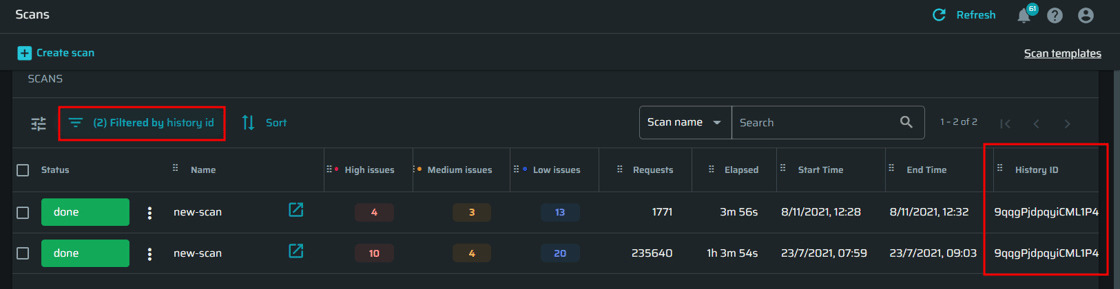
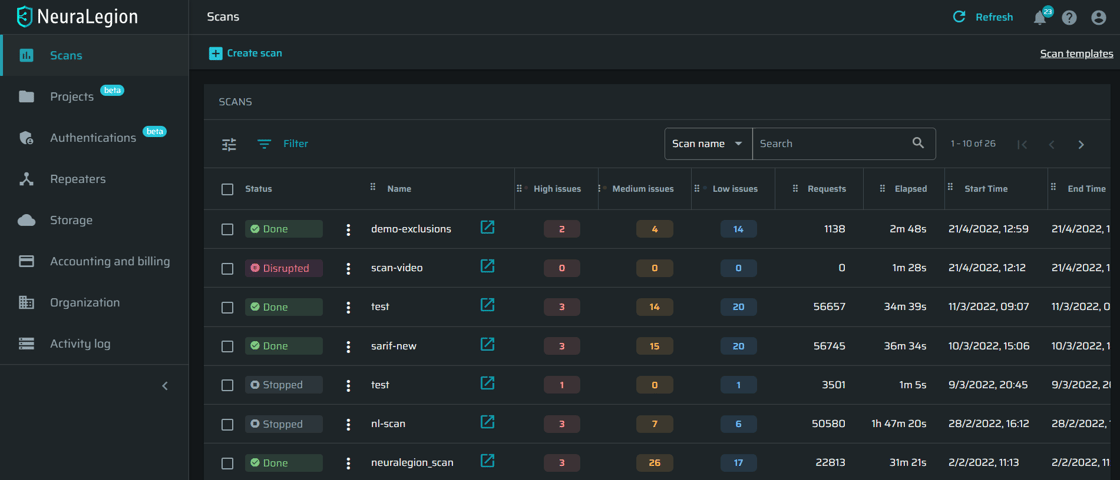
View scan history by scan ID
Have you ever wanted to see all the re-runs of a specific scan? Well, you’re in luck! We introduced a History ID to all scans. To view all of the re-runs of a specific scan, you simply need to filter scans by the History ID of the original scan.
Improvements to authentication flow configuration
There are lots of new improvements in running authenticated scans:
There is now automatic support for Firebase authentication in browser-based form authentication
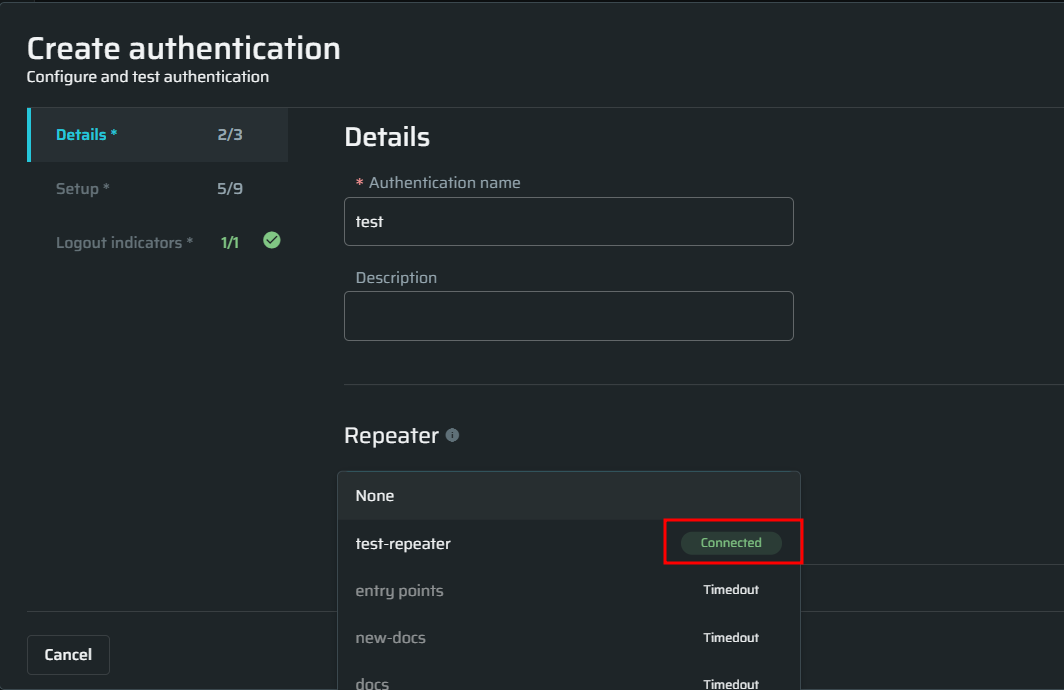
We added Repeater connectivity status to the selection of a Repeater in an authentication object configuration
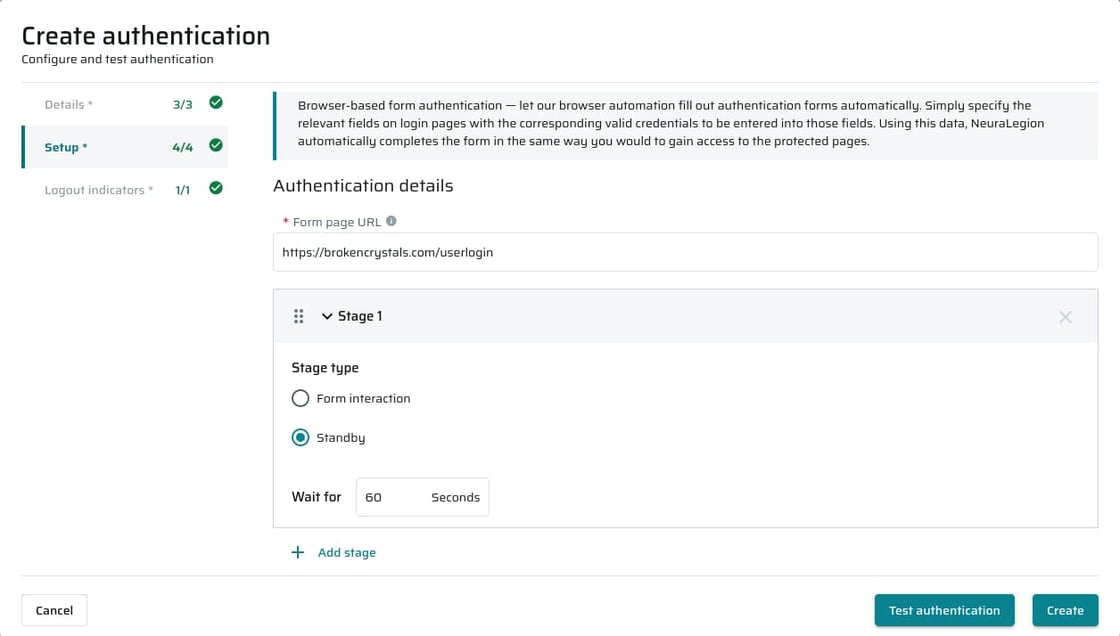
You can now easily re-order stages for custom API and browser-based authentication flows
We improved the ‘Maximum number of redirects’ selector to be more intuitive
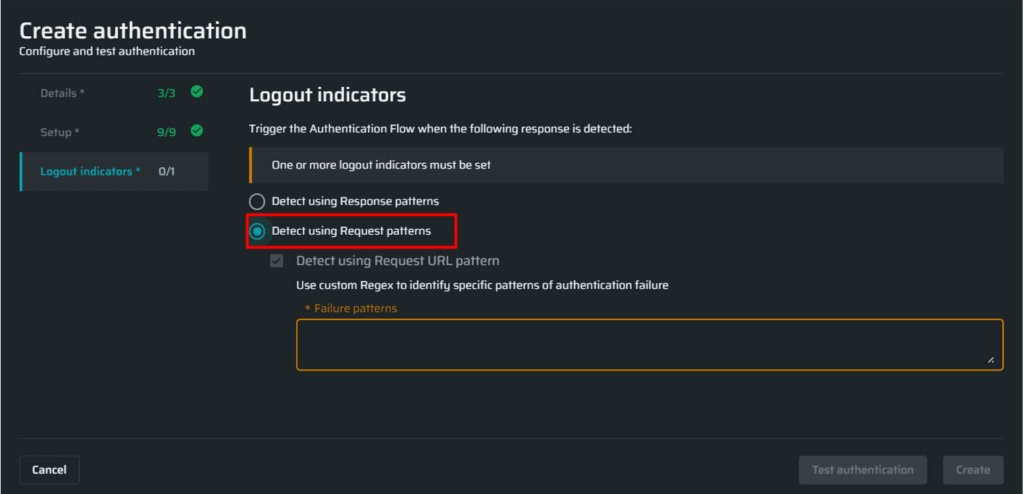
We improved the ‘Logout indicators’ section to be more user friendly and clean
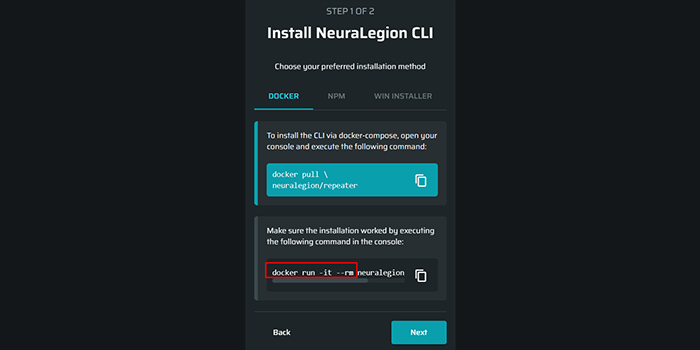
Improved Repeater execution command for Docker option in the onboarding wizard
We improved the docker command to remove the container from the list of containers in the docker management console on shutting down of the docker.
More options to open scans and projects in a new tab
We added support for middle-mouse click or Ctrl + left-mouse click to open Scans and Projects in a new tab.
UI improvements
Enjoy the improved UI we introduced to make your experience navigating our app even better!
More scan filters to make your search for specific scans more effective
Additional UX improvements to the authentication object setup dialogue to make the configuration clearer and easier to use
General Performance improvements
Various improvements for crawler performance and stability
We want to share some exciting news! Our name has changed from NeuraLegion to Bright! On top of that, we raised a $20 million funding round! This is not only great news for us, but for you too. This financing will allow us to improve the Bright DAST to secure your apps and APIs, without slowing down your software development processes.
Here are some updates and improvements that will make your experience even better:
New Features
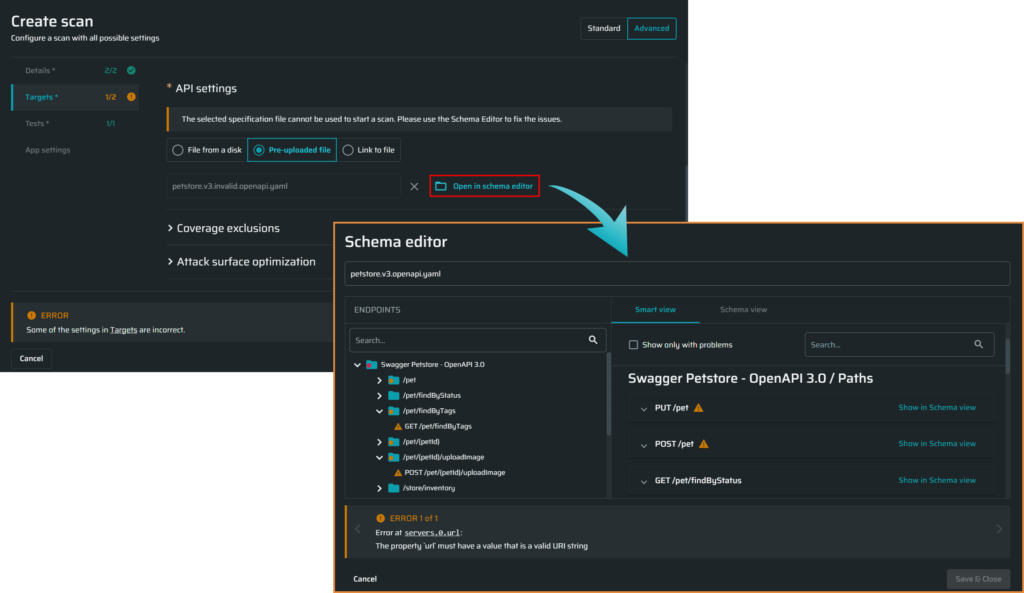
The amazing new API Linter
Our new Schema Linter (Editor) is a smart tool designed to parse, validate and edit an uploaded API schema, making it easy for you to configure high-quality, efficient scans that will ensure the best results. Explore the Linter’s features and capabilities in our step-by-step tutorial.
Improvements
Have you had your scans crash because your app logged you out? Don’t worry, we have a solution for you.
You can now configure Bright DAST to detect when applications need to re-login, without having to stop your scan and do it manually. It will re-login you into your app, without skipping a beat. This can be easily done with the new Authentication Triggers option “Detect using Request URL pattern”.
A lot is happening with Bright! Here are some updates and new features that will make your experience even better.
New Features
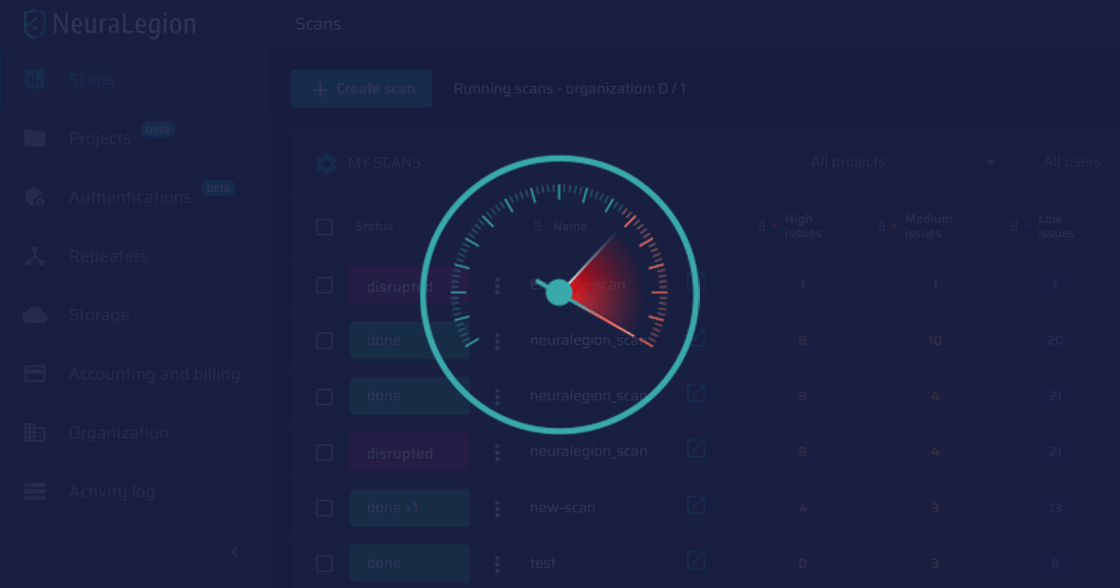
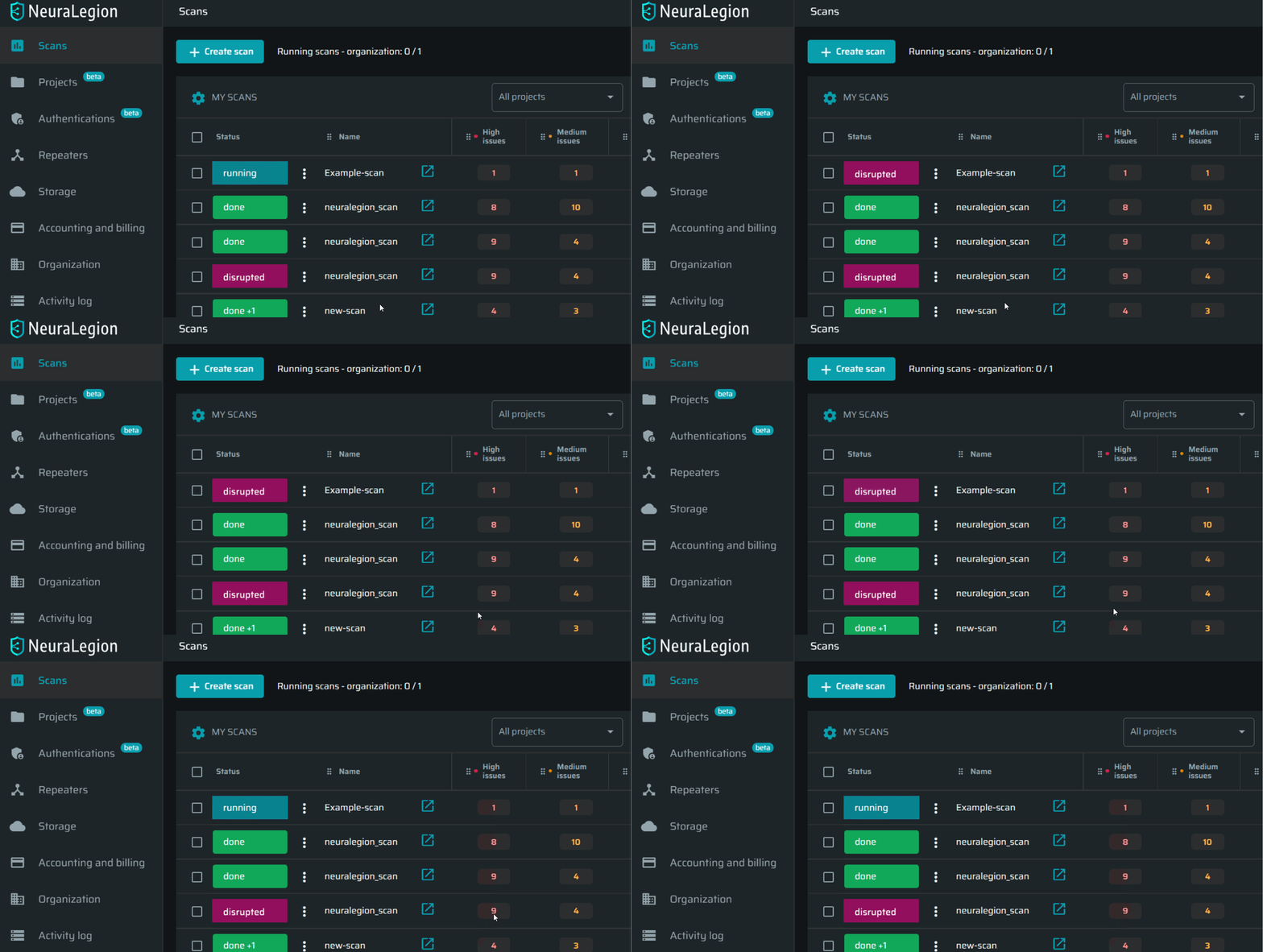
Introducing a new scan status: Disrupted
With the news scan status of Disrupted, you can now easily distinguish scans that were stopped due to recoverable issues on the user’s side, for example:
When the repeater is no longer available during an active scan
When the target is not responding for X minutes (5 minutes by default)
When the scan finds no valid entry-points, due to incorrect configuration (missing authentication, no valid responses, etc.)
When a scheduled scan cannot start due to a configuration issue (file unavailable, repeater unavailable, etc.) The disruption event details are also recorded to Engine Notifications.
We’ve made improvements to how you manage your team’s access to Bright’s scanner using Okta SSO. The Bright integration app is now available on the Okta marketplace. With this app, you can easily configure SSO integration via both OIDC and SAML protocols. You can also take advantage of the provisioning feature to automatically synchronize users and groups between your Okta application and your Bright organization.
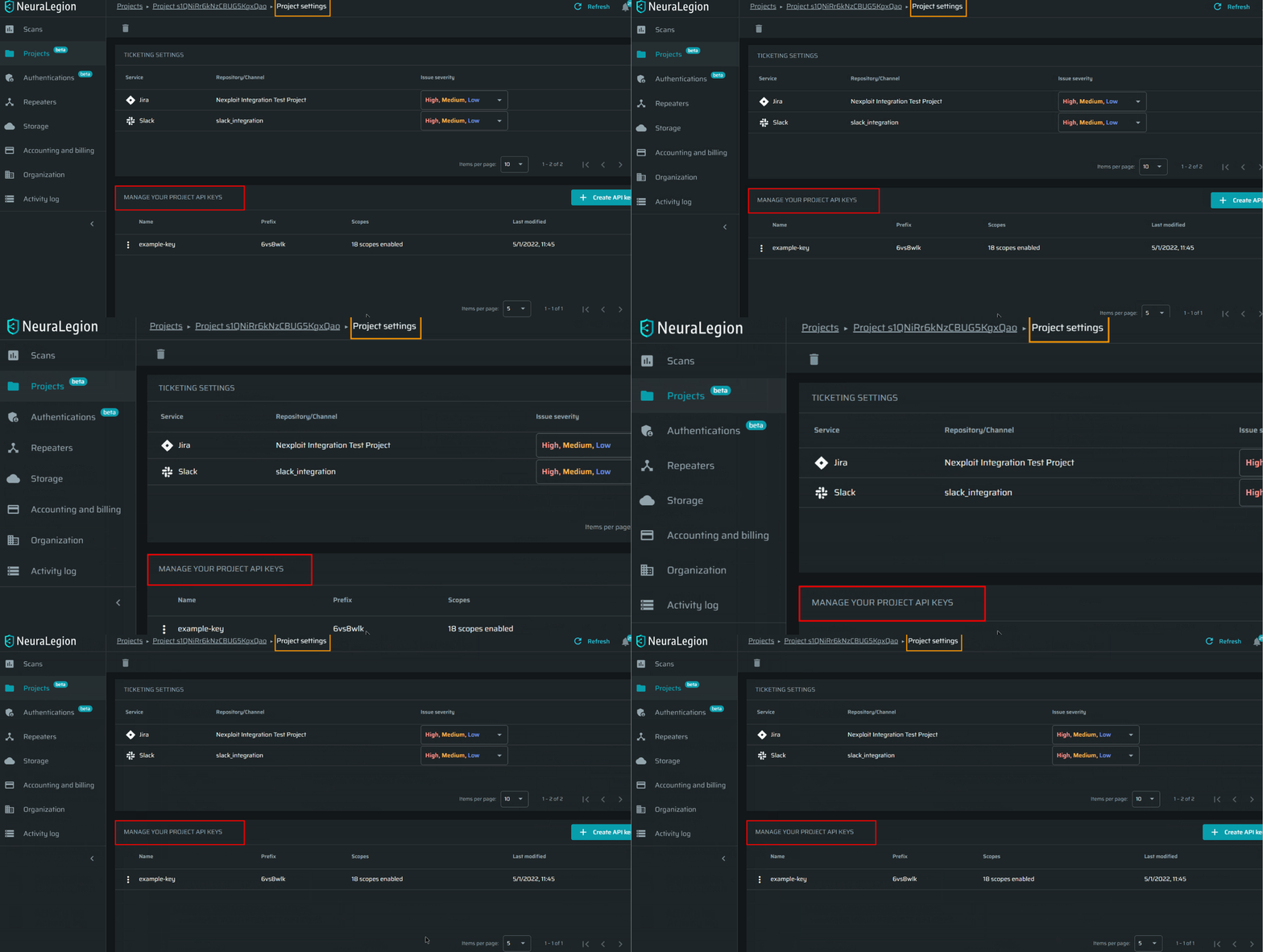
To provide with more flexibility and control of how your teams access Bright, we added the ability to create and use API keys at the project level.
Check out the docs and learn more!
Brower-Based Authentication Improvements
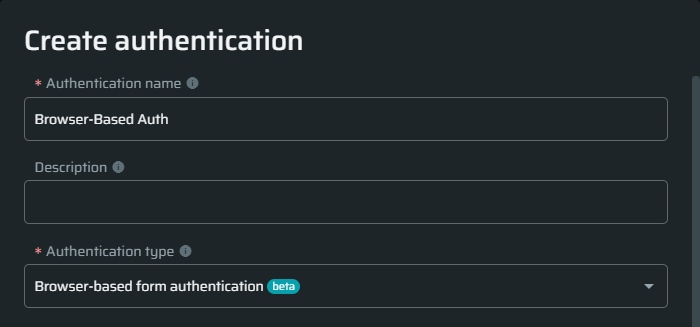
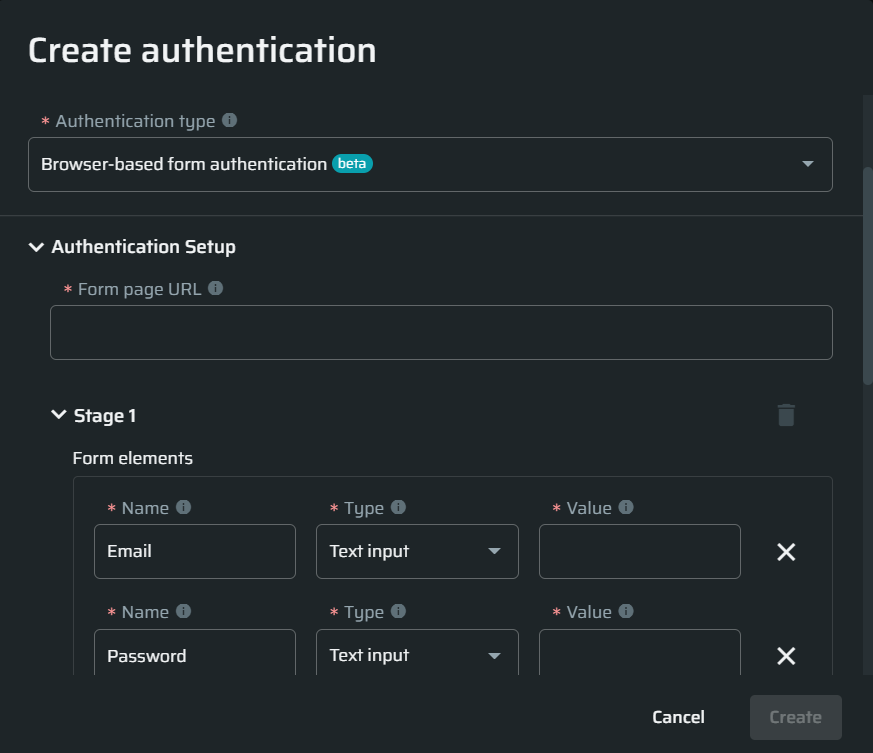
We improved our form field detection algorithm to be able to look up the target field not only by name but also by labels, placeholders, and even unique HTML object IDs. That will make the process of configuring the authentication form quick and easy! Just write the name of the field as you see it, and our browser will find it in the form automatically. Easy!
We extended the browser-based authentication configurations to support multiple steps, where you can easily specify your application’s unique login sequences.
Try it out!
General UI improvements
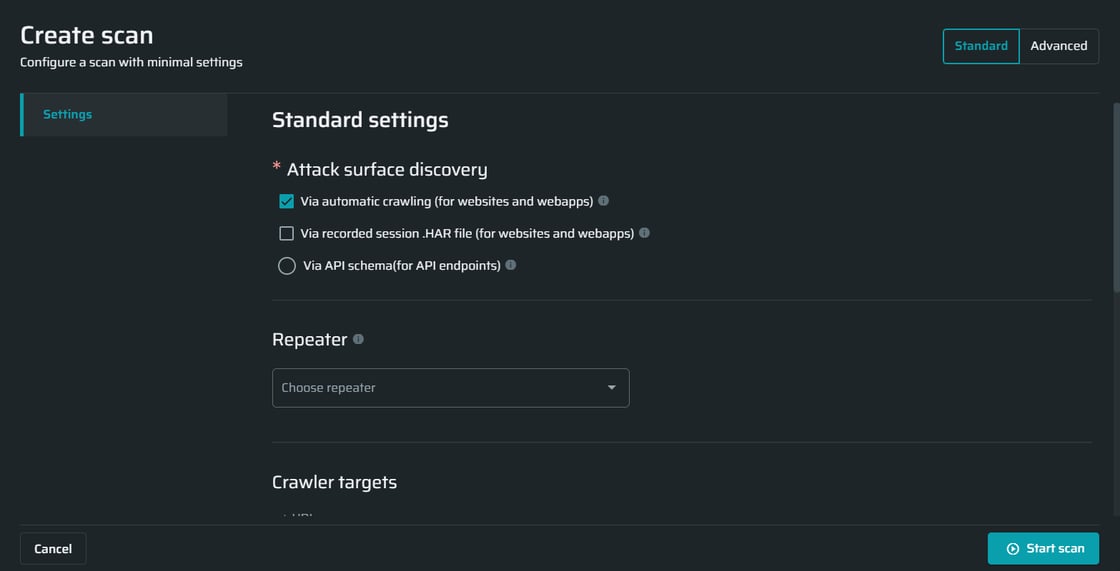
Check out our design improvements to the New Scan window to improve your user experience!
Start a new scan
General Performance improvements
Various improvements for Engine performance and stability for handling edge-cases during the discovery stage, and significant improvement to XSS testing