Table of Content
- What Is DNS?
- Why Perform an Attack on the DNS?
- What Are the 5 Major DNS Attack Types?
- DNS Attack Prevention
- How DNS Attacks Can Disrupt Business Operations
- DNS Attacks vs DDoS: What’s the Difference?
- Best Practices for DNS Security Configuration
- How to Detect Early Signs of a DNS Attack
- See Additional Guides on Key Cybersecurity Topics
What Is a Domain Name Server (DNS) Attack?
DNS is a fundamental form of communication. It takes user-inputted domains and matches them with an IP address. DNS attacks use this mechanism in order to perform malicious activities.
For example, DNS tunneling techniques enable threat actors to compromise network connectivity and gain remote access to a targeted server. Other forms of DNS attacks can enable threat actors to take down servers, steal data, lead users to fraudulent sites, and perform Distributed Denial of Service (DDoS) attacks.
This is part of an extensive series of guides about Cybersecurity.
What Is DNS?
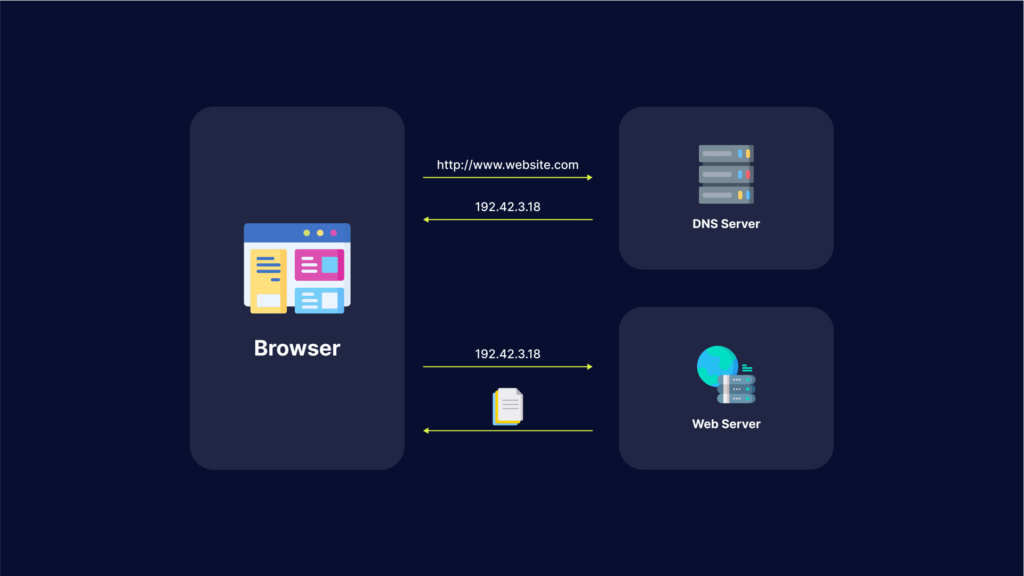
Domain name system (DNS) is a protocol that translates a domain name, such as website.com, into an IP address such as 208.38.05.149.
When users type the domain name website.com into a browser, a DNS resolver (a program in the operating system) searches for the numerical IP address or website.com. Here is how it works:
- The DNS resolver looks up the IP address in its local cache.
- If the DNS resolver does not find the address in the cache, it queries a DNS server.
- The recursive nature of DNS servers enables them to query one another to find a DNS server that has the correct IP address or to find an authoritative DNS server that stores the canonical mapping of the domain name to its IP address.
- Once the resolver finds the IP address, it returns it to the requesting program and also caches the address for future use.
Why Perform an Attack on the DNS?
DNS is a fundamental service of the IP network and the internet. This means DNS is required during most exchanges. Communication generally begins with a DNS resolution. If the resolution service becomes unavailable, the majority of applications can no longer function.
Attackers often try to deny the DNS service by bypassing the protocol standard function, or using bug exploits and flaws. DNS is accepted by all security tools with limited verification on the protocol or the usage. This can open doors to tunneling, data exfiltration and other exploits employing underground communications.
What Are the 5 Major DNS Attack Types?
Here are some of the techniques used for DNS attacks.
1. DNS Tunneling
DNS tunneling involves encoding the data of other programs or protocols within DNS queries and responses. It usually features data payloads that can take over a DNS server and allow attackers to manage the remote server and applications.
DNS tunneling often relies on the external network connectivity of a compromised system, which provides a way into an internal DNS server with network access. It also requires controlling a server and a domain, which functions as an authoritative server that carries out data payload executable programs as well as server-side tunneling.
Related content: Read our guide to DNS tunneling
2. DNS Amplification
DNS amplification attacks perform Distributed Denial of Service (DDoS) on a targeted server. This involves exploiting open DNS servers that are publicly available, in order to overwhelm a target with DNS response traffic.
Typically, an attack starts with the threat actor sending a DNS lookup request to the open DNS server, spoofing the source address to become the target address. Once the DNS server returns the DNS record response, it is passed to the new target, which is controlled by the attacker.
Learn more in our detailed guide to DNS amplification attacks
3. DNS Flood Attack
DNS flood attacks involve using the DNS protocol to carry out a user datagram protocol (UDP) flood. Threat actors deploy valid (but spoofed) DNS request packets at an extremely high packet rate and then create a massive group of source IP addresses.
Since the requests look valid, the DNS servers of the target start responding to all requests. Next, the DNS server can become overwhelmed by the massive amount of requests. A DNS attack requires a great amount of network resources, which tire out the targeted DNS infrastructure until it is taken offline. As a result, the target’s internet access also goes down.
4. DNS Spoofing
DNS spoofing, or DNS cache poisoning, involves using altered DNS records to redirect online traffic to a fraudulent site that impersonates the intended destination. Once users reach the fraudulent destination, they are prompted to login into their account.
Once they enter the information, they essentially give the threat actor the opportunity to steal access credentials as well as any sensitive information typed into the fraudulent login form. Additionally, these malicious websites are often used to install viruses or worms on end users’ computers, providing the threat actor with long-term access to the machine and any data it stores.
Learn more in our detailed guide to DNS flood attacks
5. NXDOMAIN Attack
A DNS NXDOMAIN flood DDoS attack attempts to overwhelm the DNS server using a large volume of requests for invalid or non-existent records. These attacks are often handled by a DNS proxy server that uses up most (or all) of its resources to query the DNS authoritative server. This causes both the DNS Authoritative server and the DNS proxy server to use up all their time handling bad requests. As a result, the response time for legitimate requests slows down until it eventually stops altogether.
DNS Attack Prevention
Here are several ways that can help you protect your organization against DNS attacks:
Keep DNS Resolver Private and Protected
Restrict DNS resolver usage to only users on the network and never leave it open to external users. This can prevent its cache from being poisoned by external actors.
Configure Your DNS Against Cache Poisoning
Configure security into your DNS software in order to protect your organization against cache poisoning. You can add variability to outgoing requests in order to make it difficult for threat actors to slip in a bogus response and get it accepted. Try randomizing the query ID, for example, or use a random source port instead of UDP port 53.
Securely Manage Your DNS servers
Authoritative servers can be hosted in-house, by a service provider, or through the help of a domain registrar. If you have the required skills and expertise for in-house hosting, you can have full control. If you do not have the required skills and scale, you might benefit from outsourcing this aspect.
Test Your Web Applications and APIs for DNS Vulnerabilities
Bright automatically scans your apps and APIs for hundreds of vulnerabilities, including DNS security issues.
The generated reports are false-positive free, as Bright validates every finding before reporting it to you. The reports come with clear remediation guidelines for your team. Thanks to Bright’s integration with ticketing tools like JIRA, it is easy to assign issues directly to your developers, for rapid remediation.
How DNS Attacks Can Disrupt Business Operations
DNS issues rarely announce themselves clearly. It usually starts with vague complaints – someone says the app feels slow, another says the site won’t load, and support tickets begin to trickle in. By the time teams realize DNS is involved, users are already impacted.
When DNS fails, it doesn’t just affect one service. Everything that depends on name resolution starts breaking at once – websites, APIs, login flows, email delivery, even internal tooling. From the outside, it looks like the entire system is down, even if the underlying infrastructure is perfectly fine.
That’s what makes DNS attacks so disruptive for businesses. Engineering teams may be chasing application bugs while traffic never even reaches the servers. Meanwhile, customers lose trust quickly. For revenue-facing systems, even short DNS disruptions can translate directly into lost transactions and reputational damage.
DNS Attacks vs DDoS: What’s the Difference?
DNS attacks are often described as a type of DDoS, but in practice, they behave very differently. A classic DDoS attack is about volume – overwhelm a service until it can’t respond anymore. You see traffic spikes, CPU usage jumps, and dashboards light up.
DNS attacks don’t always look like that. Instead of hitting the application, attackers interfere with how users find it in the first place. That might mean poisoning records, abusing resolvers, or overwhelming authoritative DNS servers. The traffic levels may not look extreme, but the effect is the same: users can’t reach the application.
The tricky part is visibility. DDoS problems are noisy and obvious. DNS problems are quiet. Requests just fail or go somewhere unexpected. Without DNS-specific monitoring, teams often waste time debugging the wrong layer before realizing that resolution is the real issue.
Best Practices for DNS Security Configuration
Most DNS problems aren’t caused by sophisticated attackers. They’re caused by assumptions. DNS is often treated as background infrastructure – set it up once and move on. Years later, that configuration is still running while the environment around it has changed completely.
Using a reliable DNS provider with redundancy and built-in protection is usually the first practical step. Running your own DNS can work, but only if you’re prepared to maintain it like any other critical system.
Access control is another common weak spot. DNS records are powerful, yet they’re sometimes editable by too many people or automated processes without safeguards. A single mistake or compromised credential can redirect traffic just as effectively as an external attack.
DNSSEC helps in certain scenarios, especially for public domains, but it’s not a silver bullet. What matters more is treating DNS as production infrastructure – monitored, reviewed, and protected – not something that only gets attention when it breaks.
How to Detect Early Signs of a DNS Attack
DNS attacks are hardest to deal with when you notice them late. Once users start reporting outages, you’re already in response mode. Early detection comes down to watching for subtle changes that usually get ignored.
Resolution failures that spike suddenly, odd increases in NXDOMAIN responses, or DNS lookups that start taking longer than usual are often early signals. On their own, they don’t always look alarming, which is why they get missed.
Another warning sign is inconsistency. If users in one region can access a service while others can’t, DNS should be one of the first things checked. These partial failures are common during DNS-based attacks.
Teams that log and review DNS behavior regularly have a big advantage here. When you know what “normal” looks like, it’s much easier to spot when something starts drifting – and react before it turns into a full outage.
See Additional Guides on Key Cybersecurity Topics
Together with our content partners, we have authored in-depth guides on several other topics that can also be useful as you explore the world of cybersecurity.
Device42
Authored by Faddom
- Device42: 5 Key Features, Limitations, and Alternatives
- Device42 Pricing: The 5 Pricing Tiers Explained
- Device42 CMDB: Pros, Cons, and a Quick Tutorial
Disaster Recovery
Authored by Cloudian
- What Is Disaster Recovery? – Features and Best Practices
- What Is BCDR? Business Continuity and Disaster Recovery Guide
- Disaster Recovery Plan: 4 Examples & 10 Things You Must Include
Deserialization
Authored by Bright Security