Microservices Security: Challenges and Best Practices

Microservices have become the leading method of application development.

Unfortunately, security testing has not evolved quickly enough to address the risks introduced by this mass adoption of microservices. 

Engineers and architects are challenged by security issues that arise with microservices. If these concerns are not addressed in the SDLC, vulnerabilities will appear in production. 

The common practice is to test for vulnerabilities in each microservice, the reason is that every instance of microservice exposes its own set of entry points, APIs, and communication paths that create exposure to additional attack vectors that are currently not addressed. But this is not so simple to achieve in a complex microservices architecture.

This is part of a series of articles about Web Application Security.

In this article, you will learn:

Top 5 Microservices Security Challenges

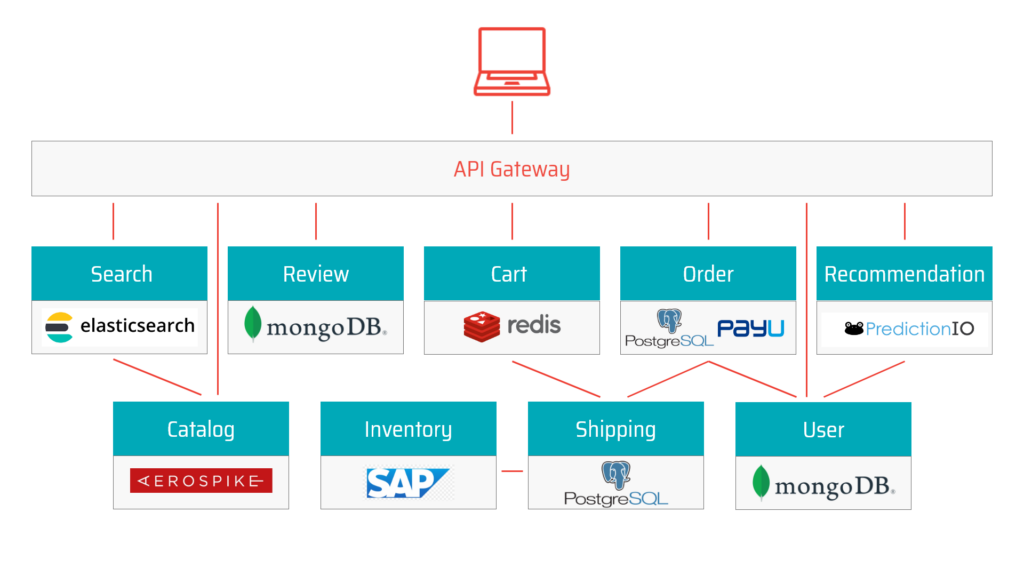
The diagram below illustrates how even a simple microservices architecture involves multiple components, each with its own vulnerabilities and security risks. Let’s review the top 5 microservices challenges making it difficult to secure modern applications.

microservices arhitecture

1. Infrastructure design and multi-cloud deployments

Microservices are distributed over many data centers, cloud providers, and host machines. 

Building infrastructure across many cloud environments increases the risk of losing control and visibility of the application components.

2. Segmentation and isolation

Decoupled application components perform their duty in co-dependence with many other services. 

All these components establish and maintain communication channels over different infrastructure layers, so often cross-service communication is skipped when testing for security vulnerabilities, the result of this is significant exposure in the interfaces between these services.

3. Identity management and access control

Microservices expose new entry points to both internal and external actors.

Access controls need to be regulated for all entities, whether legitimate or illegitimate.

It’s important to have an administrative interface that can help you manage users, applications, groups, devices, and APIs from one central location, giving you real-time visibility into what’s happening in your environment.

4. Data management

Data generated in a microservices architecture moves, changes, and is continuously interacted with. Data is also stored in different places and for different purposes. Owners of data assets need insight into the life cycle and the dynamics of data to avoid breaches.

Can you be sure that your data is secure?

Data leaks can happen regardless of the communication channel’s exposure. Malicious actors can chain vulnerabilities to break through to private assets.

5. The rapid rate of application changes

Application development in modern SDLC forces the code base and data stores to grow over time. Development methodologies push iterative and incremental development, putting microservices under the constant workload.

How can you know at any time that new code coming through the development pipeline will not expose your application to the new sets of vulnerabilities and dangerous attack vectors?

Security testing must keep up with the pace of the SDLC, to enhance DevSecOps.

Decomposing applications into microservices increases the application’s attack surface because of newly added entry points and connections between instances that are now spread out over many environments, because of that microservices security requires non-trivial and ready-made solutions.

Related content: Read our guide to websocket security.

Best Practices for an Effective a Microservices Security Architecture

The following best practices can help you design security into your microservices applications and address application security challenges.

Deploy Security at Container Level

In many, microservices are based on container technology. The most glaring vulnerability of containers is that they are based on images, which may contain vulnerabilities. Perform regular scanning to ensure you don’t use images that contain security vulnerabilities or other security issues.

In addition, a container has both internal and external threat surfaces. A great first step to protecting containers at runtimer is adopting the principle of least privilege (POLP). This can involve some or all of the following strategies:

  • Limit permissions to the minimum required by each user or service role
  • Never use sudo or a privileged accounts to run services
  • Limit or control the use and control of available resources—for example, restrict a container’s access to the host operating system
  • Never keep secrets on the container, because anyone with access to the container can see them
  • Define isolation with appropriate rules for resources with different levels of sensitivity

Create an API Gateway

Microservices often span several different networks, using a variety of technologies, interfaces and protocols. An important way to secure microservices is to create one entry point, which all clients and systems access, and which can easily be secured.

This entry point is called an API gateway. If you design your system in such a way that all clients always connect to the API gateway, you can use it to perform authentication and authorization, and filter requests to sensitive resources. The API gateway authenticates users and service roles and decides which microservices they are allowed to access.

API gateways can provide additional security capabilities like SSL termination, protocol conversion, monitoring, routing, and caching of requests. 

Isolation

In a microservices architecture, each service is a separate, isolated part of the application. You should be able to implement, maintain, modify, extend and update microservices without 

affecting other nearby microservices.

Isolation should also be performed at other layers of the infrastructure, such as the database. One microservice should not have access to data belonging to other microservices. By achieving complete isolation at all layers, attackers who compromise one microservice cannot perform lateral movement to attack other parts of the system.

Use OpenID or OAuth 2.0

OpenID and OAuth 2.0 are two authentication systems that can generate tokens to enable secure user access. Using a system like OAuth 2.0 is excellent for microservices security. It ensures users obtain permissions to any resource via a resource server. 

OAuth can provide four types of authentication tokens—resource server, resource owner, authorization server, and client. Tokens can be used to access resources until they expire. OAuth also provides a mechanism for refreshing tokens after the original one expires. 

Learn more in our detailed guide to web application scanning.

Don’t Show Sensitive Data As Plain Text

Plaintext can be easily read and copied by users and machines. A first step to protecting personally identifiable information (PII) is to avoid displaying it in clear text. All passwords 

and usernames must be stripped or masked when saving logs or records.

Adding TLS/HTTPS will not solve the problem, if data is stored unsecurely at rest. You can also try to encrypt logs, but this won’t help against attackers who can directly access system memory. Therefore the only safe route is to avoid persisting sensitive information in the first place.

Automated Microservices Security with Bright

Bright integrates automated AI-powered Dynamic Application Security Testing into the SDLC to scan applications built atop of the complex microservices architecture each time the application code is packaged to a running application and forwarded to the testing phase.

Bright provides you with real-time reports with zero false positives in no time, where you can see reported vulnerabilities with a reproducible proof-of-concept and ranked by the severity of the impact they make on an application, this confirms the overall health and capacity of an application to handle production runtime without being exposed to vulnerabilities, regardless of the scope and the complexity of the underlying microservices architecture mesh. 

Start protecting microservices today — try Bright free

Aggregating SCA, SAST and DAST Vulnerability Results

Table of Contents

  1. Example: Combining Checkmarx SAST & SCA and Bright’s DAST
  2. Engineering Security Testing Metrics

DevOps looks to combine the culture, methodologies and tooling of both the software development and operations teams, so companies can deliver new application features at a much greater velocity. 

DevSecOps takes this a step further, integrating security into DevOps, shifting security testing left. Instead of developers being brought into the fold later in the process, developer focused security testing tools bridge the gap between engineering and security.

One of the key challenges when implementing DevSecOps is prioritizing which vulnerabilities need to be remediated first. This is especially true when using multiple Application & API security testing tools to provide full coverage.

Automation is key. Implementing application security testing into the CI/CD pipeline to detect and fix security vulnerabilities on each build, or every merge to master, delivers secure and compliant application changes rapidly, while running operations consistently with the automation.

It’s not a one size fits all, with different types of automated security testing tools required across the pipeline to ship secure applications and APIs, at speed. 

Identifying security vulnerabilities at various stages of the pipeline requires the integration of several tools. These include SCA (Software Composition Analysis), SAST (Static Application Security Testing) and DAST (Dynamic Application Security Testing).

We previously discussed combining DAST with SCA from Checkmarx

Leveraging these tools is great, but aggregating the vulnerability findings can be a challenge. A ‘single pane of glass’ is often needed so that the engineering and security teams have the visibility they need. Indeed, combining SCA+SAST+DAST information can be very valuable for SIEM (Security Incident Event Management) correlation engines for example, where the vulnerability information can help in providing more accurate correlation and attack detection.

Example: Combining Checkmarx SAST & SCA and Bright’s DAST

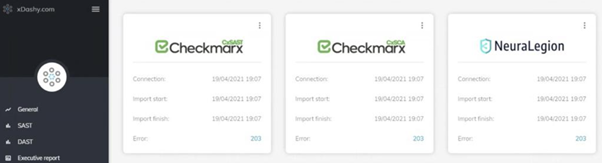
Bright’s partner, Datastream, has integrated the Checkmarx SAST and SCA solutions and Bright’s DAST platform Bright, within their proprietary xDashy platform, where their clients across the financial, retail and e-commerce sectors are benefitting from this comprehensive testing and aggregated data.

Combining security testing on the code level (SAST), checking dependencies (SCA) whilst also being able to test the runtime application (DAST), delivers comprehensive security testing integrated across DevOps / CICD pipelines at multiple stages, into the hands of developers.

Our joint customers’ engineering and security teams get full visibility and can manage custom dashboards, define executive reports, metrics and KPIs that improve decision-making at both the executive and technical level, consolidating SAST, SCA and DAST results on a single screen. 

For example, SCA will identify security vulnerabilities in 3rd party dependencies, building the open source dependency trees for applications and mapping these against a database of known vulnerabilities. It then reports vulnerable open source that has been pulled into the application, to fix or patch accordingly.

Bright engine tests for vulnerabilities that come under the OWASP Top 10 and Mitre, leveraging thousands of payloads, to test both webapps and APIs. 

Bright is also the only DAST solution on the market that can scan for specific Business Logic Vulnerabilities, normally carried out by manual testing. 

Having these tests automated, as part of your development pipelines and included in your dashboard gives you the broadest picture of your cyber posture. Coupled with Bright’s automatic validation of every security finding, the DAST output delivers real time actionable results, with no false positives. 

If you are considering a DAST tool, be sure to read our blog on the Must-Have features of your DAST Tool.

Security teams can then understand the risk, prioritise remediation and coordinate with the engineering team accordingly.

Additionally, by combining the tools and aggregating the results, companies can establish a common risk identification framework through linking projects manually and by referencing vulnerabilities according to the CWE (Common Weakness Enumeration), Miter’s CVE and also categorized by the CVSS v3 score provided by Bright.

Engineering Security Testing Metrics

Being able to visualise and correlate data across projects, squads or teams is also invaluable. 

Bright has a comprehensive ‘Projects’ reporting functionality which can be used via the Bright app UI, or integrated with your SIEM or other reporting platform, as Datastream has integrated with their platform, xDashy. Users can filter the results by project, by execution date and compare the results over time, graphically presenting trends and showing a visualization of risk management. 

Having visibility of the most frequently recurring risks, or being able to drill down into which team or project is generating certain vulnerabilities, allows you to prioritise remediation as well as providing targeted training on secure coding.

This helps with capacity building for secure development as well as providing for analysis of the cost and time to remediate.

Whether you are looking at enhancing your current SAST and / or SCA scanning or just entering into the realm of security testing, using Bright’s DAST is really simple and can be used as a standalone scanner by the security team or integrated across your pipelines.

Whether testing your webapps or APIs (SOAP, REST, GraphQL), the results produced are organised in a developer friendly way and as a QA, can help establish a culture of security testing and let you champion security testing!

Go ahead and try it out! With our free account, you can get started today; get your account now – https://app.brightsec.com/signup

Complete your AppSec testing Automation, with Bright

Table of Contents

  1. How does developer-focused DAST augment  SCA and make you more secure?
  2. Get started today.

The shift to rapid, frequent deployments over the past decade left application security behind. However, in recent years security is starting to catch up. Leading companies are now integrating security testing into CI & CD, running automated tests with every commit, and fixing bugs long before they hit production.

Software Composition Analysis (SCA) and developer-centric DAST enable this and are easily achieved by combining Checkmarx and Bright.  Different types of automated security testing tools are required across your pipeline to produce APIs and applications that are secure by design. Don’t stop with securing 3rd party code, make sure you secure 1st party code as well.

How does developer-focused DAST augment  SCA and make you more secure?

Software Composition Analysis (SCA) 

SCA is a set of technologies that analyze the application’s open-source components tied together. 

As the analyzed code is transparent and available to the tool, SCA offers accuracy when it comes to recognizing flaws in the code by detecting the exact line of code that needs remediation reducing the remediation time and effort for developers.

For organizations using open-source, SCA like Checkmarx should definitely be used to achieve some level of security, but is it enough?

Dynamic Application Security Testing  (DAST)

Although SCA can detect many vulnerabilities, everything they identify is in open-source components third-party libraries and do not cover 1st party code that you develop within your organization. 1st party code represents more than 60% of code for most organizations.

Being a black-box solution, DAST interacts with the app from the outside. DAST tests the application’s and API’s defense against techniques that a hacker might use while trying to exploit your application. Because of DAST’s language independence, you won’t have problems integrating a DAST tool into a CI/CD pipeline. 

So, which technology should you focus on and why?

Checkmarx SCA & Bright DAST – Complete Developer-Centric AppSec Testing

To be secure by design and ensure you are shipping secure applications and APIs to production, SCA like Checkmarx and Bright’s automated DAST should be used to complement each other. If you combine these two powerful and modern tools you can detect even 0-day vulnerabilities.

Checkmarx’s SCA gets you visibility of your open source vulnerabilities that may underpin your applications.

Bright enhances DevSecOps at its core, with a Dev First approach to test your applications and APIs (SOAP, REST, GraphQL). Test every build and get results you can trust, with automatically validated results free from false positives and developer-friendly remediation guidelines.

Get started today

New to Bright and/or Checkmarx? Try us both for free to start testing for vulnerabilities in your applications today

Sign up for a FREE Bright account here – follow our quick step wizard and be up and scanning in minutes!

To get started with Checkmarx request a demo here!

You can learn more about Bright, all our integrations, and more on our knowledge base.

Using FOSSA? Complete your AppSec testing automation with Bright

Table of Contents

  1. How does developer focused DAST augment SCA?
  2. Get started today.

As security testing is increasingly shifting left, developer focused application security testing tools are bridging the gap between engineering and security.

But automated tools are not a one size fits all, with different types of automated security testing tools required across your pipeline to ship secure applications and APIs, at speed.

Software Composition Analysis (SCA) and developer-focused DAST enable this and it is easily achievable with FOSSA and Bright, respectively.

How does developer focused DAST augment SCA?

Software Composition Analysis (SCA) 

SCA identifies security vulnerabilities in your 3rd party dependencies, by building the open source dependency trees for your applications and mapping these against a database of known vulnerabilities. It then reports vulnerable open source that has been pulled into your application, to fix or patch accordingly.

The use of open source has grown dramatically over the past few years, with flaws in open source dependencies being more prevalent than ever.

For any organization using open source, SCA like FOSSA’s should definitely be used to achieve a degree of security, but is that enough? 

Dynamic Application Security Testing (DAST)

Developers are usually not familiar with DAST, which is not surprising. Historically DAST solutions were built for security teams, and run either by the internal security team or outsourced testing companies on production applications.

But DevSecOps forces those tests to be conducted much earlier in the development process.

Bright’s innovative developer-focussed DAST enables developers to detect and fix security bugs that they have introduced (the custom or 1st party code). This is done as part of the developer’s workflow or as part of their CI/CD pipeline.

With Bright, an automated DAST scan can be triggered on every build / commit or PR, to test your runtime applications and underlying APIs (whether REST, SOAP, or GraphQL), detecting vulnerabilities like SQL Injection and Cross-Site Scripting (XSS), for example.

Scans that last minutes and not hours keep up with your rapid release cycles and are not a bottleneck, maintaining DevOps speed.

Having that direct feedback loop to developers means you can fix early and often. Bright’s plug and play integrations with your pipeline are seamless – developers can stay in their environment with Bright’s CLI, as well as integrating with the likes of CircleCI, Jenkins, JFrog, AzureDevOps, JIRA and more.

While false positives are notoriously an issue with DAST tools, Bright’s innovative engine automatically validates every finding…no need for manual validation checks, no delays, and no builds failing for no reason! 

New and recurring issues are identified and flagged as such, so focus and prioritization of remediation is facilitated.

These features mean that there is less of a reliance on manual testing and enables security testing to be placed in the hands of developers.

So, which technology should you focus on and why?

FOSSA & Bright – Complete Developer-Centric AppSec Testing

To ensure your are shipping secure applications and APIs to production, SCA like FOSSA’s, and Bright’s automated DAST should be used in conjunction.

FOSSA’s SCA gets you visibility of your open source vulnerabilities that may underpin your applications, that the creative features are built on top of.

Bright’s innovative DAST lets you very easily detect security vulnerabilities across your applications and APIs. Test every build and get results you can trust, as we automatically validate results free from false positives.

By deploying and leveraging both FOSSA’s SCA and Bright’s DAST, you are covering all your bases. This will enable you to find and fix a broader range of vulnerabilities faster and earlier.

The question is not whether you should be using SCA or DAST, but how and when you can start to use them together across your pipelines. Small hint – see the answer below!

Get started today

New to Bright and/or FOSSA? Try us both for free to start testing for vulnerabilities in your applications today.

Sign up for a FREE Bright account here – follow our quick step wizard and be up and scanning in minutes!

Try out FOSSA for free here too!

You can learn more about Bright, all our integrations and more on our knowledge base

Shopping for an AppSec testing solution? Here is what to consider

Table of Contents

  1. Integrating early into the SDLC
  2. Low number of False-positives.
  3. Simple usage
  4. Application security testing with Bright

Let’s face it – whether you are checking your emails, banking online , shopping for new shoes, or doing serious business, there is a very good chance you are doing it through your web browser. Organizations use the convenience web applications bring to get in front of you, but this convenience does not come without a risk.

As more businesses shift to web apps, they are becoming more attractive targets for cyber criminals. So, what can you do to stay one step ahead of bad actors? – Automate. 

In this article we introduce three key features you have to look for when shopping for your AppSec & API testing automation tool:

Integrating early into the SDLC

Development teams have been using automation to streamline manual activities such as build, deployment and functional testing for years now, and it is time security testing joins the mix. 

By integrating automated security validation into the continuous integration/continuous development (CI/CD) pipeline, you can catch vulnerabilities sooner, reducing the potential risk and financial impact.

According to the NIST (the National Institute of Standards and Technologies), the cost of fixing a security defect once it’s made it to production can be up to 60 times more expensive than during the development cycle.

Additionally, the time it takes to fix a security issue once it is discovered has increased. According to Veracode’s “State of Software Security” report the average amount of time to fix a software defect has gone from 59 days ten years ago, to 171 days. Instead of being remediated during the development cycle, the vulnerability would be in production for almost half a year.

Although SAST tools traditionally did a better job at integrating early into the SDLC,  modern DAST tools are catching up and can be integrated as early as the build phase.

Low number of False-positives

We all know the story about the boy who cried wolf.

The tale tells the story of a shepherd boy who repeatedly tricks nearby villagers into thinking a wolf is attacking his town’s flock. When a wolf actually does appear and the boy again calls for help, the villagers believe that it is another false alarm and the sheep are eaten by the wolf.


What if the same happens with application security? With all the false positives and false alarms, you could skip a serious, real vulnerability that could be exploited. Moreover, even if you don’t miss anything, you end up spending hundreds of hours trying to figure out what is real.

It’s crucial you find a tool that returns as few false positives as possible. We at Bright make sure to automatically validate every finding before reporting it to you. That way we ensure you spend the time and resources into remediating real, exploitable vulnerabilities.

Simple usage

One of the problems automation solves is the huge global shortage of security professionals. Having a tool that requires a team of security professionals to work with shouldn’t be mandatory. To see the real benefits of automation, you need a tool that your existing teams will love and know how to use.

Not even the best AppSec Testing tool is useful if your team is not going to use it.

That’s why we at Bright built our tool from the ground up with developers in mind. We made sure developers don’t have to leave the environment they already use and can configure and start a scan with code, but we also made sure our UX is simple enough so that other teams, like QA, will enjoy using it.

Application security testing with Bright

Bright enhances DevSecOps at its core, with a Dev First approach to test your WebApps and APIs

Key features of our technology include:

  • Shallow learning curve: to establish a culture of security testing across your pipelines
  • Built for Developers: We empower developers to detect and fix vulnerabilities on every build, enabling them to leverage multiple discovery methods to initiative a scan, including:
    • Crawling – for full automation
    • HAR files – generated per build/commit for scope defined testing or by QA Automation
    • OpenAPI (Swagger) files or Postman Collections – to test APIs or Single Page Applications
  • Smart Scanning functionality: leveraging sophisticated algorithms to carry out the right tests against the target, removing complexity for developers whilst ensuring scans are automatically optimized to maximize speed and prevent development drag
  • Built for Modern Technologies: Microservices, Single Page Applications, APIs (REST, GraphQL) are all supported 
  • No False Positives: The only tool with fully automated validation of every vulnerability detected, freeing up valuable time for your security team and saving a considerable amount of money, to release fast and be secure by design
  • Seamless Integration: Rest API, CLI for developers, or with common tools such as CircleCI, Jenkins, Jira, GitLab, Github, AzureDevOps and more

Using Snyk? Complete your AppSec testing Automation, with Bright

Table of Contents

  1. How does developer focused DAST augment  SCA and make you more secure?
  2. Get started today.

Security is no longer a siloed team with sole ownership of security testing – security testing is increasingly shifting left. Instead of developers being brought into the fold later in the process, developer focused security testing tools are bridging the gap between engineering and security.

Automation is key, with those implementing application security testing into their CI/CD pipeline to detect and fix security vulnerabilities on each build or every merge to master, seeing a considerable benefit. 

It’s not a one size fits all, with different types of automated security testing tools required across your pipeline to ship secure applications and APIs, at speed. 

Software Composition Analysis (SCA) and developer-centric DAST enable this and is easily achievable with Snyk and Bright, respectively.

How does developer focused DAST augment  SCA and make you more secure?

Software Composition Analysis (SCA) 

SCA is a widely used form of developer application security testing, with Snyk being amongst the leaders in the field. SCA identifies security vulnerabilities in your 3rd party dependencies, by building the open source dependency trees for your applications and mapping these against a database of known vulnerabilities. It then reports vulnerable open source that has been pulled into your application, to fix or patch accordingly.

The use of open source has grown dramatically over the past few years, with flaws in open source dependencies being more prevalent than ever.

For any organisation using open source, SCA like Snyk’s should definitely be used to achieve a degree of security, but is this enough? 

Dynamic Application Security Testing  (DAST)

Not all developers are familiar with DAST, which is not surprising. Historically DAST solutions were  built for security teams, not developers, and run either by the internal security team or outsourced testing firms on production applications. 

With DevSecOps, these tests need to be conducted much earlier in the development process to get a feedback loop to the developers.

While SCA looks at your source code and dependencies, Bright’s innovative developer-focussed DAST enables developers to detect and fix security bugs that they have introduced – the custom (or 1st party) code. This is done as part of the developer’s workflow or as part of their CI/CD pipeline. 

With Bright, an automated DAST scan can be triggered on every build / commit or PR, to test your runtime applications and underlying APIs (whether REST, SOAP, or GraphQL), detecting vulnerabilities like SQL Injection and Cross-Site Scripting (XSS), for example.

Scans that last minutes and not hours keep up with your rapid release cycles and are not a bottleneck, maintaining DevOps speed.

Having that direct feedback loop to developers means you can fix early and often. Bright’s plug and play integrations with your pipeline are seamless – developers can stay in their environment with Bright’s CLI, as well as integrating with the likes of CircleCI, Jenkins, JFrog, AzureDevOps, JIRA and more.

Whie false positives are notoriously an issue with DAST tools, Bright’s innovative engine automatically validates every finding…no need for manual validation checks, no delays, and no builds failing for no reason! 

New and recurring issues are identified and flagged as such, so focus and prioritisation of remediation is facilitated.

These features mean that there is less of a reliance on manual testing and enables security testing to be placed in the hands of developers.

So…which should you focus on and why?

Snyk & Bright – Holistic Developer-Centric AppSec Testing

To be secure by design and ensure you are shipping secure applications and APIs to production, SCA like Snyk’s, and Bright’s automated DAST should be used in conjunction.

Snyk’s SCA gets you visibility of your open source vulnerabilities that may underpin your applications, that the creative features are built on top of.

Bright’s innovative DAST lets you very easily detect security vulnerabilities across your applications and APIs. Test every build and get results you can trust, with automatically validated results free from false positives and developer friendly remediation advice.

By deploying and leveraging both tools, you are covering all your bases, to find a broader range of vulnerabilities faster and earlier, to fix them…faster and earlier!

The question is not whether you should be using SCA or DAST, but how and when you can start to use them together across your pipelines…the answer is, very easily (see below)!

Get started today

New to Bright and/or Snyk? Try us both for free to start testing for vulnerabilities in your applications today

Sign up for a FREE Bright account here – follow our quick step wizard and be up and scanning in minutes!

Try out Snyk for free here too!

You can learn more about Bright, all our integrations and more on our knowledge base

Penetration Testing Services: Manual or Automated?

What are Penetration Testing Services?

Penetration testing (also called pentesting) is a controlled attempt to breach IT systems. Penetration testing is performed on behalf of the organization, in order to discover and remediate security weaknesses. There are two types of penetration testing services: manual and automated.

Manual penetration testing services

Traditionally, organizations contract penetration testing services from ethical hackers or security consulting firms. Manual penetration tests are extensive and methodical, but because of their high cost and complexity, they are performed infrequently, usually once per quarter or even once per year. In addition, manual pentesting can be unpredictable as some testers are very good, and others are not as good so will perform less well.

Automated penetration testing services

A new type of penetration testing service is penetration testing as a service (PTaaS). In this new model, a software as a service (SaaS) platform gives an organization automated tools it can use to perform penetration tests against its own systems. The main benefit of PTaaS is that it is predictable, inexpensive, and enables penetration testing on a continuous basis.

PTaaS can be fully self-service, used by the organization’s security or development teams or it can be delivered in a hybrid model, where the PTaaS provider offers a technological platform, but also helps operate it with its own security experts, guiding penetration testing and recommending remediations.

In this article, you will learn:

Penetration Testing as a Service (Automated Penetration Testing)

Penetration testing as a service (PTaaS) is performed by utilizing an automated online service, which organizations can use without contracting an external penetration tester.

PTaaS combines manual and automated penetration testing, allowing security teams to identify and fix vulnerabilities faster, better understand security mechanisms, and perform more frequent security testing. Customers use an online interface to manage penetration testing and data, making it easier to define scope of new penetration tests, view test results in real time, and perform continuous testing. 

Benefits of PTaaS services

The main value of PTaaS is that penetration tests can be performed much more frequently. New code and configurations are released daily, and each new version can have new vulnerabilities. With PTaaS, it’s possible to schedule and run a new penetration test for each new release. 

This type of continuous testing proactively improves the security environment, by identifying vulnerabilities, simulating potential attacks, and prioritizing the severity of attack outcomes.

Key features of PTaaS platforms

Here are the most important features potential customers should look at when evaluating an automated penetration testing service:  

  • A library of up-to-date recommendations for vulnerability remediation
  • Ability for multiple testers to collaborate on the same testing project
  • Standard reporting and severity metrics across multiple vulnerability scanners
  • Customizable reporting formats
  • Long-term tracking of penetration testing activities and remediation of vulnerabilities discovered
  • Integration with existing ticketing systems and governance, risk and compliance (GRC)

Related content: read our guide to penetration testing tools

Contract Penetration Testing Services (Manual Penetration Testing)

Unlike PTaaS, traditional penetration testing services are usually contracted to a security firm or individual ethical hacker. This individual or team provides an assessment of potential threats to company systems, in a systematic way, according to a predefined scope. 

Penetration testing starts from the perspective of an outside intruder or malicious insider. Like a real attacker, the pentester performs reconnaissance of the environment, identifies possible exploit paths, and attempts to penetrate the system being tested, without causing damage or exposing sensitive data.

The most important part of a penetration testing service is a final report that provides a list of vulnerabilities discovered during the test, assets or systems related to each vulnerability, an asset-related risk score, and recommendations for mitigating the risk in each of the affected systems.

Key qualifications of penetration testers

A good penetration tester should be:

  • Certified in relevant technology systems and compliance standards
  • Proficient with IT systems used by your organization
  • Experienced with exploit toolkits, and preferably able to customize exploits and malware
  • Experienced in social engineering
  • Analytical and methodical
  • A good communicator, able to provide reports that can communicate vulnerabilities and their impact both to management and technical staff

Types of Penetration Testing Services

Penetration testing services can be applied to several levels of the IT infrastructure. When selecting a penetration testing service, ensure it supports the type of penetration tests your organization needs.

Web Application Penetration Testing

Web application penetration testing looks for weaknesses in data validation and integrity, problems with authentication and session management, and other vulnerabilities. Penetration tests can identify security issues in databases, web application source code, and backend networks.

A web application pentest typically has three phases. Reconnaissance, discovery of security vulnerabilities, and exploiting vulnerabilities, in an attempt to gain unauthorized access to the application or its backend systems.

Learn more in our detailed guide to web application penetration testing

Network Penetration Testing

A network penetration test identifies security weaknesses in network infrastructure, including firewalls, switches, routers, and endpoints like servers and employee workstations. It can help prevent attacks exploiting incorrect firewall configuration, attacks against routers or switches, DNS attacks, proxy attacks, man in the middle (MiTM), and more.

Network penetration testing uses techniques like port scanning, traffic fuzzing, configuration vulnerability testing, virus scanning, and system fingerprinting. 

API Penetration Testing

Application programming interfaces (APIs) play a crucial role in modern information systems. Many IT systems communicate with APIs, or expose APIs, over the public Internet, making APIs a preferred attack vector for many attackers. 

API penetration testing involves learning an API’s structure and commands (some tools can import API commands using standards like OpenAPI), and checking for vulnerabilities like weak authentication, code injection, resource rate limiting, and data exposure. 

Mobile Application Penetration Testing

Many organizations have adopted bring your own device (BYOD) policies, meaning that employee’s personal mobile devices are allowed to connect to the network. Naturally these devices are less secure than corporate devices. 

Mobile penetration testing can test new attack vectors, such as deploying malware through mobile applications or phishing messages sent to personal devices, attacks exploiting weaknesses in WiFi networks, compromise of mobile device management (MDM) protocols, and more.

Penetration Testing Services with Bright

Bright significantly improves the application security pen-testing progress. By providing a no-false positive, AI powered DAST solution, purpose built for modern development environments the pen-testing process can be automated and vulnerabilities can be found faster and at a lower cost. Moreover, integrating Bright into DevOps environments enables you to run DAST scans as part of your CI/CD flows to identify a broad set of known (7,000+ payloads) security vulnerabilities early in the development process. 

In addition to detecting technical vulnerabilities, Bright’s unique ability to detect business logic vulnerabilities offers broader coverage and detection than any other automated solution. 

Learn more about Bright

What is the most Important feature of your DAST Tool?

Table of Contents

  1. What is the most Important Must-Have feature of your DAST Tool?

If you’re anything like me, you’re already thinking about what you might want for Christmas (or Chanukah, or Eid – other High Holy days are available).

Whilst my son is thinking about the latest Nintendo Switch game, I know that you are probably (also) thinking about your ideal security testing tool and the key features it should have.

In today’s fast-paced software development world, with DevOps and CI/CD, the need for security testing automation has never been greater.

To enhance DevSecOps, security testing needs to be performed on every build, or merge to master at best, and on every sprint at least. This requires the adoption of effective AppSec tools that can keep up.

We recently discussed DevSecOps Tooling Best Practices, but if you had to choose one key feature for your DAST tool, what would it be?

What is the most Important Must-Have feature of your DAST Tool?

We ran polls on LinkedIn, Twitter and in a recent webinar, to ask this very question – where do you sit..?

“If you had to choose one, what is the most important must-have of your DAST Tool?% of Vote
NO False Positives67%
Test Web Apps and APIs19%
Dev / DevOps Friendly14%
Other – Comment Below0%

With 67% of respondents choosing “NO False Positives”, the need for accuracy is apparent.

In a world of automation, having false alerts that need to be manually verified is debilitating and unscalable, regardless of the size of your team. With tens, hundreds, thousands of accumulated false positives, a decision needs to be made to stop the release or push to production and take the risk. This compounds the security debt issue, but also leads to a distrust of the tooling and decimates any security culture in your organisation.

Receiving fully validated results in an automated way enables security to understand the risk in a snapshot without wasting critical time on manual validation, whilst being able to quickly prioritise remediation. Additionally, developers trust that their build failed for good reason and not a false alert and that their JIRA (or other ticketing tools) ticket is actionable and not ignored.

Nineteen percent would want their DAST tool to be able to test both web apps and APIs. 

Whether you are still using SOAP, have kept up with the times and using REST, or are pushing the innovation and adopting GraphQL, 90% of all web traffic is carried out over APIs. Traditional / legacy DAST tools either do not support API testing at all, or do so in a convoluted way with various proxies that are cumbersome for security teams, let alone developers. This forces the reliance on slow, expensive manual testing.

A DAST tool that is developer and DevOps friendly came in third place on this poll with 14%, but the importance of this feature cannot be underestimated.

Typically built for the security team, DAST tools are notoriously hard to configure and can be as hard to truly integrate into your pipelines. To shift security testing left and put it into the hands of developers, DAST needs to be intuitive to carry out the right tests against the target, without the need for developers and / or QA to be a cybersecurity expert. This enables them to effectively collaborate together to remediate security bugs, without constantly leaning on an overstretched security team. 

Bright’s DAST automatically validates every vulnerability it detects, producing results that everyone in the pipeline can trust, with No false positives, to test your web apps and APIs (SOAP, REST and GraphQL). 

Uniquely integrating into your SDLC with multiple scan optimisation settings out of the box for developers to start scanning, contact us today to learn how Bright can make your Christmas come early or request a demo.

How often are you testing for Application vulnerabilities?

Table of Contents

  1. How often are you testing for Application or API vulnerabilities?

Whether you are just starting your DevOps journey, or are fine tuning your processes as you mature, with CI/CD and easy deployment of new microservices, changes to applications and APIs are carried out at breakneck speed, with multiple iterations in a day.

Making sure your security testing can keep up with this pace, is key to a successful AppSec programme. 

Development teams that scan for security issues early and often substantially reduce their security debt and technical debt, as discussed in our blog “Size may not matter…but in DevSecOps, frequency certainly does!”.

How often are you testing for Application or API vulnerabilities?

We ran polls on LinkedIn and Twitter to ask this very question – the results of which are below and are rather telling! 

“How often are you testing for Application or API vulnerabilities?”% of Vote
Every Build / Commit17%
Every Merge to Master12%
Before a Major Release39%
Periodic Penetration Testing32%

An overwhelming 71% of respondents are testing their applications and APIs either before a major release (39%), typically carried out with manual VA or PT, or are still relying on periodic penetration testing (32%) – monthly at best, or annually.

Whether carried out internally or via a third party, this is a time-consuming, resource-intensive, and expensive process. This also compounds the security debt problem, which further increases your cyber risk. Not to mention that this practice goes completely against the notion of DevOps.

Most legacy Dynamic Application Security Testing (DAST) solutions, used to test applications for security vulnerabilities, lack the ability to test APIs at all (whether REST or GraphQL), which partially explains these results. 

However, it is an accumulation of several limitations in legacy DAST tools that make it even harder to automate the scanning process. Hence the reliance on manual work, namely:

  1. Inability to effectively and seamlessly integrate into the SDLC
  2. Not developer friendly – built for security professionals
  3. Inability to test every pull request, or merge to master due to speed limitations
  4. Lack accuracy – many false positives that need manual validation
  5. Delayed feedback loop to developers

This lack of automation creates a human bottleneck which is impossible to scale and explains why so few organizations are able to test every build or commit (17%) or every Merge to Master (12%). 

Without automation and relying on siloed security teams, it is also very hard to cement a culture of security, which underpins DevOps.

Having security champions is important to achieve this culture, but they too will face an uphill struggle to succeed with such a fragmented security testing process. A seamless and timely feedback loop of validated security issues, removing the false positives, is needed for developers to fix issues early, to be secure by design and minimise risk. 

Automation of security testing baked across your SDLC, for both WebApps and APIs, is paramount.

A DAST tool that your developers, security champions, QA professionals and security team are able to use is required, so that they can effectively collaborate to fix security bugs. 

The earlier this can be done in your pipeline the better. Add to this integration with your tooling to achieve comprehensive security compliance on every build to enable you to shift security testing left and you have a winning formula. 

Bright’s no-false positive Application Security Testing automation platform helps achieve these goals. Join the 17% of poll respondents and start running security tests on every build – contact us today to learn how our clients are achieving this success or request a demo.