Unit Testing vs. Integration Testing: 4 Key Differences and How to Choose

What Is Unit Testing? 

Unit testing is a software testing technique where the individual components or units of a product are tested. Its purpose is to confirm whether each unit of the code performs as expected. Essentially, the “unit” in Unit Testing refers to the smallest testable part of an application. This could be a function, a procedure, an interface, or a method, depending on the specific programming language you’re working with.

In unit testing, each section of code is isolated and tested separately to ascertain its correctness. This isolation is vital for accurate results, as it ensures that the test is focused solely on the unit in question, without any interference from other parts of the code. Unit testing is usually conducted by the developers themselves, immediately after a specific function or method has been developed.

Unit testing is a fundamental part of the software development process. It helps in identifying and fixing bugs at an early stage, making the code more reliable and robust. When changes are made to the software, previously written unit tests can provide assurance that the existing functionality still works as intended.

What Is Integration Testing? 

Integration testing is a software testing approach in which individual software modules are combined and tested as a group. The primary purpose of integration testing is to expose flaws in the interactions between integrated units.

In contrast to unit testing, where individual units are isolated and tested separately, integration testing focuses on the interfaces and interaction between units. It aims to detect issues that may arise when different components interact with each other, such as data inconsistencies, communication problems, or function mismatches.

Integration testing is generally performed after unit testing and before system testing in the software testing process. It is typically carried out by a testing team, rather than the developers themselves. While this type of testing can be more complex and time-consuming than unit testing, it is crucial for ensuring that all parts of the system work together correctly.

The following diagram illustrates the position of unit tests and integration tests in the overall ‘testing pyramid’. Unit tests are at the base of the pyramid, indicating that typically, there will be more unit tests than any other testing type.

In this article:

Unit Testing vs. Integration Testing: Key Differences 

Understanding the differences between unit testing and integration testing is vital for applying the right testing strategy at the right time. These differences can be categorized in the following ways:

1. Component-Level vs Interaction-Level

The fundamental difference between unit testing and integration testing lies in the level at which testing is performed. Unit testing is a component-level testing method. It focuses on testing individual components or units of a software in isolation. On the other hand, integration testing is an interaction-level testing method. It focuses on testing the interaction between different components of a software.

2. Complexity

Unit testing is simpler and more straightforward than integration testing. Since unit testing involves testing individual components in isolation, it’s easier to pinpoint the cause of a failure. Conversely, integration testing, which tests the interaction between different components, is more complex because a failure can be due to a multitude of factors.

3. Speed and Efficiency

Unit testing is usually faster and more efficient than integration testing. This is because it’s easier and quicker to test a single component in isolation rather than multiple components together. However, while unit testing can help catch issues early, it cannot identify problems that may arise when different components interact. This is where integration testing comes in, providing a more comprehensive check of the system’s functionality.

4. Tools and Technologies

For unit testing, tools like JUnit, NUnit, and PHPUnit are typically used. These tools provide a framework for writing and running test cases and are usually integrated with the development environment. For integration testing, tools like Jenkins, Bamboo, and TeamCity are often used. These tools help in automating the process of combining and testing different components together.

Learn more in our detailed guide to unit testing best practices 

Unit Testing and Integration Testing: When to Use 

Unit Testing

Early Development Stages

During the early stages of development, when individual software components are being written, unit testing proves to be invaluable. It helps developers to identify and rectify any issues in their code at an early stage, thus saving time and effort in the long run. By testing each unit in isolation, developers can ensure that their code behaves as expected under different scenarios.

Continuous Development

In the realm of Continuous Integration and Continuous Delivery (CI/CD), where new code is constantly being integrated and deployed, unit testing plays a critical role. It provides a safety net that allows developers to add new features or make changes to the existing codebase confidently. If the new code causes any existing unit tests to fail, developers can quickly identify and rectify the issue before it affects the rest of the application.

Refactoring

When it comes to refactoring, or altering the code to improve its structure without changing its behavior, unit testing is a developer’s best friend. A comprehensive set of unit tests can serve as a reliable indicator that the refactoring process has not inadvertently altered the functionality of the code. This facilitates a smooth and efficient refactoring process, ensuring the integrity of the codebase.

Isolated Functionality Testing

Unit testing is also useful when it comes to testing isolated functionality. Unit tests allow developers to verify the functionality of each component in isolation, without having to test the rest of the application. This helps ensure that each component behaves as expected, regardless of the state or behavior of other components.

Learn more in our detailed guide to unit testing vs functional testing 

Integration Testing

After Unit Testing

Once all the individual components of the software have undergone unit tests, it’s time to move on to integration testing. This type of testing ensures that the different components of the software work together as expected. It helps to identify any issues that may arise due to the interaction of different components, which might not have been evident during unit testing.

Complex Systems with Multiple Interactions

In complex systems where multiple components interact with each other, integration testing allows developers to verify that the interactions between different components are functioning as expected. This is particularly important in today’s world of microservices and distributed systems, where a single application may consist of numerous interconnected components.

Validating Data Flow

Integration testing also plays a key role in validating data flow between different components of a software. It verifies that data is correctly passed between different components and that no data is lost or incorrectly altered in the process. This is particularly important in applications where accurate data handling is critical, such as financial or healthcare applications.

End-to-End Testing Scenarios

Integration testing ensures that the entire application, from the front-end user interface to the back-end database, works as expected under different scenarios. It helps to identify any issues that may arise when the application is used in a real-world scenario.

Learn more about Bright Security

Best Practices for Secure Coding in Web Applications

Secure coding refers to the practice of writing software code in a manner that minimizes vulnerabilities and guards against potential cyber threats. It involves adhering to established coding standards, employing robust coding techniques, and leveraging security best practices throughout the software development lifecycle. Secure coding serves as a primary defense against malicious attacks and vulnerabilities that could otherwise compromise the confidentiality, integrity, and availability of software systems. 

Insecure code, on the other hand, exposes web applications to a multitude of risks, ranging from injection attacks, cross-site scripting, and data breaches, to denial-of-service exploits and unauthorized access. Such vulnerabilities can lead to severe consequences, including the unauthorized disclosure of sensitive information, disruption of services, and damage to an organization’s reputation. Therefore, embracing secure coding practices is not only a technical necessity but also a fundamental step towards building resilient and trustworthy web applications.  


In this blog post we will explore five essential secure coding best practices:

  1. Input Validation and Sanitization
  2. Authentication and Authorization
  3. Secure Data Storage and Transmission 
  4. The Principle of Least Privilege 
  5. Regular Security Updates and Patching

Input Validation and Sanitization 

Perhaps the most important practice is input validation which is the process of examining data that is entered into a software application to verify  that it conforms to specified formats and criteria. For example, input validation would expect integers between 1 and 12 for the correct input for a month value. The goal of input validation is to prevent potentially malicious data from causing issues within the application. By validating inputs, developers can ensure that only data meeting predefined standards is accepted, reducing the risk of security vulnerabilities. 

Input sanitization, on the other hand, involves cleaning or filtering input data to remove any characters, symbols, or elements that could potentially be exploited by attackers to inject malicious code or disrupt the applications behavior. An example of unusual characters includes quotation marks inside of a text field which may be indicative of an attack. Sanitization ensures that even if validation fails and potentially harmful data gets through, it is neutralized before being processed, displayed, or stored. 

Both input validation and sanitization are vital for making web applications secure. Making sure that user inputs are trustworthy is crucial to stopping various online dangers. By carefully checking data against known standards and thoroughly cleaning it to remove any harmful parts, developers can stop vulnerabilities like SQL injection and cross-site scripting attacks. This method acts as a strong shield, making web applications strong against unauthorized access and keeping user information safe. 

Authentication and Authorization 

Authentication is the process of verifying the identity of a user, system, or entity attempting to access a particular resource or system. It ensures that the individual or entity is who they claim to be. In the context of web applications, authentication involves validating user credentials, such as usernames and passwords, and sometimes additional factors like security tokens or biometric data. Authentication prevents unauthorized individuals from gaining access to sensitive information or functionalities. 

In contrast, authorization determines what actions an authenticated user is allowed to perform within the system. It specifies the permissions and privileges associated with a user’s identity. Authorization ensures that authenticated users only have access to the resources, features, and data that they are entitled to use. This prevents users from overstepping their boundaries and helps protect sensitive information from being accessed or manipulated by unauthorized parties. 

In essence, authentication confirms who you are, while authorization defines what you are allowed to do once your identity is confirmed. Both authentication and authorization are crucial components of web application security, working together to ensure that only legitimate users can access appropriate resources and perform authorized actions. 

Secure Data Storage and Transmission

Secure data storage refers to the practice of safeguarding sensitive information, such as user credentials, personal data, and confidential documents, in a way that prevents unauthorized access, tampering or theft. This involves using encryption, access controls, and other techniques to ensure that data is stored in a protected manner. 

Secure data transmission involves ensuring that data transferred between users and the web application or between different components of the application is encrypted and cannot be intercepted or manipulated by malicious actors during transit. This is typically achieved using protocols like HTTPS, which encrypts data exchanged between a user’s browser and web server. 

Secure data storage and transmission are integral to the over security posture of web applications. Implementing robust encryption, access controls, and following best practices for data handling contribute significance to a web application’s ability to protect user data and maintain its integrity. 

The Principle of Least Privilege 

The Principle of Least Privilege is a fundamental security concept that mandates  that any user, process, or entity should be granted the minimum necessary access rights, permissions, and privileges required to perform their tasks and nothing more. Applying this principle aims to reduce the potential impact of security breaches. By limiting the scope of access, the attack surface available to potential threats is minimized, making it more difficult for attackers to exploit vulnerabilities or gain unauthorized access to critical systems, data, or resources. 

In the context of web applications, following the Principle of Least Privilege involves designing and implementing role-based access controls, employing proper authentication and authorization mechanisms, and continuously reviewing and adjusting permissions as needed. While it may require additional effort to carefully define and manage access levels, the benefits far outweigh the potential risks associated with granting excessive privileges. 

Regular Security Updates and Patching

Regular security updates and patching involves consistently updating software components, libraries, frameworks, and the underlying infrastructure to address known vulnerabilities and security weaknesses. This practice is crucial for maintaining the security and integrity of web applications over time. 

Incorporating regular security updates and patching into the development process is a proactive approach that demonstrates a commitment to security and helps protect web applications from evolving cyber threats. 

Embracing Secure Coding 

In today’s digital landscape, secure coding in web applications is not just a choice but a necessity. The principles discussed above form a robust framework for building and maintaining secure web applications. Implementing input validations, authentication and authorization, secure data handling, the principle of least privilege, and regular updates enhances application security. These practices collectively counter cyber threats, safeguard data, and build user trust. By combining thoughtful practices and ongoing improvement, web applications can confidently navigate the digital realm, upholding privacy and reliability. 

How I bypassed an Imperva WAF and obtained XSS

Summary:

Cross-Site Scripting (XSS) is a type of security vulnerability commonly found in web applications. It occurs when a web application allows malicious actors to inject malicious code (usually JavaScript) into web pages viewed by other users. This allows the attacker to execute arbitrary code within the context of another user’s browser, potentially stealing sensitive information, manipulating content, or performing actions on behalf of the victim user.

XSS vulnerabilities can be classified into three main types:

1. Stored XSS (Persistent XSS):

In this type of XSS, the malicious code is permanently stored on the web server, often in a database. When a user requests the compromised page, the server includes the malicious code in the response, which then gets executed by the victim’s browser. This is particularly dangerous as the malicious code affects every user who accesses the compromised page.

2. Reflected XSS:

Reflected XSS involves injecting malicious code into a web application’s input (such as a search bar), and then the application reflects that code back to the user as part of the response. The attacker often tricks the victim into clicking a malicious link that contains the injected code. Once the victim clicks the link, the malicious code executes in their browser. Unlike stored XSS, this attack is not persistent and only impacts users who interact with the malicious link.

3. DOM-based XSS:

DOM-based XSS exploits vulnerabilities in the Document Object Model (DOM) of a web page. Instead of modifying the actual page content on the server, the attacker manipulates the DOM elements using JavaScript to execute malicious code in the victim’s browser. This type of XSS doesn’t rely on server responses to deliver the payload, making it harder to detect.

Mitigating XSS vulnerabilities involves several security practices:

1. Input Validation and Sanitization:

Web applications should validate and sanitize user inputs to prevent any malicious code from being executed. Input validation involves checking that user inputs match expected formats, while input sanitization involves removing or encoding potentially dangerous characters.

2. Output Encoding:

All user-generated content that’s displayed on a web page should be properly encoded before being rendered. This prevents browsers from interpreting malicious code as executable content.

3. Content Security Policy (CSP):

CSP is an HTTP header that helps mitigate XSS attacks by specifying which sources of content are considered safe to load on a web page. This can prevent inline scripts and restrict the loading of external scripts to trusted domains.

4. Escape User Inputs:

Escape characters that might be interpreted as code when rendering user-generated content. This ensures that even if malicious code is injected, it’s treated as plain text and not executed.

5. Regular Security Audits:

Regularly audit and scan web applications for vulnerabilities, including XSS. Automated tools and manual code reviews can help identify and remediate potential issues.

Bypassing an Imperva WAF and obtaining XSS

Bug bounty programs and bug hunting are gaining more popularity each year. One of the old and popular vulnerabilities is XSS, specifically reflected XSS. Finding a reflected XSS is quite easy and doesn’t require significant effort to prepare the right payload and trigger a simple alert box if the server doesn’t filter user input. To prevent reflected XSS, developers use various forms of protection, whether it’s input sanitization or using a different WAF (Web Application Firewalls).

Today, we’ll discuss a technique to bypass an Imperva WAF. I will describe in detail how I managed to bypass Imperva’s protection and obtain a reflected XSS on a private bug bounty program.

Note: I will not disclose the actual domain where this type of XSS was found. Instead, throughout this article, I will refer to this domain as redacted.com.

Typically, before commencing web testing, bug hunters engage in information gathering and attempt to understand the functionality of the website. This is exactly what I started doing. The website itself returned the following response:

Reference #30.9f861402.1691918727.ef5e929

I found this response intriguing, and I began brute-forcing directories and files. After some time, I discovered a registration form on the website:

https://REDACTED.COM/REDACTED/account/registration/registration.jsp?redirectURL=/REDACTED/cart/cart.jsp

After a series of manipulations with this endpoint, it became evident that the values of the redirectURL parameter were reflected in the response. This led me to the idea of testing for reflected XSS.

Usually, when testing for reflected XSS, the goal is to identify where in the response the reflection occurs. It turned out that the reflection was happening within an HTML input tag, specifically in the value attribute:

<input name=”redirect” type=”redirect” type=”hidden” value=”/REDACTED/cart/cart.jsp”>

To confirm this, I sent a simple string xssHere to recheck the reflection. In the response, I received the following:

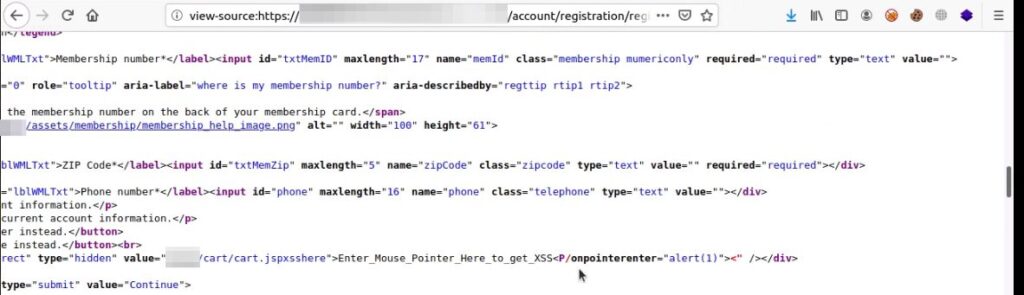
Since the reflection was occurring within the input tag’s attribute, I needed to break out of the attribute and add an event handler with an alert to trigger a popup without user interaction. The payload used was ” autofocus /onfocus=”alert(1)

But Imperva blocked this request. The next idea was to break out of both the attribute and the tag and introduce a new HTML element with an alert box, which also resulted in the request being blocked. Following this, I attempted to identify any HTML elements that were blocked through fuzzing, but unfortunately, all elements were being blocked by the WAF. The characters < and > were not blocked or filtered by the firewall, but requests like <any character were blocked.

To overcome this limitation, I tried URL-encoding characters after the < symbol, which initially didn’t work. However, this didn’t discourage me. I needed to think outside the box, and the idea of sending a request with invalid URL encoding came to mind.

After several manipulations, it turned out that if I sent an incorrect URL encoding, some characters were being converted. For instance, %5K was being converted to the symbol `P`, which opened up the possibility of crafting a new XSS payload.

I assembled the following payload:

%3C%5K/onpointerenter=alert(1)>

This payload, in the response, became:

<P/onpointerenter=alert(1)>

The final payload was:

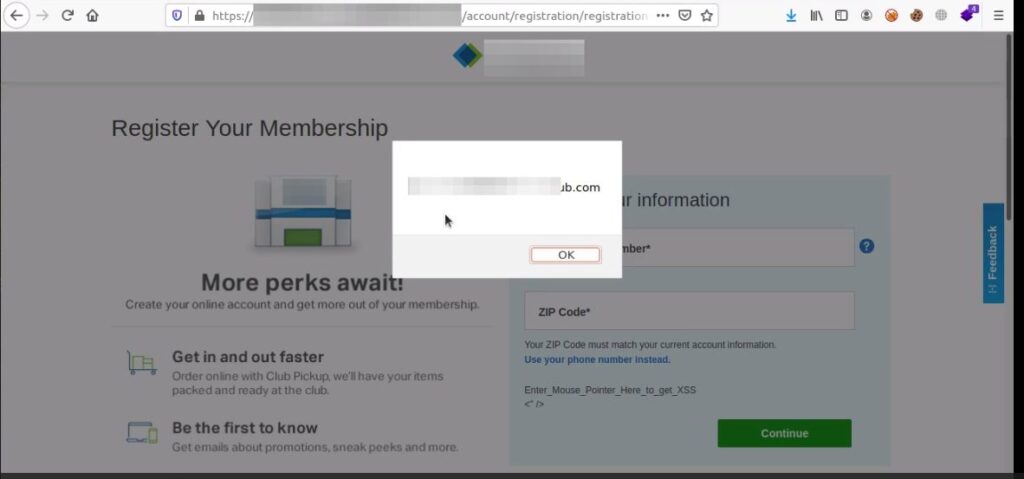
%22%3EEnter_Mouse_Pointer_Here_to_get_XSS%3C%5K/onpointerenter=alert(location)%3E%3!–

Upon hovering the mouse pointer over the text Enter_Mouse_Pointer_Here_to_get_XSS, I successfully triggered the working XSS.

Conclusion

A Web Application Firewall (WAF) can be an effective tool in mitigating Cross-Site Scripting (XSS) attacks, but it should not be relied upon as the sole line of defense. However, WAFs may not catch every possible XSS attack, especially if an attacker uses a new or highly obfuscated technique. Some attackers may find ways to bypass the rules of a WAF, leading to potential vulnerabilities. While a WAF can be a valuable component in your security posture against XSS attacks, it should be used in conjunction with other security best practices. Adopting a comprehensive approach that includes secure coding practices, regular security testing, and user awareness training will offer a more robust defense against XSS and other web application threats.

An Introduction to the Importance of Input Validation in Preventing Security Vulnerabilities

In today’s rapidly evolving digital landscape, where technology fuels both innovation and convenience, ensuring the security of our digital assets remains a critical concern. At the heart of creating robust application security lies the fundamental and most important concept of input validation.  In this blog post, we will introduce the significance of input validation and its impact on fortifying our digital defenses against a range of potential attacks. 

Understanding Input Validation 

Input validation refers to the process of scrutinizing and filtering data entered into a system, ensuring its adherence to predefined rules and constraints. Consider it as an inspector for the information we put into computer programs or websites. Its main job is to make sure that the things we type or send to these systems are safe and won’t cause any problems. Just like how we double-check our work before submitting it, input validation checks that the information we provide follows the rules and won’t harm the system. Its purpose is to prevent mistakes or malicious actors from getting inside and causing harm. 

When we don’t properly check the information we give to computer programs or websites, it can lead to trouble. Unvalidated inputs, which are like unchecked data, can create problems. For example, they might make the program show or do things it shouldn’t, or even let attackers  into the system. This can result in unauthorized access, where someone can see things they’re not supposed to, or it can lead to sensitive information being exfiltrated. Common security attacks that take advantage of this situation include injecting harmful code into the system or making it show fake information. These kinds of attacks can tamper with the program or steal important data, which is why it is crucial to properly validate inputs to keep your organization safe.

Benefits of Proper Input Validation 

Implementing strong input validation mechanisms offers a range of benefits that contribute to the overall security and reliability of computer programs and websites. One of the key advantages is improved security, as proper validation helps prevent unauthorized access, information disclosure and potential data breaches. Input validation is a crucial security measure to prevent a variety of common injection attacks, such as SQL Injection, Command Injection, and Cross-Site Scripting (XSS).

Input validation verifies that values provided by a user match a programmer’s expectations before allowing any further processing. By thoroughly checking the information entering the system, it becomes much harder for unwanted attackers to sneak in. Furthermore, input validation serves as a protective shield against various types of security attacks. It acts as a barrier and the first line of defense, preventing harmful code or malicious data from causing harm. This not only safeguards the system but also the data within it. 

Input validation also plays a crucial role in maintaining the accuracy and integrity of data. By ensuring that only valid and trustworthy information is accepted, it prevents errors or inconsistencies that could compromise the quality of data stored or processed. For example, proper input validation would check if a month entered fell between 1 and 12. Without proper validation, erroneous data could be entered or crash the application.  In essence, strong input validation is a frontline defense, fortifying applications against unauthorized access, attacks, and maintaining the reliability of the information they handle. 

Common Input Validation Techniques 

Client-Side Validation 

Client-side validation is like a friendly helper right at your fingertips when using computer programs or websites. It’s the immediate check that happens on your own device as you type information. This quick validation helps catch simple mistakes or missing details before you even submit anything. For example, If you forget to put your email address in the right format, client-side validation would give you an error message  right away. While it’s helpful for giving instant feedback and making sure you’re on the right track, it’s important to remember that it’s not the only line of defense. Stronger security measures and defense in depth are needed to ensure that everything is safe and secure on a bigger scale. 

Server-Side Validation  

Server-side validation is like a watchful guardian that stands behind the scenes when you interact with computer programs or websites. Unlike client-side validation, which happens on your device, server-side validation takes place on the actual server where the program or website is hosted. It’s an extra layer of security that ensures the information you provide meets all the necessary rules and standards, even if someone tries to bypass the client-side checks. This thorough validation helps prevent any incorrect or harmful data from entering the system, making sure that the program works as intended and that your data remains safe. Server-side validation is like the last checkpoint before any data gets processed, acting as the final safeguard against potential security risks and errors. 

Regular Expressions

Regular expressions, often called regex, are like magic patterns for searching and matching text within computer programs or websites. They’re powerful search queries that can find specific words, numbers, or patterns in a sea of information. Using a combination of characters and symbols, regular expressions allow you to define complex criteria for identifying and manipulating strings of text. Whether it’s validating email addresses, checking for phone numbers, or searching for specific keywords, regular expressions provide a versatile tool to handle a wide range of text-related tasks. While they might seem a bit cryptic at first, mastering regular expressions can unlock a whole new level of control and precision in managing and processing data. 

Whitelisting and Blacklisting 

Whitelisting and blacklisting, also now commonly referred to as “allow list” and “deny list”,  are two different approaches to managing access and permissions within computer programs or websites. Whitelisting is the most effective form of input validation and is like having a VIP list, where only the explicitly approved items or entities are allowed, and everything else is denied. It’s a strict and cautious method that ensures only trusted elements can interact with the system. On the other hand, blacklisting works like a list of things to avoid, where specific items are identified as problematic and blocked, while everything else is permitted. While both approaches have their merits, whitelisting is often considered more secure as it only permits known and verified entities, reducing the chances of unforeseen vulnerabilities. Blacklisting, while useful, can sometimes miss new or creative ways that attackers might try to breach the system. The choice between these two methods depends on the level of control and security required for a particular system or application. 

Implementing Effective Input Validation 

Implementing effective input validation is crucial to building secure and reliable computer programs or websites and considered the go-to standard for protecting against injection attacks. Best practices for input validation involves a combination of strategies aimed at ensuring that the data entering the system is safe and accurate. Firstly, adopt a comprehensive approach by validating inputs both on the client-side and server-side. Client-side validation provides quick feedback to users, while server-side validation acts as the final line of defense. Secondly, use strong validation techniques like regular expressions to define precise patterns that valid inputs must match. This prevents both common and complex input errors from sneaking through such as special characters often used in attacks. Thirdly, employ whitelisting and blacklisting techniques, reducing the risk of unexpected data causing issues. Regularly update validation rules to adapt to changing requirements and potential vulnerabilities. By consistently staying informed about the latest security trends and techniques, you can stay ahead of potential threats. In essence, combining various methods and keeping validation practices up-to-date is the key to fortifying your system against potential security vulnerabilities. 

Empowering Digital Security Through Input Validation 

In the dynamic digital world, where innovation and convenience are powered by technology, securing our digital assets stands as an essential concern. Throughout this blog post, we’ve introduced the significance of input validation and its robust impact on preventing security vulnerabilities. By adopting best practices and diligently implementing thorough validation techniques, organizations become empowered to withstand a broad spectrum of potential threats. As we navigate the line between innovation and security, input validation remains a powerful tool, if not the most important for enabling us to shape a digital landscape that can withstand evolving security challenges.

DAST for PCI DSS compliance

By mapping Dynamic Application Security Testing (DAST) to the Payment Card Industry Data Security Standard (PCI DSS) requirements, organizations can effectively strengthen their application security and ensure compliance with industry standards. DAST provides a proactive approach to security by enabling businesses to identify vulnerabilities and address them before they can be exploited, thus safeguarding cardholder data and minimizing the risk of data breaches.

Integrating DAST into the PCI DSS security framework allows organizations to adopt best practices in vulnerability management and risk mitigation. By regularly scanning and testing web applications, businesses can identify and remediate security flaws, ensuring the ongoing protection of sensitive payment card information. This proactive stance not only strengthens the overall security posture but also directly demonstrates a commitment to compliance and the protection of customer data.

Moreover, incorporating DAST as a standard practice in the Secure Development Lifecycle (SDLC) ensures that security is ingrained throughout the application development process. By detecting vulnerabilities early on, organizations can address them during the development and testing stages, reducing the potential for security issues in the final product. This approach improves the overall security of applications and reduces the need for costly remediation efforts later on.

By integrating DAST into their security practices, organizations enhance their overall security posture, maintain compliance with PCI DSS, and build trust with customers. This approach ensures the effective protection of cardholder data and minimizes the risk of data breaches, contributing to a secure and reliable payment card environment.

PCI DSS details 

PCI DSS is a set of security standards designed to protect cardholder data and ensure the secure handling, storage, and transmission of payment card information by organizations that accept, process, or store such data. 

PCI DSS consists of 12 high-level requirements that organizations must meet to ensure the security of cardholder data. These requirements are as follows:

1. Install and maintain a firewall configuration to protect cardholder data.
2. Do not use vendor-supplied default passwords or security parameters.
3. Protect stored cardholder data.
4. Encrypt transmission of cardholder data across open, public networks.
5. Use and regularly update antivirus software or programs.
6. Develop and maintain secure systems and applications.
7. Restrict access to cardholder data by business need-to-know.
8. Assign a unique ID to each person with computer access.
9. Restrict physical access to cardholder data.
10. Track and monitor all access to network resources and cardholder data.
11. Regularly test security systems and processes.
12. Maintain a policy that addresses information security for all personnel.

These requirements provide a framework for organizations to protect sensitive cardholder data and maintain a secure environment for handling payment card transactions.

PCI DSS is not a regulation in the traditional sense; rather, it is a set of security standards established by the Payment Card Industry Security Standards Council (PCI SSC). These standards are designed to ensure the protection of cardholder data and reduce the risk of data breaches within the payment card industry. 

Compliance with PCI DSS is mandated by card brands and enforced by payment card acquirers and processors, making it a crucial requirement for organizations that handle payment card information. By adhering to PCI DSS, businesses demonstrate their commitment to maintaining a secure environment for processing, storing, and transmitting cardholder data.

Where does DAST fit in? 

DAST aligns to the 6th PCI DSS requirement; developing and maintaining secure applications. In PCI-speak this means to maintain a Vulnerability Management Program. PCI defines vulnerability management as the process of systematically and continuously finding weaknesses in an entity’s payment card infrastructure system. 

Specific to DAST,  PCI DSS Requirements 6.1 and 6.3 states that information security be incorporated into the SDLC. 

6.1 Establish a process to identify security vulnerabilities, using reputable outside sources, and assign a risk ranking (e.g. “high,” “medium,” or “low”) to newly discovered security vulnerabilities.
6.3 Develop internal and external software applications (including web-based administrative access to applications) securely, as follows: In accordance with PCI DSS (for example, secure authentication and logging)Based on industry standards and/or best practices Incorporating information security throughout the software-development life cycle

By using DAST, organizations shift application security left by test early, often and throughout the SDLC. DAST can help developers during unit testing  and throughout the SDLC by identifying vulnerabilities and security weaknesses in the application’s code. 

DAST scans the application in its running state, simulating real-world attacks, and provides immediate feedback to developers, enabling them to address security issues early in the development cycle and improve the overall security of the application. 

Here’s how DAST can assist with PCI DSS compliance:

Vulnerability Detection: DAST tools scan web applications for common security vulnerabilities such as cross-site scripting (XSS), SQL injection and insecure session management. By identifying these vulnerabilities, organizations can remediate them before they can be exploited by attackers and potentially compromise cardholder data.

Continuous Monitoring: PCI DSS requires regular vulnerability assessments and security testing. DAST tools can be employed to perform ongoing scans and tests in the CI/CD ensuring that vulnerabilities are promptly detected and addressed. Continuous monitoring helps organizations stay compliant with the PCI DSS requirement for regular security testing.

Compliance Reporting: DAST tools often provide comprehensive reports that detail the vulnerabilities discovered during the scanning process. These reports can be used as evidence of compliance with PCI DSS requirements for vulnerability assessments. They can demonstrate that regular testing is being conducted and identify any security gaps that need to be addressed.

Secure Development Lifecycle (SDLC): PCI DSS encourages the integration of security throughout the software development lifecycle. DAST can be incorporated into the SDLC to identify vulnerabilities early in the development process. By scanning applications during development and testing stages, organizations can catch and remediate security issues before they become more expensive and time-consuming to fix in production.

In summary, DAST is an important element for achieving PCI DSS compliance. By actively identifying vulnerabilities, offering continuous monitoring, generating compliance reports, supporting the SDLC, and assisting in risk management, DAST strengthens an organization’s security posture. Its role in enhancing security measures, safeguarding cardholder data, and ensuring adherence to PCI DSS requirements is pivotal. 

Lastly, DAST serves as an essential component within a comprehensive security strategy, enabling organizations to maintain a robust and compliant payment card environment, instilling trust among customers and stakeholders.

Mobile App Security Testing: Tools and Best Practices

What Is Mobile Application Security Testing? 

Mobile application security testing is the process of assessing, analyzing, and evaluating the security posture of mobile applications to identify potential vulnerabilities, weaknesses, and risks. 

This testing aims to ensure the confidentiality, integrity, and availability of data and functionality in mobile applications, protecting them from unauthorized access, data breaches, and malicious activities. 

Techniques used in mobile application security testing include static analysis, dynamic analysis, penetration testing, and code review. This process helps developers to identify and address security flaws in their applications, ensuring a secure and reliable user experience across various platforms, such as Android and iOS.

In this article:

Why Is Mobile App Security Testing Important? 

Mobile app security testing is important for several reasons:

  • Data protection: Mobile apps often handle sensitive user data, such as personal information, financial details, or business data. Ensuring the security of this data is crucial to protect users from identity theft, fraud, and data breaches.
  • Compliance with regulations: Many industries have strict regulations regarding data privacy and security, such as GDPR, HIPAA, and PCI DSS. Mobile app security testing helps ensure compliance with these regulations, avoiding potential legal issues and financial penalties.
  • Reputation and trust: A secure app helps build trust with users and maintain a positive brand reputation. Security breaches can lead to loss of user trust, negative publicity, and potentially significant financial losses.
  • Competitive advantage: A secure app can differentiate itself in a crowded market, attracting users who prioritize privacy and security.
  • Reduced costs: Identifying and fixing security issues during the development process is more cost-effective than addressing them after the app is released. Mobile app security testing can help prevent costly security breaches and reduce the need for post-release patches or updates.
  • Secure development practices: Regular security testing encourages a security-focused development mindset, leading to the creation of more secure apps in the long term.
  • Device security: Mobile apps can expose not just the app itself, but also the device and other connected systems to security threats. Ensuring app security helps protect the overall device ecosystem.

What Are Mobile Application Security Testing Tools? 

Mobile application security testing tools are software programs or platforms designed to help developers and security professionals identify security vulnerabilities and weaknesses in mobile applications. These tools can be used to test mobile apps on different platforms, such as Android and iOS, and cover various aspects of security, including data protection, access control, and secure communication.

These mobile application security testing tools can help developers and security professionals identify and address security vulnerabilities in their mobile apps, ensuring a more secure user experience and protecting sensitive data.

What Features Should a Mobile App Security Testing Tool Include? 

A mobile app security testing tool should include a range of features to effectively identify and address potential security vulnerabilities. Key features to look for include:

  • Platform support: The tool should support major mobile platforms like Android and iOS, as well as any specific platforms relevant to your app.
  • Static analysis: The tool should perform static analysis by examining the source code or binary files of the app to identify potential security issues without actually executing the code.
  • Dynamic analysis: The tool should perform dynamic analysis by monitoring the app’s behavior during runtime to identify security vulnerabilities that may not be apparent during static analysis.
  • Automated testing: A good tool should automate common security testing tasks, saving time and resources while ensuring consistent and comprehensive testing.
  • Manual testing capabilities: The tool should also support manual testing, allowing security testers to perform in-depth analysis and penetration testing for more complex or targeted security concerns.
  • Integration with development tools: The tool should easily integrate with common development tools, such as integrated development environments (IDEs), build systems, and continuous integration/continuous deployment (CI/CD) pipelines, to streamline the development and testing process.
  • Customizable policies and rules: The tool should allow customization of security policies and rules to address specific organizational requirements or industry regulations.
  • Vulnerability management: The tool should provide a clear, actionable report on identified vulnerabilities, including information on the severity of the issue, potential impact, and recommendations for remediation.
  • Regular updates: A good security testing tool should be regularly updated to address new threats, vulnerabilities, and changes in the mobile app security landscape.
  • User-friendly interface: The tool should be easy to use and understand, enabling both technical and non-technical team members to participate in the security testing process effectively.
  • Scalability: The tool should be able to handle the testing of multiple apps or large, complex apps without performance issues or limitations.

Related content: Read our guide to web application scanning 

5 Best Practices for Security Testing in Mobile Apps 

1. Supply Chain Tests

Supply chain testing is a crucial aspect of mobile app security testing, as it helps identify vulnerabilities and risks associated with third-party components, such as libraries, frameworks, and APIs. 

First, ensure that you only use trusted, well-maintained, and up-to-date components from reputable sources. Perform a thorough assessment of third-party components to identify any known vulnerabilities or weaknesses. 

Additionally, monitor and track the components throughout the development lifecycle to ensure they remain secure and updated. It is essential to establish a robust governance process that includes policies, procedures, and guidelines for selecting, integrating, and managing third-party components within your mobile app development process.

2. Authentication and Authorization Testing

Authentication and authorization testing focuses on ensuring that only authorized users can access the app’s features and data. This involves verifying that the app implements strong authentication mechanisms, such as multi-factor authentication (MFA) or biometric authentication, and enforces password policies like complexity, length, and expiration. 

Authorization testing involves assessing the app’s access controls to ensure that users are granted the appropriate permissions based on their roles, and that they cannot access restricted resources or perform unauthorized actions. Regularly testing the effectiveness of your app’s authentication and authorization mechanisms helps maintain the confidentiality and integrity of sensitive data and reduces the risk of unauthorized access.

3. Encryption Testing

Encryption testing is essential for ensuring that sensitive data transmitted, stored, or processed by the app is properly protected against unauthorized access or tampering. This involves verifying that the app uses strong encryption algorithms and protocols, such as AES-256 or TLS 1.3, and that encryption keys are securely managed and stored. 

It is crucial to test encryption at various stages, including data at rest, data in transit, and data in use. Regularly reviewing and updating your app’s encryption implementation helps ensure that it remains resistant to new threats and vulnerabilities, safeguarding sensitive data and maintaining user trust.

4. Using Continuous Integration for Your Tests

Integrating security testing into your continuous integration (CI) process allows for ongoing, automated testing of the app throughout the development lifecycle. This approach helps identify and remediate security vulnerabilities early in the development process, reducing the costs and time associated with addressing them later. 

Implementing CI for security testing involves incorporating SAST, DAST, and IAST tools into your CI/CD pipeline, ensuring that security tests run automatically with each code commit or build. By regularly reviewing and refining the CI process and security test suite, developers can continuously improve the app’s security posture and maintain a security-focused development mindset.

5. Use of SAST, DAST, and IAST Techniques

Integrating static application security testing (SAST), dynamic application security testing (DAST), and interactive application security testing (IAST) techniques in the mobile app security testing process can provide comprehensive coverage and insight into potential vulnerabilities. 

SAST involves analyzing the source code or binary files of the app to identify security issues without execution. DAST involves monitoring the app’s behavior during runtime to identify vulnerabilities that may not be apparent during static analysis. 

IAST combines aspects of both SAST and DAST, providing real-time feedback on potential security risks during runtime, while also examining the code. Using these techniques in tandem allows for the identification and remediation of a wide range of vulnerabilities, ensuring a more secure mobile app.

Security Testing with Bright Security

Bright Security helps address the shortage of security personnel, enabling AppSec teams to provide governance for security testing, and enabling every developer to run their own security tests. 

NexPloit empowers developers to incorporate an automated Dynamic Application Security Testing (DAST) solution into their unit testing process so they can resolve security concerns as part of their agile development process. Bright’s DAST platform integrates into the SDLC fully and seamlessly: 

  • Test results are provided to the CISO and the security team, providing complete visibility into vulnerabilities found and remediated
  • Tickets are automatically opened for developers in their bug tracking system so they can be fixed quickly

Bright Security can scan any target, whether Web Apps, APIs (REST/SOAP/GraphQL) to help enhance DevSecOps and achieve regulatory compliance with our real-time, false positive free actionable reports of vulnerabilities. In addition, our ML-based DAST solution provides an Automated solution to identify Business Logic Vulnerabilities.

Learn more about Bright Security testing solutions

Web Application Testing: Tips & Best Practices

What is Web Application Testing?

Web application testing is a process that ensures the application is ready to launch without safety concerns and reliability issues. Our main point of concern in web application testing is making sure that the security is up to the standard as security becomes a bigger and bigger issue on the internet with each passing day. 

Even more importantly, properly testing your application could potentially save you thousands upon thousands of dollars, as you won’t have to deal with constant pushbacks due to security issues.

Top Tips for Successfully Performing Web Application Testing

Regardless of the size of your application, web application testing is absolutely essential in making sure you are ahead of the curve in optimizing your code. 

The first step is always to perform an in-depth analysis of your application, identify weak points, and move on from there. This will give you a general idea of the scope you are working with and you will be able to prioritize testing based on the initial test results. 

Automation is not enough

Even though automated testing is taking over nowadays, it’s usually a good idea to use some manual testing as well in order to get the full picture. The combination of the two is usually the winning approach, and as such, you will not have doubts and concerns over potential holes in your application knowing that both the human and the machine had a good hard look at it. 

Input And Output Are Crucial

For most applications, input handlers are quite often the weak point that gets exploited in all sorts of ways. This is why you have to pay special attention to both input & output in your application’s processes and test them heavily in order to make sure that nobody unauthorized can enter your application through these channels. 

Learn more in our detailed guide to penetration testing tools.

Think Like an Attacker

If you ever watched a buddy cop movie, you probably heard of the saying “think like a criminal”. Well, in this case, it applies perfectly! When testing your application, try to put yourself in a hacker’s mindset, and figure out what could be the main points of attack on your app. This will give you a different perspective, and often the more correct one, when dealing with potential vulnerabilities.

Related content: Read our guide to penetration testing in aws.

Have Bright Do It For You

If you try to follow all the correct steps in web application testing, it would probably get you a long way, but it would also take up a lot of your precious time. As we all know, time is money nowadays, which is why you probably can’t afford to spend months testing the security of your application before launching it.

This is where Bright comes in – we specialize in finding and remediating all vulnerabilities that your web application might come across. Try us out now – your application will be thanking us!

Mocha Testing: 4 Key Features and a Quick Tutorial

What is Mocha Testing Framework?

Mocha.js is an open source JavaScript unit testing framework that runs in Node.js and executes tests directly in the browser. Mocha supports most assertion libraries, but is typically used in conjunction with Chai for Node.js. 

Its key capabilities include:

  • Ability to test synchronous and asynchronous code with a simple interface.
  • Flexible and accurate reporting
  • Ability to run tests sequentially while detecting uncaught exceptions and mapping them to test cases.
  • Ability to run functions in a specific order and log the results to a terminal window.
  • Automatically cleaning software state so test cases run independently of each other.

In this article:

4 Mocha Features and Functions

1. Configuring Mocha

You can configure Mocha using configuration files in several formats:

  • JavaScript—you can create a .mocharc.js file in your project directory and export an object with your configuration using module.exports.
  • JSON—you can create a .mocharc.json file in your project directory. Mocha allows adding comments in this file, even though they are normally not valid in JSON.
  • YAML—you can create a .mocharc.yaml file with your configuration in your project directory.
  • package.json—you can provide Mocha configuration by adding a mocha property to your package.json manifest.

2. Mocha Hooks

Mocha lets you set up code that defines preconditions for a test, and code that automatically cleans up after your tests. You can do this using synchronous or asynchronous hooks. The most commonly used hooks in Mocha are: before(), after(), beforeEach(), and afterEach().

The basic syntax for Mocha hooks looks like this. You provide an optional description and a function to run at a specified time during the test lifecycle.

before("hook description", function () {
   // runs once before the first test in the block
});

after("hook description", function () {
// runs once after the last test in the block
});

3. Mocha Test Features

Mocha lets you specify in which circumstances tests should or should not be executed. There are three ways to do this:

  • Exclusive tests—append .only() to a function to run only the specified suite or test case.
  • Inclusive tests—append .skip() to a function to ignore certain suites or test cases.
  • Pending tests—test cases that do not have a callback are still included in the test results, but marked as “pending”, to remind the team that someone needs to write these tests. Pending tests are not considered failed. 

4. Mocha Parallel Tests

Mocha provides the –parallel flag, which allows you to run tests in parallel to improve performance. However, there are a few important considerations you should be aware of:

  • Reporter limitations—some reporters do not work when tests are run in parallel, because they need to know in advance how many tests Mocha plans to run (which is not available in parallel mode). In particular, markdown, progress, and json-stream will not work when tests run in parallel. 
  • Exclusive tests not supported—you cannot use .only() when running tests in parallel mode.
  • No guarantee on test order—when running in parallel, Mocha does not guarantee the order in which tests run, and which worker will process them. Options like -file, -sort, and -delay will therefore not work.
  • Test duration—when you run tests in parallel, it might take more time to perform certain operations, and typically more time will be needed to run individual tests.

Related content: Read our guide to cypress testing.

Mocha Tutorial: Unit Testing with Mocha and Chai

Chai is an assertion library that comes in handy when unit testing with Mocha. Tests can use functions from Chai to check the expected output of functions against what it is currently returning.

Installing Node.js and Mocha

To install Node.js and Mocha on the machine:

  1. Download and install Node.js with the package manager npm from this official link.
  2. Check for successful installation of Node.js and npm through the following command. It shows the installed versions of both technologies.

node -v
npm -v

  1. Use npm to install Mocha and Chai through the following command. The –save-dev flag installs required dependencies of the libraries.

npm install mocha --save-dev
npm install chai --save-dev

Setting Up Test Files And Folders

To create and organize test files:

  1. Create a dedicated folder called /tests in the project’s root directory. This folder will contain all the test module files and code functions.
  2. The main codebase files should be in the project’s root directory. This tutorial creates a demo multiplication function for testing purposes, shown below. This function is in a file called multiply.js.

function multiply(number_1, number_2){
    return number_1 + number_2;
}

  1. Create your tests in the /tests directory. The tutorial uses a sample test function in a file named multiplyTest.js that tests the demo multiplication function.

var assert_function = chai.assert;
describe("multiply", function() {
  it("multiplies numbers", function() {
       assert_function.equal(multiply(6, 3), 18);
  });
});

The assertion here specifies what inputs to pass for multiplication and what output to check for.

Related content: Read our guide to junit testing.

Running Tests

To run your tests and see results on a test page:

  1. Create an HTML page where you can run tests and see the outcome through a browser. Code for a sample test page is shown below.

<!DOCTYPE html>
<HTML>
  <head>
    <title>Demo Testing Page With Mocha</title>
    <link rel="stylesheet" href="node_modules/mocha/mocha.css">
  </head>
  <body>
    <div id="mocha_div"></div>
    <script src="node_modules/mocha/mocha.js"></script>
    <script src="node_modules/chai/chai.js"></script>
    <script>mocha.setup('bdd')</script>
    <script src="tests/multiplyTest.js"></script>
    <script src="multiply.js"></script>
    <script>
      mocha.run();
    </script>
  </body>
</html>

This HTML page uses Mocha’s provided CSS files. The Mocha.run() line runs Mocha and the scripts we have specified. The code with setup() specifies that test functions use the Behavior-Driven Development (BDD) approach. This approach requires naming the function and describing it. Then, the expected behavior of the function is specified for testing.

  1. Put the HTML page code above in a file title testPage.html and place it in the root directory.
  2. Go to a browser and open testPage.html. It will run Mocha, Chai, and the test scripts specified in the HTML code. The outcome on the HTML page is categorized according to test functions.

Note: This tutorial shows sample code that describes how to arrange files and write tests with Mocha and Chai. However, when working on production-level code, one should ensure that their test functions are comprehensive and offer optimal coverage. Always check the expected behavior of the code in different environments and edge cases. 

Security Unit Testing with Bright Security 

Bright is a developer-first Dynamic Application Security Testing (DAST) scanner, the first of its kind to integrate into unit testing, letting you shift security testing even further left. 

You can now start to test every component / function at the speed of unit tests, baking security testing across development and CI/CD pipelines to minimize security and technical debt, by scanning early and often, spearheaded by developers. 

With NO false positives, start trusting your scanner when testing your applications and APIs (SOAP, REST, GraphQL), built for modern technologies and architectures. 

Sign up now for a free account or read our docs to learn more.

Deserialization: How it Works and Protecting Your Apps

What Is Deserialization?

Insecure deserialization vulnerabilities involve the use of unknown or untrusted data and can result in attacks such as denial of service (DoS), malicious code execution, bypassing authentication measures or other abuses of application logic.

Deserialization is the process of extracting data from files, networks or streams and rebuilding it as objects—as opposed to serialization which involves converting objects to a storable format. A serialized object may be structured as text (i.e. YAML, JSON, XML, etc). 

Both serialization and deserialization are considered safe web application processes and are commonly used. However, deserialization of user inputs is considered a security misconfiguration, and can have serious consequences.

If the deserialization process is not adequately secured, attackers can exploit it to inject a malicious serialized object into an application, where the target computer deserializes the malicious data. Attackers can use insecure deserialization as an entry point to a system, from which they can pivot to further attacks.

This is part of an extensive series of guides about Cybersecurity.

In this article:

Types of Insecure Deserialization

The three main types of insecure deserialization attacks are:

  • Blind deserialization—these attacks occur behind a restricted system or network protected by a firewall and benefiting from robust security management policies. The attacker exploits the Java payload or manipulates a transformer chain to enable remote code execution (RCE).
  • Asynchronous deserialization—these attacks involve storing serialized gadgets in a database. When target web applications initiate deserialization, a chain of gadgets programmed to manipulate the deserialization process is executed in a JMS broker client library. JMS libraries can be vulnerable, including Oracle OpenMQ, IBM WebSphereMQ, Apache QPID JMS, Pivotal RabbitMQ and Oracle Weblogic.
  • Deferred-execution deserialization—these attacks involve the execution of a gadget chain (or chains) into vulnerable applications after the deserialization process. A gadget chain is a sequence of return-oriented programming (ROP) gadgets ending in return-from-procedure (RET) instructions. This allows an attacker to bypass any non-executable protections like kernel-code cohesion and read-only memory protections. ROP gadgets don’t require injecting binary code, so an attacker only needs to link an executable address to the required data arguments to enable code execution. 

Deserialization Attack Examples

The following examples were shared in the OWASP project’s deserialization advisory

Deserialization Using JFrame Object

A deserialization vulnerability was discovered in Adobe BlazeDS, a Java remoting and web messaging technology, and added to the Common Vulnerabilities and Exposures database as CVE-2011-2092. It has since been patched. 

Vulnerable versions of BlazeDS allow users to specify classes and properties which BlazeDS applications should deserialize. Attackers used this capability to create a JFrame object on a target BlazeDS server, which causes the JVM to exit when a user closes it. The JFrame could be used to run other malicious code on the target server.

Reading Object from Untrusted Source

The following Java code reads an object, without validating its source or sanitizing its contents, and casts it to an object. Because the casting operation happens only after deserialization, attacks may occur during the deserialization process. 

Attackers can customize deserialization protocols—for example, by overriding the readObject() function of the Java Serializable class—to achieve remote code execution in most Java applications.

Denial of Service Attack via Deserialization Loop

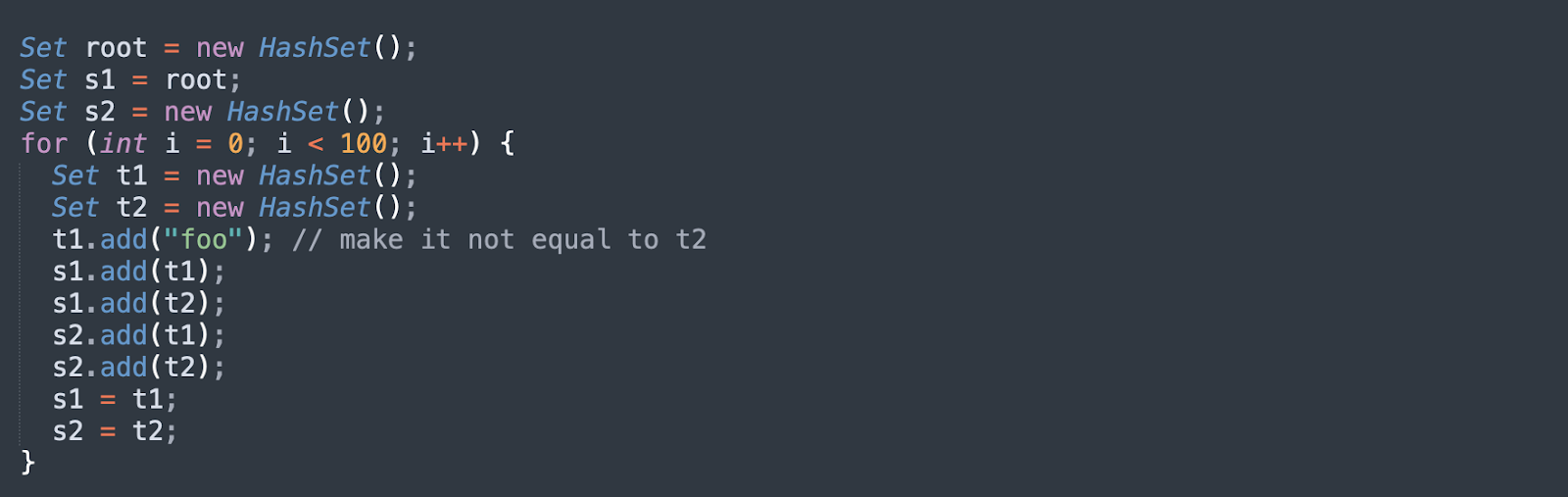
The following code performs a denial-of-service (DoS) attack that leverages deserialization. The root object is crafted in such a way that its members are linked together in a loop. If the application attempts to deserialize this object, the JVM will run through a recursive compute graph which never ends, and will consume 100% of CPU resources. 

How to Protect Applications Against Insecure Deserialization

There is no single solution for protecting your web applications against every kind of insecure deserialization attack. Even if you prevent deserialization of an application according to its own logic, this will not eliminate the threat altogether, given that many other components in your application stack (such as an external library) will still use a deserialization process.  

Using a WAF

There are some web application security tools that can help protect against insecure deserialization attacks, such as a web application firewall (WAF), whitelisting and blacklisting. However, each security solution also has its disadvantages, given the requirement for significant manual intervention (such as pentesting) and complex management. 

For example, a WAF is effective in restricting HTTP traffic, but it will generate large volumes of false positives. It can be difficult and expensive to maintain a WAF throughout the lifecycle of an application. Approaches such as whitelisting and blacklisting to restrict network traffic require constant maintenance and policy updates. Blacklists can produce dangerous false negatives, while whitelists can produce time-consuming false positives. 

Avoid native formats

Another risk reduction strategy is to avoid the use of native formats for deserialization—for example, you can use data-only or language-agnostic formats to make it harder for attackers to exploit deserialization logic. The only way to ensure complete protection against insecure deserialization attacks is to reject any serialized objects from an unvetted source (or to accept only the serialized objects derived from a primitive data type).

Using RASP

Runtime application self-protection (RASP) is an important DevSecOps component and embeds security in the software. RASP can detect and block attempted exploits, including insecure deserialization. It is fixed as a server-side process in the application, it monitors application behavior to identify, prevent and mitigate attacks, with no manual intervention required.    

How to Prevent Insecure Deserialization Vulnerabilities

The deserialization of user input potentially enables severe exploits that are difficult to protect against, so you should generally avoid it unless strictly necessary. In cases that do require deserialization of data from an unknown or untrusted source, you should incorporate additional security measures to verify that the data has not been manipulated by an attacker:

  • Verify data integrity by implementing a digital signature, although this only works if checks are carried out before the deserialization process begins.
  • Avoid using generic deserialization methods where possible. Serialized data often includes private fields containing sensitive information, so it is recommended you control the exposure of various fields. You can do this by creating your own serialization method that is class-specific.
  • Focus on sanitizing inputs. It is not realistic to plug every gadget chain, given the likely complexity of the cross-library dependency structure. Your application could be vulnerable at any given time, given the potential for corruption exploits of memory, which may be publicly documented. Always focus your prevention efforts on the actual vulnerability that needs to be addressed – deserialization of user input. 

Related content: Read our guide to deserialization in java.

See Additional Guides on Key Cybersecurity Topics

Together with our content partners, we have authored in-depth guides on several other topics that can also be useful as you explore the world of cybersecurity.

Device42

Authored by Faddom

API Security

Authored by Radware

DAST

Authored by Bright Security