SolarWinds Vulnerability: How to Protect Your Organization

The SolarWinds attack was one of the largest nation-state supply chain attacks we have seen to date. The attack originated from SolarWinds’ Orion network management software and was likely carried out by nation-state adversaries.

The fallout of this hack affected thousands of global organizations, including U.S. federal agencies like the Treasury Department and the Pentagon, and a majority of the Fortune 500. 

SolarWinds Orion Vulnerabilities

According to the official SolarWinds Security advisory, SolarWinds Orion was originally attacked via two vulnerabilities, known as SUNBURST and SUPERNOVA.

What is SUNBURST?

SUNBURST is the main vulnerability used to carry out the SolarWinds supply chain attack. SUNBURST is a vulnerability inserted into the SolarWinds Orion Platform, versions 2019.4 HF 5, 2020.2 unpatched, and 2020.2 HF 1. The vulnerability, when active, allows attackers to compromise the server running the Orion Platform. 

Additional components of the SUNBURST attack mechanism are:

  • SUNSPOT – a sophisticated specially-designed malware that inserts SUNBURST malicious code into Orion during the build process. 
  • TEARDROP and RAINDROP – malware loaders that are used as secondary tools by the SUNBURST backdoor.

What is SUPERNOVA?

SUPERNOVA is malware that was not delivered via the SolarWinds build process as a supply chain attack, but rather, distributed via a vulnerability in the Orion product itself. It has two components:

  • A malicious webshell .dll file named “app_web_logoimagehandler.ashx.b6031896.dll” – designed by the attackers to operate as part of SolarWinds Orion and appear to be part of the product. 
  • An exploited vulnerability in the Orion Platform that enables deployment of the malicious code. Recent updates of the Orion Platform have resolved this vulnerability, so the malware can no longer be deployed.

Additional SolarWinds Vulnerabilities Discovered After the Attack

Cybersecurity researchers at Trustwave have discovered additional vulnerabilities in the Orion Platform, in the months after the initial SolarWinds attack. There is no evidence these vulnerabilities have been exploited by attackers. They are:

  • CVE-2021-25275 – a vulnerability in the interface between Orion and Microsoft Message Queue (MSMQ), which can allow attackers to access secured credentials and gain control over a Windows server running Orion.
  • CVE-2021-25274 – could allow an unauthenticated user to inject malicious code and gain complete control to the Windows operating system on an Orion server.
  • CVE-2021-25276 – vulnerability in the Serv-U FTP utility, allowing anyone who logs in either locally or via RDP to create an admin account and gain full access to the server and attached networks.

Is Your Data at Risk from the SolarWinds Hack?

Thankfully, not all SolarWinds customers are vulnerable to this hack. Only users of the Orion software platform are affected, and specifically only those that loaded the March 2020 update – SolarWinds has confirmed that 18,000 customers have done this.

Specifically, the affected versions are SolarWinds Orion Platform versions 2019.4 HF5, 2020.2 with no hotfix installed, and 2020.2 HF 1. 

Please note that:

  • Not all organizations affected by the vulnerability were hacked. The attackers did not hack all organizations that had the vulnerability, apparently starting with the most valuable targets. 
  • Some organizations were affected without having the vulnerable SolarWinds version, or even if they did not use SolarWinds Orion at all. The same threat actors compromised other software from Microsoft (the Zerologon vulnerability) and VMware (the SUNBURST trojan was discovered in VMware Access and VMware Identity Manager).

How to Protect Your Organization

There are some immediate steps you can take to protect your organization if you’ve been compromised by the SolarWinds attack. These guidelines were provided by the Center for Internet Security (CIS):

  • Test your systems and immediately apply the relevant SolarWinds updates to your vulnerable systems. For example, update 2019.4 HF 5 to version 6, update earlier versions of 2020.2 to 2020.2.1 HF 2, or apply the CVE-2020-10148 security patch (provided by SolarWinds) if you want to continue running 2018.2 HF 6, 2018.4 HF 3 or 2019.2 HF3.
  • Monitor Microsoft 365 Cloud, because FireEye researchers have discovered that SolarWinds attackers can move laterally from local networks into the Microsoft 365 cloud. Learn more in the FireEye white paper. You can check your Microsoft 365 environment for signs of attack using the Azure AD Investigator.

In addition, pay special attention to user behavior that can increase security risk:

  • Run any software as a regular user without administrative privileges, to minimize the impact of attack.
  • Raise awareness so users don’t visit untrusted sites or click on links from an unknown or untrusted source.
  • Educate users on the risks related to hypertext links or email attachments provided by an untrusted source.
  • Apply a least privilege strategy across your systems and services.

Remediating Affected Systems

CIS recommends the following additional steps your organization should take to remediate systems affected by the SolarWinds attack.

Take the following steps to identify if your environment has malicious traffic that could be related to SolarWinds malware:

  1. Examine network traffic since March 2020 and look for any activity with the domain avsvmcloud.com.
  2. If you find any such traffic, look for unexplained external communications from SolarWinds systems.
    1. If there is no additional abnormal traffic, follow the steps for SolarWinds products not affected by the attack below.
    2. If there is additional abnormal traffic, follow the steps for SolarWinds products with malicious traffic below.
  3. If external communications to avsvmcloud.com ceased on 14 December 2020, and this was not the result of actions by security staff, this means the environment is compromised – follow the steps for SolarWinds products with malicious traffic.
  4. In addition, conduct an audit of all systems looking for default credentials and new accounts created; perform an organizational-wide password/credential reset.

Steps for SolarWinds Products Not Affected by the Attack

If your organization is running SolarWinds products that were not affected by the attack, or products that were affected, but you did not find malicious traffic, follow these steps:

  1. Download and install the latest software updates from the SolarWinds portal, and ensure servers running SolarWinds have other security updates and patches.
  2. Apply CIS Benchmarks hardening recommendations for all SolarWinds systems. CIS-CAT Pro is a free tool that can provide hardening recommendations for SolarWinds.
  3. Monitor the environment for malicious communication or suspicious activities.

Steps for SolarWinds Products with Malicious Network Traffic

If you have a product affected by the malicious SolarWinds code and you have seen network traffic both to the malicious domain avsvmcloud.com and an additional command and control destination, follow these steps:

  1. Perform forensic investigation of system memory and host operating systems on any system hosting infected Orion versions
  2. Analyze network traffic for additional malicious activity
  3. Examine SolarWinds host systems for new users, new service accounts, new processes running, or other signs of persistence. Remove all accounts and persistence mechanisms created by attackers.
  4. After forensic investigation, power down or disconnect all infected SolarWinds Orion instances from the network
  5. Add firewall rules blocking traffic from hosts outside of the environment where Orion software is installed

Additional Recommendations

In addition to the above steps, CISA recommends:

  1. Reimaging and rebuild affected systems
  2. Restoring firmware of all network infrastructure managed by SolarWinds to previous known good versions
  3. Resetting credentials across the enterprise for user accounts, SNMP, SSH keys, and certificates, and forcing multi-factor authentication (MFA)
  4. Applying hardened configuration for all affected systems
  5. Following the additional guidelines in the CIA document: Uncovering and Remediating Malicious Activity.

Checking your Supply Chain Web and API Application Security

Currently, there is no specific evidence that indicates the SolarWinds hack involved exploiting a specific web application vulnerability, however there is a possibility especially with exposed APIs. 

The hack involved gaining upload access to a file server which can also be carried out via a vulnerable admin panel. Weak points in your cybersecurity can be exploited to other connected applications and so it is imperative to check not only your own products, but also that of any and all third-party products. 

Bright is a dynamic application security testing (DAST) solution that should be part of your toolset to detect and remediate vulnerabilities across your applications and APIs to mitigate this risk. Contact us now to learn more and request a demo

SQL Injection in PHP Web Applications

What is PHP SQL Injection?

When an attacker exploits a PHP application via an SQL Injection, they can gain access to the application’s database and make the application execute unauthorized injected SQL commands to control the behavior of the application. 

In this article you will learn:

How does PHP SQL Injection work?

To exploit an SQL injection vulnerability in a PHP application, an attacker can use several types of SQL injections. For example, they could enter data in the form fields of the application, which is then passed to the database for processing. If the application can’t properly validate the form input data, and accepts the input without sanitizing it, the attacker can inject SQL statements via these form fields and delete, copy, or modify the contents of the database.

In this blog post we will focus on a few select SQL injection types. More are covered in depth in this blog post – [link].

Common variants of SQL injection include:

  • SQL injection based on user input
  • SQL injection based on cookies
  • SQL injection based on HTTP headers
  • Second-order SQL injection

A successful SQL injection attack on a PHP application can enable an attacker to:

  • Steal credentials
  • Access databases
  • Alter data
  • Access network(s)  

Code Examples of SQL Injection in PHP

Let’s have a look at these examples of SQL Injection:

Making Superusers (PostgreSQL)

<?php
$offset = $argv[0]; // beware, no input validation!
$query  = "SELECT id, name FROM products ORDER BY name LIMIT 20 OFFSET $offset;";
$result = pg_query($conn, $query);
?>

The above example is used to split a result set into pages. When someone clicks on the ‘next’ or ‘prev’ link, the $offset is encoded into the URL. While the script is expecting a decimal number, an attacker exploit this by appending a urlencode()’d form of the following code to the URL:

0;
insert into pg_shadow(usename,usesysid,usesuper,usecatupd,passed)
    select 'crack', usesysid, 't','t','crack'
    from pg_shadow where usename='postgres';
--

When executed, this script would provide the attacker a superuser access. The 0; in the code example above is there to supply a valid offset to the original query in order to terminate it.

Listing Passwords

An easy way to gain passwords is to bypass your search result pages. An attacker only needs to check if there are any submitted variables that are not properly handled, used in SQL statements.

Customisation of WHERE, ORDER BY, LIMIT and OFFSET clauses in SELECT statements can be achieved by setting filters commonly in a prior form.

Databases that support the UNION construct are particularly at risk, where an attacker could attach an entire query to the original in order to list passwords from an arbitrary table. As a result, it is highly recommended that encrypted password fields are used.

<?php
$query  = "SELECT id, name, inserted, size FROM products
           WHERE size = '$size'";
$result = odbc_exec($conn, $query);
?>

The attacker can combine the static part of the query with another SELECT statement that will reveal all passwords:

'
union select '1', concat(uname||'-'||passwd) as name, '1971-01-01', '0' from usertable;
--

An attractive target for an SQL Injection attack can also be the SQL UPDATE’s. As with SELECT, an attacker can chop and append a new query to the UPDATE statement, however the attacker might change the SET clause. To successfully manipulate the query, the attacker would require some schema information, which they could get by examining the form variable names, or simply via brute force.

Attacking the database host operating system (MSSQL Server)

<?php
$query  = "SELECT * FROM products WHERE id LIKE '%$prod%'";
$result = mssql_query($query);
?>

If an attacker submits the value a%’ exec master..xp_cmdshell ‘net user test testpass /ADD’ — to $prod, then the $query will be:

<?php
$query  = "SELECT * FROM products
           WHERE id LIKE '%a%'
           exec master..xp_cmdshell 'net user test testpass /ADD' --%'";
$result = mssql_query($query);
?>

The SQL statements in the batch will be executed by the MSSQL server, which includes a command to add a new user to the local accounts database. Should the application be running as sa and the MSSQLSERVER service is running with adequate privileges, the attacker would gain an account he can use to access this machine.

PHP SQL Injection Prevention

Ensure you never trust any kind of input, especially input coming from the client side. To prevent SQL Injections in your PHP applications:

  1. Always use customized users with very limited privileges. 
  2. Use prepared statements with bounds variables. Prepared statements are precompiled SQL commands, which can be used with a specific database access library (such as mysqli) or with the more generic library PDO
  3. Check if the input has the expected data type. PHP has a broadrange of input validation functions
  4. If the application waits for numerical input, ensure you verify data with ctype_digit(). Alternatively, you cansilently change its type using settype(), or use its numeric representation by sprintf().
  5. If binding variables is not supported by the database layer, each non-numeric, user supplied value can be quoted with the database-specific string escape function (e.g. mysql_real_escape_string(), sqlite_escape_string(), etc.) – this removes all special characters in a string so they lose their meaning when used by the database. The whole string now gets passed as a harmless string to the database, instead of being able to participate in query manipulation
  6. Using stored procedures and previously defined cursors to abstract data access ensures users cannot  directly access tables or views

PHP SQL Injection Prevention with Bright

Bright’s cloud-based application security testing scanner Bright tests for SQL Injection, delivering developer friendly remediation guidelines to fix issues.

By shifting DAST scans left and integrating them into the SDLC, developers can detect vulnerabilities early, and remediate them before they hit production. 

Start integrating security testing automation into your development pipelines today with Bright’s FREE scanning account. Sign up here: https://app.brightsecurdev.wpenginepowered.com/signup

Simply follow the 3-step wizard to start scanning your applications and APIs 

If you want to learn more about different types of SQL Injections this is a must read blog post too!

10 Security Acronyms Every Developer Must Know

The days where security testing is carried out in a penetration test by your security team or a third party firm, are increasingly becoming a thing of the past. Today, developers are leading the charge, as we “shift Left” with ”AppSec testing for developers”.

With DevSecOps and CI/CD, security testing now sits at multiple stages of the development pipeline, especially with developer first application security tools, with conversations about security being held regularly. 

As a developer though, what the hell are all these abbreviations and cybersecurity acronyms that security folk love to use and expect you to know?

As our application security testing tool is widely and increasingly used by developers (you can sign up for a free account here), our ongoing support includes hands-on workshops, where it became very apparent that keeping up with new technologies and their acronyms, as well as getting to grips with common security and vulnerability parler, is a tough ask for many developers.

So, to help you along the way, we’ve put together this cheatsheet of our top 10 most common cybersecurity acronyms – hope it helps, LMKWYT (let me know what you think)

  1. DAST – Dynamic Application Security Testing
  2. SCA – Software Composition Analysis
  3. SAST – Static Application Security Testing
  4. OWASP – Open Web Application Security Project
  5. XSS – Cross-Site Scripting 
  6. CSRF – Cross-Site Request Forgery
  7. SQLi – SQL Injection
  8. XXE – XML External Entity
  9. SSRF – Server Side Request Forgery
  10. Security Champion

1. DAST – Dynamic Application Security Testing

Dynamic Application Security Testing (DAST), like Bright, is an Application Security Testing methodology in which the application is analysed and tested in operating mode, from the outside-in. As DAST tools don’t have access to the application and API source code, they detect vulnerabilities by performing actual attacks, similar to a real hacker.

Therefore, DAST solutions are a perfect fit if you want a better insight into how your web applications and APIs behave in production. While code scanning is an important part of the process of making your applications more secure, code scanners have many limitations. In addition to having a very high rate of false-positives and being limited to specific development languages and frameworks, some vulnerabilities only exist in the runtime environment, and if you don’t utilize a DAST tool, they will be missed. This is particularly relevant to microservice based architectures, which are becoming the norm.

DAST has typically been performed late in the testing phases, typically just before an application or service is deployed to a production. With a DAST like Bright’s, you can integrate this into the CI/CD, to enable developers to scan each build/commit early and detect and remediate security risks before they become serious. With Bright’s NO false positive reporting, developers can trust the output and start fixing issues!

2. SCA – Software Composition Analysis

SCA is a widely used form of developer application security testing, which identifies security vulnerabilities in your 3rd party dependencies. Run throughout the development pipeline, SCA builds the open source dependency trees for your applications and maps these against a database of known vulnerabilities. It then reports vulnerable open source that has been pulled into your application, to fix or patch accordingly.

SCA is very complimentary to DAST, where running a check on your dependencies and a dynamic test delivers considerable security testing coverage. Read here how you can complete your appsec testing automation with Bright and Snyk

3. SAST – Static Application Security Testing

Static Application Security Testing, or SAST, analyses the source code of an application to detect security vulnerabilities that may exist. SAST is an automated tool that looks for vulnerabilities in newly developed code, carried out during the coding stage. It does this by searching for coding patterns, insecure functions or objects that may lead to security vulnerabilities.

Although SAST can detect vulnerabilities early in the development process, you will notice that the word “may exist” or “may lead to” are used frequently when referring to SAST results. This is because SAST tools generate a large number of false positives. This requires a considerable amount of fine tuning to reduce these and to be more accurate.

What are the differences between SAST and DAST? Check-out our SAST vs. DAST blog.

4. OWASP Top 10

Everyone in security talks about The Open Web Application Security Project, or OWASP. It is a non-profit that works tirelessly to improve the security of software, led by a global community of open source software projects and chapters, to deliver educational and training conferences to guide you on how to produce more secure software.

The most prominent of OWAP’s projects is the ‘OWASP Top 10’. This lists the ten most common types of web application vulnerabilities, updated by the community. 

As a developer, you will regularly hear that the security tool you are using, such as your SAST or DAST, will cover this list. It is not comprehensive, but adopting and testing for this list will minimise your risks as an effective way of enhancing your security culture to produce secure product. Bright’s DAST has you covered here.

With APIs now more prevalent than ever, there is also the OWASP API Top 10. We ran a poll on how mature API security testing processes are in organisations and how often they test their APIs for security vulnerabilities – see the results here. With many security testing tools not able to test APIs, this was typically carried out manually or not at all. Ensuring your DAST tool can test APIs is very important, something NeuraLegoin has full support for, to cover SOAP, REST and GraphQL based API security testing.

For more info, see our post on The Rising Importance of API Security

5. XSS – Cross-Site Scripting

Cross-site scripting (XSS) is a common and dangerous type of attack that plagues almost all web applications, be it older or modern ones. Having been included in the OWASP Top 10 since its inception, it relies on developers using javascript to enhance the experience of end-users of their application, but when the javascript isn’t properly handled it leads to many possible issues, and one of them is XSS. This allows an attacker to execute malicious (usually) javascript code within a user’s browser, to steal sensitive information.

There are three main forms of XSS:

Reflected XSS: This is where the attacker makes the unsuspecting user send a request to the application that contains a payload and the application includes this in the response, causing it to be executed within the browser.

Stored: Where the attacker sends the payload to the application, which is stored in a value that is returned to the user (or users) resulting in the script / payload executing within their browser.

DOM-based XSS: Document Object Model-based Cross-site Scripting. This kind of XSS attack occurs when an application receives some client-side JavaScript that processes data from an unsafe, or untrusted source by writing the data to a potentially dangerous sink within the DOM instead of writing data in HTML which would present a regular XSS.

Learn more on in our article on “The Ultimate Beginners Guide to XSS Vulnerability” and how you can mitigate this common security issue

6. CSRF – Cross-Site Request Forgery

Cross-site Request Forgery (CSRF/XSRF), also known as Sea Surf or Session Riding is a web security vulnerability that tricks a web browser into executing an unwanted action. An  attacker can abuse the trust that a web application has for the victim’s browser. It allows an attacker to partly bypass the same-origin policy, which is meant to prevent different websites from interfering with each other.

When a website sends a data request to another website on behalf of a user along with the user’s session cookie, an attacker can launch a Cross-Site Request Forgery Attack, which abuses a trusting relationship between the victim’s browser and the webserver.

In some cases, an attacker can gain full control of the user’s account or worse, full control of all the application’s functionality and data, if the user has privileged access. The result can be data theft, unauthorized fund transfers, damaged client relationships, changed passwords and many more.

For detailed information, see our blog on Cross-Site Request Forgery and how to prevent CSRF Attacks.

7. SQLi – SQL Injection

Again, a staple on the OWASP Top 10, SQL injections represent a code injection technique used to attack applications and the data they hold. They usually occur when user input is required, for example, username, but the user gives an SQL statement instead.

To make an SQL injection attack, an attacker must first find vulnerable user inputs within the web page or application. When the attacker creates input content and sends it, malicious SQL commands are executed in the database. This way an attacker can gain complete control over the affected database.

There are many types of SQL injection attacks, whether they are user input triggered, or second-order SQL injection attacks. Common ones include:

  1. Union-based SQL Injection
  2. Error-Based SQL Injection
  3. Blind SQL Injection, which can include
    1. Boolean-based SQL Injection
    2. Time-based SQL Injection

For more detailed information on SQL injection, read our article on What Are SQL Injections and How Can They Be Prevented.

8. XXE – XML External Entity

What’s your XXE-cuse..? Another one of the OWASP Top 10, XML external entity (XXE) attacks are targeted against applications that parse XML input. They exploit weakly configured XML parsers, which process XML code that references external entities. XXE attacks can result in port scanning within the internal network, server-side request forgery (SSRF), data exfiltration, use of an organization’s servers to perform denial of service (DoS), and more.

For more info, delve into our blog on Understanding XXE: Attack Types and Prevention Methods

9. SSRF—Server Side Request Forgery

Server-Side Request Forgery (SSRF) attacks allow an attacker to make requests to any domains through a vulnerable server. Attackers achieve this by making the server connect back to itself, to an internal service or resource, or to its own cloud provider.

Attackers exploiting SSRF vulnerabilities can abuse any user inputs that accept URLs or file uploads, causing the server to connect to malformed URLs or external resources..not good!

There are several impacts of an SSRF server side attack that can be very damaging. To read more about these, the three main types of SSRF attacks that cause them and more importantly how to prevent them, read our blog post on 3 Types of SSRF Attacks and How to Prevent Them

10. Security Champion

OK, I concede, this one isn’t an abbreviation or a cybersecurity acronym, but it is a term that is quite rightly becoming more common. 

A security culture is very important for a successful DevOps and AppSec programme. To succeed, security needs to be top of mind for everyone across your pipeline. 

You as developers, QA and security teams must have a close working partnership to break down silos and improve security knowledge.

One effective way to achieve this is to create security champions to act as the voice of security across your teams.

Are you the perfect security champion that can help bridge this gap, by evangelizing, managing and enforcing the security posture with your development team(s) acting as an extended member of the security team?

Learn more about the responsibilities of a security champion and how to get your AppSec program kicked off here

You’ve Got the Lingo….Now Start Automating your AppSec Testing

Security has many technical terms and the ones above merely scratch the surface. Terms get thrown around which can make conversations confusing for developers. Additionally, application security tools compound the matter by being built for security experts and not developers, who are supposed to be using them now as part of their pipeline.
For a developer friendly, intuitive and accurate DAST scanner (NO false positives), try Bright for free by signing up here. We also provide developer focussed remediation guidelines for every finding detected. We speak your language so you can understand the issue and how to fix it. If the lingo gets too confusing (and for continued support by our security engineers), reach out on our Discord and we’ll soon have it translated for you!

SOAP Security: Top Vulnerabilities and How to Prevent Them

Learn what is the purpose of SOAP APIs, how they function, the main difference between REST and SOAP APIs, and what you can do to prevent the 7 most common SOAP API vulnerabilities.

In this article, you will learn:

What are SOAP APIs?

Simple Objects Access Protocol (SOAP) originated in 1998. It’s a web communication protocol that was designed for Microsoft. Nowadays SOAP is used to send data over both HTTP and HTTPS. However, SOAP isn’t limited to just those protocols. SOAP supports XML data format only. Preset standards like a set of encoding rules, messaging structure, and a convention for granting procedure requests and responses are standard practice for SOAP. 

SOAP data format

Unlike REST APIs, which support both JSON and XML, SOAP only supports XML both for requests and responses.

SOAP messages follow a standardized structure as well. Why are SOAP API requests and responses considered heavy? Because they appear as enveloped messages. Each message is made out of four elements that have unique functions for each one:

  • Envelope. The core element of all messages. It tags start and end messages, enveloping it in a sense.
  • Header. The header is an optimal element. It defines extra requirements like authentication.
  • Body. Contains the data needed to process the request or the appropriate response to the user.
  • Fault. Another optional element. Showcases data about errors that can appear throughout API requests and responses.

WS standard protocols

SOAP can also be extended with WS standard protocols. SOAP on its own already provides basic structural elements for messages. But it doesn’t direct the things that go into bodies and headers. Standard protocols augment the main protocol. They specify how you do particular things. WS- is the mark of these protocols and WS-Security is an example. 

WSDL documents

Another important SOAP API feature is the use of WSDL documents. WSDL documents are XML descriptions of a web service that SOAP APIs continually use and are the abbreviation of web-service-communication guidelines. They describe all processes that exposed applications can perform and they define endpoints. This includes data types that are used inside SOAP messages and any action that’s available through the web service. WSDL file services act like signed contracts between servers and clients.

What is SOAP Security?

SOAP security includes strategies and practices for preventing unauthorized access to SOAP messages and user information, tampering with SOAP APIs, and disruption of normal operations. Web Standard Security (WS Security) is a key element in ensuring SOAP security.

WS-Security is a set of principles/guidelines for standardizing SOAP messages using authentication and confidentiality processes. WSS-compliant security methods include digital signatures, XML encryption, and X.509 certificates. XML encryption prevents unauthorized users from reading data when accessing it.

While WS-Security provides enhanced security controls that are built into many SOAP APIs, organizations still need to set up these controls correctly, and ensure they cannot be bypassed. Critical SOAP security practices include input validation and sanitization, ensuring access control, and configuring authentication for all API endpoints, as well as for SAML-based single sign on (SSO) systems.

Are SOAP APIs More Secure than REST APIs?

The short answer is yes, SOAP APIs are more secure. To understand why, let’s explore the differences between these two types of APIs.

SOAP is a format used for message exchange. REST, on the other hand, is an architectural style. REST Sample Implementations use JSON over HTTP. SOAP Sample Implementations use XML over SOAP over HTTP. 

The REST architectural structure focuses on using HTTP Transport. SOAP focuses on restricting your message structure:

  • When it comes to the Data Exchange Format, SOAP is always SOAP-XML. This XML includes an envelope, a header, and a body.
  • REST always uses HTTP as a transport protocol. REST also uses HTTP features like Response headers, Response, Request methods, etc.

In regards to the Message Interchange Format, SOAP uses the SOAP XML format for Request and Response. REST doesn’t need a fixed format. It’s the same thing for Service Definitions. SOAP uses WSDL while REST doesn’t have a standard service definition language. When we’re talking about Transport, SOAP doesn’t restrict the transport protocol that’s used. Both HTTP and MQ are available. REST utilizes the HTTP Transport Protocol.

To summarize the differences:

  • SOAP services offer more comprehensive security measures, but REST services are much easier to implement. 
  • SOAP needs you to define your service via WSDL which comes with a lot of overhead. REST uses JSON that is much simpler to process and parse. 
  • REST doesn’t need a service definition to provide you with a web service

Top 7 SOAP API Vulnerabilities

We have now covered the basics. Now let’s talk about the 7 most common vulnerabilities and how to prevent them. 

The most common SOAP API vulnerabilities include:

SOAP Injections

SQL Injection

SQL injection is a web security vulnerability that could allow an attacker to tamper with database queries made by an application, injecting malicious code into queries. In the context of SOAP APIs, this involves injecting malicious SQL queries into API calls that use SQL syntax as part of their inputs. If your API is vulnerable to SQL injection, attackers can change the content or behavior of an application and in some cases compromise the entire server. 

XML Injection (XXE)

An XML or SOAP injection vulnerability occurs when user input is insecurely injected into a server-side XML document or SOAP message. Attackers can use XML metacharacters to change the structure of the generated XML. Depending on the XML capabilities enabled on the server side, it can interfere with your application’s logic, perform malicious actions and allow attackers to access sensitive data.

Command Injection

Command injection is an attack designed to execute arbitrary commands on the host operating system through a vulnerable application. In the context of SOAP APIs, any API that accepts user inputs and performs operating system commands, such as creating directories or accessing files in the file system, can be vulnerable to command injection.

A command injection attack can occur when an application passes insecure user-supplied data (forms, cookies, HTTP headers, etc.) to the SOAP API, which then passes the data to the system shell. In this type of attack, commands injected by the attacker are typically executed with the privileges of the server side of the SOAP API.

XAML Injections

XAML Injection attacks are made possible when untrusted input is involved. XAML is the markup language that’s used to directly represent object execution and instantiation. What does that entail? Any elements made in XAML are able to interact with system resources. What happens when a hacker gains control of the XamlReader method call input? They can execute malicious code. 

To protect against XAML injection, Microsoft enforces a rule in their IDEs, but this rule is not foolproof and can be disabled. The best prevention practice against this is manually validating and sanitizing the received input (learn more below).

SOAP Action Spoofing

Every HTTP request contains a field called a SOAP action, that is used to perform an action defined on the content. If communication is not encrypted, an attacker can place themselves between the client and the server, and perform a variety of bypass or man-in-the-middle (MitM) attacks that can modify the content of SOAP requests or responses.

SAML Vulnerabilities

Security Assertion Markup Language (SAML) originated way back in 2001. It is an XML-based open standard that provides authorization and authentication services. It lets identity providers pass authorization credentials to a service provider (for example, Salesforce SAML SSO). SAML is a common way to implement single sign on (SSO).

How is SAML vulnerable? Hackers found a way to modify SAML body content, but without invalidating the cryptographic signature. That’s the trick, you bypass the main authentication for any affected SAML service provider. A hacker that obtains access to one or compromises another account can then add comments to any attribute, obtaining an administrator account, for example.

Replay Attacks

The biggest problem with APIs is that they’re open to the public. In the sea of incoming requests, you need to know which are safe and which aren’t. Any web service that’s exposed over an HTTP request is vulnerable to attacks, such as a replay attack. 

What can a hacker do when he acquires the web service request together with valid input parameters? Attack manually over and over again or use automated techniques that repeatedly perform attacks. What kind of damage can these attacks cause? The server’s memory gets consumed. This tanks the server’s performance greatly. 

This attack is even more dangerous when used in conjunction with a malicious code injection in the input parameter. This gives the hacker sensitive data in the response. 

Cross-Site Scripting

Cross-site scripting (also known as XSS) is a web security vulnerability that could allow an attacker to compromise the interaction between a user and a vulnerable API. This allows attackers to bypass same-origin policies that seek to isolate scripts running on different websites from each other. 

Cross-site scripting vulnerabilities typically allow an attacker to impersonate a victim user, perform any actions the user is capable of, and gain access to user data. In the context of a SOAP API, a successful XSS attack would allow the attacker to perform user actions that result in API calls that are processed with the same privileges of the legitimate user.

Broken Access and Authorization

Access control enforces policies to prevent users from operating beyond their expected privileges. Common access control vulnerabilities in SOAP APIs include:

  • Ability to modify URLs, internal application state or HTML pages, to bypass access control checks.
  • Ability to change a primary key to another user’s record, allowing an attacker to view or edit another user’s account.
  • Ability to escalate privileges, such as logging in as a regular user and receiving administrative privileges. 
  • Ability to manipulate or tamper with JSON Web Token (JWT) metadata, cookies, or hidden fields that affect user authorization.
  • Incorrect Cross Origin Resource Sharing (CORS) configuration allowing unauthorized API access.
  • Ability to access authenticated content or operations as unauthenticated users, or force retrieval of privileged content or administrative operations as a standard user. 
  • Ability to access APIs without sufficient control for POST, PUT and DELETE operations.

Denial of Service (DoS)

Denial of service (DoS) attacks on APIs flood the API endpoint with traffic, in order to disrupt service and deny access to legitimate users. DoS attacks can significantly degrade the quality of service experienced by legitimate users of the API, cause significant delays in response, and eventually result in downtime.

DoS attacks are not limited to disruption of service. An attacker could inject and execute arbitrary code into an API during a DoS attack, to access sensitive information or execute commands on the server. 

SOAP Security Best Practices: Preventing SOAP Security Threats

What actions help protect SOAP APIs? Continue reading to find out!

Input Validation

Input parameters are the entry points that are exploited when a hacker wants to access layers of an application. Hackers can inject their malicious code into an API message. This malicious code then endangers your entire application.

Regex Protection is a good security technique. XML or JSON payload, URL Path, Header. These incoming requests need to be evaluated against regular expressions like EXECUTE, DELETE, and UPDATE. Rejecting any detected request that’s vulnerable is important.

Input HTTP Verb Validation deals with HTTP verbs/methods. These include DELETE, GET, POST, PUT, PATCH, HEAD, TRACE, and OPTIONS. All of them need restrictions. The approved verbs are allowed to function while the rest of the methods should only return a valid response code.

Then there’s Headers Validation. Many kinds of Security Headers exist. Content-Length, Accept, Content-Type. All of them need validation against API. It’s also important to always perform validation for obligatory headers. API-specific headers and Authorization for example. In the case of custom-defined headers, we need to make sure to validate proper formatting and value (X-Access-Token).

Validating incoming content-types is also important. How do you validate the Content-Type policy for PUT/POST/DELETE requests? IBy ensuring  the values for the request and the Content-Type header are the same. If the API detects that value does not match type, it returns a Bad Request Response (400).

Lastly, you need to handle Unsupported Resources. Addressing this is easy, by only permitting allowed resources and blocking unknown resources.

Access Control

All APIs need special configuration. Why? So that only approved IP domains or regions are allowed. Any requests that don’t meet the set conditions should get rejected.

There are many different approaches to managing resource access. The most common method is role-based access control. By default users have all permissions denied to ensure full level security. Afterwards administrators grant required privileges to appropriate roles. Several types of permission levels exist. They include:

  • Never (Regardless of role, this function restricts the user completely, making them unable to perform any operation)
  • Always (This access level allows the user to perform operations as they see fit no matter what role they have)
  • Grant (A user can perform an operation unless an entity-level permission disallowed it)
  • Entity (Users that obtained access via entity-level permissions can perform the operation)

Implement Authentication for SOAP APIs

Each security layer in the organization requires comprehensive authentication. Without it, the API is vulnerable, making the data vulnerable as well. For example, hackers that have a valid mobile number are able to steal sensitive data. That’s why we use OAuth/OpenID. They offer complex and potent authentication and authorization mechanisms. It’s recommended to authenticate the end-user and the application as well. 

Usage of 2FA, OAuth, and Nonce tokens improve access control and can also help prevent replay attacks. A Nonce token combines a unique GUID and a timestamp. One token is valid for one request. That way any request is unique, making it free of vulnerabilities. Use signed URLs for providing access to media type resources.

Enable SAML Authentication

If you use SAML for SSO, it is essential to use SAML authentication. The SAML authentication model has two parts:

  • An identity provider  – produces all SAML assertions
  • A service provider (SP) – a consumer of assertions. This could be, for example, G Suite, Office 365, or other SAML-supported cloud applications.

Most SAML assertions are signed with a PKI signature. This signature checks if the assertion is valid or not.

Any cloud application that’s being accessed needs an authentication service – one that acts as an identity provider (IdP) – to collect user credentials and return a response to the accessed cloud application. This response is what we call a SAML assertion. This assertion can contain a reject or accept response only. The user successfully logs into the app if the SAML assertion is confirmed to be valid.

Ensure URLs Never Contain API Keys

Any API needs standard authentication and authorization mechanisms. Yet there are cases where the API key gets sent as a part of URI (Uniform Resource identifier). This makes the key compromised as it’s shown as a plain text in your browser. Sending API keys via the GET method is also a problem. Why? Because they can be stored either in the system logs as cache or in the browser history. This makes them accessible to other users. You never want your API  key to be part of URI and should prefer sending it as part of headers instead of sending it via GET.

Automating SOAP Security with Bright

In summary, SOAP APIs have many advantages. It’s a more secure protocol than REST, it supports automation, and it’s standardized to an incredible degree. Yet, the inherent use of SOAP APIs also brings more overhead to SecOps teams. We’ve listed common vulnerabilities and what you can do to prevent them. However, you can automatically apply SOAP security best practices with an automated security testing solution.

Most legacy Dynamic Application Security Testing (DAST) tools support API security testing. Those that have attempted to make the leap are unable to support SOAP API security testing, resulting in a continued reliance on expensive manual testing, carried out late in the process and often after the API is in production.

With Bright, you can test your SOAP, REST and indeed GraphQL APIs, either as a standalone scanner or integrated seamlessly across your DevOps and CI/CD pipelines. You can now start to detect, prioritise and fix issues early, before they hit production.

By simply uploading the OpenAPI (Swagger) or Postman collections into Bright, you can achieve a comprehensive security scan that will cover the OWASP API Top 10 vulnerabilities. This can be achieved for a full scan against the complate target or for scope defined incremental testing on each new build, feature or merge.

Additionally, Bright has unparalleled support for a range of different authentication mechanisms, including SAML, OIDC, OAuth and more, ensuring you have maximum coverage.

API security testing tools are now a thing of the present and no longer needs to be an afterthought and another human bottleneck in your processes – start automating your security testing.

Get a free account for Bright and start testing today!

What is a CSRF Token and How Does It Work?

A CSRF (Cross-Site Request Forgery) token is a unique security measure designed to protect web applications from unauthorized or malicious requests. It’s a specific type of token, often referred to as a synchronizer token or challenge token, that verifies the authenticity of requests made by a user. Each CSRF token is unique to an individual user session and is embedded in web forms or requests. When a user submits a form, the server checks the CSRF token to ensure it matches the one it issued, confirming the request’s legitimacy. This token is crucial for security, as it prevents attackers from performing actions on behalf of unsuspecting users. To maximize security, a CSRF token should be a large, unpredictable value, making it extremely difficult for attackers to guess or replicate

In this article you are going to learn:

What is a CSRF token?

A CSRF Token is a secret, unique and unpredictable value a server-side application generates in order to protect CSRF vulnerable resources. 

The tokens are generated and submitted by the server-side application in a subsequent HTTP request made by the client.

After the request is made, the server side application compares the two tokens found in the user session and in the request. If the token is missing or does not match the value within the user session, the request is rejected, the user session terminated and the event logged as a potential CSRF attack.

How should CSRF tokens be generated?

Just like session tokens in general, CSRF tokens should contain significant entropy and be strongly unpredictable.

You can achieve this by using a cryptographic strength pseudo-random number generator (PRNG), seeded with the timestamp when it was created and a static secret.

For further security, you can generate individual tokens by chaining their outputs with user-specific entropy and take a strong hash of the whole structure.

This presents an additional obstacle to a malicious user who attempts to analyze the tokens based on a sample that is issued to him.

In short, here are the principles you should follow when generating and verifying your token:

  • Use a well-established random number generator with enough entropy
  • Make sure tokens can’t be reused. Expire them after a short amount of time
  • Verify the received token is the same as the set token in a safe way, for example, compare hashes
  • Do not send CSRF tokens in HTTP GET requests. This will make sure they are not directly available in the URL and they don’t leak in the Referer header with other referrer information

For example, a CSRF token in PHP can be generated as follows:

$_SESSION[‘token’] = bin2hex(random_bytes(24));

And verify the token as follows:

if (hash_equals($_SESSION[‘token’], $_POST[‘token’])) {
// Action if the token is valid
} else {
// Action if the token is invalid
}

If you prefer a more secure approach, generate separate tokens for each form. Make sure you don’t expose the token directly to the user’s browser. Hash the token using the filename of the form Hash the token with the filename of the form. Here is one example how to do it in PHP:

hash_hmac(‘sha256’, ‘post.php’, $_SESSION[‘internal_token’])

When you verify, compare the hashes. If both the token and the form are valid, the hashes will match.

How should CSRF tokens be transmitted?

CSRF tokens are secrets and should be handled as such in a secure manner throughout their lifecycle.

Try transmitting the token to the client within a hidden HTML form field, using the POST method. This way the token will be included as a request parameter when the form is submitted.

Place the field containing the CSRF token as early as possible within the HTML file. Place the field that contains the token before any non-hidden fields and before any places where user-controllable data is embedded. This way you will mitigate the risk against various techniquest where an attacker can use crafted data to manipulate the HTML document and capture part of its content.

For example:

<form action="/transfer.do" method="post">
<input type="hidden" name="CSRFToken" value="OWY4NmQwODE4ODRjN2Q2NTlhMmZlYWEwYzU1YWQwMTVhM2JmNGYxYjJiMGI4MjJjZDE1ZDZMGYwMGEwOA==">
[...]
</form>

You can place the CSRF token into the URL query string, but this approach is less safe, as the query string:

  • Is logged in various locations (client and server-side)
  • Can be transmitted to third parties within the HTTP Referer header
  • Can be displayed on-screen within the user’s browser

To further defend against an attacker who manages to predict or capture another user’s token, insert the CSRF token in the custom HTTP request header via JavaScript. This approach is particularly well suited for AJAX or API endpoints. Browsers usually don’t allow custom headers to be sent cross-domain. The downside of this approach is the limitation for the application to make CSRF-protected requests using XHR, and might be considered over-complicated for many situations.

Never transmit CSRF tokens within cookies.

CSRF protection in Angular

Angular is a popular frontend framework developed by Google. It’s an open-source project and offers its own set of user interface components that work across devices and platforms.

Angular packs the common security measure of reading the CSRF token called “CSRF-TOKEN”, and sets a custom header named “X-XSRF-TOKEN”. However, Angular is just a client-side framework, so to protect against CSRF, your web server must support this protective method as well.

CSRF protection in Django

Django is a free backend framework based on Python. Django focuses on reusability of code and pluggability of modules along with low coupling and rapid development principles.

Django offers middleware for protecting a web server against CSRF attacks. To protect your apps, the middleware must be activated in your project. Also, you have to include the csrf_token tag inside the form elements which point to any in-project URLs.

CSRF protection in Express

Express is a backend web framework for Node.js. It is fast, flexible and minimalistic. It’s free and open source.

Since Express is a minimalistic web framework, it doesn’t support any anti-CSRF measures by default. But it provides a pluggable middleware that helps your web server to protect itself against CSRF attacks.

The middleware is known as “csurf”, and it’s super easy to set up in your project. It offers some bootstrap options as well to configure its functionality.

CSRF protection in Laravel

Laravel is a free, open source web framework for PHP. Laravel supports a modular packaging system and offers numerous utilities to ease the development and maintenance of web applications.

Part of Laravel’s middleware group is middleware named VerifyCsrfToken. VerifyCsrfToken auto-verifies the token in incoming web requests and disregards CSRF-based requests. To use it, just include @csrf in your forms to include the token field.

CSRF protection in React

React is a front-end framework developed by Facebook. It’s free and open source and is mostly used for building mobile or single-page applications.

Unlike Angular, React doesn’t come with a default security measure against CSRF attacks. 

In order to protect a React application against CSRF, you have to introduce a security solution in your app, and have the web server support it.

Luckily, it’s easy to implement CSRF protection in React. You only have to store the CSRF token in your React app and generate relevant headers to send along with the request to the server. The server will quarantine all CSRF requests.

Bright’s technology for CSRF Token security

You can easily stop CSRF attacks by just adding code that requires a CSRF token. To do so, you need to know which applications are vulnerable and where, and Bright can help!

Bright automatically scans every aspect of your apps, providing actionable reports. It seamlessly integrates with the tools and workflows developers already use. Scans are fast as our AI-powered engine can understand application architecture and generate sophisticated and targeted attacks. The results are completely false-positive free, so you can focus on releasing code.

Try Bright today, and start testing for CSRF, XSS, and hundreds of other vulnerabilities in minuteshttps://app.brightsecurdev.wpenginepowered.com/signup

Want to learn more about CSRF?

Have a look at these articles:

Microservices Security: Challenges and Best Practices

Microservices have become the leading method of application development.

Unfortunately, security testing has not evolved quickly enough to address the risks introduced by this mass adoption of microservices. 

Engineers and architects are challenged by security issues that arise with microservices. If these concerns are not addressed in the SDLC, vulnerabilities will appear in production. 

The common practice is to test for vulnerabilities in each microservice, the reason is that every instance of microservice exposes its own set of entry points, APIs, and communication paths that create exposure to additional attack vectors that are currently not addressed. But this is not so simple to achieve in a complex microservices architecture.

This is part of a series of articles about Web Application Security.

In this article, you will learn:

Top 5 Microservices Security Challenges

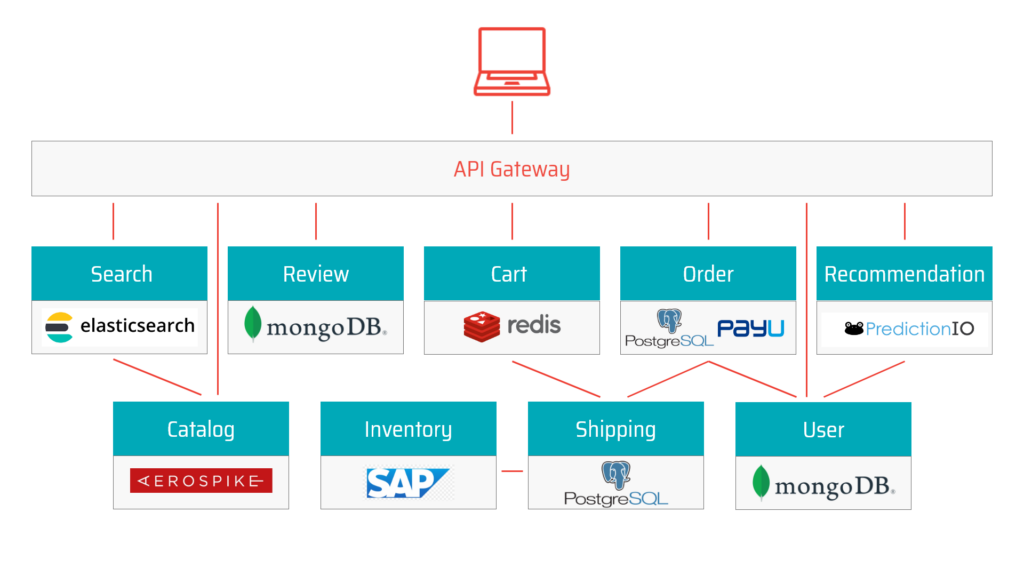
The diagram below illustrates how even a simple microservices architecture involves multiple components, each with its own vulnerabilities and security risks. Let’s review the top 5 microservices challenges making it difficult to secure modern applications.

microservices arhitecture

1. Infrastructure design and multi-cloud deployments

Microservices are distributed over many data centers, cloud providers, and host machines. 

Building infrastructure across many cloud environments increases the risk of losing control and visibility of the application components.

2. Segmentation and isolation

Decoupled application components perform their duty in co-dependence with many other services. 

All these components establish and maintain communication channels over different infrastructure layers, so often cross-service communication is skipped when testing for security vulnerabilities, the result of this is significant exposure in the interfaces between these services.

3. Identity management and access control

Microservices expose new entry points to both internal and external actors.

Access controls need to be regulated for all entities, whether legitimate or illegitimate.

It’s important to have an administrative interface that can help you manage users, applications, groups, devices, and APIs from one central location, giving you real-time visibility into what’s happening in your environment.

4. Data management

Data generated in a microservices architecture moves, changes, and is continuously interacted with. Data is also stored in different places and for different purposes. Owners of data assets need insight into the life cycle and the dynamics of data to avoid breaches.

Can you be sure that your data is secure?

Data leaks can happen regardless of the communication channel’s exposure. Malicious actors can chain vulnerabilities to break through to private assets.

5. The rapid rate of application changes

Application development in modern SDLC forces the code base and data stores to grow over time. Development methodologies push iterative and incremental development, putting microservices under the constant workload.

How can you know at any time that new code coming through the development pipeline will not expose your application to the new sets of vulnerabilities and dangerous attack vectors?

Security testing must keep up with the pace of the SDLC, to enhance DevSecOps.

Decomposing applications into microservices increases the application’s attack surface because of newly added entry points and connections between instances that are now spread out over many environments, because of that microservices security requires non-trivial and ready-made solutions.

Related content: Read our guide to websocket security.

Best Practices for an Effective a Microservices Security Architecture

The following best practices can help you design security into your microservices applications and address application security challenges.

Deploy Security at Container Level

In many, microservices are based on container technology. The most glaring vulnerability of containers is that they are based on images, which may contain vulnerabilities. Perform regular scanning to ensure you don’t use images that contain security vulnerabilities or other security issues.

In addition, a container has both internal and external threat surfaces. A great first step to protecting containers at runtimer is adopting the principle of least privilege (POLP). This can involve some or all of the following strategies:

  • Limit permissions to the minimum required by each user or service role
  • Never use sudo or a privileged accounts to run services
  • Limit or control the use and control of available resources—for example, restrict a container’s access to the host operating system
  • Never keep secrets on the container, because anyone with access to the container can see them
  • Define isolation with appropriate rules for resources with different levels of sensitivity

Create an API Gateway

Microservices often span several different networks, using a variety of technologies, interfaces and protocols. An important way to secure microservices is to create one entry point, which all clients and systems access, and which can easily be secured.

This entry point is called an API gateway. If you design your system in such a way that all clients always connect to the API gateway, you can use it to perform authentication and authorization, and filter requests to sensitive resources. The API gateway authenticates users and service roles and decides which microservices they are allowed to access.

API gateways can provide additional security capabilities like SSL termination, protocol conversion, monitoring, routing, and caching of requests. 

Isolation

In a microservices architecture, each service is a separate, isolated part of the application. You should be able to implement, maintain, modify, extend and update microservices without 

affecting other nearby microservices.

Isolation should also be performed at other layers of the infrastructure, such as the database. One microservice should not have access to data belonging to other microservices. By achieving complete isolation at all layers, attackers who compromise one microservice cannot perform lateral movement to attack other parts of the system.

Use OpenID or OAuth 2.0

OpenID and OAuth 2.0 are two authentication systems that can generate tokens to enable secure user access. Using a system like OAuth 2.0 is excellent for microservices security. It ensures users obtain permissions to any resource via a resource server. 

OAuth can provide four types of authentication tokens—resource server, resource owner, authorization server, and client. Tokens can be used to access resources until they expire. OAuth also provides a mechanism for refreshing tokens after the original one expires. 

Learn more in our detailed guide to web application scanning.

Don’t Show Sensitive Data As Plain Text

Plaintext can be easily read and copied by users and machines. A first step to protecting personally identifiable information (PII) is to avoid displaying it in clear text. All passwords 

and usernames must be stripped or masked when saving logs or records.

Adding TLS/HTTPS will not solve the problem, if data is stored unsecurely at rest. You can also try to encrypt logs, but this won’t help against attackers who can directly access system memory. Therefore the only safe route is to avoid persisting sensitive information in the first place.

Automated Microservices Security with Bright

Bright integrates automated AI-powered Dynamic Application Security Testing into the SDLC to scan applications built atop of the complex microservices architecture each time the application code is packaged to a running application and forwarded to the testing phase.

Bright provides you with real-time reports with zero false positives in no time, where you can see reported vulnerabilities with a reproducible proof-of-concept and ranked by the severity of the impact they make on an application, this confirms the overall health and capacity of an application to handle production runtime without being exposed to vulnerabilities, regardless of the scope and the complexity of the underlying microservices architecture mesh. 

Start protecting microservices today — try Bright free

Aggregating SCA, SAST and DAST Vulnerability Results

DevOps looks to combine the culture, methodologies and tooling of both the software development and operations teams, so companies can deliver new application features at a much greater velocity. 

DevSecOps takes this a step further, integrating security into DevOps, shifting security testing left. Instead of developers being brought into the fold later in the process, developer focused security testing tools bridge the gap between engineering and security.

One of the key challenges when implementing DevSecOps is prioritizing which vulnerabilities need to be remediated first. This is especially true when using multiple Application & API security testing tools to provide full coverage.

Automation is key. Implementing application security testing into the CI/CD pipeline to detect and fix security vulnerabilities on each build, or every merge to master, delivers secure and compliant application changes rapidly, while running operations consistently with the automation.

It’s not a one size fits all, with different types of automated security testing tools required across the pipeline to ship secure applications and APIs, at speed. 

Identifying security vulnerabilities at various stages of the pipeline requires the integration of several tools. These include SCA (Software Composition Analysis), SAST (Static Application Security Testing) and DAST (Dynamic Application Security Testing).

We previously discussed combining DAST with SCA from Checkmarx

Leveraging these tools is great, but aggregating the vulnerability findings can be a challenge. A ‘single pane of glass’ is often needed so that the engineering and security teams have the visibility they need. Indeed, combining SCA+SAST+DAST information can be very valuable for SIEM (Security Incident Event Management) correlation engines for example, where the vulnerability information can help in providing more accurate correlation and attack detection.

Example: Combining Checkmarx SAST & SCA and Bright’s DAST

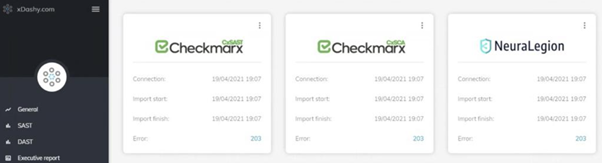
Bright’s partner, Datastream, has integrated the Checkmarx SAST and SCA solutions and Bright’s DAST platform Bright, within their proprietary xDashy platform, where their clients across the financial, retail and e-commerce sectors are benefitting from this comprehensive testing and aggregated data.

Combining security testing on the code level (SAST), checking dependencies (SCA) whilst also being able to test the runtime application (DAST), delivers comprehensive security testing integrated across DevOps / CICD pipelines at multiple stages, into the hands of developers.

Our joint customers’ engineering and security teams get full visibility and can manage custom dashboards, define executive reports, metrics and KPIs that improve decision-making at both the executive and technical level, consolidating SAST, SCA and DAST results on a single screen. 

For example, SCA will identify security vulnerabilities in 3rd party dependencies, building the open source dependency trees for applications and mapping these against a database of known vulnerabilities. It then reports vulnerable open source that has been pulled into the application, to fix or patch accordingly.

Bright engine tests for vulnerabilities that come under the OWASP Top 10 and Mitre, leveraging thousands of payloads, to test both webapps and APIs. 

Bright is also the only DAST solution on the market that can scan for specific Business Logic Vulnerabilities, normally carried out by manual testing. 

Having these tests automated, as part of your development pipelines and included in your dashboard gives you the broadest picture of your cyber posture. Coupled with Bright’s automatic validation of every security finding, the DAST output delivers real time actionable results, with no false positives. 

If you are considering a DAST tool, be sure to read our blog on the Must-Have features of your DAST Tool.

Security teams can then understand the risk, prioritise remediation and coordinate with the engineering team accordingly.

Additionally, by combining the tools and aggregating the results, companies can establish a common risk identification framework through linking projects manually and by referencing vulnerabilities according to the CWE (Common Weakness Enumeration), Miter’s CVE and also categorized by the CVSS v3 score provided by Bright.

Engineering Security Testing Metrics

Being able to visualise and correlate data across projects, squads or teams is also invaluable. 

Bright has a comprehensive ‘Projects’ reporting functionality which can be used via the Bright app UI, or integrated with your SIEM or other reporting platform, as Datastream has integrated with their platform, xDashy. Users can filter the results by project, by execution date and compare the results over time, graphically presenting trends and showing a visualization of risk management. 

Having visibility of the most frequently recurring risks, or being able to drill down into which team or project is generating certain vulnerabilities, allows you to prioritise remediation as well as providing targeted training on secure coding.

This helps with capacity building for secure development as well as providing for analysis of the cost and time to remediate.

Whether you are looking at enhancing your current SAST and / or SCA scanning or just entering into the realm of security testing, using Bright’s DAST is really simple and can be used as a standalone scanner by the security team or integrated across your pipelines.

Whether testing your webapps or APIs (SOAP, REST, GraphQL), the results produced are organised in a developer friendly way and as a QA, can help establish a culture of security testing and let you champion security testing!

Go ahead and try it out! With our free account, you can get started today; get your account now – https://nexploit.app/signup

Complete your AppSec testing Automation, with Bright

The shift to rapid, frequent deployments over the past decade left application security behind. However, in recent years security is starting to catch up. Leading companies are now integrating security testing into CI & CD, running automated tests with every commit, and fixing bugs long before they hit production.

Software Composition Analysis (SCA) and developer-centric DAST enable this and are easily achieved by combining Checkmarx and Bright.  Different types of automated security testing tools are required across your pipeline to produce APIs and applications that are secure by design. Don’t stop with securing 3rd party code, make sure you secure 1st party code as well.

How does developer-focused DAST augment  SCA and make you more secure?

Software Composition Analysis (SCA) 

SCA is a set of technologies that analyze the application’s open-source components tied together. 

As the analyzed code is transparent and available to the tool, SCA offers accuracy when it comes to recognizing flaws in the code by detecting the exact line of code that needs remediation reducing the remediation time and effort for developers.

For organizations using open-source, SCA like Checkmarx should definitely be used to achieve some level of security, but is it enough?

Dynamic Application Security Testing  (DAST)

Although SCA can detect many vulnerabilities, everything they identify is in open-source components third-party libraries and do not cover 1st party code that you develop within your organization. 1st party code represents more than 60% of code for most organizations.

Being a black-box solution, DAST interacts with the app from the outside. DAST tests the application’s and API’s defense against techniques that a hacker might use while trying to exploit your application. Because of DAST’s language independence, you won’t have problems integrating a DAST tool into a CI/CD pipeline. 

So, which technology should you focus on and why?

Checkmarx SCA & Bright DAST – Complete Developer-Centric AppSec Testing

To be secure by design and ensure you are shipping secure applications and APIs to production, SCA like Checkmarx and Bright’s automated DAST should be used to complement each other. If you combine these two powerful and modern tools you can detect even 0-day vulnerabilities.

Checkmarx’s SCA gets you visibility of your open source vulnerabilities that may underpin your applications.

Bright enhances DevSecOps at its core, with a Dev First approach to test your applications and APIs (SOAP, REST, GraphQL). Test every build and get results you can trust, with automatically validated results free from false positives and developer-friendly remediation guidelines.

Get started today

New to Bright and/or Checkmarx? Try us both for free to start testing for vulnerabilities in your applications today

Sign up for a FREE Bright account here – follow our quick step wizard and be up and scanning in minutes!

To get started with Checkmarx request a demo here!

You can learn more about Bright, all our integrations, and more on our knowledge base.

Using FOSSA? Complete your AppSec testing automation with Bright

As security testing is increasingly shifting left, developer focused application security testing tools are bridging the gap between engineering and security.

But automated tools are not a one size fits all, with different types of automated security testing tools required across your pipeline to ship secure applications and APIs, at speed.

Software Composition Analysis (SCA) and developer-focused DAST enable this and it is easily achievable with FOSSA and Bright, respectively.

How does developer focused DAST augment SCA?

Software Composition Analysis (SCA) 

SCA identifies security vulnerabilities in your 3rd party dependencies, by building the open source dependency trees for your applications and mapping these against a database of known vulnerabilities. It then reports vulnerable open source that has been pulled into your application, to fix or patch accordingly.

The use of open source has grown dramatically over the past few years, with flaws in open source dependencies being more prevalent than ever.

For any organization using open source, SCA like FOSSA’s should definitely be used to achieve a degree of security, but is that enough? 

Dynamic Application Security Testing (DAST)

Developers are usually not familiar with DAST, which is not surprising. Historically DAST solutions were built for security teams, and run either by the internal security team or outsourced testing companies on production applications.

But DevSecOps forces those tests to be conducted much earlier in the development process.

Bright’s innovative developer-focussed DAST enables developers to detect and fix security bugs that they have introduced (the custom or 1st party code). This is done as part of the developer’s workflow or as part of their CI/CD pipeline.

With Bright, an automated DAST scan can be triggered on every build / commit or PR, to test your runtime applications and underlying APIs (whether REST, SOAP, or GraphQL), detecting vulnerabilities like SQL Injection and Cross-Site Scripting (XSS), for example.

Scans that last minutes and not hours keep up with your rapid release cycles and are not a bottleneck, maintaining DevOps speed.

Having that direct feedback loop to developers means you can fix early and often. Bright’s plug and play integrations with your pipeline are seamless – developers can stay in their environment with Bright’s CLI, as well as integrating with the likes of CircleCI, Jenkins, JFrog, AzureDevOps, JIRA and more.

While false positives are notoriously an issue with DAST tools, Bright’s innovative engine automatically validates every finding…no need for manual validation checks, no delays, and no builds failing for no reason! 

New and recurring issues are identified and flagged as such, so focus and prioritization of remediation is facilitated.

These features mean that there is less of a reliance on manual testing and enables security testing to be placed in the hands of developers.

So, which technology should you focus on and why?

FOSSA & Bright – Complete Developer-Centric AppSec Testing

To ensure your are shipping secure applications and APIs to production, SCA like FOSSA’s, and Bright’s automated DAST should be used in conjunction.

FOSSA’s SCA gets you visibility of your open source vulnerabilities that may underpin your applications, that the creative features are built on top of.

Bright’s innovative DAST lets you very easily detect security vulnerabilities across your applications and APIs. Test every build and get results you can trust, as we automatically validate results free from false positives.

By deploying and leveraging both FOSSA’s SCA and Bright’s DAST, you are covering all your bases. This will enable you to find and fix a broader range of vulnerabilities faster and earlier.

The question is not whether you should be using SCA or DAST, but how and when you can start to use them together across your pipelines. Small hint – see the answer below!

Get started today

New to Bright and/or FOSSA? Try us both for free to start testing for vulnerabilities in your applications today.

Sign up for a FREE Bright account here – follow our quick step wizard and be up and scanning in minutes!

Try out FOSSA for free here too!

You can learn more about Bright, all our integrations and more on our knowledge base