DevOps Testing: The Basics and 5 Best Practices

What Is DevOps Testing?

DevOps is a methodology promoting close communication and cooperation between development and operations teams. Implementing DevOps requires adopting certain tools and processes, including the deployment and maintenance of programmable infrastructure, iterative development practices, and automation.

It can be challenging to build a DevOps pipeline—you need to consider numerous aspects and make decisions on a rapid and continuous basis. Automation, especially automated testing, is essential for enabling successful DevOps lifecycles.  

Automated tests are just one aspect of DevOps, but they are key to delivering high-quality software quickly. Test automation allows you to implement continuous testing, enhancing productivity and reducing the risks and costs associated with software flaws. Integrating security checks into your automated tests is also one of the requirements for DevSecOps.

In this article:

Traditional Testing vs. DevOps Testing

Software testing in a DevOps environment differs significantly from testing in traditional development environments. In a traditional waterfall approach, testing is limited to one phase at the end of the development lifecycle. Traditional testing methods involve time-consuming and error-prone manual processes. 

Traditionally, separate teams handled development and testing. Any bugs detected in the testing phases were difficult and expensive to fix. Organizations had to predict potential error scenarios in advance.

With the introduction of agile development methodologies, testing strategies and tools evolved to support faster, higher-quality development. DevOps applies a “shift left” approach to testing, introducing tests early in the software development lifecycle (SDLC). Testing and development take place simultaneously, allowing you to identify flaws sooner.

DevOps testing involves:

  • A continuous, automated testing process enabling fast, continuous software delivery.
  • Testing across all phases of the SDLC.
  • Various testing methodologies for each phase of the SDLC to minimize backtracking.
  • Sharing responsibility for testing across all teams, not just testers.

Testing in a DevOps Environment

There are two complementary approaches to DevOps testing: test automation and continuous testing.

Test Automation

A common misconception is that you should “automate as much as possible” when testing in DevOps. Automation’s main aim is reducing manual-intensive workloads rather than removing them entirely. Examples of everyday tasks that don’t need human intervention are: 

  • Software testing—straightforward regression, unit, or end-to-end tests are typically automated.
  • Infrastructure management—minimize repetitive configurations, setups, and maintenance of IT infrastructure such as network and servers.
  • Log management—automated logging tools will help you effectively deal with a greater amount of data, from error messages to application requests.
  • Monitoring—provides an up-to-date and accurate understanding of the system’s health and performance trends of every testing activity.

Continuous Testing

Continuity is essential for organizations that implement DevOps’ goal of quality-at-speed deliveries. 

CI/CD means continuous integration and delivery (or deployment). This pipeline is supported by automation. CI/CD plays a key role in DevOps testing and automation strategies. Its four core components are: 

  1. Continuous integration (CI)—continuously merges or integrates new code into a central repository and pushes them into builds.
  2. Continuous testing—validating product and code quality with automated integration, unit, or end-to-end testing to identify bugs or if anything had broken from the commit.
  3. Continuous delivery (CD)—once recent code submissions are moved to staging, CD helps developers manually select appropriate release candidates to push through to production.
  4. Continuous deployment (CD)—runs end-to-end tests to ensure no regressions before automatically shiping every effective build to production.

Learn more in our detailed guide to cloud native security.

5 Best Practices For Developing a DevOps Testing Strategy

Select the Right Tools

Automation testing is a highly efficient way of improving software application effectiveness. The tool you choose will influence your organization’s ability to deliver services and applications quickly. 

 No single tool will meet all your automated testing requirements. Here are some key points to consider when selecting tools: 

  • Type of testing tools—consider if the tools are commercial or open source. Also, consider the framework, language, and whether the tools are intended for developers or testers.
  • Licensing and support cost—there are many open source tools. However, many open source tools demand technical skills (such as programming experience). Recruiting employees with these skills and investing the time to learn and use open source tools can be a major investment. 
  • Supports CI and DevOps tool integration—a tool that doesn’t support DevOps or CI workflows might not be beneficial, particularly when velocity is the primary concern.
  • Solid test reports—an informative and insightful test report will help examine root causes and defects and test the effectiveness of analyses. 
  • An in-depth understanding of your project needs—including the project scope, project type (whether mobile, desktop, or web-based), and the skill level of your current team.

Related content: Read our guide to DevSecOps tools

Shift Testing Left

Not promptly addressing a problem can prove harmful in the long run. If you rely on occasional manual tests, unaddressed problems in your pipeline can quickly escalate. However, if you automate testing and perform consistent testing on all software artifacts, you can catch issues early.

To truly shift testing left, apply a combination of behavior drive development (BDD) and test driven development (TDD) to ensure testability, improved efficiency, and greater collaboration. 

Update Documentation Continuously

Organizations may approach documentation as an afterthought. However, they should consider it equally important as testing and coding. DevOps teams should thoroughly document every release and modification to support developers, users, business leaders, and operations staff. 

Effective DevOps teams create and retain testing-related documents often, including: 

  • Quality Management Plans (QMP)
  • Test Summary Report
  • Risk assessment Report
  • Test Case Specifications Report
  • Regression test Report
  • Bugs Report

Adopt Pair Testing

There could be test cases too involved to automate or that demand manual testing. In such cases, you can adopt pair testing. Like pair programming, pair testing involves two team members working alongside one another to test the software. It might be a combination of team members: developer and tester, two testers, or a tester and a product manager. 

Both team members work on one workstation to test the software.  One team member conducts the testing while the other analyzes the outcomes. 

Monitor Applications in Production

Testers should be able to identify problems early on and report them proactively. To do so, they have to monitor the production environment to expose bugs before they cause harm. 

You can establish specialized measures such as memory and CPU utilization, response time, and the like, offering you insight into the end-user experience. 

Testers may also use a small subset of current high-priority test cases. They can execute these test cases during production to monitor the environment.

What is Penetration Testing as a Service (PTaaS)?

Organizations are under constant threat from a wide variety of vulnerabilities. Security professionals can be slow to identify and remediate vulnerabilities in software and IT systems, creating a large window of exposure. 

Over the last decade or so, penetration testing has developed into a popular method that organizations can use to safeguard their technical infrastructure, finding security gaps and vulnerabilities before cybercriminals can exploit them. 

Penetration testing as a service (PTaaS) eases the procurement of pentesting, enabling more frequent and lower cost penetration tests, while providing a platform for collaboration between the organisation and PT company. This allows an organization to identify vulnerabilities and remediate them on an ongoing basis. Originally, penetration testing was a complex, contract-based engagement that organizations could carry out only once or twice per year. With PTaaS, they can carry out a penetration test every day, or immediately after every code change.

Pentesting as a Service is not the same as cloud pentesting. PTaaS is a delivery platform. Comparatively, cloud pentesting aims to discover security gaps in a particular cloud infrastructure. 

In this article:

Penetration Testing as a Service (PTaaS) Benefits

Real-Time, Hacker-Like Testing

Pentesting is a unique type of security hardening. It’s the only real way to understand precisely what cybercriminals see when they approach your software or company. What cybercriminals see may be very different from what the organization or your developer sees. 

Continuous retesting extends the usefulness of a pentesting service, meaning you will immediately know if there is a vulnerability in the most recent update, and not once it is too late. 

Continuous and Early Feedback

Agile methodology promotes frequent testing of minor code modifications. These are simpler to deal with than a large software release. The outcome is a more robust software that demonstrates resilience and is easier to patch. 

PTaaS has similar benefits as traditional penetration testing. By providing your developers with early and continuous feedback during and after the test about possible vulnerabilities, they can quickly remediate them. A good PTaaS will offer detailed reports, including attack steps, screenshots, and documented error codes so that developers don’t need to spend time working out why or how. 

The result is improved efficiency in operations and closer integration of security measures into the development process. 

How Pentesting as a Service (PTaaS) Works

Traditionally, before cloud computing, security specialists delivered penetration test results at the end of the testing period. While the information was useful, the delayed nature of the information often made it hard for on-site security teams to fix and prioritize test results.  

PTaaS platforms allow customers to see their data, in real-time, via a dashboard that presents all pertinent details before, during, and after the test is carried out. 

Like traditional pentesting services, PTaaS vendors give their customers detailed reports that can help them identify and remediate the discovered vulnerabilities. PTaaS vendors assist their customers, providing them with a knowledge base to help on-site security teams handle remediation.

PTaaS is suitable for any sized organization. Most platforms are highly flexible and can deal with everything from a holistic testing program to custom reporting tools for customers to meet strict regulatory requirements.  

Related content: Read our guide to penetration testing reports (coming soon)

Types of Penetration Testing Services

You can use PTaaS to identify security weaknesses in different parts of your organization’s infrastructure, including web applications, networks, APIs, and mobile applications.

Web Application Penetration Testing

PTaaS solutions use automated scanners (like Bright’s) to crawl web applications and perform initial reconnaissance, identification of vulnerabilities, and active exploitation to discover the impact of each vulnerability. They look for issues like:

  • Weak information validation and integrity in pages including forms or other data input
  • Weak authentication and session management
  • Lack of secure coding practices in web application source code
  • Security vulnerabilities in back-end databases and networks exposed to the web application

Related content: Read our guide to web application penetration testing

Network Penetration Testing

You can grant a PTaaS solution access to your network, and allow it to perform network security testing using methods such as port scanning, configuration benchmarking, traffic fuzzing, virus scanning, and fingerprinting. This enables investigation of vulnerabilities like:

  • Weaknesses in security tools like firewalls and intrusion detection/prevention systems (IDS/IPS).
  • Weaknesses in network equipment like switches and routers.
  • Vulnerabilities in servers, workstations, and other endpoints deployed in the network.

Network-based PTaaS can prevent attacks exploiting vulnerabilities in any of the tested systems, incorrect security tools configuration, DNS attacks, and man in the middle (MiTM) attacks. 

API Penetration Testing

Another use of PTaaS is to test application programming interfaces (APIs). Many IT systems expose APIs over the public Internet, have publicly available documentation, and enable access to valuable data, making them a prime target for attackers. 

PTaaS can learn API structure and commands, either using a standard like OpenAPI, or by importing a list of rules. PTaaS solutions can identify issues like:

  • Weak API authentication
  • Code injection vulnerabilities
  • Lack of resource rate limiting
  • Sensitive data exposure

Related content: Read our guide to penetration testing in aws.

Mobile Application Penetration Testing

A lot of organizations provide mobile applications for the use of their employees, partners, and customers. Because these applications are commonly accessed by personal devices, they are exposed to a wider variety of attacks. 

PTaaS for mobile applications can scan for and identify a variety of issues such as:

  • Malware present in a mobile application or a user’s device
  • Phishing messages sent to user devices
  • Weaknesses in WiFi networks
  • Compromise of mobile device management (MDM) protocols

Complementing Penetration Testing with Dynamic Application Security Testing (DAST)

Penetration testing and PTaaS are valuable to ensure your applications and network are secure, however a large proportion of each is conducted manually by specialist penetration testers. While PTaaS has streamlined the process of procuring and managing more frequent pentests, the process still takes time, is not scalable and the costs can spiral.

With more companies now apopting DevOps and CICD, further automation of security testing is required that removes security related bottlenecks and provides a direct and immediate feedback loop to developers.

Bright’s developer focussed Dynamic Application Security Testing scanner is used by penetration testing companies to carry out preliminary scans on their client applications and APIs. You can integrate Bright into your development pipelines to benefit from continual, scalable security testing early and often, on every build / commit. Bright automatically validates every security issue, so has NO false positives. This removes the need for you to manually validate security issues (one of the services performed by PT / PTaaS). Coupled with the ability to detect Business Logic Vulnerabilities with Bright, this reduces your reliance on and cost of your manual penetration testing or PTaaS.

Sign up for a FREE Bright account and start automating your application and API security testing

5 Types of Application Security Testing to Know

What is Application Security Testing?

Application security testing (AST) is an umbrella term for methodologies that assist in finding and eliminating software vulnerabilities. The security testing process includes tests, analysis, and reports that provide insight into the security level of a software program. 

You can apply the AST process across various phases of the software development lifecycle (SDLC). AST can help catch and remediate software vulnerabilities before deployment to production, reducing the scope of vulnerabilities persisting after deployment. You can also apply AST in production to enable continuous detection of critical threats. 

This is part of an extensive series of guides about cybersecurity.

In this article:

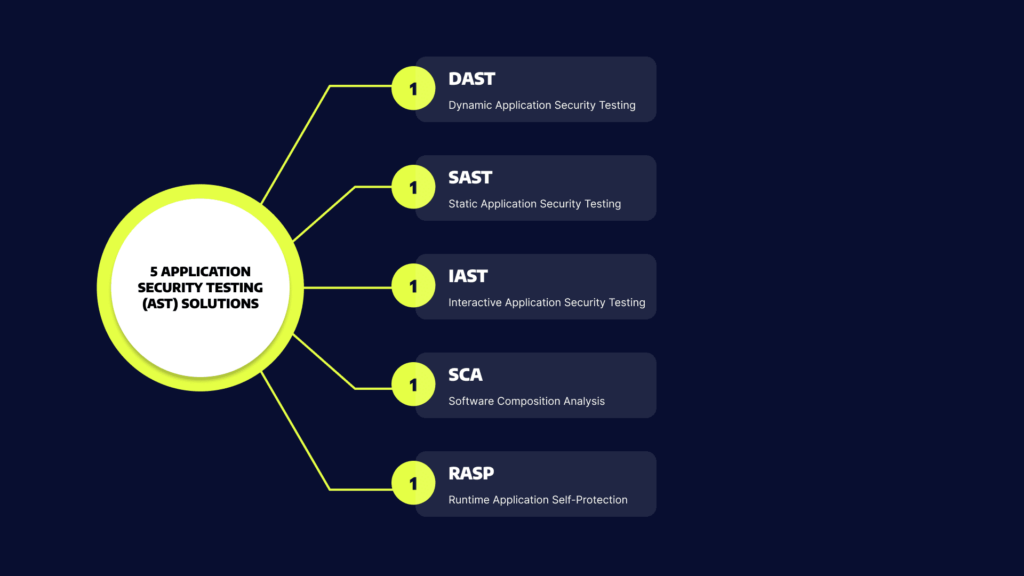
5 Application Security Testing (AST) Solutions

AST won’t happen without tools. Let’s review five types of solutions that can help you test software through the SDLC – from development to production.

Static Application Security Testing (SAST)

SAST is a form of white-box testing that involves analyzing at-rest source code. SAST tools look for vulnerabilities in the source code that external parties can exploit. 

You can use SAST to the source code of your applications, bytes, and binaries. After analyzing your code, the tool flags exploitable design and coding flaws.

Most SAST scans use a collection of predefined rules to specify coding errors to address. You can also use a SAST scan to detect common security vulnerabilities, such as input validation errors, stack buffer overflow, and SQL injection. 

You can implement SAST during development and quality assurance (QA) and integrate the tool with your integrated development environments (IDEs) and continuous integration (CI) servers. 

Related content: Read our guide to SAST

Dynamic Application Security Testing (DAST)

DAST is a form of black-box testing that simulates external attacks on a running application. DAST aims to find architectural weaknesses and security vulnerabilities. 

DAST solutions attempt to penetrate the application from the outside, often by looking for vulnerabilities and flaws in exposed interfaces.

SAST tools perform a line-by-line scan of your application’s source code while it is at rest, while DAST is executed when the application is running. DAST can be used to test an application running in a development or testing environment, or while it is running in production.

Related content: Read our guide to DAST

Interactive Application Security Testing (IAST)

IAST tools and testers scan the post-build source code of your application in a dynamic environment. The test is usually executed in a test or QA environment and in real-time while the application is running. You can employ IAST to identify problematic lines of code and get alerts that prompt immediate remediation.

IAST looks directly at the source code post-build in a dynamic environment through the instrumentation of the code. It involves deploying agents and sensors into the application and analyzing the code to detect vulnerabilities. You can easily integrate IAST into your continuous integration / continuous delivery (CI/CD). 

Software Composition Analysis (SCA)

SCA tools automatically scan the codebase of your application to provide visibility into open source software usage. SCA tools can identify all open source components in your codebase, the license compliance data of the components, and detect common security vulnerabilities. Some SCA tools can also prioritize open source vulnerabilities and offer insights and automated remediation.

Runtime Application Self-Protection (RASP)

Runtime Application Self-Protection (RASP) is a security technology that provides an additional layer of protection for applications by detecting and preventing attacks in real-time. It is designed to monitor an application during runtime and prevent malicious activity that may not be detected by traditional security measures such as firewalls, intrusion detection systems (IDS), and antivirus software.

RASP works by embedding security controls directly into the application or the runtime environment. The security controls are designed to monitor the application’s behavior, detect any suspicious activity, and take appropriate action to prevent the attack. For example, RASP can prevent SQL injection attacks, buffer overflows, and cross-site scripting (XSS) attacks.

3 Types of Application Security Testing

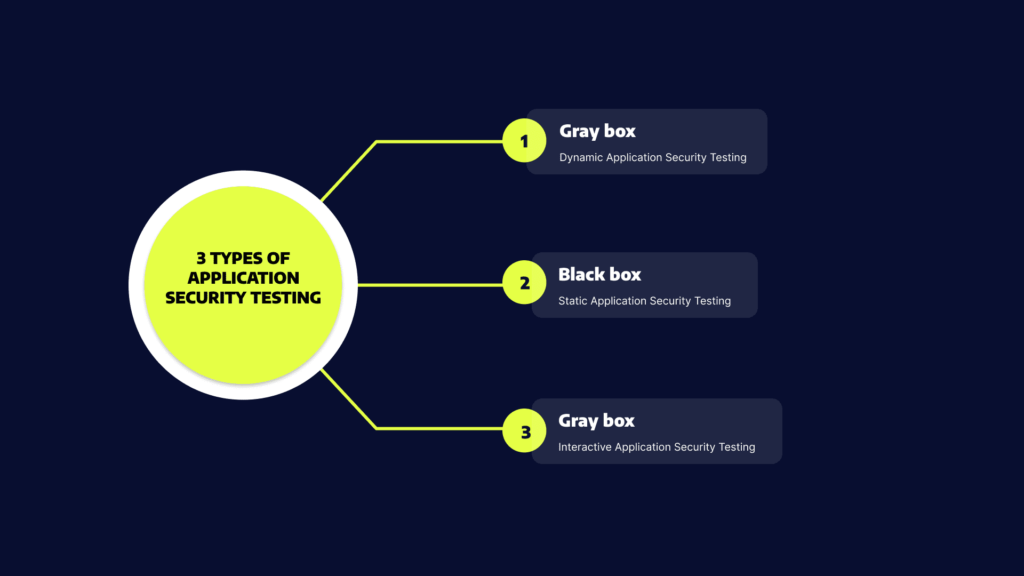
Application security testing can be categorized into three types: black-box, gray-box, and white-box testing.

Black-Box Security Testing

In black-box security testing, the tester or test automation application does not have information about the internal workings of the system. This allows the tester to simulate a real attack by an external entity. 

Black box testing has the important advantage that it tests application security from end to end, including security misconfigurations and the integration between security systems. For example, if there is a misconfiguration in the firewall, a black box test will immediately discover it because it attempts to access the application like an outside attacker. The disadvantage is that it can miss vulnerabilities in the underlying applications.

Gray-Box Security Testing

In gray-box security testing, the tester or automated test application has limited information about the application. This simulates the case of a privileged insider who uses their knowledge to conduct a more sophisticated attack or a persistent threat conducting in-depth reconnaissance of the environment. 

Gray box testing has the advantage that it balances between testing depth and efficiency. It can be fine-tuned to focus on the most important elements that need to be tested in your security posture. Its disadvantage is that, depending on the information provided to the tester, the test may be skewed or unrealistic.

White-Box Security Testing

In white-box security testing, a human tester or automated testing mechanism receives full access to the internals of the application. A classic example of white box testing is static application security testing (SAST), in which an automated tool scans application source code for bugs and security flaws. 

White-box testing can help uncover many important security issues, such as security misconfiguration in the application itself, poor code quality, insecure coding practices, and business logic vulnerabilities. Its primary advantage is that it is comprehensive and can identify issues that other types of tests miss. However, white-box testing can uncover issues that cannot be easily exploited by an outside attacker, and thus have lower priority.

Related content: Read our guide to mobile app security testing.

Application Security Testing Best Practices

Here are some best practices for effective AST:

  • Start early: AST should be started as early as possible in the application development lifecycle, ideally during the design and planning phase. This allows security considerations to be built into the application from the start, rather than trying to retrofit security later on.
  • Use multiple testing techniques: A combination of static and dynamic testing techniques can provide a more comprehensive view of the application’s security posture. This can help identify a wider range of vulnerabilities than using a single technique alone.
  • Test regularly: AST should be performed regularly, especially during code changes or updates. This ensures that any new code is tested for vulnerabilities before it is deployed.
  • Prioritize vulnerabilities: Not all vulnerabilities are created equal. Prioritize vulnerabilities based on their severity and potential impact, and address the most critical vulnerabilities first.
  • Involve all stakeholders: Application security is everyone’s responsibility. Involve all stakeholders, including developers, testers, and operations teams, in the AST process to ensure that everyone is aware of the risks and taking appropriate actions.
  • Monitor and respond to findings: The AST process is not a one-time event. Continuously monitor the application for new vulnerabilities and respond to findings promptly to ensure that the application remains secure.

Application Security Testing with Bright Security

For a robust AppSec programme, it is important to ensure that security vulnerabilities are detected and remediated early and often. With agile development and CICD, security testing needs to shift left and into the hands of developers.

To succeed, you need to adopt developer-friendly security testing tools like Bright’s DAST scanner, built from the ground up to enable developers to own the security testing process, with the following key features:

  • Developer first – built for DevOps / CICD
  • Test everything – WebApps and APIs (SOAP, REST, GraphQL)
  • Accurate – NO false positives 
  • Automation integrated automatic validation of findings removes manual validation bottlenecks that stifle your release cycles and compound your technical and security debt
  • Feedback Loop – Easy to use, fast scans and integrates across your pipelines 
  • Easy fixes – Developer friendly remediation guidelines, start fixing security issues early and often
  • Detect more – automatic Business Logic vulnerability detection

See Additional Guides on Key Cybersecurity Topics

Together with our content partners, we have authored in-depth guides on several other topics that can also be useful as you explore the world of cybersecurity.

UEBA

Authored by Exabeam

What Are TTPs

Authored by Exabeam

Disaster Recovery

Authored by Cloudian

Black Box Penetration Testing: Pros and Cons

What is Black-Box Penetration Testing?

The term black-box penetration testing (pentesting) refers to external tests aimed at identifying vulnerabilities in systems, applications, or networks. Unlike other forms of security testing, penetration testing can verify that vulnerabilities are exploitable by attackers, and show exactly how. Black-box penetration testing is also known as external penetration testing or trial and error testing. 

A black-box pentest is performed by an external party, or an automated system, which is completely unfamiliar with the target. During the test, the pentester attempts to imitate the behavior of an unprivileged hacker to simulate a real attack. It means the pentester is responsible for the reconnaissance phase of the attack, during which they gather any sensitive information needed to penetrate the network.

After gaining the necessary information, the black-box pentester draws up a map of the targeted system. The map is created according to the pentester’s observations, research, and analysis – similarly to how an unprivileged attacker would map the target. 

Next, the pentester uses these findings to attack the target. They may use any necessary means, including password cracking and brute force attack. After the breach, the pentester attempts privilege escalation and tries to establish a persistent presence, like an attacker would, but of course without causing damage. At the end of the test, the pentester prepares a report and cleans up the environment. Read our guide to penetration testing reports (coming soon)

In this article:

Pros and Cons of Black-Box Penetration Testing

Pros of Black-Box Penetration Testing

A black-box pentest provides the following advantages:

  • Simulates a real attack to discover unexpected results.
  • Identifies exposed vulnerabilities.
  • Identifies implementation and configuration issues by testing the application on run time.
  • Detects incorrect product builds, such as missing or old or modules and files.
  • Employs social engineering techniques to discover security issues related to people.
  • Locates security issues that occur due to interactions with underlying environments, including improper configuration files and unhardened operating systems.
  • Find error issues, such as information disclosure in error messages and input or output validation errors.
  • Looks for common vulnerabilities, such as SQL injection, XSS, and CSRF. 
  • Checks server misconfiguration issues. 
  • Helps fix flaws quickly by providing detailed remediation information.

Cons of Black-Box Penetration Testing

A black-box penetration test does not offer a comprehensive review of your source code and internal systems. A black-box pentest that discovers issues indicates that the target has a weak security build. However, a black-box pentest that cannot guarantee the target is secure. The target may still have internal issues hidden beneath the surface.

A black-box pentest is based on the guesswork, trial, and error of the external party contracted to perform the test. The pentest can be quick and end after the identification of vulnerabilities, or it may take months of reconnaissance until the pentester identifies one vulnerability. The time range depends on the expertise of the pentester and other criteria.

Related content: Get a better understanding of how penetration testing services work

Black-Box vs. White-Box vs. Grey-Box Penetration Testing

What is White-Box Penetration Testing?

White-box pentesting refers to tests that involve sharing full system and network information, including network maps and credentials, with the pentester. The information helps reduce the total cost of an engagement and save time. A white-box test can help you try multiple attack vectors to see which can breach a specific system.

What is Grey-Box Penetration Testing?

The term grey-box penetration testing refers to tests during which organizations share limited information with the pentester, usually login credentials. A grey-box test can simulate an insider threat as well as an attack by an external threat that breached the network. A grey-box penetration test can help you determine which type of access level a privileged user can attain and what damage this escalation can potentially cause. 

Related content: Read our guide to network penetration testing.

Engagement Accuracy

The main objective of a pentest is to find and patch any vulnerabilities that an external attacker can potentially exploit. A black-box pentest can provide the most accurate engagement for this purpose because the pentester is not given any insider information. 

Threat actors usually have more time to devote to an attack than a pentester. Grey-box and white-box pentesting help pentesters reduce engagement time by increasing the level of information provided before an attack is simulated. 

The main concern is that the information provided during white-box and grey-box tests may cause testers to act differently than a black-box hacker would. This information can potentially lead the pentester to miss vulnerabilities that a less-informed attacker might exploit.

Learn more in our detailed guide to web application testing.

Speed, Efficiency and Coverage

Each pentesting methodology makes tradeoffs between efficiency, coverage, and speed. Here are key differences:

  • Black-box penetration testing – is considered the fastest pentest type. However, because pentesters have no insider information on the targeted system, they may miss vulnerabilities. The lack of information can decrease the efficiency of the pentest.
  • Gray-box testing – may take longer to perform compared to black-box tests. However, a grey-box test provides a higher level of efficiency and coverage because pentesters get access to certain information before launching an attack. For example, access to design documentation helps testers to focus their efforts.
  • White-box testing – is considered the slowest but most comprehensive type of pentesting. White-box pentesters get large amounts of data, which take time to process. However, the scope of information and high level of access can significantly improve the probability of identifying and remediating both outward-facing and internal vulnerabilities.

Complementing Penetration Testing with DAST

Penetration testing, whether carried out by a 3rd party testing firm or internally by a security team, will leverage Dynamic Application Security Testing (DAST) scanners for their preliminary scans. These tests are carried out periodically, whether monthly, quarterly or in most cases, annually. 

With rapid release cycles and CICD however, security tests need to be run more frequently to be secure, ideally on every build to detect and fix security bugs early and often, to remove manual bottlenecks.

Bright’s DAST scanner automatically detects security vulnerabilities in your web applications and APIs, validating every finding before reporting it to you and your team, with NO false positives.

What Is DevSecOps? Adding Security to the SDLC

DevSecOps is a strategic approach that unites development, security, operations, and infrastructure as code (IaaS) in a continuous and automated delivery cycle. 

DevSecOps aims to monitor, automate, and implement security during all software lifecycle stages, including the planning, development, building, testing, deployment, operation, and monitoring phases. By implementing security in all steps of the software development process, you reduce the risk of security issues in production, minimize the cost of compliance, and deliver software faster. 

DevSecOps means that all employees and team members need to take responsibility for security from the very start. They must also make effective decisions at each of the development lifecycle and implement them without compromising on security.

This is part of an extensive series of guides about cybersecurity.

In this article:

DevSecOps vs DevOps

DevOps fosters collaboration between application teams during the application development and release process. Operations and development teams work in unison to put into practice shared tools and KPIs. The DevOps approach aims to increase the pace of deployments while guaranteeing the efficiency and predictability of the application. 

A DevOps engineer focuses on deploying updates to an application as quickly as possible with limited disruption to the user experience. Because they focus on increasing the speed of delivery, DevOps teams do not always regard security threats as a high priority, resulting in the build-up of vulnerabilities that can negatively affect the application, proprietary company assets, and end-user data. 

DevSecOps is an extension of DevOps. It arose as development teams started to understand that the DevOps model does not sufficiently address security issues. Rather than retrofitting security into the build, IT and security professionals developed DevSecOps to integrate security management from the onset and during the development process. This way, application security starts at the beginning of the build process rather than at the final stages of the development pipeline.   

With this innovative strategy, an engineer of DevSecOps aims to ensure that applications are secure against attacks before they are released to the user and remain secure during application updates. DevSecOps notes that developers should develop code while considering security. In essence, it strives to deal with security issues that DevOps do not oversee.

Shift Left Security

‘Shift left’ is a core component of DevSecOps. It encourages developers to move security from the end (right) to the beginning (left) of the DevOps process. In a DevSecOps environment, the DevSecOps team members integrate security into the development process from the onset. 

An organization that adopts DevSecOps involves its engineers and cybersecurity architects as members of its development team. Their role is to ensure the documentation, patching, and secure configuration of all components and configuration items in the stack. 

Shifting left lets the DevSecOps team isolate security risks and weaknesses early on. It also makes sure that these security exposure sites are dealt with immediately. In this way, the security team builds the product effectively and implements security as they develop it.

What Is Software Development Life Cycle (SDLC) Security?

A software development life cycle (SDLC) is a structure used to process the creation of an application from the onset to decommission. Over time, many SDLC models have come into existence—from iterative and waterfall to the more current CI/CD and agile models, which increase the frequency and speed of deployment. 

Generally speaking, SDLCs feature the following phases: 

  • Planning and requirements
  • Architecture and design
  • Test planning
  • Coding
  • Testing and results
  • Release and maintenance

Previously, organizations carried out security-related activities exclusively as a testing component during the last part of the SDLC. Consequently, they wouldn’t discover flaws, bugs, or other vulnerabilities until it was late in the process and more time-consuming and expensive to fix. In some cases, they would miss essential security vulnerabilities altogether. 

Research from IBM shows that it costs six times more to address a bug discovered during implementation than fixing one identified during design. In addition, it could be 15 times more costly to fix a bug found during the testing phase than if developers discovered it during design.

Implementing DevSecOps into the SDLC

You should address five key stages to enable DevSecOps in an existing DevOps pipeline. 

Secure Local Development

Begin by establishing secure working environments. When you are creating an application, you are writing source code and integrating components together. Docker is beneficial during this phase as it automates the service development and infrastructure on local machines. When using this ready-to-go Docker environment, ensure that you use up-to-date versions of Docker Images and scan all images for vulnerabilities. Even images provided by official sources have vulnerabilities that developers should patch.

Version Control and Security Analysis

When several people are involved with a piece of code, it is more difficult to identify and remediate vulnerabilities. Git systems can be helpful in this respect. If a team member uploads a bit of code, it strongly recommends that you perform automated security testing on your core and code dependencies.  

Continuous Integration and Build

When establishing the development package/image, you should ensure that your system or build tool has suitable security in place. It should use HTTPS, should be secure and properly hardened. Preferably, the build system should not be accessible through the Internet.

Promotion and Deployment

When you deploy your application to an environment, insert environment variables and credentials via your CI/CD tool and aim to manage them as secrets. You should effectively manage and encrypt these secrets to ensure they are secure.

Infrastructure Security

When you deploy your application, ensure that you implement a firewall and Intrusion Detection System (IDS) on all container hosts. Security teams must watch logs and alerts from these tools and rapidly respond to them.

DevSecOps Tools

Here are a few categories of DevSecOps tools you can use to implement a DevSecOps process.

Dynamic Application Security Testing (DAST) 

Developers use DAST tools to analyze web applications while running and discover any security weaknesses or vulnerabilities. DAST examines an application and attacks it as a cybercriminal would. DAST tools offer valuable information to developers about the behavior of the application. Developers can use this information to identify where a cybercriminal could stage an attack and work to eliminate the threat.

Bright is from ground-up built for developers and can easily be integrated into your DevOps pipelines. With Bright, you can create end-to-end deployment pipelines in minutes and have security testing as an integral part, without slowing you down or causing too much noise, and resulting in secure products being deployed with a streamlined DevSecOps process in place.

Static Application Security Testing (SAST) 

SAST tools can help organizations identify vulnerabilities in their proprietary code. Developers should know about and use SAST tools as an automated component of their development process, which will help them identify and remediate security weaknesses early in the DevOps process. Common static analysis tools include Veracode and SonarQube.

Software Composition Analysis (SCA) 

SCA includes monitoring and managing license compliance and security vulnerabilities in the open-source elements that support your code. It helps you understand what open source components are in use, what their dependencies are, and what open source licenses they use. 

Advanced SCA tools have policy enforcement abilities – they can prevent the downloads of malicious binaries, fail a build if open source components have vulnerabilities or license issues, and alert security teams. Examples of SCA tools are Whitesource, GitLab, and JFrog X-Ray.

Container Runtime Security 

Container runtime security tools examine containers within their runtime environment. These tools can add a firewall to protect container hosts, prevent unauthorized network communication between containers, discover anomalies according to behavioral analytics, and more. Examples of runtime protection tools are Aqua Security, Rezilion, and NeuVector.

Learn more in our detailed guide to devops testing.

6 DevSecOps Best Practices

Here are a few best practices you can use to practice DevSecOps more effectively.

Related content: Read our guide to devsecops vs devops.

Automate Tools and Processes

Automation is essential when finding a middle ground between security, speed, and scale. DevOps already emphasized automation; the same is true for DevSecOps. Automating security processes and tools ensures that teams adhere to DevSecOps best practices.  

Automation ensures that developers and security professionals use the tools and processes in a repeatable, reliable, and consistent way. It is essential to know which security processes and activities may be entirely automated and which methods need a degree of manual intervention.

An effective automation strategy is also reliant on the technology and tools in use. One of the things to consider in automation is if a tool has enough interface to facilitate its integration with different subsystems. 

Invest In Security Education

Security is the coming together of compliance and engineering. Organizations should promote teamwork between the development engineers, compliance teams, and operations teams to ensure that all employees appreciate the organization’s security posture and adhere to the same standards.

Everyone who contributes to the delivery process must be aware of the fundamental principles of application security. They should also know about application security testing, the Open Web Application Security Project (OWASP) Top 10, and additional secure coding practices. 

Developers must understand compliance checks, threat models, and have a working understanding of how to assess risks, exposure and establish security measures.  

Promote a Security Culture

Effective leadership promotes a good culture which leads to change within the organization. It is essential in DevSecOps to relay the responsibilities of product ownership and security of processes. Once this occurs, engineers and developers can take responsibility for their tasks and own the process. 

DevSecOps operations teams must develop a system that suits them and use the protocols and technologies that serve their current project and team. By empowering the team to create the workflow environment that meets their needs, they become invested in its outcome.

Learn more in our detailed guide to cloud native security.

Recruit Security Champions

A security champion is someone who has both a motivational and an educational role. They encourage and engage with all employees helping them learn, use, and stay committed to security practices. These individuals need not be accomplished security professionals. They should have enough knowledge to answer fundamental questions and bridge the gap between information security specialists and other employees.

In large organizations, particularly those with several offices, security champions are the ones who make sure that employees communicate up-to-date security information throughout their departments. Furthermore, security champions can assist with real-world security simulations and training.

If an actual breach or attack occurs, the security champions will play an essential role in mitigating damage. Generally, a critical factor in effective phishing scams is the delay in reporting the incident, often out of fear of repercussions or embarrassment. Thus, a security champion must be someone that people feel comfortable approaching when real life security issues occur. 

Treat Security Vulnerabilities as Software Defects

Organizations generally report security vulnerabilities differently than functional and quality defects, and save the findings in different systems. Teams thus have less visibility into the overall security posture of their tasks. 

Retaining quality and security in one location helps teams approach both kinds of issues with the same degree of importance. Security alerts, especially those from automated scanning tools, might include false positives. It can be complex to ask developers to examine and attend to those issues. 

One way to address this problem is to fine-tune the security tooling over time by studying historical discoveries and application data. You can also apply custom rulesets and filters so that the tool only reports on critical issues.

Achieve Traceability, Auditability, and Visibility

Implementing auditability, visibility, and traceability in a DevSecOps process can foster a deeper understanding and a safer environment: 

  • Traceability—lets you monitor configuration items during the development cycle to where developers introduce requirements into the code. This approach can help strengthen your organization’s control framework, as it helps maintain compliance, minimize bugs, ensure security code during application development, and assist with code maintainability.
  • Auditability—essential for maintaining compliance with security controls. Procedural, administrative, and technical security controls must be well-documented and auditable. Also, all team members should uphold security control measures. 
  • Visibility—means that the organization has implemented a monitoring system that oversees operations, sends alerts, and improves awareness of cyberattacks and changes as they take place. It should also provide accountability throughout the entire project lifecycle.  

See Additional Guides on Key Cybersecurity Topics

Together with our content partners, we have authored in-depth guides on several other topics that can also be useful as you explore the world of cybersecurity.

Device42

Authored by Faddom

API Security

Authored by Radware

DAST

Authored by Bright Security

11 DevSecOps Tools That Help You Shift Security Left

What is DevSecOps, and what are DevSecOps Tools?

DevSecOps is a holistic approach to security, informed by a community-driven mindset. Developers, IT operations, and security professionals use DevSecOps tools to build secure software, by embedding security standards in all parts of the DevOps pipeline. Security is now a part of all stages of development, from writing code to deployment of applications in production. 

DevSecOps aims to ensure that all team members are responsible for security in the software they deliver. DevOps Security delivers secure software by implementing continuous delivery architectures and a community-driven strategy informed by experimentation and learning. 

Learn more in our detailed guide to devops testing.

While traditional security measures added security on top of the continuous delivery pipeline, DevSecOps tools aim to build compliance and security into the pipeline. A primary way of doing this is by automating security processes using a variety of DevSecOps tools. We’ll discuss several important categories of DevSecOps tools, including:

  • Dynamic Application Security Testing (DAST)—used to test applications for security flaws while running in a development environment or in production
  • Static Application Security Testing (SAST)—used to test for security flaws in source code
  • Dashboard tools—used to gain visibility into security issues in the development process
  • Threat modeling tools—used to identify and prioritize risk in applications

In this article:

Dynamic Application Security Testing (DAST)

DAST tools use a black-box testing approach, where the tester doesn’t have a prior understanding of the system. They typically detect security vulnerabilities present in the application while it is running in production and were historically deployed late in the CICD by the security team. DAST tools use operating code to identify issues with requests, interfaces, scripting, responses, authentication, sessions, data injection, and more. 

1. Bright Security

Bright is a developer-focused and AI-powered DAST scanner. It removes legacy DAST tools’ limitations and pain points, providing security testing automation for CI/CD and DevOps pipelines, to test both modern applications and APIs early and often, at speed.

Key features include:

  • Integrates into CI/CD pipelines seamlessly. 
  • Full support for testing microservices, single page applications, APIs (REST, GraphQL) and authentication mechanisms.
  • Tailored to developers, it uses proprietary Smart Scanning to remove complex configurations and test setup, enabling developers run the most important tests, without the need to be a cyber security expert.
  • Each pull request or build can be tested, ensuring scans perform at the speed of DevOps while successfully identifying vulnerabilities. 
  • Eliminates false positives in an automated way, removing the need for manual validation and false alerts, saving time for security teams and developers.
  • Provides transparent, developer friendly remediation guidelines with full proof of concept of the exploit. 
  • The only DAST scanner to automatically detect Business Logic vulnerabilities, reducing further the reliance on manual testing and putting comprehensive scanning into the hands of developers.

2. GitLab

GitLab is a collaborative software development platform and an open source code repository for sizable DevSecOps and DevOps projects. 

GitLab provides a place for online code storage and the capacity for CI/CD and issue tracking. The repository allows for the hosting of various development versions and chains and lets users examine previous code and return to it in the case of unexpected problems. 

GitLab offers – start to end – DevOps capabilities for every point in the software development life cycle. GitLab’s continuous integration (CI) abilities let development teams automate the building and testing of their code. The tool includes security features with scan results given to developers within their CI pipeline/workflow. Furthermore, a dashboard helps security professionals manage vulnerabilities. Users can also make use of fuzz testing via GitLab’s acquisitions of Fuzzit and Peach Tech.  

3. OWASP Zap

Zed Attack Proxy (ZAP) is an open-source web application security scanner. It is one of the most active Open Web Application Security Project (OWASP) projects. Initially, IT specialists used to identify vulnerabilities in web applications. It is now also commonly used for mobile application security testing.

ZAP sends malicious messages to identify security flaws in an application, increasingly used to test the security of mobile applications. This form of testing is made possible by sending any file or request via a malicious message and testing if a mobile application is vulnerable to that message. 

Key features include: 

  • An international community-based tool maintained and supported by hundreds of volunteers
  • Available in 20 programming languages
  • Support for manual security testing

Static Application Security Testing (SAST) Tools

SAST is a core component of a shift-left security methodology. Your organization can save time dealing with security issues by looking for potential problems early on. You can identify issues as soon as you start developing the code. SAST integrates into CI/CD pipelines and IDEs to stop harmful code from reaching production.

4. LGTM

LGTM enables pull request approvals using GitHub maintainers files and protected branches. You can lock pull requests, so they are not merged until a specified number of project maintainers give their approvals. Project maintainers can show their approval by remarking “looks good to me” (LGTM) in their pull request.

  • Enable automatic code review – stop bugs from making it to your project by employing automated reviews that tell you when your code modification might initiate alerts within your project.
  • Track projects over time – LGTM studies the whole history, so you can view how your alerts have evolved and which particular commits or events had the largest influence on your code quality.
  • See how your projects measure up – you can use LGTM to discover how your project measures up against other projects on the market and improve your projects’ grades and alert counts by using a shield via your repositories’ readme files. 

5. Codacy

Codacy identifies patterns to help developers or software engineers in code reviews. Codacy is a useful tool in discovering security issues and improving code quality. 

The tool uses an interface to provide you with more information about the code you are using, and can help you demonstrate the quality of your project.

Codacy integrates with GitHub, looking for errors and discovering code complexity and style. When you deploy Codacy in your work, you save time when reviewing codes. It also helps you keep track of the quality of your project.

Codacy automates code quality. It undertakes static code examination automatically, offering speedier notifications of security problems, code coverage, and code complexity and code duplication.  

Dashboard Tools

Dedicated DevSecOps dashboard tools permit you to view and share security data. They provide an overall graphical view of the DevSecOps process from development through to operations, promoting collaboration between developers, operations, and security teams. In addition to standalone dashboard tools, many DevSecOps tools include dashboards.

6. Grafana

Grafana provides one central hub from which you can visualize, query, and analyze metrics. It is an open observability platform.

Grafana lets you structure dashboards to meet your needs and share them with your team members. Its visualization tools feature graphs, geomaps, and histograms. Furthermore, it provides support for many databases, allowing you to aggregate additional data.

Grafana observability functionality helps teams gain visibility over complex environments like containerized or serverless applications.

7. Kibana

Kibana performs visualization for Elasticsearch data. You can use it to track request workflows, query loads, and more. DevSecOps teams can implement custom visualizations according to their needs. Kibana adds an intelligence feature that suggests visualizations to communicate data successfully.   

Threat Modeling Tools

Threat modeling DevSecOps tools are intended to discover, define and predict threats over the entire attack surface so that your team can reach proactive security decisions. Specific tools automatically design threat models from details users give them about their applications and systems. These tools offer a visual interface to assist non-security and security professionals in exploring threats and their possible impacts. 

8. OWASP Threat Dragon

OWASP Threat Dragon develops threat model diagrams to keep track of probable threats and decide how to mitigate them. It works for desktop and web applications. It has a rule engine and system diagramming to auto-generate threats and mitigation efforts. DevSecOps teams will find it helpful because it provides a proactive method of threat management from the beginning of the development process.  

9. ThreatModeler

ThreatModeler is an automated threat modeling system. It is available in the cloud and AppSec editions. Once you enter functional details about your systems or applications, ThreatModeler automatically assesses the data and discovers potential threats over the whole attack surface, according to up-to-date threat intelligence.   

Auditing Tools

It is important to test applications in development for possible vulnerabilities as part of DevSecOps. This process lets you pinpoint security vulnerabilities before they are exploited.

10. Chef InSpec

Chef InSpec assists with standardized security auditing to help with ongoing compliance. This tool is suitable for identifying non-compliance early, helping with quick remediation. Also, it provides automated security compliance for your infrastructure to minimize risk. DevSecOps teams find this a valuable tool because of its streamlined delivery of security and compliance audits. 

11. Gauntlt

Gauntlt offers hooks to different security tools and makes them available for use by security, dev, and ops teams so that they can build sturdy software. It is built to allow communication and testing between groups and develop actionable tests that may be hooked into your testing and deploy processes. 

Features:

  • Gauntlt attacks are created in easy-to-ready language
  • Hooks into your organization’s testing processes and tools
  • Security tool adapters feature Gauntlt
  • Uses Unix standard out and standard error to pass status

How To Select a DevSecOps Tool

Native Artifact Management

Before teams can begin identifying which open source components possess vulnerabilities, they need to use a universal DevOps platform. This platform should manage all binaries and artifacts in one unified place, irrespective of technology and type. The DevOps platform must know which artifacts are created, used, or consumed. The platform should also know about the dependencies of the artifacts. 

Related content: Read our guide to cloud native security.

Visibility Into All Environment Layers

It is important to know which open source components and libraries your binaries use. However, beyond this, you should also understand how to scan and unpack them to see into additional dependencies and layers – including those packed in ZIP files and Docker images. 

A DevSecOps solution should know an organization’s dependency and artifact structure. It should also provide visibility and assess the impact of any license violation or vulnerability identified anywhere in the software ecosystem. 

Cloud-native Support

Solutions must support container-based release frameworks. Such frameworks are quickly becoming the standard for DevOps infrastructure. In-depth, recursive knowledge of container technology and the capacity to deeply explore each layer will ensure that vulnerabilities are revealed. However, many scanning tools don’t provide support for containers. Or, they don’t have enough knowledge about their transitive dependencies and different layers. 

Automation

Organizations must think about the development and operations environment as a whole. This environment includes container registries, source control repositories, the continuous integration and continuous deployment (CI/CD) pipeline, orchestration and release automation, API management, operational management, and monitoring.  

Innovative automation technologies are helping organizations implement agile development practices. They have also played a role in improving security practices. Ensure that automation is robust and covers new forms of infrastructure, such as containerized and serverless applications.

Automate Governance

DevSecOps tools should be able to automate governance in coordination with an organization’s security policies. A governing system should automatically enforce organizational policies and assume action accordingly without interference. 

Core features should include: 

  • Notification of compliance or security violations through different channels, including instant messages, JIRA, and email
  • Prevention of downloads
  • Failing builds that are dependent on vulnerable elements
  • Stopping the deployment of vulnerable release components 

GraphQL Testing: Components to Test and Security Tips

What Is GraphQL?

GraphQL is a query language, as well as a server-side runtime, designed for APIs. GraphQL prioritizes providing clients with only the requested data. The goal of GraphQL is to make APIs flexible, developer-friendly and fast. 

GraphQL offers an alternative to the REST architectural style – it enables developers to create requests to gather data from multiple sources using a single API call. 

GraphQL lets you add or remove fields without affecting existing queries. You can construct APIs with your method of choice, and GraphQL will ensure the APIs function predictably for the clients.

This is part of our series of articles about API security.

In this article:

How Can You Test GraphQL API Implementations?

GraphQL serves as an abstraction layer located between front-end systems and backend APIs. This makes GraphQL essential for testing purposes. GraphQL queries enable access to multiple backend resources as well as aggregating data together into one meaningful response.

Backend APIs are often granular because they help create new building blocks that can be reused for multiple applications. However, this does not necessarily mean that the desired front-end actions are accomplished. GraphQL simplifies interactions with backend data. This is achieved through the use of an interface with schemas that describe system behavior. You can then get efficient data from APIs.

Each GraphQL schema maps to functions, which then make subsequent calls to your backend. The calls are made according to business logic, against databases, REST APIs and other resources required for collecting the requested data.

Next, the functions assemble all necessary information to produce a response, which retains the shape of the request. This makes it easier to identify which data relates to each element in the request.

You can also set up GraphQL to make calls to various backend services while it assembles a query response. This can reduce the overall time it takes for a user to browse through API documents in order to read and make sense of the information generated from a call.

Components to Test in GraphQL

The majority of functional GraphQL tests are optimized to ensure that the queries, mutations and schema work as expected at the front-end. There are numerous security testing tools available for running this type of testing. You can choose those that are suitable for your language, test infrastructure, platform and certain testing requirements.

EasyGraphQL, for example, is the most widely used tool for functional GraphQL testing when developing APIs with JavaScript. You can integrate it with a library, such as Mocha, and then test assertions in order to evaluate API responses – all as part of your automated test toolkit.

Here is an example of an assertion with EasyGraphQL:

    t(‘should pass if the query is valid’, () => {
        const validQuery = `
            {
                getUserByTestResult(result: 4.9) {
                    email
                }
            }
        tester.test(true, validQuery)
    })

Here are several types of tests you can use:

  • Query tests – ensure that a certain query and its parameters return the correct response.
  • Mutation tests – ensure that a certain query and its parameters successfully save data inside the database.
  • Load tests – ensure that the API maintains performance (according to SLAs) even when bombarded by a large number of requests.
  • Security tests – ensure that the APIs do not return any sensitive data without applying the necessary precautions.

When using GraphQL to test an external web service (e.g. GitHub V4), you should also simulate responses. This can help you avoid unnecessary usage as well as reduce test run times. In some cases, you can employ mocks and fixtures to simulate these services. However, other cases may require virtualizing services in order to analyze usage and any other metrics.

5 GraphQL Security Testing Tips

Here are some important aspects of GraphQL-based applications that should be tested to ensure they are secure.

Related content: Read our general guide to API security best practices

Consistency of Authorization Checks

A common issue when testing a GraphQL-based application is flawed authorization logic. GraphQL can help you implement data validation, but you have to handle the authentication and authorization yourself. GraphQL APIs have several layers of resolvers, which add complexity given that you need to conduct authorization checks for query-level resolvers as well as resolvers that load extra data. 

One of the main types of authorization flaws that can typically be found in GraphQL APIs involves the authorization functionality being directly controlled by GraphQL API layer resolvers. To prevent exploitable flaws, you must carry out separate authorization checks in each location. This becomes more complicated as the API schema becomes more complex, with more distinct resolvers having to control access to data. 

Attacks on APIs Enabled by REST Proxies 

When you adapt an existing REST API for a GraphQL client, you typically start with the implementation of a new GraphQL interface, which serves as a proxy layer on top of the internal REST APIs. The API resolver converts requests to the format of the REST API, with the responses formatted so they can be understood by the client. 

If requests are not safely implemented in the proxy layer, an attacker could carry out Server-Side Request Forgery (SSRF) and modify the parameters or path to the backend API. The attacker could then use the credentials of the GraphQL proxy layer to manipulate the API. This is a risk, for example, if you implement the user(id: 1) resolver in the GraphQL proxy layer – you make a GET request for /api/users/1 on the backend API.

Unvalidated Scalars

GraphQL works with scalar data for both inputs and outputs. The five standard scalars are int, string, float, bool and ID. However, you can also create custom scalars for different types of data, such as date and time.

This may be useful, but you have to be particularly careful, as you are responsible for sanitizing the user input and properly validating the data. For JavaScript-based applications, for example, you can secure your application by implementing parseLiteral and parseValue.

If you create a new scalar type using a GraphQL library, there is a higher risk of introducing vulnerabilities into your application. This may be a relatively easy way to create custom scalars, but is best avoided. 

Inadequate Rate Limits

GraphQL queries can take multiple actions, so there isn’t a set amount of server resources prepared beforehand. This complexity makes it difficult to create DOS protection for GraphQL APIs, and applications become unpredictable. Rate-limiting is also difficult, because you cannot limit the number of requests in the same way for GraphQL as with a REST API for example. Even a small query can become excessively complex to execute.

Exposure of Sensitive Information Through Introspection

Hidden API endpoints can be added to provide functionalities that cannot be accessed publicly (e.g. API endpoints for handling server-to-server communications or hidden administrative functionality). Developer tools like GraphiQL IDE use hidden endpoints to retrieve the schema dynamically. For public APIs, introspection can enhance the developer experience, but this can also expose non-public information.

GraphQL Security Testing with Bright

Bright has been built from the ground up with a dev first approach to test your web applications, with a specific focus on API security testing.

With support for a wide range of API architectures, Bright tests your legacy and modern applications, including GraphQL, REST API and SOAP security.

To compliment DevOps and CI/CD, Bright empowers developers to detect and fix vulnerabilities on every build, reducing the reliance on manual testing, leveraging multiple discovery methods:

Start detecting the technical OWASP API Top 10 and more, seamlessly integrated across your pipelines via:

  • Bright Rest API
  • Convenient CLI for developers
  • Common DevOps tools like CircleCI, Jenkins, JIRA, GitHub, Azure DevOps, and more

Start testing your applications and APIs with a FREE Bright account. With no false positives and developer friendly remediation guidelines, security testing automation is easily achievable across your pipeline, to detect and fix security issues early and often.

Get a free Bright account and start testing your GraphQL APIs!

Top 6 API Security Testing Tools and How to Choose

What Is API Security Testing?

Application Programming Interfaces (APIs) enable communication between applications and services. API misconfigurations and vulnerabilities can expose data. Threat actors exploit APIs as access points into systems and networks. 

API security testing tools can help reduce risks and prevent breaches, designed to assess APIs and determine if the build fulfills expectations in terms of functionality, performance, security and dependability. 

There is a wide range of API security testing tools available. CI/CD pipelines usually employ API automation testing tools, which provide the efficiency needed to maintain fast-paced development without compromising security. 

Learn more in our detailed guide to API security testing

In this article:

Top API Security Testing Tools

Here are some notable tools for testing API security.

Bright

Bright uses a dev first approach to test APIs and web applications, so that security testing can be put into the hands of developers, to ‘shift left’. It tests a wide range of API architectures including REST API & GraphQL testing.

Bright complements DevOps and CI/CD processes, empowering developers to detect and fix vulnerabilities early and often, on every build. Bright automatically validates every security finding, removing all false positives and the need for lengthy and costly manual validation that slows down your rapid release cycles. It reduces the reliance on manual testing by leveraging multiple discovery methods:

  • HAR files
  • OpenAPI (Swagger) files 
  • Postman Collections

It allows you to detect the OWASP API Top 10 and more, seamlessly integrated across pipelines via:

  • Bright Rest API
  • Convenient CLI for developers
  • Common DevOps tools like CircleCI, Jenkins, JIRA, GitHub, Azure DevOps, and more

Bright supports multiple authentication mechanisms to ensure coverage is maximized and uses an innovative approach to testing, to include certain Business Logic Vulnerability testing, the first of its kind.

Other notable features include:

  • Free account available
  • Smart Scan – automatic ‘smart’ decisions to minimize scan time, without compromising on coverage, to maintain rapid release cycles. Includes out of the box scan optimisations and templates
  • Scans can be configured with yaml files
  • Developer friendly remediation guidelines
  • cURL commands to reproduce the attack and debug
  • Execute and replay specific vulnerability attacks, removing the need to run a full re-test

Learn more about Bright

Katalon Studio

Katalon Studio is an end-to-end testing automation solution for web applications, APIs, as well as desktop and mobile applications. The solution supports SOAP and REST requests, as well as a wide range of parameterization features and commands. Katalon Studio offers both UI and API/Web services for various platforms, including Windows, Linux and Mac OS.

Here are several notable features:

  • API, WebUI, mobile testing, Desktop App and combined capabilities.
  • Supports data-driven approaches, automated and exploratory testing, CI/CD integration and AssertJ.
  • It is suitable for stakeholders of various skill sets, offering Manual and Groovy Scripting modes.
  • You can integrate it with Katalon TestOps, which is a test orchestration platform.

Postman

Postman was initially a browser plugin designed for Chrome. It now offers native versions for Mac and Windows. Postman lets you test APIs without coding or even use the same language used by the developers.

Here are several notable features:

  • Simple REST client
  • A rich and user-friendly interface
  • Suitable for automated and exploratory testing
  • Can run on Windows, Mac, Linux and Chrome Apps
  • Offers several integrations, including support for Swagger and RAML formats
  • Provides run, test, document and monitoring features
  • Allows users to package all requests and expected responses and send the package to their colleagues.

Version 7.3 and later offer new advanced preferences that help organize collections and API elements, such as mock server, tests, documentation and monitors generated from API schemas. 

Apache JMeter

JMeter was initially built for load testing. The tool provides functionality that lets you run functional API tests. It lets you automate work with CSV files, and quickly produce unique parameter values for tests. It can also integrate with Jenkins, which enables you to include API tests in your CI/CD pipelines. This tool is suitable for running API functional tests as well as performance tests.

Taurus

Taurus provides an automation-friendly framework designed for continuous testing. When used in combination with JMeter, Taurus can handle API testing. The tool can also serve as an abstraction layer on top of other tools, such as Locust, the Grinder, Selenium and Gatling. This level of integration enables teams to adopt performance testing into the CI/CD pipeline. 

The main advantage of Taurus is that it lets you write tests in YAML, which is both human-readable and editable. This enables you to describe a test in a simple text file, and even describe a full-blown script in about ten lines of text. Teams can use this functionality to describe their test in a JSON or YAML file.

crAPI

Completely Ridiculous API (crAPI) can help teams understand the ten most important security aspects of an API within a mock environment. crAPI has implemented almost every security loophole that APIs should not have – this offers a good model that showcases how not to secure APIs.

crAPI uses a microservices architecture and is composed of several services which are developed using the following:

  • Identity – user and authentication endpoints
  • Web: main Ingress service
  • Community -community blogs and comments endpoints
  • Mailhog – mail service
  • Workshop – vehicle workshop endpoints
  • Postgres – SQL Database
  • Mongo – NoSQL Database

What to Look For in API Security Testing Tools

Use the following criteria to ensure API security testing tools fit your needs.

  • Support for API styles – a critical consideration is whether the tool supports your organization’s API architecture, both current and future. The tool should support REST and GraphQL, if they are in use in your systems. API testing tools should only send the type of requests appropriate to a specific API style, e.g. JSON for REST and GraphQL.
  • CI/CD Integration – ensure API security tests can be automated in your pipeline via CI/CD tools, and can run locally to enable easy debugging. This makes it possible to alert developers to vulnerabilities, and allow them to remediate it early in the development process.
  • Crawling vs explicit API routes – evaluate whether the tool uses crawling techniques to discover API routes, or leverages standards like OpenAPI (Swagger), Postman or GraphQL introspection to identify API functionality, which is much more accurate.
  • Testing speed – the speed at which API tests run can be critical for rapid CI/CD workflows. Tests should take only a few minutes – if they take multiple hours or in some cases days, they can result in productivity issues and break the CI/CD pipeline.
  • Developer experience – API security testing tools should be accessible and usable for developers. This makes it possible to shift testing left – ensuring that developers can run tests themselves in their environment and remediate security issues early.If security issues are discovered later on, developers should find it easy to identify and resolve issues. Developer friendly remediation guidelines with a clear proof of concept is therefore paramount.
  • False positives – a major concern with any testing tools is the number of false positives. False positive results place a large burden on testing and security teams, because they need to manually inspect and validate every alert. While less of a concern when testing APIs, this is a major factor in your overall appsec testing programme and the tool, which should be able to test both your applications and APIs, needs to minimise false positives, or like with Bright, remove them completely with automatic validation 
  • Business logic vulnerabilities – APIs are not only vulnerable to security exploits, like injections or other ‘trivial’ attacks.. They may also have gaps or errors in functionality that can create severe logic based security issues, which are typically only tested for manually by security experts. Modern testing tools leverage AI to automatically detect certain business logic vulnerabilities, attempting to bypass the validation mechanisms and logic of the application.. 

Bright is an automated API security testing tool that provides all these capabilities and more.

Discover Bright and Get a Free Account to start testing your applications and APIs!

REST API Testing: Methods, Tools, and Best Practices

What Is REST and Why Should You Test REST APIs?

Representational State Transfer (REST) is a software architectural style that defines certain rules (constraints). For example, a REST constraint states that a web application must be able to deliver data whenever a command is given.

API testing helps ensure that the API functionality of an application works as expected without any errors or deviations. It usually involves testing activities on a collection of APIs. 

Here are key reasons to test APIs:

  • Early detection of issues – API tests are conducted before an application is coupled with any user interface (UI) components. This enables developers to detect errors and misconfigurations early on and easily apply the fix during the API testing phase. It can also help reduce costs, because applying fixes later during development may be more difficult and time consuming, accumulating more costs.
  • Consistent business logic – usually, an application uses the same set of APIs across multiple platforms, including desktops and mobile devices. Testing API collections can help ensure that the same business logic offers the same functionality across all platforms.
  • Security testingAPI security is a critical concern for production APIs. By testing your API, you can discover business logic issues and security vulnerabilities that can expose your API to attacks.

In this article:

  1. Use Smoke Tests for Initial Testing
  2. Keep Track of API Responses
  3. Recreate Production Conditions for Your Tests
  4. Conduct Negative Testing
  5. Recreate Production Conditions for API Tests
  6. Eliminate Dependencies Where Possible
  7. Enforce SLAs
  8. Don’t Neglect Security Tests

REST API Testing Basics

When testing a REST API, there are two things to focus on – HTTP commands and status codes. 

REST APIs use five HTTP commands:

  • GET: retrieves the data from a given URL
  • PUT: updates the previous resource or creates new data at a given URL
  • PATCH: handles partial updates
  • POST: enables the development of a new entity (you can also use this command to send data to the server)
  • DELETE: deletes any current representations at a given URL

You will use these commands in your tests to explore how the API behaves in different situations.

REST APIs return standard HTTP status codes:

  • 1xx (100-199): an informational response
  • 2xx (200-299): successful response confirmed
  • 3xx (300-399): further action required to meet the request
  • 4xx (400-499): the syntax is flawed and the server cannot complete the request 
  • 5xx (500-599): the server has completely failed to complete the request

You can use status codes to understand the outcomes of your requests. If the application is functioning properly, the results of the REST API automation test will fall into the 2xx range. A response in the 3xx range usually does not affect user experience and is not considered an error. 

Status codes in the 4xx and 5xx ranges however, indicate that something is wrong and the users will receive error messages when using the API. The 4xx range usually indicates an error at the client or browser level, while the 5xx range indicates an error at the server level.

What Aspects of the REST API Should You Test?

Here are several aspects of the REST API you should test:

API Test Actions 

A rest API test typically consists of test actions, which the test needs to implement per each API test flow. Here are several actions that should be included in a test, which should be applied for every API request: 

  1. Verify that the right HTTP status code is returned – for instance, the creation of a resource should receive a response of 201 CREATED and an unpermitted request should receive a response of 403 FORBIDDEN.
  2. Verify the response payload – check valid JSON body and field types, names and values. This check should include error responses.
  3. Verify the response headers – HTTP server headers impact both security and performance.
  4. Verify that the application state is correct – this action is optional and can be applied primarily to manual testing. You can also use it when a user interface (UI) or another interface is easy to inspect.  
  5. Verify performance sanity – for example, a test may fail if an operation was successfully completed but took too long.

Test Scenario Categories

Here are key general test scenario groups:

  • Basic positive tests: also known as happy paths, these tests check the API’s acceptance criteria and basic functionality. 
  • Extended positive testing: checks additional optional parameters that fall outside the scope of a basic positive test.
  • Negative testing: tests that use both valid and invalid user inputs to assess how well the application handles problematic scenarios.
  • Destructive testing: a more advanced form of negative testing. It involves intentionally attempting to break an API in order to check its robustness.   
  • Security, authorization and permission tests: check security and access controls to see if the API includes any vulnerabilities. 

Test Flows

Here are the three main types of test flows:

  • Testing a request in isolation: involves executing an API request and assessing the response. There are basic tests that serve as the building blocks of the flow. If these tests fail, there is no need to run additional tests.
  • A combined web UI and API test: applies to manual tests that check data integrity and consistency between a UI and the API.
  • A multi-step workflow with multiple requests: involves testing a series of requests that represent common actions by users. 

Related content: Get more background about testing APIs in our detailed guide to API security testing

Challenges of API Testing

There are several challenges of API testing, which you should be aware of as you build your testing strategy:

  • Managing test data – traditional UI testing focuses on the functionality of an entire application. This means the test provides the input and validates the output against predicted outcomes. In API testing, the scenarios or use cases being tested involve predictions of faster and more effective performance. 
  • API versioning impact – versioning increasingly complicates API Testing. The majority of systems have a certain degree of depreciation, and this means an API needs to handle old to new versions.
  • Understanding the logic of business applications – APIs typically come with rules and guidelines, including copyright and storage policies, rate limits, as well as display policies. The overall business architecture logic defines the APIs developed, integrated and used. API QA testers that do not understand this business application logic may experience uncertainty about test objectives.
  • Keeping the API testing schema updated – the schema consists of data formatting and storage, including API requests and responses. Enhancements to the program, which can generate additional parameters for API calls, must take into account the configuration of the schema.
  • Managing the sequence API calls – to work correctly, API calls usually need to appear in a specified sequence. If, for example, the API receives a request to return the profile information of a user before a user profile is even created, it will return an error. When it involves software applications with multiple threads, this process can become highly complex.
  • Validating parameters – API tests involve validating parameters that are sent via API requests. This can be difficult to do for a large set of parameters and validation options. It requires making sure that all parameters use the right type of data (i.e. numerical data), and that it matches the specified value range, length restrictions, and other criteria for validation.

8 REST API Testing Tips You Must Know

Here are some best practices to help you implement an effective API testing strategy.

Learn more about these and other best practices in our guide to API security best practices

Use Smoke Tests for Initial Testing

You should first test new APIs using smoke tests. A smoke test is a fast, easy way of validating the code of an API to ensure that it functions as intended on a basic level. This may involve checking if the API responds to calls, responds correctly, or interacts properly with other components.

Smoke tests are quicker than full tests, so they can help you save time by detecting and remediating flaws immediately. You can reinforce these with sanity tests, which evaluate whether the results of a smoke test match the intended purpose of the API. Sanity testing ensures that the API interprets and displays data correctly. For example, an exchange rate API should display results that match the current exchange rate.

Keep Track of API Responses 

Developers and testers commonly delete the API responses from tests. However, all responses should be retained for posterity, so they can be used as benchmarks for the functioning of each iteration. If a future change to the API causes an error, the record of API responses will allow developers or testers to investigate the error and compare it to previous iterations. This makes it easier to identify the exact cause of the error.

Recreate Production Conditions for Your Tests

Try to simulate the real conditions that you expect will affect the API in production or upon public release. This ensures your tests reflect the API’s functionality and performance in an accurate context.

Conduct Negative Testing

Positive testing is a standard API testing practice, which involves providing valid data inputs to test whether the API completes the request. However, you should also test the API’s ability to handle negative responses. This lets you see if the API responds well to invalid data, for instance by returning an error message, rather than stopping or crashing.

Recreate Production Conditions for API Tests

Tests should always be designed to reflect real-world conditions as closely as possible. This ensures that the API will perform as intended in the actual production environment. Testers can more accurately assess and resolve performance issues when tests simulate production conditions.

Eliminate Dependencies Where Possible

API testing often involves dependencies, such as third-party services, external servers and  legacy systems. You should reduce the number of dependencies your API testing process relies on, in order to make testing faster and more efficient.

Enforce SLAs

Service-level agreements (SLAs) should be enforced during the testing procedures. This is particularly important for testing at an advanced stage, when the API is fully functional – it allows you to identify any performance issues. This will also help you prevent the breach of SLAs.

Don’t Neglect Security Tests

API security is a critical concern at most organizations. APIs are used for mission critical applications and can potentially expose sensitive data, and result in damaging service disruption in case of an attack. Therefore, consistently testing for security vulnerabilities is a critical part of your API testing strategy.

Bright has been built from the ground up with a dev first approach to test your web applications, with a specific focus on API security testing.

With support for a wide range of API architectures, test your legacy and modern applications, including REST API, SOAP and GraphQL.

To compliment DevOps and CI/CD, Bright empowers developers to detect and fix vulnerabilities on every build, reducing the reliance on manual testing by leveraging multiple discovery methods:

Start detecting the technical OWASP API Top 10 and more, seamlessly integrated across your pipelines via:

  • Bright Rest API
  • Convenient CLI for developers
  • Common DevOps tools like CircleCI, Jenkins, JIRA, GitHub, Azure DevOps, and more
  • Learn more in our detailed guide to api security testing tools

Start testing your applications and APIs with a FREE Bright account. With no false positives and developer friendly remediation guidelines  Get a free Bright account and start testing!