Penetration Testing in AWS: Can You Test Your Cloud?

What Is AWS Penetration Testing?

Penetration testing typically involves an ethical hacker looking for network vulnerabilities that a malicious hacker could exploit. These tests provide insights into a network’s points of weakness, informing security teams on how to repair them.

However, Amazon Web Services (AWS) doesn’t always support standard ethical hacking practices, because they may conflict with Amazon policies. Amazon owns the core infrastructure of AWS, so any penetration testing methodologies used on AWS systems are subject to Amazon’s policies.

Pentesting in AWS generally has to address these main areas:

  • The external AWS cloud infrastructure 
  • The internal AWS cloud infrastructure
  • Any applications built or hosted on the platform
  • Review of the AWS configuration

In this article:

The Importance of AWS Pentesting

As AWS continues to deploy more services and serve millions of additional users, the system becomes exponentially more complex. This added complexity could allow attackers to exploit undiscovered vulnerabilities. The problem only increases if the human factor is also taken into account—any user or administrator who has an identity and access management (IAM) account can be the target of a social engineering attack.

Regular AWS penetration testing is critical for cybersecurity professionals to address these challenges. Penetration testing can help discover misconfigured security groups and excessive privileges, known vulnerabilities in cloud systems, misunderstandings regarding the shared responsibility model which can lead to unintentional risk exposure, failure to implement strong authentication for cloud resources, and lack of employee education with regard to social engineering.

Another aspect of penetration testing is that it can help achieve compliance with regulations such as HIPAA, PCI DSS, and FedRAMP. These and other compliance standards require regular penetration testing to identify, address, and remediate compliance gaps.

Amazon supports penetration testing against its systems, but requires special approval for certain types of tests. Organizations should rely on security experts with the expertise to perform Amazon penetration testing. AWS security partners know what to test and which simulations require Amazon approval.

Penetration Testing Methodologies for AWS

The security testing methodologies of an AWS platform fall into these two categories:

  • Security of the cloud—Amazon is responsible for ensuring that the AWS cloud infrastructure is secure. This category includes any vulnerabilities, logic flaws, or zero-day threats on AWS servers that may impact their performance or damage users.
  • Security in the cloud—the customers are responsible for ensuring that the assets and applications they deploy on the AWS platform are secure. Organizations must follow the required security procedures to enhance the security of their applications in the AWS cloud.

AWS allows security testing for user-operated services, including cloud offerings that the user creates and configures. Organizations can test their AWS EC2 instances, for example, without incorporating tactics that might disrupt business continuity (e.g., launching a DoS attack).

AWS restricted security testing for vendor-operated services, including any cloud offering that a third-party vendor owns or manages. AWS allows users to pentest the cloud environment configuration and implementation, but not the hosting infrastructure. For example, customers can perform penetration tests for the configuration of AWS services like API Gateway and Cloudfront, but they can’t touch the underlying infrastructure.

One AWS service that supports penetration testing is Elastic Cloud Computing (EC2). The following areas of AWS EC2 instances are open to pentesting:

  • The API 
  • Customer-hosted mobile and web applications
  • The application server 
  • The stack associated with an application 
  • Virtual machines (VMs) 
  • Operating systems

Organizations traditionally use pentesting in on-premise environments or infrastructure-as-a-service (IaaS) offerings. AWS has many software-as-a-service (SaaS) offerings that don’t allow the customer to perform penetration tests because Amazon owns the environment. However, customers can use a black box or security audit to test the identity and configuration of a SaaS service. 

Other areas of the AWS cloud that don’t allow pentesting for legal or technological reasons include:

  • Applications and services owned by AWS (including SaaS offerings)
  • Third-party EC2 environments owned by another vendor or partner
  • Any underlying infrastructure or physical hardware owned by AWS
  • Micro or small AWS Relational Database Service (RDS)
  • Third-party security appliances managed by another vendor (unless the customer has permission)

AWS Vulnerabilities and Pentest Tools

Several vulnerabilities specifically affect AWS systems, although some are more common than others. Some of the top vulnerabilities of the AWS architecture include:

  •   Permissions and configuration flaws—for example, in S3 bucket policies.
  •   Compromised credentials—for example, identity access management (IAM) keys.
  •   Cloudfront or WAF misconfigurations—enable attackers to bypass security measures.
  •   Lambda backdoor functions—enable private cloud access.
  •   Cloudtrail log obfuscation—covers an attacker’s tracks. 

It is important to understand the approach and capabilities of a pentest provider. Choosing the right provider allows organizations to leverage end deliverables to identify and prioritize business risks so their teams can take action. 

Related content: Read our guide to penetration testing services

Many independent and off-the-shelf tools are uniquely developed for cloud environments and help organizations understand AWS flaws and misconfigurations. Basic tools for identifying basic vulnerabilities include:

The following basic tools can also help identify basic flaws:

  • AWS Inspector—designed to secure applications deployed on AWS.
  • BucketHead—from Rhino Security Lab, identifies misconfigured S3 Buckets.
  • Nmap—discovers networks and enumerates services.

Basic tests using free tools can be a good start for addressing low-hanging fruit, but they don’t provide extensive protection against vulnerabilities and other business risks. Third-party security providers can offer the expertise and experience necessary to conduct comprehensive AWS security assessments and strengthen an organization’s security posture.

Related content: Read our guide to penetration testing tools 

Complementing Penetration Testing with Dynamic Application Security Testing (DAST)

Penetration testing is valuable to ensure your applications and network are secure, however a large proportion of each is conducted manually by specialist penetration testers. The penetration process takes time, is not scalable and the costs can spiral.

With more companies now apopting DevOps and CICD, further automation of security testing is required that removes security related bottlenecks and provides a direct and immediate feedback loop to developers.

Bright Security’s developer focused Dynamic Application Security Testing scanner is used by penetration testing companies to carry out preliminary scans on their client applications and APIs. You can integrate Bright into your development pipelines to benefit from continual, scalable security testing early and often, on every build / commit. 

Bright automatically validates every security issue, so has NO false positives. This removes the need for you to manually validate security issues (one of the services performed by PT / PTaaS). Coupled with the ability to detect Business Logic Vulnerabilities with Bright, this reduces your reliance on and cost of your manual penetration testing or PTaaS.

Sign up for a FREE Bright account and start automating your application and API security testing

SQL Injection in Oracle: Examples and Prevention

Table of Content

  1. What is SQL Injection and Can it Happen in an Oracle Database?
  2. Examples of SQL Injection in Oracle
  3. How to Prevent SQL Injection in Oracle
  4. Detecting SQL Injection in Oracle
  5. Conclusion

What is SQL Injection and Can it Happen in an Oracle Database?

Unfortunately, the quick answer is a resounding YES – Oracle databases are by no means immune to these attacks.

SQL injections represent one of the most prominent and dangerous attacks, a staple inclusion in the OWASP Top 10. It is a code injection technique used to exploit vulnerabilities in the application layer to retrieve or corrupt the data they hold. 

One example is when a required user’s input is either incorrectly filtered, or the user’s input is not strongly typed and unexpectedly executed or the user gives an SQL statement instead.

While SQL injections are known predominantly as a website attack vector, they are also used to attack any SQL database. 

Security of your applications that use Oracle databases is imperative to secure your data and reputation, especially as attackers have multiple automated tools at their fingertips to facilitate an SQL attack.  Below are some tips on how to protect your web apps.

Using MongoDB…? Read more about SQL injection in MongoDB 

Examples of SQL Injection in Oracle

Attackers carrying out SQL injection attacks in Oracle will generally try to minimize the number of database calls in order to maximize their chances of success. 

One of the most popular tools used to carry out SQL injection in Oracle is an open-source tool called BSQL Hacker, used to discover exploits in the target web application. Some of the things that BSQL Hacker does include:

  • fingerprint database version, user details, and permission
  • changing attacker’s permissions to database admin
  • obtaining available data from the database

One of the safest ways to defend from SQL Injection is to never, ever concatenate user input into your SQL queries. These inputs should always – and by always we mean without exception – be bound into the statement. As soon as you allow the end-user to input the code into your SQL statements, it’s as if you gave them the key to your apps. To carry out an SQL injection attack, an attacker must first find vulnerable user inputs within the web page or application and then input content, namely malicious SQL commands, which are in turn executed in the database. Successful attacks can gain total control over the affected database.

Although they have devastating repercussions and widespread awareness, SQL injections remain commonplace, with most web applications remaining vulnerable in production.

It is crucial to understand how to prevent SQL injection attacks and hackers from breaching your databases.

How to Prevent SQL Injection in Oracle

SQL injection can be prevented using proper programming techniques and robust testing as part of your development pipeline. Here are some tips that could help you to prevent SQL injection in Oracle and keep your application protected:

1. Input Validation 

You must take precautionary measures in order to ensure that the attacker cannot inject malicious code via forms that go out directly towards the database. This is the most common issue as the developers are unaware of the fact that loose input validation could result in catastrophic consequences. What you should at least do is limit the number of characters a user can send into a form field. So, in case you have a “first name” field, it should never contain more than 32 characters. 

2. Minimum Permissions 

Another useful tip is to only grant minimum permissions possible to the end user. This means limiting their ability to edit content on your website as much as you can, because it ultimately means that you’re protected from the attacker potentially taking over as an admin on your website. 

3. Static Statements

What you should also be doing when writing queries and such is to try to always use static statements, where the attacker cannot inject dynamic content that changes your website. As an additional step in securing your web application, make sure that you’re binding variables whenever you can, given that it provides an extra layer of security. 

4. Encrypt Confidential Data

Encrypting the most important and confidential data makes sure that you add an extra layer of protection that might just make a key difference for your web app. Thus, you ought to do this whenever possible since it’s the most popular protection method ever since security took its place in modern IT.

5. Blacklisting

This one is pretty simple, yet extremely efficient in preventing malicious codes from entering your web apps. You can create a list of characters that a user cannot send via input forms, such as “<>/?*()&”, or even malicious statements like “SELECT”, which is automatically limiting the scope of vulnerability on your website. 

Detecting SQL Injection in Oracle

Securing your applications is crucial nowadays. The data has never been more important and sensitive, which also means that the attackers are getting smarter by the day. 

This is why Bright Security’s developer-focused approach allows for non-security-minded developers to scan their applications and find all about potential vulnerabilities. In fact, you can sign up for a free account now in order to scan your applications and ensure that you avoid SQL injection and all other sorts of attacks on your apps. 

Conclusion

Hopefully this article sheds some light on the threat of SQL injection in your Oracle database. Security of your applications should never be taken for granted, which is why checking and testing for security is now a part of our everyday work as developers.

CSRF Protection Best Practices You Must Know

What is Cross Site Request Forgery (CSRF)?

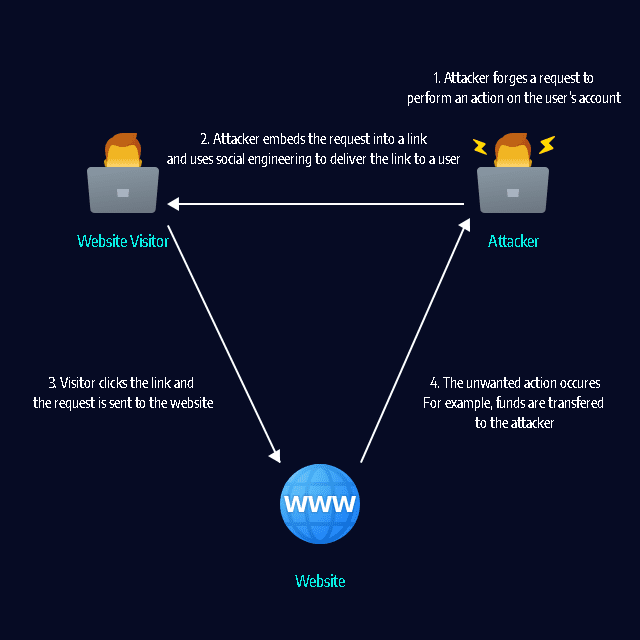
A CSRF attack can force a user to perform unwanted actions on a web application. CSRF assumes that the user is already authenticated. Attackers typically use social engineering to trick users into clicking a link that performs actions that can benefit the attacker.

For example, on an eCommerce website, the attacker can cause the user to inadvertently make a purchase. On a bank website, the attacker can cause the user to transfer funds. If the user has administrative access to a web application, CSRF can be used to compromise the entire application.

In this article:

How CSRF Attacks Work

A website consists of client-side code, typically written in HTML and JavaScript, and server-side code, which depends on the framework used to build the website. Client-side code allows users to perform actions like navigating to different URLs, submitting HTML forms, and triggering AJAX requests via JavaScript. The server-side code intercepts the data sent in the HTTP request and handles it appropriately.

These server-side actions can also be triggered by forged HTTP requests, unless you explicitly protect them. CSRF attacks occur when a malicious attacker tricks the victim into clicking on a link or executing code that triggers a forged request. The malicious code is hosted on another domain controlled by the attacker, therefore the attack is known as “cross site” request forgery.

To protect yourself from CSRF, you need to do two things. Make sure your GET requests have no side effects, and only allow non-GET requests from your client code.

csrf protection or how csrf works

6 CSRF Protection Best Practices

1. Use Same-Site Cookies

CSRF attacks are only viable because cookies are sent with any requests sent to an origin related to that cookie. You can create a flag for a cookie, which converts it into a same-site cookie. 

Threat actors can send a same-site cookie only if a user made a request from the cookie’s origin. However, it is not possible when a request is made across domains. The request source and the cookie have the same origin if the following conditions are met:

  • They have the same protocol and host, but they do not share the same IP address.
  • When applicable, they can also share the same port. 

Not all browsers support same-site cookies (see a full compatibility chart), and a same-site cookie will default to a regular cookie when a visitor uses an older browser. It means same-site cookies are more suited as an added layer of defense, and you should only use them with other CSRF security mechanisms. 

2. Use CSRF Tokens

A popular approach to stop CSRF is using a challenge token. A challenge token is connected with a specific user and is sent as a concealed value in all state-changing forms via the web application. This token is an anti-CSRF token, also known as a synchronizer token.

Here is how the anti-CSRF token works:  

  • The web server creates a token and retains it
  • The token is statically created as a concealed field of the form 
  • The user submits the form
  • The token is a part of the POST request information
  • The application compares the token created and stored by the application with the token transferred in the request
  • If these tokens are the same, the request is validated
  • If these tokens are different, the request is rejected 

This CSRF protection approach is known as the synchronizer token pattern. It secures the form from CSRF attacks because a cybercriminal also has to guess the token to trick a target into creating a valid request. Attackers cannot readily guess the token, and they cannot create it according to a predictable pattern. To improve protection, invalidate the token after a timeout period, or every time the user logs out. 

Anti-CSRF tokens are typically exposed via AJAX – they are sent as request parameters or headers alongside AJAX requests. To be successful, an anti-CSRF mechanism must be cryptographically protected. 

It is also recommended to utilize anti-CSRF options in development frameworks, rather than having developers create their own mechanisms. This reduces mistakes, makes implementation smoother, and in the end improves security. 

3. Require Stronger Authentication for Sensitive Actions

Many websites require a secondary authentication measure or need reconfirmation of login details when a user carries out a sensitive action – for example, on a password reset page. Generally, the user needs to enter their old password before they create a new password.  

This approach protects the user who could remain logged in by accident and minimizes the likelihood of CSRF attacks. 

4. Mitigate Login CSRF

CSRF vulnerabilities can occur on login forms even when users are not logged in. For example, an attacker could employ CSRF to adopt an authenticated identity of the target on an eCommerce site using the attacker’s account. If the victim then enters their credit card details, an attacker could purchase items via the target’s stored credentials. 

You can mitigate login CSRF by establishing pre-sessions that include tokens in the login form.  You can use a pre-session only before a user is verified – do not reuse it after the user is authenticated. Instead, you should destroy the session and create a new one to avoid session fixation attacks. 

If you do not trust subdomains within your master domain in your threat model, it is challenging to mitigate login CSRF. In this case, you can use strict subdomain and path level referrer header verification to mitigate CSRF on login forms.

5. Use Representational State Transfer (REST) Principles

Representational State Transfer (REST) is a set of design principles that assign actions (create, view, update, delete) to various HTTP verbs. Using REST-ful designs helps your site scale and keeps your code clean. REST demands that GET requests are only utilized for viewing resources. 

Maintaining your GET requests side-effect-free will minimize the damage that maliciously created URLs can achieve. Consequently, an attacker has to work harder to create damaging POST requests. 

6. Leverage Web Application Security Testing

After you have effectively resolved a vulnerability in a web application that could enable a CSRF attack, vulnerabilities can still occur later on. These vulnerabilities occur because developers update the application and change its code. 

Given this, it is recommended that you continually test and scan your web applications for any vulnerabilities, including those connected with CSRF attacks. You should use web applications security tools. 

CSRF Protection with Bright Security

Bright helps you automate the detection and remediation of many vulnerabilities including CSRF early in the development process, across web applications and APIs.

By shifting DAST scans left, and integrating them into the SDLC, developers and application security professionals can detect vulnerabilities early, and remediate them before they hit production. Bright completes scans in minutes and achieves zero false positives, by automatically validating every finding. This allows developers to adopt the solution and use it throughout the development lifecycle.

Avoiding Security Incidents with a Dev First AppSec Program

Did you miss our webinar on ‘Avoiding Security Incidents with a Dev-First AppSec Program’?
Don’t worry; it’s available on-demand!

Renowned security expert Ofer Maor and Bright’s CEO Gadi Bashvitz, discuss the importance of proactive security testing as an intrinsic part of a holistic approach to modern application security. Listen in as they will discuss how effective DevSecOps best practices and a Dev-First approach to security testing can avoid incidents further downstream, covering:

  • Real world examples where a lack of an effective AppSec program has led to major incidents
  • Security challenges for security and development teams and how you can overcome these
  • Shifting left – modernizing your security toolkit and processes to meet developers’ changing needs
https://youtu.be/MpFztmysu_k

Guide to Snyk CLI: Install and Key Commands to Know

What Is Snyk CLI?

Snyk is a popular security testing platform for developers. The Snyk Command Line Interface (CLI) lets you introduce Snyk functionality into your software development workflow, to scan for security problems as part of ongoing development. You can run Snyk CLI on a local machine or as part of a continuous integration/deployment (CI/CD) pipeline. 

The Snyk CLI lets you manually identify and fix dependency vulnerabilities in proprietary code; open source components and their dependencies; and infrastructure as code (IaC) templates. Snyk CLI supports a wide range of frameworks and languages, including .NET, Java, JavaScript, C/C++, Ruby, Python, PHP, Scala, and Golang.  

This is part of a series of articles about Web Application Security.

In this article:

Getting Started with the Snyk CLI

Follow these steps to start working with the CLI.

1. Install 

First, you need to install the Snyk Command Line Interface (CLI) – you can do this manually using an installer from the Snyk GitHub repository or via Scoop, npm, or Homebrew. Once installed, you can verify the CLI works using:

snyk--version

2. Authenticate

Authenticate your account via the browser or an application program interface (API) token to link your Snyk account to the CLI. 

3. Authorize

Snyk CLI requires Snyk.io APIs. Link the Snyk CLI to Snyk.io using:

snyk auth

4. Scan

Next, scan your project using one of the following options:

  • If your folder has a supported project, you can run:

snyk test

  • Alternatively, scan a Docker image using Snyk Container:

snyk container test ubuntu:18.04

  • You can also scan a Kubernetes file:

snyk iac test /path/to/kubernetes_file.yaml

5. Build a Project

Now you can start building your project. You need to build a project to test for vulnerabilities unless it has a lock file such as package-lock.json, yarn.lock, gemfile.lock, or paket.lock. For Gradle projects, you don’t need to provide a full build if your project already has an external Gradle file with declared versions of dependencies – you only need the build.gradle file and any other files declaring dependencies.

You build or install a project using:

  • npm install
  • mvn install
  • gradle build
  • dotnet restore
  • dep ensure

Common Snyk CLI Commands

Here are the most common Snyk CLI commands, what they do and how to use them. You run all CLI commands from the folder of the project you want to test. 

Note that all commands have an extensive set of flags and options – these are beyond the scope of the current article. Refer to the CLI documentation for more details, and to read about additional CLI commands we could not cover here.

Related content: Read our guide to Snyk alternatives

Snyk Test

Basic command: snyk test

What it does
Tests a local project for vulnerabilities, providing the following information:

  • Issues to fix by upgrading – you can fix one or more vulnerabilities by updating the project.
  • Patchable issue – Snyk provides a patch you can use to remediate the vulnerability.
  • Issues with no direct upgrade or patch – an issue in the main project or a transitive library that does not have a known fix. In some cases you can replace a transitive library with a newer version that fixes the vulnerability.

How to use it
There are a few ways to use the snyk test command:

  • Run in a local project to identify vulnerabilities. Ensure you first download your full dependency tree using commands like npm install or mvn install.
  • Run within your CI pipeline, and break the build when a vulnerability is found.
  • Run in a script – if the exit code is 0, this means no vulnerabilities were found.

Related content: Read our guide to application security testing

Snyk Monitor

Syntax example: snyk monitor

What it does
Takes a snapshot of a project’s vulnerabilities and uploads it to Snyk’s cloud platform. The command then monitors the project over time, and you can receive alerts when new vulnerabilities are discovered. This command uses snyk test under the hood.

How to use it
First run snyk test to identify vulnerabilities found in your project right now. Snyk recommends first remediating those vulnerabilities you can, and then before going to production, running snyk monitor. This way you can reach an acceptable level of vulnerabilities in the project and be alerted if new vulnerabilities are found.

Note that the results of snyk monitor are stored in the Snyk platform depending on the organization you are a part of. If you belong to several organizations, use the --org flag to indicate which organization this monitor belongs to.

Related content: Read our guide to security testing tools.

Snyk Ignore

Syntax: snyk ignore --id= [--expiry=] [--reason=] []

What it does
It is common to have a vulnerability in an application which cannot be easily remediated, but which does not represent an immediate risk. In this case, you can use the snyk ignore command, telling Snyk to ignore this vulnerability for a certain period of time.

How to use it
First run snyk test and copy the vulnerability ID. You can then run snyk ignore, providing the vulnerability ID using the –id flag. 

Additional, optional flags are –expiry, which specify on what date Snyk should resume reporting the vulnerability, and –reason, which is a text field explaining why you are ignoring the vulnerability.

For example:

$ snyk ignore --id=npm:tough-cookie:20160722 --expiry=2020-12-20 --reason=’Package not used in runtime’

Snyk Container

Syntax: snyk container test :

What it does
Scans container images, distroless images, and container archives for vulnerabilities. You can also monitor images on an ongoing basis, similar to the snyk monitor command.

How to use it

  • You can scan a Docker image you downloaded from a repository by running snyk container test :
  • You can scan a distroless image like this: snyk container test gcr.io/distroless/base | head
  • You can scan a container archive like this: snyk container test docker-archive:container.tar
  • If you add a Dockerfile to any of these commands, Snyk provides remediation advice on the base image, and suggests alternative base images from Snyk if available.

Snyk Infrastructure As Code

Syntax: snyk iac test

What it does
Lets you identify and fix misconfigurations in infrastructure as code (IaC) systems like Terraform or Kubernetes. You can run scans from your local machine or as part of a continuous integration (CI) process.

How to use it
To scan a Kubernetes or Terraform template file, use commands like these:

$ snyk iac test /path/to/Kubernetes.yaml

$ snyk iac test /path/to/terraform_file.tf

Snyk Auth

Syntax: snyk auth [] []

What it does
Lets you authenticate Snyk CLI using your Snyk account. 

How to use it
The input is necessary for CI environments to validate the Snyk API command. If you run $ snyk auth without , a browser window opens, prompting you to log in and authorize using a Snyk..

Snyk Protect

Syntax: snyk protect []

What it does
Lets you apply patches to vulnerable dependencies.

How to use it 
You can use $ snyk protect after you open a fix pull request from the GitHub website or if you run the Snyk wizard on the CLI. This command reads .snyk policy files to determine the patches it applies.

Snyk Wizard

Syntax: snyk wizard []

What it does
Provides various functions to help you detect, keep track of, and fix vulnerabilities.

How to use it
Use the wizard as a guide for fixing discovered vulnerabilities. The Snyk wizard can enumerate local dependencies and query the Snyk servers to find vulnerabilities. You can use it to create .snyk policy files that determine Snyk commands like test and protect. The wizard can also retain a record of your dependencies and notify you of new vulnerabilities.

Complement Snyk with a Developer-First DAST

To ensure your apps and API are secure before hitting production, use SCA like Snyk’s, and Bright’s automated DAST in conjunction.

Snyk’s SCA will allow you to detect your open-source vulnerabilities that may underpin your applications, while Bright’s innovative DAST lets you seamlessly detect security vulnerabilities across your applications and APIs. As Bright automatically validates results, they are NO false-positives, with developer-friendly remediation guidelines provided for each finding.

By leveraging both Snyk and Bright, you are covering all your bases, to find a broader range of vulnerabilities faster and earlier.

The question is not if you should be using SCA or DAST, but how and when you can start to use them together across the pipelines.

Sign-up for a free Bright account.

8 Great Snyk Alternatives

What is Snyk?

Snyk is an application security testing tool that lets you identify and remediate vulnerabilities in open source components, proprietary source code, containers, and infrastructure as code (IaC) templates. It is cloud-based and offered on a monthly subscription basis, with a limited free plan.

Snyk was designed to be used directly by developers, not security teams. It enables developers to test their work directly in an IDE, via the command line, or via automated tests integrated with a CI/CD pipeline. Snyk integrates with many tools commonly used in a DevOps environment, such as JIRA, GitHub, Jenkins, Slack, and Eclipse. It uses a semantic analysis engine to reduce false positives, by cross referencing code against historical data. 

This is part of a series of articles about Web Application Security.

Related content: Read our guide to application security testing

In this article we review the following Snyk alternatives:

  1. Bright Security
  2. GitLab
  3. Veracode
  4. Checkmarx
  5. Nessus
  6. Black Duck

1. Bright Security

Bright is a developer-focused Dynamic Application Security Testing scanner. It removes legacy DAST tools’ limitations and pain points, providing security testing automation for CI/CD and DevOps pipelines, to test both modern applications and APIs early and often, at speed and with NO false positives. A free account is available.

Features

  • Integrates into CI/CD pipelines seamlessly. 
  • Full support for testing microservices, single page applications, APIs (SOAP, REST, GraphQL) and authentication mechanisms.
  • Tailored to developers, it uses proprietary Smart Scanning to remove complex configurations and test setup, enabling developers to run the most important tests, without the need to be a cyber security expert.
  • Each pull request or build can be tested, ensuring scans perform at the speed of DevOps while successfully identifying vulnerabilities. 
  • Eliminates false positives in an automated way, removing the need for manual validation and false alerts, saving time for security teams and developers.
  • Provides transparent, developer friendly remediation guidelines with full proof of concept of the exploit. 
  • The only DAST scanner to automatically detect Business Logic vulnerabilities, reducing further the reliance on manual testing and putting comprehensive scanning into the hands of developers.

2. GitLab

GitLab is a cloud-based project management platform that enables software developers to jointly develop and manage code. The platform can be deployed locally or in the cloud.

GitLab helps developers manage the entire lifecycle of their code, from initial planning to deployment of the code in a production environment. Users can upload their code to a managed repository, and GitLab provides a repository mirroring, allowing users to access repositories on other servers via the GitLab interface.

Features

GitLab’s main features include Git repository management, code reviews, issue tracking, activity feeds, and audit logs. The code review feature allows users to rate code and provide comments for colleagues. The platform also provides continuous integration (CI) and continuous delivery (CD) for code testing, building and deployment.

Learn more in our detailed guide to mobile security.

3. Veracode

Veracode is a static application security testing (SAST) solution that helps manage security risks of development pipelines. It monitors source code and helps developers identify and remediate vulnerabilities. Veracode also allows administrators to scan applications prior to deployment and ensure compliance with industry standards. 

Features

Features include automatic notifications, server monitoring, analytics, scanning across all popular programming languages, automated workflows, auditing, and custom reports.

Veracode comes with APIs that let you integrate with CI/CD tools including Github, Apache Maven, JIRA, Azure DevOps, Artifactory, Bamboo, and Docker. 

Related content: Read our guide to SAST

4. Checkmarx

Checkmarx Static Application Security Testing (CxSAST) is a static analysis platform that lets you identify security vulnerabilities across your entire codebase. It also supports policies that let you automate security testing workflows.

Features

Checkmarx features include cookie scope evaluation, process control, command injection detection, data filtering and analysis, and integration with collaboration tools. CxSAST supports all popular programming languages, and integrates with agile planning, error tracking, and release orchestration platforms via APIs. 

5. Nessus 

Nessus is a cloud-based solution that identifies vulnerabilities in software systems, prioritizes critical issues, and speeds up remediation. It provides an audit trail that lets you view granular details like vulnerability status, severity, and remediation progress, across historical scans.

Features

Nessus features include the Tenable Vulnerability Priority Rating (VPR) tool, which combines data science and threat intelligence capabilities to alert about critical vulnerabilities, and flexible vulnerabilities grouping. It creates customizable reports in HTML, CSV, and XML formats, with preconfigured templates for standard processes like compliance auditing and patch management.

6. Black Duck

Black Duck has been acquired by Synopsys. It provides an open source management and license compliance solution. The solution is based on a knowledge base of over 4.5 million open source projects and 2,750 open source licenses. Identifies risks in software applications and containers, prioritizing vulnerabilities and providing specific remediation guidance. 

Related content: Read our guide to websocket security.

Features

Black Duck Binary Analysis scans source code and binary code to find open source components. It continuously monitors for new vulnerabilities and alerts developers, security teams, and legal teams. 

7 Open Source Pentesting Tools and When To Use Them

What is Pentesting and what are Pentesting tools?

The goal of pentesting (penetration testing) is to detect security vulnerabilities by utilizing specific processes, tools and services. You can either opt-in for a manual pentest, conducted by a team of white-hat hackers, or you can use an automated approach, having a software solution perform the test. Either way, the target of a pentest can be a computer system, a network or a web application.

When conducting a pentest, the pen testers use a range of tools, most often the same tools a malicious attacker would use. Those tools can include port scanners, vulnerability scanners, network sniffers, web proxies and password crackers.

If you want to learn more about this topic, we have a great article about penetration testing.

Open Source pentesting Tools on the list:
1. OWASP ZAP
2. Zenmap
3. Scapy
4. BeEF
5. Firefox Addons
6. Sqlmap
7. Kali NetHunter
Alternatives

1. OWASP ZAP

owasp zap

OWASP ZAP (Zed Attack Proxy) is a web app vulnerability scanner maintained by an international team of volunteers, and is one of the most active OWASP projects. You can configure OWASP ZAP to detect vulnerabilities automatically, or you can trigger the scans manually. You can also choose if you want to use it as a man-in-the-middle, between your browser and the application’s server, or as a standalone application. If you are not a fan of GUI, you can use OWASP ZAP as a daemon process, without UI.

Platform support: Windows, Linux, Mac OS/X, Docker

License:  Apache License 2.0

2. Zenmap

zenmap

Zenmap, the official GUI for the Nmap Security Scanner, is a free and open source tool that aims to make Nmap easy to use for beginners, while providing advanced features for experienced Nmap users. The tool is multi-platform and will work on Windows, MacOS, Linux, BSD, etc. Profiles can be created for frequently used scans to make them easier to run again and again. A command creator allows you to create Nmap command lines interactively. The results of a scan can be saved and retrieved at a later time. Scan results saved in the past can be compared to see how they differ. Recent scan results are saved in a database that can be searched.

Platform Support: Multi-platform (Windows, MacOS, Linux, BSD, etc.

License: Nmap Public Source License

Scapy

scapy

Scapy is capable of forging or decoding packets of a wide variety of protocols. This open source pentesting tool will allow you to transmit, capture, and match requests and responses, among other things. You can use Scapy to perform most tasks, such as scanning, tracerouting, probing, unit tests, attacks, and network discovery, but you can also send invalid frames, inject your own 802.11 frames, and combine techniques.

Platform Support: Linux, Windows, MacOS/X and most UNIXes with libpcap

License: GPLv2

BeEF

BeEF

BeEF is an open source, GUI-based pentesting tool. The BeEF bypasses hardened network perimeters to examine how hackers could exploit security weaknesses in the web browser itself. One or more web browsers can be hooked by BeEF to serve as launching pads for further attacks. It can run on many platforms, including Ubuntu, MacOS, Windows, and others, but it requires Ruby and SQLite to run.

Platform Support: Mac OSX 10.5.0 or higher / modern Linux

License: MIT License

Firefox Addons

firefox addons

Firefox is the go-to web browser for most system administrators when it comes to pentesting activities. The browser is open source and comes with the ability to easily install addons to it. Mozilla has already compiled a list of 30 addons you can choose from, so you don’t have to spend time searching. You’ll find Hackbar, an addon that helps you test for SQL Injection and XSS attacks in the address bar, ViewStatePeeker to examine the ASP.Net viewstate, and Firebug to track down fraudulent JavaScript code on servers.

Platform Support: Firefox Browser

License: Check for every specific addon.

Sqlmap

sqlmap

To take over the control of the database server, attackers usually use SQL injections. To be a step ahead, use sqlmap to detect possible weak spots the attackers could take advantage of. Sqlmap is a free and open source pentesting tool for SQLi in Windows and UNIX/Linux systems. Sqlmap comes with the ability to test for different SQLi techniques, including boolean-based blind, time-based blind, stacked queries, out-of-band and others. If you are not familiar with those techniques and would like to know more, we have a great article for you covering SQL Injection in depth. SQLMap supports a wide range of DBMSs in addition to MS SQL Server, MS Access, Oracle, IBM DB2, Firebird, SAP MaxDB, and HSQLDB. You can also embed sqlmap technology in proprietary software, but this requires an alternate license.

Platform Support: Cross Platform

License: GNU General Public License v2.0

Kali NetHunter

kali nethunter

In our fast-paced world, a system administrator may have to perform pentests on-the-go. Kali NetHunter is the first open-source Android penetration testing platform. Thanks to Kali NetHunter, you will be able to access the Kali toolset from various supported Android devices. NetHunter supports various features unique to the Android platform. NetHunter comes with an interface that will allow you to easily work with complex configuration files through a local web interface. Kali NetHunter is an excellent network security tool thanks to this feature, along with a custom kernel that supports 802.11 wireless injection and a preconfigured connect back VPN service.

Platform Support: Android

License: GNU GPL

Alternatives to open source tools

People often opt-in for open source tools because they are free, however you don’t have to limit yourself to open source tools if you want to avoid paying for proprietary tools. Some, like Bright, have a bounteous free plan. In the best case, you won’t even be limited in the features you can use, so try to find free solutions that are not necessarily open source. Proprietary tools have a big advantage on their side – the support you get with them.
Sign-up for Bright’s free developer security testing automation account and enhance your pen tests with the only no false positive API and application security scanner – sign-up now.

Deserialization in Java and How Attackers Exploit It

What is deserialization in Java?

Serialization in Java represents a process in which an object in the Java programming language is converted into a format that can either be transferred over a network or saved to a database. Deserialization in Java represents a process opposite to that. In the process of deserialization, a serialized Java object is read from a file or network and is being converted into an object.

The process of deserialization is supported in a lot of other programming languages, such as PHP, Python, and Ruby, just to name a few.

In the case of insecure Java deserialization, an attacker manipulates a serialized Java object with the goal to cause unintended consequences in the program flow, possibly causing DoS, remote code execution (RCE) or authentication bypass.

To learn more about deserialization in general, read our guide on deserialization.

In this article:

Serialization interface in Java

Before we can exploit deserialization vulnerabilities in Java, we need to understand how serialization and deserialization work in Java, so let’s start with that.

The serialization of Java classes is enabled by implementing java.io.Serializable. For a Java application to handle serialization and deserialization of objects of a certain class, special methods need to be implemented to classes writeObject() and readObject(). If we don’t implement this interface to any class, objects of that class will not be serialized or deserialized.

Exploiting Java insecure deserialization

To exploit a Java application using an insecure deserialization bug, we first have to find an entry point to insert the malicious serialized object.

Serialized objects in Java are often used to transport data in HTTP headers, parameters, or cookies.

The Java serialized object 

To recognize potential entry points for your exploit, look out for signatures all Java serialized objects have:

  • The signature starts with AC ED 00 05 in Hex, or ro0 in Base64 (for example, you can find them within HTTP requests as cookies or parameters)
  • Content-type header of an HTTP response set to application/x-java-serialized-object.

A lot of special characters can be found in Java serialized objects, so it is not uncommon for them to be encoded before transmission. Take a moment to look out for differently encoded versions of these signatures.

Manipulating object data and application logic

After you discover a user-supplied serialized object, try to manipulate the program logic by tampering with the data stored in the object. Try to change the usernames, role names, or other identity markers in the object, in case the Java object is used as a cookie for access control. After you do that, re-serialize the object and send it back to the application.

To test if you can manipulate the program’s flow, tamper with any sort of value in an object that is a file specifier or a file path, and control the flow values.

From insecure deserialization to code execution

With no restrictions in the application on what classes are allowed to get deserialized, all serializable classes that the current classloader can load can also be deserialized. That means that a user can create arbitrary classes! A potential attacker can use this to achieve Remote Code Execution (RCE) by constructing objects of the right classes that can lead to arbitrary commands.

The process of achieving remote code execution can be complicated, and there are a series of tools that need to be used to reach the desired method for code execution.

These tools and gadgets can be found in the libraries that a Java application loads. Try chaining method invocations that will eventually lead to remote code execution.

While creating the chain, ensure that the first gadget in the chain is self-executing. Look also for gadgets that are found in commonly available libraries to maximize the chances that your gadgets are in-scope for the application.

There are exploits out there developed and published using gadgets in some popular libraries like the Spring Framework, Groovy, Commons-Collection and Apache Commons Fileupload.

Limitations of this approach

This approach doesn’t come without limitations however. Finding and chaining gadgets to formulate an exploit is very time consuming. Keep in mind that you are limited to the classes that are available to the application, so you are limited in what you can do with the exploit. In addition, gadget classes have to implement serializable or externalizable, and different library versions may come with different usable gadgets.

Preventing Java insecure deserialization bugs

To prevent Java insecure deserialization bugs, make sure not to deserialize any data contaminated by user-input, without properly checking it. If you can’t avoid deserialization, restrict it to a small list of whitelisted classes.

Don’t use objects when you don’t have to – if possible, use simple data types like strings or arrays.

Don’t rely on user input for session information. Instead, keep the session state on the server. That will prevent the tampering of cookies.

Another important tip – keep an eye out for patches and keep the dependencies up to date.

Learn more in our detailed guide to deserialization vulnerability.

How not to prevent Java insecure deserialization

Some developers try to prevent deserialization vulnerabilities by identifying commonly vulnerable classes and removing them from the application. This is, for sure, an effective way to restrict available gadgets! Why shouldn’t you do it then? Limiting gadgets is not a cure-all for deserialization issues.

Address the root cause of this vulnerability – insecure deserialization.

Hackers can always find more gadgets in other libraries, and come up with creative ways to achieve the same result.

Sign-up for a free Bright account and start testing for deserialization vulnerabilities today.

How to Write an Effective Penetration Testing Report

What Is a Penetration Testing Report?

Penetration testing (pentesting) involves assessing the security of a system, network, or application. Although pentesters use the same techniques as malicious attackers, the process is legal, because it is performed with the consent of the tested organization. 

A pentester must provide a detailed report on the testing process and the vulnerabilities discovered. A penetration testing report is the only tangible product of a pentest. The whole purpose of a penetration test is to identify vulnerabilities and security issues the organization can remediate – and these are communicated via the report. Thus, a penetration tester must ensure they create the best possible report. 

A good penetration testing report provides an executive summary of finding, summarizes the vulnerabilities and their business impact, and provides recommendations to fix them. Successful penetration testers use a methodical approach, and document their methodology as part of the report.

In this article:

Key Points to Consider Before Writing a Pentest Report

A penetration test report provides a detailed overview of the weaknesses of the system being tested. It also outlines how to solve problems, including recommendations for patching, hardening, and restricting the functionality of systems when needed. The goal is to identify problem areas that need attention and to fix the issue.  

Here are points to consider before you write a pentest report: 

  • Identify and specify the aims of penetration testing
  • Know the plausible impacts of a breach
  • Outline the testing process and other related techniques

What makes a great pentesting report?

Penetration testing reports are often overly technical and lack practical steps. Also, they don’t explain the business impacts resulting from the listed vulnerabilities’ presence. 

A skilled penetration tester does not only find the weaknesses but also specifies the impact they have on the customer. The reports should offer the customer practical solutions to risks. 

Related content: Read our guide to penetration testing services

How to Create a Penetration Testing Report

Here are the main sections you should include in a penetration testing report:

  1. Executive summary – pentesting reports start with a summary of your findings, intended for company executives. This should be written in non-technical language for people who are not security professionals but want to understand the significance of the vulnerabilities discovered and what the organization needs to do to solve them.
  1. Details of discovered vulnerabilities – provide an outline of the vulnerabilities you found, how you discovered them, and how an attacker can manipulate them. Keep it short, preferably in simple language that security professionals, developers, and non-technical roles can understand.
  1. Business impact – now that it is clear which vulnerabilities exist, you should analyze their impact on the organization. Use the Common Vulnerability Scoring System (CVSS) to score the vulnerabilities by severity. But go beyond CVSS scores to explain what critical systems each vulnerability affects. Provide a technical walkthrough of the impact to the specific organization if the vulnerability is exploited. 

For example, when pentesting a financial application, explain for each vulnerability what it would allow attackers to do. What specific files could they view, and which operations would they be allowed to perform? Would they be able to perform financial transactions? This is critical for decision-makers to understand in order to manage remediation efforts.

  1. Exploitation difficulty – in this section, provide more details on the process you went through to discover and exploit each vulnerability. Provide a clear score for ease of exploitation such as Easy / Medium / Hard. The organization can use this, in combination with the severity of the vulnerabilities, to prioritize fixes. 
  1. Remediation recommendations – this is the most important part of a pentesting report, explaining to the organization how to remediate the vulnerabilities you discovered. The main reason an organization invests in pentesting is to understand how to remediate its critical vulnerabilities. Provide specific instructions on how to remediate all affected systems. 

To make your recommendations more effective, perform research to identify the most efficient fix in each case. For example, one system can be easily patched to fix a vulnerability, while another system may not support patching and may need to be isolated from the network. 

  1. Strategic recommendations – beyond fixing the specific vulnerabilities, provide advice that can help the organization improve its security practices. For example, if the organization failed to detect your penetration test, recommend they adopt a better monitoring strategy. If you see that the organization grants excessive privileges to user accounts, recommend a better access control strategy.

Learn more in our detailed guide to penetration testing tools.

Best Practices for Writing a Penetration Testing Report

The following best practices will help you create a winning pentesting report:

  1. Note the good with the bad – don’t only focus your reports on security shortcomings at the organization. If you found areas that were well secured, or you attempted an attack and were blocked by security tools, note this, so the organization knows which parts of its defenses are working well. Effective security controls that withstand your attacks do not reduce the value of your penetration test. The client will be happy to discover that their security investments have a good return. 
  2. Write the report as you go – it is far better to write the report while conducting the penetration test rather than wait until the end and then start writing. Write your rough report as you are testing, taking screenshots, and recording events as they happen. At the end of your test, you will have a good record of your experiences, and you can organize them into your final report. This will also avoid “writer’s block” at the end of your pentesting engagement.
  3. Document your methods – every penetration tester has different methods and approaches. Share your methods with readers of the report. How did you perform reconnaissance? Why did you try a specific attack and not others? Did you use a specific framework such as NIST or SANS? This information should be woven into your report and can help strengthen the credibility and value of your findings.
  4. Clearly define the scope – it is critical to define the scope of your penetration test, both to keep your client happy and to avoid ethical and legal issues. Remember that if you do something outside the agreed scope of the penetration test, even if you have the best intentions, you could face legal liability. Draft a clear Statement of Work (SOW) that explains what you are and are not expected to test. Repeat the agreed scope in your report, so it is clear to everyone what you were hired to do.

Complementing Penetration Testing with Dynamic Application Security Testing (DAST)

Penetration testing and PTaaS are valuable to ensure your applications and network are secure, however a large proportion of each is conducted manually by specialist penetration testers. While PTaaS has streamlined the process of procuring and managing more frequent pentests, the process still takes time, is not scalable and the costs can spiral.

With more companies now apopting DevOps and CICD, further automation of security testing is required that removes security related bottlenecks and provides a direct and immediate feedback loop to developers.

Bright Security’s developer focussed Dynamic Application Security Testing scanner is used by penetration testing companies to carry out preliminary scans on their client applications and APIs. You can integrate Bright into your development pipelines to benefit from continual, scalable security testing early and often, on every build / commit. 

Bright automatically validates every security issue, so has NO false positives. This removes the need for you to manually validate security issues (one of the services performed by PT / PTaaS). Coupled with the ability to detect Business Logic Vulnerabilities with Bright, this reduces your reliance on and cost of your manual penetration testing or PTaaS.

Sign up for a FREE Bright account and start automating your application and API security testing