What Is DevSecOps? Adding Security to the SDLC

DevSecOps is a strategic approach that unites development, security, operations, and infrastructure as code (IaaS) in a continuous and automated delivery cycle. 

DevSecOps aims to monitor, automate, and implement security during all software lifecycle stages, including the planning, development, building, testing, deployment, operation, and monitoring phases. By implementing security in all steps of the software development process, you reduce the risk of security issues in production, minimize the cost of compliance, and deliver software faster. 

DevSecOps means that all employees and team members need to take responsibility for security from the very start. They must also make effective decisions at each of the development lifecycle and implement them without compromising on security.

This is part of an extensive series of guides about cybersecurity.

In this article:

DevSecOps vs DevOps

DevOps fosters collaboration between application teams during the application development and release process. Operations and development teams work in unison to put into practice shared tools and KPIs. The DevOps approach aims to increase the pace of deployments while guaranteeing the efficiency and predictability of the application. 
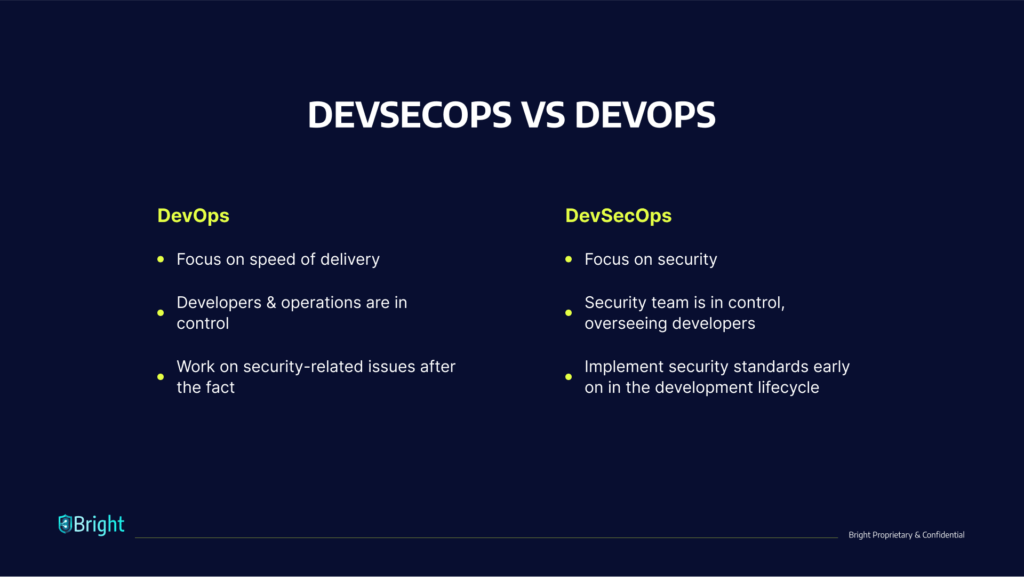
A DevOps engineer focuses on deploying updates to an application as quickly as possible with limited disruption to the user experience. Because they focus on increasing the speed of delivery, DevOps teams do not always regard security threats as a high priority, resulting in the build-up of vulnerabilities that can negatively affect the application, proprietary company assets, and end-user data. 

DevSecOps is an extension of DevOps. It arose as development teams started to understand that the DevOps model does not sufficiently address security issues. Rather than retrofitting security into the build, IT and security professionals developed DevSecOps to integrate security management from the onset and during the development process. This way, application security starts at the beginning of the build process rather than at the final stages of the development pipeline.   

With this innovative strategy, an engineer of DevSecOps aims to ensure that applications are secure against attacks before they are released to the user and remain secure during application updates. DevSecOps notes that developers should develop code while considering security. In essence, it strives to deal with security issues that DevOps do not oversee.

Shift Left Security

‘Shift left’ is a core component of DevSecOps. It encourages developers to move security from the end (right) to the beginning (left) of the DevOps process. In a DevSecOps environment, the DevSecOps team members integrate security into the development process from the onset. 

An organization that adopts DevSecOps involves its engineers and cybersecurity architects as members of its development team. Their role is to ensure the documentation, patching, and secure configuration of all components and configuration items in the stack. 

Shifting left lets the DevSecOps team isolate security risks and weaknesses early on. It also makes sure that these security exposure sites are dealt with immediately. In this way, the security team builds the product effectively and implements security as they develop it.

What Is Software Development Life Cycle (SDLC) Security?

A software development life cycle (SDLC) is a structure used to process the creation of an application from the onset to decommission. Over time, many SDLC models have come into existence—from iterative and waterfall to the more current CI/CD and agile models, which increase the frequency and speed of deployment. 

Generally speaking, SDLCs feature the following phases: 

  • Planning and requirements
  • Architecture and design
  • Test planning
  • Coding
  • Testing and results
  • Release and maintenance

Previously, organizations carried out security-related activities exclusively as a testing component during the last part of the SDLC. Consequently, they wouldn’t discover flaws, bugs, or other vulnerabilities until it was late in the process and more time-consuming and expensive to fix. In some cases, they would miss essential security vulnerabilities altogether. 

Research from IBM shows that it costs six times more to address a bug discovered during implementation than fixing one identified during design. In addition, it could be 15 times more costly to fix a bug found during the testing phase than if developers discovered it during design.

Implementing DevSecOps into the SDLC

You should address five key stages to enable DevSecOps in an existing DevOps pipeline. 

Secure Local Development

Begin by establishing secure working environments. When you are creating an application, you are writing source code and integrating components together. Docker is beneficial during this phase as it automates the service development and infrastructure on local machines. When using this ready-to-go Docker environment, ensure that you use up-to-date versions of Docker Images and scan all images for vulnerabilities. Even images provided by official sources have vulnerabilities that developers should patch.

Version Control and Security Analysis

When several people are involved with a piece of code, it is more difficult to identify and remediate vulnerabilities. Git systems can be helpful in this respect. If a team member uploads a bit of code, it strongly recommends that you perform automated security testing on your core and code dependencies.  

Continuous Integration and Build

When establishing the development package/image, you should ensure that your system or build tool has suitable security in place. It should use HTTPS, should be secure and properly hardened. Preferably, the build system should not be accessible through the Internet.

Promotion and Deployment

When you deploy your application to an environment, insert environment variables and credentials via your CI/CD tool and aim to manage them as secrets. You should effectively manage and encrypt these secrets to ensure they are secure.

Infrastructure Security

When you deploy your application, ensure that you implement a firewall and Intrusion Detection System (IDS) on all container hosts. Security teams must watch logs and alerts from these tools and rapidly respond to them.

DevSecOps Tools

Here are a few categories of DevSecOps tools you can use to implement a DevSecOps process.

Dynamic Application Security Testing (DAST) 

Developers use DAST tools to analyze web applications while running and discover any security weaknesses or vulnerabilities. DAST examines an application and attacks it as a cybercriminal would. DAST tools offer valuable information to developers about the behavior of the application. Developers can use this information to identify where a cybercriminal could stage an attack and work to eliminate the threat.

Bright is from ground-up built for developers and can easily be integrated into your DevOps pipelines. With Bright, you can create end-to-end deployment pipelines in minutes and have security testing as an integral part, without slowing you down or causing too much noise, and resulting in secure products being deployed with a streamlined DevSecOps process in place.

Static Application Security Testing (SAST) 

SAST tools can help organizations identify vulnerabilities in their proprietary code. Developers should know about and use SAST tools as an automated component of their development process, which will help them identify and remediate security weaknesses early in the DevOps process. Common static analysis tools include Veracode and SonarQube.

Software Composition Analysis (SCA) 

SCA includes monitoring and managing license compliance and security vulnerabilities in the open-source elements that support your code. It helps you understand what open source components are in use, what their dependencies are, and what open source licenses they use. 

Advanced SCA tools have policy enforcement abilities – they can prevent the downloads of malicious binaries, fail a build if open source components have vulnerabilities or license issues, and alert security teams. Examples of SCA tools are Whitesource, GitLab, and JFrog X-Ray.

Container Runtime Security 

Container runtime security tools examine containers within their runtime environment. These tools can add a firewall to protect container hosts, prevent unauthorized network communication between containers, discover anomalies according to behavioral analytics, and more. Examples of runtime protection tools are Aqua Security, Rezilion, and NeuVector.

Learn more in our detailed guide to devops testing.

6 DevSecOps Best Practices

Here are a few best practices you can use to practice DevSecOps more effectively.

Related content: Read our guide to devsecops vs devops.

Automate Tools and Processes

Automation is essential when finding a middle ground between security, speed, and scale. DevOps already emphasized automation; the same is true for DevSecOps. Automating security processes and tools ensures that teams adhere to DevSecOps best practices.  

Automation ensures that developers and security professionals use the tools and processes in a repeatable, reliable, and consistent way. It is essential to know which security processes and activities may be entirely automated and which methods need a degree of manual intervention.

An effective automation strategy is also reliant on the technology and tools in use. One of the things to consider in automation is if a tool has enough interface to facilitate its integration with different subsystems. 

Invest In Security Education

Security is the coming together of compliance and engineering. Organizations should promote teamwork between the development engineers, compliance teams, and operations teams to ensure that all employees appreciate the organization’s security posture and adhere to the same standards.

Everyone who contributes to the delivery process must be aware of the fundamental principles of application security. They should also know about application security testing, the Open Web Application Security Project (OWASP) Top 10, and additional secure coding practices. 

Developers must understand compliance checks, threat models, and have a working understanding of how to assess risks, exposure and establish security measures.  

Promote a Security Culture

Effective leadership promotes a good culture which leads to change within the organization. It is essential in DevSecOps to relay the responsibilities of product ownership and security of processes. Once this occurs, engineers and developers can take responsibility for their tasks and own the process. 

DevSecOps operations teams must develop a system that suits them and use the protocols and technologies that serve their current project and team. By empowering the team to create the workflow environment that meets their needs, they become invested in its outcome.

Learn more in our detailed guide to cloud native security.

Recruit Security Champions

A security champion is someone who has both a motivational and an educational role. They encourage and engage with all employees helping them learn, use, and stay committed to security practices. These individuals need not be accomplished security professionals. They should have enough knowledge to answer fundamental questions and bridge the gap between information security specialists and other employees.

In large organizations, particularly those with several offices, security champions are the ones who make sure that employees communicate up-to-date security information throughout their departments. Furthermore, security champions can assist with real-world security simulations and training.

If an actual breach or attack occurs, the security champions will play an essential role in mitigating damage. Generally, a critical factor in effective phishing scams is the delay in reporting the incident, often out of fear of repercussions or embarrassment. Thus, a security champion must be someone that people feel comfortable approaching when real life security issues occur. 

Treat Security Vulnerabilities as Software Defects

Organizations generally report security vulnerabilities differently than functional and quality defects, and save the findings in different systems. Teams thus have less visibility into the overall security posture of their tasks. 

Retaining quality and security in one location helps teams approach both kinds of issues with the same degree of importance. Security alerts, especially those from automated scanning tools, might include false positives. It can be complex to ask developers to examine and attend to those issues. 

One way to address this problem is to fine-tune the security tooling over time by studying historical discoveries and application data. You can also apply custom rulesets and filters so that the tool only reports on critical issues.

Achieve Traceability, Auditability, and Visibility

Implementing auditability, visibility, and traceability in a DevSecOps process can foster a deeper understanding and a safer environment: 

  • Traceability—lets you monitor configuration items during the development cycle to where developers introduce requirements into the code. This approach can help strengthen your organization’s control framework, as it helps maintain compliance, minimize bugs, ensure security code during application development, and assist with code maintainability.
  • Auditability—essential for maintaining compliance with security controls. Procedural, administrative, and technical security controls must be well-documented and auditable. Also, all team members should uphold security control measures. 
  • Visibility—means that the organization has implemented a monitoring system that oversees operations, sends alerts, and improves awareness of cyberattacks and changes as they take place. It should also provide accountability throughout the entire project lifecycle.  

See Additional Guides on Key Cybersecurity Topics

Together with our content partners, we have authored in-depth guides on several other topics that can also be useful as you explore the world of cybersecurity.

Device42

Authored by Faddom

API Security

Authored by Radware

DAST

Authored by Bright Security

11 DevSecOps Tools That Will Help You Shift Security Left

What is DevSecOps, and what are DevSecOps Tools?

DevSecOps is a holistic approach to security, informed by a community-driven mindset. Developers, IT operations, and security professionals use DevSecOps tools to build secure software, by embedding security standards in all parts of the DevOps pipeline. Security is now a part of all stages of development, from writing code to deployment of applications in production. 

DevSecOps aims to ensure that all team members are responsible for security in the software they deliver. DevOps Security delivers secure software by implementing continuous delivery architectures and a community-driven strategy informed by experimentation and learning. 

Learn more in our detailed guide to devops testing.

While traditional security measures added security on top of the continuous delivery pipeline, DevSecOps tools aim to build compliance and security into the pipeline. A primary way of doing this is by automating security processes using a variety of DevSecOps tools. We’ll discuss several important categories of DevSecOps tools, including:

  • Dynamic Application Security Testing (DAST)—used to test applications for security flaws while running in a development environment or in production
  • Static Application Security Testing (SAST)—used to test for security flaws in source code
  • Dashboard tools—used to gain visibility into security issues in the development process
  • Threat modeling tools—used to identify and prioritize risk in applications

In this article:

Dynamic Application Security Testing (DAST)

DAST tools use a black-box testing approach, where the tester doesn’t have a prior understanding of the system. They typically detect security vulnerabilities present in the application while it is running in production and were historically deployed late in the CICD by the security team. DAST tools use operating code to identify issues with requests, interfaces, scripting, responses, authentication, sessions, data injection, and more. 

1. Bright Security

Bright is a developer-focused and AI-powered DAST scanner. It removes legacy DAST tools’ limitations and pain points, providing security testing automation for CI/CD and DevOps pipelines, to test both modern applications and APIs early and often, at speed.

Key features include:

  • Integrates into CI/CD pipelines seamlessly. 
  • Full support for testing microservices, single page applications, APIs (REST, GraphQL) and authentication mechanisms.
  • Tailored to developers, it uses proprietary Smart Scanning to remove complex configurations and test setup, enabling developers run the most important tests, without the need to be a cyber security expert.
  • Each pull request or build can be tested, ensuring scans perform at the speed of DevOps while successfully identifying vulnerabilities. 
  • Eliminates false positives in an automated way, removing the need for manual validation and false alerts, saving time for security teams and developers.
  • Provides transparent, developer friendly remediation guidelines with full proof of concept of the exploit. 
  • The only DAST scanner to automatically detect Business Logic vulnerabilities, reducing further the reliance on manual testing and putting comprehensive scanning into the hands of developers.

2. GitLab

GitLab is a collaborative software development platform and an open source code repository for sizable DevSecOps and DevOps projects. 

GitLab provides a place for online code storage and the capacity for CI/CD and issue tracking. The repository allows for the hosting of various development versions and chains and lets users examine previous code and return to it in the case of unexpected problems. 

GitLab offers – start to end – DevOps capabilities for every point in the software development life cycle. GitLab’s continuous integration (CI) abilities let development teams automate the building and testing of their code. The tool includes security features with scan results given to developers within their CI pipeline/workflow. Furthermore, a dashboard helps security professionals manage vulnerabilities. Users can also make use of fuzz testing via GitLab’s acquisitions of Fuzzit and Peach Tech.  

3. OWASP Zap

Zed Attack Proxy (ZAP) is an open-source web application security scanner. It is one of the most active Open Web Application Security Project (OWASP) projects. Initially, IT specialists used to identify vulnerabilities in web applications. It is now also commonly used for mobile application security testing.

ZAP sends malicious messages to identify security flaws in an application, increasingly used to test the security of mobile applications. This form of testing is made possible by sending any file or request via a malicious message and testing if a mobile application is vulnerable to that message. 

Key features include: 

  • An international community-based tool maintained and supported by hundreds of volunteers
  • Available in 20 programming languages
  • Support for manual security testing

Static Application Security Testing (SAST) Tools

SAST is a core component of a shift-left security methodology. Your organization can save time dealing with security issues by looking for potential problems early on. You can identify issues as soon as you start developing the code. SAST integrates into CI/CD pipelines and IDEs to stop harmful code from reaching production.

4. LGTM

LGTM enables pull request approvals using GitHub maintainers files and protected branches. You can lock pull requests, so they are not merged until a specified number of project maintainers give their approvals. Project maintainers can show their approval by remarking “looks good to me” (LGTM) in their pull request.

  • Enable automatic code review – stop bugs from making it to your project by employing automated reviews that tell you when your code modification might initiate alerts within your project.
  • Track projects over time – LGTM studies the whole history, so you can view how your alerts have evolved and which particular commits or events had the largest influence on your code quality.
  • See how your projects measure up – you can use LGTM to discover how your project measures up against other projects on the market and improve your projects’ grades and alert counts by using a shield via your repositories’ readme files. 

5. Codacy

Codacy identifies patterns to help developers or software engineers in code reviews. Codacy is a useful tool in discovering security issues and improving code quality. 

The tool uses an interface to provide you with more information about the code you are using, and can help you demonstrate the quality of your project.

Codacy integrates with GitHub, looking for errors and discovering code complexity and style. When you deploy Codacy in your work, you save time when reviewing codes. It also helps you keep track of the quality of your project.

Codacy automates code quality. It undertakes static code examination automatically, offering speedier notifications of security problems, code coverage, and code complexity and code duplication.  

Dashboard Tools

Dedicated DevSecOps dashboard tools permit you to view and share security data. They provide an overall graphical view of the DevSecOps process from development through to operations, promoting collaboration between developers, operations, and security teams. In addition to standalone dashboard tools, many DevSecOps tools include dashboards.

6. Grafana

Grafana provides one central hub from which you can visualize, query, and analyze metrics. It is an open observability platform.

Grafana lets you structure dashboards to meet your needs and share them with your team members. Its visualization tools feature graphs, geomaps, and histograms. Furthermore, it provides support for many databases, allowing you to aggregate additional data.

Grafana observability functionality helps teams gain visibility over complex environments like containerized or serverless applications.

7. Kibana

Kibana performs visualization for Elasticsearch data. You can use it to track request workflows, query loads, and more. DevSecOps teams can implement custom visualizations according to their needs. Kibana adds an intelligence feature that suggests visualizations to communicate data successfully.   

Threat Modeling Tools

Threat modeling DevSecOps tools are intended to discover, define and predict threats over the entire attack surface so that your team can reach proactive security decisions. Specific tools automatically design threat models from details users give them about their applications and systems. These tools offer a visual interface to assist non-security and security professionals in exploring threats and their possible impacts. 

8. OWASP Threat Dragon

OWASP Threat Dragon develops threat model diagrams to keep track of probable threats and decide how to mitigate them. It works for desktop and web applications. It has a rule engine and system diagramming to auto-generate threats and mitigation efforts. DevSecOps teams will find it helpful because it provides a proactive method of threat management from the beginning of the development process.  

9. ThreatModeler

ThreatModeler is an automated threat modeling system. It is available in the cloud and AppSec editions. Once you enter functional details about your systems or applications, ThreatModeler automatically assesses the data and discovers potential threats over the whole attack surface, according to up-to-date threat intelligence.   

Auditing Tools

It is important to test applications in development for possible vulnerabilities as part of DevSecOps. This process lets you pinpoint security vulnerabilities before they are exploited.

10. Chef InSpec

Chef InSpec assists with standardized security auditing to help with ongoing compliance. This tool is suitable for identifying non-compliance early, helping with quick remediation. Also, it provides automated security compliance for your infrastructure to minimize risk. DevSecOps teams find this a valuable tool because of its streamlined delivery of security and compliance audits. 

11. Gauntlt

Gauntlt offers hooks to different security tools and makes them available for use by security, dev, and ops teams so that they can build sturdy software. It is built to allow communication and testing between groups and develop actionable tests that may be hooked into your testing and deploy processes. 

Features:

  • Gauntlt attacks are created in easy-to-ready language
  • Hooks into your organization’s testing processes and tools
  • Security tool adapters feature Gauntlt
  • Uses Unix standard out and standard error to pass status

How To Select a DevSecOps Tool

Native Artifact Management

Before teams can begin identifying which open source components possess vulnerabilities, they need to use a universal DevOps platform. This platform should manage all binaries and artifacts in one unified place, irrespective of technology and type. The DevOps platform must know which artifacts are created, used, or consumed. The platform should also know about the dependencies of the artifacts. 

Related content: Read our guide to cloud native security.

Visibility Into All Environment Layers

It is important to know which open source components and libraries your binaries use. However, beyond this, you should also understand how to scan and unpack them to see into additional dependencies and layers – including those packed in ZIP files and Docker images. 

A DevSecOps solution should know an organization’s dependency and artifact structure. It should also provide visibility and assess the impact of any license violation or vulnerability identified anywhere in the software ecosystem. 

Cloud-native Support

Solutions must support container-based release frameworks. Such frameworks are quickly becoming the standard for DevOps infrastructure. In-depth, recursive knowledge of container technology and the capacity to deeply explore each layer will ensure that vulnerabilities are revealed. However, many scanning tools don’t provide support for containers. Or, they don’t have enough knowledge about their transitive dependencies and different layers. 

Automation

Organizations must think about the development and operations environment as a whole. This environment includes container registries, source control repositories, the continuous integration and continuous deployment (CI/CD) pipeline, orchestration and release automation, API management, operational management, and monitoring.  

Innovative automation technologies are helping organizations implement agile development practices. They have also played a role in improving security practices. Ensure that automation is robust and covers new forms of infrastructure, such as containerized and serverless applications.

Automate Governance

DevSecOps tools should be able to automate governance in coordination with an organization’s security policies. A governing system should automatically enforce organizational policies and assume action accordingly without interference. 

Core features should include: 

  • Notification of compliance or security violations through different channels, including instant messages, JIRA, and email
  • Prevention of downloads
  • Failing builds that are dependent on vulnerable elements
  • Stopping the deployment of vulnerable release components 

GraphQL Testing: Components to Test and 5 Security Testing Tips

What Is GraphQL?

GraphQL is a query language, as well as a server-side runtime, designed for APIs. GraphQL prioritizes providing clients with only the requested data. The goal of GraphQL is to make APIs flexible, developer-friendly and fast. 

GraphQL offers an alternative to the REST architectural style – it enables developers to create requests to gather data from multiple sources using a single API call. 

GraphQL lets you add or remove fields without affecting existing queries. You can construct APIs with your method of choice, and GraphQL will ensure the APIs function predictably for the clients.

This is part of our series of articles about API security.

In this article:

How Can You Test GraphQL API Implementations?

GraphQL serves as an abstraction layer located between front-end systems and backend APIs. This makes GraphQL essential for testing purposes. GraphQL queries enable access to multiple backend resources as well as aggregating data together into one meaningful response.

Backend APIs are often granular because they help create new building blocks that can be reused for multiple applications. However, this does not necessarily mean that the desired front-end actions are accomplished. GraphQL simplifies interactions with backend data. This is achieved through the use of an interface with schemas that describe system behavior. You can then get efficient data from APIs.

Each GraphQL schema maps to functions, which then make subsequent calls to your backend. The calls are made according to business logic, against databases, REST APIs and other resources required for collecting the requested data.

Next, the functions assemble all necessary information to produce a response, which retains the shape of the request. This makes it easier to identify which data relates to each element in the request.

You can also set up GraphQL to make calls to various backend services while it assembles a query response. This can reduce the overall time it takes for a user to browse through API documents in order to read and make sense of the information generated from a call.

Components to Test in GraphQL

The majority of functional GraphQL tests are optimized to ensure that the queries, mutations and schema work as expected at the front-end. There are numerous security testing tools available for running this type of testing. You can choose those that are suitable for your language, test infrastructure, platform and certain testing requirements.

EasyGraphQL, for example, is the most widely used tool for functional GraphQL testing when developing APIs with JavaScript. You can integrate it with a library, such as Mocha, and then test assertions in order to evaluate API responses – all as part of your automated test toolkit.

Here is an example of an assertion with EasyGraphQL:

    t(‘should pass if the query is valid’, () => {
        const validQuery = `
            {
                getUserByTestResult(result: 4.9) {
                    email
                }
            }
        tester.test(true, validQuery)
    })

Here are several types of tests you can use:

  • Query tests – ensure that a certain query and its parameters return the correct response.
  • Mutation tests – ensure that a certain query and its parameters successfully save data inside the database.
  • Load tests – ensure that the API maintains performance (according to SLAs) even when bombarded by a large number of requests.
  • Security tests – ensure that the APIs do not return any sensitive data without applying the necessary precautions.

When using GraphQL to test an external web service (e.g. GitHub V4), you should also simulate responses. This can help you avoid unnecessary usage as well as reduce test run times. In some cases, you can employ mocks and fixtures to simulate these services. However, other cases may require virtualizing services in order to analyze usage and any other metrics.

5 GraphQL Security Testing Tips

Here are some important aspects of GraphQL-based applications that should be tested to ensure they are secure.

Related content: Read our general guide to API security best practices

Consistency of Authorization Checks

A common issue when testing a GraphQL-based application is flawed authorization logic. GraphQL can help you implement data validation, but you have to handle the authentication and authorization yourself. GraphQL APIs have several layers of resolvers, which add complexity given that you need to conduct authorization checks for query-level resolvers as well as resolvers that load extra data. 

One of the main types of authorization flaws that can typically be found in GraphQL APIs involves the authorization functionality being directly controlled by GraphQL API layer resolvers. To prevent exploitable flaws, you must carry out separate authorization checks in each location. This becomes more complicated as the API schema becomes more complex, with more distinct resolvers having to control access to data. 

Attacks on APIs Enabled by REST Proxies 

When you adapt an existing REST API for a GraphQL client, you typically start with the implementation of a new GraphQL interface, which serves as a proxy layer on top of the internal REST APIs. The API resolver converts requests to the format of the REST API, with the responses formatted so they can be understood by the client. 

If requests are not safely implemented in the proxy layer, an attacker could carry out Server-Side Request Forgery (SSRF) and modify the parameters or path to the backend API. The attacker could then use the credentials of the GraphQL proxy layer to manipulate the API. This is a risk, for example, if you implement the user(id: 1) resolver in the GraphQL proxy layer – you make a GET request for /api/users/1 on the backend API.

Unvalidated Scalars

GraphQL works with scalar data for both inputs and outputs. The five standard scalars are int, string, float, bool and ID. However, you can also create custom scalars for different types of data, such as date and time.

This may be useful, but you have to be particularly careful, as you are responsible for sanitizing the user input and properly validating the data. For JavaScript-based applications, for example, you can secure your application by implementing parseLiteral and parseValue.

If you create a new scalar type using a GraphQL library, there is a higher risk of introducing vulnerabilities into your application. This may be a relatively easy way to create custom scalars, but is best avoided. 

Inadequate Rate Limits

GraphQL queries can take multiple actions, so there isn’t a set amount of server resources prepared beforehand. This complexity makes it difficult to create DOS protection for GraphQL APIs, and applications become unpredictable. Rate-limiting is also difficult, because you cannot limit the number of requests in the same way for GraphQL as with a REST API for example. Even a small query can become excessively complex to execute.

Exposure of Sensitive Information Through Introspection

Hidden API endpoints can be added to provide functionalities that cannot be accessed publicly (e.g. API endpoints for handling server-to-server communications or hidden administrative functionality). Developer tools like GraphiQL IDE use hidden endpoints to retrieve the schema dynamically. For public APIs, introspection can enhance the developer experience, but this can also expose non-public information.

GraphQL Security Testing with Bright

Bright has been built from the ground up with a dev first approach to test your web applications, with a specific focus on API security testing.

With support for a wide range of API architectures, Bright tests your legacy and modern applications, including GraphQL, REST API and SOAP security.

To compliment DevOps and CI/CD, Bright empowers developers to detect and fix vulnerabilities on every build, reducing the reliance on manual testing, leveraging multiple discovery methods:

Start detecting the technical OWASP API Top 10 and more, seamlessly integrated across your pipelines via:

  • Bright Rest API
  • Convenient CLI for developers
  • Common DevOps tools like CircleCI, Jenkins, JIRA, GitHub, Azure DevOps, and more

Start testing your applications and APIs with a FREE Bright account. With no false positives and developer friendly remediation guidelines, security testing automation is easily achievable across your pipeline, to detect and fix security issues early and often.

Get a free Bright account and start testing your GraphQL APIs!

Top 6 API Security Testing Tools and How to Choose

What Is API Security Testing?

Application Programming Interfaces (APIs) enable communication between applications and services. API misconfigurations and vulnerabilities can expose data. Threat actors exploit APIs as access points into systems and networks. 

API security testing tools can help reduce risks and prevent breaches, designed to assess APIs and determine if the build fulfills expectations in terms of functionality, performance, security and dependability. 

There is a wide range of API security testing tools available. CI/CD pipelines usually employ API automation testing tools, which provide the efficiency needed to maintain fast-paced development without compromising security. 

Learn more in our detailed guide to API security testing

In this article:

Top API Security Testing Tools

Here are some notable tools for testing API security.

Bright

Bright uses a dev first approach to test APIs and web applications, so that security testing can be put into the hands of developers, to ‘shift left’. It tests a wide range of API architectures including REST API & GraphQL testing.

Bright complements DevOps and CI/CD processes, empowering developers to detect and fix vulnerabilities early and often, on every build. Bright automatically validates every security finding, removing all false positives and the need for lengthy and costly manual validation that slows down your rapid release cycles. It reduces the reliance on manual testing by leveraging multiple discovery methods:

  • HAR files
  • OpenAPI (Swagger) files 
  • Postman Collections

It allows you to detect the OWASP API Top 10 and more, seamlessly integrated across pipelines via:

  • Bright Rest API
  • Convenient CLI for developers
  • Common DevOps tools like CircleCI, Jenkins, JIRA, GitHub, Azure DevOps, and more

Bright supports multiple authentication mechanisms to ensure coverage is maximized and uses an innovative approach to testing, to include certain Business Logic Vulnerability testing, the first of its kind.

Other notable features include:

  • Free account available
  • Smart Scan – automatic ‘smart’ decisions to minimize scan time, without compromising on coverage, to maintain rapid release cycles. Includes out of the box scan optimisations and templates
  • Scans can be configured with yaml files
  • Developer friendly remediation guidelines
  • cURL commands to reproduce the attack and debug
  • Execute and replay specific vulnerability attacks, removing the need to run a full re-test

Learn more about Bright

Katalon Studio

Katalon Studio is an end-to-end testing automation solution for web applications, APIs, as well as desktop and mobile applications. The solution supports SOAP and REST requests, as well as a wide range of parameterization features and commands. Katalon Studio offers both UI and API/Web services for various platforms, including Windows, Linux and Mac OS.

Here are several notable features:

  • API, WebUI, mobile testing, Desktop App and combined capabilities.
  • Supports data-driven approaches, automated and exploratory testing, CI/CD integration and AssertJ.
  • It is suitable for stakeholders of various skill sets, offering Manual and Groovy Scripting modes.
  • You can integrate it with Katalon TestOps, which is a test orchestration platform.

Postman

Postman was initially a browser plugin designed for Chrome. It now offers native versions for Mac and Windows. Postman lets you test APIs without coding or even use the same language used by the developers.

Here are several notable features:

  • Simple REST client
  • A rich and user-friendly interface
  • Suitable for automated and exploratory testing
  • Can run on Windows, Mac, Linux and Chrome Apps
  • Offers several integrations, including support for Swagger and RAML formats
  • Provides run, test, document and monitoring features
  • Allows users to package all requests and expected responses and send the package to their colleagues.

Version 7.3 and later offer new advanced preferences that help organize collections and API elements, such as mock server, tests, documentation and monitors generated from API schemas. 

Apache JMeter

JMeter was initially built for load testing. The tool provides functionality that lets you run functional API tests. It lets you automate work with CSV files, and quickly produce unique parameter values for tests. It can also integrate with Jenkins, which enables you to include API tests in your CI/CD pipelines. This tool is suitable for running API functional tests as well as performance tests.

Taurus

Taurus provides an automation-friendly framework designed for continuous testing. When used in combination with JMeter, Taurus can handle API testing. The tool can also serve as an abstraction layer on top of other tools, such as Locust, the Grinder, Selenium and Gatling. This level of integration enables teams to adopt performance testing into the CI/CD pipeline. 

The main advantage of Taurus is that it lets you write tests in YAML, which is both human-readable and editable. This enables you to describe a test in a simple text file, and even describe a full-blown script in about ten lines of text. Teams can use this functionality to describe their test in a JSON or YAML file.

crAPI

Completely Ridiculous API (crAPI) can help teams understand the ten most important security aspects of an API within a mock environment. crAPI has implemented almost every security loophole that APIs should not have – this offers a good model that showcases how not to secure APIs.

crAPI uses a microservices architecture and is composed of several services which are developed using the following:

  • Identity – user and authentication endpoints
  • Web: main Ingress service
  • Community -community blogs and comments endpoints
  • Mailhog – mail service
  • Workshop – vehicle workshop endpoints
  • Postgres – SQL Database
  • Mongo – NoSQL Database

What to Look For in API Security Testing Tools

Use the following criteria to ensure API security testing tools fit your needs.

  • Support for API styles – a critical consideration is whether the tool supports your organization’s API architecture, both current and future. The tool should support REST and GraphQL, if they are in use in your systems. API testing tools should only send the type of requests appropriate to a specific API style, e.g. JSON for REST and GraphQL.
  • CI/CD Integration – ensure API security tests can be automated in your pipeline via CI/CD tools, and can run locally to enable easy debugging. This makes it possible to alert developers to vulnerabilities, and allow them to remediate it early in the development process.
  • Crawling vs explicit API routes – evaluate whether the tool uses crawling techniques to discover API routes, or leverages standards like OpenAPI (Swagger), Postman or GraphQL introspection to identify API functionality, which is much more accurate.
  • Testing speed – the speed at which API tests run can be critical for rapid CI/CD workflows. Tests should take only a few minutes – if they take multiple hours or in some cases days, they can result in productivity issues and break the CI/CD pipeline.
  • Developer experience – API security testing tools should be accessible and usable for developers. This makes it possible to shift testing left – ensuring that developers can run tests themselves in their environment and remediate security issues early.If security issues are discovered later on, developers should find it easy to identify and resolve issues. Developer friendly remediation guidelines with a clear proof of concept is therefore paramount.
  • False positives – a major concern with any testing tools is the number of false positives. False positive results place a large burden on testing and security teams, because they need to manually inspect and validate every alert. While less of a concern when testing APIs, this is a major factor in your overall appsec testing programme and the tool, which should be able to test both your applications and APIs, needs to minimise false positives, or like with Bright, remove them completely with automatic validation 
  • Business logic vulnerabilities – APIs are not only vulnerable to security exploits, like injections or other ‘trivial’ attacks.. They may also have gaps or errors in functionality that can create severe logic based security issues, which are typically only tested for manually by security experts. Modern testing tools leverage AI to automatically detect certain business logic vulnerabilities, attempting to bypass the validation mechanisms and logic of the application.. 

Bright is an automated API security testing tool that provides all these capabilities and more.

Discover Bright and Get a Free Account to start testing your applications and APIs!

REST API Testing: The Basics and 8 API Testing Tips

What Is REST and Why Should You Test REST APIs?

Representational State Transfer (REST) is a software architectural style that defines certain rules (constraints). For example, a REST constraint states that a web application must be able to deliver data whenever a command is given.

API testing helps ensure that the API functionality of an application works as expected without any errors or deviations. It usually involves testing activities on a collection of APIs. 

Here are key reasons to test APIs:

  • Early detection of issues – API tests are conducted before an application is coupled with any user interface (UI) components. This enables developers to detect errors and misconfigurations early on and easily apply the fix during the API testing phase. It can also help reduce costs, because applying fixes later during development may be more difficult and time consuming, accumulating more costs.
  • Consistent business logic – usually, an application uses the same set of APIs across multiple platforms, including desktops and mobile devices. Testing API collections can help ensure that the same business logic offers the same functionality across all platforms.
  • Security testingAPI security is a critical concern for production APIs. By testing your API, you can discover business logic issues and security vulnerabilities that can expose your API to attacks.

In this article:

  1. Use Smoke Tests for Initial Testing
  2. Keep Track of API Responses
  3. Recreate Production Conditions for Your Tests
  4. Conduct Negative Testing
  5. Recreate Production Conditions for API Tests
  6. Eliminate Dependencies Where Possible
  7. Enforce SLAs
  8. Don’t Neglect Security Tests

REST API Testing Basics

When testing a REST API, there are two things to focus on – HTTP commands and status codes. 

REST APIs use five HTTP commands:

  • GET: retrieves the data from a given URL
  • PUT: updates the previous resource or creates new data at a given URL
  • PATCH: handles partial updates
  • POST: enables the development of a new entity (you can also use this command to send data to the server)
  • DELETE: deletes any current representations at a given URL

You will use these commands in your tests to explore how the API behaves in different situations.

REST APIs return standard HTTP status codes:

  • 1xx (100-199): an informational response
  • 2xx (200-299): successful response confirmed
  • 3xx (300-399): further action required to meet the request
  • 4xx (400-499): the syntax is flawed and the server cannot complete the request 
  • 5xx (500-599): the server has completely failed to complete the request

You can use status codes to understand the outcomes of your requests. If the application is functioning properly, the results of the REST API automation test will fall into the 2xx range. A response in the 3xx range usually does not affect user experience and is not considered an error. 

Status codes in the 4xx and 5xx ranges however, indicate that something is wrong and the users will receive error messages when using the API. The 4xx range usually indicates an error at the client or browser level, while the 5xx range indicates an error at the server level.

What Aspects of the REST API Should You Test?

Here are several aspects of the REST API you should test:

API Test Actions 

A rest API test typically consists of test actions, which the test needs to implement per each API test flow. Here are several actions that should be included in a test, which should be applied for every API request: 

  1. Verify that the right HTTP status code is returned – for instance, the creation of a resource should receive a response of 201 CREATED and an unpermitted request should receive a response of 403 FORBIDDEN.
  2. Verify the response payload – check valid JSON body and field types, names and values. This check should include error responses.
  3. Verify the response headers – HTTP server headers impact both security and performance.
  4. Verify that the application state is correct – this action is optional and can be applied primarily to manual testing. You can also use it when a user interface (UI) or another interface is easy to inspect.  
  5. Verify performance sanity – for example, a test may fail if an operation was successfully completed but took too long.

Test Scenario Categories

Here are key general test scenario groups:

  • Basic positive tests: also known as happy paths, these tests check the API’s acceptance criteria and basic functionality. 
  • Extended positive testing: checks additional optional parameters that fall outside the scope of a basic positive test.
  • Negative testing: tests that use both valid and invalid user inputs to assess how well the application handles problematic scenarios.
  • Destructive testing: a more advanced form of negative testing. It involves intentionally attempting to break an API in order to check its robustness.   
  • Security, authorization and permission tests: check security and access controls to see if the API includes any vulnerabilities. 

Test Flows

Here are the three main types of test flows:

  • Testing a request in isolation: involves executing an API request and assessing the response. There are basic tests that serve as the building blocks of the flow. If these tests fail, there is no need to run additional tests.
  • A combined web UI and API test: applies to manual tests that check data integrity and consistency between a UI and the API.
  • A multi-step workflow with multiple requests: involves testing a series of requests that represent common actions by users. 

Related content: Get more background about testing APIs in our detailed guide to API security testing

Challenges of API Testing

There are several challenges of API testing, which you should be aware of as you build your testing strategy:

  • Managing test data – traditional UI testing focuses on the functionality of an entire application. This means the test provides the input and validates the output against predicted outcomes. In API testing, the scenarios or use cases being tested involve predictions of faster and more effective performance. 
  • API versioning impact – versioning increasingly complicates API Testing. The majority of systems have a certain degree of depreciation, and this means an API needs to handle old to new versions.
  • Understanding the logic of business applications – APIs typically come with rules and guidelines, including copyright and storage policies, rate limits, as well as display policies. The overall business architecture logic defines the APIs developed, integrated and used. API QA testers that do not understand this business application logic may experience uncertainty about test objectives.
  • Keeping the API testing schema updated – the schema consists of data formatting and storage, including API requests and responses. Enhancements to the program, which can generate additional parameters for API calls, must take into account the configuration of the schema.
  • Managing the sequence API calls – to work correctly, API calls usually need to appear in a specified sequence. If, for example, the API receives a request to return the profile information of a user before a user profile is even created, it will return an error. When it involves software applications with multiple threads, this process can become highly complex.
  • Validating parameters – API tests involve validating parameters that are sent via API requests. This can be difficult to do for a large set of parameters and validation options. It requires making sure that all parameters use the right type of data (i.e. numerical data), and that it matches the specified value range, length restrictions, and other criteria for validation.

8 REST API Testing Tips You Must Know

Here are some best practices to help you implement an effective API testing strategy.

Learn more about these and other best practices in our guide to API security best practices

Use Smoke Tests for Initial Testing

You should first test new APIs using smoke tests. A smoke test is a fast, easy way of validating the code of an API to ensure that it functions as intended on a basic level. This may involve checking if the API responds to calls, responds correctly, or interacts properly with other components.

Smoke tests are quicker than full tests, so they can help you save time by detecting and remediating flaws immediately. You can reinforce these with sanity tests, which evaluate whether the results of a smoke test match the intended purpose of the API. Sanity testing ensures that the API interprets and displays data correctly. For example, an exchange rate API should display results that match the current exchange rate.

Keep Track of API Responses 

Developers and testers commonly delete the API responses from tests. However, all responses should be retained for posterity, so they can be used as benchmarks for the functioning of each iteration. If a future change to the API causes an error, the record of API responses will allow developers or testers to investigate the error and compare it to previous iterations. This makes it easier to identify the exact cause of the error.

Recreate Production Conditions for Your Tests

Try to simulate the real conditions that you expect will affect the API in production or upon public release. This ensures your tests reflect the API’s functionality and performance in an accurate context.

Conduct Negative Testing

Positive testing is a standard API testing practice, which involves providing valid data inputs to test whether the API completes the request. However, you should also test the API’s ability to handle negative responses. This lets you see if the API responds well to invalid data, for instance by returning an error message, rather than stopping or crashing.

Recreate Production Conditions for API Tests

Tests should always be designed to reflect real-world conditions as closely as possible. This ensures that the API will perform as intended in the actual production environment. Testers can more accurately assess and resolve performance issues when tests simulate production conditions.

Eliminate Dependencies Where Possible

API testing often involves dependencies, such as third-party services, external servers and  legacy systems. You should reduce the number of dependencies your API testing process relies on, in order to make testing faster and more efficient.

Enforce SLAs

Service-level agreements (SLAs) should be enforced during the testing procedures. This is particularly important for testing at an advanced stage, when the API is fully functional – it allows you to identify any performance issues. This will also help you prevent the breach of SLAs.

Don’t Neglect Security Tests

API security is a critical concern at most organizations. APIs are used for mission critical applications and can potentially expose sensitive data, and result in damaging service disruption in case of an attack. Therefore, consistently testing for security vulnerabilities is a critical part of your API testing strategy.

Bright has been built from the ground up with a dev first approach to test your web applications, with a specific focus on API security testing.

With support for a wide range of API architectures, test your legacy and modern applications, including REST API, SOAP and GraphQL.

To compliment DevOps and CI/CD, Bright empowers developers to detect and fix vulnerabilities on every build, reducing the reliance on manual testing by leveraging multiple discovery methods:

Start detecting the technical OWASP API Top 10 and more, seamlessly integrated across your pipelines via:

  • Bright Rest API
  • Convenient CLI for developers
  • Common DevOps tools like CircleCI, Jenkins, JIRA, GitHub, Azure DevOps, and more
  • Learn more in our detailed guide to api security testing tools

Start testing your applications and APIs with a FREE Bright account. With no false positives and developer friendly remediation guidelines  Get a free Bright account and start testing!

WS-Security: Is It Enough to Secure Your SOAP Web Services?

What Is WS-Security?

Web Services Security, also known as WS Security, is an extension to the SOAP specification, which specifies how to secure SOAP web services from external attacks. WS Security offers a set of API security measures that can help ensure security for SOAP-based messages, through the implementation of several principles that help achieve confidentiality, authentication and integrity.

Important aspects of the WS security standard include:

  • SOAP web services operate independently of specific hardware and software implementations. This means that WS Security protocols must be flexible enough to accommodate new security mechanisms as well as provide alternative mechanisms when a certain approach does not work. 
  • SOAP-based messages traverse multiple intermediaries. Security protocols must be able to identify fake nodes as well as prevent data interpretation at any nodes. 

Related content: Read our guide to SOAP security

In this article:

The WS-Security Standard

Here are the three main mechanisms described by the WS Security standard:

  • Signing SOAP messages – how to do this in a way that ensures both integrity and non-repudiation.
  • Encrypting SOAP messages – the standard explains how you can encrypt SOAP messages in a manner that ensures confidentiality.
  • Attaching security tokens – the standard recommends attaching security tokens in a way that helps ascertain the identity of the sender.

The WS Security specification considers a wide range of encryption algorithms and signature formats, as well as multiple trust domains. The standard is also open to a variety of security token models, including user ID/Password credentials, Kerberos tickets, X.509 certificates, SAML assertions, and custom-defined tokens. You can find information about semantics and token formats in the associated profile documents.

Can WS Security work as a complete security solution?

The WS-Security standard defines security measures that are incorporated within the header of a SOAP message. This means WS Security measures work in the application layer. By themselves, these mechanisms do not provide a complete security solution and WS Security alone does not offer a complete security guarantee for Web services. 

The WS Security specific serves as a building block, which you should use alongside other Web service extensions as well as with higher-level application-specific protocols. Ideally, your security should accommodate a variety of security technologies and security models. 

Note that trust bootstrapping key management, federation and agreement on the technical details (such as ciphers, algorithms, and formats) is outside the scope of WS Security. When you implement and use the WS Security framework and syntax, you are responsible to ensure that your result is not vulnerable. 

WS Security Threats and Countermeasures

To protect web services, you can use the HTTPS protocol, which helps establish secure communication between client and server over the web. To achieve secure communication, the HTTPS protocol uses the Secure Sockets Layer (SSL) protocol, which ensures that both client and server have a digital certificate that validates their identity. 

Here are several steps that occur during HTTPS communication between clients and servers:

  1. A client uses the client SSL certificate to send a request to a certain server. 
  2. The server receives the client certificate. 
  3. The server makes a note in the cache system. This ensures the server knows that a response to this request should go back only to this specific client.
  4. In order to authenticate itself to the client, the server sends its own certificate. This validation occurs to ensure the client achieves communication with the correct server.
  5. All future communication between the client and server is encrypted. If threat actors attempt to breach security and obtain this data, the encryption can prevent them from making use of the data.

The above security is effective in some cases, but does not offer complete protection for web services. For example, when a client talks to multiple servers, or when a client talks to a web server and a database simultaneously. In these scenarios, not all information can be transmitted through the HTTPS protocol.

SOAP and WS Security

WS Security specifications recommend applying several security measures to the SOAP security protocol. These measures should be defined within the SOAP header element, which can contain the following information:

  • If a message in the SOAP body is signed with any security key, then that key can be defined in the header element.
  • If any element in the SOAP body is encrypted, then the header should contain all necessary encryptions keys. This ensures that the message is decrypted once it reaches its destination.

Here is how the above SOAP authentication techniques can help contribute to the security of multiple server environments:

  • Only the host server can decrypt the SOAP body—by encrypting the SOAP body, you ensure that it can only be decrypted by the web server hosting your web service. 
  • A database server cannot read the message—if a message is transferred to a database server via an HTTP request, the database cannot decrypt it. This is because it does not have the mechanisms needed to decrypt the message.
  • Only a SOAP protocol message can be decrypted—a request can be decrypted only when it reaches the web server in the form of a SOAP protocol. The server can then decipher the message and send the relevant response back to the client.

Web Service Security Best Practices

In addition to using the WS Security standard, you can ensure your web services are secure by following these best practices.

Related content: For even more best practices, read our guide to general API security best practices

Ensure Transport Confidentiality

Transport confidentiality can help you protect against attacks like Man-in-the-Middle (MITM) and eavesdropping attacks trying to intercept, delete or modify communications made to and from your server. You should always assume that all communication with and between web services contain sensitive data.

Data transfer of any kind, particularly sensitive or regulated information, as well as authenticated sessions, must always be encrypted with properly-configured Transport Layer Security (TLS) protocols. The protocol offers additional benefits, such as protection against replay attacks and server authentication. 

Maintain Message Integrity

TLS can help you maintain the integrity of data at rest. This means you should implement TLS even if the content of a message is already encrypted. This is because TLS also protects the integrity of the transmitted data.

Public keys can protect the confidentiality of data but do not protect its integrity. This is because a public key may be accessed by others. Additionally, public-key encryption cannot maintain the identity of a sender.

To maintain XML data integrity, you need to use XML digital signatures. This process uses the private key of the sender for encryption. It enables recipients to validate the signature by using the public key of a sender. 

Maintain Message Confidentiality

You must always encrypt data with a strong encryption key. Ideally, the length of the key should be adequate to prevent brute force attacks. Here are several aspects to consider when implementing message confidentiality:

  • Identify messages containing sensitive or regulated data—always use strong encryption keys to protect sensitive data. You can implement both message encryption and transport encryption when the data is in transit. 
  • Identify sensitive data that must remain encrypted when at rest—always use strong encryption processes to protect this data. Transport encryption is not sufficient in this case. 

Prevent XML DoS Attacks

XML Denial-of-Service (DoS) attacks are highly common in web services and are arguably the most dangerous attacks that occur within web service environments. Here are two methods that can help you achieve XML DoS prevention:

  • Validate—always validate against XML entity expansion, oversized payloads and recursive payloads. You should also validate against overlong element names, especially in SOAP-based web services.
  • Test—develop test cases that can help you simulate and determine whether the XML parser or schema validator is capable of defending against XML DoS attacks. 

Ensure Availability

When attacks occur, a web service might need more resources than are available. This can lead to a state of instability and may result in denial of service. When configuring your resource usage, applying the following limits to ensure availability during attacks:

  • The number of CPU cycles—to ensure stability, you should set this limit according to the expected service rate. 
  • The amount of memory—to prevent system crashes, set a limit on the amount of memory the web service is allowed to use. 
  • The number of simultaneous operations—to ensure stability, set a limit to the number of processes, open files and network connections allowed to work simultaneously.

It is essential to prioritize security and ensure continuous protection for your web services. However, security should not come at the expense of availability. When implemented correctly, these WS security measures should help you maintain availability when attacks occur. When systems fail, you should be able to resume normal operations quickly and efficiently.

GraphQL Security: The complete guide

What is GraphQL?

Simply put, GraphQL is a query language specifically designed for processing data. It’s most often used to communicate between the client and server. The biggest GraphQL advantage is that it’s very efficient in saving bandwidth as it serves the data with a single query using schemas. 

However, given its wide array of usage, GraphQL is very sensitive to vulnerabilities, and you’ll want to be 100% sure that your queries are well protected as these issues could lead to endless vulnerabilities on your app.

In this article:

GraphQL Security Challenges

If implemented properly, GraphQL is an extremely elegant methodology for data retrieval. GraphQL offers more back-end stability and increased query efficiency.

Please note the phrase “when implemented properly.” The problem with GraphQL is that many people aren’t considering what adopting GraphQL means for their system, and what security implications come with its adoption.

With GraphQL, security concerns have changed. Thanks to the architectural differences and nuances, some security concerns have gone away, but others have been amplified. 

In this article, we are going to cover the security concerns that an API system supporting GraphQL should acknowledge.

The 5 Most Common GraphQL Security Vulnerabilities

1. Inconsistent Authorization Checks

When assessing GraphQL-based applications, flaws in authorization logic are a common issue. While GraphQL helps implement proper data validation, API developers are left to implement authorization and authentication methods on their own. The multiple  “layers’ ‘ of resolvers used for GraphQL APIs add complexity since authorization checks are required for both query-level resolvers and resolvers that load additional data. 

Generally, we see two types of authorization flaws in GraphQL APIs. The first and most common is seen when authorization functionality is controlled directly by resolvers at the GraphQL API layer. Authorization checks need to be performed separately in each location to prevent an exploitable authorization flaw. This is compounded as the complexity of the API schema enlarges and there are more distinct resolvers that are responsible for the access control to the same data. 

In our demo API example below, there are several ways to retrieve a listing of Post objects – a client can retrieve a list of users, public posts, or simply recover a post by its numeric ID. For example, the following query might be used to read all of the currently logged-in user’s posts:

query ReadMyPosts {
  # "me" returns the current user
  me {
    # then, resolve the posts
    posts {
      # finally, return the content
      # and whether this is a public post or not.
      public
      content
    }
  }
}

However, each of these various paths used to retrieve a post has its own set of logic to check the accessibility. Particularly, if examining the code to retrieve a post by its ID (for example the GetPostById function in lib/gql/types/post.ts of the source repository),it should be mentioned that there are no authorization checks in place. This is how the attacker is allowed to perform the GraphQL equivalent of a  traditional insecure direct object reference attack and retrieve any post they want to, whether it is public or private. Our database assigns Post object IDs by ascending order:

query ReadPost {
   # we shouldn't be able to read post "1"
   post(id: 1) {
       public
       content
   }
}

The example might seem simple, but similar issues are often found in real-world GraphQL deployments. A similar problem was recently disclosed to the HackerOne bug bounty program where an attacker was able to read all the email addresses that belong to users they sent an invitation to by their username. (The intended behavior is to only allow access to the email address if that was originally used to create the invitation object).

GraphQL documentation provides guidance on performing authorization safely. The advice is simple – instead of performing authorization logic inside of resolver functions, all the logic should be performed by the business-logic layer underneath it. This results in all authorization checks being performed in one location, which makes applying constraints easier and consistent. 

2. REST Proxies Allow Attacks on Underlying APIs

To adapt an existing REST API for GraphQL clients, you will usually begin the transition by implementing the new GraphQL interface as a thin proxy layer on top of internal REST APIs. In a very simple implementation, the API resolver will simply “translate” requests to the REST API format, and the response will be formatted in a way that the GraphQL client can understand. 

For example, the resolver for user(id: 1) could be implemented in the GraphQL proxy layer by making a request to GET /api/users/1 on the backend API. If this is implemented unsafely, the attacker is able to modify the path or parameters to the backend API, presenting a limited form of SSRF. If the attacker provides the ID 1/ delete, the GraphQL proxy layer might instead access GET /api/users/1/delete with its credentials, not the desired response. One could say this is not an ideal REST API design, but similar scenarios are not uncommon in real-world implementations.

We implemented the getAsset resolver in the following manner:

        getAsset: {
            type: GraphQLString,
            args: {
                name: {
                    type: GraphQLString
                }
            },
            resolve: async (_root, args, _context) => {
                let filename = args.name;
                let results = await axios.get(`http://localhost:8081/assets/${filename}`);
                return results.data;
            }
        }

In this instance, we’re using the name of the asset that we’re aiming for. The name of the asset itself is added to the full path of the service we’re trying to access. It’s not predefined whether we should add it to the beginning or the end of the path. By using the function below, we’re getting the secret path to the file in the root directory:

query ReadSecretFile {
   getAsset(name: "../secret");
}

To protect against this type of vulnerability, proper validation of any parameter passed to another service is required. You can do this by ensuring the GraphQL schema type validator requires a number for the file name, as the numbers are the valid inputs for this request. Alternatively, you can implement validation of input values. GraphQL will validate the types, but the format validation is left to you. A custom scalar type can be used to apply any custom validation rules that apply for a commonly used type. 

3. Missing Validation of Custom Scalars

The data that GraphQL works with is a scalar type, whether the data is input data or the returned output. There are five types of scalar data – int, float, string, ID, and bool. 

As a developer however, you can create your own custom data types,  for example, a time and date datatype.

While this is very useful, care and restraint are required as the responsibility for sanitizing the user input and validating the data properly lies with you. If you’re using JavaScript, for example,  you could implement parseValue and parseLiteral to keep your application safe.

You may also want to avoid using GraphQL libraries for creating new scalar types, as this could create vulnerabilities in your application. While it is an easier method to use, it creates many problems that you want to avoid as a security-conscious developer.

For example, in the below, we’ve used graphql-json library to obtain password reset mutation. 

export const PasswordReset: GraphQLFieldConfig<any,any,any> = {
    type: UserType,
    args: {
        input: {
            type: GraphQLJSON
        },
    },
    resolve: async(_root, args, context) => {
        console.log(args);
        if (args.input.username === undefined || args.input.reset_token === undefined || args.input.new_password === undefined) {
            throw new Error("Must provide username, new_password, and reset_token.")
        }
        let user = await db.User.findOne({where: {username: args.input.username, resetToken: args.input.reset_token}})
        if (user) {
            // Update the user in the database first.
            user.password = await argon2.hash(args.input.new_password);
            user.save();
            // Now, return it.
            context.user = user;
            context.session.user_id = user.id;
            return user;
        }
        else {
            throw new Error('The password reset token you submitted was incorrect.')
        }
    }
}

The API queries that database for the input of a username, new password, and a password reset token. However, this process results in data being directly input from the form, resulting in a vulnerability as the input was not properly checked.

Our password reset function takes in a JSON object that contains a username, a new password, and a password reset token checked to ensure validity. The API backend queries the database to check if the token was correct, directly passing the username and reset token values that haven’t been properly checked from the input. Since our application uses the Sequelize ORM, which allows complex operators to be embedded in queries, removing the object in favor of a string gives us an option of creating a query that’s similar to NoSQL injection techniques. In the example below, a user is resetting the password to “RTest!”: 

mutation ResetPassword {
  passwordReset(input: {username:"Helena_Simonis", new_password: "RTest!", reset_token:{gt:""}}) {
    username
  }
}

4. Failure to Appropriately Rate-limit

Rate-limiting and creating DOS protection in general is getting more difficult by the day due to the complexity of GraphQL APIs. This is because the GraphQL query is able to take in multiple actions, meaning that no specific amount of server resources is prepared beforehand. This makes for an unpredictable application. This means that you cannot use the same strategy for limiting the number of requests for a GraphQL as you usually would with an API.

Even the smallest queries could easily “explode” in terms of the execution complexity. Here’s an example of our query where a User has a set of Posts, which in turn has an Author, that also has Posts. As you can see, the query, even though it looks small and simple, is actually very complex.

query Recurse {
  allUsers {
    posts {
      author {
        posts {
          author {
            posts {
              author {
                posts {
                  id
                }
              }
            }
          }
        }
      }
    }
  }
}

If we add another layer to this query the complexity is compounded even further. The most common strategy to prevent DOS attacks in GraphQL is to put a limit on the query depth. Although this can be quite limiting, it ensures your application is secure with a simple strategy to implement.

An alternative solution to this would be to implement a complexity score system. Every part of the query gets its own complexity score. Should the total score exceed a predetermined amount, the query is rejected. Although this is a popular solution, it’s also one that is subjective and difficult to implement in practice. 

In the below example, we’re using rate-limiting to prevent brute-force on the password reset token. The problem with GraphQL, in this case, is that a single query can contain multiple actions, allowing the attacker to send multiple requests, which may include a large number of guesses to try and retrieve data.

mutation BruteForce {
  p000000: passwordReset(input: {username:"Helena_Simonis", new_password: "CarveSystems!", reset_token:"000000"}) {
    username
  }
  p000001: passwordReset(input: {username:"Helena_Simonis", new_password: "CarveSystems!", reset_token:"000001"}) {
    username
  }
...
  p999999: passwordReset(input: {username:"Helena_Simonis", new_password: "CarveSystems!", reset_token:"999999"}) {
    username
  }
}

In this case, rate-limiting on individual mutation types may be a useful mitigation, along with using harder-to-guess password reset tokens.

5. Introspection Reveals Non-public Information

It can be beneficial  to add “hidden” API endpoints that provide functionality that is not accessible to the general public –  hidden administrative functionality, or an API endpoint for facilitating server to server communications, for example. Development tools such as GraphQL IDE use this to dynamically retrieve the schema. When it applies to a public API, introspection might improve the developer experience.

GraphQL Security Best Practices

You’d be surprised to see just how far using best practices with GraphQL could take you. The good thing is that there are plenty of ways to secure our queries in order to avoid malicious attempts. Things you should focus on when securing your apps include:

Query Timeouts

Query timeouts are a simple, yet incredibly effective way of limiting the operational window for the attacker. By using query timeouts, you’re basically setting a fixed limit on how long a single query can be executed. 

Limiting Query Depth 

Perhaps the biggest issue that GraphQL security has are unbounded queries. This means that an attacker is able to send huge queries to your server, potentially resulting in a denial of service. 

However, by limiting query depth to a reasonable stage, you’re effectively shutting down this possibility as the attacker won’t have the ability to spam your server with useless requests.

GraphQL Security with Bright

Bright offers the most advanced API testing automation. This allows you to test your GraphQL queries for any potential vulnerabilities. One of the biggest benefits of Bright is that you can deploy full depth parsing, meaning that you can parse varying interactive definitions (in this case, a good example would be an XML object inside a GraphQL query).

Bright offers simple updates on any potential vulnerabilities that your web application might have, and you can code freely knowing your apps are well guarded.

What is a Security Champion and Why You Need One

While a security culture for a successful DevOps and AppSec programme is important, to succeed, security needs to be top of mind for everyone across your pipeline. 

Your developers, QA and security teams must have a close working partnership to break down silos and improve security knowledge.

One effective way to achieve this is to create security champions to act as the voice of security across your teams.

In this article:

What is a security champion?

With the ratio of developers to security professionals being ~50:1, your security team is spread thin – they cannot make up for the lack of security experience of your developers, nor provide the full security coverage developers need.

A security champion can help bridge this gap, by evangelizing, managing and enforcing the security posture with your development team(s) acting as an extended member of the security team.

What are the benefits of a security champion program?

A security champion can help an organization compensate for a lack in security skills among existing teams. This can be achieved by providing a member of the development team with the knowledge and authority to assist with security tasks. The security champion can become a force multiplier who can address questions, ensure security awareness, and help enforce security best practices across the development organization. 

Because a security champion understands the terminology used by developers working on software projects, they can relay security concerns in a manner that the development team will understand and be able to implement. Also, by performing code reviews, they can improve code quality early in the development lifecycle, reducing security efforts later on.

Responsibilities of a security champion

Being in the Know – knowledge is key and your security champion will benefit from ongoing training to keep up-to-date with the latest practices, methodologies and tooling to share this knowledge.

Raising Awareness – disseminating security best practices, raising and maintaining continual security awareness around issues / threats with the development organization and answering security related questions

Being Part of Security – performing scans for security issues and being the go between to escalate issues for review by the security team, helping with QA and testing. This will also enable them to be involved in risk and threat assessments, as well as architectural and tooling reviews to identify opportunities to remediate security issues early. 

Getting and Maintaining Buy-In – Intrinsic to the project and speaking the developers’ language, your security champion can get their colleagues’ buy-in by communicating security issues in a way they understand, to produce secure products early in the SDLC. This increases the effectiveness and efficiency of your AppSec program while strengthening relationships across multifunctional teams, while minimizing the security testing bottlenecks further downstream, so your security team can focus on other critical tasks.

Collaboration – Connecting and partnering with other security champions and players, attending weekly meetings to share ideas and tips whilst assisting in making security decisions

Review and escalation – Evaluating code for security issues and taking responsibility for raising issues that require the involvement of the security team.

Inspiration – Creating team workshops, sharing best practices, or simply relaying news from the security field. Champions can get teams involved with security by starting challenges, hackathons, and competitions. These and other initiatives can create interest, share knowledge, and also have practical value by encouraging teams to identify and fix vulnerabilities. 

Do you already have a security champion in the making?

It is likely that the perfect candidate for a security champion is already part of your team. They are a colleague who is involved with and familiar with your product(s) while showing an interest in security issues. They could be a developer, QA, architect, or DevOps colleague.

They don’t need to be senior, but management needs to see the value in having a security champion to provide them the right support. Extra work will be required so having a willing ‘volunteer’ with a keen interest in the role is important to ensure they are effective and stay engaged.

Get Your Security Champion Programme Started today!

Here are some key aspects to consider to help build your security champion programme in your organisation. See the OWASP Playbook for a complete framework that can help you develop security champions.

Management buy-in

This is the most critical aspect, as without it, you are likely to fail. Management, along with security and engineering managers will need to invest time, money and resources to ensure security champions are effective, but the benefits will soon outweigh the investment

Nominate your security champions

Ideally you should nominate, rather than appoint, a security champion. This will ensure that they are attentive and keen to give time to the position. Because the aim is to nominate champions in a voluntary way, you should articulate the advantages that come with being a champion. People are not likely to want to participate and take on extra work if they don’t get something in return. 

If management approves, you may give champions the opportunity to attend security conferences. There is also the advantage of self-development – adopting the role of a security champion can help advance the career of an individual and increase their value within the organization. 

Establish communication channels 

Once you have nominated the champions, next you will need to establish communication channels they can use. These channels should make use of the technologies your organization already uses, such as Skype, Slack, or Stride channels. You may even use a traditional email mailing list – whatever is most likely to attract the attention and engagement of teams. 

Build a sound knowledge base 

Champions should be responsible for creating an internal base of knowledge, which will be the main focal point for security-related information. A knowledge base may provide access to the organization’s security approach, policies and procedures, information about vulnerabilities and risks relevant to the organization, and best practices relating to secure coding.

Define and track success

Security needs to be a fundamental KPI and the efficacy of the Security Champion, and the efficiencies they bring to the security team and DevOps pipeline, all need to be tracked to evaluate the ROI of the program

Training and education

A security champion can’t be expected to know everything…at least not initially. Build on their willingness to be part of the solution, by leveraging your internal security experts to define issues they want the security champion to manage. Provide the knowledge they will need to start reviewing products for issues early and pass on best practices to the development team, freeing up your security team

The right tooling

Consolidating your tooling, so your developers, security champion, QA and security team are able to use, understand the output of and effectively collaborate to remediate issues early is important. You need security tools that are developer friendly and dead accurate while providing comprehensive security compliance on every build to enable you to shift security testing left, coordinated by your security champion.

Bright is an automated security testing and vulnerability scanning tool that can promote security awareness among developers:

  • Built for Developers – empowers developers to detect and fix vulnerabilities on every build. It can initiative a scan based on crawling, HAR files generated per build/commit, OpenAPI (Swagger) files or Postman Collections for testing APIs.
  • Smart scanning – uses sophisticated algorithms to carry out the right tests against the target, removing complexity for developers, and running scans fast to ensure they do not hurt developer productivity.
  • Supports modern architecture – microservices, single page applications, SOAP, REST, and GraphQL APIs.
  • No false positives – developers don’t have the time and expertise to weed out false positives from the results of security tools. Bright performs automated validation of every vulnerability detected, ensuring that every alert represents a real security threat.
  • Integrates with CI/CD – provides a convenient CLI for developers, and integrates with tools like CircleCI, Jenkins, Jira, GitLab, Github, and Azure DevOps.

Learn more about Bright and get started free!

WebSocket Security: Top 8 Vulnerabilities and How to Solve Them

What is a WebSocket?

WebSockets are becoming increasingly popular, because they greatly simplify the communication between a client and a server. 

The WebSocket protocol uses OSI model application layer (Layer 7) to allow a client and server to perform bidirectional (full duplix) communication. This makes it possible to create dynamic, real-time web applications such as instant messaging and photo sharing apps.

This is part of a series of articles about Web Application Security.

WebSockets overcome some of the traditional restrictions of communications between browsers and servers:

  • Client requests/server responds – n the past servers had permanent listeners. The client (the one using the browser) didn’t have a fixed listener for long term connections. This made each communication centered around the client demanding and the server responding.
  • Communication dependent on client – he server can only push a resource to a client when the client requests it.
  • Continual checking – clients are constantly forced to refresh results from the server. This is why libraries focus on making all asynchronous calls optimized. They also have to identify their response. The most common solution to this problem is the use of callback functions.

WebSocket overcomes the latency inherent in unidirectional communication from the client to the browser. In the http[s]:// protocol, the client initiates a request and waits for a response. This is called a transaction. Each request/response starts a different transaction, and each transaction has an overhead. In the ws[s]:// protocol, WebSockets initiate long-lived transactions with multiple requests and responses. The server can also send data without prior request, making communication much more efficient.

This is part of a series of articles about Web Application Security.

In this article:

Most Common WebSocket Vulnerabilities

Let’s go over the most common WebSocket vulnerabilities and see how they’re exploited.

DoS Attacks

WebSockets let an unlimited number of connections reach the server. This lets an attacker flood the server with a DOS attack. This greatly strains the server and exhausts the resources on that server. Then the website slows down greatly.

No Authentication During the Handshake Process

The problem here is that the WebSocket protocol doesn’t let a server authenticate the client during the handshake process. Only the normal mechanisms for HTTP connections are available. That includes HTTP and TLS authentication and cookies. The upgraded handshake still occurs from HTTP to WebSocket. But, the HTTP sends the authentication information directly to WS. This can be exploited and we call this attack Cross-Site WebSocket Hijacking.

Unencrypted TCP Channels

Another issue with WebSockets is that they can be used over an unencrypted TCP channel. This leads to all kinds of issues that are listed in the OWASP Top 10 A6-Sensitive Data Exposure.

Vulnerability to Input Data Attacks

What happens when a component is vulnerable to malicious input data attacks? A technique like Cross-Site Scripting. It’s a common yet very dangerous attack that can greatly damage your website. 

Learn more in our detailed blog post about  Cross-Site Scripting.

Data Masking

Data masking isn’t inherently bad. WebSockets protocols use it to stop things like proxy cache poisoning. However, there’s a problem. Masking prevents security tools from actions like identifying a pattern in the traffic. 

Software like DLP (Data Loss Prevention) isn’t even aware of the existence of WebSockets. This makes them unable to perform data analysis on WebSocket traffic. This also prevents these software programs from being able to identify things like malicious JavaScript and data leakage.

Learn more in our detailed guide to mobile security.

WhenSocket Authorization/Authentication

A big flaw of WebSocket protocols is that they don’t handle authorization/authentication. Any application-level protocols need to handle this separately. Especially in cases when sensitive data gets transferred.

Tunneling

WebSockets let anyone tunnel an arbitrary TCP service. An example is tunneling a database connection directly through and reaching the browser. In the case of a Cross-Site Scripting attack it evolves and ends up becoming a complete security breach.

Sniffing Attacks

Data transfer over the WebSocket protocol is done in plain text, similar to HTTP. Therefore, this data is vulnerable to man-in-the-middle attacks. To prevent information leakage, use the WebSocket Secure (wss://) protocol. Like HTTPS, wss doesn’t mean your web application is secure, but ensures that data transmission is encrypted using Transport Layer Security (TLS).

How to Improve WebSocket Security

The vulnerabilities have been covered. We now present some prevention guidelines to help protect your WebSockets.

WSS

You shouldn’t use ws://, it’s not a secure transport. Instead, use wss://, which is a much safer protocol. WSS is secure, so it prevents things like man-in-the-middle attacks. A secure transport prevents many attacks from the start.

In conclusion, WebSockets aren’t your standard socket implementation. WebSockets are versatile, the established connection is always open, and messages can be sent and received continuously. However, DOS attacks, no authentication/authorization, vulnerability to data input attacks are all vulnerabilities that are exploitable. That’s why it’s important to use client input and server data validation, ticket-based authentication, and WSS.

Related content: Read our guide to security testing tools.

Client Input Validation

Arbitrary data. WebSocket connections can easily be established outside a browser. You will deal with arbitrary data no matter what. This data needs validation as well as any other that comes from a client before it gets processed. Why? Because injection attacks like OS, SQL, Blind SQL are possible via WebSockets. 

Server Data Validation

You don’t have to worry about only client data validation. Data that the server returns can also carry problems. Messages received on the client-side should always be processed as data. Assigning these messages directly to DOM or evaluating as code isn’t recommended. In the case of JSON responses, use JSON.parse() in combination with exception handling and if needed custom sanitization methods to parse the data safely.

Ticket-Based Authentication

As mentioned before, WebSocket protocols don’t handle authorization or authentication. How does one increase WebSocket security then? By optimizing and securing your connection. WebSockets pass through all standard HTTP headers that are used for authentication. Then why don’t we use the authentication mechanisms we use for our web views for WebSocket connections?

We can’t customize WebSocket headers from JavaScript. Unfortunately, everyone is limited to the “implicit” auth (cookies) that the browser sends. That’s not all, as the servers that handle WebSockets are usually separate from the ones that handle standard HTTP requests. This greatly hinders shared authorization headers. Thankfully there’s a pattern that helps with the WebSocket authentication problem. A ticket-based authentication system that works like this:

  1. In the case where the client-side code tries to open a WebSocket, the HTTP server gets contacted to allow the client-side code to obtain an (authorization) ticket
  2. Now the ticket gets generated, and it contains a user/account ID, the IP of the one requesting the ticket, a timestamp, and other internal record keeping
  3. The ticket gets stored on the server/database and gets returned to the client
  4. A client can now open the WebSocket connection and send this ticket together with the initial handshake
  5. Now the server has the option of comparing the ticket, evaluating the source IP, verify the safety of the ticket (if it is re-used) etc.
  6. When everything checks out, the WebSocket connection gets verified

Preventing Tunneling

Tunneling arbitrary TCP services via a WebSocket is easy, as we’ve mentioned already. This is a risk that needs to be prevented. The best way to avoid this issue? Just avoid tunneling whenever possible. Using other secured and verified protocols on top of WebSockets is highly recommended. 

Learn more in our detailed guide to web application scanning.

Rate Limiting

Rate limiting is an important way to prevent abuse of your web application or web service. It can protect against bad bots, scraping attacks, and small-scale denial of service (DoS) attacks. In some cases, a malfunctioning client can result in an accidental DoS attack.  

To implement rate limiting, assign a “bucket” to every user, and determine the following parameters:

  • How much websocket traffic is sent by the user per second
  • How much traffic the server can safely process per second
  • Traffic from the same user that exceeds the server’s capacity should be placed in a queue
  • The server should allow a certain timeout period, to allow for bursty traffic by the client followed by a quiet period, in which the server can process the queue
  • After the timeout, messages in the queue should be discarded

Related content: Read our guide to security testing tools.

Origin Header

The WebSocket standard lets you define an Origin header field. This is similar to the AJAX X-Requested-With header. It determines which host a WebSocket connection is coming from. Otherwise the client can communicate with any host over the WebSocket protocol. 

The Origin header is advisory, and can be faked by an attacker. But still, this would require an attacker to change the Origin header on the client browser, which is blocked by modern browsers in most circumstances. So, while it is a good idea to set the Origin field, you should not rely on it for authentication – always combine it with cookies or another authentication mechanism.