Snyk CLI Quick Guide: Installation and Common Commands

What Is Snyk CLI?

Snyk is a popular security testing platform for developers. The Snyk Command Line Interface (CLI) lets you introduce Snyk functionality into your software development workflow, to scan for security problems as part of ongoing development. You can run Snyk CLI on a local machine or as part of a continuous integration/deployment (CI/CD) pipeline. 

The Snyk CLI lets you manually identify and fix dependency vulnerabilities in proprietary code; open source components and their dependencies; and infrastructure as code (IaC) templates. Snyk CLI supports a wide range of frameworks and languages, including .NET, Java, JavaScript, C/C++, Ruby, Python, PHP, Scala, and Golang.  

This is part of a series of articles about Web Application Security.

In this article:

Getting Started with the Snyk CLI

Follow these steps to start working with the CLI.

1. Install 

First, you need to install the Snyk Command Line Interface (CLI) – you can do this manually using an installer from the Snyk GitHub repository or via Scoop, npm, or Homebrew. Once installed, you can verify the CLI works using:

snyk--version

2. Authenticate

Authenticate your account via the browser or an application program interface (API) token to link your Snyk account to the CLI. 

3. Authorize

Snyk CLI requires Snyk.io APIs. Link the Snyk CLI to Snyk.io using:

snyk auth

4. Scan

Next, scan your project using one of the following options:

  • If your folder has a supported project, you can run:

snyk test

  • Alternatively, scan a Docker image using Snyk Container:

snyk container test ubuntu:18.04

  • You can also scan a Kubernetes file:

snyk iac test /path/to/kubernetes_file.yaml

5. Build a Project

Now you can start building your project. You need to build a project to test for vulnerabilities unless it has a lock file such as package-lock.json, yarn.lock, gemfile.lock, or paket.lock. For Gradle projects, you don’t need to provide a full build if your project already has an external Gradle file with declared versions of dependencies – you only need the build.gradle file and any other files declaring dependencies.

You build or install a project using:

  • npm install
  • mvn install
  • gradle build
  • dotnet restore
  • dep ensure

Common Snyk CLI Commands

Here are the most common Snyk CLI commands, what they do and how to use them. You run all CLI commands from the folder of the project you want to test. 

Note that all commands have an extensive set of flags and options – these are beyond the scope of the current article. Refer to the CLI documentation for more details, and to read about additional CLI commands we could not cover here.

Related content: Read our guide to Snyk alternatives

Snyk Test

Basic command: snyk test

What it does
Tests a local project for vulnerabilities, providing the following information:

  • Issues to fix by upgrading – you can fix one or more vulnerabilities by updating the project.
  • Patchable issue – Snyk provides a patch you can use to remediate the vulnerability.
  • Issues with no direct upgrade or patch – an issue in the main project or a transitive library that does not have a known fix. In some cases you can replace a transitive library with a newer version that fixes the vulnerability.

How to use it
There are a few ways to use the snyk test command:

  • Run in a local project to identify vulnerabilities. Ensure you first download your full dependency tree using commands like npm install or mvn install.
  • Run within your CI pipeline, and break the build when a vulnerability is found.
  • Run in a script – if the exit code is 0, this means no vulnerabilities were found.

Related content: Read our guide to application security testing

Snyk Monitor

Syntax example: snyk monitor

What it does
Takes a snapshot of a project’s vulnerabilities and uploads it to Snyk’s cloud platform. The command then monitors the project over time, and you can receive alerts when new vulnerabilities are discovered. This command uses snyk test under the hood.

How to use it
First run snyk test to identify vulnerabilities found in your project right now. Snyk recommends first remediating those vulnerabilities you can, and then before going to production, running snyk monitor. This way you can reach an acceptable level of vulnerabilities in the project and be alerted if new vulnerabilities are found.

Note that the results of snyk monitor are stored in the Snyk platform depending on the organization you are a part of. If you belong to several organizations, use the --org flag to indicate which organization this monitor belongs to.

Related content: Read our guide to security testing tools.

Snyk Ignore

Syntax: snyk ignore --id=<VULNERABILITY_ID> [--expiry=] [--reason=] []

What it does
It is common to have a vulnerability in an application which cannot be easily remediated, but which does not represent an immediate risk. In this case, you can use the snyk ignore command, telling Snyk to ignore this vulnerability for a certain period of time.

How to use it
First run snyk test and copy the vulnerability ID. You can then run snyk ignore, providing the vulnerability ID using the –id flag. 

Additional, optional flags are –expiry, which specify on what date Snyk should resume reporting the vulnerability, and –reason, which is a text field explaining why you are ignoring the vulnerability.

For example:

$ snyk ignore --id=npm:tough-cookie:20160722 --expiry=2020-12-20 --reason=’Package not used in runtime’

Snyk Container

Syntax: snyk container test <image>:<tag>

What it does
Scans container images, distroless images, and container archives for vulnerabilities. You can also monitor images on an ongoing basis, similar to the snyk monitor command.

How to use it

  • You can scan a Docker image you downloaded from a repository by running snyk container test <image>:<tag>
  • You can scan a distroless image like this: snyk container test gcr.io/distroless/base | head
  • You can scan a container archive like this: snyk container test docker-archive:container.tar
  • If you add a Dockerfile to any of these commands, Snyk provides remediation advice on the base image, and suggests alternative base images from Snyk if available.

Snyk Infrastructure As Code

Syntax: snyk iac test <PATH_TO_CONFIG>

What it does
Lets you identify and fix misconfigurations in infrastructure as code (IaC) systems like Terraform or Kubernetes. You can run scans from your local machine or as part of a continuous integration (CI) process.

How to use it
To scan a Kubernetes or Terraform template file, use commands like these:

$ snyk iac test /path/to/Kubernetes.yaml

$ snyk iac test /path/to/terraform_file.tf

Snyk Auth

Syntax: snyk auth [<API_TOKEN>] []

What it does
Lets you authenticate Snyk CLI using your Snyk account. 

How to use it
The <API_TOKEN> input is necessary for CI environments to validate the Snyk API command. If you run $ snyk auth without <API_TOKEN>, a browser window opens, prompting you to log in and authorize using a Snyk..

Snyk Protect

Syntax: snyk protect []

What it does
Lets you apply patches to vulnerable dependencies.

How to use it 
You can use $ snyk protect after you open a fix pull request from the GitHub website or if you run the Snyk wizard on the CLI. This command reads .snyk policy files to determine the patches it applies.

Snyk Wizard

Syntax: snyk wizard []

What it does
Provides various functions to help you detect, keep track of, and fix vulnerabilities.

How to use it
Use the wizard as a guide for fixing discovered vulnerabilities. The Snyk wizard can enumerate local dependencies and query the Snyk servers to find vulnerabilities. You can use it to create .snyk policy files that determine Snyk commands like test and protect. The wizard can also retain a record of your dependencies and notify you of new vulnerabilities.

Complement Snyk with a Developer-First DAST

To ensure your apps and API are secure before hitting production, use SCA like Snyk’s, and Bright’s automated DAST in conjunction.

Snyk’s SCA will allow you to detect your open-source vulnerabilities that may underpin your applications, while Bright’s innovative DAST lets you seamlessly detect security vulnerabilities across your applications and APIs. As Bright automatically validates results, they are NO false-positives, with developer-friendly remediation guidelines provided for each finding.

By leveraging both Snyk and Bright, you are covering all your bases, to find a broader range of vulnerabilities faster and earlier.

The question is not if you should be using SCA or DAST, but how and when you can start to use them together across the pipelines.

Sign-up for a free Bright account.

8 Great Snyk Alternatives

What is Snyk?

Snyk is an application security testing tool that lets you identify and remediate vulnerabilities in open source components, proprietary source code, containers, and infrastructure as code (IaC) templates. It is cloud-based and offered on a monthly subscription basis, with a limited free plan.

Snyk was designed to be used directly by developers, not security teams. It enables developers to test their work directly in an IDE, via the command line, or via automated tests integrated with a CI/CD pipeline. Snyk integrates with many tools commonly used in a DevOps environment, such as JIRA, GitHub, Jenkins, Slack, and Eclipse. It uses a semantic analysis engine to reduce false positives, by cross referencing code against historical data. 

This is part of a series of articles about Web Application Security.

Related content: Read our guide to application security testing

In this article we review the following Snyk alternatives:

  1. Bright Security
  2. GitLab
  3. Veracode
  4. Checkmarx
  5. Nessus
  6. Black Duck

1. Bright Security

Bright is a developer-focused Dynamic Application Security Testing scanner. It removes legacy DAST tools’ limitations and pain points, providing security testing automation for CI/CD and DevOps pipelines, to test both modern applications and APIs early and often, at speed and with NO false positives. A free account is available.

Features

  • Integrates into CI/CD pipelines seamlessly. 
  • Full support for testing microservices, single page applications, APIs (SOAP, REST, GraphQL) and authentication mechanisms.
  • Tailored to developers, it uses proprietary Smart Scanning to remove complex configurations and test setup, enabling developers to run the most important tests, without the need to be a cyber security expert.
  • Each pull request or build can be tested, ensuring scans perform at the speed of DevOps while successfully identifying vulnerabilities. 
  • Eliminates false positives in an automated way, removing the need for manual validation and false alerts, saving time for security teams and developers.
  • Provides transparent, developer friendly remediation guidelines with full proof of concept of the exploit. 
  • The only DAST scanner to automatically detect Business Logic vulnerabilities, reducing further the reliance on manual testing and putting comprehensive scanning into the hands of developers.

2. GitLab

GitLab is a cloud-based project management platform that enables software developers to jointly develop and manage code. The platform can be deployed locally or in the cloud.

GitLab helps developers manage the entire lifecycle of their code, from initial planning to deployment of the code in a production environment. Users can upload their code to a managed repository, and GitLab provides a repository mirroring, allowing users to access repositories on other servers via the GitLab interface.

Features

GitLab’s main features include Git repository management, code reviews, issue tracking, activity feeds, and audit logs. The code review feature allows users to rate code and provide comments for colleagues. The platform also provides continuous integration (CI) and continuous delivery (CD) for code testing, building and deployment.

Learn more in our detailed guide to mobile security.

3. Veracode

Veracode is a static application security testing (SAST) solution that helps manage security risks of development pipelines. It monitors source code and helps developers identify and remediate vulnerabilities. Veracode also allows administrators to scan applications prior to deployment and ensure compliance with industry standards. 

Features

Features include automatic notifications, server monitoring, analytics, scanning across all popular programming languages, automated workflows, auditing, and custom reports.

Veracode comes with APIs that let you integrate with CI/CD tools including Github, Apache Maven, JIRA, Azure DevOps, Artifactory, Bamboo, and Docker. 

Related content: Read our guide to SAST

4. Checkmarx

Checkmarx Static Application Security Testing (CxSAST) is a static analysis platform that lets you identify security vulnerabilities across your entire codebase. It also supports policies that let you automate security testing workflows.

Features

Checkmarx features include cookie scope evaluation, process control, command injection detection, data filtering and analysis, and integration with collaboration tools. CxSAST supports all popular programming languages, and integrates with agile planning, error tracking, and release orchestration platforms via APIs. 

5. Nessus 

Nessus is a cloud-based solution that identifies vulnerabilities in software systems, prioritizes critical issues, and speeds up remediation. It provides an audit trail that lets you view granular details like vulnerability status, severity, and remediation progress, across historical scans.

Features

Nessus features include the Tenable Vulnerability Priority Rating (VPR) tool, which combines data science and threat intelligence capabilities to alert about critical vulnerabilities, and flexible vulnerabilities grouping. It creates customizable reports in HTML, CSV, and XML formats, with preconfigured templates for standard processes like compliance auditing and patch management.

6. Black Duck

Black Duck has been acquired by Synopsys. It provides an open source management and license compliance solution. The solution is based on a knowledge base of over 4.5 million open source projects and 2,750 open source licenses. Identifies risks in software applications and containers, prioritizing vulnerabilities and providing specific remediation guidance. 

Related content: Read our guide to websocket security.

Features

Black Duck Binary Analysis scans source code and binary code to find open source components. It continuously monitors for new vulnerabilities and alerts developers, security teams, and legal teams. 

7 Open Source Pentesting Tools and When To Use Them

What is Pentesting and what are Pentesting tools?

The goal of pentesting (penetration testing) is to detect security vulnerabilities by utilizing specific processes, tools and services. You can either opt-in for a manual pentest, conducted by a team of white-hat hackers, or you can use an automated approach, having a software solution perform the test. Either way, the target of a pentest can be a computer system, a network or a web application.

When conducting a pentest, the pen testers use a range of tools, most often the same tools a malicious attacker would use. Those tools can include port scanners, vulnerability scanners, network sniffers, web proxies and password crackers.

If you want to learn more about this topic, we have a great article about penetration testing.

Open Source pentesting Tools on the list:
1. OWASP ZAP
2. Zenmap
3. Scapy
4. BeEF
5. Firefox Addons
6. Sqlmap
7. Kali NetHunter
Alternatives

1. OWASP ZAP

owasp zap

OWASP ZAP (Zed Attack Proxy) is a web app vulnerability scanner maintained by an international team of volunteers, and is one of the most active OWASP projects. You can configure OWASP ZAP to detect vulnerabilities automatically, or you can trigger the scans manually. You can also choose if you want to use it as a man-in-the-middle, between your browser and the application’s server, or as a standalone application. If you are not a fan of GUI, you can use OWASP ZAP as a daemon process, without UI.

Platform support: Windows, Linux, Mac OS/X, Docker

License:  Apache License 2.0

2. Zenmap

zenmap

Zenmap, the official GUI for the Nmap Security Scanner, is a free and open source tool that aims to make Nmap easy to use for beginners, while providing advanced features for experienced Nmap users. The tool is multi-platform and will work on Windows, MacOS, Linux, BSD, etc. Profiles can be created for frequently used scans to make them easier to run again and again. A command creator allows you to create Nmap command lines interactively. The results of a scan can be saved and retrieved at a later time. Scan results saved in the past can be compared to see how they differ. Recent scan results are saved in a database that can be searched.

Platform Support: Multi-platform (Windows, MacOS, Linux, BSD, etc.

License: Nmap Public Source License

Scapy

scapy

Scapy is capable of forging or decoding packets of a wide variety of protocols. This open source pentesting tool will allow you to transmit, capture, and match requests and responses, among other things. You can use Scapy to perform most tasks, such as scanning, tracerouting, probing, unit tests, attacks, and network discovery, but you can also send invalid frames, inject your own 802.11 frames, and combine techniques.

Platform Support: Linux, Windows, MacOS/X and most UNIXes with libpcap

License: GPLv2

BeEF

BeEF

BeEF is an open source, GUI-based pentesting tool. The BeEF bypasses hardened network perimeters to examine how hackers could exploit security weaknesses in the web browser itself. One or more web browsers can be hooked by BeEF to serve as launching pads for further attacks. It can run on many platforms, including Ubuntu, MacOS, Windows, and others, but it requires Ruby and SQLite to run.

Platform Support: Mac OSX 10.5.0 or higher / modern Linux

License: MIT License

Firefox Addons

firefox addons

Firefox is the go-to web browser for most system administrators when it comes to pentesting activities. The browser is open source and comes with the ability to easily install addons to it. Mozilla has already compiled a list of 30 addons you can choose from, so you don’t have to spend time searching. You’ll find Hackbar, an addon that helps you test for SQL Injection and XSS attacks in the address bar, ViewStatePeeker to examine the ASP.Net viewstate, and Firebug to track down fraudulent JavaScript code on servers.

Platform Support: Firefox Browser

License: Check for every specific addon.

Sqlmap

sqlmap

To take over the control of the database server, attackers usually use SQL injections. To be a step ahead, use sqlmap to detect possible weak spots the attackers could take advantage of. Sqlmap is a free and open source pentesting tool for SQLi in Windows and UNIX/Linux systems. Sqlmap comes with the ability to test for different SQLi techniques, including boolean-based blind, time-based blind, stacked queries, out-of-band and others. If you are not familiar with those techniques and would like to know more, we have a great article for you covering SQL Injection in depth. SQLMap supports a wide range of DBMSs in addition to MS SQL Server, MS Access, Oracle, IBM DB2, Firebird, SAP MaxDB, and HSQLDB. You can also embed sqlmap technology in proprietary software, but this requires an alternate license.

Platform Support: Cross Platform

License: GNU General Public License v2.0

Kali NetHunter

kali nethunter

In our fast-paced world, a system administrator may have to perform pentests on-the-go. Kali NetHunter is the first open-source Android penetration testing platform. Thanks to Kali NetHunter, you will be able to access the Kali toolset from various supported Android devices. NetHunter supports various features unique to the Android platform. NetHunter comes with an interface that will allow you to easily work with complex configuration files through a local web interface. Kali NetHunter is an excellent network security tool thanks to this feature, along with a custom kernel that supports 802.11 wireless injection and a preconfigured connect back VPN service.

Platform Support: Android

License: GNU GPL

Alternatives to open source tools

People often opt-in for open source tools because they are free, however you don’t have to limit yourself to open source tools if you want to avoid paying for proprietary tools. Some, like Bright, have a bounteous free plan. In the best case, you won’t even be limited in the features you can use, so try to find free solutions that are not necessarily open source. Proprietary tools have a big advantage on their side – the support you get with them.
Sign-up for Bright’s free developer security testing automation account and enhance your pen tests with the only no false positive API and application security scanner – sign-up now.

Deserialization in Java and How Attackers Exploit It

What is deserialization in Java?

Serialization in Java represents a process in which an object in the Java programming language is converted into a format that can either be transferred over a network or saved to a database. Deserialization in Java represents a process opposite to that. In the process of deserialization, a serialized Java object is read from a file or network and is being converted into an object.

The process of deserialization is supported in a lot of other programming languages, such as PHP, Python, and Ruby, just to name a few.

In the case of insecure Java deserialization, an attacker manipulates a serialized Java object with the goal to cause unintended consequences in the program flow, possibly causing DoS, remote code execution (RCE) or authentication bypass.

To learn more about deserialization in general, read our guide on deserialization.

In this article:

Serialization interface in Java

Before we can exploit deserialization vulnerabilities in Java, we need to understand how serialization and deserialization work in Java, so let’s start with that.

The serialization of Java classes is enabled by implementing java.io.Serializable. For a Java application to handle serialization and deserialization of objects of a certain class, special methods need to be implemented to classes writeObject() and readObject(). If we don’t implement this interface to any class, objects of that class will not be serialized or deserialized.

Exploiting Java insecure deserialization

To exploit a Java application using an insecure deserialization bug, we first have to find an entry point to insert the malicious serialized object.

Serialized objects in Java are often used to transport data in HTTP headers, parameters, or cookies.

The Java serialized object 

To recognize potential entry points for your exploit, look out for signatures all Java serialized objects have:

  • The signature starts with AC ED 00 05 in Hex, or ro0 in Base64 (for example, you can find them within HTTP requests as cookies or parameters)
  • Content-type header of an HTTP response set to application/x-java-serialized-object.

A lot of special characters can be found in Java serialized objects, so it is not uncommon for them to be encoded before transmission. Take a moment to look out for differently encoded versions of these signatures.

Manipulating object data and application logic

After you discover a user-supplied serialized object, try to manipulate the program logic by tampering with the data stored in the object. Try to change the usernames, role names, or other identity markers in the object, in case the Java object is used as a cookie for access control. After you do that, re-serialize the object and send it back to the application.

To test if you can manipulate the program’s flow, tamper with any sort of value in an object that is a file specifier or a file path, and control the flow values.

From insecure deserialization to code execution

With no restrictions in the application on what classes are allowed to get deserialized, all serializable classes that the current classloader can load can also be deserialized. That means that a user can create arbitrary classes! A potential attacker can use this to achieve Remote Code Execution (RCE) by constructing objects of the right classes that can lead to arbitrary commands.

The process of achieving remote code execution can be complicated, and there are a series of tools that need to be used to reach the desired method for code execution.

These tools and gadgets can be found in the libraries that a Java application loads. Try chaining method invocations that will eventually lead to remote code execution.

While creating the chain, ensure that the first gadget in the chain is self-executing. Look also for gadgets that are found in commonly available libraries to maximize the chances that your gadgets are in-scope for the application.

There are exploits out there developed and published using gadgets in some popular libraries like the Spring Framework, Groovy, Commons-Collection and Apache Commons Fileupload.

Limitations of this approach

This approach doesn’t come without limitations however. Finding and chaining gadgets to formulate an exploit is very time consuming. Keep in mind that you are limited to the classes that are available to the application, so you are limited in what you can do with the exploit. In addition, gadget classes have to implement serializable or externalizable, and different library versions may come with different usable gadgets.

Preventing Java insecure deserialization bugs

To prevent Java insecure deserialization bugs, make sure not to deserialize any data contaminated by user-input, without properly checking it. If you can’t avoid deserialization, restrict it to a small list of whitelisted classes.

Don’t use objects when you don’t have to – if possible, use simple data types like strings or arrays.

Don’t rely on user input for session information. Instead, keep the session state on the server. That will prevent the tampering of cookies.

Another important tip – keep an eye out for patches and keep the dependencies up to date.

Learn more in our detailed guide to deserialization vulnerability.

How not to prevent Java insecure deserialization

Some developers try to prevent deserialization vulnerabilities by identifying commonly vulnerable classes and removing them from the application. This is, for sure, an effective way to restrict available gadgets! Why shouldn’t you do it then? Limiting gadgets is not a cure-all for deserialization issues.

Address the root cause of this vulnerability – insecure deserialization.

Hackers can always find more gadgets in other libraries, and come up with creative ways to achieve the same result.

Sign-up for a free Bright account and start testing for deserialization vulnerabilities today.

Penetration Testing Report: 6 Key Sections and 4 Best Practices

What Is a Penetration Testing Report?

Penetration testing (pentesting) involves assessing the security of a system, network, or application. Although pentesters use the same techniques as malicious attackers, the process is legal, because it is performed with the consent of the tested organization. 

A pentester must provide a detailed report on the testing process and the vulnerabilities discovered. A penetration testing report is the only tangible product of a pentest. The whole purpose of a penetration test is to identify vulnerabilities and security issues the organization can remediate – and these are communicated via the report. Thus, a penetration tester must ensure they create the best possible report. 

A good penetration testing report provides an executive summary of finding, summarizes the vulnerabilities and their business impact, and provides recommendations to fix them. Successful penetration testers use a methodical approach, and document their methodology as part of the report.

In this article:

Key Points to Consider Before Writing a Pentest Report

A penetration test report provides a detailed overview of the weaknesses of the system being tested. It also outlines how to solve problems, including recommendations for patching, hardening, and restricting the functionality of systems when needed. The goal is to identify problem areas that need attention and to fix the issue.  

Here are points to consider before you write a pentest report: 

  • Identify and specify the aims of penetration testing
  • Know the plausible impacts of a breach
  • Outline the testing process and other related techniques

What makes a great pentesting report?

Penetration testing reports are often overly technical and lack practical steps. Also, they don’t explain the business impacts resulting from the listed vulnerabilities’ presence. 

A skilled penetration tester does not only find the weaknesses but also specifies the impact they have on the customer. The reports should offer the customer practical solutions to risks. 

Related content: Read our guide to penetration testing services

How to Create a Penetration Testing Report

Here are the main sections you should include in a penetration testing report:

  1. Executive summary – pentesting reports start with a summary of your findings, intended for company executives. This should be written in non-technical language for people who are not security professionals but want to understand the significance of the vulnerabilities discovered and what the organization needs to do to solve them.
  1. Details of discovered vulnerabilities – provide an outline of the vulnerabilities you found, how you discovered them, and how an attacker can manipulate them. Keep it short, preferably in simple language that security professionals, developers, and non-technical roles can understand.
  1. Business impact – now that it is clear which vulnerabilities exist, you should analyze their impact on the organization. Use the Common Vulnerability Scoring System (CVSS) to score the vulnerabilities by severity. But go beyond CVSS scores to explain what critical systems each vulnerability affects. Provide a technical walkthrough of the impact to the specific organization if the vulnerability is exploited. 

For example, when pentesting a financial application, explain for each vulnerability what it would allow attackers to do. What specific files could they view, and which operations would they be allowed to perform? Would they be able to perform financial transactions? This is critical for decision-makers to understand in order to manage remediation efforts.

  1. Exploitation difficulty – in this section, provide more details on the process you went through to discover and exploit each vulnerability. Provide a clear score for ease of exploitation such as Easy / Medium / Hard. The organization can use this, in combination with the severity of the vulnerabilities, to prioritize fixes. 
  1. Remediation recommendations – this is the most important part of a pentesting report, explaining to the organization how to remediate the vulnerabilities you discovered. The main reason an organization invests in pentesting is to understand how to remediate its critical vulnerabilities. Provide specific instructions on how to remediate all affected systems. 

To make your recommendations more effective, perform research to identify the most efficient fix in each case. For example, one system can be easily patched to fix a vulnerability, while another system may not support patching and may need to be isolated from the network. 

  1. Strategic recommendations – beyond fixing the specific vulnerabilities, provide advice that can help the organization improve its security practices. For example, if the organization failed to detect your penetration test, recommend they adopt a better monitoring strategy. If you see that the organization grants excessive privileges to user accounts, recommend a better access control strategy.

Learn more in our detailed guide to penetration testing tools.

Best Practices for Writing a Penetration Testing Report

The following best practices will help you create a winning pentesting report:

  1. Note the good with the bad – don’t only focus your reports on security shortcomings at the organization. If you found areas that were well secured, or you attempted an attack and were blocked by security tools, note this, so the organization knows which parts of its defenses are working well. Effective security controls that withstand your attacks do not reduce the value of your penetration test. The client will be happy to discover that their security investments have a good return. 
  2. Write the report as you go – it is far better to write the report while conducting the penetration test rather than wait until the end and then start writing. Write your rough report as you are testing, taking screenshots, and recording events as they happen. At the end of your test, you will have a good record of your experiences, and you can organize them into your final report. This will also avoid “writer’s block” at the end of your pentesting engagement.
  3. Document your methods – every penetration tester has different methods and approaches. Share your methods with readers of the report. How did you perform reconnaissance? Why did you try a specific attack and not others? Did you use a specific framework such as NIST or SANS? This information should be woven into your report and can help strengthen the credibility and value of your findings.
  4. Clearly define the scope – it is critical to define the scope of your penetration test, both to keep your client happy and to avoid ethical and legal issues. Remember that if you do something outside the agreed scope of the penetration test, even if you have the best intentions, you could face legal liability. Draft a clear Statement of Work (SOW) that explains what you are and are not expected to test. Repeat the agreed scope in your report, so it is clear to everyone what you were hired to do.

Complementing Penetration Testing with Dynamic Application Security Testing (DAST)

Penetration testing and PTaaS are valuable to ensure your applications and network are secure, however a large proportion of each is conducted manually by specialist penetration testers. While PTaaS has streamlined the process of procuring and managing more frequent pentests, the process still takes time, is not scalable and the costs can spiral.

With more companies now apopting DevOps and CICD, further automation of security testing is required that removes security related bottlenecks and provides a direct and immediate feedback loop to developers.

Bright Security’s developer focussed Dynamic Application Security Testing scanner is used by penetration testing companies to carry out preliminary scans on their client applications and APIs. You can integrate Bright into your development pipelines to benefit from continual, scalable security testing early and often, on every build / commit. 

Bright automatically validates every security issue, so has NO false positives. This removes the need for you to manually validate security issues (one of the services performed by PT / PTaaS). Coupled with the ability to detect Business Logic Vulnerabilities with Bright, this reduces your reliance on and cost of your manual penetration testing or PTaaS.

Sign up for a FREE Bright account and start automating your application and API security testing

DevOps Testing: The Basics and 5 Best Practices

What Is DevOps Testing?

DevOps is a methodology promoting close communication and cooperation between development and operations teams. Implementing DevOps requires adopting certain tools and processes, including the deployment and maintenance of programmable infrastructure, iterative development practices, and automation.

It can be challenging to build a DevOps pipeline—you need to consider numerous aspects and make decisions on a rapid and continuous basis. Automation, especially automated testing, is essential for enabling successful DevOps lifecycles.  

Automated tests are just one aspect of DevOps, but they are key to delivering high-quality software quickly. Test automation allows you to implement continuous testing, enhancing productivity and reducing the risks and costs associated with software flaws. Integrating security checks into your automated tests is also one of the requirements for DevSecOps.

In this article:

Traditional Testing vs. DevOps Testing

Software testing in a DevOps environment differs significantly from testing in traditional development environments. In a traditional waterfall approach, testing is limited to one phase at the end of the development lifecycle. Traditional testing methods involve time-consuming and error-prone manual processes. 

Traditionally, separate teams handled development and testing. Any bugs detected in the testing phases were difficult and expensive to fix. Organizations had to predict potential error scenarios in advance.

With the introduction of agile development methodologies, testing strategies and tools evolved to support faster, higher-quality development. DevOps applies a “shift left” approach to testing, introducing tests early in the software development lifecycle (SDLC). Testing and development take place simultaneously, allowing you to identify flaws sooner.

DevOps testing involves:

  • A continuous, automated testing process enabling fast, continuous software delivery.
  • Testing across all phases of the SDLC.
  • Various testing methodologies for each phase of the SDLC to minimize backtracking.
  • Sharing responsibility for testing across all teams, not just testers.

Testing in a DevOps Environment

There are two complementary approaches to DevOps testing: test automation and continuous testing.

Test Automation

A common misconception is that you should “automate as much as possible” when testing in DevOps. Automation’s main aim is reducing manual-intensive workloads rather than removing them entirely. Examples of everyday tasks that don’t need human intervention are: 

  • Software testing—straightforward regression, unit, or end-to-end tests are typically automated.
  • Infrastructure management—minimize repetitive configurations, setups, and maintenance of IT infrastructure such as network and servers.
  • Log management—automated logging tools will help you effectively deal with a greater amount of data, from error messages to application requests.
  • Monitoring—provides an up-to-date and accurate understanding of the system’s health and performance trends of every testing activity.

Continuous Testing

Continuity is essential for organizations that implement DevOps’ goal of quality-at-speed deliveries. 

CI/CD means continuous integration and delivery (or deployment). This pipeline is supported by automation. CI/CD plays a key role in DevOps testing and automation strategies. Its four core components are: 

  1. Continuous integration (CI)—continuously merges or integrates new code into a central repository and pushes them into builds.
  2. Continuous testing—validating product and code quality with automated integration, unit, or end-to-end testing to identify bugs or if anything had broken from the commit.
  3. Continuous delivery (CD)—once recent code submissions are moved to staging, CD helps developers manually select appropriate release candidates to push through to production.
  4. Continuous deployment (CD)—runs end-to-end tests to ensure no regressions before automatically shiping every effective build to production.

Learn more in our detailed guide to cloud native security.

5 Best Practices For Developing a DevOps Testing Strategy

Select the Right Tools

Automation testing is a highly efficient way of improving software application effectiveness. The tool you choose will influence your organization’s ability to deliver services and applications quickly. 

 No single tool will meet all your automated testing requirements. Here are some key points to consider when selecting tools: 

  • Type of testing tools—consider if the tools are commercial or open source. Also, consider the framework, language, and whether the tools are intended for developers or testers.
  • Licensing and support cost—there are many open source tools. However, many open source tools demand technical skills (such as programming experience). Recruiting employees with these skills and investing the time to learn and use open source tools can be a major investment. 
  • Supports CI and DevOps tool integration—a tool that doesn’t support DevOps or CI workflows might not be beneficial, particularly when velocity is the primary concern.
  • Solid test reports—an informative and insightful test report will help examine root causes and defects and test the effectiveness of analyses. 
  • An in-depth understanding of your project needs—including the project scope, project type (whether mobile, desktop, or web-based), and the skill level of your current team.

Related content: Read our guide to DevSecOps tools

Shift Testing Left

Not promptly addressing a problem can prove harmful in the long run. If you rely on occasional manual tests, unaddressed problems in your pipeline can quickly escalate. However, if you automate testing and perform consistent testing on all software artifacts, you can catch issues early.

To truly shift testing left, apply a combination of behavior drive development (BDD) and test driven development (TDD) to ensure testability, improved efficiency, and greater collaboration. 

Update Documentation Continuously

Organizations may approach documentation as an afterthought. However, they should consider it equally important as testing and coding. DevOps teams should thoroughly document every release and modification to support developers, users, business leaders, and operations staff. 

Effective DevOps teams create and retain testing-related documents often, including: 

  • Quality Management Plans (QMP)
  • Test Summary Report
  • Risk assessment Report
  • Test Case Specifications Report
  • Regression test Report
  • Bugs Report

Adopt Pair Testing

There could be test cases too involved to automate or that demand manual testing. In such cases, you can adopt pair testing. Like pair programming, pair testing involves two team members working alongside one another to test the software. It might be a combination of team members: developer and tester, two testers, or a tester and a product manager. 

Both team members work on one workstation to test the software.  One team member conducts the testing while the other analyzes the outcomes. 

Monitor Applications in Production

Testers should be able to identify problems early on and report them proactively. To do so, they have to monitor the production environment to expose bugs before they cause harm. 

You can establish specialized measures such as memory and CPU utilization, response time, and the like, offering you insight into the end-user experience. 

Testers may also use a small subset of current high-priority test cases. They can execute these test cases during production to monitor the environment.

What is Penetration Testing as a Service (PTaaS)?

Organizations are under constant threat from a wide variety of vulnerabilities. Security professionals can be slow to identify and remediate vulnerabilities in software and IT systems, creating a large window of exposure. 

Over the last decade or so, penetration testing has developed into a popular method that organizations can use to safeguard their technical infrastructure, finding security gaps and vulnerabilities before cybercriminals can exploit them. 

Penetration testing as a service (PTaaS) eases the procurement of pentesting, enabling more frequent and lower cost penetration tests, while providing a platform for collaboration between the organisation and PT company. This allows an organization to identify vulnerabilities and remediate them on an ongoing basis. Originally, penetration testing was a complex, contract-based engagement that organizations could carry out only once or twice per year. With PTaaS, they can carry out a penetration test every day, or immediately after every code change.

Pentesting as a Service is not the same as cloud pentesting. PTaaS is a delivery platform. Comparatively, cloud pentesting aims to discover security gaps in a particular cloud infrastructure. 

In this article:

Penetration Testing as a Service (PTaaS) Benefits

Real-Time, Hacker-Like Testing

Pentesting is a unique type of security hardening. It’s the only real way to understand precisely what cybercriminals see when they approach your software or company. What cybercriminals see may be very different from what the organization or your developer sees. 

Continuous retesting extends the usefulness of a pentesting service, meaning you will immediately know if there is a vulnerability in the most recent update, and not once it is too late. 

Continuous and Early Feedback

Agile methodology promotes frequent testing of minor code modifications. These are simpler to deal with than a large software release. The outcome is a more robust software that demonstrates resilience and is easier to patch. 

PTaaS has similar benefits as traditional penetration testing. By providing your developers with early and continuous feedback during and after the test about possible vulnerabilities, they can quickly remediate them. A good PTaaS will offer detailed reports, including attack steps, screenshots, and documented error codes so that developers don’t need to spend time working out why or how. 

The result is improved efficiency in operations and closer integration of security measures into the development process. 

How Pentesting as a Service (PTaaS) Works

Traditionally, before cloud computing, security specialists delivered penetration test results at the end of the testing period. While the information was useful, the delayed nature of the information often made it hard for on-site security teams to fix and prioritize test results.  

PTaaS platforms allow customers to see their data, in real-time, via a dashboard that presents all pertinent details before, during, and after the test is carried out. 

Like traditional pentesting services, PTaaS vendors give their customers detailed reports that can help them identify and remediate the discovered vulnerabilities. PTaaS vendors assist their customers, providing them with a knowledge base to help on-site security teams handle remediation.

PTaaS is suitable for any sized organization. Most platforms are highly flexible and can deal with everything from a holistic testing program to custom reporting tools for customers to meet strict regulatory requirements.  

Related content: Read our guide to penetration testing reports (coming soon)

Types of Penetration Testing Services

You can use PTaaS to identify security weaknesses in different parts of your organization’s infrastructure, including web applications, networks, APIs, and mobile applications.

Web Application Penetration Testing

PTaaS solutions use automated scanners (like Bright’s) to crawl web applications and perform initial reconnaissance, identification of vulnerabilities, and active exploitation to discover the impact of each vulnerability. They look for issues like:

  • Weak information validation and integrity in pages including forms or other data input
  • Weak authentication and session management
  • Lack of secure coding practices in web application source code
  • Security vulnerabilities in back-end databases and networks exposed to the web application

Related content: Read our guide to web application penetration testing

Network Penetration Testing

You can grant a PTaaS solution access to your network, and allow it to perform network security testing using methods such as port scanning, configuration benchmarking, traffic fuzzing, virus scanning, and fingerprinting. This enables investigation of vulnerabilities like:

  • Weaknesses in security tools like firewalls and intrusion detection/prevention systems (IDS/IPS).
  • Weaknesses in network equipment like switches and routers.
  • Vulnerabilities in servers, workstations, and other endpoints deployed in the network.

Network-based PTaaS can prevent attacks exploiting vulnerabilities in any of the tested systems, incorrect security tools configuration, DNS attacks, and man in the middle (MiTM) attacks. 

API Penetration Testing

Another use of PTaaS is to test application programming interfaces (APIs). Many IT systems expose APIs over the public Internet, have publicly available documentation, and enable access to valuable data, making them a prime target for attackers. 

PTaaS can learn API structure and commands, either using a standard like OpenAPI, or by importing a list of rules. PTaaS solutions can identify issues like:

  • Weak API authentication
  • Code injection vulnerabilities
  • Lack of resource rate limiting
  • Sensitive data exposure

Related content: Read our guide to penetration testing in aws.

Mobile Application Penetration Testing

A lot of organizations provide mobile applications for the use of their employees, partners, and customers. Because these applications are commonly accessed by personal devices, they are exposed to a wider variety of attacks. 

PTaaS for mobile applications can scan for and identify a variety of issues such as:

  • Malware present in a mobile application or a user’s device
  • Phishing messages sent to user devices
  • Weaknesses in WiFi networks
  • Compromise of mobile device management (MDM) protocols

Complementing Penetration Testing with Dynamic Application Security Testing (DAST)

Penetration testing and PTaaS are valuable to ensure your applications and network are secure, however a large proportion of each is conducted manually by specialist penetration testers. While PTaaS has streamlined the process of procuring and managing more frequent pentests, the process still takes time, is not scalable and the costs can spiral.

With more companies now apopting DevOps and CICD, further automation of security testing is required that removes security related bottlenecks and provides a direct and immediate feedback loop to developers.

Bright’s developer focussed Dynamic Application Security Testing scanner is used by penetration testing companies to carry out preliminary scans on their client applications and APIs. You can integrate Bright into your development pipelines to benefit from continual, scalable security testing early and often, on every build / commit. Bright automatically validates every security issue, so has NO false positives. This removes the need for you to manually validate security issues (one of the services performed by PT / PTaaS). Coupled with the ability to detect Business Logic Vulnerabilities with Bright, this reduces your reliance on and cost of your manual penetration testing or PTaaS.

Sign up for a FREE Bright account and start automating your application and API security testing

5 Types of Application Security Testing You Must Know About

What is Application Security Testing?

Application security testing (AST) is an umbrella term for methodologies that assist in finding and eliminating software vulnerabilities. The security testing process includes tests, analysis, and reports that provide insight into the security level of a software program. 

You can apply the AST process across various phases of the software development lifecycle (SDLC). AST can help catch and remediate software vulnerabilities before deployment to production, reducing the scope of vulnerabilities persisting after deployment. You can also apply AST in production to enable continuous detection of critical threats. 

This is part of an extensive series of guides about cybersecurity.

In this article:

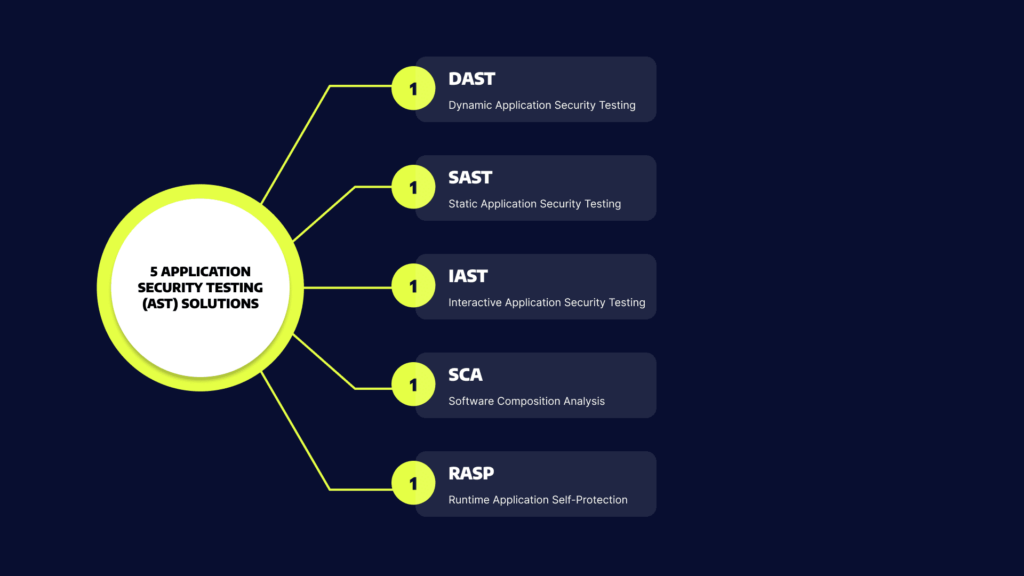
5 Application Security Testing (AST) Solutions

AST won’t happen without tools. Let’s review five types of solutions that can help you test software through the SDLC – from development to production.

Static Application Security Testing (SAST)

SAST is a form of white-box testing that involves analyzing at-rest source code. SAST tools look for vulnerabilities in the source code that external parties can exploit. 

You can use SAST to the source code of your applications, bytes, and binaries. After analyzing your code, the tool flags exploitable design and coding flaws.

Most SAST scans use a collection of predefined rules to specify coding errors to address. You can also use a SAST scan to detect common security vulnerabilities, such as input validation errors, stack buffer overflow, and SQL injection. 

You can implement SAST during development and quality assurance (QA) and integrate the tool with your integrated development environments (IDEs) and continuous integration (CI) servers. 

Related content: Read our guide to SAST

Dynamic Application Security Testing (DAST)

DAST is a form of black-box testing that simulates external attacks on a running application. DAST aims to find architectural weaknesses and security vulnerabilities. 

DAST solutions attempt to penetrate the application from the outside, often by looking for vulnerabilities and flaws in exposed interfaces.

SAST tools perform a line-by-line scan of your application’s source code while it is at rest, while DAST is executed when the application is running. DAST can be used to test an application running in a development or testing environment, or while it is running in production.

Related content: Read our guide to DAST

Interactive Application Security Testing (IAST)

IAST tools and testers scan the post-build source code of your application in a dynamic environment. The test is usually executed in a test or QA environment and in real-time while the application is running. You can employ IAST to identify problematic lines of code and get alerts that prompt immediate remediation.

IAST looks directly at the source code post-build in a dynamic environment through the instrumentation of the code. It involves deploying agents and sensors into the application and analyzing the code to detect vulnerabilities. You can easily integrate IAST into your continuous integration / continuous delivery (CI/CD). 

Software Composition Analysis (SCA)

SCA tools automatically scan the codebase of your application to provide visibility into open source software usage. SCA tools can identify all open source components in your codebase, the license compliance data of the components, and detect common security vulnerabilities. Some SCA tools can also prioritize open source vulnerabilities and offer insights and automated remediation.

Runtime Application Self-Protection (RASP)

Runtime Application Self-Protection (RASP) is a security technology that provides an additional layer of protection for applications by detecting and preventing attacks in real-time. It is designed to monitor an application during runtime and prevent malicious activity that may not be detected by traditional security measures such as firewalls, intrusion detection systems (IDS), and antivirus software.

RASP works by embedding security controls directly into the application or the runtime environment. The security controls are designed to monitor the application’s behavior, detect any suspicious activity, and take appropriate action to prevent the attack. For example, RASP can prevent SQL injection attacks, buffer overflows, and cross-site scripting (XSS) attacks.

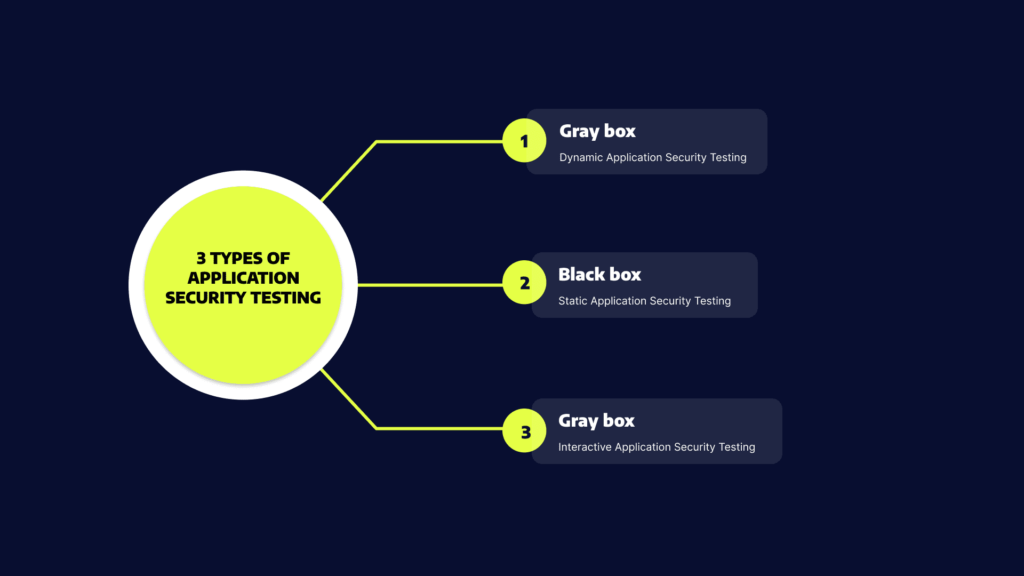
3 Types of Application Security Testing

Application security testing can be categorized into three types: black-box, gray-box, and white-box testing.

Black-Box Security Testing

In black-box security testing, the tester or test automation application does not have information about the internal workings of the system. This allows the tester to simulate a real attack by an external entity. 

Black box testing has the important advantage that it tests application security from end to end, including security misconfigurations and the integration between security systems. For example, if there is a misconfiguration in the firewall, a black box test will immediately discover it because it attempts to access the application like an outside attacker. The disadvantage is that it can miss vulnerabilities in the underlying applications.

Gray-Box Security Testing

In gray-box security testing, the tester or automated test application has limited information about the application. This simulates the case of a privileged insider who uses their knowledge to conduct a more sophisticated attack or a persistent threat conducting in-depth reconnaissance of the environment. 

Gray box testing has the advantage that it balances between testing depth and efficiency. It can be fine-tuned to focus on the most important elements that need to be tested in your security posture. Its disadvantage is that, depending on the information provided to the tester, the test may be skewed or unrealistic.

White-Box Security Testing

In white-box security testing, a human tester or automated testing mechanism receives full access to the internals of the application. A classic example of white box testing is static application security testing (SAST), in which an automated tool scans application source code for bugs and security flaws. 

White-box testing can help uncover many important security issues, such as security misconfiguration in the application itself, poor code quality, insecure coding practices, and business logic vulnerabilities. Its primary advantage is that it is comprehensive and can identify issues that other types of tests miss. However, white-box testing can uncover issues that cannot be easily exploited by an outside attacker, and thus have lower priority.

Related content: Read our guide to mobile app security testing.

Application Security Testing Best Practices

Here are some best practices for effective AST:

  • Start early: AST should be started as early as possible in the application development lifecycle, ideally during the design and planning phase. This allows security considerations to be built into the application from the start, rather than trying to retrofit security later on.
  • Use multiple testing techniques: A combination of static and dynamic testing techniques can provide a more comprehensive view of the application’s security posture. This can help identify a wider range of vulnerabilities than using a single technique alone.
  • Test regularly: AST should be performed regularly, especially during code changes or updates. This ensures that any new code is tested for vulnerabilities before it is deployed.
  • Prioritize vulnerabilities: Not all vulnerabilities are created equal. Prioritize vulnerabilities based on their severity and potential impact, and address the most critical vulnerabilities first.
  • Involve all stakeholders: Application security is everyone’s responsibility. Involve all stakeholders, including developers, testers, and operations teams, in the AST process to ensure that everyone is aware of the risks and taking appropriate actions.
  • Monitor and respond to findings: The AST process is not a one-time event. Continuously monitor the application for new vulnerabilities and respond to findings promptly to ensure that the application remains secure.

Application Security Testing with Bright Security

For a robust AppSec programme, it is important to ensure that security vulnerabilities are detected and remediated early and often. With agile development and CICD, security testing needs to shift left and into the hands of developers.

To succeed, you need to adopt developer-friendly security testing tools like Bright’s DAST scanner, built from the ground up to enable developers to own the security testing process, with the following key features:

  • Developer first – built for DevOps / CICD
  • Test everything – WebApps and APIs (SOAP, REST, GraphQL)
  • Accurate – NO false positives 
  • Automation integrated automatic validation of findings removes manual validation bottlenecks that stifle your release cycles and compound your technical and security debt
  • Feedback Loop – Easy to use, fast scans and integrates across your pipelines 
  • Easy fixes – Developer friendly remediation guidelines, start fixing security issues early and often
  • Detect more – automatic Business Logic vulnerability detection

See Additional Guides on Key Cybersecurity Topics

Together with our content partners, we have authored in-depth guides on several other topics that can also be useful as you explore the world of cybersecurity.

UEBA

Authored by Exabeam

What Are TTPs

Authored by Exabeam

Disaster Recovery

Authored by Cloudian

Black-Box Penetration Testing: Pros and Cons

What is Black-Box Penetration Testing?

The term black-box penetration testing (pentesting) refers to external tests aimed at identifying vulnerabilities in systems, applications, or networks. Unlike other forms of security testing, penetration testing can verify that vulnerabilities are exploitable by attackers, and show exactly how. Black-box penetration testing is also known as external penetration testing or trial and error testing. 

A black-box pentest is performed by an external party, or an automated system, which is completely unfamiliar with the target. During the test, the pentester attempts to imitate the behavior of an unprivileged hacker to simulate a real attack. It means the pentester is responsible for the reconnaissance phase of the attack, during which they gather any sensitive information needed to penetrate the network.

After gaining the necessary information, the black-box pentester draws up a map of the targeted system. The map is created according to the pentester’s observations, research, and analysis – similarly to how an unprivileged attacker would map the target. 

Next, the pentester uses these findings to attack the target. They may use any necessary means, including password cracking and brute force attack. After the breach, the pentester attempts privilege escalation and tries to establish a persistent presence, like an attacker would, but of course without causing damage. At the end of the test, the pentester prepares a report and cleans up the environment. Read our guide to penetration testing reports (coming soon)

In this article:

Pros and Cons of Black-Box Penetration Testing

Pros of Black-Box Penetration Testing

A black-box pentest provides the following advantages:

  • Simulates a real attack to discover unexpected results.
  • Identifies exposed vulnerabilities.
  • Identifies implementation and configuration issues by testing the application on run time.
  • Detects incorrect product builds, such as missing or old or modules and files.
  • Employs social engineering techniques to discover security issues related to people.
  • Locates security issues that occur due to interactions with underlying environments, including improper configuration files and unhardened operating systems.
  • Find error issues, such as information disclosure in error messages and input or output validation errors.
  • Looks for common vulnerabilities, such as SQL injection, XSS, and CSRF. 
  • Checks server misconfiguration issues. 
  • Helps fix flaws quickly by providing detailed remediation information.

Cons of Black-Box Penetration Testing

A black-box penetration test does not offer a comprehensive review of your source code and internal systems. A black-box pentest that discovers issues indicates that the target has a weak security build. However, a black-box pentest that cannot guarantee the target is secure. The target may still have internal issues hidden beneath the surface.

A black-box pentest is based on the guesswork, trial, and error of the external party contracted to perform the test. The pentest can be quick and end after the identification of vulnerabilities, or it may take months of reconnaissance until the pentester identifies one vulnerability. The time range depends on the expertise of the pentester and other criteria.

Related content: Get a better understanding of how penetration testing services work

Black-Box vs. White-Box vs. Grey-Box Penetration Testing

What is White-Box Penetration Testing?

White-box pentesting refers to tests that involve sharing full system and network information, including network maps and credentials, with the pentester. The information helps reduce the total cost of an engagement and save time. A white-box test can help you try multiple attack vectors to see which can breach a specific system.

What is Grey-Box Penetration Testing?

The term grey-box penetration testing refers to tests during which organizations share limited information with the pentester, usually login credentials. A grey-box test can simulate an insider threat as well as an attack by an external threat that breached the network. A grey-box penetration test can help you determine which type of access level a privileged user can attain and what damage this escalation can potentially cause. 

Related content: Read our guide to network penetration testing.

Engagement Accuracy

The main objective of a pentest is to find and patch any vulnerabilities that an external attacker can potentially exploit. A black-box pentest can provide the most accurate engagement for this purpose because the pentester is not given any insider information. 

Threat actors usually have more time to devote to an attack than a pentester. Grey-box and white-box pentesting help pentesters reduce engagement time by increasing the level of information provided before an attack is simulated. 

The main concern is that the information provided during white-box and grey-box tests may cause testers to act differently than a black-box hacker would. This information can potentially lead the pentester to miss vulnerabilities that a less-informed attacker might exploit.

Learn more in our detailed guide to web application testing.

Speed, Efficiency and Coverage

Each pentesting methodology makes tradeoffs between efficiency, coverage, and speed. Here are key differences:

  • Black-box penetration testing – is considered the fastest pentest type. However, because pentesters have no insider information on the targeted system, they may miss vulnerabilities. The lack of information can decrease the efficiency of the pentest.
  • Gray-box testing – may take longer to perform compared to black-box tests. However, a grey-box test provides a higher level of efficiency and coverage because pentesters get access to certain information before launching an attack. For example, access to design documentation helps testers to focus their efforts.
  • White-box testing – is considered the slowest but most comprehensive type of pentesting. White-box pentesters get large amounts of data, which take time to process. However, the scope of information and high level of access can significantly improve the probability of identifying and remediating both outward-facing and internal vulnerabilities.

Complementing Penetration Testing with DAST

Penetration testing, whether carried out by a 3rd party testing firm or internally by a security team, will leverage Dynamic Application Security Testing (DAST) scanners for their preliminary scans. These tests are carried out periodically, whether monthly, quarterly or in most cases, annually. 

With rapid release cycles and CICD however, security tests need to be run more frequently to be secure, ideally on every build to detect and fix security bugs early and often, to remove manual bottlenecks.

Bright’s DAST scanner automatically detects security vulnerabilities in your web applications and APIs, validating every finding before reporting it to you and your team, with NO false positives.